mellow-webapp
build a todo webapp with single page design and minimalist logic and design

Comments (0)
Sign in to leave a comment
System Requirements
mellow-webapp System Requirements Document
Introduction
The purpose of this document is to outline the system requirements for the "mellow-webapp," a minimalist todo web application designed with a single-page layout. The focus is on simplicity and user-friendliness, ensuring users can manage their tasks efficiently without unnecessary features or distractions.
System Overview
The mellow-webapp is a single-page application (SPA) designed to provide users with a straightforward and efficient way to manage their personal tasks. The application will not include any sharing functionalities, emphasizing a clutter-free and focused user experience. The app is intended for personal use, allowing users to create, edit, and delete tasks seamlessly.
Functional Requirements
- As a User, I should be able to add new tasks to my todo list.
- As a User, I should be able to edit existing tasks.
- As a User, I should be able to delete tasks from my list.
- As a User, I should be able to mark tasks as completed.
- As a User, I should be able to view all tasks in a single-page layout.
User Personas
- User: An individual looking for a simple and efficient way to manage personal tasks without the need for sharing or collaboration features.
Visuals Colors and Theme
- primary: #4A90E2 (a calming blue)
- primary_light: #A6C8F0 (a lighter tint of the primary blue)
- secondary: #F5A623 (a warm amber for emphasis)
- accent: #E94E77 (a vibrant pink for CTAs and active states)
- highlight: #F8E71C (a bright yellow for notifications and hover states)
- bg: #F7F9FC (a soft, light background color)
- surface: rgba(255, 255, 255, 0.9) (a subtle white for card backgrounds)
- text: #333333 (a dark grey for primary text)
- text_muted: #888888 (a softer grey for secondary text)
- border: rgba(200, 200, 200, 0.5) (a light grey for borders)
Signature Design Concept
The mellow-webapp will feature an interactive "Zen Garden" homepage. As users scroll through their tasks, the background will subtly animate with calming, flowing water and gentle swaying bamboo. This creates a serene environment that enhances focus and relaxation. The garden elements will respond to user interactions: hovering over tasks will cause ripples in the water, and clicking on tasks will make bamboo leaves rustle gently. This concept will be implemented using framer-motion for smooth animations and gsap for scroll-triggered effects.
Interaction Model & Motion Direction
The landing page will utilize a "parallax" interaction model. Layers of the Zen Garden will move at different speeds as the user scrolls, creating a sense of depth and immersion. Task elements will have animated reveals and hover transitions to maintain a polished and engaging user experience. Internal pages will adopt a "static" model to prioritize readability and task management efficiency.
Non-Functional Requirements
- The application must load quickly and perform efficiently on all modern web browsers.
- The design should be responsive and accessible, ensuring usability across various devices and screen sizes.
- The application should maintain a high level of security to protect user data.
Tech Stack
- Frontend: React for Web
- Backend: Python with FastAPI
- Database: MySQL or MariaDB, using Alembic for migrations
- Local Orchestration: Docker and docker-compose
Assumptions and Constraints
- The application will be used primarily for personal task management.
- The design will focus on simplicity and minimalism, avoiding complex features like task sharing or collaboration.
- The application will be developed to support English as the primary language.
Glossary
- SPA: Single-Page Application
- CTA: Call to Action
- Responsive Design: An approach to web design that makes web pages render well on a variety of devices and window or screen sizes.
- Parallax: A scrolling technique used to create a sense of depth by moving background images slower than foreground images.
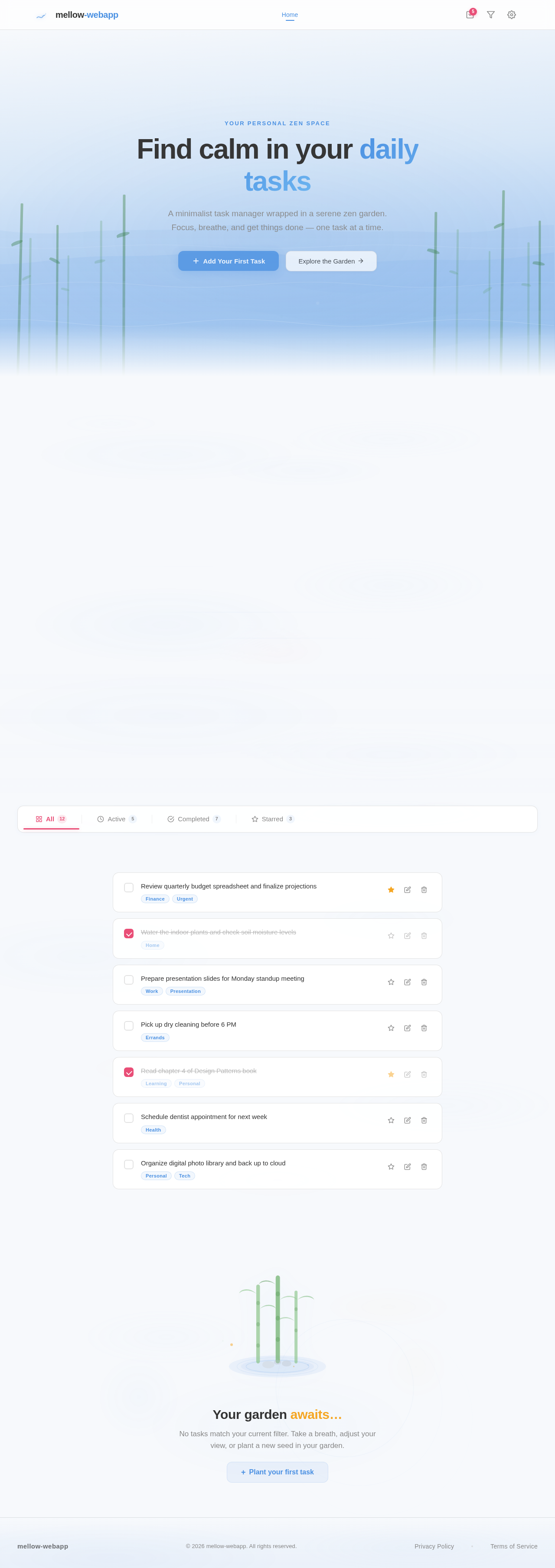
Your personal zen space
Find calm in your daily tasks
A minimalist task manager wrapped in a serene zen garden. Focus, breathe, and get things done — one task at a time.
Your Peaceful Task Garden
A serene space to organize your thoughts and tasks. Focus in calm, accomplish with clarity.
Your garden awaits…
No tasks match your current filter. Take a breath, adjust your view, or plant a new seed in your garden.
No comments yet. Be the first!