marine-page
create a project to build a simple single page design of calculator

Comments (0)
Sign in to leave a comment
Project Tasks7
Implement OceanBackdrop for Calculator
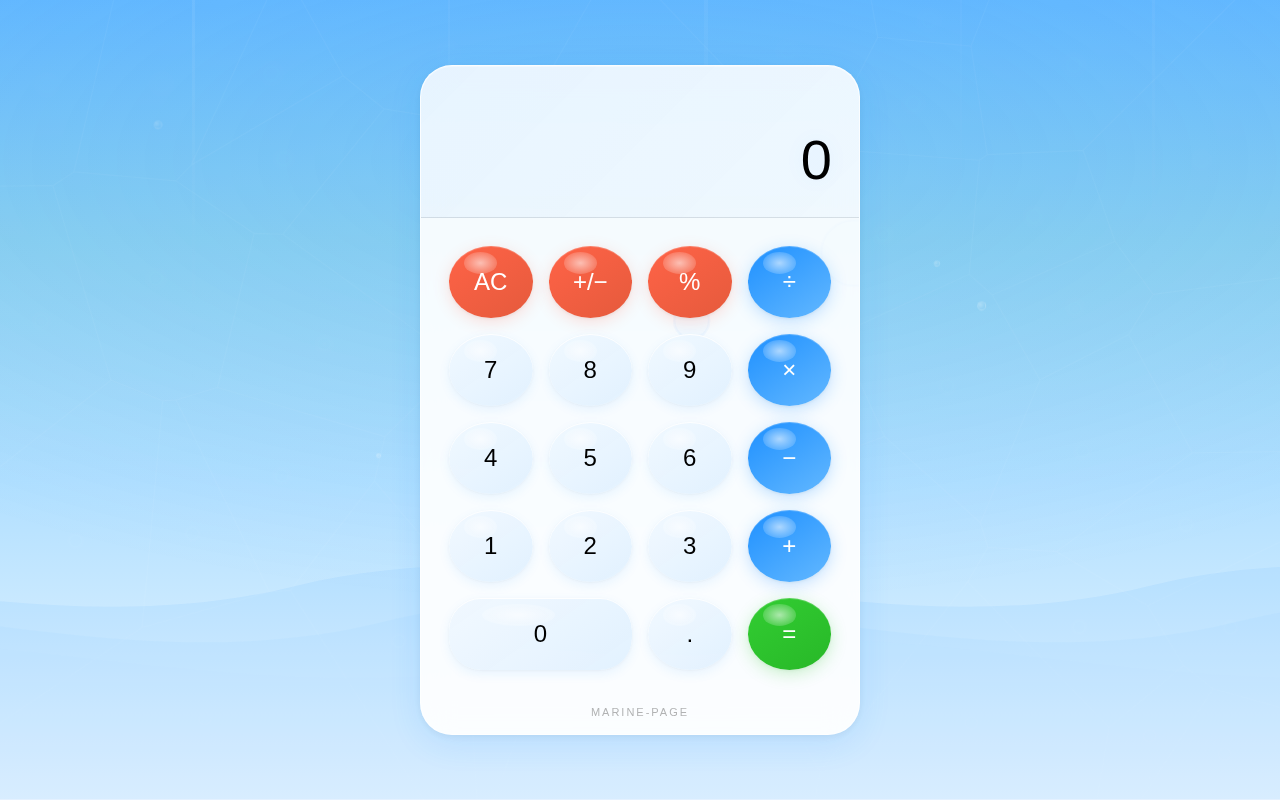
As a frontend developer, implement the OceanBackdrop section for the Calculator page. This section renders a full-screen animated ocean background using a layered approach: (1) a canvas element (canvasRef) driven by D3 Voronoi/Delaunay caustic light simulation — 40 randomly drifting points generate Voronoi cell edges drawn as semi-transparent cyan strokes to simulate underwater caustic light patterns, with a ResizeObserver handling responsive canvas scaling at devicePixelRatio; (2) framer-motion animated light ray divs (lightRays useMemo array of 5 rays with left/rotate/width/opacity props) creating god-ray effects; (3) framer-motion animated bubble divs (bubbles useMemo array of 10 bubbles with size/left/delay/duration props) that float upward with staggered CSS keyframe animations. Uses useEffect with animFrameRef for the requestAnimationFrame loop and cleanup. Import OceanBackdrop.css for base ocean gradient background styles.
Implement CalculatorContainer for Calculator
As a frontend developer, implement the CalculatorContainer section for the Calculator page. This section is the core interactive calculator UI with full arithmetic logic. State hooks: display (string, initial '0'), expression (string), prevValue (null|number), operator (null|string), waitingForOperand (bool), justEvaluated (bool), glowing (bool). SVG display overlay: svgRef drives a D3 animation of 12 ambient floating bubbles inside the display area (400×130 viewBox) using requestAnimationFrame — bubbles drift sinusoidally in cx/cy and pulse in opacity, cleaned up on unmount. Calculator logic callbacks (useCallback): inputDigit handles digit entry respecting justEvaluated/waitingForOperand state, inputDecimal handles decimal point insertion. Full operator handling, equals evaluation, clear, and backspace functions complete the arithmetic engine. The display panel shows expression (smaller) and current value (large), wrapped in framer-motion AnimatePresence for value change transitions. Button grid uses motion.button with tap/hover variants and glowing state CSS class toggled on equals. Import CalculatorContainer.css for glassmorphism panel, button grid layout, and glow effects.
Setup Theme and Design System
As a Frontend Developer, establish the global theme configuration for Marine-Page. Create a theme file (e.g., theme.js or theme.css variables) defining all SRD-specified color tokens: primary #1E90FF, primary_light #63B8FF, secondary #FF6347, accent #32CD32, highlight #FFD700, bg #F0F8FF, surface rgba(255,255,255,0.9), text #000000, text_muted #696969, border rgba(0,0,0,0.1). Set up global CSS resets, base typography, and responsive breakpoints. This should be completed before any page-level component tasks are finalized to ensure visual consistency across the Calculator page.
Setup D3 Integration Utility
As a Frontend Developer, install D3.js as a project dependency and create a shared d3Utils.js utility module. This module should expose helpers for the Voronoi/Delaunay caustic simulation (used by OceanBackdrop) and the ambient bubble animation (used by CalculatorContainer). Centralizing D3 initialization avoids duplicate imports and ensures consistent use of requestAnimationFrame cleanup patterns across both canvas-driven sections.
Setup Framer Motion Animations
As a Frontend Developer, install and configure framer-motion as a project dependency. Define shared animation variants for the ocean-themed interaction model: spring physics config for bubble hover/tap transitions, AnimatePresence settings for display value transitions, and god-ray/light-ray animation presets. Create a shared animations.js utility exporting reusable motion variants referenced by both CalculatorContainer and OceanBackdrop sections. This ensures consistent spring physics and animated transitions across the Calculator page as specified in the SRD Signature Design Concept and Interaction Model sections.
Implement Responsive Layout Shell
As a Frontend Developer, create the top-level App component and responsive layout shell for the Calculator single-page application. This includes setting the full-viewport root container that positions OceanBackdrop as a fixed full-screen background layer and CalculatorContainer as a centered foreground overlay. Implement CSS media queries ensuring the calculator is usable on both desktop and mobile screen sizes as per SRD Non-Functional Requirements. The layout shell should import and compose both major section components.
Integrate Calculator Page Components
As a Tech Lead, verify the end-to-end integration between the CalculatorContainer frontend implementation and the OceanBackdrop frontend implementation within the Calculator page. Ensure the layered composition renders correctly (ocean backdrop behind calculator UI), D3 animations and framer-motion transitions coexist without conflicts, the calculator arithmetic logic works correctly in the context of the full page, and the responsive layout behaves as expected across desktop and mobile viewports. Confirm theme tokens are consistently applied across both sections and that the overall ocean-themed aesthetic matches the SRD Signature Design Concept.
No comments yet. Be the first!