mango-create
Create simple calculator

Comments (0)
Sign in to leave a comment
Project Tasks7
Implement CalculatorHeader for Calculator
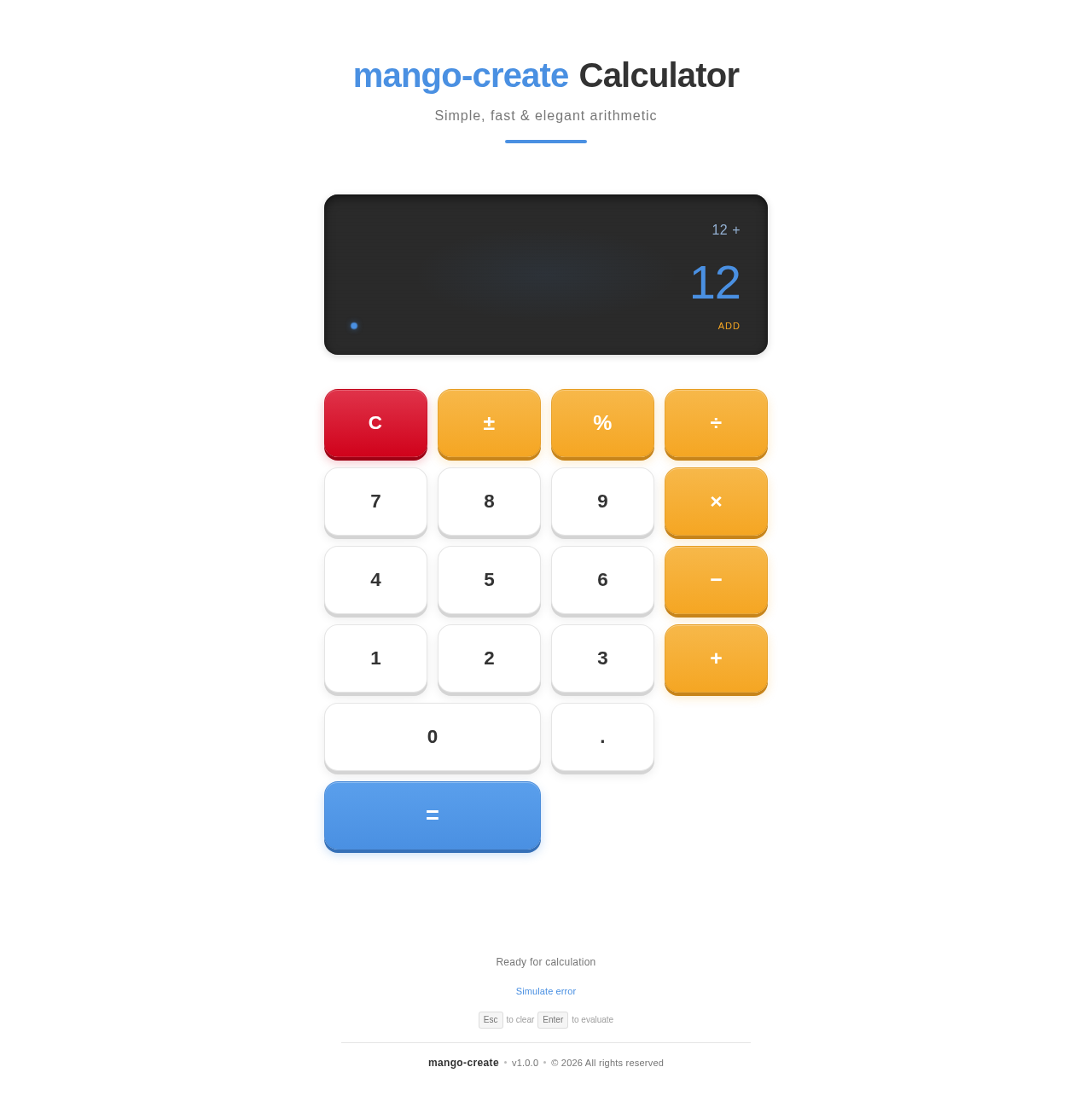
As a frontend developer, implement the CalculatorHeader section for the Calculator page. This section renders a `<header className="ch-header">` with an animated title using framer-motion. The title 'mango-create Calculator' is split character-by-character into `brandChars` and `suffixChars` arrays, each rendered as `<motion.span className="ch-title-char ch-brand">` or `<motion.span className="ch-title-char">` with `charVariants` (opacity: 0→1, y: 18→0, rotateX: -90→0, spring stiffness 260 damping 20). A `containerVariants` staggerChildren (0.04s) with delayChildren (0.1s) orchestrates the letter animation. Below the title, a `<motion.p className="ch-tagline">` fades in (delay 0.7s, 0.5s easeOut) with text 'Simple, fast & elegant arithmetic'. An `<motion.div className="ch-accent-line">` scales from scaleX 0→1 (delay 0.9s, custom cubic bezier). All animations use `initial="hidden" animate="visible"`. Implement CalculatorHeader.css for the header, content wrapper, title row, tagline, and accent line styles.
Implement CalculatorDisplay for Calculator
As a frontend developer, implement the CalculatorDisplay section for the Calculator page. This section manages full calculator state via `useState` hooks: `currentValue` (default '0'), `previousValue`, `operation`, `hasResult`, and `animationKey`. It listens for custom DOM events via `useEffect` → `handleKeypadInput` dispatched from the keypad, handling event detail types: 'digit' (append or replace on hasResult), 'decimal' (guard duplicate dots), 'operator' (store previousValue and operation, set hasResult true), 'equals' (compute using `operations` map {'+', '−', '×', '÷'} with divide-by-zero guard returning 'Error', format result with toFixed(8) trimming trailing zeros), 'clear' (reset all state), 'backspace' (slice last char), 'toggle-sign' (prefix '-'), and 'percent' (divide by 100). Uses `AnimatePresence` with `animationKey` as key to animate the current value display. Implement CalculatorDisplay.css for the display panel, previous expression row, and current value with dynamic font-size scaling.
Implement CalculatorKeypad for Calculator
As a frontend developer, implement the CalculatorKeypad section for the Calculator page. This section renders a grid of `CalcButton` components from the `BUTTONS` constant array (19 entries: C, ±, %, ÷, 7-9, ×, 4-6, −, 1-3, +, 0 with span='zero', ., =). Each `CalcButton` is a `<motion.button>` with: `whileTap` (y: 3, type-specific boxShadow via `getShadowPressed(type)`, spring stiffness 600 damping 25 mass 0.4), `whileHover` (scale 1.035, spring stiffness 400), `initial` boxShadow via `getShadowRest(type)`. Button types ('number', 'operation', 'clear', 'equals') each have distinct shadow colors (number: #d4d4d4, operation: #c7841a amber, clear: #9e0114 red, equals: #3570b8 blue). `isPressed` state via `useState` toggled by `onTapStart`/`onTap`/`onTapCancel` framer callbacks. On button press, dispatch a custom DOM `CustomEvent('keypad-input')` with `{ detail: { type, value } }` to communicate with CalculatorDisplay. The '0' button has `ck-btn--zero` class for double-width spanning. Implement CalculatorKeypad.css for the grid layout and button styling.
Implement CalculatorFooter for Calculator
As a frontend developer, implement the CalculatorFooter section for the Calculator page. This section manages `currentError` (null | {id, text}), `feedbackMsg` (string), and `errorCycleIndex` state. The `ERROR_MESSAGES` array contains 4 entries (divzero, invalid, overflow, syntax) and `FEEDBACK_MESSAGES` has 4 status strings. `showDemoError` cycles through errors by index and sets feedbackMsg to 'Error encountered'. `clearError` resets to null/'Ready for calculation'. A `useEffect` auto-dismisses `currentError` after 4000ms via `setTimeout`. The template renders two zones: `cf-error-area` uses `AnimatePresence mode="wait"` — when `currentError` is set, a `<motion.div className="cf-error-box">` enters (opacity 0→1, y -8→0, scaleY 0.9→1, spring 400/28) and exits (opacity→0, y→8, scaleY→0.9) with an inline SVG warning icon (circle + lines) and `cf-error-text`. The `cf-feedback-area` also uses `AnimatePresence mode="wait"` keyed by `feedbackMsg` with a simple opacity fade (0.25s). Implement CalculatorFooter.css for footer layout, error box, icon, and feedback text.
Calculator API Endpoints
As a Backend Developer, implement the FastAPI backend service exposing arithmetic operation endpoints. Create POST /api/calculate accepting a JSON body with operands and operator, returning the computed result. Include input validation, divide-by-zero error handling, overflow guards, and proper HTTP error responses. Also implement GET /api/health for service health checks. Ensure CORS is configured for frontend origin.
Setup Theme Design System
As a Frontend Developer, set up the global theme and design system for the mango-create project. Define CSS custom properties (variables) for the full color palette: primary (#4A90E2), primary_light (#A6C8F0), secondary (#F5A623), accent (#D0021B), highlight (#F8E71C), bg (#FFFFFF), surface (rgba(255,255,255,0.9)), text (#333333), text_muted (#777777), border (rgba(0,0,0,0.1)). Create a global styles file (globals.css or theme.js) consumed by all components. Install and configure framer-motion. Ensure responsive base styles and accessibility defaults are included.
Integrate Calculator Frontend Backend
As a Tech Lead, verify the end-to-end integration between the Calculator frontend implementation and the Calculator backend API. Ensure that arithmetic operations performed via the keypad and display components correctly dispatch requests to the FastAPI /api/calculate endpoint (if used), API responses are handled properly in the UI, divide-by-zero and error states surface correctly in CalculatorFooter, and all user flow interactions (enter number → select operation → view result → clear) work as expected end-to-end. Note: frontend section tasks (03036881, 13dbcc10, 52105b06, d15baa7b) and backend task (temp_backend_calc_api) should be completed before this integration task.
Simple, fast & elegant arithmetic
No comments yet. Be the first!