magma-design
start a project to build a to-do application with single page design and minimal design


Comments (0)
Sign in to leave a comment
Project Tasks14
Implement HomeHeader for Home
As a frontend developer, implement the HomeHeader section for the Home page. This section renders an animated `<header>` with class `hh-root` using framer-motion. Implement character-by-character stagger animation for the APP_NAME ('magma-design') using `containerVariants` (staggerChildren: 0.045, delayChildren: 0.1) and `letterVariants` (opacity/y with cubic-bezier easing). The dash character renders as `hh-accent-dash` span, letters as `hh-letter` spans. Include animated tagline via `taglineVariants` (opacity/y, delay 0.65s), an animated underline via `underlineVariants` (scaleX from 0→1 with originX: 0.5, delay 0.85s), and a nav via `navVariants` (opacity fade, delay 1.0s) containing links to /Home and /Modal. Import and apply HomeHeader.css. This is the root section — no cross-page dependencies.
Implement TaskCanvasContainer for Home
As a frontend developer, implement the TaskCanvasContainer section for the Home page. This section uses `useState` for `tasks` (initialized with 6 `initialTasks` objects containing id, title, description, priority ['high'|'medium'|'low'|'none'], completed, and date fields), `editingTask` (nullable task id), and `editForm` ({title, description, priority}). Uses `useCallback` for `handleToggleComplete`, `handleDelete`, `handleOpenEdit`, `handleSaveEdit`, and `handleCloseModal`. Renders a `<section className='tcc-section'>` with a `tcc-header` showing active task count. Uses framer-motion `Reorder` for drag-to-reorder task list with `GripVertical` (lucide-react) drag handles. Each task card uses `AnimatePresence` for enter/exit animations and shows `Pencil`, `Trash2`, `Check`, and `X` lucide icons for edit/delete/complete/cancel actions. An edit modal (AnimatePresence) overlays with form fields for title, description, and priority select. Includes an empty-state with `ClipboardList` icon. Import and apply TaskCanvasContainer.css. This section is independent of HomeHeader — no intra-page dependency needed.
Implement TaskInputSection for Home
As a frontend developer, implement the TaskInputSection section for the Home page. This section uses `useState` for `task` (string), `isFocused` (boolean), `showSuccess` (boolean), and `isSubmitting` (boolean), plus `useRef` for `inputRef` and `timeoutRef`. `handleSubmit` (useCallback) validates non-empty input, sets isSubmitting and showSuccess to true, clears task state, then uses a 1500ms setTimeout (via timeoutRef) to reset both flags. `handleKeyDown` triggers submit on Enter (without Shift). Renders a `<section className='tis-section'>` with a label 'Add a task', a framer-motion `tis-form-wrapper` div that animates `backgroundColor` to `rgba(241,196,15,0.15)` on success. The form has a text input (maxLength 200, aria-label, ref, focus/blur handlers) and a bottom row with: an `AnimatePresence` success message (opacity/x animation, '✓ Task added'), a character counter (`{charCount}/200` visible when charCount > 0), and an animated submit button with whileTap/whileHover. Import and apply TaskInputSection.css. This section is independent of HomeHeader and TaskCanvasContainer — no intra-page dependency.
Implement TaskActionsFooter for Home
As a frontend developer, implement the TaskActionsFooter section for the Home page. This section defines a reusable `AnimatedCounter` sub-component that wraps each numeric value in an `AnimatePresence` + `motion.span` with scale (0.8→1→0.8) and y (6→0→-6) enter/exit animation keyed by value. The main `TaskActionsFooter` component uses `useState` for `totalTasks` (init 5) and `completedTasks` (init 2), deriving `remainingTasks`. `handleAddTask` increments totalTasks; `handleCompleteTask` increments completedTasks only when completedTasks < totalTasks. Renders a `<div className='taf-root'>` with two rows: left row shows `AnimatedCounter` for totalTasks, pluralized 'task/tasks' label, a `taf-dot` separator, and two `taf-status-pill` divs (each with a colored status icon span, `AnimatedCounter`, and label for completed/remaining counts); right row shows two `motion.button` demo controls ('+' and '✓', whileTap scale 0.9) and a `taf-brand` span displaying 'magma-design'. Import and apply TaskActionsFooter.css. This section is independent of all other Home sections — no intra-page dependency.
Create Task DB Models
As a Backend Developer, define the SQLAlchemy ORM model for the Task entity in a MySQL/MariaDB database. Task model fields: id (INT, PK, auto-increment), title (VARCHAR 200, NOT NULL), description (TEXT, nullable), priority (ENUM 'high','medium','low','none', default 'none'), completed (BOOLEAN, default false), order_index (INT, default 0 for drag-to-reorder support), created_at (DATETIME, default now), updated_at (DATETIME, auto-update). Create Alembic migration script for the initial schema. Add seed data script with 3-5 example tasks for local development.
Setup Global Task State
As a Frontend Developer, set up global state management for tasks shared across Home and Modal pages. Implement a React Context (TaskContext) with useReducer to manage: tasks array, loading state, error state, and modal state (open/closed, mode 'update'|'delete', selectedTask). Expose actions: fetchTasks, createTask, updateTask, deleteTask, reorderTasks, openModal, closeModal. Wire up API calls to the backend endpoints (GET /tasks, POST /tasks, PUT /tasks/{id}, DELETE /tasks/{id}, PATCH /tasks/{id}/reorder). This context bridges TaskCanvasContainer (b7598208), TaskInputSection (61abddf0), and the Modal sections (ModalBody a57c6d0b, ModalFooter aae2ff1e) to backend data. Note: depends on backend API task (tmp-backend-task-api).
Setup Design System Theme
As a Frontend Developer, create a global theme/design-system CSS file (theme.css) with all CSS custom properties derived from the SRD color palette: --primary: #2C3E50, --primary-light: #34495E, --secondary: #E74C3C, --accent: #F39C12, --highlight: #F1C40F, --bg: #ECF0F1, --surface: rgba(255,255,255,0.9), --text: #2C3E50, --text-muted: #95A5A6, --border: rgba(44,62,80,0.2). Include base typography with Inter font family, global resets, and shared utility classes (spacing, shadows, border-radius). This file must be imported before all section-level CSS files. All section components (HomeHeader, TaskCanvasContainer, ModalContainer, etc.) depend on these tokens.
Implement ModalBackdrop for Modal
As a frontend developer, implement the ModalBackdrop section for the Modal page. This component accepts `visible`, `onClose`, and `children` props. It uses `useEffect` and `useCallback` hooks to attach/detach a `keydown` event listener that calls `onClose` when Escape is pressed, and sets `document.body.style.overflow` to 'hidden' while visible. It renders a div with class `mb-backdrop` and conditionally appends `mb-visible` when visible. A `handleBackdropClick` handler closes the modal when clicking the backdrop itself (target === currentTarget check). The inner `mb-backdrop-inner` div wraps children. Includes `role='dialog'` and `aria-modal='true'` for accessibility.
Implement Tasks CRUD API
As a Backend Developer, implement the FastAPI endpoints for task management. Create the following REST endpoints: GET /tasks (list all tasks), POST /tasks (create task, body: {title, description, priority}), PUT /tasks/{id} (update task, body: {title, description, priority, completed}), DELETE /tasks/{id} (delete task), PATCH /tasks/{id}/reorder (update task order). Use Pydantic models for request/response validation. Return appropriate HTTP status codes (200, 201, 404, 422). Note: Frontend tasks TaskCanvasContainer (b7598208), TaskInputSection (61abddf0), ModalBody (a57c6d0b), and ModalFooter (aae2ff1e) depend on these endpoints.
Implement ModalContainer for Modal
As a frontend developer, implement the ModalContainer section for the Modal page. This component uses `framer-motion` `motion.div` with `modalVariants` defining `hidden` (opacity 0, scale 0.92, y 12), `visible` (opacity 1, scale 1, y 0 via spring with stiffness 400, damping 32, mass 0.9), and `exit` (opacity 0, scale 0.94, y 8, duration 0.2 easeIn) states. The `visible` prop toggles animate between 'visible' and 'hidden'. Includes `role='dialog'`, `aria-label='Task modal'`, and a `stopPropagation` click handler to prevent backdrop dismissal. Renders inside a `mc-wrapper` div with class `mc-container`.
Implement ModalHeader for Modal
As a frontend developer, implement the ModalHeader section for the Modal page. Uses `framer-motion` with `headerVariants` (hidden: opacity 0, y -12; visible: opacity 1, y 0, duration 0.35 cubic-bezier ease) and `titleVariants` (hidden: opacity 0, x -16; visible: opacity 1, x 0, delay 0.1, easeOut). Renders a `motion.div` with class `mh-header` containing a `mh-title-area` with `h2.mh-title` and optional `p.mh-subtitle`. Includes a `motion.button` close button using `lucide-react` X icon (size 20, strokeWidth 2) with `whileHover` (scale 1.08, color var(--secondary)) and `whileTap` (scale 0.94) spring animations. Accepts `title`, `subtitle`, `onClose`, and `visible` props.
Implement ModalBody for Modal
As a frontend developer, implement the ModalBody section for the Modal page. Accepts `mode` ('update' | 'delete'), `taskTitle`, `taskDescription`, `onTitleChange`, and `onDescriptionChange` props. Uses `useState` for `focusedField` and `useRef` for `titleRef` and `descRef`. In `delete` mode, renders a `motion.div` with class `mbo-delete-warning` using `warningVariants` (hidden: opacity 0, scale 0.92; visible: cubic-bezier ease) plus an `AlertTriangle` lucide icon (size 26, strokeWidth 1.8) with infinite pulse animation (scale 1→1.08→1, 2s). In `update` mode, renders a form with `formItemVariants` staggered animations (custom index i, delay i*0.08, blur filter 2px→0px). Contains `mbo-field-group` divs for Task Title (input with maxLength 120, onFocus/onBlur for focusedField state, `mbo-input-focused` class toggle) and Description fields with `Edit3` lucide icon.
Implement ModalFooter for Modal
As a frontend developer, implement the ModalFooter section for the Modal page. Uses `framer-motion` with `buttonVariants` (initial: opacity 0, y 8, scale 0.96; animate: opacity 1, y 0, scale 1) and `buttonTransition` (duration 0.28, cubic-bezier [0.4,0,0.2,1]). Renders two `motion.button` elements inside `mf-root`: a secondary cancel button (class `mf-btn mf-btn-secondary`, delay 0.06, label from `cancelLabel` prop or 'Cancel') and a primary confirm button (class `mf-btn mf-btn-primary`, delay 0.12, `disabled` from `confirmDisabled` prop, label from `confirmLabel` or 'Confirm'). Both buttons have `whileHover` scale 1.02 and `whileTap` scale 0.97 animations. Accepts `onConfirm`, `onCancel`, `confirmLabel`, `cancelLabel`, and `confirmDisabled` props.
Integrate Task Management Flow
As a Tech Lead, verify the end-to-end integration between the task management frontend (TaskCanvasContainer, TaskInputSection, Modal sections) and the Tasks CRUD backend API. Ensure: (1) tasks load from GET /tasks on app mount and display correctly in the canvas, (2) task creation via TaskInputSection POSTs to /tasks and updates the canvas, (3) task editing via Modal PUTs to /tasks/{id} and reflects in canvas, (4) task deletion via Modal DELETEs /tasks/{id} and removes from canvas, (5) drag-to-reorder PATCHes /tasks/{id}/reorder and persists order, (6) loading and error states display appropriately in the UI. Validate all API responses are handled correctly and framer-motion animations trigger as expected on state changes.
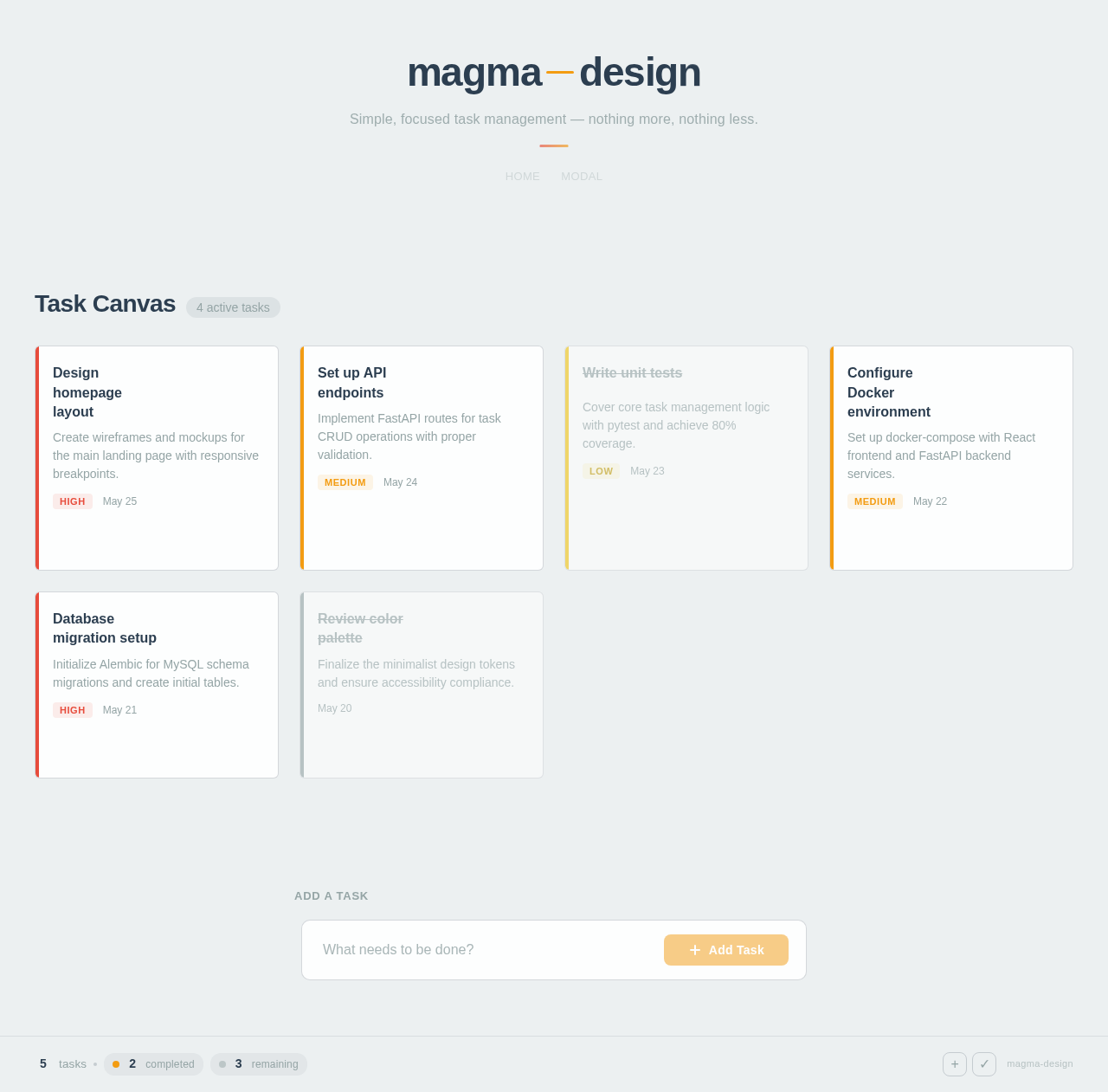
Simple, focused task management — nothing more, nothing less.
Task Canvas
4 active tasksDesign homepage layout
Create wireframes and mockups for the main landing page with responsive breakpoints.
Set up API endpoints
Implement FastAPI routes for task CRUD operations with proper validation.
Write unit tests
Cover core task management logic with pytest and achieve 80% coverage.
Configure Docker environment
Set up docker-compose with React frontend and FastAPI backend services.
Database migration setup
Initialize Alembic for MySQL schema migrations and create initial tables.
Review color palette
Finalize the minimalist design tokens and ensure accessibility compliance.
No comments yet. Be the first!