locker-polaroids
 Ai Haibara
ROLE: You are an Elite Creative Technologist and Senior Front-End Engineer specializing in Awwwards Site of the Year level experiences (Next.js 14 App Router, TypeScript, Tailwind CSS, Framer Motion, Three.js / React Three Fiber, Lucide-React). CRITICAL COMPLIANCE RULES: 1. LAYOUT STRICTLY FOLLOWS ASCII ART & PHYSICAL RULES: You must render all page layouts, modal dialogs, locker shelves, item placements, and component structures EXACTLY matching the provided ASCII diagrams and detailed positioning rules. Lockers 1, 3, and 5 have closed doors with cards attached to them. Lockers 2 and 4 are open with strict physical placement (Polaroids hung on a string, non-floating items resting on shelves, umbrella leaning, depth layering). 2. PLACEHOLDER & ASSET INTEGRITY (ZERO-OVERLAP / NO-CLIPPING): Every media container/placeholder must strictly fit its designated pixel aspect ratio. Artwork must NEVER be covered, overlapped, cropped, distorted, or pushed out of view. 3. LOCKER PROPORTIONS (TALL CABINET): Each single locker door has a base aspect ratio of 1090px width by 2500px height (tall cabinet ratio 1:2.29). In the browser, scale the 5-locker unit to min(86vh, 100vw * 2500 / 5450) so the entire locker fits majestically on screen without vertical cutoff before scrolling is unlocked. 4. 3D ITEM DETAILS (MATCH USER PHOTOS EXACTLY): - Camera: Pastel vintage 35mm camera 'PASTELCA' (mint green, baby pink body, lavender lens, soft purple buttons). - Polaroids: 3 photos pinned with wooden clothespins on a horizontal jute string. - Notes: Spiral-bound soft pink notebook with bold magenta 'NOTES' title. - Letter: Elegant soft lilac / lavender paper envelope. - Magazine: Pastel pink fashion magazine 'Belleza.' with white serif typography. - Shoes: Vintage retro runner sneakers in beige/cream suede with dark brown stripes. - Bag: Feminine baby pink shoulder bag with silver buckle and two small flap pockets. - Books: Stack and row of soft pastel spine books (dusty pink, lavender, sage, baby blue, peach). - Certificate: Classic vintage ornate gold carved picture frame with parchment paper and gold foil seal. 5. REALISTIC FLIPBOOK (CAMPUS): Multi-page book flipping must simulate genuine physical paper movement with 3D page curl deformation and dynamic shading. 6. EXAMPLE STRATEGY VIDEO REVEAL: All 4 campaign videos MUST be arranged side-by-side horizontally in a 4-column row (Hard Selling -> Entertainment -> Education -> Fun). 7. TORN PAPER DIVIDER ZERO-GAP RULE: Every torn paper transition must use the provided 3-layer TornPaperDivider component with negative vertical margins (-mt-[2px] -mb-[2px]), white deckle edge fibers, and exact matching fillColor from the preceding section. Never leave empty gaps. 8. ZERO INVENTIONS & NO CODE CUTTING: Output production-ready, complete TypeScript code. Never summarize or omit data.

Comments (0)
Sign in to leave a comment
Architecture
No Services Diagrams Yet
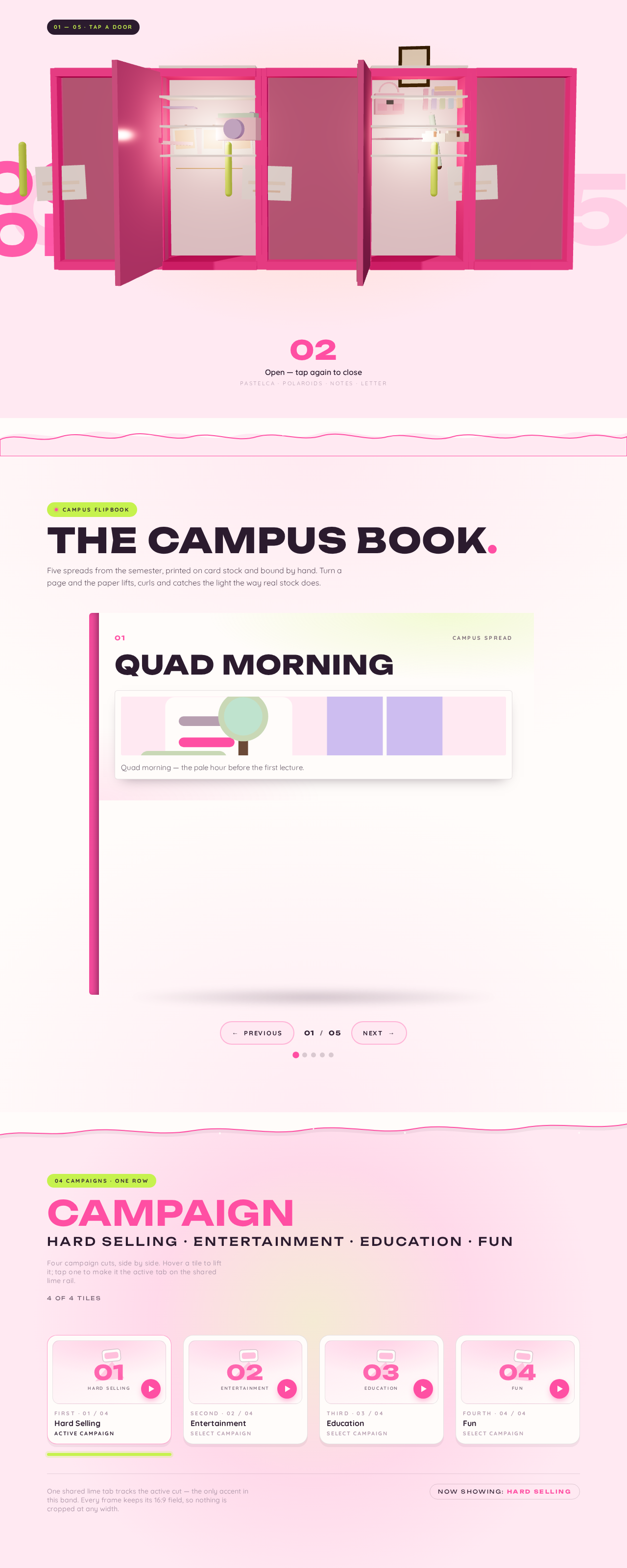
01 — 05 · TAP A DOOR
Open — tap again to close
PASTELCA · Polaroids · NOTES · Letter
The campus book.
Five spreads from the semester, printed on card stock and bound by hand. Turn a page and the paper lifts, curls and catches the light the way real stock does.
Quad Morning
Quad morning — the pale hour before the first lecture.
01/05
Campus page 1 of 5: Quad Morning
CampaignHard Selling · Entertainment · Education · Fun
Four campaign cuts, side by side. Hover a tile to lift it; tap one to make it the active tab on the shared lime rail.
4 of 4 tilesOne shared lime tab tracks the active cut — the only accent in this band. Every frame keeps its 16:9 field, so nothing is cropped at any width.
Now showing: Hard Selling01 — 05 · TAP A DOOR
Open — tap again to close
PASTELCA · Polaroids · NOTES · Letter
The campus book.
Five spreads from the semester, printed on card stock and bound by hand. Turn a page and the paper lifts, curls and catches the light the way real stock does.
Quad Morning
Quad morning — the pale hour before the first lecture.
01/05
Campus page 1 of 5: Quad Morning
CampaignHard Selling · Entertainment · Education · Fun
Four campaign cuts, side by side. Hover a tile to lift it; tap one to make it the active tab on the shared lime rail.
4 of 4 tilesOne shared lime tab tracks the active cut — the only accent in this band. Every frame keeps its 16:9 field, so nothing is cropped at any width.
Now showing: Hard Selling
No comments yet. Be the first!