lifegrid
 oasis
oasisBUILD A PREMIUM LIFE CALENDAR WEBSITE Act as an expert full-stack developer, UI/UX designer, and product architect. Build a beautiful, fully functional, responsive web application called Life Calendar that helps users visualize their lives, track time, set meaningful goals, and become more intentional about how they spend each day. 1. Core Concept Create a personal life calendar inspired by the concept of visualizing an entire human lifespan using a grid of weeks. Users should be able to see: - How many weeks they have lived. - How many weeks have passed in their current year. - Their current age in years, months, and days. - A visual representation of past weeks and upcoming weeks. - Important milestones, memories, goals, and life events. Make it clear that lifespan estimates are illustrative, not predictions of an individual's lifespan. 2. Interactive Life Grid Create the main feature: a beautiful, interactive grid representing a user's life in weeks. Requirements: - Each small square represents one week. - Arrange the grid into 52 columns or rows per year, with clear year labels. - Use distinct visual styles for past weeks, the current week, and future weeks. - Highlight the current week with a subtle animation. - Allow users to hover over or tap any square to see its week number, approximate date range, age at that time, and associated events. - Allow users to click a week to add a memory, goal, journal entry, or milestone. - Include zoom controls and a way to navigate between life stages. - Provide a legend explaining the colors. - Ensure the grid works smoothly on mobile and desktop. Let users choose an illustrative lifespan, such as 70, 80, 90, or 100 years. 3. Personalized Onboarding When users first open the application, guide them through a simple onboarding process. Collect: - Name or nickname. - Date of birth. - Preferred lifespan visualization. - Week-start preference. - Theme preference. After onboarding, calculate their age and generate their personalized life grid automatically. Allow users to edit these settings later. 4. Dashboard Create a modern dashboard containing: - Current age. - Total weeks lived. - Weeks elapsed this year. - Days lived. - Current week number. - Upcoming birthdays and important events. - A countdown to the next personal milestone. - A daily reflection prompt. - A motivational quote that changes daily. Use attractive cards, clean typography, subtle gradients, and elegant spacing. 5. Goals and Milestones Build a dedicated section where users can: - Create personal goals. - Assign target dates. - Categorize goals into education, career, health, relationships, finances, personal growth, and experiences. - Set priorities and track progress. - Add milestones to their life grid. - Mark completed goals. - View overdue and upcoming goals. - Create short-term, yearly, and long-term goals. Display progress using simple progress bars and charts. 6. Memories and Journal Create a private personal journal where users can: - Write daily reflections. - Record memorable moments. - Add dates, tags, and optional photos. - Link journal entries to specific weeks. - Search and filter past entries. - Review memories by month, year, or life stage. Include a calendar view for navigating journal entries. 7. Daily Habits and Reflection Add a daily check-in feature that allows users to: - Record one thing they are grateful for. - Write what they learned. - Record a meaningful moment. - Identify their main priority for tomorrow. - Track selected habits. Display weekly and monthly summaries without encouraging unhealthy perfectionism. 8. Calendar and Events Include a functional calendar with: - Month, week, and agenda views. - Birthdays and anniversaries. - Personal deadlines. - Goal milestones. - Reminders and recurring events. - Event creation, editing, and deletion. - Search and filtering. Use the user's local timezone when displaying dates and times. 9. Design and User Experience The website must feel premium, calm, thoughtful, and emotionally meaningful. Visual direction: - Minimalist, modern interface. - Dark mode as the default, with an optional light mode. - Deep charcoal backgrounds with subtle accent colors. - Soft glowing highlights for the current week. - Smooth transitions and micro-interactions. - Rounded cards and carefully balanced whitespace. - Elegant typography. - Responsive navigation and accessible controls. Create these pages: 1. Landing page. 2. Onboarding page. 3. Main dashboard. 4. Life Calendar. 5. Goals and Milestones. 6. Journal and Memories. 7. Daily Habits. 8. Events Calendar. 9. Profile and Settings. The landing page should include a compelling headline: "Your life is made of weeks. Make them count." Add a prominent button labeled "Visualize My Life" that takes the user into onboarding. 10. Authentication and Database Implement secure user authentication, including sign-up, sign-in, sign-out, and password recovery. Use Supabase for: - Authentication. - PostgreSQL database. - Secure user-specific data storage. - Optional image storage for memories. Create suitable database tables for: - Profiles. - Life calendar settings. - Goals. - Milestones. - Journal entries. - Habits. - Habit records. - Calendar events. Associate private records with their owners and enforce Row Level Security (RLS) so users cannot access other users' private information. Never expose secret keys in frontend code. Allow users to export their data and permanently delete their account and personal information. 11. Technical Requirements Use: - React with TypeScript. - Tailwind CSS. - A clean, reusable component architecture. - Supabase for the backend. - A reliable date-handling library. - Accessible icons and keyboard navigation. Requirements: - Fully responsive on Android, iPhone, tablet, and desktop. - Fast loading and smooth interactions. - Proper validation and helpful error messages. - Loading states, empty states, and success feedback. - Functional forms and navigation. - No dead buttons or placeholder interactions. - No fake statistics or randomly generated personal data. - Handle leap years, birthdays, timezones, and dates correctly. - Calculate completed weeks using actual dates rather than assuming every year contains exactly 52 weeks. 12. Privacy and Reliability Treat the life calendar as a private personal space. - Collect only necessary information. - Clearly explain how personal data is used. - Protect personal memories and journal entries. - Make backups and data exports possible where supported. - Handle failed network requests gracefully. - Avoid making predictions about how long a user will live. - Clearly distinguish estimated lifespan visualization from factual age and date calculations. 13. Final Deliverable Build the actual working application, not just a static mockup or design concept. Start by creating the complete UI and life-grid calculations. Then implement authentication, database integration, goals, memories, habits, and event management. Test every major feature on mobile and desktop. Fix errors before declaring the application complete. If a required external service needs credentials, provide clear setup instructions and a working configuration template rather than pretending the integration is connected. The final result should feel like a polished personal productivity product that people would genuinely enjoy using every day.

Comments (0)
Sign in to leave a comment
System Requirements
System Requirements Document for lifegrid
1. Introduction
lifegrid is a premium personal life calendar: a private, emotionally meaningful web application that renders a human life as a grid of weeks so its owner can see time already spent, time remaining in the current year, and the milestones, memories, goals, and events that give those weeks meaning. The product exists to make time legible and to help one person become more intentional about how each day is spent.
The audience is a single thoughtful adult (roughly 28–55) who already keeps a good watch and a paper journal: reflective rather than gamified, seeking quiet gravity rather than cheer. The product is a personal instrument, not a social or team tool. Every private record belongs to exactly one owner, and the interface is designed to be consulted daily and to never shout.
The product intent, in the user's own framing: "Your life is made of weeks. Make them count."
2. System Overview
lifegrid is a responsive, full-stack web application delivered as a first-party React + TypeScript single-page application styled with Tailwind CSS, backed by Supabase for authentication, PostgreSQL storage, owner-scoped data, and optional image storage for memories. A reliable date-handling library performs all calendar arithmetic.
Actors. The accepted active-human catalog is closed and consists of four personas: Life Calendar User, Goal and Habit Tracker, Journal and Event Planner, and Account Owner. These are the same individual acting in distinct accepted responsibilities; they are documented separately because their working contexts, decisions, and success conditions differ.
Accepted behavior. The application provides: an anonymous landing page with the headline "Your life is made of weeks. Make them count." and a prominent Visualize My Life button; self-service sign-up, sign-in, sign-out, and password recovery; a personalized onboarding that collects name or nickname, date of birth, preferred illustrative lifespan, week-start preference, and theme preference, then automatically computes age and generates the personalized life grid; a main dashboard of age, weeks lived, weeks elapsed this year, days lived, current week number, upcoming birthdays and important events, a countdown to the next personal milestone, a daily reflection prompt, and a daily-changing motivational quote; an interactive life grid of one square per week arranged 52 per year with year labels, distinct past/current/future styles, a subtly animated current week, hover/tap detail, click-to-add actions, zoom controls, life-stage navigation, and a color legend; a Goals and Milestones section with target dates, seven categories, priorities, progress tracking, grid-linked milestones, completion, overdue/upcoming views, and short-term/yearly/long-term horizons; a private Journal and Memories space with daily reflections, memorable moments, dates, tags, optional photos, week links, search, filtering, month/year/life-stage review, and a calendar view; a Daily Habits check-in for gratitude, learning, a meaningful moment, tomorrow's priority, and tracked habits with supportive weekly and monthly summaries; an Events Calendar with month, week, and agenda views, birthdays and anniversaries, personal deadlines, goal milestones, reminders, recurring events, full create/edit/delete, search and filtering, all displayed in the user's local timezone; and a Profile and Settings surface for editing onboarding settings, privacy explanation, data export, and permanent account deletion.
Ownership. All accepted human-facing work is owned by first-party pages. Supabase owns authentication execution, PostgreSQL persistence, owner-scoped row security, and optional memory image storage. No accepted capability is owned by a third-party end-user surface.
Narrow exclusions. lifegrid does not predict how long any user will live; lifespan visualization is illustrative only and is visually and textually distinguished from factual age and date calculations. It does not generate fake statistics or randomly generated personal data, does not ship dead buttons or placeholder interactions, and does not expose secret keys in frontend code. It is not a static mockup or design concept.
2a. Product Interpretation and Delivery Boundary
lifegrid is delivered as a working first-party web application. The anonymous entry surface is the Landing page, which explains the product and routes the visitor into onboarding via the Visualize My Life button. Because the product stores durable, private, owner-bound records — profiles, life calendar settings, goals, milestones, journal entries, habits, habit records, and calendar events — identity is application-owned and indispensable: a person must be able to privately own and resume their own life data, and a commitment, memory, or record must remain bound to the correct participant. Accordingly, Sign Up, Login, and Account Recovery are first-party access surfaces reachable without an existing session, and every personalized destination requires an authenticated session. Onboarding is the first protected step and cannot own the interaction that establishes access to itself.
Supabase is the accepted backend owner for authentication execution, PostgreSQL storage, owner-scoped row security, and optional image storage for memories. Where Supabase credentials are required, the deliverable includes clear setup instructions and a working configuration template rather than a pretended connection. All current requirements are in the current delivery horizon; no future-horizon product capability is accepted in this document.
2b. Source Content Inventory
Not applicable — no reference directive in this request declares content_source authority, so no source content inventory is produced.
2c. Page Content and Component Coverage
Landing page
- Information/state: Product name lifegrid; the headline "Your life is made of weeks. Make them count."; a short explanation that the life calendar visualizes a lifespan as a grid of weeks; an explicit statement that lifespan estimates are illustrative and not predictions of an individual's lifespan; a 3-up aligned label/value rail (WEEKS LIVED / WEEKS THIS YEAR / DAYS LIVED) that shows clearly labelled illustrative values before onboarding and the user's own real values once onboarded; a live miniature week-grid preview (past cells gold, future cells graphite, the current week a single glowing teal cell).
- Primary action: the prominent Visualize My Life button, which takes the user into onboarding.
- Supporting actions: navigation to Login, Sign Up, and Account Recovery; a link to the plain-language explanation of how personal data is used.
- Domain entities: illustrative lifespan, week, current week, elapsed counts.
- Component responsibilities: hero headline block; hairline rule; instrument stat rail with tabular numerals; miniature grid preview with current-week pulse; primary CTA; access links; illustrative-estimate disclaimer.
- States: loading (preview and rail render a skeleton while any real values resolve); empty (no session — rail shows labelled illustrative values, never fabricated personal data); success (onboarded session — rail shows the user's real counts); error (if real values cannot be fetched, the rail falls back to the labelled illustrative state with a non-blocking notice); recovery (retry fetch; the CTA always remains functional).
Login
- Information/state: email and password fields; inline validation messages; a link to Account Recovery; a link to Sign Up.
- Primary action: sign in and enter the private workspace.
- Supporting actions: navigate to recovery; navigate to sign-up.
- Domain entities: account credentials, session.
- Component responsibilities: credential form; validation display; submit control with pending state; error banner.
- States: loading (submit disabled with pending indicator); empty (blank fields with no error until submission); success (session established, redirect to the dashboard or to onboarding when onboarding is incomplete); error (invalid credentials, unverified account, or network failure shown as a helpful message with the form preserved); recovery (retry submission; password reset path offered).
Sign Up
- Information/state: email and password fields with stated password requirements; inline validation; a link to Login.
- Primary action: create an account and begin the private workspace.
- Supporting actions: navigate to login; navigate to recovery.
- Domain entities: account credentials, profile.
- Component responsibilities: enrollment form; requirement hints; validation display; submit control with pending state.
- States: loading (submit disabled with pending indicator); empty (blank fields); success (account created, session established, routed into onboarding); error (duplicate email, weak password, or network failure shown as a helpful message with entered values preserved); recovery (retry; switch to login if the account already exists).
Account Recovery
- Information/state: email field; explanation that a recovery message will be sent; confirmation that the request was accepted.
- Primary action: request password recovery.
- Supporting actions: return to Login.
- Domain entities: account credentials, recovery request.
- Component responsibilities: recovery request form; confirmation panel; validation display.
- States: loading (submit disabled with pending indicator); empty (blank field); success (neutral confirmation that does not reveal whether an account exists); error (invalid email format or network failure shown as a helpful message); recovery (retry request; return to login).
Onboarding page
- Information/state: a simple guided sequence collecting name or nickname, date of birth, preferred illustrative lifespan (70, 80, 90, or 100 years), week-start preference, and theme preference (dark default, optional light); a clear statement that the lifespan choice is illustrative and not a prediction.
- Primary action: complete onboarding, which calculates age and automatically generates the personalized life grid.
- Supporting actions: move between steps; go back; select lifespan, week start, and theme.
- Domain entities: profile, life calendar settings, date of birth, illustrative lifespan, week start, theme.
- Component responsibilities: step indicator; input controls with validation; lifespan selector; week-start selector; theme selector; illustrative-estimate notice; completion control.
- States: loading (settings load with a skeleton); empty (no settings yet — the guided sequence starts at step one); success (settings saved, age computed, grid generated, routed to the dashboard); error (validation failure on name or date of birth, or a failed save, shown inline with entered values preserved); recovery (retry save; the user may leave and resume onboarding later because settings are owner-scoped).
Main dashboard
- Information/state: current age; total weeks lived; weeks elapsed this year; days lived; current week number; upcoming birthdays and important events; a countdown to the next personal milestone; a daily reflection prompt; a motivational quote that changes daily. Estimated lifespan visualization is visually and textually distinguished from factual age and date counts.
- Primary action: open the Life Calendar.
- Supporting actions: open Goals and Milestones, Journal and Memories, Daily Habits, Events Calendar, and Profile and Settings; open an upcoming event; open the milestone the countdown refers to; respond to the daily reflection prompt.
- Domain entities: profile, life calendar settings, computed age and week counts, calendar events, milestones, reflection prompt, daily quote.
- Component responsibilities: instrument stat rail; week-grid preview; upcoming events list; milestone countdown; reflection prompt card; daily quote card; navigation rail.
- States: loading (stat rail and cards show skeletons); empty (no events, no milestones, or no reflection yet — each card shows a truthful empty message with the action that creates the missing item); success (all counts and cards populated from real owner data); error (a failed section shows an inline retry without blanking the rest of the dashboard); recovery (per-section retry; failed network requests handled gracefully).
Life Calendar
- Information/state: the interactive grid of one square per week, arranged 52 columns or rows per year with clear year labels; distinct visual styles for past weeks, the current week, and future weeks; the current week highlighted with a subtle animation; a legend explaining the colors; the selected illustrative lifespan; the current zoom level and life-stage position.
- Primary action: select a week to act on it.
- Supporting actions: hover over or tap any square to see its week number, approximate date range, age at that time, and associated events; click a week to add a memory, goal, journal entry, or milestone; zoom controls; navigate between life stages; open a linked event.
- Domain entities: week, week number, date range, age at week, associated events, memories, goals, journal entries, milestones, illustrative lifespan.
- Component responsibilities: grid renderer with year labels and decade rules; current-week highlight; week detail panel; four-way action row (Memory / Goal / Journal / Milestone); zoom controls; life-stage navigation; color legend; illustrative-estimate notice.
- States: loading (grid renders a skeleton frame while settings and linked records load); empty (no linked records — the week detail panel shows the four-way action row and a truthful empty message); success (week detail shows week number, date range, age at that week, and associated events; the added record appears linked to that week); error (a failed load shows an inline retry; a failed add preserves the entered content and offers retry); recovery (retry load or save; the grid remains navigable throughout).
Goals and Milestones
- Information/state: the owner's goals with target dates, categories (education, career, health, relationships, finances, personal growth, experiences), priorities, progress, and completion status; overdue and upcoming goals; short-term, yearly, and long-term horizons; milestones attached to the life grid; progress bars and charts.
- Primary action: create a personal goal.
- Supporting actions: open a goal for editing; mark a goal completed; filter by category, priority, horizon, overdue, or upcoming; add a milestone to the life grid; open the linked week.
- Domain entities: goal, target date, category, priority, progress, completion status, horizon, milestone, life-grid week.
- Component responsibilities: goal list with filters; progress bars and charts; overdue and upcoming groupings; create control; completion control; milestone-to-grid control.
- States: loading (list and charts show skeletons); empty (no goals — a truthful empty state with the create action); success (created, edited, completed, or grid-linked goal reflected immediately with success feedback); error (validation failure on required fields, or a failed save, shown inline with entered values preserved); recovery (retry save; filters reset without losing data).
Goal Details
- Information/state: a single goal's title, description, target date, category, priority, progress, completion status, horizon, and any milestones linked to life-grid weeks.
- Primary action: save the goal.
- Supporting actions: edit any field; change progress; mark completed; add or remove a milestone; link a milestone to a life-grid week; delete the goal.
- Domain entities: goal, target date, category, priority, progress, completion status, horizon, milestone, life-grid week.
- Component responsibilities: goal form with validation; category selector; priority selector; horizon selector; progress control; milestone editor; grid-link control; delete control with confirmation.
- States: loading (form shows a skeleton); empty (new goal — blank form with required-field guidance); success (saved goal confirmed and reflected in the list and on the grid); error (validation or save failure shown inline with entered values preserved); recovery (retry save; cancel returns to the list without losing the last saved state).
Journal and Memories
- Information/state: the owner's private journal entries and memories with dates, tags, and optional photos; entries linked to specific weeks; a calendar view for navigating entries; search and filter controls; review groupings by month, year, or life stage.
- Primary action: open the Journal Entry surface to write a new entry.
- Supporting actions: search entries; filter by tag, date, or life stage; review by month, year, or life stage; navigate the calendar view; open an existing entry; open the linked week.
- Domain entities: journal entry, memory, date, tag, optional photo, linked week, life stage.
- Component responsibilities: entry list; calendar view; search field; filter controls; month/year/life-stage grouping; entry open control; new-entry control.
- States: loading (list and calendar show skeletons); empty (no entries — a truthful empty state with the write action); success (new or edited entry appears in the list, calendar, and any linked week); error (a failed load shows an inline retry; a failed save preserves the draft); recovery (retry load or save; search and filters remain usable).
Journal Entry
- Information/state: a single entry's date, body text, tags, optional photo, and linked week; whether the entry is a daily reflection or a memorable moment.
- Primary action: save the entry.
- Supporting actions: add or remove tags; attach or remove an optional photo; link the entry to a specific week; edit; delete.
- Domain entities: journal entry, memory, date, tag, optional photo, linked week.
- Component responsibilities: entry form with validation; date control; tag editor; photo attach control with upload state; week-link control; save and delete controls.
- States: loading (form shows a skeleton); empty (new entry — blank form with date defaulted to today in the user's local timezone); success (saved entry confirmed and visible in the journal list, calendar, and linked week); error (validation failure, failed save, or failed image upload shown inline with the draft preserved); recovery (retry save or upload; the entry remains editable).
Daily Habits
- Information/state: today's check-in fields — one thing they are grateful for, what they learned, a meaningful moment, and the main priority for tomorrow; the owner's selected habits and their records; weekly and monthly summaries presented supportively without encouraging unhealthy perfectionism.
- Primary action: complete the daily check-in.
- Supporting actions: select and manage tracked habits; record a habit for today; view weekly and monthly summaries; move to a previous day's check-in.
- Domain entities: check-in, gratitude, learning, meaningful moment, tomorrow's priority, habit, habit record, weekly summary, monthly summary.
- Component responsibilities: check-in form; habit selector; habit record controls; weekly summary; monthly summary; supportive framing copy.
- States: loading (check-in and summaries show skeletons); empty (no check-in today — a truthful prompt to begin; no habits selected — a truthful prompt to choose habits); success (check-in saved and reflected in the summaries with success feedback); error (validation or save failure shown inline with entered values preserved); recovery (retry save; summaries remain readable from previously saved records).
Events Calendar
- Information/state: the owner's events in month, week, and agenda views; birthdays and anniversaries; personal deadlines; goal milestones; reminders and recurring events; all dates and times displayed in the user's local timezone.
- Primary action: open the Event Details surface to create an event.
- Supporting actions: switch between month, week, and agenda views; search events; filter events; open an existing event; open the linked goal milestone.
- Domain entities: calendar event, birthday, anniversary, personal deadline, goal milestone, reminder, recurrence rule, local timezone.
- Component responsibilities: month view; week view; agenda view; view switcher; search field; filter controls; event open control; create control; timezone-aware date and time rendering.
- States: loading (calendar views show skeletons); empty (no events — a truthful empty state with the create action); success (created, edited, or deleted events reflected immediately across all views); error (a failed load shows an inline retry; a failed delete restores the event); recovery (retry load or action; view and filter state preserved).
Event Details
- Information/state: a single event's title, date, start and end time in the user's local timezone, type (birthday, anniversary, personal deadline, goal milestone, or general event), reminder setting, recurrence rule, and any linked goal milestone.
- Primary action: save the event.
- Supporting actions: edit any field; set or change a reminder; set or change recurrence; link the event to a goal milestone; delete the event.
- Domain entities: calendar event, date, start time, end time, event type, reminder, recurrence rule, goal milestone, local timezone.
- Component responsibilities: event form with validation; date and time controls; type selector; reminder control; recurrence control; milestone link control; save and delete controls with confirmation.
- States: loading (form shows a skeleton); empty (new event — blank form with date defaulted to the selected calendar day); success (saved event confirmed and visible in all calendar views); error (validation failure, invalid time range, or failed save shown inline with entered values preserved); recovery (retry save; cancel returns to the calendar without losing the last saved state).
Profile and Settings
- Information/state: the owner's name or nickname, date of birth, preferred illustrative lifespan, week-start preference, and theme preference; a clear explanation of how personal data is used; data export control; permanent account deletion control; sign-out control.
- Primary action: save edited settings.
- Supporting actions: edit name or nickname, date of birth, illustrative lifespan, week start, and theme; export data; permanently delete the account and personal information; sign out.
- Domain entities: profile, life calendar settings, illustrative lifespan, week start, theme, export bundle, account.
- Component responsibilities: settings form with validation; theme selector; data-use explanation; export control with progress and download state; deletion control with explicit confirmation; sign-out control.
- States: loading (settings show a skeleton); empty (no settings yet — the form prompts completion and routes to onboarding); success (saved settings immediately regenerate age and the life grid; export produces a downloadable bundle; deletion completes and ends the session); error (validation or save failure shown inline; failed export or failed deletion shown with a helpful message and no partial destructive effect); recovery (retry save, export, or deletion; the account remains intact unless deletion fully succeeds).
3. Functional Requirements
Each requirement below is a distinct story point with provenance, lifecycle facts, and observable acceptance.
FR-1 — Anonymous product entry. As a visitor, I should land on a page that explains lifegrid and invites me to begin, so that I understand the product before committing.
- Provenance: explicit.
- Trigger/input: opening the application without a session.
- Observable result: the Landing page renders the headline "Your life is made of weeks. Make them count.", a short explanation of the week-grid concept, an explicit statement that lifespan estimates are illustrative and not predictions, and a prominent Visualize My Life button.
- Access state: anonymous.
- Failure/recovery: if any live value cannot be fetched, the stat rail falls back to a clearly labelled illustrative state with a non-blocking notice; the CTA remains functional.
- Continuation: activating Visualize My Life takes the user into onboarding.
FR-2 — Self-service account enrollment. As a visitor, I should be able to create an account, so that I can privately own and resume my life data.
- Provenance: required_inference (indispensable for the accepted private-workspace journey).
- Trigger/input: submitting the Sign Up form with a valid email and password.
- Observable result: an account is created, a session is established, and the user is routed into onboarding.
- Access state: anonymous entry; authenticated on success.
- Failure/recovery: duplicate email, weak password, or network failure produces a helpful inline message with entered values preserved; the user may retry or switch to Login.
- Continuation: onboarding collects the initial settings.
FR-3 — Returning verification. As a returning account owner, I should be able to sign in, so that I can reach my private records.
- Provenance: required_inference (indispensable for the accepted private-workspace journey).
- Trigger/input: submitting the Login form with valid credentials.
- Observable result: a session is established and the user reaches the dashboard, or onboarding when onboarding is incomplete.
- Access state: anonymous entry; authenticated on success.
- Failure/recovery: invalid credentials or network failure produce a helpful inline message with the form preserved; Account Recovery is offered.
- Continuation: the user proceeds to the dashboard or completes onboarding.
FR-4 — Password recovery. As an account owner, I should be able to recover access when I cannot sign in, so that I am not permanently locked out of my private records.
- Provenance: explicit.
- Trigger/input: submitting the Account Recovery form with an email address.
- Observable result: a neutral confirmation that the recovery request was accepted, without revealing whether an account exists.
- Access state: anonymous.
- Failure/recovery: invalid email format or network failure produces a helpful inline message; the user may retry or return to Login.
- Continuation: the user returns to Login to sign in with recovered access.
FR-5 — Sign out. As an account owner, I should be able to sign out, so that my private space is not left open on a shared device.
- Provenance: explicit.
- Trigger/input: activating sign-out from Profile and Settings.
- Observable result: the session ends and the user returns to the anonymous Landing page.
- Access state: authenticated before; anonymous after.
- Failure/recovery: a failed sign-out shows a helpful message and leaves the session intact rather than appearing to succeed.
- Continuation: the user may sign in again.
FR-6 — Personalized onboarding. As a Life Calendar User, I should be guided through a simple onboarding on first open, so that my life grid is generated for me automatically.
- Provenance: explicit.
- Trigger/input: first entry into the protected workspace with no saved settings.
- Observable result: the Onboarding page collects name or nickname, date of birth, preferred illustrative lifespan (70, 80, 90, or 100 years), week-start preference, and theme preference; on completion the application calculates age and automatically generates the personalized life grid.
- Access state: authenticated.
- Failure/recovery: validation failure on name or date of birth, or a failed save, is shown inline with entered values preserved; the user may retry or resume onboarding later.
- Continuation: the user is routed to the dashboard with a generated grid.
FR-7 — Editable settings. As a Life Calendar User, I should be able to edit my onboarding settings later, so that my grid stays accurate as my preferences change.
- Provenance: explicit.
- Trigger/input: editing name or nickname, date of birth, illustrative lifespan, week start, or theme in Profile and Settings.
- Observable result: saved settings immediately regenerate age and the life grid.
- Access state: authenticated.
- Failure/recovery: validation or save failure is shown inline with entered values preserved; the previous saved settings remain in effect.
- Continuation: the user returns to the dashboard or life calendar with updated calculations.
FR-8 — Lifespan illustration honesty. As a Life Calendar User, I should always be able to tell an illustrative lifespan estimate apart from factual age and date counts, so that I never mistake a model for a prediction.
- Provenance: explicit.
- Trigger/input: viewing any surface that shows lifespan, age, or elapsed counts.
- Observable result: estimated lifespan visualization is visually and textually distinguished from factual age and date calculations, and the product never states or implies how long the user will live.
- Access state: any.
- Failure/recovery: not applicable — this is a presentation constraint applied to every state, including loading and empty states.
- Continuation: the user continues to read factual counts with confidence.
FR-9 — Interactive life grid. As a Life Calendar User, I should see my life as an interactive grid of weeks, so that I can grasp my whole life at a glance.
- Provenance: explicit.
- Trigger/input: opening the Life Calendar.
- Observable result: each small square represents one week; the grid is arranged into 52 columns or rows per year with clear year labels; past weeks, the current week, and future weeks use distinct visual styles; the current week is highlighted with a subtle animation; a legend explains the colors; the grid works smoothly on mobile and desktop.
- Access state: authenticated.
- Failure/recovery: a failed load shows an inline retry while the grid frame remains visible; the grid stays navigable.
- Continuation: the user inspects or acts on weeks.
FR-10 — Week inspection. As a Life Calendar User, I should be able to inspect any week, so that I can understand what that week represents.
- Provenance: explicit.
- Trigger/input: hovering over or tapping any square.
- Observable result: the week's week number, approximate date range, age at that time, and associated events are shown.
- Access state: authenticated.
- Failure/recovery: if associated events cannot be fetched, the week number, date range, and age still display with a non-blocking notice and retry.
- Continuation: the user may act on the week or continue inspecting.
FR-11 — Week-linked capture. As a Life Calendar User, I should be able to click a week to add a memory, goal, journal entry, or milestone, so that meaning is attached to the right point in time.
- Provenance: explicit.
- Trigger/input: clicking a week and choosing Memory, Goal, Journal, or Milestone.
- Observable result: the chosen record is created and linked to that week, and the link is visible on the week and in the owning section.
- Access state: authenticated.
- Failure/recovery: a failed save preserves the entered content and offers retry; the week remains selected.
- Continuation: the user returns to the grid with the new link visible.
FR-12 — Grid navigation and zoom. As a Life Calendar User, I should be able to zoom and move between life stages, so that I can read the grid at the scale I need.
- Provenance: explicit.
- Trigger/input: using zoom controls or life-stage navigation.
- Observable result: the grid changes scale or moves to the selected life stage while remaining readable and correctly labelled.
- Access state: authenticated.
- Failure/recovery: navigation is client-side and remains available even if record loading fails.
- Continuation: the user continues inspecting or acting on weeks.
FR-13 — Dashboard summary. As a Life Calendar User, I should see a modern dashboard of my time, so that I can orient myself each day.
- Provenance: explicit.
- Trigger/input: opening the Main dashboard.
- Observable result: the dashboard shows current age, total weeks lived, weeks elapsed this year, days lived, current week number, upcoming birthdays and important events, a countdown to the next personal milestone, a daily reflection prompt, and a motivational quote that changes daily, presented with attractive cards, clean typography, subtle gradients, and elegant spacing.
- Access state: authenticated.
- Failure/recovery: a failed section shows an inline retry without blanking the rest of the dashboard; failed network requests are handled gracefully.
- Continuation: the user opens the life calendar, a goal, an event, or the daily reflection.
FR-14 — Daily reflection prompt. As a Life Calendar User, I should receive a daily reflection prompt, so that I am nudged toward intentional reflection.
- Provenance: explicit.
- Trigger/input: viewing the dashboard on a given day.
- Observable result: a reflection prompt for that day is displayed and can be responded to, with the response stored as the user's own content.
- Access state: authenticated.
- Failure/recovery: if the prompt cannot be fetched, the card shows a truthful unavailable state with retry rather than fabricated content.
- Continuation: the user writes a reflection or continues to other work.
FR-15 — Daily motivational quote. As a Life Calendar User, I should see a motivational quote that changes daily, so that the dashboard feels alive without being chirpy.
- Provenance: explicit.
- Trigger/input: viewing the dashboard on a given day.
- Observable result: a motivational quote for that day is displayed and differs from the previous day's quote.
- Access state: authenticated.
- Failure/recovery: if the quote cannot be resolved, the card shows a truthful unavailable state with retry; no fabricated quote is invented.
- Continuation: the user continues to other dashboard work.
FR-16 — Goal creation and attributes. As a Goal and Habit Tracker, I should be able to create personal goals with dates, categories, and priorities, so that my intentions are concrete.
- Provenance: explicit.
- Trigger/input: creating a goal from Goals and Milestones or Goal Details.
- Observable result: the goal is saved with a target date, a category from education, career, health, relationships, finances, personal growth, or experiences, a priority, and a horizon of short-term, yearly, or long-term.
- Access state: authenticated.
- Failure/recovery: validation failure or a failed save is shown inline with entered values preserved; the user may retry.
- Continuation: the goal appears in the list and can be tracked.
FR-17 — Goal progress and completion. As a Goal and Habit Tracker, I should be able to track progress and mark goals completed, so that I can see movement over time.
- Provenance: explicit.
- Trigger/input: updating progress or marking a goal completed.
- Observable result: progress is displayed with simple progress bars and charts, and completed goals are marked as completed.
- Access state: authenticated.
- Failure/recovery: a failed update is shown inline with the previous value retained; the user may retry.
- Continuation: the user reviews overdue and upcoming goals.
FR-18 — Goal review views. As a Goal and Habit Tracker, I should be able to view overdue and upcoming goals, so that I can act on what needs attention.
- Provenance: explicit.
- Trigger/input: opening the overdue or upcoming view, or filtering by category, priority, or horizon.
- Observable result: the matching goals are listed with their target dates, categories, priorities, and progress.
- Access state: authenticated.
- Failure/recovery: a failed load shows an inline retry; filters remain usable.
- Continuation: the user opens a goal to edit it or marks it complete.
FR-19 — Milestones on the life grid. As a Goal and Habit Tracker, I should be able to add milestones to my life grid, so that my goals are anchored in time.
- Provenance: explicit.
- Trigger/input: adding a milestone from a goal and linking it to a life-grid week.
- Observable result: the milestone appears on the life grid at the linked week and is visible from the goal.
- Access state: authenticated.
- Failure/recovery: a failed link or save preserves the milestone and offers retry.
- Continuation: the user views the milestone on the grid or continues managing goals.
FR-20 — Private journal writing. As a Journal and Event Planner, I should be able to write daily reflections and record memorable moments, so that my private history is captured.
- Provenance: explicit.
- Trigger/input: creating a journal entry from Journal and Memories, Journal Entry, or a life-grid week.
- Observable result: the entry is saved with a date, optional tags, an optional photo, and an optional link to a specific week.
- Access state: authenticated; entries are private to their owner.
- Failure/recovery: validation failure, failed save, or failed image upload is shown inline with the draft preserved; the user may retry.
- Continuation: the entry appears in the journal list, the calendar view, and any linked week.
FR-21 — Journal search, filter, and review. As a Journal and Event Planner, I should be able to search, filter, and review my memories, so that I can find and revisit my past.
- Provenance: explicit.
- Trigger/input: searching, filtering by tag or date, or reviewing by month, year, or life stage.
- Observable result: matching entries are listed, and the calendar view allows navigation to entries by date.
- Access state: authenticated.
- Failure/recovery: a failed load shows an inline retry; search and filter state is preserved.
- Continuation: the user opens an entry to read or edit it.
FR-22 — Daily check-in. As a Goal and Habit Tracker, I should be able to complete a daily check-in, so that I close each day with intention.
- Provenance: explicit.
- Trigger/input: completing the check-in on Daily Habits.
- Observable result: the check-in records one thing they are grateful for, what they learned, a meaningful moment, and the main priority for tomorrow.
- Access state: authenticated.
- Failure/recovery: validation or save failure is shown inline with entered values preserved; the user may retry.
- Continuation: the check-in is reflected in the weekly and monthly summaries.
FR-23 — Habit tracking. As a Goal and Habit Tracker, I should be able to track selected habits, so that I can see consistency without pressure.
- Provenance: explicit.
- Trigger/input: selecting habits and recording them for a day.
- Observable result: habit records are stored and shown in the weekly and monthly summaries.
- Access state: authenticated.
- Failure/recovery: a failed record is shown inline with the previous state retained; the user may retry.
- Continuation: the user reviews the summaries.
FR-24 — Supportive summaries. As a Goal and Habit Tracker, I should see weekly and monthly summaries that do not encourage unhealthy perfectionism, so that reflection stays kind.
- Provenance: explicit.
- Trigger/input: viewing the weekly or monthly summary on Daily Habits.
- Observable result: summaries present recorded activity supportively, without streaks, guilt copy, or gamified celebration of completion.
- Access state: authenticated.
- Failure/recovery: a failed summary load shows an inline retry; previously saved records remain readable.
- Continuation: the user continues to the next day's check-in.
FR-25 — Calendar views. As a Journal and Event Planner, I should be able to view my events in month, week, and agenda views, so that I can read my schedule at the right scale.
- Provenance: explicit.
- Trigger/input: opening Events Calendar and switching views.
- Observable result: the selected view renders the owner's events, including birthdays and anniversaries, personal deadlines, and goal milestones.
- Access state: authenticated.
- Failure/recovery: a failed load shows an inline retry; the selected view is preserved.
- Continuation: the user opens an event or creates a new one.
FR-26 — Event creation, editing, and deletion. As a Journal and Event Planner, I should be able to create, edit, and delete events, so that my calendar stays accurate.
- Provenance: explicit.
- Trigger/input: creating, editing, or deleting an event from Event Details.
- Observable result: the event is saved or removed and the change is reflected immediately across all calendar views.
- Access state: authenticated.
- Failure/recovery: validation failure, an invalid time range, or a failed save is shown inline with entered values preserved; a failed delete restores the event.
- Continuation: the user returns to the calendar.
FR-27 — Reminders and recurring events. As a Journal and Event Planner, I should be able to set reminders and recurring events, so that repeating commitments are not re-entered.
- Provenance: explicit.
- Trigger/input: setting a reminder or a recurrence rule on an event.
- Observable result: the reminder and recurrence are saved and the recurring occurrences appear in the calendar views.
- Access state: authenticated.
- Failure/recovery: an invalid recurrence or failed save is shown inline with entered values preserved; the user may retry.
- Continuation: the user reviews the recurring occurrences in the calendar.
FR-28 — Event search and filtering. As a Journal and Event Planner, I should be able to search and filter events, so that I can find a specific commitment.
- Provenance: explicit.
- Trigger/input: entering a search term or applying a filter on Events Calendar.
- Observable result: matching events are listed across the active view.
- Access state: authenticated.
- Failure/recovery: a failed search shows an inline retry; the query is preserved.
- Continuation: the user opens the found event.
FR-29 — Local timezone display. As a Journal and Event Planner, I should see dates and times in my local timezone, so that my schedule matches my day.
- Provenance: explicit.
- Trigger/input: viewing any event or journal date and time.
- Observable result: dates and times are displayed in the user's local timezone.
- Access state: authenticated.
- Failure/recovery: if the local timezone cannot be resolved, the application falls back to a clearly labelled default rather than silently shifting times.
- Continuation: the user continues reading or editing the event.
FR-30 — Data export. As an Account Owner, I should be able to export my data, so that I can keep a copy of my private records.
- Provenance: explicit.
- Trigger/input: activating export in Profile and Settings.
- Observable result: a downloadable bundle of the owner's data is produced.
- Access state: authenticated.
- Failure/recovery: a failed export shows a helpful message and produces no partial file; the user may retry.
- Continuation: the user retains the export and continues using the application.
FR-31 — Permanent account deletion. As an Account Owner, I should be able to permanently delete my account and personal information, so that I can leave with my data removed.
- Provenance: explicit.
- Trigger/input: activating deletion in Profile and Settings and confirming explicitly.
- Observable result: the account and personal information are permanently deleted and the session ends.
- Access state: authenticated before; anonymous after.
- Failure/recovery: a failed deletion shows a helpful message and leaves the account intact rather than partially destroying data; the user may retry.
- Continuation: the user returns to the anonymous Landing page.
FR-32 — Data-use explanation. As an Account Owner, I should be able to read how my personal data is used, so that I can trust the private space.
- Provenance: explicit.
- Trigger/input: opening the data-use explanation from Profile and Settings or the Landing page.
- Observable result: a clear, plain-language explanation of how personal data is used and what is collected.
- Access state: any.
- Failure/recovery: not applicable — the explanation is static content and always available.
- Continuation: the user continues to settings or onboarding.
FR-33 — Owner-scoped private records. As an Account Owner, I should have my private records associated with me and protected, so that no other user can access them.
- Provenance: explicit.
- Trigger/input: any read or write of profiles, life calendar settings, goals, milestones, journal entries, habits, habit records, or calendar events.
- Observable result: records are associated with their owner and Row Level Security prevents any user from accessing another user's private information.
- Access state: authenticated; unauthenticated requests are rejected.
- Failure/recovery: a rejected request surfaces a helpful message and no data; the user may retry after re-authenticating.
- Continuation: the user continues working within their own records.
FR-34 — Secret key protection. As an Account Owner, I should be confident that secrets are not exposed, so that my account is not compromised by the frontend.
- Provenance: explicit.
- Trigger/input: any client-side request to Supabase.
- Observable result: secret keys are never present in frontend code; only publishable client configuration is used in the browser.
- Access state: any.
- Failure/recovery: not applicable — this is an implementation constraint verified by inspection.
- Continuation: the application continues to function with server-side secret handling.
FR-35 — Correct date arithmetic. As a Life Calendar User, I should see correct ages and week counts, so that the instrument is trustworthy.
- Provenance: explicit.
- Trigger/input: any computation of age, weeks lived, weeks elapsed this year, days lived, or current week number.
- Observable result: completed weeks are calculated using actual dates rather than assuming every year contains exactly 52 weeks, and leap years, birthdays, timezones, and dates are handled correctly.
- Access state: authenticated.
- Failure/recovery: if a required input such as date of birth is missing, the application shows a truthful prompt to complete onboarding rather than displaying a guessed value.
- Continuation: the user reads accurate counts.
FR-36 — Responsive, accessible, complete interface. As a Life Calendar User, I should be able to use lifegrid on any device with accessible controls, so that the instrument is always at hand.
- Provenance: explicit.
- Trigger/input: using the application on Android, iPhone, tablet, or desktop, with pointer, touch, or keyboard.
- Observable result: the interface is fully responsive, uses accessible icons and keyboard navigation, provides proper validation and helpful error messages, loading states, empty states, and success feedback, and contains no dead buttons or placeholder interactions.
- Access state: any.
- Failure/recovery: failed network requests are handled gracefully with retry affordances rather than broken controls.
- Continuation: the user continues their work on any device.
FR-37 — No fabricated personal data. As a Life Calendar User, I should never see invented statistics about my life, so that I can trust what the instrument tells me.
- Provenance: explicit.
- Trigger/input: viewing any statistic, count, or personal record.
- Observable result: no fake statistics or randomly generated personal data appear anywhere; every personal value derives from the user's own inputs.
- Access state: any.
- Failure/recovery: when real data is unavailable, the application shows a truthful empty or unavailable state instead of a fabricated value.
- Continuation: the user supplies the missing input or continues.
FR-38 — Credential setup guidance. As a developer deploying lifegrid, I should receive clear setup instructions and a working configuration template when an external service needs credentials, so that the integration is genuinely connected.
- Provenance: explicit.
- Trigger/input: configuring Supabase credentials for a deployment.
- Observable result: clear setup instructions and a working configuration template are provided, and the application does not pretend the integration is connected when it is not.
- Access state: not applicable — developer-facing.
- Failure/recovery: missing credentials produce a clear configuration error rather than a silently broken feature.
- Continuation: the developer completes configuration and the application connects.
4. User Personas
Life Calendar User
Product context. The primary individual who opens lifegrid for the first time and turns an abstract lifespan into a legible instrument. They arrive with a birth date and a curiosity about how much time has already been spent.
Primary goal. To see their life as a grid of weeks and understand, at a glance, how much time has passed and what remains.
Distinct accepted responsibilities. Completing onboarding with name or nickname, date of birth, preferred illustrative lifespan (70, 80, 90, or 100 years), week-start preference, and theme preference; reading current age, total weeks lived, weeks elapsed this year, days lived, and current week number; inspecting individual weeks for week number, approximate date range, age at that time, and associated events; clicking a week to attach a memory, goal, journal entry, or milestone; zooming and navigating between life stages; reading the color legend; responding to the daily reflection prompt; reading the daily motivational quote; and editing onboarding settings later.
Relevant inputs and decisions. Their date of birth, the illustrative lifespan they choose to visualize, their week-start preference, and their theme preference. Their central decision is what to attach to a given week and whether the grid's scale and stage navigation are showing them what they need.
Interactions with other accepted participants. The Life Calendar User is the same individual as the Goal and Habit Tracker, the Journal and Event Planner, and the Account Owner; the records they create on the grid become the goals, journal entries, and milestones those responsibilities manage. They depend on the Account Owner's enrollment and verification to reach the private workspace at all.
Observable success. A generated personalized grid that correctly reflects their real dates, a current week they can find in under a second, and a dashboard whose counts match their own inputs.
Goal and Habit Tracker
Product context. The same individual in a planning posture: looking forward rather than backward, deciding what the remaining weeks are for.
Primary goal. To set meaningful goals and maintain steady daily practice without being made to feel inadequate.
Distinct accepted responsibilities. Creating personal goals with target dates; categorizing them into education, career, health, relationships, finances, personal growth, or experiences; setting priorities and tracking progress; creating short-term, yearly, and long-term goals; adding milestones to the life grid; marking goals completed; reviewing overdue and upcoming goals; reading progress bars and charts; completing the daily check-in for gratitude, learning, a meaningful moment, and tomorrow's priority; selecting and tracking habits; and reading weekly and monthly summaries.
Relevant inputs and decisions. Goal titles, target dates, categories, priorities, progress values, milestone-to-week links, and daily check-in content. Their central decisions are which goals deserve a place on the grid and how honestly to record progress.
Interactions with other accepted participants. Their milestones appear on the Life Calendar User's grid; their goal milestones surface in the Journal and Event Planner's Events Calendar; their records are protected by the Account Owner's owner-scoped security.
Observable success. Goals that visibly move from upcoming to completed, milestones that appear at the right week on the grid, and summaries that read as supportive rather than judgmental.
Journal and Event Planner
Product context. The same individual in a record-keeping posture: preserving what happened and keeping track of what is coming.
Primary goal. To maintain a searchable private history and a reliable schedule in their own timezone.
Distinct accepted responsibilities. Writing daily reflections and recording memorable moments; adding dates, tags, and optional photos; linking entries to specific weeks; searching and filtering past entries; reviewing memories by month, year, or life stage; navigating entries through a calendar view; viewing events in month, week, and agenda views; managing birthdays and anniversaries, personal deadlines, and goal milestones; setting reminders and recurring events; creating, editing, and deleting events; and searching and filtering events.
Relevant inputs and decisions. Entry text, dates, tags, optional photos, week links, event titles, times, types, reminders, and recurrence rules. Their central decisions are what is worth recording and how a recurring commitment should repeat.
Interactions with other accepted participants. Their week links place entries on the Life Calendar User's grid; their calendar surfaces the Goal and Habit Tracker's goal milestones; their private records are protected by the Account Owner's owner-scoped security.
Observable success. A journal they can search and revisit by month, year, or life stage, and a calendar whose times match their local day.
Account Owner
Product context. The same individual in a custodial posture: responsible for the security and eventual disposition of a private life record.
Primary goal. To hold secure, owner-scoped control over private records and to be able to leave with their data.
Distinct accepted responsibilities. Signing up, signing in, signing out, and recovering a password; reading how personal data is used; editing onboarding settings later; exporting their data; and permanently deleting their account and personal information.
Relevant inputs and decisions. Credentials, recovery requests, settings changes, export requests, and deletion confirmations. Their central decisions are whether to export before deleting and whether a settings change is correct.
Interactions with other accepted participants. They gate access to every other persona's work and own the security boundary that keeps each persona's records private.
Observable success. A session that opens only their own records, an export that contains their data, and a deletion that fully removes their account and personal information.
5. Core User Flows
Flow 1 — First visit and account creation (Account Owner)
- The visitor opens lifegrid with no session and lands on the Landing page.
- They read the headline "Your life is made of weeks. Make them count.", the explanation of the week-grid concept, and the explicit statement that lifespan estimates are illustrative and not predictions. The stat rail shows clearly labelled illustrative values because no personal data exists yet.
- They activate the prominent Visualize My Life button, which takes them into onboarding; because onboarding is protected, they are routed to Sign Up.
- On Sign Up they enter an email and a password meeting the stated requirements and submit. The submit control shows a pending state.
- Observable result: the account is created, a session is established, and they are routed into onboarding.
- Failure/recovery: if the email is already registered, the password is too weak, or the network fails, a helpful inline message appears with their entered values preserved; they retry or switch to Login.
- Continuation: they proceed to Flow 2.
Flow 2 — Personalized onboarding (Life Calendar User)
- The authenticated user arrives at the Onboarding page with no saved settings.
- They enter their name or nickname and their date of birth.
- They choose a preferred illustrative lifespan from 70, 80, 90, or 100 years, with the illustrative-estimate notice visible.
- They choose a week-start preference and a theme preference, with dark mode as the default.
- They complete onboarding.
- Observable result: the application calculates their age and automatically generates their personalized life grid; they are routed to the Main dashboard.
- Failure/recovery: if the name or date of birth fails validation, or the save fails, an inline message appears with their entries preserved; they retry, or leave and resume onboarding later because settings are owner-scoped.
- Continuation: they read the dashboard and open the Life Calendar.
Flow 3 — Returning sign-in (Account Owner)
- A returning user opens lifegrid without a session and lands on the Landing page.
- They navigate to Login and enter their email and password.
- Observable result: a session is established and they reach the Main dashboard, or the Onboarding page if onboarding is still incomplete.
- Failure/recovery: invalid credentials or a network failure produce a helpful inline message with the form preserved; they retry or follow Account Recovery.
- Continuation: they resume their private work.
Flow 4 — Password recovery (Account Owner)
- From Login, the user opens Account Recovery.
- They enter their email address and submit the recovery request.
- Observable result: a neutral confirmation appears stating the request was accepted, without revealing whether an account exists.
- Failure/recovery: an invalid email format or a network failure produces a helpful inline message; they retry or return to Login.
- Continuation: they return to Login and sign in with recovered access.
Flow 5 — Reading the life grid (Life Calendar User)
- From the Main dashboard, the user opens the Life Calendar.
- The grid renders one square per week, arranged 52 columns or rows per year with clear year labels. Past weeks, the current week, and future weeks use distinct visual styles, and the current week is highlighted with a subtle animation. The legend explains the colors, and the illustrative-estimate notice is visible.
- They hover over or tap a square.
- Observable result: the week's week number, approximate date range, age at that time, and associated events are shown.
- They use the zoom controls or life-stage navigation to read the grid at a different scale or stage.
- Failure/recovery: if the grid or its linked records fail to load, an inline retry appears while the grid frame remains visible and navigable; if associated events cannot be fetched, the week number, date range, and age still display with a non-blocking notice.
- Continuation: they act on a week (Flow 6) or return to the dashboard.
Flow 6 — Attaching meaning to a week (Life Calendar User)
- On the Life Calendar, the user clicks a week.
- A four-way action row appears offering Memory, Goal, Journal, or Milestone.
- They choose one. The corresponding surface opens with that week already linked: Journal Entry for a memory or journal entry, Goal Details for a goal, or the milestone editor for a milestone.
- They complete the content and save.
- Observable result: the record is created and linked to that week, and the link is visible on the week and in the owning section.
- Failure/recovery: a failed save preserves the entered content and offers retry; the week remains selected.
- Continuation: they return to the grid with the new link visible, or continue to the owning section.
Flow 7 — Daily orientation (Life Calendar User)
- The user opens the Main dashboard.
- They read current age, total weeks lived, weeks elapsed this year, days lived, and current week number from the instrument stat rail, with estimated lifespan visualization clearly distinguished from the factual counts.
- They read upcoming birthdays and important events and the countdown to the next personal milestone.
- They read the daily reflection prompt and the motivational quote that changes daily.
- Observable result: they can see where they are in time and what is coming next.
- Failure/recovery: a failed section shows an inline retry without blanking the rest of the dashboard; if the prompt or quote cannot be resolved, that card shows a truthful unavailable state rather than fabricated content.
- Continuation: they respond to the reflection prompt, open an upcoming event, open the milestone the countdown refers to, or move to another section.
Flow 8 — Creating and tracking a goal (Goal and Habit Tracker)
- From the Main dashboard or the navigation rail, the user opens Goals and Milestones.
- They activate the create control and land on Goal Details.
- They enter a title and description, assign a target date, choose a category from education, career, health, relationships, finances, personal growth, or experiences, set a priority, and choose a horizon of short-term, yearly, or long-term.
- They save.
- Observable result: the goal appears in the list with its target date, category, priority, and horizon, and its progress is displayed with simple progress bars and charts.
- Failure/recovery: validation failure or a failed save is shown inline with entered values preserved; they retry.
- Continuation: they update progress over time, and when the goal is achieved they mark it completed. They review overdue and upcoming goals, filtering by category, priority, or horizon.
Flow 9 — Anchoring a milestone to the grid (Goal and Habit Tracker)
- On Goal Details, the user adds a milestone to the goal.
- They link the milestone to a specific life-grid week.
- They save.
- Observable result: the milestone appears on the Life Calendar at the linked week and is visible from the goal.
- Failure/recovery: a failed link or save preserves the milestone and offers retry.
- Continuation: they view the milestone on the grid, or continue managing goals.
Flow 10 — Writing a private journal entry (Journal and Event Planner)
- From the Main dashboard, the navigation rail, or a life-grid week, the user opens Journal Entry.
- They write a daily reflection or record a memorable moment, with the date defaulted to today in their local timezone.
- They add tags, optionally attach a photo, and optionally link the entry to a specific week.
- They save.
- Observable result: the entry is saved privately to their account and appears in the journal list, the calendar view, and any linked week.
- Failure/recovery: validation failure, a failed save, or a failed image upload is shown inline with the draft preserved; they retry.
- Continuation: they return to Journal and Memories.
Flow 11 — Searching and revisiting memories (Journal and Event Planner)
- The user opens Journal and Memories.
- They search by text or filter by tag or date, or they review by month, year, or life stage.
- They use the calendar view to navigate to entries by date.
- Observable result: matching entries are listed and can be opened to read or edit.
- Failure/recovery: a failed load shows an inline retry with the search and filter state preserved.
- Continuation: they open an entry to read or edit it, or open the linked week on the Life Calendar.
Flow 12 — Daily check-in and habit tracking (Goal and Habit Tracker)
- The user opens Daily Habits.
- They record one thing they are grateful for, write what they learned, record a meaningful moment, and identify their main priority for tomorrow.
- They record their selected habits for the day.
- They save the check-in.
- Observable result: the check-in is saved and reflected in the weekly and monthly summaries, which present recorded activity supportively without streaks, guilt copy, or gamified celebration.
- Failure/recovery: validation or save failure is shown inline with entered values preserved; a failed habit record retains the previous state; they retry.
- Continuation: they read the weekly and monthly summaries, or return the next day.
Flow 13 — Managing the events calendar (Journal and Event Planner)
- The user opens Events Calendar.
- They switch between month, week, and agenda views to read their schedule, including birthdays and anniversaries, personal deadlines, and goal milestones, with all dates and times shown in their local timezone.
- They activate the create control and land on Event Details.
- They enter a title, date, start and end time, and event type; they set a reminder and, if the event repeats, a recurrence rule; they may link the event to a goal milestone.
- They save.
- Observable result: the event is saved and appears immediately across all calendar views, with recurring occurrences shown.
- Failure/recovery: validation failure, an invalid time range, or a failed save is shown inline with entered values preserved; a failed delete restores the event; they retry.
- Continuation: they search or filter events to find a specific commitment, open an event to edit it, or delete an event they no longer need.
Flow 14 — Editing settings later (Life Calendar User)
- The user opens Profile and Settings.
- They edit their name or nickname, date of birth, preferred illustrative lifespan, week-start preference, or theme preference.
- They save.
- Observable result: their age and life grid are immediately regenerated to reflect the change.
- Failure/recovery: validation or save failure is shown inline with entered values preserved; the previous saved settings remain in effect.
- Continuation: they return to the dashboard or life calendar with updated calculations.
Flow 15 — Exporting data (Account Owner)
- The user opens Profile and Settings.
- They activate the data export control.
- Observable result: a downloadable bundle of their data is produced.
- Failure/recovery: a failed export shows a helpful message and produces no partial file; they retry.
- Continuation: they retain the export and continue using the application.
Flow 16 — Permanently deleting the account (Account Owner)
- The user opens Profile and Settings and reads the plain-language explanation of how personal data is used.
- They activate the permanent account deletion control and confirm explicitly.
- Observable result: the account and personal information are permanently deleted and the session ends; they return to the anonymous Landing page.
- Failure/recovery: a failed deletion shows a helpful message and leaves the account intact rather than partially destroying data; they retry.
- Continuation: they may create a new account from Sign Up if they wish.
Flow 17 — Signing out (Account Owner)
- The user opens Profile and Settings and activates sign-out.
- Observable result: the session ends and they return to the anonymous Landing page.
- Failure/recovery: a failed sign-out shows a helpful message and leaves the session intact rather than appearing to succeed.
- Continuation: they may sign in again from Login.
6. Visuals Colors and Theme
The creative direction is authoritative for this section. The muse is MARQ by Garmin — a luxury instrument aesthetic — and the headline register is quiet gravity: mortality made legible, time made tactile. The life calendar is treated as a precision instrument, a ruled dial of weeks with a needle on the current one, not a habit-tracker toy.
Dark mode (default).
| Role | Token |
|---|---|
| Background (dark titanium ground, ~70% of every screen) | #0B0D0F |
| Surface (brushed graphite cards) | #16191D |
| Hairline borders | #2A2F35 |
| Text | #EDEAE4 |
| Primary (champagne gold) | #C9A227 |
| Accent (instrument teal — the only teal in the product) | #4FB3A5 |
| Muted labels | #8A9099 |
| Lived weeks | #C9A227 at 90% opacity |
| Future weeks | #23272C |
| Current week | #4FB3A5 with a soft 12px outer glow |
Light mode (optional). Brushed aluminium: ground #EFEDE8, surfaces #FFFFFF, text #14171A, the same gold #C9A227, and teal darkened to #2F7E74 for contrast on light.
Contrast. Body text #EDEAE4 on #0B0D0F measures approximately 15:1. Muted labels #8A9099 stay above 4.6:1 and are used only at 13px or larger, or as uppercase micro-labels.
Typography. Headings use Saira Condensed at 600/700, uppercase for section titles and all instrument numerals, with tracking tightened to −0.01em at display sizes and opened to +0.14em for 11–12px micro-labels. Numerals are set tabular and large so counts read like a dial. Body copy uses Barlow at 400/500/600, 16–18px with 1.65 leading — humanist warmth held inside the technical frame. The scale is a 1.25 modular with a display jump: 96px display / 56px h1 / 40px h2 / 24px h3 / 18px body-lg / 16px body / 13px label / 11px micro. Mobile display is 44px, h1 32px, h2 26px; desktop display is 96px, h1 56px. All headings use clamp(min, vw, max).
Shape language. Machined, not soft: 4px radii on data tiles and grid cells (2px on the smallest size), 10px on cards, and 999px only on the current-week ring and the single primary CTA. Cells are perfect squares with a 1px inset hairline so the grid reads as a milled dial. Circular gauge motifs — age ring, year ring, goal progress ring — recur as the product's one ornamental shape, and every ring is data, never decoration. No blobs, and no pills except the CTA.
Spacing rhythm. A ruled instrument panel: the life grid is the page, edge-to-edge inside a bezel frame, with year labels in a fixed left gutter (Barlow 500, 11px, tabular) and decade rules every 10 years. Above it sits a 4-up stat rail of aligned label/value pairs separated by hairlines; below it, a legend styled as a watch bezel key. The app shell uses a 240px left rail on desktop (icon plus uppercase 12px label) collapsing to a bottom tab bar at 375px, content max-width 1440px with 24/32/48px gutters. The dashboard uses a 12-column grid where stat tiles span 3, the week-grid preview spans 8, and the reflection card spans 4 — asymmetric, never a uniform card wall.
Imagery style. No stock photography and no illustration. The imagery is the instrument itself: the week grid at macro scale, ruled data rows, topographic contour lines as a faint background texture at 2% opacity behind the hero, and a single macro material shot — brushed titanium or sapphire edge — used once on the landing page as a full-bleed band. Icons are 1.5px stroked, geometric, drawn on a 24px grid. User photos in journal entries are the only photographic content inside the app, always cropped to a 16:9 plate with a hairline frame.
Forbidden. Any blue, indigo, or violet accent (#0057FF, #2563EB, #6366F1, #7C3AED and neighbours); Inter, Roboto, Arial, Helvetica, Open Sans, Lato, Poppins, or system-ui for headings or body; centred headline-plus-subtext-plus-button heroes and gradient-blob or mesh-gradient backgrounds; uniform grids of identical hover-lift cards with drop shadows; more than one glowing element per screen; confetti, streaks, guilt copy, or gamified celebration of habit completion; chirpy rounded display faces or playful illustration; and presenting the illustrative lifespan as a prediction or dressing an estimate in the same visual weight as factual age and date counts. The generic indigo/blue-on-white SaaS template is forbidden for this project.
7. Signature Design Concept
The instrument face. The public entry is a dark instrument face, not a centred SaaS stack. The left 58% of the viewport carries the headline "Your life is made of weeks. Make them count." set in Saira Condensed 700 uppercase at clamp(44px, 7vw, 96px), broken across four lines, flush left, with the word weeks rendered in champagne gold #C9A227 and the rest in #EDEAE4. Directly beneath it a single hairline rule in #2A2F35 separates a 3-up aligned label/value rail — WEEKS LIVED / WEEKS THIS YEAR / DAYS LIVED — with tabular numerals in gold, showing clearly labelled illustrative values before onboarding and the user's own real values once onboarded. The Visualize My Life CTA is a gold-filled 999px button pinned under the rail, 56px tall, with a teal focus ring.
The right 42% bleeds off the right viewport edge: a live miniature of the week grid, 22 rows of 52 cells at 6px, past cells gold, future cells #23272C, and the current week a single glowing teal cell with its 3.2s pulse. The grid is cut by the viewport edge on purpose, and no text or control overlaps it. At 375px the grid drops below the headline as a 10-row band with the same pulse, and the stat rail becomes a stacked three-row list. A faint topographic contour texture at 2% opacity sits behind the hero, and a single full-bleed macro material band — brushed titanium or sapphire edge — appears once down the page.
The concept recomposes only accepted content, states, and controls: the headline, the illustrative-estimate disclaimer, the stat rail, the CTA, and the week-grid preview. It introduces no new behaviour, page, or destination.
8. Interaction Model & Motion Direction
Interaction Model: Animated Motion Tempo: restrained Hero Dimensionality: dimensional_css
Landing Hero Motion Brief. The focal subject is the miniature week grid bleeding off the right viewport edge, with the current week as its single teal light. The input→transformation→outcome thesis: as the page settles, the grid's cells resolve from graphite into gold from the first week forward, the current week's teal cell ignites with its 3.2s ease-in-out pulse (glow 0.35 → 0.6 opacity, scale 1 → 1.06), and the stat rail's tabular numerals count up once over 700ms — so the visitor sees elapsed time become legible and finds "now" in under a second. The motion vocabulary is precision instrumentation: a 900ms needle sweep with cubic-bezier(0.2, 0.8, 0.2, 1), 180ms cross-fades for page transitions, a 1px cell lift on hover with a hairline tooltip and zero bounce, and no particles, springs, or parallax decoration — motion exists only where a value changed. The composed first frame is the dark instrument face at rest: headline flush left with weeks in gold, hairline rule, stat rail, gold CTA, and the grid already visible with the current week glowing. The reduced-motion state presents the same arrangement statically: the grid fully rendered with past cells gold, future cells graphite, and the current week a solid teal cell with no pulse, glow, count-up, or needle sweep, and every label, number, and control fully readable and operable.
Signature moves carried through the product. The life grid as a machined instrument dial: 52 columns × lifespan rows, perfect 6–10px squares with 1px inset hairlines, a fixed left gutter of year numerals, and horizontal decade rules, framed by a 1px bezel and readable as one object at 1280px, horizontally scrollable with snap-to-decade at 375px. The single-light rule: the current week is the only teal element on any screen, pulsing on a 3.2s loop with a 12px soft glow, so the eye always finds "now" in under a second. The instrument stat rail — 11px uppercase Saira Condensed label above a 40–56px tabular Barlow numeral, separated by hairlines, counting up once on mount — is used identically on the dashboard, the life calendar header, and the landing hero. The week-cell hover/tap card is a dark glass-free panel anchored to the cell with a hairline border and a small triangular pointer, showing week number, date range, exact age at that week, and any linked events as ruled rows; clicking opens the four-way action row (Memory / Goal / Journal / Milestone) rather than a generic modal. The bezel legend renders the colour key as a watch bezel strip — gold swatch "lived", graphite swatch "ahead", pulsing teal ring "this week", amber ring "milestone" — placed under the grid and repeated as a compact inline key on mobile.
Readable text and controls. Headlines, wordmarks, labels, numbers, card text, and controls stay entirely inside the viewport and their container at 375px, 768px, and 1280px, wrapping or scaling with clamp(...) to fit, and no other element covers any part of them. Imagery, decoration, and motion may be cropped, bled off an edge, or cut exactly as the direction asks, as long as they cover no readable text or control. The horizontally scrollable grid is judged by whether it actually scrolls and whether every week becomes fully readable as it passes, never by the cell cut at the edge in a still frame; with prefers-reduced-motion, the grid remains horizontally scrollable so each week can be brought fully into view.
9. Non-Functional Requirements
NFR-1 — Responsive across devices. The application is fully responsive on Android, iPhone, tablet, and desktop, with the app shell collapsing from a 240px left rail to a bottom tab bar at 375px. Provenance: explicit. Rationale: the instrument must be usable wherever the user is.
NFR-2 — Fast loading and smooth interactions. Loading is fast and interactions are smooth, with page transitions at 180ms cross-fades and no jank in grid rendering or scrolling. Provenance: explicit.
NFR-3 — Validation, errors, and feedback. The application provides proper validation and helpful error messages, loading states, empty states, and success feedback, with functional forms and navigation and no dead buttons or placeholder interactions. Provenance: explicit.
NFR-4 — Correct date handling. Leap years, birthdays, timezones, and dates are handled correctly, and completed weeks are calculated using actual dates rather than assuming every year contains exactly 52 weeks. Provenance: explicit.
NFR-5 — Local timezone display. Dates and times are displayed in the user's local timezone. Provenance: explicit.
NFR-6 — Owner-scoped security. Private records are associated with their owners and Row Level Security is enforced so users cannot access other users' private information. Provenance: explicit.
NFR-7 — Secret key protection. Secret keys are never exposed in frontend code. Provenance: explicit.
NFR-8 — Privacy of personal content. The life calendar is treated as a private personal space: only necessary information is collected, how personal data is used is clearly explained, and personal memories and journal entries are protected. Provenance: explicit.
NFR-9 — Graceful network failure. Failed network requests are handled gracefully with retry affordances and preserved user input. Provenance: explicit.
NFR-10 — No lifespan prediction. The product avoids making predictions about how long a user will live, and clearly distinguishes estimated lifespan visualization from factual age and date calculations. Provenance: explicit.
NFR-11 — No fabricated data. No fake statistics or randomly generated personal data appear anywhere in the product. Provenance: explicit.
NFR-12 — Supportive habit framing. Weekly and monthly summaries are displayed without encouraging unhealthy perfectionism. Provenance: explicit.
NFR-13 — Accessibility. Accessible icons and keyboard navigation are provided, with visible focus states and controls operable without a pointer. Provenance: explicit.
NFR-14 — Working application. The deliverable is the actual working application, not a static mockup or design concept, with every major feature tested on mobile and desktop and errors fixed before the application is declared complete. Provenance: explicit.
NFR-15 — Credential setup guidance. Where a required external service needs credentials, clear setup instructions and a working configuration template are provided rather than pretending the integration is connected. Provenance: explicit.
NFR-16 — Dark mode default. Dark mode is the default, with an optional light mode. Provenance: explicit.
NFR-17 — Readable text and controls at every viewport. Headlines, labels, numbers, card text, and controls remain whole and uncovered at 375px, 768px, and 1280px, and a usable static arrangement is provided under prefers-reduced-motion. Provenance: explicit (creative direction).
10. Tech Stack
- Frontend: React with TypeScript. Source-specified.
- Styling: Tailwind CSS. Source-specified.
- Component architecture: a clean, reusable component architecture. Source-specified.
- Backend: Supabase for authentication, PostgreSQL database, secure user-specific data storage, and optional image storage for memories. Source-specified.
- Date handling: a reliable date-handling library. Source-specified.
- Icons and accessibility: accessible icons and keyboard navigation. Source-specified.
- Database tables: profiles, life calendar settings, goals, milestones, journal entries, habits, habit records, and calendar events, each associated with its owner and protected by Row Level Security. Source-specified.
- Configuration: a working configuration template with clear setup instructions for Supabase credentials; secret keys are never placed in frontend code. Source-specified.
- Typography: Saira Condensed for headings and instrument numerals, Barlow for body copy. Source-specified (creative direction).
11. Assumptions and Constraints
Assumptions.
- A1 — The four accepted personas are the same individual acting in distinct accepted responsibilities; the product is single-user and private, with no sharing, collaboration, or social surface. [Assumption — grounded in the accepted persona catalog and the private-personal-space constraint.]
- A2 — The daily motivational quote is resolved from a curated set of quotes rather than generated, so that no fabricated or randomly generated content enters the product. [Assumption — required to satisfy the no-fake-data constraint.]
- A3 — The daily reflection prompt is likewise resolved from a curated set of prompts. [Assumption — required to satisfy the no-fake-data constraint.]
- A4 — Where Supabase credentials are absent, the application surfaces a clear configuration error rather than a silently broken feature. [Assumption — required to satisfy the credential-setup constraint.]
- A5 — The illustrative lifespan choices are exactly 70, 80, 90, and 100 years, as stated in the source. [Assumption — source-stated set.]
Constraints.
- C1 — Lifespan estimates are illustrative, not predictions of an individual's lifespan; the product must avoid making predictions about how long a user will live. Provenance: explicit.
- C2 — Estimated lifespan visualization must be clearly distinguished from factual age and date calculations. Provenance: explicit.
- C3 — Completed weeks must be calculated using actual dates rather than assuming every year contains exactly 52 weeks; leap years, birthdays, timezones, and dates must be handled correctly. Provenance: explicit.
- C4 — The user's local timezone must be used when displaying dates and times. Provenance: explicit.
- C5 — The life calendar is a private personal space: collect only necessary information, clearly explain how personal data is used, and protect personal memories and journal entries. Provenance: explicit.
- C6 — Row Level Security must be enforced so users cannot access other users' private information, and private records must be associated with their owners. Provenance: explicit.
- C7 — Secret keys must never be exposed in frontend code. Provenance: explicit.
- C8 — No fake statistics or randomly generated personal data. Provenance: explicit.
- C9 — No dead buttons or placeholder interactions. Provenance: explicit.
- C10 — The deliverable is the actual working application, not just a static mockup or design concept. Provenance: explicit.
- C11 — If a required external service needs credentials, provide clear setup instructions and a working configuration template rather than pretending the integration is connected. Provenance: explicit.
- C12 — Dark mode is the default, with an optional light mode. Provenance: explicit.
- C13 — The application must be fully responsive on Android, iPhone, tablet, and desktop. Provenance: explicit.
- C14 — React with TypeScript, Tailwind CSS, a clean reusable component architecture, Supabase for the backend, a reliable date-handling library, and accessible icons and keyboard navigation must be used. Provenance: explicit.
- C15 — Weekly and monthly summaries must be displayed without encouraging unhealthy perfectionism. Provenance: explicit.
- C16 — The palette, typography, surfaces, and tone of the creative direction are binding: gold, teal, and graphite only; no blue, indigo, or violet accents; no Inter, Roboto, Arial, Helvetica, Open Sans, Lato, Poppins, or system-ui for headings or body; no more than one glowing element per screen, with glow reserved for the current week. Provenance: explicit (creative direction).
12. Glossary
- Life grid — The interactive grid of one square per week that represents a user's life, arranged 52 columns or rows per year with year labels.
- Week cell — A single square in the life grid representing one week.
- Current week — The week containing today, highlighted with a subtle animation and rendered as the only teal element on screen.
- Illustrative lifespan — The user-selected visualization horizon of 70, 80, 90, or 100 years. It is a model, not a prediction of how long the user will live.
- Weeks lived — The count of completed weeks from the user's date of birth to today, calculated from actual dates.
- Weeks elapsed this year — The count of weeks that have passed in the user's current year.
- Days lived — The count of days from the user's date of birth to today.
- Current week number — The ordinal position of the current week within the user's life grid.
- Milestone — A goal-linked marker placed on a specific week of the life grid.
- Goal horizon — The classification of a goal as short-term, yearly, or long-term.
- Goal category — One of education, career, health, relationships, finances, personal growth, or experiences.
- Check-in — The daily record of one thing the user is grateful for, what they learned, a meaningful moment, and the main priority for tomorrow.
- Habit record — A record of a selected habit for a given day.
- Life stage — A navigable span of the life grid used to move between periods of a life.
- Bezel legend — The color key rendered as a watch bezel strip explaining lived, ahead, this week, and milestone colors.
- Instrument stat rail — The aligned label/value rail of tabular numerals used identically on the landing hero, the dashboard, and the life calendar header.
- Row Level Security (RLS) — The Supabase/PostgreSQL mechanism that restricts each user's access to their own private records.
- Owner-scoped — Describes records associated with, and accessible only to, the user who created them.
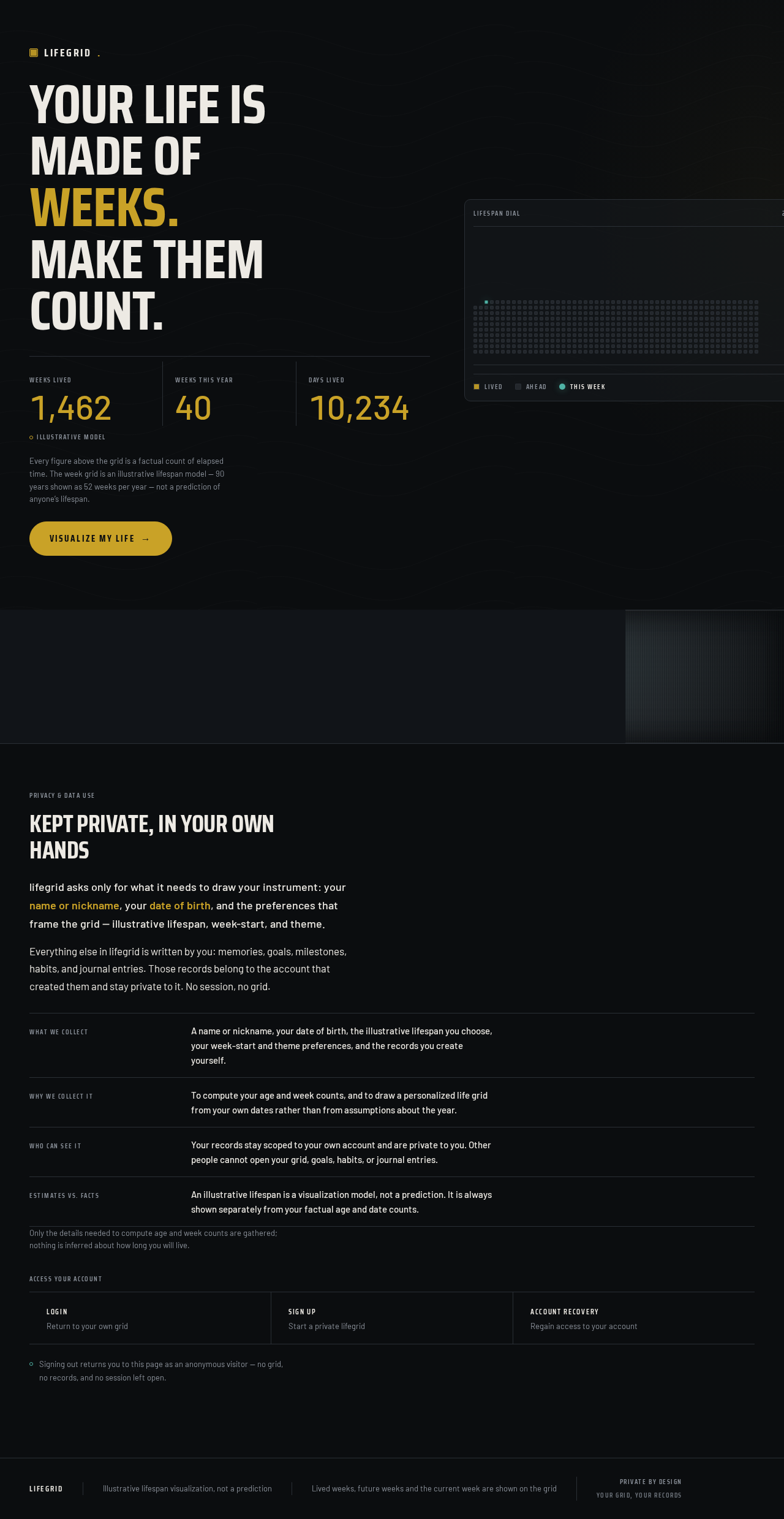
Your life ismade ofweeks.Make them count.
Showing illustrative values, not your own records.
Every figure above the grid is a factual count of elapsed time. The week grid is an illustrative lifespan model — 90 years shown as 52 weeks per year — not a prediction of anyone’s lifespan.
A miniature week grid: 52 squares per row for every year of an illustrative 90-year lifespan. Elapsed weeks are gold, weeks ahead are graphite, and the current week is the single teal square.
Kept private, in your own hands
lifegrid asks only for what it needs to draw your instrument: your name or nickname, your date of birth, and the preferences that frame the grid — illustrative lifespan, week-start, and theme.
Everything else in lifegrid is written by you: memories, goals, milestones, habits, and journal entries. Those records belong to the account that created them and stay private to it. No session, no grid.
Only the details needed to compute age and week counts are gathered; nothing is inferred about how long you will live.
Access your account
Signing out returns you to this page as an anonymous visitor — no grid, no records, and no session left open.
Your life ismade ofweeks.Make them count.
Showing illustrative values, not your own records.
Every figure above the grid is a factual count of elapsed time. The week grid is an illustrative lifespan model — 90 years shown as 52 weeks per year — not a prediction of anyone’s lifespan.
A miniature week grid: 52 squares per row for every year of an illustrative 90-year lifespan. Elapsed weeks are gold, weeks ahead are graphite, and the current week is the single teal square.
Kept private, in your own hands
lifegrid asks only for what it needs to draw your instrument: your name or nickname, your date of birth, and the preferences that frame the grid — illustrative lifespan, week-start, and theme.
Everything else in lifegrid is written by you: memories, goals, milestones, habits, and journal entries. Those records belong to the account that created them and stay private to it. No session, no grid.
Only the details needed to compute age and week counts are gathered; nothing is inferred about how long you will live.
Access your account
Signing out returns you to this page as an anonymous visitor — no grid, no records, and no session left open.
No comments yet. Be the first!