lifegrid
 oasis
oasisBUILD A PREMIUM LIFE CALENDAR WEBSITE Act as an expert full-stack developer, UI/UX designer, and product architect. Build a beautiful, fully functional, responsive web application called Life Calendar that helps users visualize their lives, track time, set meaningful goals, and become more intentional about how they spend each day. 1. Core Concept Create a personal life calendar inspired by the concept of visualizing an entire human lifespan using a grid of weeks. Users should be able to see: - How many weeks they have lived. - How many weeks have passed in their current year. - Their current age in years, months, and days. - A visual representation of past weeks and upcoming weeks. - Important milestones, memories, goals, and life events. Make it clear that lifespan estimates are illustrative, not predictions of an individual's lifespan. 2. Interactive Life Grid Create the main feature: a beautiful, interactive grid representing a user's life in weeks. Requirements: - Each small square represents one week. - Arrange the grid into 52 columns or rows per year, with clear year labels. - Use distinct visual styles for past weeks, the current week, and future weeks. - Highlight the current week with a subtle animation. - Allow users to hover over or tap any square to see its week number, approximate date range, age at that time, and associated events. - Allow users to click a week to add a memory, goal, journal entry, or milestone. - Include zoom controls and a way to navigate between life stages. - Provide a legend explaining the colors. - Ensure the grid works smoothly on mobile and desktop. Let users choose an illustrative lifespan, such as 70, 80, 90, or 100 years. 3. Personalized Onboarding When users first open the application, guide them through a simple onboarding process. Collect: - Name or nickname. - Date of birth. - Preferred lifespan visualization. - Week-start preference. - Theme preference. After onboarding, calculate their age and generate their personalized life grid automatically. Allow users to edit these settings later. 4. Dashboard Create a modern dashboard containing: - Current age. - Total weeks lived. - Weeks elapsed this year. - Days lived. - Current week number. - Upcoming birthdays and important events. - A countdown to the next personal milestone. - A daily reflection prompt. - A motivational quote that changes daily. Use attractive cards, clean typography, subtle gradients, and elegant spacing. 5. Goals and Milestones Build a dedicated section where users can: - Create personal goals. - Assign target dates. - Categorize goals into education, career, health, relationships, finances, personal growth, and experiences. - Set priorities and track progress. - Add milestones to their life grid. - Mark completed goals. - View overdue and upcoming goals. - Create short-term, yearly, and long-term goals. Display progress using simple progress bars and charts. 6. Memories and Journal Create a private personal journal where users can: - Write daily reflections. - Record memorable moments. - Add dates, tags, and optional photos. - Link journal entries to specific weeks. - Search and filter past entries. - Review memories by month, year, or life stage. Include a calendar view for navigating journal entries. 7. Daily Habits and Reflection Add a daily check-in feature that allows users to: - Record one thing they are grateful for. - Write what they learned. - Record a meaningful moment. - Identify their main priority for tomorrow. - Track selected habits. Display weekly and monthly summaries without encouraging unhealthy perfectionism. 8. Calendar and Events Include a functional calendar with: - Month, week, and agenda views. - Birthdays and anniversaries. - Personal deadlines. - Goal milestones. - Reminders and recurring events. - Event creation, editing, and deletion. - Search and filtering. Use the user's local timezone when displaying dates and times. 9. Design and User Experience The website must feel premium, calm, thoughtful, and emotionally meaningful. Visual direction: - Minimalist, modern interface. - Dark mode as the default, with an optional light mode. - Deep charcoal backgrounds with subtle accent colors. - Soft glowing highlights for the current week. - Smooth transitions and micro-interactions. - Rounded cards and carefully balanced whitespace. - Elegant typography. - Responsive navigation and accessible controls. Create these pages: 1. Landing page. 2. Onboarding page. 3. Main dashboard. 4. Life Calendar. 5. Goals and Milestones. 6. Journal and Memories. 7. Daily Habits. 8. Events Calendar. 9. Profile and Settings. The landing page should include a compelling headline: "Your life is made of weeks. Make them count." Add a prominent button labeled "Visualize My Life" that takes the user into onboarding. 10. Authentication and Database Implement secure user authentication, including sign-up, sign-in, sign-out, and password recovery. Use Supabase for: - Authentication. - PostgreSQL database. - Secure user-specific data storage. - Optional image storage for memories. Create suitable database tables for: - Profiles. - Life calendar settings. - Goals. - Milestones. - Journal entries. - Habits. - Habit records. - Calendar events. Associate private records with their owners and enforce Row Level Security (RLS) so users cannot access other users' private information. Never expose secret keys in frontend code. Allow users to export their data and permanently delete their account and personal information. 11. Technical Requirements Use: - React with TypeScript. - Tailwind CSS. - A clean, reusable component architecture. - Supabase for the backend. - A reliable date-handling library. - Accessible icons and keyboard navigation. Requirements: - Fully responsive on Android, iPhone, tablet, and desktop. - Fast loading and smooth interactions. - Proper validation and helpful error messages. - Loading states, empty states, and success feedback. - Functional forms and navigation. - No dead buttons or placeholder interactions. - No fake statistics or randomly generated personal data. - Handle leap years, birthdays, timezones, and dates correctly. - Calculate completed weeks using actual dates rather than assuming every year contains exactly 52 weeks. 12. Privacy and Reliability Treat the life calendar as a private personal space. - Collect only necessary information. - Clearly explain how personal data is used. - Protect personal memories and journal entries. - Make backups and data exports possible where supported. - Handle failed network requests gracefully. - Avoid making predictions about how long a user will live. - Clearly distinguish estimated lifespan visualization from factual age and date calculations. 13. Final Deliverable Build the actual working application, not just a static mockup or design concept. Start by creating the complete UI and life-grid calculations. Then implement authentication, database integration, goals, memories, habits, and event management. Test every major feature on mobile and desktop. Fix errors before declaring the application complete. If a required external service needs credentials, provide clear setup instructions and a working configuration template rather than pretending the integration is connected. The final result should feel like a polished personal productivity product that people would genuinely enjoy using every day.

Comments (0)
Sign in to leave a comment
Architecture
No Services Diagrams Yet
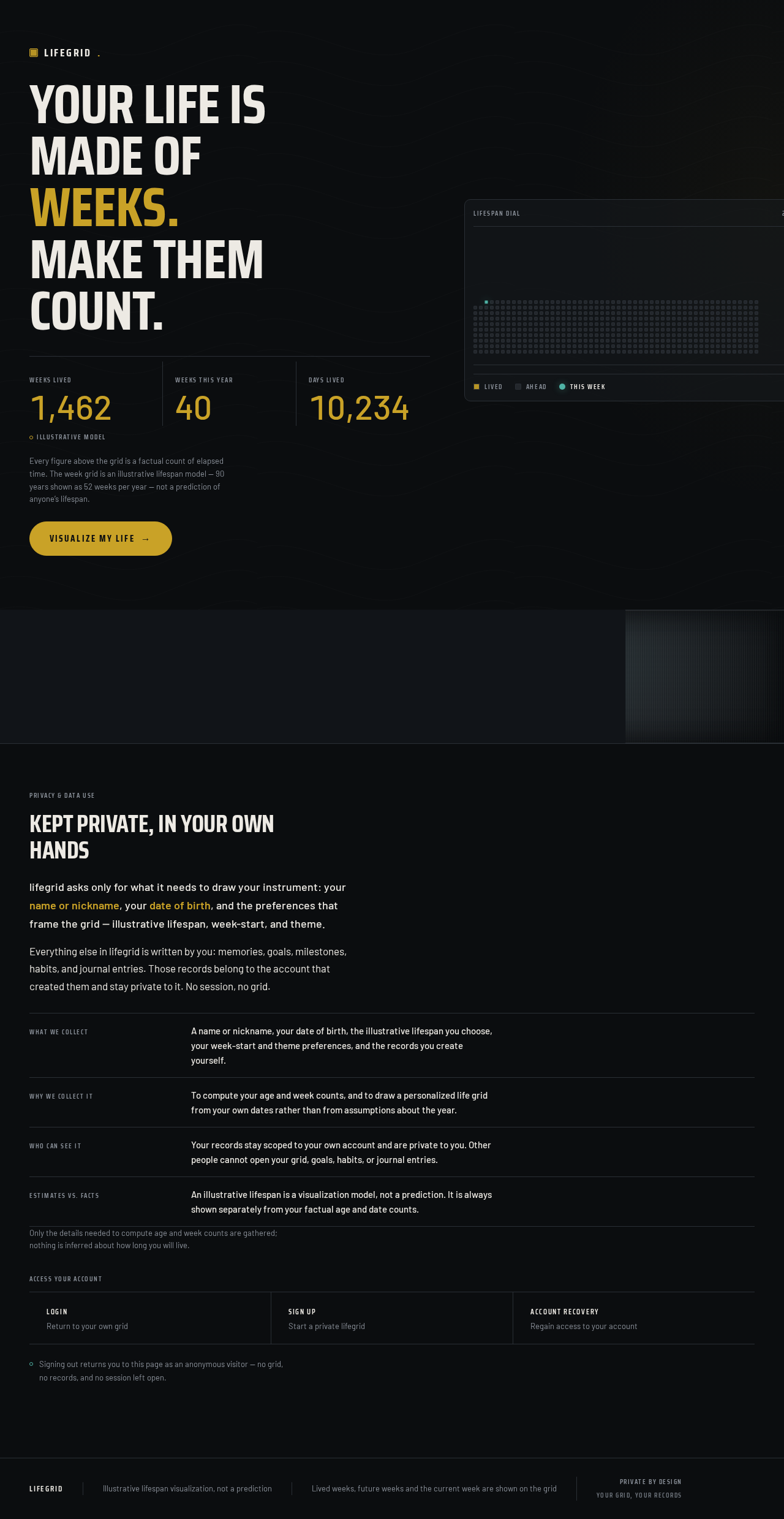
Your life ismade ofweeks.Make them count.
Showing illustrative values, not your own records.
Every figure above the grid is a factual count of elapsed time. The week grid is an illustrative lifespan model — 90 years shown as 52 weeks per year — not a prediction of anyone’s lifespan.
A miniature week grid: 52 squares per row for every year of an illustrative 90-year lifespan. Elapsed weeks are gold, weeks ahead are graphite, and the current week is the single teal square.
Kept private, in your own hands
lifegrid asks only for what it needs to draw your instrument: your name or nickname, your date of birth, and the preferences that frame the grid — illustrative lifespan, week-start, and theme.
Everything else in lifegrid is written by you: memories, goals, milestones, habits, and journal entries. Those records belong to the account that created them and stay private to it. No session, no grid.
Only the details needed to compute age and week counts are gathered; nothing is inferred about how long you will live.
Access your account
Signing out returns you to this page as an anonymous visitor — no grid, no records, and no session left open.
Your life ismade ofweeks.Make them count.
Showing illustrative values, not your own records.
Every figure above the grid is a factual count of elapsed time. The week grid is an illustrative lifespan model — 90 years shown as 52 weeks per year — not a prediction of anyone’s lifespan.
A miniature week grid: 52 squares per row for every year of an illustrative 90-year lifespan. Elapsed weeks are gold, weeks ahead are graphite, and the current week is the single teal square.
Kept private, in your own hands
lifegrid asks only for what it needs to draw your instrument: your name or nickname, your date of birth, and the preferences that frame the grid — illustrative lifespan, week-start, and theme.
Everything else in lifegrid is written by you: memories, goals, milestones, habits, and journal entries. Those records belong to the account that created them and stay private to it. No session, no grid.
Only the details needed to compute age and week counts are gathered; nothing is inferred about how long you will live.
Access your account
Signing out returns you to this page as an anonymous visitor — no grid, no records, and no session left open.
No comments yet. Be the first!