leads-linkedin
 Hello Mcdonald
can you build an app that can extract leads from linkedin


Comments (0)
Sign in to leave a comment
System Requirements
System Requirements Document for leads-linkedin
1. Introduction
leads-linkedin is a web application that extracts leads from LinkedIn. A lead researcher signs in to the application, starts an extraction, and receives a list of leads drawn from LinkedIn profiles; the resulting lead lists are saved so the researcher can return in a later session and review them again.
The product intent is narrow and deliberate: turn LinkedIn profile information into a usable, reviewable lead list, with the researcher in control of when an extraction runs and what it produced. The audience is the lead researcher — a sales or research operator who needs speed, trust, and dense, legible data rather than a decorative marketing surface. The interface is treated as a precise instrument: honest controls, a strict grid, one signal colour, and data presented in aligned label/value pairs.
This document is the System Requirements Document for the product described above. It defines the current delivery, the single accepted human persona, the four accepted pages and their access boundaries, the functional requirements, the end-to-end journeys, and the visual and technical direction.
2. System Overview
2a. Product Interpretation and Delivery Boundary
leads-linkedin is delivered as a first-party web application with its own custom interface. The application owns the identity of its users: a lead researcher enrolls through self-service on first use and verifies identity on return, because the lead lists they produce are private, durable, actor-specific data that must remain bound to the correct person across sessions.
Delivery is split across three access boundaries:
- Public entry (no sign-in). The Landing page explains what the application does and offers the route into enrollment or sign-in. It holds no private data.
- Identity access (no prior sign-in). The Login page is where a researcher enrolls for the first time and where a returning researcher verifies identity. It is anonymously reachable by design; it cannot be gated behind the access it establishes.
- Protected working surfaces (sign-in required). The Extraction page, where a researcher starts an extraction and sees the returned result list, and the Leads page, where saved lead lists are reviewed again in a later session, both require an established identity.
The application's backend performs the extraction work and persists lead lists; the researcher initiates, observes, and revisits that work through the first-party pages. No provider-owned or external surface is part of the accepted scope, and no headless-only delivery is accepted.
Everything described in this document is current scope. No future-horizon capabilities are accepted at this time.
2b. Source Content Inventory
Not applicable — no reference directive supplies a content_source.
2c. Page Content and Component Coverage
Landing
- Purpose and access. Public entry surface, reachable without sign-in. Explains the LinkedIn lead extraction application before the researcher commits to enrollment or sign-in.
- Information and state. Product name
leads-linkedin; a flush-left headline stating that the application extracts leads from LinkedIn; a short statement of what an extraction produces (a lead list the researcher can review and return to); the two entry actions. No private data, no counters tied to a real account, no lead content. - Primary action. Proceed to enrollment or sign-in on the Login page.
- Supporting actions. Read the explanation of what the application does; move between the headline, the explanation, and the entry action in a single ruled panel.
- Domain entities. None persisted on this page.
- Component responsibilities.
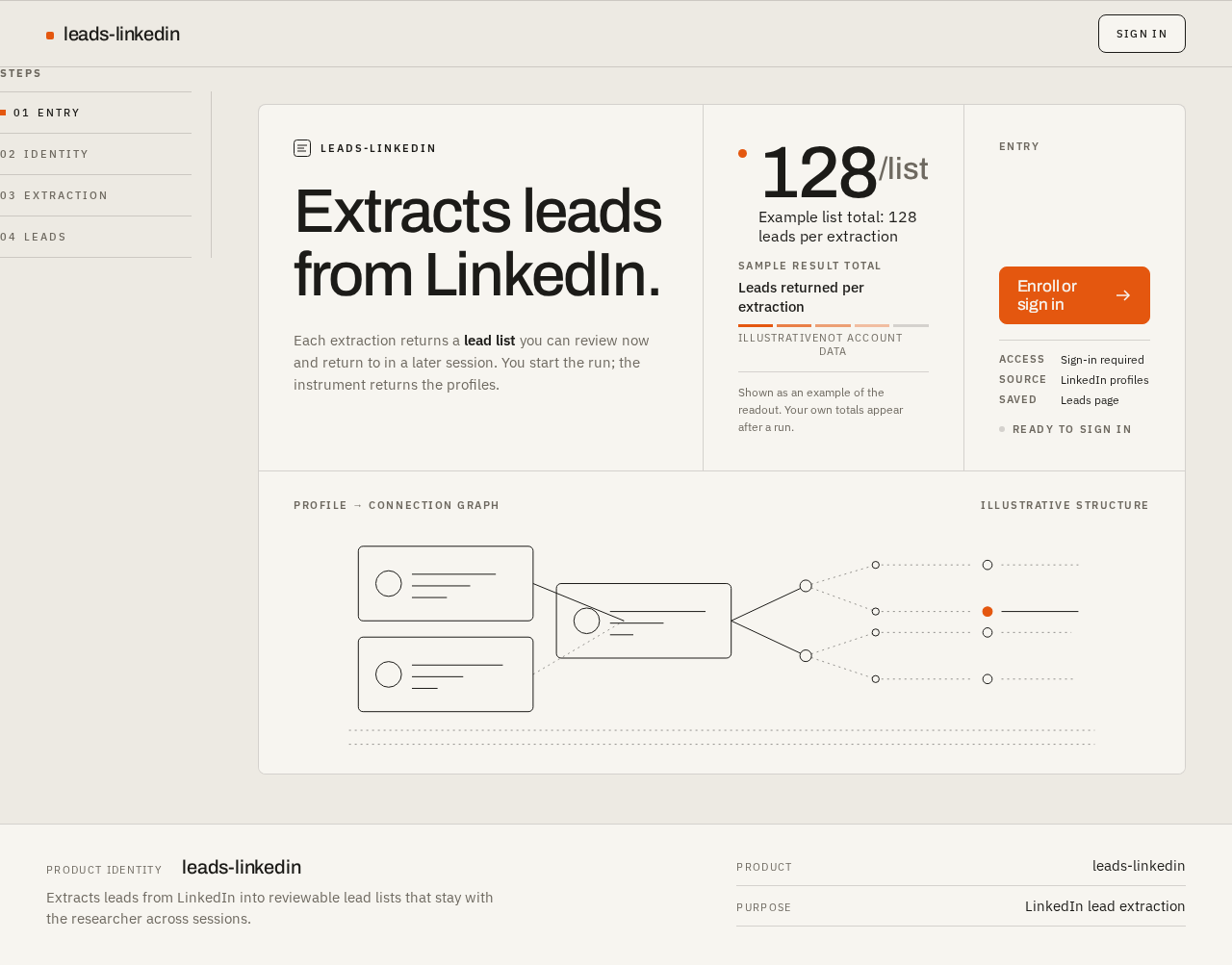
- Ruled three-column hero panel: column one carries the 64px flush-left Archivo headline; column two carries the extraction-counter treatment as a static, illustrative figure in tabular numerals beside an orange signal dot; column three carries the orange signal button that leads to Login.
- Fixed left rail with numbered steps, one orange marker on the active step.
- Diagrammatic line art of profile cards and connection graphs as the only imagery.
- States.
- Loading: not applicable — the page is static content.
- Empty: not applicable.
- Success: the entry action navigates to Login.
- Error: if navigation to Login fails, the entry action remains available and re-invokable; no partial state is shown.
- Recovery: the researcher can retry the entry action or reload the page.
Login
- Purpose and access. Identity access surface, reachable without prior sign-in. Establishes a first-time identity through self-service enrollment and verifies a returning identity.
- Information and state. Two modes on one page: Enroll (first use) and Sign in (returning). Fields for the researcher's identifying credentials; inline validation messages; a submitting state; a failure message when enrollment or verification does not succeed. On success the researcher is taken to the protected working surfaces.
- Primary action. Enroll a new identity, or verify an existing identity.
- Supporting actions. Switch between Enroll and Sign in; correct invalid input and resubmit.
- Domain entities. Researcher identity (the account that owns lead lists).
- Component responsibilities.
- Mode switch between Enroll and Sign in, with the active mode marked by the single orange accent.
- Credential fields with aligned small-caps labels and hairline rules.
- Submit control in the primary black treatment; the orange accent marks the active/live state only.
- Inline error region adjacent to the field or form it concerns.
- States.
- Loading: submit control shows a submitting state; fields are not silently cleared.
- Empty: fields start empty with labels visible; no placeholder carries required meaning.
- Success: identity established or verified; the researcher proceeds to Extraction.
- Error: invalid or incomplete input shows an inline message and keeps entered values; a failed verification shows a form-level message and offers retry.
- Recovery: the researcher corrects input and resubmits, or switches mode if they chose the wrong one.
Extraction
- Purpose and access. Protected surface, sign-in required. The researcher starts a LinkedIn lead extraction and receives the returned result list.
- Information and state. The extraction input (what the researcher is extracting leads from on LinkedIn); the run control; the run state (idle, running, complete, failed); the returned result list of leads for the current run; the result total in tabular figures beside an orange signal dot, counting up once when the run completes.
- Primary action. Start an extraction.
- Supporting actions. Read the returned lead list; open the saved lead lists on the Leads page; re-run after a failure.
- Domain entities. Extraction run (with its state and result total); lead (the individual extracted record); lead list (the saved result of a completed run).
- Component responsibilities.
- Extraction input with a small-caps label and hairline rule.
- Run control in the primary black treatment; the orange accent marks the live/running state.
- Result total in tabular numerals with an orange signal dot; counts up once on completion.
- Dense result rows on a ruled panel, each row an aligned label/value pair set with small-caps headers.
- Fixed left rail with numbered steps and one orange marker on the active step.
- States.
- Loading: running state is shown explicitly; the run control is not re-invokable while a run is in progress.
- Empty: before any run, and when a completed run returns no leads, the result area states that there are no leads for this run rather than showing a blank panel.
- Success: the result list renders with the counted-up total; the run is saved and reachable from Leads.
- Error: a failed run shows a failure message with the reason where available, keeps the researcher's input, and offers a retry.
- Recovery: retry the run; previously saved lead lists remain intact and reachable from Leads.
Leads
- Purpose and access. Protected surface, sign-in required. The researcher reviews saved lead lists again in a later session.
- Information and state. The researcher's saved lead lists, each with its identifying context and result total; the selected list's lead rows; an empty state when the researcher has no saved lists yet.
- Primary action. Select a saved lead list to review its leads.
- Supporting actions. Read lead rows as aligned label/value pairs; return to Extraction to run a new extraction.
- Domain entities. Lead list; lead.
- Component responsibilities.
- List selector for saved lead lists, with the active selection marked by the single orange accent.
- Ruled data panel of lead rows with small-caps headers and aligned label/value pairs.
- Result total in tabular numerals.
- Fixed left rail with numbered steps and one orange marker on the active step.
- States.
- Loading: list and rows show a loading state; the rail and headers remain in place.
- Empty: no saved lists yet — the page states this and points to Extraction as the next step.
- Success: the selected list's leads render fully.
- Error: if saved lists cannot be loaded, an error message is shown with a retry; the researcher is not shown a misleading empty state.
- Recovery: retry loading; navigate to Extraction to produce a new list.
3. Functional Requirements
FR-1 — Extract leads from LinkedIn (explicit) As a Lead researcher, I should start an extraction that collects leads from LinkedIn, so that I obtain a lead list I can act on.
- Trigger/input: the researcher supplies the extraction input on the Extraction page and invokes the run control.
- Observable result: the run enters a visible running state, then completes and renders the returned lead list with its result total.
- Access state: sign-in required.
- Failure/recovery: a failed run shows a failure message with the reason where available, preserves the researcher's input, and offers retry; saved lists are unaffected.
- Continuation: the completed run is saved and reachable from the Leads page.
FR-2 — Self-service enrollment (required_inference) As a Lead researcher, I should enroll myself on first use, so that the lead lists I produce are privately mine and can be resumed later.
- Trigger/input: the researcher arrives at Login without an established identity and chooses Enroll, supplying identifying credentials.
- Observable result: the identity is established and the researcher proceeds to the protected working surfaces.
- Access state: Login is reachable without prior sign-in; the protected surfaces are not.
- Failure/recovery: invalid or incomplete input shows an inline message and keeps entered values; the researcher corrects and resubmits.
- Continuation: the researcher lands on Extraction ready to run an extraction.
FR-3 — Verify identity on return (required_inference) As a Lead researcher, I should verify my identity when I return, so that I reach my own saved lead lists and no one else's.
- Trigger/input: the returning researcher chooses Sign in on Login and supplies their credentials.
- Observable result: the identity is verified and the researcher reaches the protected working surfaces with their own saved lists available.
- Access state: Login is reachable without prior sign-in.
- Failure/recovery: a failed verification shows a form-level message and offers retry; the researcher may switch to Enroll if they have no identity yet.
- Continuation: the researcher proceeds to Extraction or directly to Leads.
FR-4 — Review saved lead lists in a later session (required_inference) As a Lead researcher, I should review my saved lead lists in a later session, so that extraction results remain usable after the run that produced them.
- Trigger/input: the signed-in researcher opens Leads and selects a saved list.
- Observable result: the selected list's lead rows render as aligned label/value pairs with the list's result total.
- Access state: sign-in required.
- Failure/recovery: if saved lists cannot be loaded, an error message with retry is shown instead of a misleading empty state.
- Continuation: the researcher reads the list, selects another, or returns to Extraction for a new run.
FR-5 — Observe extraction progress and totals (required_inference) As a Lead researcher, I should see the run state and the result total as the extraction proceeds, so that I know whether the instrument is working and what it produced.
- Trigger/input: the researcher starts a run on Extraction.
- Observable result: the running state is visible and the run control is not re-invokable mid-run; on completion the result total counts up once in tabular figures beside an orange signal dot.
- Access state: sign-in required.
- Failure/recovery: a failed run replaces the running state with a failure message and a retry.
- Continuation: the researcher reads the returned rows or moves to Leads.
4. User Personas
Lead researcher
- Product context. The lead researcher is a sales or research operator who works from LinkedIn profile information and needs it turned into a lead list quickly and trustworthily. They are a power user of dense data: they read aligned label/value pairs, scan totals, and expect the tool to behave like a precise instrument rather than a toy. They work across sessions — an extraction run today is reviewed again later.
- Primary goal. Obtain a lead list extracted from LinkedIn, and be able to return to it.
- Distinct accepted responsibilities.
- Enrolls a private identity on first use and verifies it on return, because the lead lists are theirs alone.
- Supplies the extraction input and starts a run on the Extraction page.
- Observes the run state and the result total, and reads the returned lead rows.
- Returns in a later session to the Leads page and selects a saved list to review.
- Recovers from a failed run by retrying, and from a failed load by retrying, without losing saved work.
- Relevant inputs and decisions. What to extract from LinkedIn; whether to enroll or sign in; whether a returned list is worth keeping and reviewing again; whether to re-run after a failure.
- Interactions with other accepted participants. None — the lead researcher is the only accepted human persona. The application backend performs the extraction and persists lists on the researcher's behalf; it is not a persona.
- Observable success. A completed run whose lead list renders with a counted-up total, and the same list reachable from Leads in a later session under the researcher's own identity.
5. Core User Flows
Flow A — First use: enroll, extract, and see the result
- The researcher opens the application and lands on Landing without signing in. The ruled three-column panel presents the flush-left headline, the illustrative extraction counter, and the orange signal button.
- The researcher invokes the entry action and arrives at Login.
- On Login the researcher selects Enroll, supplies identifying credentials, and submits. The submit control shows a submitting state.
- If input is invalid or incomplete, an inline message appears, the entered values remain, and the researcher corrects and resubmits. If enrollment fails, a form-level message appears and the researcher retries.
- On success the identity is established and the researcher is taken to Extraction.
- On Extraction the researcher supplies the extraction input and invokes the run control. The run enters a visible running state and the control is not re-invokable.
- If the run fails, a failure message with the reason appears, the input is preserved, and the researcher retries from step 6.
- On completion the returned lead list renders as dense ruled rows, and the result total counts up once in tabular figures beside an orange signal dot.
- The researcher reads the returned leads. The run is saved and reachable from Leads.
Flow B — Returning: verify identity and review a saved list
- The researcher returns and opens Login without a session.
- The researcher selects Sign in, supplies credentials, and submits.
- If verification fails, a form-level message appears and the researcher retries, or switches to Enroll if they have no identity yet.
- On success the researcher reaches the protected surfaces and opens Leads.
- Leads loads the researcher's saved lead lists. If loading fails, an error message with a retry is shown — not an empty state — and the researcher retries.
- If the researcher has no saved lists, the page states this and points to Extraction as the next step; the researcher follows Flow A from step 6.
- The researcher selects a saved list; the active selection is marked by the orange accent and the list's lead rows render as aligned label/value pairs with the list's result total.
- The researcher reads the list, selects another saved list, or returns to Extraction to run a new extraction.
Flow C — Run another extraction from a returning session
- From a verified session, the researcher opens Extraction.
- The researcher supplies the extraction input and invokes the run control.
- The run shows its running state; on completion the new lead list renders with its counted-up total and is saved alongside the earlier lists.
- The researcher opens Leads and selects either list to review.
6. Visuals Colors and Theme
The visual direction is functional clarity after Dieter Rams: a precise instrument for lead researchers and sales operators, built on a strict grid, honest controls, and one signal colour.
Palette (light mode)
| Role | Hex | Use |
|---|---|---|
| Background | #EDEAE3 | Warm grey ground filling most of the page |
| Surface | #F7F5F0 | Off-white panels holding data |
| Text | #1C1B18 | Type and controls |
| Primary | #1C1B18 | Primary controls and headings |
| Accent | #E4570F | Braun orange — actions and live states only |
| Muted | #7A756B | Secondary labels and supporting text |
Typography
- Headings: Archivo, Medium weight, tight tracking, flush-left, sentence case.
- Body: IBM Plex Sans.
- Labels: small caps at 11px with wide tracking.
- Scale: 1.25 modular — 64 / 48 / 32 / 20 / 15px. Mobile headline 34px; desktop headline 64px. Headline sizes use
clamp(...)with their mobile size so they stay whole at 375px, 768px, and 1280px. - Numerals in totals use tabular figures.
Shape language
- Rounded-rectangle controls with 8px radius.
- Hairline 1px rules.
- Aligned label and value pairs.
- No shadows and no decoration.
Layout
- 12-column grid with a fixed left rail for navigation.
- Dense data rows on ruled panels.
- Every section aligns to the same baseline.
- The left rail shows numbered steps with a single orange marker for the active step.
Motion
- Instant state changes at 120ms.
- One counting animation on result totals.
- No bounce and no parallax.
Imagery
- Diagrammatic line art of profile cards and connection graphs only. No stock photos and no illustration for its own sake.
Avoid
- Centred hero with subtext and a blue button.
- Gradient blobs and glass cards.
- Hover-lift card grids.
- Rounded pill buttons.
- Inter, Roboto, or system fonts.
- Decorative shadows.
- The generic indigo/blue-on-white SaaS template.
7. Signature Design Concept
The public entry is a full-width ruled panel on the warm grey #EDEAE3 ground, split into three columns on the 12-column grid, with the fixed left rail carrying numbered steps and one orange marker on the active step.
- Column one — the headline. A 64px Archivo Medium headline sits flush-left on the panel, sentence case, tight tracking, never centred. On mobile it scales down to 34px via
clamp(...)and wraps inside its column without clipping. - Column two — the live extraction counter. A result-total treatment in tabular figures beside an orange signal dot, presented as the instrument's readout. On the public entry it is illustrative of what an extraction produces; it introduces no account data and no behaviour.
- Column three — the orange signal button. The single orange
#E4570Faction that carries the researcher into Login. It is a rounded rectangle at 8px radius, not a pill, with no shadow.
The panel is off-white #F7F5F0 against the warm grey ground, separated by hairline 1px rules that align to the same baseline as the left rail. Diagrammatic line art of profile cards and connection graphs occupies the panel's remaining space as ruled structure, never as decoration for its own sake. Nothing overlaps the headline, the counter figures, or the button at 375px, 768px, or 1280px.
8. Interaction Model & Motion Direction
Interaction Model: Animated Motion Tempo: restrained Hero Dimensionality: flat
Landing Hero Motion Brief
- Focal subject. The ruled three-column panel: the flush-left 64px Archivo headline, the tabular-figure extraction counter with its orange signal dot, and the orange signal button.
- Input → transformation → outcome thesis. The researcher's pointer or keyboard focus moves across the panel's three columns; the active column's rule and the orange marker on the left rail respond instantly at 120ms; the outcome is the researcher's confident press of the orange signal button into Login. No accepted behaviour is added — the panel only composes the entry action and the explanation already on the page.
- Motion vocabulary. Instant state changes at 120ms; a single counting animation reserved for result totals; no bounce, no parallax, no hover-lift.
- Composed first frame. Warm grey ground; off-white ruled panel spanning the grid; headline flush-left in column one; counter and orange dot in column two; orange button in column three; left rail with numbered steps and one orange marker.
- Reduced-motion state. With
prefers-reduced-motion, all transitions resolve instantly, the counting animation is skipped and totals appear at their final value, and the three-column panel reflows into stacked rows so every headline, figure, and control remains fully readable and operable at 375px, 768px, and 1280px.
9. Non-Functional Requirements
- Identity and privacy of lead data (required_inference). Lead lists are private, durable, actor-specific data. A signed-in researcher reaches only their own saved lists; the Extraction and Leads pages require an established identity, while Landing and Login are reachable without one. Rationale: the accepted journey requires the researcher to resume their own lists in a later session.
- Durable persistence (required_inference). Completed extraction runs and their lead lists persist across sessions in the application-owned database, so the Leads page can present them later. Rationale: the accepted review-in-a-later-session outcome cannot exist without durable storage.
- Explicit run state (required_inference). A run is never silently re-invoked while in progress, and a failed run never destroys previously saved lists. Rationale: the researcher must be able to trust the instrument and recover without losing work.
- Readable at every viewport (explicit, from the design direction). Headlines, wordmarks, labels, numbers, and controls stay entirely inside the viewport and their container at 375px, 768px, and 1280px, wrapping or scaling with
clamp(...); no element covers any part of them. Diagrammatic line art may be cropped or bled off an edge but never covers readable text or a control. - Motion accessibility (explicit, from the design direction). Under
prefers-reduced-motion, the interface provides a usable static arrangement with totals at their final value and no counting animation. - No decorative effects (explicit, from the design direction). No shadows, no gradients, no glass, no hover-lift, no parallax, no bounce; state changes resolve at 120ms.
10. Tech Stack
- Frontend. React application UI, implementing the four accepted pages, the fixed left rail, the ruled panel system, and the Archivo / IBM Plex Sans typography with the specified palette and 8px radius controls.
- Backend. A shared FastAPI process hosting the application APIs and domain modules for extraction runs, leads, and lead lists, plus identity enrollment and verification. Feature APIs extend this existing backend rather than adding a new service.
- Database. MariaDB for application-owned persistent data: researcher identities, extraction runs, and saved lead lists with their leads.
- Deployment. Docker and docker-compose with the provisioned services:
frontend,backend, anddatabase. No additional infrastructure is required for the accepted workflows.
11. Assumptions and Constraints
- Single persona. The Lead researcher is the only accepted human persona; no administrator, team, or reviewer role is in scope.
- No differentiated permissions. Identity establishes ownership of private lead data only. No role-based visibility or permission tiers are accepted.
- No provider-owned surface. The application owns all four pages; no external or provider surface is part of the accepted delivery.
- Extraction input is researcher-supplied. The researcher supplies what to extract from LinkedIn on the Extraction page; the exact shape of that input is not further specified by the source and is presented as a single labelled input.
- Current horizon only. No future capabilities are accepted; nothing in this document is deferred.
- Design defaults. The palette, fonts, scale, radius, motion timing, and imagery rules come from the supplied creative direction and are binding. Any detail not covered by it is a presentation default, not product behaviour.
12. Glossary
- Lead. An individual record extracted from LinkedIn and presented in a lead list.
- Lead list. The saved result of a completed extraction run, reviewable again in a later session on the Leads page.
- Extraction run. A single invocation of the extraction on the Extraction page, with its own state (idle, running, complete, failed) and result total.
- Result total. The count of leads in a run or list, shown in tabular figures beside an orange signal dot and counted up once on completion.
- Lead researcher. The single accepted human persona: the operator who enrolls, runs extractions, and reviews saved lists.
- Signal colour. The single Braun orange
#E4570F, reserved for actions and live states. - Left rail. The fixed navigation column showing numbered steps with one orange marker on the active step.
Steps
Extracts leads from LinkedIn.
Each extraction returns a lead list you can review now and return to in a later session. You start the run; the instrument returns the profiles.
0
Example list total: 128 leads per extractionShown as an example of the readout. Your own totals appear after a run.
Entry
Ready to sign in
- Access
- Sign-in required
- Source
- LinkedIn profiles
- Saved
- Leads page
Profile → connection graph
Illustrative structure
Steps
Extracts leads from LinkedIn.
Each extraction returns a lead list you can review now and return to in a later session. You start the run; the instrument returns the profiles.
0
Example list total: 128 leads per extractionShown as an example of the readout. Your own totals appear after a run.
Entry
Ready to sign in
- Access
- Sign-in required
- Source
- LinkedIn profiles
- Saved
- Leads page
Profile → connection graph
Illustrative structure
No comments yet. Be the first!