keen-app
 Hlo Hlo
Create a mobile learning app called “Accent Français” that helps beginners practice and improve their French pronunciation. The app should focus on helping users pronounce French words correctly using speech recognition and interactive learning tools. Main features: 1. Pronunciation Practice - Show a French word (for example: Bonjour, Merci, Croissant). - Include a button to hear the correct pronunciation using text-to-speech. - Include a microphone button so the user can say the word. - The app compares the spoken word with the correct one and shows feedback such as: - “Correct pronunciation” - “Try again” 2. Difficulty Levels - Words are divided into three levels: - Easy (Bonjour, Merci, Paris) - Medium (Fromage, Baguette) - Hard (Croissant, Écureuil) 3. Mouth Position Guide - When a word is selected, show a simple guide explaining how to shape the mouth or tongue to produce the sound. - Example: rounded lips for “u” sound. 4. Common Mistakes Section - Show typical pronunciation mistakes for each word. - Example: - Croissant → often mispronounced as “kroy-sant” - Correct pronunciation: “kwa-sahn” 5. French Tongue Twister Practice - Include a section with French tongue twisters to improve pronunciation. - Example: “Les chaussettes de l’archiduchesse sont-elles sèches ?” 6. Daily Pronunciation Challenge - Each day the app gives one word to practice. - If the user pronounces it correctly they receive points. 7. Progress Tracker - Track number of words practiced and pronunciation accuracy. - Show improvement with a simple progress bar or graph. 8. App Interface - Home Screen with buttons: - Practice Words - Daily Challenge - Tongue Twisters - Progress The design should be simple, modern, and educational with French-themed colors (blue, white, red).



Comments (0)
Sign in to leave a comment
Project Tasks20
Implement Theme and Structure
As a user I want to see a consistent French-themed visual identity across all pages. Implement the global color palette (Blue #0055A4, White #FFFFFF, Red #EF4135, Gold #FFD700, Light Gray #F5F5F5), typography, and shared component structure based on the mock-design pages. Remove scaffold pages not needed (welcome page post-login, generic dashboard/overview, dashboard/ai-assistant, dashboard/settings). Ensure the app shell matches the animated French café aesthetic defined in the SRD signature design concept.
Implement Words and Content API
As a user I want to see French words with their metadata (difficulty, category, IPA transcription, common mistakes) so I can practice structured content. Implement FastAPI endpoints to CRUD French words, including fields: word text, IPA transcription, English translation, difficulty level, category, common mistakes list, and associated phonemes. Pre-seed the database with beginner/intermediate/advanced word sets.
Build Home Page
As a user I want to experience the interactive French Café landing page so I can navigate to all main features. Implement the Home page based on the existing v3 JSX design. Includes: animated café background (steam, waiter, bokeh), NavBar with glass-morphism, HeroCafeScene (full viewport), DailyStreakBanner (gold gradient), CafeMenuGrid (Practice Words, Daily Challenge, Tongue Twisters, Progress), DailyChallengeFeature card, ProgressSnapshot, TongueTwisterTeaser (café bookshelf), SavedWordsFavorites, HowItWorks, MotivationalCTA, and Footer with Parisian silhouette SVG.
Implement TTS Pronunciation API
As a user I want to hear the correct French pronunciation of any word via text-to-speech so I can learn the right sound before recording. Implement a backend FastAPI endpoint that accepts a French word and returns TTS audio. Integrate Google TTS or equivalent for natural French pronunciation. Support normal and slow playback speeds.
Implement Speech Recognition API
As a user I want to record my pronunciation and receive accuracy analysis so I can understand how close my speech is to native French. Implement a backend FastAPI endpoint that accepts audio input, runs speech recognition, and returns an overall accuracy score plus per-phoneme breakdown scores. Integrate with a suitable speech recognition service (e.g., Google Speech-to-Text or similar).
Implement Mouth Position Guide API
As a user I want to see visual mouth position guides for difficult phonemes so I can learn correct articulation. Implement a backend API endpoint that returns mouth position illustration data or SVG descriptors per phoneme. Integrate Google Nano Banana or equivalent to generate visual guides for French phonemes.
Implement Streak and Progress API
As a user I want my practice streaks and accuracy history to be tracked and persisted so I can see my improvement over time. Implement FastAPI endpoints for: recording daily practice sessions, calculating consecutive streak days, aggregating accuracy scores over time (7-day sparkline data), and returning words mastered count. Use IST timezone for streak calculations.
Implement Saved Words API
As a user I want to save and manage my favorite words so I can quickly revisit them for further practice. Implement FastAPI endpoints to add, remove, and list saved/favorite words per user. Each saved word entry stores the word ID, last accuracy score, and revisit flag. Support sorting by accuracy (lowest first) for the revisit queue.
Implement Tongue Twisters API
As a user I want to browse and practice French tongue twisters with difficulty metadata so I can target specific sounds. Implement FastAPI endpoints to list tongue twisters with fields: text, difficulty level, target phonemes/sounds, category, and point reward. Support filtering by difficulty. Pre-seed with at least 10 tongue twisters including 'Les chaussettes de l'archiduchesse'.
Build Practice Page
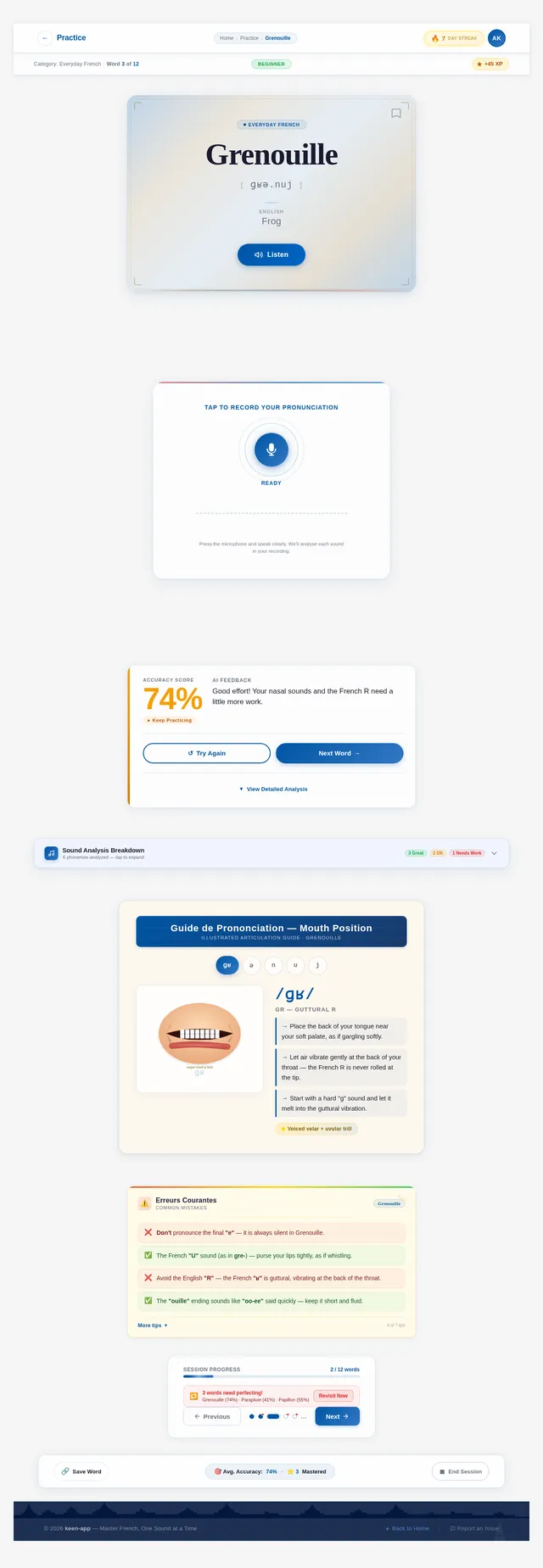
As a user I want to practice French word pronunciation so I can improve my spoken French. Implement the Practice page based on the existing v3 JSX design. Includes: PracticeNavBar, PracticeSessionHeader (category/word count/XP), WordDisplayCard (large serif word display, IPA transcription, TTS listen button, bookmark), PronunciationRecorder (mic button with idle/recording/processing states, waveform visualizer), FeedbackPanel (score with count-up animation, AI feedback summary, Try Again / Next Word CTAs), SoundAnalysisBreakdown (phoneme chips with accuracy dots), MouthPositionGuide, CommonMistakesTips (notepad style), WordNavigationControls (prev/next + progress bar + dot pagination), SaveAndProgressBar, and PracticeFooter.
Build Tongue Twisters Page
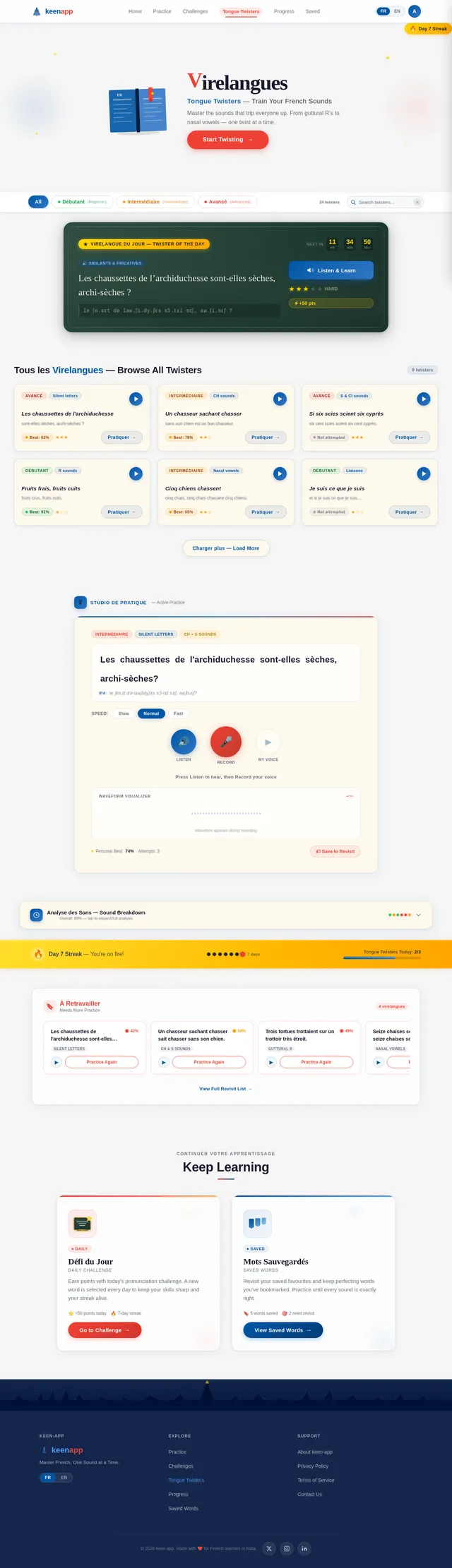
As a user I want to browse and practice French tongue twisters so I can improve specific pronunciation sounds. Implement the Tongue Twisters page based on the existing v3 JSX design. Includes: NavBar (Tongue Twisters active), TongueTwisterHero (animated headline, illustrated book, Start Twisting CTA), DifficultyFilterBar (Débutant/Intermédiaire/Avancé pills + search), FeaturedTwisterCard (chalkboard style, full twister text, play button, difficulty stars, point reward, countdown), TwisterBrowseGrid (glassmorphism cards, difficulty badges, category tags, personal best), ActivePracticeStudio (listen/record/replay buttons, waveform visualizer, speed control), SoundBreakdownPanel (score donut, phoneme chips, try again/save), StreakProgressBar (gold banner, flame, pip row, daily completion counter), RevisitDifficultQueue (horizontally scrollable chips), RelatedChallengesCTA, and Footer.
Build Progress Page
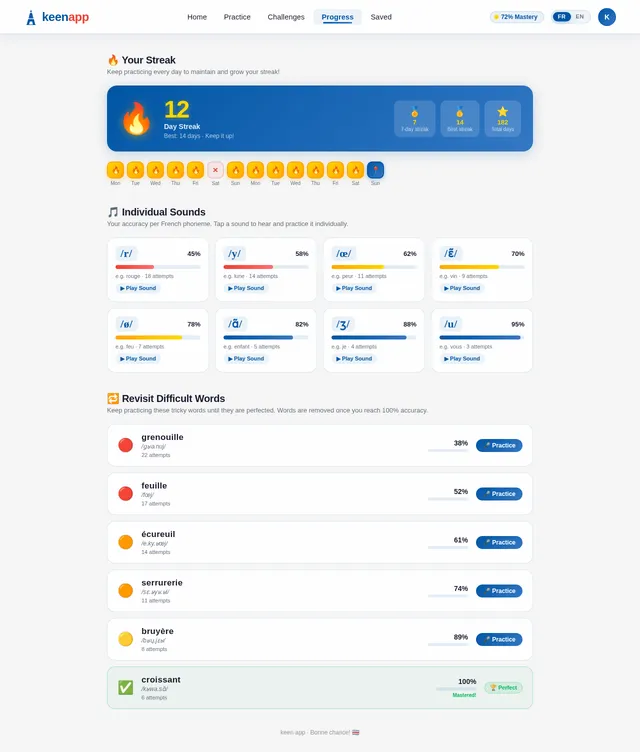
As a user I want to view my learning progress and streaks so I can stay motivated. Implement the Progress page based on the existing v3 JSX design. Includes: streak display with flame animation, accuracy improvement graphs, words mastered count, 7-day sparkline bar chart, circular accuracy ring, and revisit queue for difficult words. Page links from Home CafeMenuGrid and from Casual/Consistent learner flows.
Build Daily Challenge Page
As a user I want to complete a daily pronunciation challenge so I can earn points and maintain my streak. Implement the Daily Challenge page based on the existing v3 JSX design. Includes: featured word of the day on a chalkboard-style card, IPA transcription, listen button, record button, point reward badge, difficulty indicator, countdown timer to next challenge, and result/celebration screen on completion. Links from Home DailyChallengeFeature section and Casual learner flow.
Build Saved Words Page
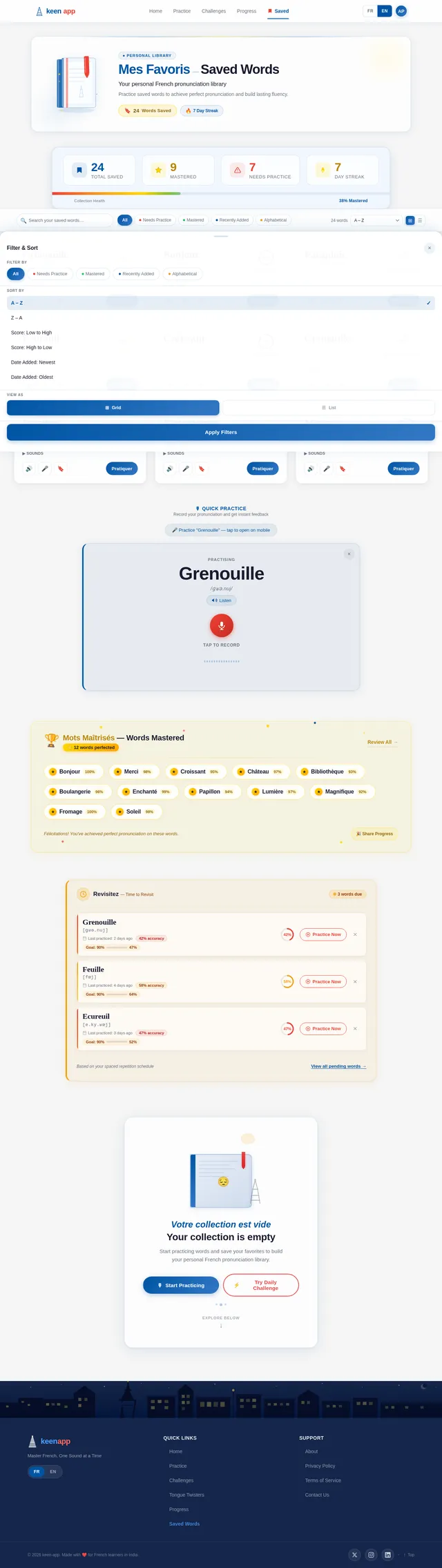
As a user I want to access and manage my saved favorite words so I can quickly revisit and practice them. Implement the Saved Words page based on the existing v3 JSX design. Includes: saved word chips/cards with pronunciation score indicators (green/amber/red), replay icon per word, ability to remove words, empty state illustration, and a link back to Practice for any saved word. Links from Home SavedWordsFavorites section and Consistent learner flow.
Implement AI Pronunciation Feedback API
As a user I want to receive friendly, human-readable AI-generated feedback on my pronunciation so I know specifically what to improve. Implement a Langchain-based pipeline using GPT to generate contextual feedback from phoneme accuracy scores. Return a short encouragement message, specific mistake descriptions per phoneme, and actionable improvement tips tailored for Indian learners.
Implement Daily Challenge API
As a user I want to receive one featured word challenge per day and earn points upon correct pronunciation so I can stay engaged. Implement a FastAPI endpoint that selects a daily challenge word (rotated daily, IST timezone), records user attempt results, awards points on success, and returns the next challenge countdown. Include a leaderboard-ready points accumulation endpoint.
Build Feedback Page
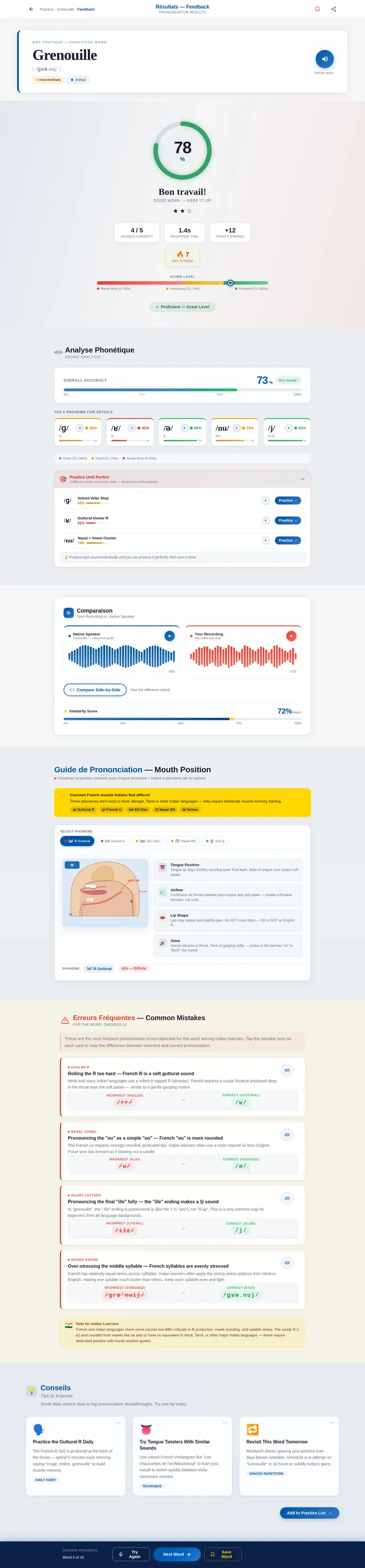
As a user I want to see detailed pronunciation feedback after recording so I can understand what to improve. Implement the Feedback page based on the existing v3 JSX design. Includes: TopBar (sticky, breadcrumb Practice > Grenouille > Feedback, save bookmark, share icon), WordResultHeader (large word + IPA + play button + difficulty badge), OverallScoreBanner (animated SVG score ring, color-coded tier band), PhonemeBreakdown (phoneme chip row with expand-on-click accuracy details), WaveformPlayback (side-by-side native vs user waveforms, similarity score), MouthPositionGuide (phoneme selector tabs, illustrated diagram), CommonMistakesPanel (amber-tinted frosted card, 3-4 mistake cards), ImprovementTips (3 tip cards with hover lift), and ActionFooterBar (Try Again, Next Word, Save Word).
Integrate Progress and Streak Data
As a user I want my real progress stats and streak data to appear across the Home page, Progress page, and streak banners so I can see my actual improvement. Wire the ProgressSnapshot, DailyStreakBanner, StreakProgressBar (Tongue Twisters page), and Progress page to the Streak and Progress API. Animate score count-ups and streak pip fills on data load.
Build Guide Page
As a user I want to view mouth and tongue position guides for specific French sounds so I can learn correct articulation. Implement the Guide page based on the existing v3 JSX design. Includes: phoneme selector pill tabs, illustrated mouth/tongue/lip position diagram per phoneme, labeled arrows for tongue placement and airflow, 'Common French sounds Indians find difficult' callout box, and a 2-3 line description per sound. Links from Practice FeedbackPanel and Feedback MouthPositionGuide section.
Integrate Speech and AI into Practice Flow
As a user I want the full practice loop (hear word → record → get phoneme feedback → see mouth guide → retry) to work end-to-end so I can have a seamless learning experience. Wire the Practice page and Feedback page frontend to the TTS, speech recognition, AI feedback, and mouth position guide APIs. Handle loading states, error states, and retry flows in the UI.
No comments yet. Be the first!