keen-app
 Hlo Hlo
Create a mobile learning app called “Accent Français” that helps beginners practice and improve their French pronunciation. The app should focus on helping users pronounce French words correctly using speech recognition and interactive learning tools. Main features: 1. Pronunciation Practice - Show a French word (for example: Bonjour, Merci, Croissant). - Include a button to hear the correct pronunciation using text-to-speech. - Include a microphone button so the user can say the word. - The app compares the spoken word with the correct one and shows feedback such as: - “Correct pronunciation” - “Try again” 2. Difficulty Levels - Words are divided into three levels: - Easy (Bonjour, Merci, Paris) - Medium (Fromage, Baguette) - Hard (Croissant, Écureuil) 3. Mouth Position Guide - When a word is selected, show a simple guide explaining how to shape the mouth or tongue to produce the sound. - Example: rounded lips for “u” sound. 4. Common Mistakes Section - Show typical pronunciation mistakes for each word. - Example: - Croissant → often mispronounced as “kroy-sant” - Correct pronunciation: “kwa-sahn” 5. French Tongue Twister Practice - Include a section with French tongue twisters to improve pronunciation. - Example: “Les chaussettes de l’archiduchesse sont-elles sèches ?” 6. Daily Pronunciation Challenge - Each day the app gives one word to practice. - If the user pronounces it correctly they receive points. 7. Progress Tracker - Track number of words practiced and pronunciation accuracy. - Show improvement with a simple progress bar or graph. 8. App Interface - Home Screen with buttons: - Practice Words - Daily Challenge - Tongue Twisters - Progress The design should be simple, modern, and educational with French-themed colors (blue, white, red).



Comments (0)
Sign in to leave a comment
System Requirements
System Requirements Document (SRD)
Project Name: keen-app
1. Introduction
The keen-app is a mobile learning application designed to help beginners practice and improve their French pronunciation. By leveraging speech recognition technology and interactive learning tools, the app provides users with a precise and engaging way to master French pronunciation. The app is tailored for users in India (IN), with a focus on accessibility, gamification, and educational value.
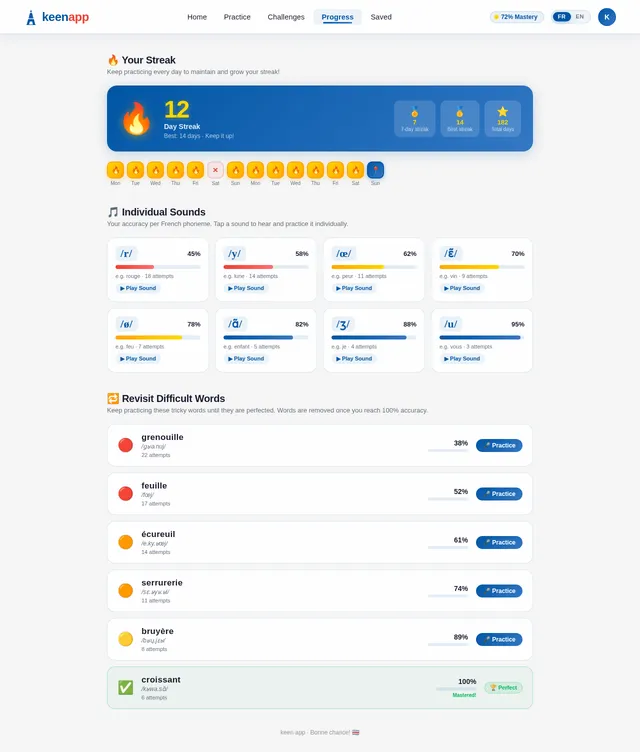
This document outlines the system requirements for the keen-app, incorporating features such as individual sound analysis, streak tracking, and a revisit mechanism for difficult words until they are perfected.
2. System Overview
The keen-app is a mobile-first application that focuses on improving French pronunciation through interactive learning. The app provides:
- Speech recognition to analyze pronunciation accuracy, including individual sound (phoneme) analysis.
- Interactive tools like mouth position guides and common mistake tips.
- Gamified elements such as daily challenges, streak tracking, and progress visualization.
- Personalized learning paths that allow users to revisit difficult words until they are mastered.
The app is designed to be simple, modern, and educational, with a French-themed aesthetic (blue, white, red). It caters to beginner-level learners and ensures an engaging experience through daily challenges, progress tracking, and streak rewards.
3. Functional Requirements
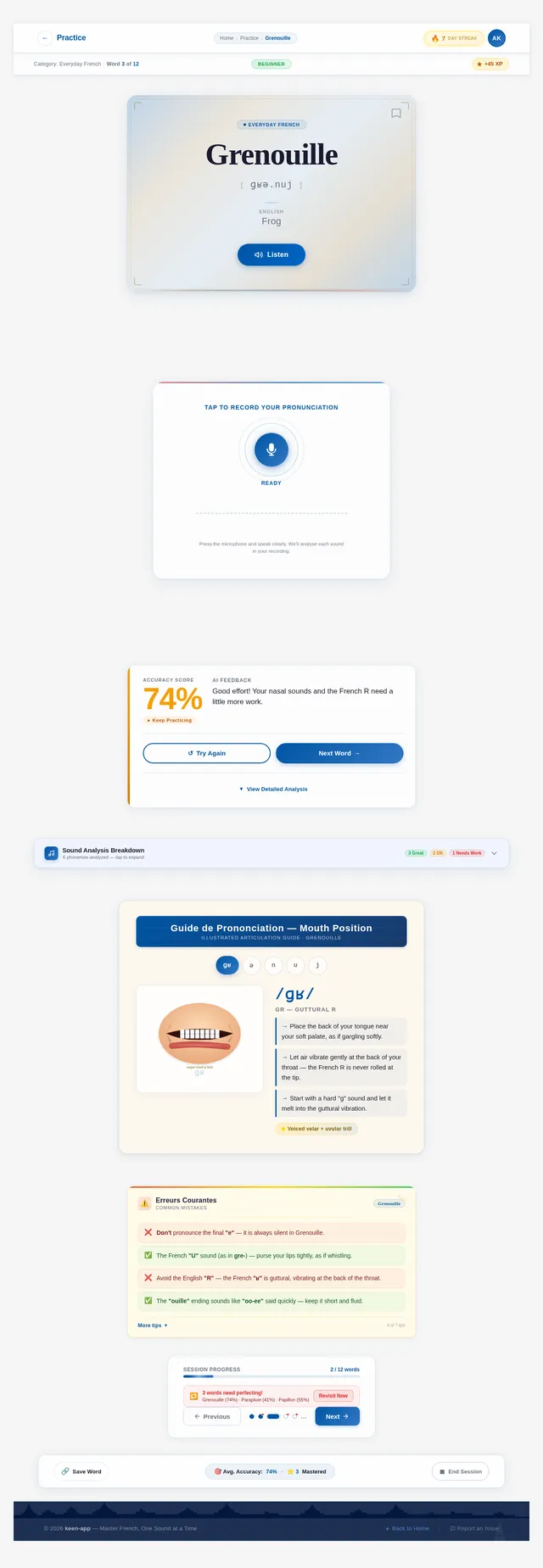
- As a User, I should be able to see a French word and hear its correct pronunciation using text-to-speech.
- As a User, I should be able to record my pronunciation of a word using a microphone button.
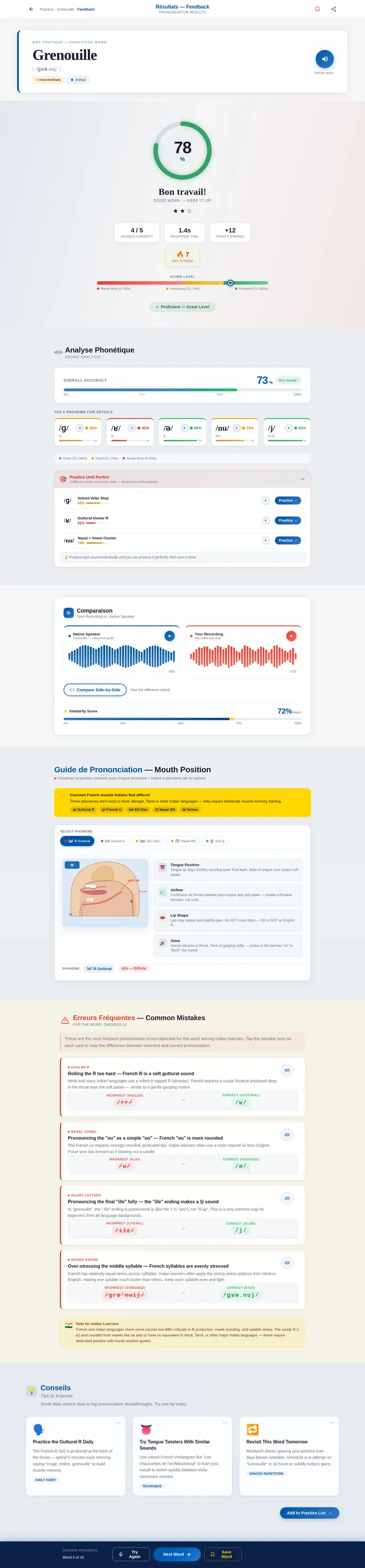
- As a User, I should receive feedback on my pronunciation, including individual sound (phoneme) analysis.
- As a User, I should be able to view a guide on how to shape my mouth or tongue to produce specific sounds.
- As a User, I should be able to see common pronunciation mistakes for each word.
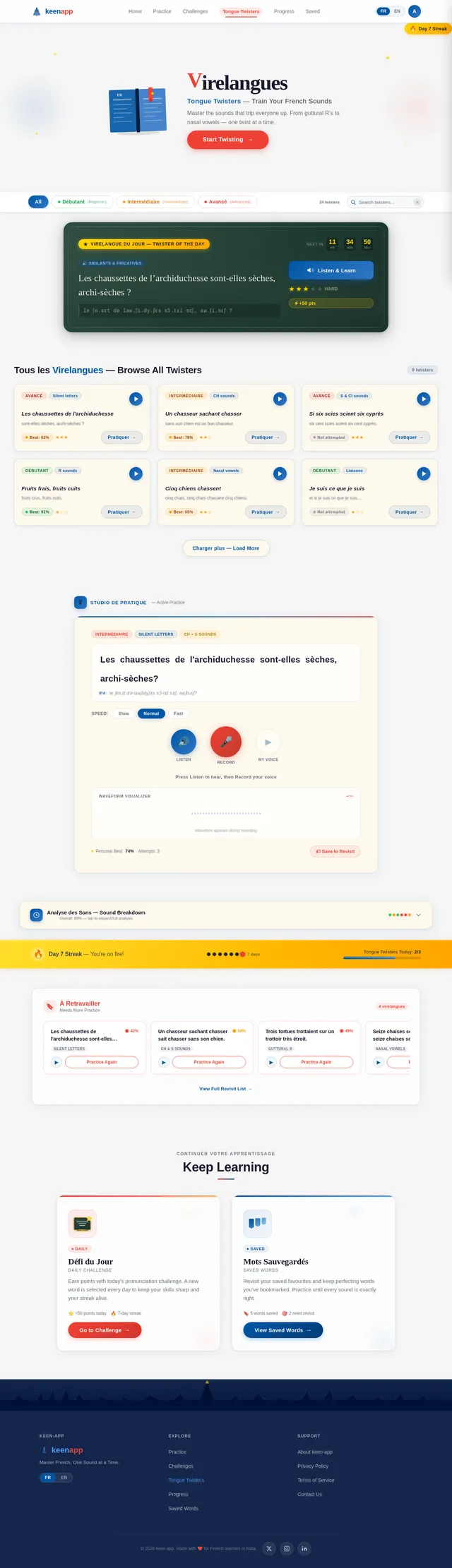
- As a User, I should be able to practice French tongue twisters to improve my pronunciation.
- As a User, I should receive a daily pronunciation challenge and earn points for completing it.
- As a User, I should be able to track my progress, including streaks and accuracy improvements, using a progress bar or graph.
- As a User, I should be able to revisit difficult words until I achieve perfect pronunciation.
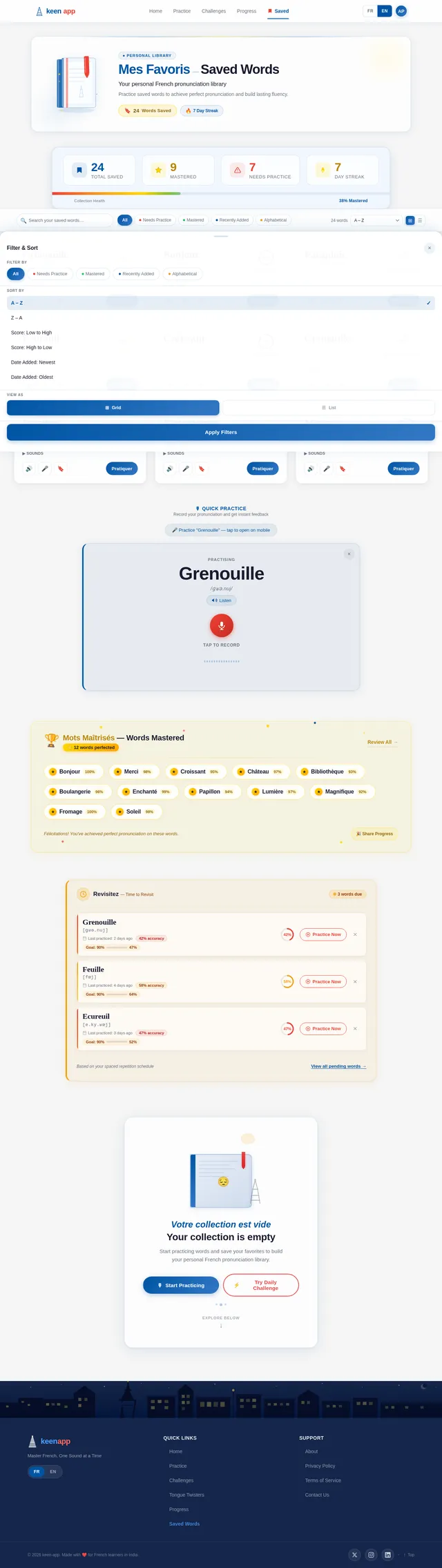
- As a User, I should be able to save my favorite words for quick access.
- As a User, I should be able to hear individual sound playback for detailed practice.
4. User Personas
-
Beginner Learner
- Age: 15-40
- Goals: Learn and improve French pronunciation from scratch.
- Needs: Clear feedback, simple guides, and engaging tools to stay motivated.
-
Casual Learner
- Age: 20-50
- Goals: Practice French pronunciation for travel or casual use.
- Needs: Quick, easy-to-use features like daily challenges and tongue twisters.
-
Consistent Learner
- Age: 18-35
- Goals: Achieve mastery in French pronunciation.
- Needs: Detailed feedback, progress tracking, streak rewards, and the ability to revisit difficult words.
5. Visuals Colors and Theme
The keen-app will adopt a French-themed color palette to create an immersive and educational experience:
- Primary Colors:
- Blue (#0055A4)
- White (#FFFFFF)
- Red (#EF4135)
- Accent Colors:
- Light Gray (#F5F5F5) for backgrounds.
- Gold (#FFD700) for streaks and rewards.
The design will be clean, modern, and intuitive, with a focus on usability and accessibility.
6. Signature Design Concept
Interactive French Café Landing Page
The home page of the keen-app will transport users to a vibrant French café scene. The background will feature an animated café with subtle movements:
- Animated Details: Steam rising from coffee cups, a waiter walking by, and a Parisian street view in the distance.
- Interactive Elements:
- Each menu item (Practice Words, Daily Challenge, Tongue Twisters, Progress) will appear as part of the café environment. For example:
- A chalkboard menu for "Daily Challenge."
- A stack of books for "Tongue Twisters."
- A progress bar integrated into a café window.
- Each menu item (Practice Words, Daily Challenge, Tongue Twisters, Progress) will appear as part of the café environment. For example:
- Micro-Interactions:
- When users hover over a button, it will "light up" like a neon café sign.
- Clicking a button will trigger a subtle animation, such as a coffee cup tipping over or a croissant sliding onto a plate.
- Sound Design: Gentle café background sounds (e.g., soft chatter, clinking cups) will enhance immersion.
This design will make the app feel warm, inviting, and distinctly French, creating an unforgettable first impression.
7. Non-Functional Requirements
- Performance: The app should load within 2 seconds on a 4G network.
- Scalability: Support up to 100,000 active users.
- Accessibility: Comply with WCAG 2.1 AA standards for accessibility.
- Localization: Support English and French languages.
- Security: Ensure user data is encrypted and stored securely.
8. Tech Stack
- Frontend: React Native for mobile app development.
- Backend: Python with FastAPI for handling API requests.
- Database: MySQL with Alembic for migrations.
- AI Models:
- GPT 5.2 for user-friendly feedback on pronunciation.
- Google Nano Banana for generating mouth position visuals.
- AI Tools: Langchain for managing AI workflows.
- Orchestration: Docker for local development and Kubernetes for server-side orchestration.
9. Assumptions and Constraints
- The app will primarily target users in India, assuming a default timezone of IST (Indian Standard Time).
- Users will have access to a stable internet connection for speech recognition and text-to-speech features.
- The app will be optimized for Android and iOS devices.
10. Glossary
- Speech Recognition: Technology that converts spoken words into text and analyzes pronunciation accuracy.
- Text-to-Speech (TTS): Technology that converts text into spoken words.
- Phoneme: The smallest unit of sound in a language.
- Streak: A gamified feature that tracks consecutive days of app usage.
- Progress Tracker: A visual representation of a user's learning progress.
- Individual Sound Playback: A feature that allows users to hear and practice specific phonemes or sounds within a word.
This document outlines the vision, features, and technical requirements for the keen-app, ensuring a clear roadmap for development.

Bienvenue!
Master French Pronunciation — One Word at a Time
Notre Menu
Choose your learning adventure
Pratiquer les Mots
Practice Words
Record your pronunciation and get instant feedback on every sound.
→Défi du Jour
Daily Challenge
Tackle today’s featured word and earn points for your streak.
→Virelangues
Tongue Twisters
Master tricky French phrases that sharpen your fluency.
→Suivi des Progrès
Progress Tracker
Visualise your accuracy, streaks, and words mastered over time.
→Défi du Jour — Daily Challenge
A new pronunciation challenge awaits you every day
(noun) — Frog
Master the French R Sound
Grenouille is a classic test of French pronunciation. The uvular R followed by the nasal vowel combination makes this word a favourite challenge. Record yourself, get instant feedback, and earn your gold badge!
Complete the challenge before midnight to earn bonus streak points
Votre Progrès — Your Progress
Sons Individuels — Individual Sounds
Break down each sound and perfect your pronunciation one phoneme at a time
Mots Difficiles — Revisit Difficult Words
Practice these words until they are perfected. Keep going!
Words are removed from this list once you achieve 3 consecutive perfect scores
Virelangues — Tongue Twisters
Twist your tongue around tricky French phrases and perfect your pronunciation
Les chaussettes de l'archiduchesse, sont-elles sèches ou archi-sèches ?
"The archduchess's socks — are they dry or very dry?"
Mes Favoris — Saved Words
Comment ça marche
How It Works
Listen
Tap to hear the correct French pronunciation powered by text-to-speech. Study each sound carefully before you try.
Record
Press the microphone and speak the word aloud. Our speech recognition captures every detail of your pronunciation.
Get Feedback
Receive individual sound analysis with tips on mouth position, common mistakes, and a clear accuracy score.
Start TodayCommencez Aujourd'hui
Join thousands of learners perfecting their French pronunciation. Practice daily, track your progress, and master every sound.
No comments yet. Be the first!