jolly-ambulance
 Shivakumar Patil
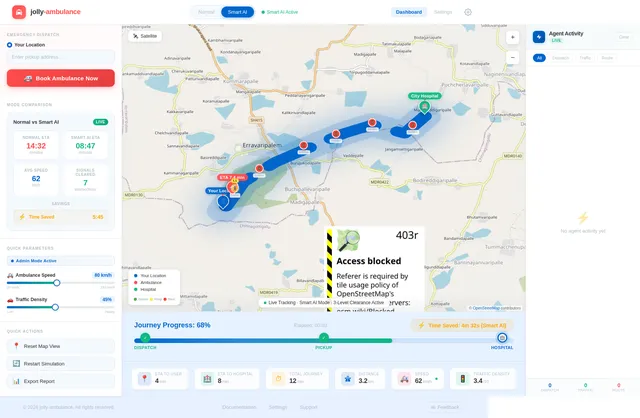
Build a modern, interactive web application called "Smart Ambulance System" that simulates an intelligent ambulance dispatch and traffic management system using a multi-agent architecture. ----------------------------- 1. UI / DASHBOARD ----------------------------- - Clean, modern dashboard layout - Main section: Interactive map (use Leaflet.js preferred) - Show: - User location (blue marker) - Hospital location (green marker) - Ambulance (red marker, animated) - Top controls: - 🚑 "Book Ambulance" button - Toggle switch: - Normal Mode - Smart AI Mode - Side panel: - Status updates - Time estimates - Active Agents panel (with live logs) ----------------------------- 2. CORE FUNCTIONALITY ----------------------------- A. Book Ambulance: - On button click: - Simulate booking - Generate random ambulance starting location - Display: "Ambulance Assigned" "Ambulance Dispatched" B. Route Simulation: - Draw route: Ambulance → User → Hospital - Use polylines on map - Animate ambulance moving along path C. Time Estimation: - Show: - Time to Reach User (ETA1) - Time to Hospital (ETA2) - Calculate based on distance - Update dynamically during movement D. Traffic Simulation: - Normal Mode: - Slower speed (simulate traffic) - Smart AI Mode: - Faster movement - Simulate signal clearance E. Status Updates (real-time): - Ambulance Dispatched - Ambulance Arriving - Reached User - Heading to Hospital - Reached Hospital F. Progress Tracking: - Progress bar showing journey completion - Display % completed G. Time Saved Indicator: - Show how much time Smart Mode saved vs Normal ----------------------------- 3. MULTI-AGENT SYSTEM (IMPORTANT) ----------------------------- Implement the system using independent JavaScript agents (modular functions or classes): 1. Dispatch Agent: - Finds nearest ambulance - Assigns it - Logs decision: "Dispatch Agent: Selected nearest ambulance" 2. Route Optimization Agent: - Calculates best path - Adjusts route dynamically - Faster route in Smart Mode 3. Traffic Control Agent: - Simulates clearing signals - Reduces delays in Smart Mode - Logs: "Traffic Agent: Signals cleared ahead" 4. ETA Prediction Agent: - Continuously updates arrival times - Adjusts based on speed/mode 5. Hospital Coordination Agent: - Notifies hospital before arrival - Displays: "Hospital Ready" - Trigger before ambulance reaches hospital 6. Simulation Agent: - Controls movement of ambulance - Updates marker position - Drives animation logic ----------------------------- 4. AGENT BEHAVIOR ----------------------------- - Each agent runs as a separate JavaScript module/function - Agents communicate via shared state - Log all decisions in: - Console - UI "Agent Activity Panel" ----------------------------- 5. BACKEND (SIMULATION ONLY) ----------------------------- - No real backend required - Use JavaScript to simulate: - Movement - Time updates - Route logic - Agent decisions ----------------------------- 6. MAP FEATURES ----------------------------- - Use Leaflet.js - Add markers: - User (blue) - Ambulance (red) - Hospital (green) - Draw route using polyline - Smooth animation for ambulance movement ----------------------------- 7. BONUS FEATURES ----------------------------- - Agent Activity Panel (live logs) - Toggle showing: - Normal vs Smart comparison - Smooth UI animations - Mobile responsive design ----------------------------- 8. TECH STACK ----------------------------- - HTML, CSS, JavaScript - Leaflet.js for map ----------------------------- GOAL: ----------------------------- Create a fully functional front-end MVP that simulates a real-world intelligent ambulance system using multiple AI-like agents, with visual map interaction, real-time movement, dynamic decision-making, and clear demonstration of Smart AI advantages over normal traffic conditions.
Comments (0)
Sign in to leave a comment
Project Tasks15
Implement Theme & Structure
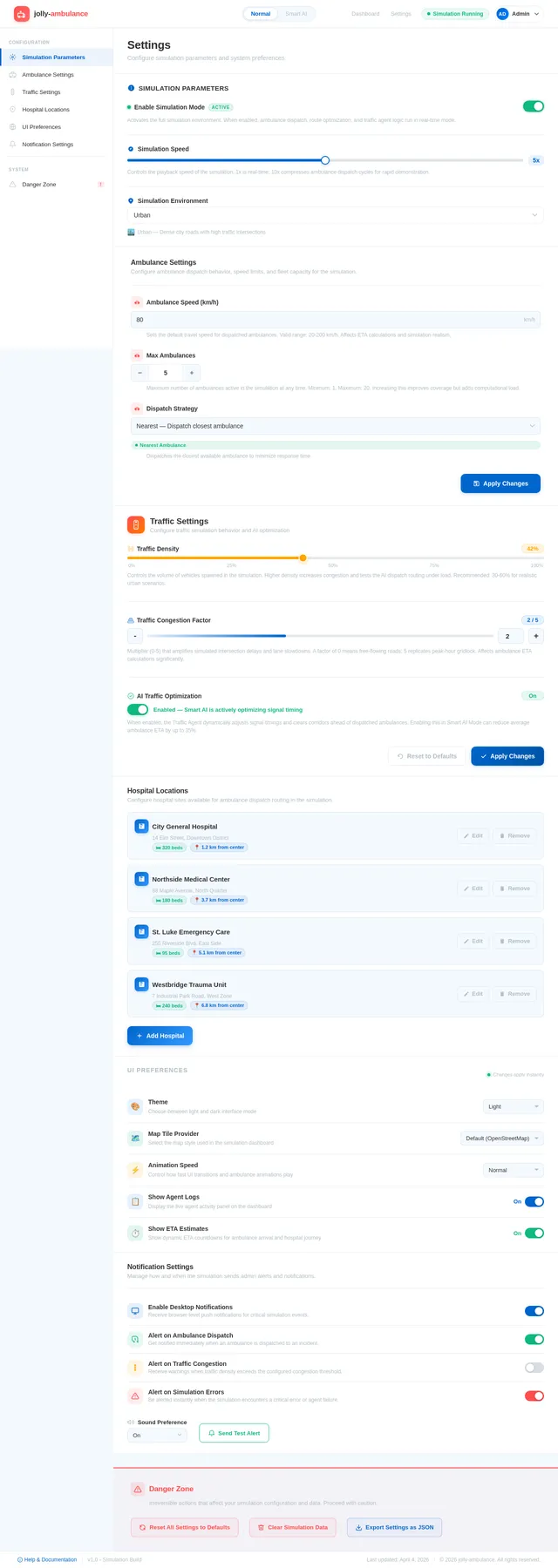
As a user, I want the scaffold pages (home, login, signup, welcome, dashboard/overview, dashboard/ai-assistant, dashboard/settings) to look exactly identical to the mock-design pages. Apply the jolly-ambulance color palette (#E8F6FF background, #FFFFFF surface, #2C3E50 text, #FF6B6B accent, #AAB7C4 muted, traffic signal colors) and typography globally. Remove any pages not present in the design. This task is independent of all others and must be completed first.
Build Dashboard Page
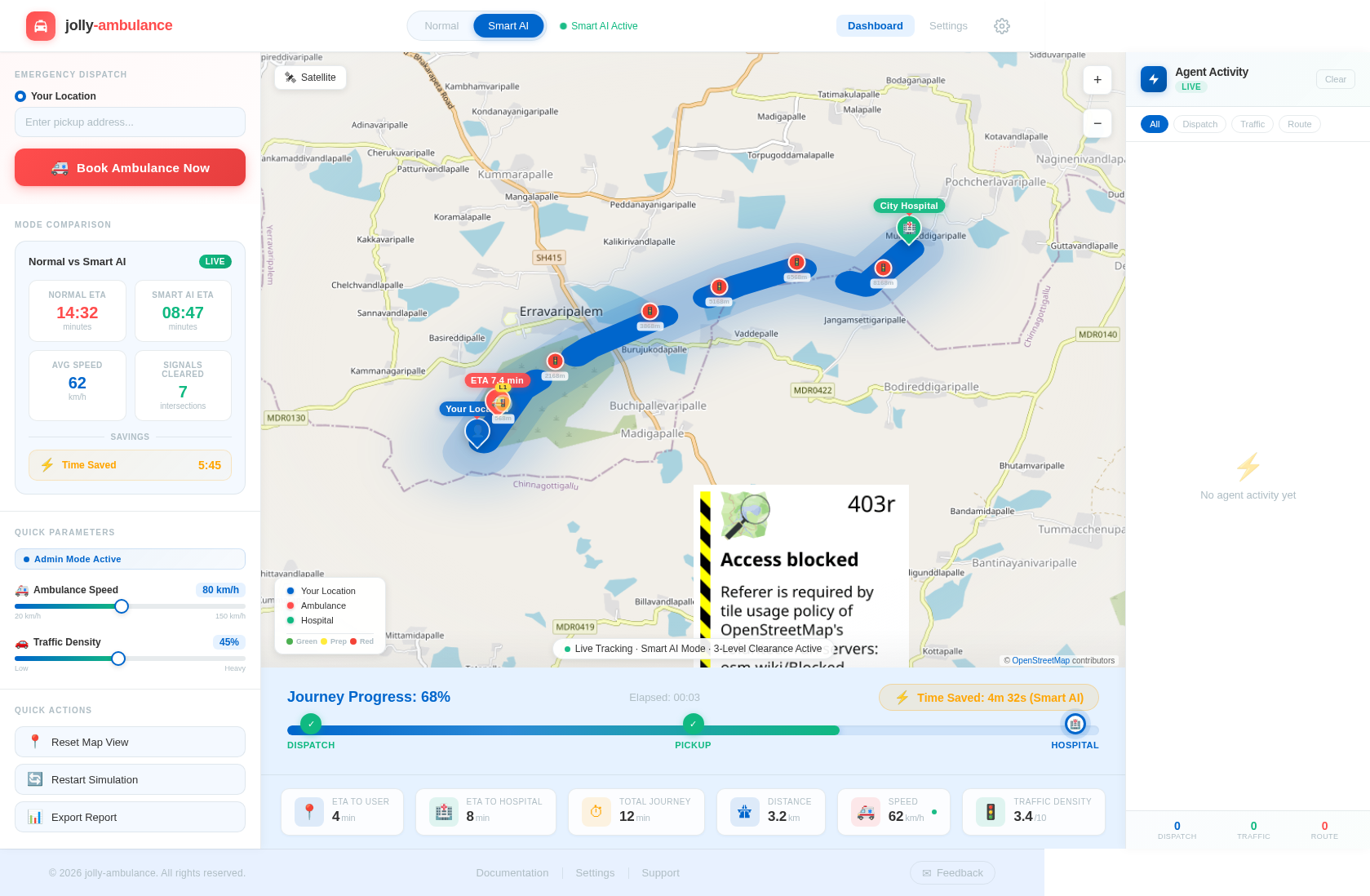
As a user, I want to see the main Dashboard page implemented based on the existing JSX design (Dashboard v4). The page should include: an interactive Leaflet.js map with realistic OpenStreetMap/Mapbox tiles showing user (blue marker), ambulance (red animated marker), and hospital (green marker); a 'Book Ambulance' button; a Normal/Smart AI Mode toggle; a side panel for status updates, ETA, and agent activity logs; a progress bar; and a 'Time Saved' indicator. Follows the user flow: View Map → Book Ambulance → Toggle Mode → Watch Simulation → View ETA Updates → Track Progress.
Build Settings Page
As an admin, I want the Settings page implemented based on the existing JSX design (Settings v2). The page should allow configuration of simulation parameters: ambulance speed, traffic density, hospital locations, and enable/disable the 3-Level Intelligent Traffic Clearance System. Follows the admin user flow: Dashboard: View Overview → Settings: Configure Parameters → Set Ambulance Speed / Set Traffic Density.
Implement Leaflet.js Realistic Map
As a user, I want the map to use realistic map tiles (OpenStreetMap or Mapbox) via Leaflet.js so the simulation looks visually immersive. Integrate Leaflet.js into the Dashboard, configure realistic tile layers, render user (blue), ambulance (red animated), and hospital (green) markers, and draw polyline routes between them. Ensure smooth map interactions and mobile responsiveness.
Implement Dispatch Agent
As a user, I want the Dispatch Agent to simulate finding and assigning the nearest ambulance when 'Book Ambulance' is clicked. The agent should: generate a random ambulance starting location, log 'Dispatch Agent: Selected nearest ambulance' to the UI agent activity panel and console, and update shared simulation state with assignment details.
Implement Route Optimization Agent
As a user, I want the Route Optimization Agent to calculate and animate the best polyline route (Ambulance → User → Hospital) on the Leaflet map. In Smart AI Mode it should use a faster/optimized path. The agent should dynamically adjust routes, log decisions to the Agent Activity Panel, and coordinate with ETA and Traffic Control agents via shared state.
Implement Traffic Control Agent
As a user, I want the Traffic Control Agent to simulate the 3-Level Intelligent Traffic Clearance System in Smart AI Mode. Each traffic signal is represented as {id, position: {lat, lng}, state, priority}. Every second in the simulation loop: Level 1 (≤1000m) → mark READY, show yellow/blinking marker, log 'Level 1: Preparing signal ahead'; Level 2 (≤500m) → PREPARE_GREEN, slight speed boost, log 'Level 2: Clearing traffic ahead'; Level 3 (≤50m) → force GREEN, stop cross traffic, max speed, log 'Level 3: Full clearance activated'. In Normal Mode signals remain unchanged. Map markers update to red/yellow/green with L1/L2/L3 labels. Log format: 'Signal {id} → Level {n} activated ({distance}m)'. Coordinate with Route Optimization and ETA agents.
Implement ETA Prediction Agent
As a user, I want the ETA Prediction Agent to continuously calculate and display ETA1 (ambulance to user) and ETA2 (user to hospital) in real time. It should update based on current ambulance speed, active traffic clearance level, and mode (Normal vs Smart AI). ETAs should be shown dynamically in the dashboard side panel and update every simulation tick.
Implement Hospital Coordination Agent
As a user, I want the Hospital Coordination Agent to simulate notifying the hospital before ambulance arrival. When the ambulance is within a threshold distance of the hospital, display 'Hospital Ready' in the status panel and log the notification in the Agent Activity Panel. Coordinate timing with the Simulation and ETA agents.
Implement Simulation Agent & Animation
As a user, I want the Simulation Agent to drive the ambulance marker animation along the polyline route on the Leaflet map. It should update marker position every tick, trigger status transitions ('Ambulance Dispatched' → 'Ambulance Arriving' → 'Reached User' → 'Heading to Hospital' → 'Reached Hospital'), update the progress bar (% completed), and coordinate speed changes from the Traffic Control Agent. Smooth animations and micro-interactions should be included.
Implement Time Saved Indicator
As a user, I want to see a 'Time Saved' indicator that dynamically updates to show how much time Smart AI Mode saved compared to Normal Mode during and after simulation. This should integrate with the ETA Prediction Agent and Simulation Agent outputs, and display prominently on the Dashboard per the design.
Implement Agent Activity Log Panel
As a user, I want a live Agent Activity Panel on the Dashboard side panel that displays real-time logs from all agents (Dispatch, Route Optimization, Traffic Control, ETA, Hospital Coordination, Simulation). Logs should include level triggers, signal IDs, distances, and all agent decision messages. The panel should auto-scroll and be visually distinct per the Dashboard v4 design.
Implement Normal vs Smart AI Mode Toggle
As a user, I want a prominent toggle on the Dashboard to switch between Normal Mode and Smart AI Mode. In Normal Mode the ambulance moves slower, signals remain unchanged, and no clearance is applied. In Smart AI Mode the 3-level traffic clearance activates, ambulance speed increases dynamically, and the Time Saved indicator updates. The toggle should provide immediate visual feedback on the map and side panel.
Implement Admin Agent Monitor View
As an admin, I want to monitor the performance of each agent in real-time from the Dashboard overview. The view should display per-agent status, recent decisions, and activity metrics. Follows the admin flow: Dashboard: View Overview → Dashboard: Monitor Agents → Dashboard: View Agent Logs.
Ensure Mobile Responsiveness
As a user, I want the entire application (Dashboard, Settings) to be fully responsive and functional on both desktop and mobile devices. Ensure map, panels, buttons, toggles, and log panels adapt correctly to various screen sizes as per the NFRs.


No comments yet. Be the first!