jolly-ambulance
 Shivakumar Patil
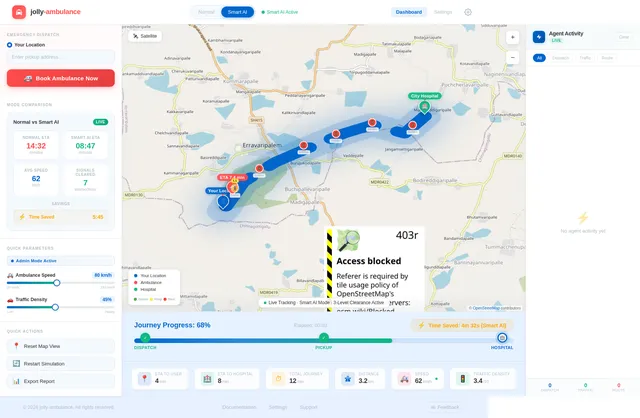
Build a modern, interactive web application called "Smart Ambulance System" that simulates an intelligent ambulance dispatch and traffic management system using a multi-agent architecture. ----------------------------- 1. UI / DASHBOARD ----------------------------- - Clean, modern dashboard layout - Main section: Interactive map (use Leaflet.js preferred) - Show: - User location (blue marker) - Hospital location (green marker) - Ambulance (red marker, animated) - Top controls: - 🚑 "Book Ambulance" button - Toggle switch: - Normal Mode - Smart AI Mode - Side panel: - Status updates - Time estimates - Active Agents panel (with live logs) ----------------------------- 2. CORE FUNCTIONALITY ----------------------------- A. Book Ambulance: - On button click: - Simulate booking - Generate random ambulance starting location - Display: "Ambulance Assigned" "Ambulance Dispatched" B. Route Simulation: - Draw route: Ambulance → User → Hospital - Use polylines on map - Animate ambulance moving along path C. Time Estimation: - Show: - Time to Reach User (ETA1) - Time to Hospital (ETA2) - Calculate based on distance - Update dynamically during movement D. Traffic Simulation: - Normal Mode: - Slower speed (simulate traffic) - Smart AI Mode: - Faster movement - Simulate signal clearance E. Status Updates (real-time): - Ambulance Dispatched - Ambulance Arriving - Reached User - Heading to Hospital - Reached Hospital F. Progress Tracking: - Progress bar showing journey completion - Display % completed G. Time Saved Indicator: - Show how much time Smart Mode saved vs Normal ----------------------------- 3. MULTI-AGENT SYSTEM (IMPORTANT) ----------------------------- Implement the system using independent JavaScript agents (modular functions or classes): 1. Dispatch Agent: - Finds nearest ambulance - Assigns it - Logs decision: "Dispatch Agent: Selected nearest ambulance" 2. Route Optimization Agent: - Calculates best path - Adjusts route dynamically - Faster route in Smart Mode 3. Traffic Control Agent: - Simulates clearing signals - Reduces delays in Smart Mode - Logs: "Traffic Agent: Signals cleared ahead" 4. ETA Prediction Agent: - Continuously updates arrival times - Adjusts based on speed/mode 5. Hospital Coordination Agent: - Notifies hospital before arrival - Displays: "Hospital Ready" - Trigger before ambulance reaches hospital 6. Simulation Agent: - Controls movement of ambulance - Updates marker position - Drives animation logic ----------------------------- 4. AGENT BEHAVIOR ----------------------------- - Each agent runs as a separate JavaScript module/function - Agents communicate via shared state - Log all decisions in: - Console - UI "Agent Activity Panel" ----------------------------- 5. BACKEND (SIMULATION ONLY) ----------------------------- - No real backend required - Use JavaScript to simulate: - Movement - Time updates - Route logic - Agent decisions ----------------------------- 6. MAP FEATURES ----------------------------- - Use Leaflet.js - Add markers: - User (blue) - Ambulance (red) - Hospital (green) - Draw route using polyline - Smooth animation for ambulance movement ----------------------------- 7. BONUS FEATURES ----------------------------- - Agent Activity Panel (live logs) - Toggle showing: - Normal vs Smart comparison - Smooth UI animations - Mobile responsive design ----------------------------- 8. TECH STACK ----------------------------- - HTML, CSS, JavaScript - Leaflet.js for map ----------------------------- GOAL: ----------------------------- Create a fully functional front-end MVP that simulates a real-world intelligent ambulance system using multiple AI-like agents, with visual map interaction, real-time movement, dynamic decision-making, and clear demonstration of Smart AI advantages over normal traffic conditions.
Comments (0)
Sign in to leave a comment
System Requirements
System Requirements Document (SRD)
Project Name: jolly-ambulance
1. Introduction
The jolly-ambulance project is a modern, interactive web application designed to simulate an intelligent ambulance dispatch and traffic management system. This simulation leverages a multi-agent architecture to demonstrate how smart systems can optimize emergency response times and improve traffic flow. The project is tailored for demonstration purposes, focusing on a polished, interactive experience that showcases the advantages of smart AI-driven decision-making over traditional methods.
This document outlines the system requirements for the jolly-ambulance project, including functional and non-functional requirements, user personas, design concepts, and technical specifications.
2. System Overview
The jolly-ambulance system is a front-end web application that simulates the behavior of an intelligent ambulance dispatch system. It features:
- A clean, interactive dashboard with a real-time map interface rendered using Leaflet.js with realistic map tiles for enhanced visual appeal.
- Multi-agent architecture to simulate decision-making processes, such as ambulance dispatch, route optimization, traffic control, and ETA prediction.
- Dynamic animations and visual indicators to demonstrate ambulance movement, ETA updates, and progress tracking.
- Two operational modes: Normal Mode (traditional traffic conditions) and Smart AI Mode (optimized traffic management).
- A simulation mode for demonstration purposes, allowing users to observe the system's behavior in a controlled environment.
- A 3-Level Intelligent Traffic Clearance System integrated into the Traffic Control Agent to demonstrate proactive signal management.
- A realistic map with custom tiles and overlays to enhance the user experience and provide a more immersive simulation.
The system is designed to be educational and engaging, providing users with a clear understanding of how intelligent systems can revolutionize emergency response logistics.
3. Functional Requirements
As User:
- I should be able to book an ambulance by clicking a "Book Ambulance" button.
- I should see a real-time animated ambulance moving on the map from its starting location to my location and then to the hospital.
- I should be able to toggle between Normal Mode and Smart AI Mode to compare performance.
- I should see dynamic ETA updates for the ambulance's arrival at my location and the hospital.
- I should see a progress bar indicating the journey's completion percentage.
- I should see a "Time Saved" indicator showing how much time Smart AI Mode saved compared to Normal Mode.
- I should see real-time status updates, such as "Ambulance Dispatched," "Ambulance Arriving," and "Reached Hospital."
- I should see a side panel displaying live logs of agent activities.
- I should be able to view the simulation mode to understand how the system operates.
As Admin:
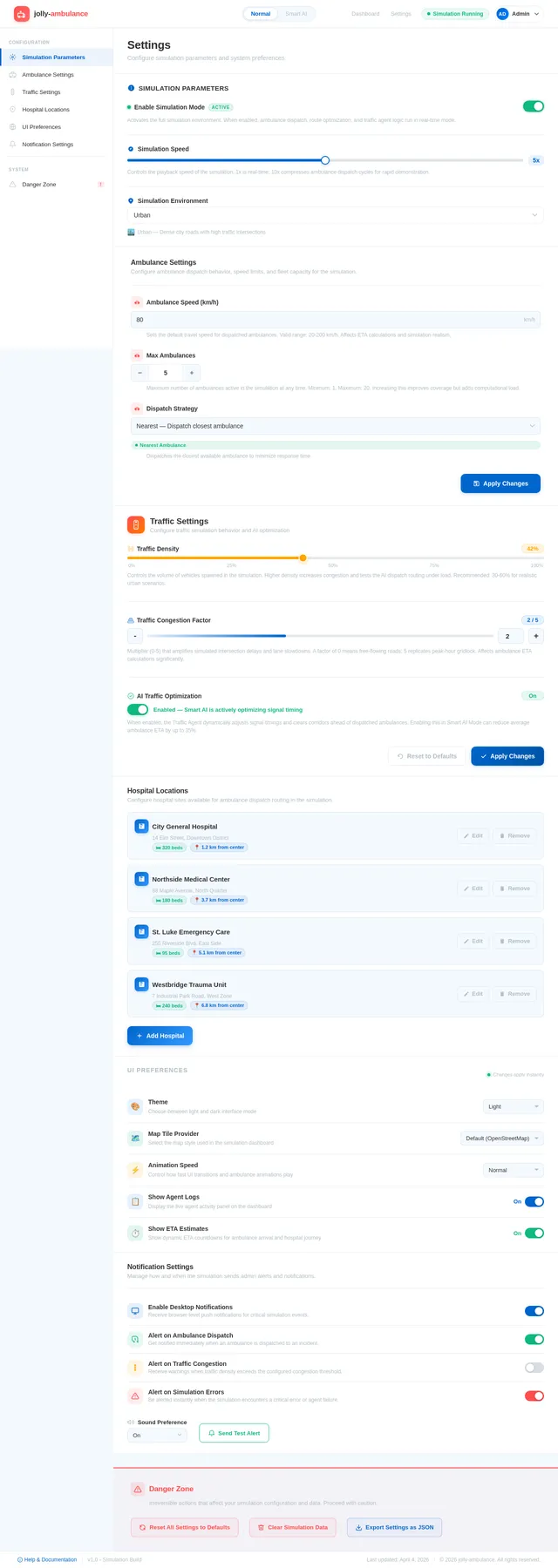
- I should be able to configure the simulation parameters, such as ambulance speed, traffic density, and hospital locations.
- I should be able to monitor the performance of each agent in real-time.
- I should be able to enable or disable the 3-Level Intelligent Traffic Clearance System for testing purposes.
As Developer:
- I should be able to selectively re-run the SRD generation process to regenerate specific sections on demand.
- I should be able to implement and test the 3-Level Intelligent Traffic Clearance System within the Traffic Control Agent.
4. User Personas
1. General User
- Description: A user who interacts with the system to book ambulances and observe the simulation.
- Goals: Understand how the system works and compare the efficiency of Normal Mode vs Smart AI Mode.
2. Admin
- Description: A system administrator who configures and monitors the simulation.
- Goals: Adjust simulation parameters and ensure the system operates as intended.
3. Developer
- Description: A developer working on the system who needs to regenerate specific sections of the SRD for updates or debugging.
- Goals: Efficiently update and test the system requirements document without regenerating the entire document.
5. Visuals Colors and Theme
The jolly-ambulance project adopts a vibrant and modern color palette to reflect urgency, clarity, and technological sophistication.
- Background: #E8F6FF (soft sky blue for a calming backdrop)
- Surface: #FFFFFF (pure white for panels and cards)
- Text: #2C3E50 (deep navy for readability)
- Accent: #FF6B6B (vivid red for ambulance markers and critical actions)
- Muted Tones: #AAB7C4 (soft gray-blue for secondary elements)
- Traffic Signal Colors:
- Green: #27AE60 (cleared signal)
- Yellow: #F1C40F (preparing signal)
- Red: #E74C3C (normal signal)
6. Signature Design Concept
Realistic Map Simulation with 3-Level Traffic Clearance Visualization
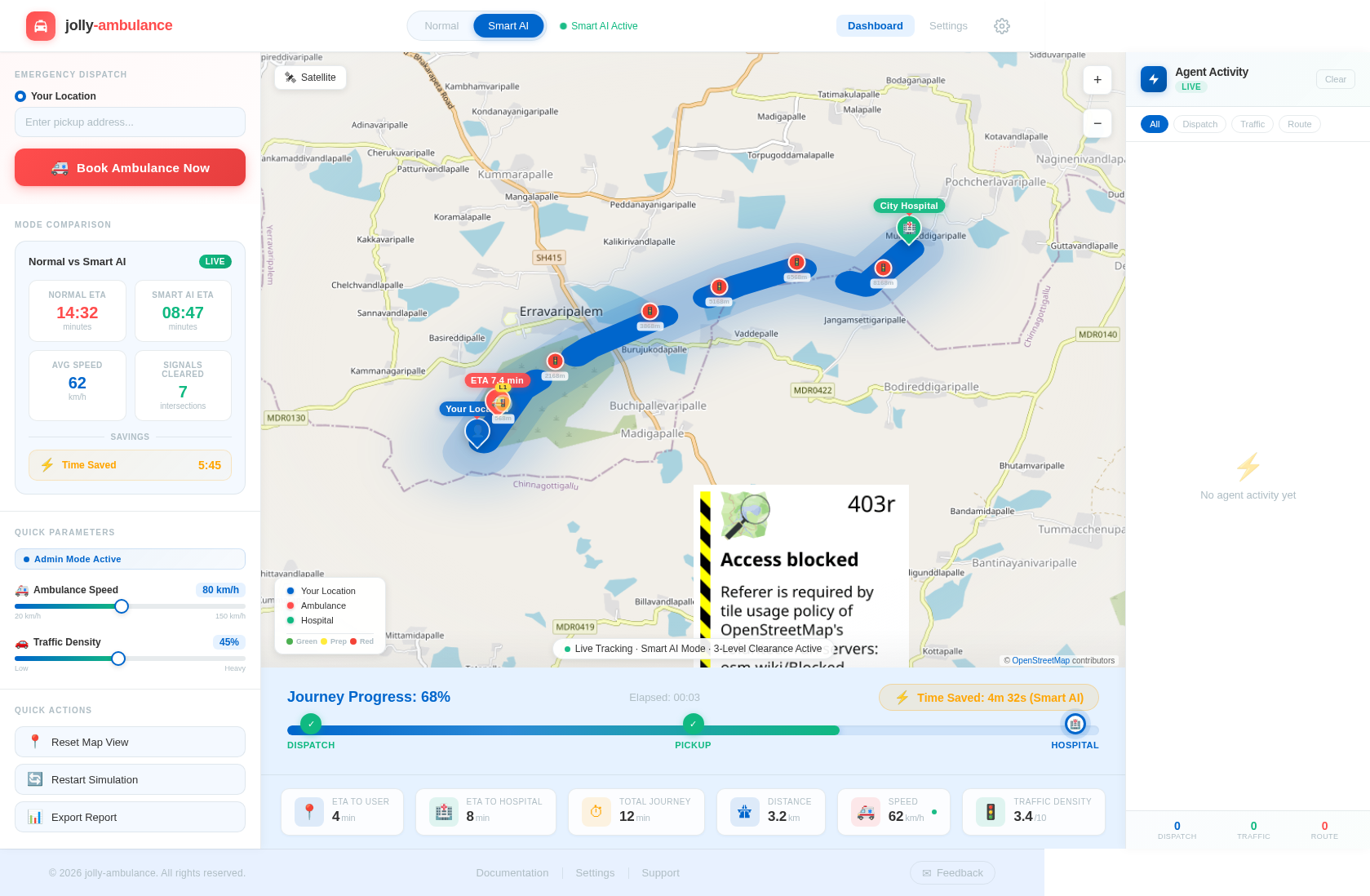
The homepage of the jolly-ambulance system will feature a realistic map simulation that immerses users in the experience of an intelligent ambulance system.
-
Interactive Map: The central feature is a real-time map (powered by Leaflet.js) with realistic map tiles (e.g., OpenStreetMap or Mapbox) that displays:
- User location (blue marker).
- Ambulance location (animated red marker).
- Hospital location (green marker).
- Traffic signals along the route (colored markers: red, yellow, green).
- A polyline route connecting these points.
-
3-Level Traffic Clearance Visualization:
- Traffic signals dynamically change color and state based on the ambulance's distance.
- Signals display their current level (L1, L2, L3) near the marker.
- Smooth animations highlight upcoming signals being cleared.
-
Simulation Mode Toggle: A prominent toggle switch allows users to switch between Normal Mode and Smart AI Mode, with immediate visual feedback on the map (e.g., faster ambulance movement and signal clearance in Smart AI Mode).
-
Agent Activity Panel: A live log panel on the side displays real-time decisions made by the system's agents, such as "Dispatch Agent: Selected nearest ambulance" or "Traffic Agent: Level 2 activated for Signal 3 (420m)."
-
Progress Bar and Time Saved Indicator: A sleek progress bar at the bottom of the screen shows journey completion, while a "Time Saved" indicator dynamically updates to highlight the efficiency of Smart AI Mode.
-
Animations and Micro-Interactions: Smooth animations for ambulance movement, button clicks, mode toggles, and signal changes create a polished, engaging user experience.
This design ensures that users are not just passive observers but active participants in the simulation, making the system both educational and captivating.
7. Non-Functional Requirements
- Performance: The system should render animations and updates smoothly without noticeable lag.
- Scalability: The modular agent architecture should allow for easy addition of new features or agents.
- Responsiveness: The UI should be fully responsive and functional on both desktop and mobile devices.
- Accessibility: The system should adhere to accessibility standards, ensuring usability for all users.
- Localization: Default settings should align with Indian locale preferences (e.g., IST timezone).
- Selective Re-run Capability: The SRD generation process should allow developers to regenerate specific sections on demand.
8. Tech Stack
Frontend
- React for Web
- Leaflet.js for map rendering
Backend (Simulation Only)
- JavaScript for agent logic and simulation
Database
- None required (simulation-only system)
AI Tools
- None required (simulation-only system)
Local Orchestration
- Docker for containerization
9. Assumptions and Constraints
- The system is a simulation and does not integrate with live GPS or traffic APIs.
- All data (e.g., ambulance locations, traffic conditions) is generated dynamically for demonstration purposes.
- The system is designed for educational and demonstration purposes only, not for real-world deployment.
- Traffic signal positions are pre-defined and static for the simulation.
10. Glossary
- Normal Mode: A simulation mode that mimics traditional traffic conditions.
- Smart AI Mode: A simulation mode that demonstrates optimized traffic management using intelligent agents.
- Agent: A modular function or class responsible for a specific task in the system (e.g., dispatching ambulances, optimizing routes).
- ETA: Estimated Time of Arrival.
- Leaflet.js: A JavaScript library for interactive maps.
- Simulation Mode: A mode designed to demonstrate the system's functionality in a controlled environment.
- 3-Level Intelligent Traffic Clearance System: A traffic management system that dynamically adjusts signal states based on the ambulance's distance.


No comments yet. Be the first!