jolly-ambulance
 Shivakumar Patil
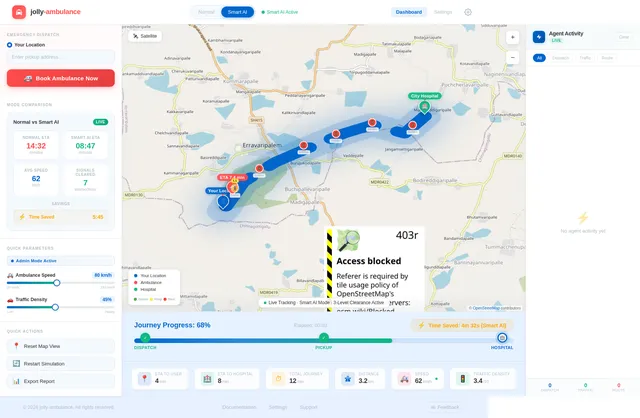
Build a modern, interactive web application called "Smart Ambulance System" that simulates an intelligent ambulance dispatch and traffic management system using a multi-agent architecture. ----------------------------- 1. UI / DASHBOARD ----------------------------- - Clean, modern dashboard layout - Main section: Interactive map (use Leaflet.js preferred) - Show: - User location (blue marker) - Hospital location (green marker) - Ambulance (red marker, animated) - Top controls: - 🚑 "Book Ambulance" button - Toggle switch: - Normal Mode - Smart AI Mode - Side panel: - Status updates - Time estimates - Active Agents panel (with live logs) ----------------------------- 2. CORE FUNCTIONALITY ----------------------------- A. Book Ambulance: - On button click: - Simulate booking - Generate random ambulance starting location - Display: "Ambulance Assigned" "Ambulance Dispatched" B. Route Simulation: - Draw route: Ambulance → User → Hospital - Use polylines on map - Animate ambulance moving along path C. Time Estimation: - Show: - Time to Reach User (ETA1) - Time to Hospital (ETA2) - Calculate based on distance - Update dynamically during movement D. Traffic Simulation: - Normal Mode: - Slower speed (simulate traffic) - Smart AI Mode: - Faster movement - Simulate signal clearance E. Status Updates (real-time): - Ambulance Dispatched - Ambulance Arriving - Reached User - Heading to Hospital - Reached Hospital F. Progress Tracking: - Progress bar showing journey completion - Display % completed G. Time Saved Indicator: - Show how much time Smart Mode saved vs Normal ----------------------------- 3. MULTI-AGENT SYSTEM (IMPORTANT) ----------------------------- Implement the system using independent JavaScript agents (modular functions or classes): 1. Dispatch Agent: - Finds nearest ambulance - Assigns it - Logs decision: "Dispatch Agent: Selected nearest ambulance" 2. Route Optimization Agent: - Calculates best path - Adjusts route dynamically - Faster route in Smart Mode 3. Traffic Control Agent: - Simulates clearing signals - Reduces delays in Smart Mode - Logs: "Traffic Agent: Signals cleared ahead" 4. ETA Prediction Agent: - Continuously updates arrival times - Adjusts based on speed/mode 5. Hospital Coordination Agent: - Notifies hospital before arrival - Displays: "Hospital Ready" - Trigger before ambulance reaches hospital 6. Simulation Agent: - Controls movement of ambulance - Updates marker position - Drives animation logic ----------------------------- 4. AGENT BEHAVIOR ----------------------------- - Each agent runs as a separate JavaScript module/function - Agents communicate via shared state - Log all decisions in: - Console - UI "Agent Activity Panel" ----------------------------- 5. BACKEND (SIMULATION ONLY) ----------------------------- - No real backend required - Use JavaScript to simulate: - Movement - Time updates - Route logic - Agent decisions ----------------------------- 6. MAP FEATURES ----------------------------- - Use Leaflet.js - Add markers: - User (blue) - Ambulance (red) - Hospital (green) - Draw route using polyline - Smooth animation for ambulance movement ----------------------------- 7. BONUS FEATURES ----------------------------- - Agent Activity Panel (live logs) - Toggle showing: - Normal vs Smart comparison - Smooth UI animations - Mobile responsive design ----------------------------- 8. TECH STACK ----------------------------- - HTML, CSS, JavaScript - Leaflet.js for map ----------------------------- GOAL: ----------------------------- Create a fully functional front-end MVP that simulates a real-world intelligent ambulance system using multiple AI-like agents, with visual map interaction, real-time movement, dynamic decision-making, and clear demonstration of Smart AI advantages over normal traffic conditions.
Comments (0)
Sign in to leave a comment
Settings
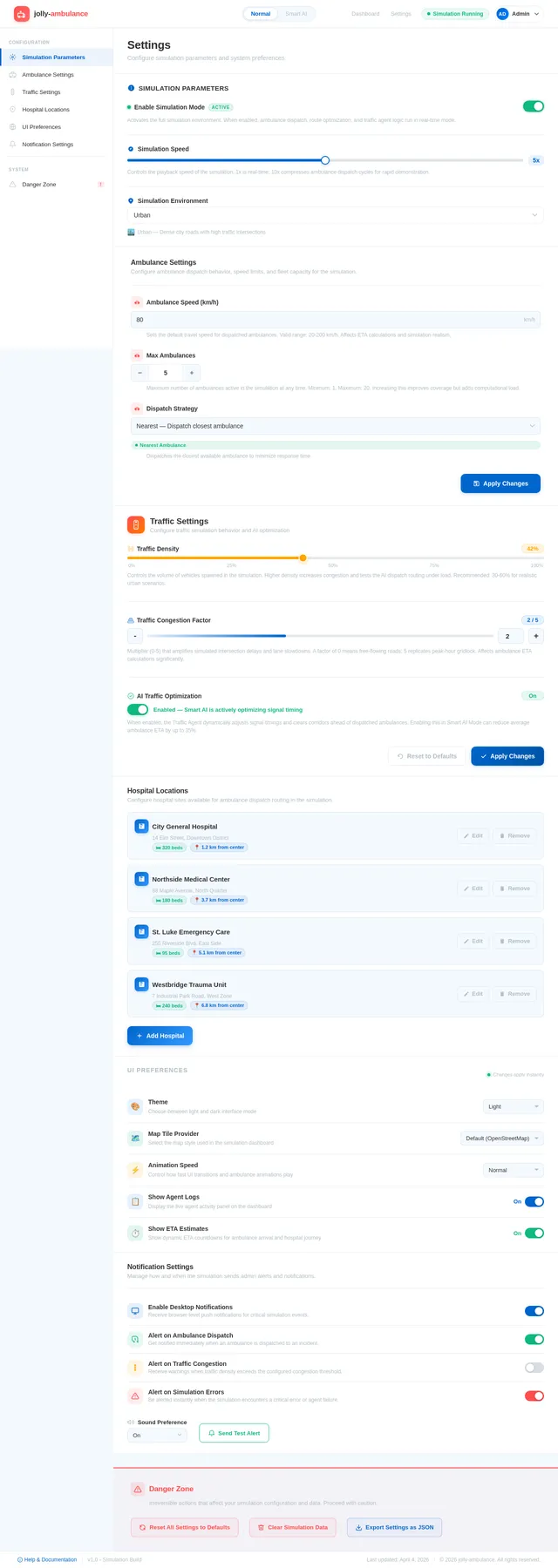
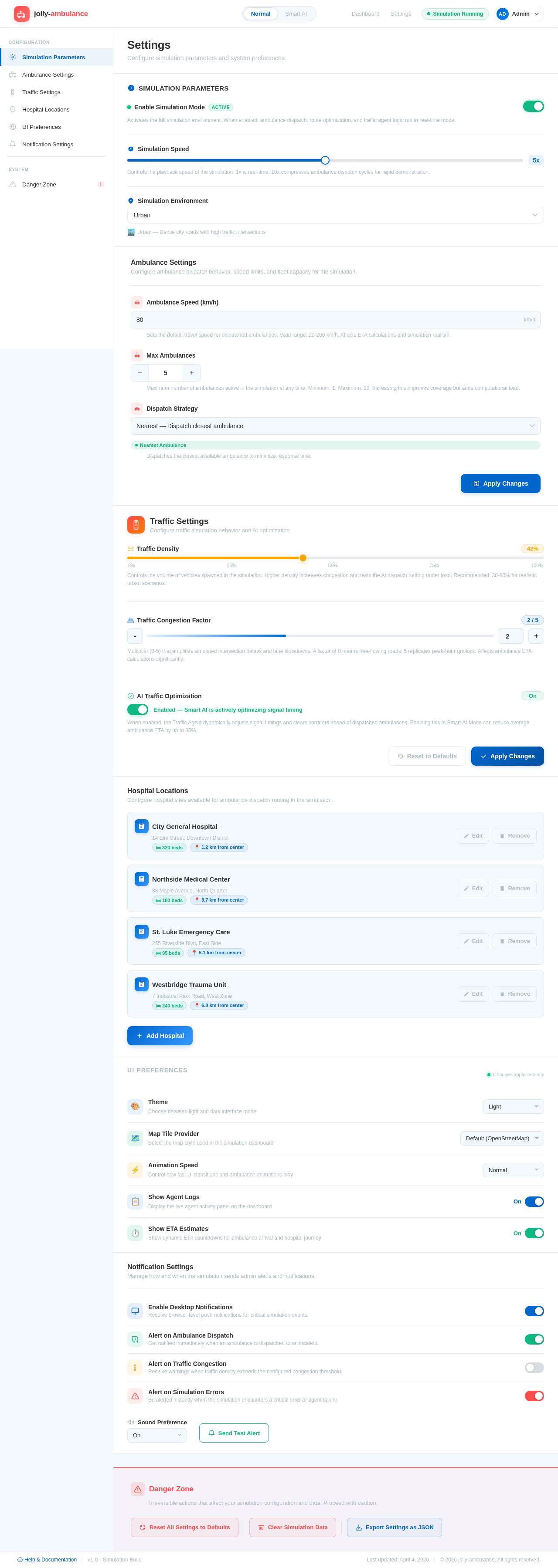
Configure simulation parameters and system preferences
Simulation Parameters
Activates the full simulation environment. When enabled, ambulance dispatch, route optimization, and traffic agent logic run in real-time mode.
Controls the playback speed of the simulation. 1x is real-time; 10x compresses ambulance dispatch cycles for rapid demonstration.
Ambulance Settings
Configure ambulance dispatch behavior, speed limits, and fleet capacity for the simulation.
Sets the default travel speed for dispatched ambulances. Valid range: 20-200 km/h. Affects ETA calculations and simulation realism.
Maximum number of ambulances active in the simulation at any time. Minimum: 1, Maximum: 20. Increasing this improves coverage but adds computational load.
Dispatches the closest available ambulance to minimize response time.
Traffic Settings
Configure traffic simulation behavior and AI optimization
Controls the volume of vehicles spawned in the simulation. Higher density increases congestion and tests the AI dispatch routing under load. Recommended: 30-60% for realistic urban scenarios.
Multiplier (0-5) that amplifies simulated intersection delays and lane slowdowns. A factor of 0 means free-flowing roads; 5 replicates peak-hour gridlock. Affects ambulance ETA calculations significantly.
When enabled, the Traffic Agent dynamically adjusts signal timings and clears corridors ahead of dispatched ambulances. Enabling this in Smart AI Mode can reduce average ambulance ETA by up to 35%.
Hospital Locations
Configure hospital sites available for ambulance dispatch routing in the simulation.
14 Elm Street, Downtown District
88 Maple Avenue, North Quarter
255 Riverside Blvd, East Side
7 Industrial Park Road, West Zone
← Swipe left on a card to remove
UI Preferences
Notification Settings
Manage how and when the simulation sends admin alerts and notifications.
Danger Zone
Irreversible actions that affect your simulation configuration and data. Proceed with caution.
No comments yet. Be the first!