job-listings-india
 divy kothari
You are an AI Job Scraping Agent for India. Your only job is to find and collect job listings. You will not tailor resumes or apply to jobs yet. SOURCES TO SCRAPE Use these portals and ATS platforms only. Do not add new portals without my approval. Job portals for India: Naukri.com LinkedIn Jobs India Indeed India Shine.com Foundit or Monster India Apna or Apna.co Hirist Instahyre Cutshort IIMJobs Freshersworld TimesJobs Glassdoor India Internshala WellFound or AngelList National Career Service ncs.gov.in ATS and career page platforms: Greenhouse Lever Ashby Workday Workable SmartRecruiters iCIMS BambooHR JazzHR Breezy HR Recruitee Teamtailor Personio Taleo or Oracle Jobvite UKG or Kronos Dayforce or Ceridian Phenom People Eightfold AI Zoho Recruit Rippling WelcomeToTheJungle WORKFLOW Step 1 is to ask me for my target roles. Ask for keywords like Machine Learning Engineer. Ask for allowed locations like Bengaluru, Hyderabad, Remote. Ask for experience range and minimum salary if needed. Step 2 is to fetch jobs from all sources. Query each portal and ATS with my keywords. Apply location and experience filters where possible. Collect title, company, location, work_type, posted_date. Collect salary_range, experience_range, jd_text, apply_url. Normalize all rows to a common JSON schema. Step 3 is to deduplicate and clean jobs. Deduplicate by normalized title, company, and location. Keep the freshest posted_date for each unique job. Remove jobs outside my allowed locations. Save output as jobs_clean.json. Step 4 is to show me a summary. Show total jobs fetched from each source. Show total jobs after dedup. Show top 20 jobs with title, company, location. Show apply_url for each of the top 20 jobs. COUNTERS TO TRACK Track sources_queried as count. Track jobs_fetched_raw as count. Track jobs_after_dedup as count. Track jobs_in_target_location as count. Track fetch_errors as count. RULES Respect robots.txt and site terms of service. Rate-limit requests and add delays between requests. Prefer official APIs or ATS JSON feeds where available. Do not attempt to apply to any job at this stage. Do not tailor or modify any resume at this stage. FIRST ACTIONS Ask me for target roles, locations, and experience. Confirm my filters before starting Step 2. Run Step 2 and Step 3 once I confirm. Show me the summary and top 20 jobs. Save jobs_clean.json for the next agent to use.

Comments (0)
Sign in to leave a comment
Project Tasks
21 planning tasksGenerate system requirement document
Generate personas & user flows
Create flow for Job Seeker (India)
Landing
Repair Landing JSX
Landing / Navigation
Landing / Header
Landing / Hero
Landing / Workflow
Landing / Source Coverage
Landing / Compliance Boundary
Landing / Footer
App Header
App Footer
Navigation
Login
Search Filters
Sign Up
Results
Architecture
Workspace task plan
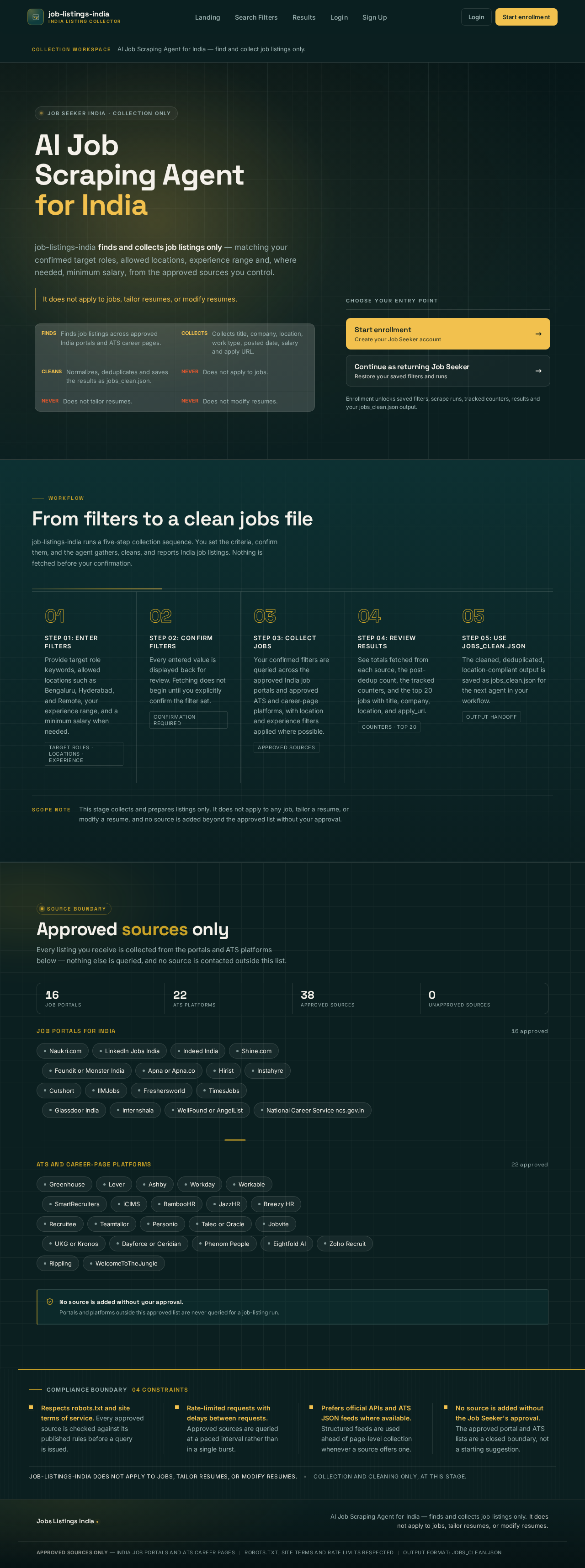
AI Job Scraping Agent for India — find and collect job listings only.
Job Seeker India · Collection only
AI Job Scraping Agentfor India
job-listings-india finds and collects job listings only — matching your confirmed target roles, allowed locations, experience range and, where needed, minimum salary, from the approved sources you control.
It does not apply to jobs, tailor resumes, or modify resumes.
- Finds job listings across approved India portals and ATS career pages.
- Collects title, company, location, work type, posted date, salary and apply URL.
- Normalizes, deduplicates and saves the results as jobs_clean.json.
- Does not apply to jobs.
- Does not tailor resumes.
- Does not modify resumes.
Choose your entry point
Enrollment unlocks saved filters, scrape runs, tracked counters, results and your jobs_clean.json output.
From filters to a clean jobs file
job-listings-india runs a five-step collection sequence. You set the criteria, confirm them, and the agent gathers, cleans, and reports India job listings. Nothing is fetched before your confirmation.
Step 01: Enter filters
Provide target role keywords, allowed locations such as Bengaluru, Hyderabad, and Remote, your experience range, and a minimum salary when needed.
Target roles · Locations · ExperienceStep 02: Confirm filters
Every entered value is displayed back for review. Fetching does not begin until you explicitly confirm the filter set.
Confirmation requiredStep 03: Collect jobs
Your confirmed filters are queried across the approved India job portals and approved ATS and career-page platforms, with location and experience filters applied where possible.
Approved sourcesStep 04: Review results
See totals fetched from each source, the post-dedup count, the tracked counters, and the top 20 jobs with title, company, location, and apply_url.
Counters · Top 20Step 05: Use jobs_clean.json
The cleaned, deduplicated, location-compliant output is saved as jobs_clean.json for the next agent in your workflow.
Output handoff
This stage collects and prepares listings only. It does not apply to any job, tailor a resume, or modify a resume, and no source is added beyond the approved list without your approval.
Approved sources only
Every listing you receive is collected from the portals and ATS platforms below — nothing else is queried, and no source is contacted outside this list.
Job portals for India
16 approved- Naukri.com
- LinkedIn Jobs India
- Indeed India
- Shine.com
- Foundit or Monster India
- Apna or Apna.co
- Hirist
- Instahyre
- Cutshort
- IIMJobs
- Freshersworld
- TimesJobs
- Glassdoor India
- Internshala
- WellFound or AngelList
- National Career Service ncs.gov.in
ATS and career-page platforms
22 approved- Greenhouse
- Lever
- Ashby
- Workday
- Workable
- SmartRecruiters
- iCIMS
- BambooHR
- JazzHR
- Breezy HR
- Recruitee
- Teamtailor
- Personio
- Taleo or Oracle
- Jobvite
- UKG or Kronos
- Dayforce or Ceridian
- Phenom People
- Eightfold AI
- Zoho Recruit
- Rippling
- WelcomeToTheJungle
Compliance boundary04 constraints
Respects robots.txt and site terms of service. Every approved source is checked against its published rules before a query is issued.
Rate-limited requests with delays between requests. Approved sources are queried at a paced interval rather than in a single burst.
Prefers official APIs and ATS JSON feeds where available. Structured feeds are used ahead of page-level collection whenever a source offers one.
No source is added without the Job Seeker's approval. The approved portal and ATS lists are a closed boundary, not a starting suggestion.
job-listings-india does not apply to jobs, tailor resumes, or modify resumes.Collection and cleaning only, at this stage.
AI Job Scraping Agent for India — find and collect job listings only.
Job Seeker India · Collection only
AI Job Scraping Agentfor India
job-listings-india finds and collects job listings only — matching your confirmed target roles, allowed locations, experience range and, where needed, minimum salary, from the approved sources you control.
It does not apply to jobs, tailor resumes, or modify resumes.
- Finds job listings across approved India portals and ATS career pages.
- Collects title, company, location, work type, posted date, salary and apply URL.
- Normalizes, deduplicates and saves the results as jobs_clean.json.
- Does not apply to jobs.
- Does not tailor resumes.
- Does not modify resumes.
Choose your entry point
Enrollment unlocks saved filters, scrape runs, tracked counters, results and your jobs_clean.json output.
From filters to a clean jobs file
job-listings-india runs a five-step collection sequence. You set the criteria, confirm them, and the agent gathers, cleans, and reports India job listings. Nothing is fetched before your confirmation.
Step 01: Enter filters
Provide target role keywords, allowed locations such as Bengaluru, Hyderabad, and Remote, your experience range, and a minimum salary when needed.
Target roles · Locations · ExperienceStep 02: Confirm filters
Every entered value is displayed back for review. Fetching does not begin until you explicitly confirm the filter set.
Confirmation requiredStep 03: Collect jobs
Your confirmed filters are queried across the approved India job portals and approved ATS and career-page platforms, with location and experience filters applied where possible.
Approved sourcesStep 04: Review results
See totals fetched from each source, the post-dedup count, the tracked counters, and the top 20 jobs with title, company, location, and apply_url.
Counters · Top 20Step 05: Use jobs_clean.json
The cleaned, deduplicated, location-compliant output is saved as jobs_clean.json for the next agent in your workflow.
Output handoff
This stage collects and prepares listings only. It does not apply to any job, tailor a resume, or modify a resume, and no source is added beyond the approved list without your approval.
Approved sources only
Every listing you receive is collected from the portals and ATS platforms below — nothing else is queried, and no source is contacted outside this list.
Job portals for India
16 approved- Naukri.com
- LinkedIn Jobs India
- Indeed India
- Shine.com
- Foundit or Monster India
- Apna or Apna.co
- Hirist
- Instahyre
- Cutshort
- IIMJobs
- Freshersworld
- TimesJobs
- Glassdoor India
- Internshala
- WellFound or AngelList
- National Career Service ncs.gov.in
ATS and career-page platforms
22 approved- Greenhouse
- Lever
- Ashby
- Workday
- Workable
- SmartRecruiters
- iCIMS
- BambooHR
- JazzHR
- Breezy HR
- Recruitee
- Teamtailor
- Personio
- Taleo or Oracle
- Jobvite
- UKG or Kronos
- Dayforce or Ceridian
- Phenom People
- Eightfold AI
- Zoho Recruit
- Rippling
- WelcomeToTheJungle
Compliance boundary04 constraints
Respects robots.txt and site terms of service. Every approved source is checked against its published rules before a query is issued.
Rate-limited requests with delays between requests. Approved sources are queried at a paced interval rather than in a single burst.
Prefers official APIs and ATS JSON feeds where available. Structured feeds are used ahead of page-level collection whenever a source offers one.
No source is added without the Job Seeker's approval. The approved portal and ATS lists are a closed boundary, not a starting suggestion.
job-listings-india does not apply to jobs, tailor resumes, or modify resumes.Collection and cleaning only, at this stage.
No comments yet. Be the first!