job-listings-india
 divy kothari
You are an AI Job Scraping Agent for India. Your only job is to find and collect job listings. You will not tailor resumes or apply to jobs yet. SOURCES TO SCRAPE Use these portals and ATS platforms only. Do not add new portals without my approval. Job portals for India: Naukri.com LinkedIn Jobs India Indeed India Shine.com Foundit or Monster India Apna or Apna.co Hirist Instahyre Cutshort IIMJobs Freshersworld TimesJobs Glassdoor India Internshala WellFound or AngelList National Career Service ncs.gov.in ATS and career page platforms: Greenhouse Lever Ashby Workday Workable SmartRecruiters iCIMS BambooHR JazzHR Breezy HR Recruitee Teamtailor Personio Taleo or Oracle Jobvite UKG or Kronos Dayforce or Ceridian Phenom People Eightfold AI Zoho Recruit Rippling WelcomeToTheJungle WORKFLOW Step 1 is to ask me for my target roles. Ask for keywords like Machine Learning Engineer. Ask for allowed locations like Bengaluru, Hyderabad, Remote. Ask for experience range and minimum salary if needed. Step 2 is to fetch jobs from all sources. Query each portal and ATS with my keywords. Apply location and experience filters where possible. Collect title, company, location, work_type, posted_date. Collect salary_range, experience_range, jd_text, apply_url. Normalize all rows to a common JSON schema. Step 3 is to deduplicate and clean jobs. Deduplicate by normalized title, company, and location. Keep the freshest posted_date for each unique job. Remove jobs outside my allowed locations. Save output as jobs_clean.json. Step 4 is to show me a summary. Show total jobs fetched from each source. Show total jobs after dedup. Show top 20 jobs with title, company, location. Show apply_url for each of the top 20 jobs. COUNTERS TO TRACK Track sources_queried as count. Track jobs_fetched_raw as count. Track jobs_after_dedup as count. Track jobs_in_target_location as count. Track fetch_errors as count. RULES Respect robots.txt and site terms of service. Rate-limit requests and add delays between requests. Prefer official APIs or ATS JSON feeds where available. Do not attempt to apply to any job at this stage. Do not tailor or modify any resume at this stage. FIRST ACTIONS Ask me for target roles, locations, and experience. Confirm my filters before starting Step 2. Run Step 2 and Step 3 once I confirm. Show me the summary and top 20 jobs. Save jobs_clean.json for the next agent to use.

Comments (0)
Sign in to leave a comment
System Requirements
System Requirements Document for job-listings-india
1. Introduction
job-listings-india is an AI Job Scraping Agent for India. Its sole current purpose is to find and collect job listings that match a Job Seeker (India)’s confirmed target roles, locations, experience range, and, where needed, minimum salary.
The system queries only the approved job portals and ATS/career-page platforms, normalizes collected listings into a common JSON schema, cleans and deduplicates the results, saves the output as jobs_clean.json, and presents a concise top-20 summary.
The product does not apply to jobs, tailor resumes, modify resumes, or add sources without the Job Seeker (India)’s approval.
2. System Overview
The system is a custom web application with application-owned identity, protected filter intake, protected run results, background scraping automation, and generated JSON output.
The active human audience is the Job Seeker (India). The Job Seeker provides search criteria, confirms the criteria, reviews the resulting job summary, and uses the generated jobs_clean.json output in a subsequent agent workflow.
The application must:
- Ask for target role keywords, allowed locations, experience range, and minimum salary where needed.
- Require filter confirmation before fetching begins.
- Query only approved India job portals and approved ATS/career-page platforms.
- Apply location and experience filters where possible.
- Collect required job fields.
- Normalize each collected job record into a common JSON schema.
- Deduplicate jobs using normalized title, company, and location.
- Keep the freshest
posted_datefor each duplicate group. - Remove jobs outside the Job Seeker’s allowed locations.
- Track required scrape counters.
- Save cleaned output as
jobs_clean.json. - Show source totals, post-dedup totals, counters, and the top 20 jobs with their
apply_url.
Current Exclusions
The system must not:
- Apply to jobs.
- Submit applications on behalf of the Job Seeker.
- Tailor, modify, upload, or generate resumes.
- Add portals or sources beyond the approved list without user approval.
- Circumvent robots.txt, site terms of service, source restrictions, rate limits, or access controls.
Approved Job Portals for India
The system may query only these job portals:
- Naukri.com
- LinkedIn Jobs India
- Indeed India
- Shine.com
- Foundit or Monster India
- Apna or Apna.co
- Hirist
- Instahyre
- Cutshort
- IIMJobs
- Freshersworld
- TimesJobs
- Glassdoor India
- Internshala
- WellFound or AngelList
- National Career Service ncs.gov.in
Approved ATS and Career-Page Platforms
The system may query only these ATS and career-page platforms:
- Greenhouse
- Lever
- Ashby
- Workday
- Workable
- SmartRecruiters
- iCIMS
- BambooHR
- JazzHR
- Breezy HR
- Recruitee
- Teamtailor
- Personio
- Taleo or Oracle
- Jobvite
- UKG or Kronos
- Dayforce or Ceridian
- Phenom People
- Eightfold AI
- Zoho Recruit
- Rippling
- WelcomeToTheJungle
2a. Product Interpretation and Delivery Boundary
The product is an India-focused job-listing collection service. It begins by collecting and confirming the Job Seeker’s filters, then performs a compliant, rate-limited scrape of the approved source list.
The application owns the Job Seeker’s enrollment, returning verification, private saved filters, scrape-run information, counters, results, and jobs_clean.json output. Job portals, ATS platforms, official APIs, and ATS JSON feeds remain external sources.
The system may expose external apply_url links as collected job data, but it must not apply to jobs or initiate an application workflow. Resume-related functions are outside the current delivery boundary.
2c. Page Content and Component Coverage
Landing
- Access: Public; no login required.
- Information and state:
- Explains that the product is an AI Job Scraping Agent for India.
- States that the product finds and collects job listings only.
- States that the product does not apply to jobs, tailor resumes, or modify resumes.
- Communicates that only approved India job portals and approved ATS/career-page platforms are queried.
- Primary actions:
- Start self-service enrollment through Sign Up.
- Continue as a returning Job Seeker through Login.
- Supporting information:
- Brief explanation of the workflow: enter filters, confirm filters, collect jobs, review results, and use
jobs_clean.json. - Compliance messaging that robots.txt, site terms, rate limiting, and source constraints are respected.
- Brief explanation of the workflow: enter filters, confirm filters, collect jobs, review results, and use
- Component responsibilities:
- Present the product boundary and current workflow.
- Provide clear entry paths to Sign Up and Login.
- States:
- Standard public entry state.
- Error state if navigation to Sign Up or Login cannot be completed, with a retry action.
Login
- Access: Public; no login required to reach this page.
- Information and state:
- Supports returning verification for a Job Seeker (India).
- Explains that verification restores access to saved filters, scrape runs, tracked counters, results, and
jobs_clean.json.
- Primary actions:
- Submit returning verification details.
- Continue to Search Filters after successful verification.
- Supporting actions:
- Navigate to Sign Up when the Job Seeker does not yet have an account.
- Component responsibilities:
- Validate returning identity.
- Establish an authenticated session before protected content is shown.
- States:
- Idle verification state.
- Verification-in-progress state.
- Successful verification state with continuation to Search Filters.
- Failed verification state with an explanatory message and retry option.
- Session-expired recovery state directing the Job Seeker to verify again.
Search Filters
- Access: Login required.
- Information and state:
- Displays the current filter intake step before any source query begins.
- Preserves the Job Seeker’s saved filter values for revisiting and reuse.
- Primary actions:
- Enter target roles and role keywords, such as
Machine Learning Engineer. - Enter allowed locations, such as
Bengaluru,Hyderabad, andRemote. - Enter experience range.
- Enter minimum salary when needed.
- Review and explicitly confirm filters before Step 2 fetching begins.
- Enter target roles and role keywords, such as
- Supporting information:
- Shows that location and experience filters will be applied where possible by each source.
- States that only approved portals and platforms will be queried.
- States that no job application or resume tailoring will occur.
- Domain entities:
- Saved filter set.
- Target role keywords.
- Allowed locations.
- Experience range.
- Minimum salary.
- Confirmed scrape request.
- Component responsibilities:
- Validate that target roles, allowed locations, and experience range are provided before confirmation.
- Present the final filter values for confirmation.
- Create a scrape request only after explicit confirmation.
- Start Step 2 and Step 3 processing after confirmation.
- States:
- Empty state for a first-time Job Seeker.
- Editable saved-filter state.
- Validation-error state identifying missing or invalid filter input.
- Confirmation-ready state.
- Fetch-started state after confirmation.
- Processing state while fetching, normalizing, cleaning, and deduplicating.
- Processing-error state with a return path to review or correct filters.
- Completion state continuing to Results.
Sign Up
- Access: Public; no login required.
- Information and state:
- Supports self-service enrollment for a new Job Seeker (India).
- Explains that enrollment enables private access to saved filters, scrape runs, counters, results, and
jobs_clean.json.
- Primary actions:
- Submit enrollment information.
- Establish application identity.
- Continue to Search Filters after successful enrollment.
- Supporting actions:
- Navigate to Login if the Job Seeker already has an account.
- Component responsibilities:
- Create the Job Seeker’s application identity.
- Establish an authenticated session following successful enrollment.
- Avoid collecting or managing resume content.
- States:
- Idle enrollment state.
- Enrollment-in-progress state.
- Successful enrollment state with continuation to Search Filters.
- Validation or enrollment-error state with corrective guidance and retry.
- Existing-account recovery state directing the Job Seeker to Login.
Results
- Access: Login required.
- Information and state:
- Displays the outcome of a confirmed scrape request.
- Displays source-level job totals.
- Displays post-dedup totals and required tracked counters.
- Displays the top 20 cleaned jobs.
- Makes
jobs_clean.jsonavailable for the next agent to use.
- Primary actions:
- Review the scrape summary.
- Review top 20 job listings.
- Access the saved
jobs_clean.jsonoutput. - Return to Search Filters to review or change filters for a subsequent run.
- Supporting information:
- Each top-20 job displays:
titlecompanylocationapply_url
- Summary displays:
- Total jobs fetched from each source.
- Total jobs after deduplication.
sources_queriedjobs_fetched_rawjobs_after_dedupjobs_in_target_locationfetch_errors
- Each top-20 job displays:
- Domain entities:
- Scrape run.
- Source result totals.
- Counter set.
- Cleaned job listing.
- Top-20 listing collection.
jobs_clean.json.
- Component responsibilities:
- Clearly distinguish successful results from source failures.
- Show counters even when some source queries fail.
- Ensure displayed listings are cleaned, location-compliant, and deduplicated.
- Preserve external
apply_urlvalues as job data without initiating applications.
- States:
- Loading state while an accepted scrape request is still processing.
- Successful-results state with summary, counters, top 20, and output availability.
- Empty-results state when no cleaned jobs match the confirmed filters.
- Partial-results state when one or more sources fail but usable results are available.
- Failed-run state when results cannot be produced, with a continuation path to Search Filters.
- Missing-output recovery state if
jobs_clean.jsonis temporarily unavailable, with a retry action.
3. Functional Requirements
FR-01 — Product Scope
As a Job Seeker (India), I should use an AI Job Scraping Agent whose only current job is to find and collect job listings, so that I can obtain job data without application or resume-related actions.
- Provenance: Explicit.
- Access: Authenticated use is required for filter intake and results.
- Trigger: The Job Seeker begins a job-listing collection journey.
- Observable result: The system supports job discovery, collection, cleaning, output generation, and summary reporting only.
- Acceptance criteria:
- The system must not apply to a job.
- The system must not tailor a resume.
- The system must not modify a resume.
- The system must not add resume-management functionality to the current scope.
- Failure and recovery: If an unavailable or disallowed action is requested, the system must communicate that it is outside the current job-listing collection scope.
- Continuation: The Job Seeker proceeds to filter intake.
FR-02 — Self-Service Enrollment
As a Job Seeker (India), I should enroll before accessing protected filter intake and results, so that my saved filters, scrape runs, counters, and output remain private and revisitable.
- Provenance: Required inference.
- Access: Public entry through Sign Up.
- Trigger: A new Job Seeker selects the enrollment path.
- Observable result: The application establishes an authenticated Job Seeker identity and permits continuation to Search Filters.
- Acceptance criteria:
- Sign Up must be reachable without login.
- Successful enrollment must establish access to protected Search Filters.
- Enrollment must not collect, tailor, or modify resume content.
- Failure and recovery: Invalid or unsuccessful enrollment must show a corrective error state and preserve a retry path. An existing-account condition must direct the Job Seeker to Login.
- Continuation: The Job Seeker enters filters in Search Filters.
FR-03 — Returning Verification
As a Job Seeker (India), I should verify my identity when returning, so that I can access my saved filters, scrape runs, counters, results, and jobs_clean.json.
- Provenance: Required inference.
- Access: Public entry through Login.
- Trigger: A returning Job Seeker opens Login and submits verification details.
- Observable result: The system restores authenticated access to protected job-search work.
- Acceptance criteria:
- Login must be reachable without login.
- Search Filters and Results must remain protected until verification succeeds.
- A verified Job Seeker must be able to continue to Search Filters.
- Failure and recovery: Failed or expired verification must show an error state and allow another verification attempt.
- Continuation: The Job Seeker resumes filter intake or later accesses Results.
FR-04 — Target Role and Filter Intake
As a Job Seeker (India), I should provide target roles, allowed locations, experience range, and minimum salary when needed, so that the system can collect relevant job listings.
- Provenance: Explicit.
- Access: Login required.
- Trigger: The Job Seeker opens Search Filters.
- Inputs:
- Target roles and keywords, such as
Machine Learning Engineer. - Allowed locations, such as
Bengaluru,Hyderabad, andRemote. - Experience range.
- Minimum salary when needed.
- Target roles and keywords, such as
- Observable result: The system saves an editable filter set and presents it for confirmation.
- Acceptance criteria:
- The system must ask for target roles.
- The system must ask for allowed locations.
- The system must ask for experience range.
- The system must ask for minimum salary if needed.
- The system must preserve saved filters for the authenticated Job Seeker.
- Failure and recovery: Missing or invalid required filter data must prevent confirmation and identify what the Job Seeker needs to correct.
- Continuation: The Job Seeker confirms the filter set before fetching can begin.
FR-05 — Filter Confirmation Before Fetching
As a Job Seeker (India), I should confirm my target roles, allowed locations, and experience range before fetching starts, so that the scrape uses the intended criteria.
- Provenance: Explicit and required inference.
- Access: Login required.
- Trigger: The Job Seeker completes filter intake.
- Observable result: A confirmed scrape request is created only after explicit confirmation.
- Acceptance criteria:
- The system must display the entered filters for review.
- The system must require explicit confirmation before Step 2 begins.
- The system must not start source queries before filter confirmation.
- Failure and recovery: The Job Seeker must be able to return to filter editing if the displayed values are incorrect.
- Continuation: Confirmation starts Step 2 fetching and Step 3 cleaning.
FR-06 — Approved Source Restriction
As a Job Seeker (India), I should have jobs collected only from approved job portals and ATS/career-page platforms, so that the scrape remains within the approved source boundary.
- Provenance: Explicit.
- Access: Login required for initiating a scrape.
- Trigger: A confirmed scrape request begins.
- Observable result: The system queries only the approved source list.
- Acceptance criteria:
- The system may query only the approved job portals and ATS/career-page platforms named in this document.
- The system must not add a new portal or platform without the Job Seeker’s approval.
- The system must not query unapproved sources as a substitute for unavailable approved sources.
- Failure and recovery: If an approved source cannot be queried compliantly or is unavailable, the system must record the failure in
fetch_errorsand continue with other eligible approved sources where possible. - Continuation: Available compliant source results proceed to normalization.
FR-07 — Source Querying and Filter Application
As a Job Seeker (India), I should have each approved portal and ATS queried with my confirmed keywords, locations, and experience range where possible, so that collection reflects my confirmed search criteria.
- Provenance: Explicit.
- Access: Login required; initiated after confirmation.
- Trigger: The system receives a confirmed scrape request.
- Observable result: Source queries use the Job Seeker’s target role keywords and apply location and experience filters where possible.
- Acceptance criteria:
- The system must query each approved portal and ATS platform with the confirmed keywords.
- The system must apply location filters where possible.
- The system must apply experience filters where possible.
- The system may use minimum salary as a filtering criterion where supported by a source.
- Failure and recovery: A source-specific filtering limitation or request failure must not stop the entire scrape. The system must record fetch failures and continue where possible.
- Continuation: Collected listings proceed to field extraction and normalization.
FR-08 — Job Listing Data Collection
As a Job Seeker (India), I should have required job data collected for each discovered listing, so that the cleaned output is useful to the next agent.
- Provenance: Explicit.
- Access: Background processing after confirmed search.
- Trigger: A source returns an eligible job listing.
- Observable result: The system captures the required job fields for each listing.
- Acceptance criteria:
- The system must collect
title. - The system must collect
company. - The system must collect
location. - The system must collect
work_type. - The system must collect
posted_date. - The system must collect
salary_range. - The system must collect
experience_range. - The system must collect
jd_text. - The system must collect
apply_url.
- The system must collect
- Failure and recovery: If a source does not expose a field, the system must retain the listing with the available source data where collection remains compliant and valid; the system must not invent unavailable values.
- Continuation: Captured listings proceed to common-schema normalization.
FR-09 — Common JSON Normalization
As a Job Seeker (India), I should receive listings normalized into a common JSON schema, so that jobs from different sources can be cleaned and reused consistently.
- Provenance: Explicit.
- Access: Background processing after collection.
- Trigger: Job fields are collected from an approved source.
- Observable result: Each collected row conforms to a common JSON representation containing the required job data.
- Acceptance criteria:
- All collected rows must be normalized to a common JSON schema.
- The common schema must support
title,company,location,work_type,posted_date,salary_range,experience_range,jd_text, andapply_url. - The system must not alter the meaning of source-provided
apply_url.
- Failure and recovery: Records that cannot be normalized must be handled as collection or processing failures and must not corrupt the cleaned output.
- Continuation: Normalized rows proceed to cleaning and deduplication.
FR-10 — Deduplication and Cleaning
As a Job Seeker (India), I should receive a cleaned and deduplicated job set, so that repeated listings do not reduce the usefulness of the results.
- Provenance: Explicit.
- Access: Background processing after normalization.
- Trigger: Normalized job rows are available.
- Observable result: Duplicate job rows are consolidated, and only jobs in allowed locations remain.
- Acceptance criteria:
- The system must deduplicate using normalized title, company, and location.
- The system must retain the freshest
posted_datefor each unique job. - The system must remove jobs outside the Job Seeker’s allowed locations.
- The system must calculate the cleaned result set after deduplication and location removal.
- Failure and recovery: If a record cannot be reliably processed for deduplication or location compliance, it must not be represented as a valid cleaned job result.
- Continuation: The cleaned result set is saved as
jobs_clean.jsonand summarized in Results.
FR-11 — Output File Generation
As a Job Seeker (India), I should receive jobs_clean.json, so that the next agent can use the cleaned job output.
- Provenance: Explicit.
- Access: Login required to access the Job Seeker’s private output.
- Trigger: Cleaning and deduplication complete.
- Observable result: The system saves the cleaned, normalized job output as
jobs_clean.json. - Acceptance criteria:
- The output file must be named exactly
jobs_clean.json. - The file must contain the cleaned job output after deduplication and allowed-location filtering.
- The file must be available to the next agent for use.
- The output file must be named exactly
- Failure and recovery: If the file cannot be saved or accessed, the system must show an output error state and provide a retry path without presenting the run as fully complete.
- Continuation: The Job Seeker reviews the Results summary and top 20 jobs.
FR-12 — Counter Tracking
As a Job Seeker (India), I should see scrape counters, so that I can understand the scope and outcome of a scrape run.
- Provenance: Explicit.
- Access: Login required.
- Trigger: A confirmed scrape request is processed.
- Observable result: The system tracks and displays the required counters for the run.
- Acceptance criteria:
- The system must track
sources_queriedas a count. - The system must track
jobs_fetched_rawas a count. - The system must track
jobs_after_dedupas a count. - The system must track
jobs_in_target_locationas a count. - The system must track
fetch_errorsas a count.
- The system must track
- Failure and recovery: Source failures must contribute to
fetch_errorswithout preventing other counters from being reported for available results. - Continuation: The counters appear in Results with the job summary.
FR-13 — Results Summary and Top 20 Jobs
As a Job Seeker (India), I should view a summary and the top 20 cleaned jobs, so that I can quickly review the collected job opportunities and their source links.
- Provenance: Explicit.
- Access: Login required.
- Trigger: A scrape run completes or yields partial results.
- Observable result: Results displays source totals, the post-dedup total, required counters, and the top 20 jobs.
- Acceptance criteria:
- The system must show total jobs fetched from each source.
- The system must show total jobs after deduplication.
- The system must show the top 20 jobs.
- Each displayed top-20 job must show
title,company, andlocation. - Each displayed top-20 job must show its
apply_url. - The system must display
sources_queried,jobs_fetched_raw,jobs_after_dedup,jobs_in_target_location, andfetch_errors.
- Failure and recovery: When some sources fail, the system must show partial results and the failure count where usable results exist. When no jobs remain after cleaning, the system must show an empty-results state and allow return to Search Filters.
- Continuation: The Job Seeker may use
jobs_clean.jsonwith the next agent or return to Search Filters.
FR-14 — Source Compliance and Rate Limiting
As a Job Seeker (India), I should have source collection performed compliantly, so that the system respects source restrictions while collecting jobs.
- Provenance: Explicit.
- Access: Background processing.
- Trigger: The system prepares or executes a source query.
- Observable result: Source access follows applicable robots.txt and site terms, uses rate limits and delays, and prefers official APIs or ATS JSON feeds where available.
- Acceptance criteria:
- The system must respect robots.txt.
- The system must respect site terms of service.
- The system must rate-limit requests.
- The system must add delays between requests.
- The system must prefer official APIs where available.
- The system must prefer ATS JSON feeds where available.
- Failure and recovery: If compliant access is not possible, the system must not bypass the restriction. It must record the failure and continue with eligible approved sources where possible.
- Continuation: Compliant source data proceeds through collection, normalization, cleaning, and reporting.
4. User Personas
Job Seeker (India)
- Provenance: Required inference from the accepted workflow and Planning Scope.
- Product context: The Job Seeker is the individual using the agent to find and collect India-focused job listings. Their job-search preferences drive the entire scrape workflow.
- Primary goal: Receive a clean, deduplicated set of relevant job listings and a usable
jobs_clean.jsonoutput for the next agent. - Distinct responsibilities:
- Provide target role keywords, such as Machine Learning Engineer.
- Specify allowed locations, such as Bengaluru, Hyderabad, and Remote.
- Provide experience range.
- Provide minimum salary when needed.
- Review and confirm filters before source queries begin.
- Review results, counters, source totals, top 20 jobs, and external
apply_urlvalues. - Use
jobs_clean.jsonas the output for the next agent.
- Relevant inputs and decisions:
- Whether the displayed target roles, locations, experience range, and minimum salary are correct.
- Whether to confirm the filters and begin the scrape.
- Whether to revise filters after an empty, partial, or failed result.
- Interaction with external participants:
- The Job Seeker does not directly interact with the external job portals or ATS providers through this system.
- External portals and ATS platforms provide source listing data to the system where compliant access is possible.
- The Job Seeker receives external
apply_urlvalues as data but does not apply to jobs through this product.
- Observable success: The Job Seeker sees source totals, required counters, a top-20 job list containing title, company, location, and
apply_url, and a savedjobs_clean.jsonfile.
5. Core User Flows
Flow 1 — New Job Seeker Enrollment and Filter Intake
- The Job Seeker opens Landing without authentication.
- Landing explains that the product finds and collects India job listings only and does not apply to jobs or tailor resumes.
- The Job Seeker selects the enrollment action and opens Sign Up.
- The Job Seeker submits enrollment information.
- The application establishes the Job Seeker’s identity and authenticated session.
- The application sends the Job Seeker to Search Filters.
- The Job Seeker enters target role keywords, such as Machine Learning Engineer.
- The Job Seeker enters allowed locations, such as Bengaluru, Hyderabad, and Remote.
- The Job Seeker enters experience range.
- The Job Seeker enters minimum salary when needed.
- Search Filters validates the required filter inputs.
- The application displays the entered filters for review and confirmation.
- The Job Seeker confirms the filters.
- The system starts the
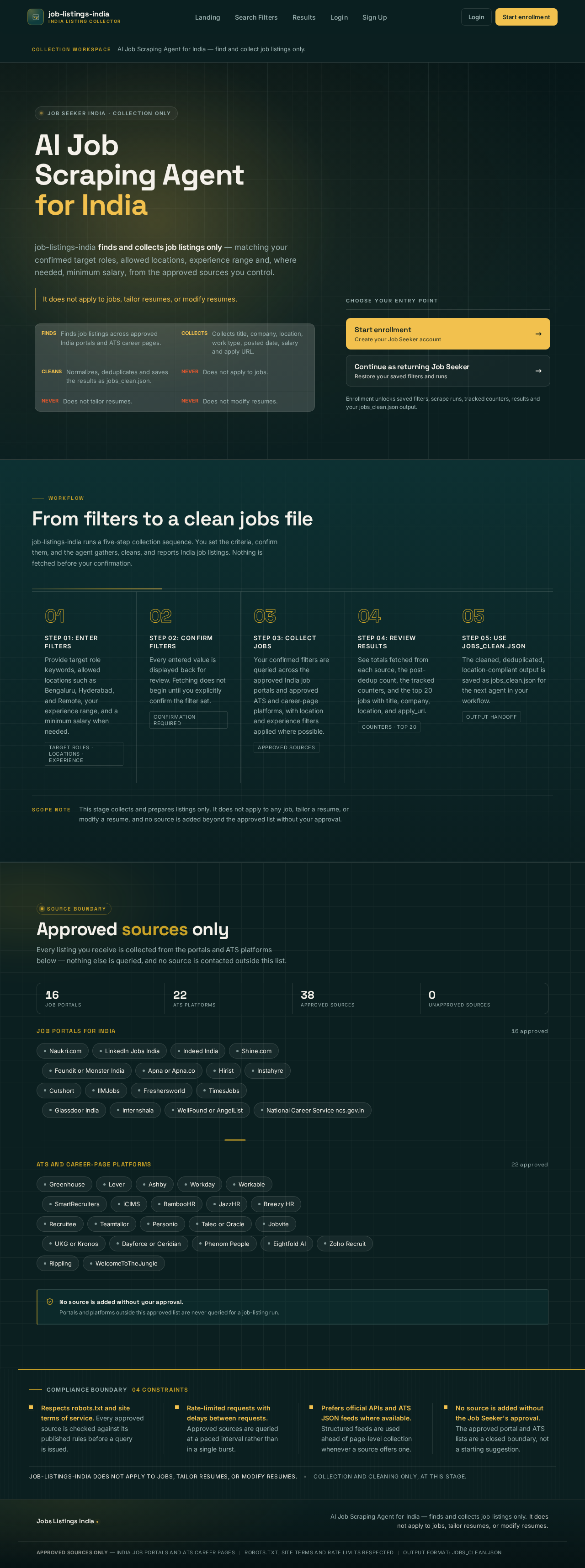
AI Job Scraping Agent for India — find and collect job listings only.
Job Seeker India · Collection only
AI Job Scraping Agentfor India
job-listings-india finds and collects job listings only — matching your confirmed target roles, allowed locations, experience range and, where needed, minimum salary, from the approved sources you control.
It does not apply to jobs, tailor resumes, or modify resumes.
- Finds job listings across approved India portals and ATS career pages.
- Collects title, company, location, work type, posted date, salary and apply URL.
- Normalizes, deduplicates and saves the results as jobs_clean.json.
- Does not apply to jobs.
- Does not tailor resumes.
- Does not modify resumes.
Choose your entry point
Enrollment unlocks saved filters, scrape runs, tracked counters, results and your jobs_clean.json output.
From filters to a clean jobs file
job-listings-india runs a five-step collection sequence. You set the criteria, confirm them, and the agent gathers, cleans, and reports India job listings. Nothing is fetched before your confirmation.
Step 01: Enter filters
Provide target role keywords, allowed locations such as Bengaluru, Hyderabad, and Remote, your experience range, and a minimum salary when needed.
Target roles · Locations · ExperienceStep 02: Confirm filters
Every entered value is displayed back for review. Fetching does not begin until you explicitly confirm the filter set.
Confirmation requiredStep 03: Collect jobs
Your confirmed filters are queried across the approved India job portals and approved ATS and career-page platforms, with location and experience filters applied where possible.
Approved sourcesStep 04: Review results
See totals fetched from each source, the post-dedup count, the tracked counters, and the top 20 jobs with title, company, location, and apply_url.
Counters · Top 20Step 05: Use jobs_clean.json
The cleaned, deduplicated, location-compliant output is saved as jobs_clean.json for the next agent in your workflow.
Output handoff
This stage collects and prepares listings only. It does not apply to any job, tailor a resume, or modify a resume, and no source is added beyond the approved list without your approval.
Approved sources only
Every listing you receive is collected from the portals and ATS platforms below — nothing else is queried, and no source is contacted outside this list.
Job portals for India
16 approved- Naukri.com
- LinkedIn Jobs India
- Indeed India
- Shine.com
- Foundit or Monster India
- Apna or Apna.co
- Hirist
- Instahyre
- Cutshort
- IIMJobs
- Freshersworld
- TimesJobs
- Glassdoor India
- Internshala
- WellFound or AngelList
- National Career Service ncs.gov.in
ATS and career-page platforms
22 approved- Greenhouse
- Lever
- Ashby
- Workday
- Workable
- SmartRecruiters
- iCIMS
- BambooHR
- JazzHR
- Breezy HR
- Recruitee
- Teamtailor
- Personio
- Taleo or Oracle
- Jobvite
- UKG or Kronos
- Dayforce or Ceridian
- Phenom People
- Eightfold AI
- Zoho Recruit
- Rippling
- WelcomeToTheJungle
Compliance boundary04 constraints
Respects robots.txt and site terms of service. Every approved source is checked against its published rules before a query is issued.
Rate-limited requests with delays between requests. Approved sources are queried at a paced interval rather than in a single burst.
Prefers official APIs and ATS JSON feeds where available. Structured feeds are used ahead of page-level collection whenever a source offers one.
No source is added without the Job Seeker's approval. The approved portal and ATS lists are a closed boundary, not a starting suggestion.
job-listings-india does not apply to jobs, tailor resumes, or modify resumes.Collection and cleaning only, at this stage.
AI Job Scraping Agent for India — find and collect job listings only.
Job Seeker India · Collection only
AI Job Scraping Agentfor India
job-listings-india finds and collects job listings only — matching your confirmed target roles, allowed locations, experience range and, where needed, minimum salary, from the approved sources you control.
It does not apply to jobs, tailor resumes, or modify resumes.
- Finds job listings across approved India portals and ATS career pages.
- Collects title, company, location, work type, posted date, salary and apply URL.
- Normalizes, deduplicates and saves the results as jobs_clean.json.
- Does not apply to jobs.
- Does not tailor resumes.
- Does not modify resumes.
Choose your entry point
Enrollment unlocks saved filters, scrape runs, tracked counters, results and your jobs_clean.json output.
From filters to a clean jobs file
job-listings-india runs a five-step collection sequence. You set the criteria, confirm them, and the agent gathers, cleans, and reports India job listings. Nothing is fetched before your confirmation.
Step 01: Enter filters
Provide target role keywords, allowed locations such as Bengaluru, Hyderabad, and Remote, your experience range, and a minimum salary when needed.
Target roles · Locations · ExperienceStep 02: Confirm filters
Every entered value is displayed back for review. Fetching does not begin until you explicitly confirm the filter set.
Confirmation requiredStep 03: Collect jobs
Your confirmed filters are queried across the approved India job portals and approved ATS and career-page platforms, with location and experience filters applied where possible.
Approved sourcesStep 04: Review results
See totals fetched from each source, the post-dedup count, the tracked counters, and the top 20 jobs with title, company, location, and apply_url.
Counters · Top 20Step 05: Use jobs_clean.json
The cleaned, deduplicated, location-compliant output is saved as jobs_clean.json for the next agent in your workflow.
Output handoff
This stage collects and prepares listings only. It does not apply to any job, tailor a resume, or modify a resume, and no source is added beyond the approved list without your approval.
Approved sources only
Every listing you receive is collected from the portals and ATS platforms below — nothing else is queried, and no source is contacted outside this list.
Job portals for India
16 approved- Naukri.com
- LinkedIn Jobs India
- Indeed India
- Shine.com
- Foundit or Monster India
- Apna or Apna.co
- Hirist
- Instahyre
- Cutshort
- IIMJobs
- Freshersworld
- TimesJobs
- Glassdoor India
- Internshala
- WellFound or AngelList
- National Career Service ncs.gov.in
ATS and career-page platforms
22 approved- Greenhouse
- Lever
- Ashby
- Workday
- Workable
- SmartRecruiters
- iCIMS
- BambooHR
- JazzHR
- Breezy HR
- Recruitee
- Teamtailor
- Personio
- Taleo or Oracle
- Jobvite
- UKG or Kronos
- Dayforce or Ceridian
- Phenom People
- Eightfold AI
- Zoho Recruit
- Rippling
- WelcomeToTheJungle
Compliance boundary04 constraints
Respects robots.txt and site terms of service. Every approved source is checked against its published rules before a query is issued.
Rate-limited requests with delays between requests. Approved sources are queried at a paced interval rather than in a single burst.
Prefers official APIs and ATS JSON feeds where available. Structured feeds are used ahead of page-level collection whenever a source offers one.
No source is added without the Job Seeker's approval. The approved portal and ATS lists are a closed boundary, not a starting suggestion.
job-listings-india does not apply to jobs, tailor resumes, or modify resumes.Collection and cleaning only, at this stage.
No comments yet. Be the first!