jade-calculator
 Dev Kalyani
create a simple calculator app

Comments (0)
Sign in to leave a comment
Project Tasks7
Implement HomeHero for Home
As a frontend developer, implement the HomeHero section for the Home page. This section renders a full-width hero with a cascading animated number layer (`hh-cascade-layer`) built using `framer-motion`. Fifteen `motion.span` elements (digits, operators, symbols) are positioned absolutely via inline `left` and `fontSize` styles, each animated with `numberVariants` that loop opacity pulses and vertical drift using `useMemo`-cached custom props (`startY`, `duration`, `repeatDelay`). The `containerVariants` orchestrates staggered children with `delayChildren: 0.2`. Below the cascade layer, `hh-content` holds a `motion.h1` with `whileHover` text-shadow glow and a `motion.p` subheadline, both entering via `opacity/y` fade-up transitions with staggered delays (0.3s and 0.55s). Imports `HomeHero.css`. No external API calls.
Implement HomeCalculatorContainer for Home
As a frontend developer, implement the HomeCalculatorContainer section for the Home page. This section is the core interactive calculator UI. It defines a `BUTTONS` array (17 entries: numbers, operations C, ÷, ×, −, +, =, .) and a `safeEval` function that sanitizes and evaluates arithmetic expressions via `new Function`. Two sub-components are defined: `FlipButton` and `FlipButtonWide`, each using `useState(isFlipped)` and `useCallback` to trigger a `rotateX: 360` spring animation on click with a 400ms reset timeout. Operation buttons additionally render an `AnimatePresence`-wrapped `hcc-btn-flash` overlay. `FlipButton` uses `whileHover: scale 1.06` and `whileTap: scale 0.92`. The wide variant (`hcc-btn-wrapper--wide`) spans the '0' key. Calculator state (expression, display) is managed in the parent component with `useState` and `useCallback`. Imports `HomeCalculatorContainer.css` and `framer-motion`. No backend calls.
Implement HomeFeatures for Home
As a frontend developer, implement the HomeFeatures section for the Home page. This section renders three `FeatureCard` components from a `features` array, each with a Lucide icon (`Zap`, `Layout`, `Calculator`), title, and description. Each `FeatureCard` uses `useState(hovered)` toggled via `onMouseEnter`/`onMouseLeave` to animate `backgroundColor` between `rgba(168, 218, 220, 0.6)` (hovered) and `rgba(233, 233, 233, 0.8)` (default), and the `hf-accent-bar` transitions color from `#F4A261` to `#FFB703`. The icon wrapper animates `rotate: 360` on hover. Cards use `cardVariants` (`opacity 0→1`, `y 40→0`) inside a `containerVariants` stagger (`staggerChildren: 0.15`). The section heading uses `whileInView` fade-up with `viewport: once, margin: -80px`. Imports `HomeFeatures.css` and `lucide-react`.
Implement HomeCTA for Home
As a frontend developer, implement the HomeCTA section for the Home page. This section features a magnetic CTA button with particle burst on click. State includes `magnetOffset {x,y}`, `magnetScale`, `particles[]`, and `pulseColor`, all managed via `useState`. A `useRef(btnRef)` tracks the button DOM node. `handleMouseMove` computes distance from button center; within 80px it applies `dx*0.1, dy*0.1` magnetic offset and `scale 1.05`. On click, `handleClick` spawns 10 particles via `particleIdRef` counter, each with randomized `angle`, `radius (60–110px)`, `size (5–10px)`, and color (`#F4A261` or `#FFB703`). `pulseColor` triggers a 300ms flash; particles clear after 700ms. Background decorative math symbols (`=`, `+`, `÷`, `×`) are rendered as `hcta-bg-symbol` spans. The inner content block enters via `whileInView` `opacity/y` fade-up. `AnimatePresence` manages particle lifecycle. Imports `HomeCTA.css` and `framer-motion`.
Implement Calculator API Endpoint
As a Backend Developer, implement a FastAPI endpoint POST /api/calculate that accepts a JSON body with an arithmetic expression string, validates and safely evaluates the expression server-side (addition, subtraction, multiplication, division only), and returns the computed result or a structured error response. Implement input sanitization to prevent injection attacks. Include proper error handling for division by zero, invalid expressions, and malformed input. This endpoint supports the HomeCalculatorContainer section (task 83184266-b973-4a05-9ef3-e31ab5cbbb69) as an optional server-side evaluation fallback.
Setup Theme and Design System
As a Frontend Developer, set up the global theme and design system for jade-calculator. Create a CSS variables file (or theme.js/theme.css) defining all design tokens from the SRD: primary (#2A9D8F), primary_light (#A8DADC), secondary (#E76F51), accent (#F4A261), highlight (#FFB703), bg (#F1FAEE), surface (rgba(233,233,233,0.8)), text (#264653), text_muted (#6D6875), border (rgba(38,70,83,0.2)). Configure global font family ('Inter', -apple-system, BlinkMacSystemFont, sans-serif). Install and configure framer-motion for animation support across all sections. Set up global reset CSS and base typography styles. This foundational task must complete before all frontend section tasks.
Integrate Calculator Frontend Backend
As a Tech Lead, verify the end-to-end integration between the HomeCalculatorContainer frontend implementation and the Calculator API backend. Ensure the arithmetic expression is correctly sent to POST /api/calculate, the API response is handled in the UI (result displayed on screen, errors shown gracefully), division by zero and invalid expression edge cases are handled correctly in both layers, and the framer-motion flip animations still trigger properly on server-validated results. Note: HomeCalculatorContainer frontend task is 83184266-b973-4a05-9ef3-e31ab5cbbb69; backend task is temp_backend_calculator_api.
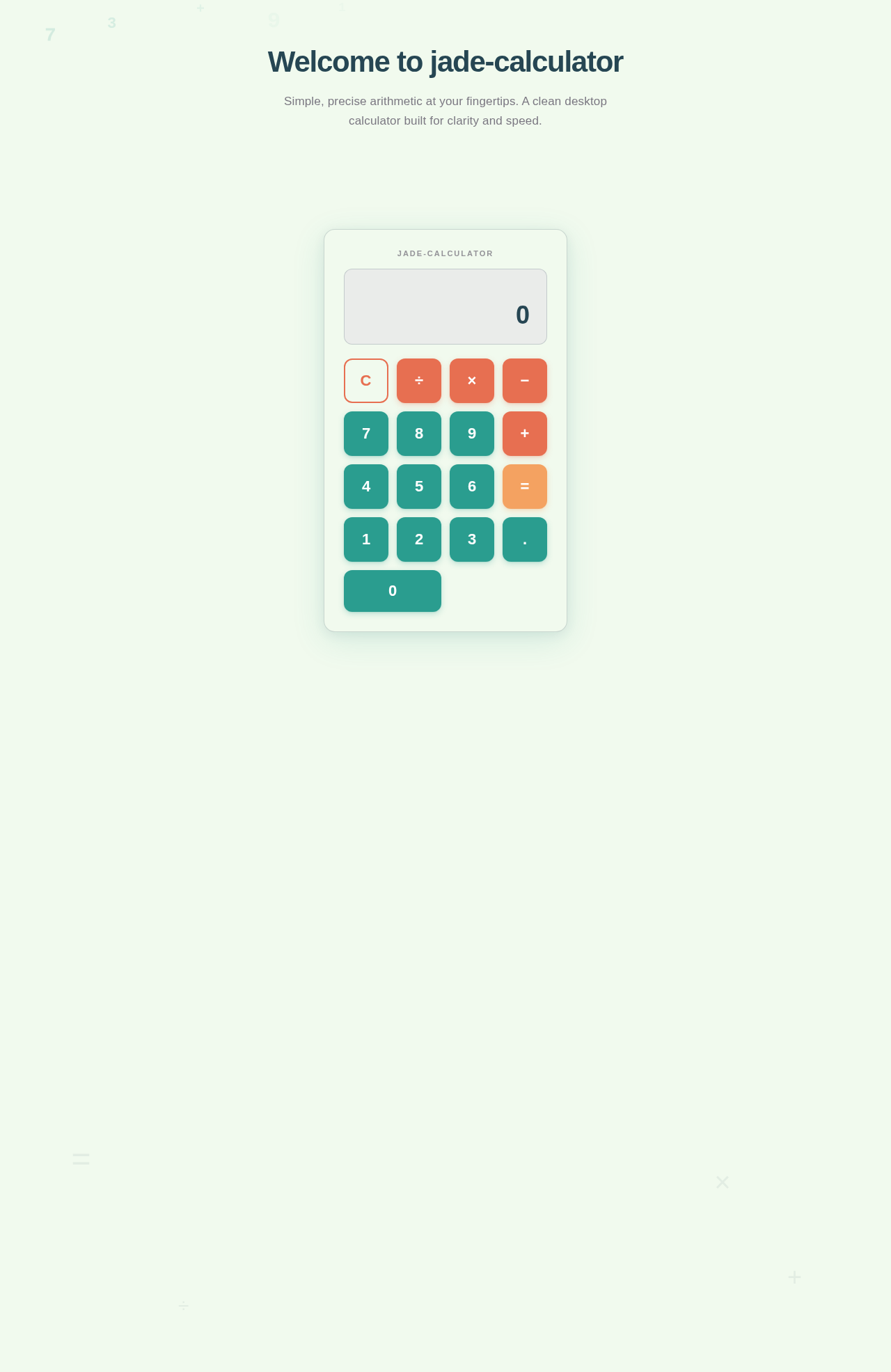
Welcome to jade-calculator
Simple, precise arithmetic at your fingertips. A clean desktop calculator built for clarity and speed.
Why jade-calculator?
A focused desktop calculator built for speed, simplicity, and reliability.
Fast Loading
Experience blazing performance with a guaranteed load time under 2 seconds on standard desktop hardware. No waiting — just instant calculations.
Intuitive Design
A clean, distraction-free interface that any user can master within 5 minutes. No learning curve, no clutter — just a straightforward calculator.
Precision Arithmetic
Reliable addition, subtraction, multiplication, and division you can trust. Every result is accurate, every operation dependable.
Start Calculating Now
Experience fast, intuitive arithmetic with a beautifully crafted interface. No clutter, no distractions — just clean calculations.
No comments yet. Be the first!