jade-calculator
 Dev Kalyani
create a simple calculator app

Comments (0)
Sign in to leave a comment
System Requirements
jade-calculator System Requirements Document
Introduction
The jade-calculator project aims to develop a simple, user-friendly calculator application specifically for desktop use. This document outlines the system requirements necessary to achieve the project's objectives.
System Overview
The jade-calculator is designed to provide basic arithmetic operations in a clean and functional desktop application. The focus is on delivering a straightforward user experience without the complexities of advanced scientific functions or mobile compatibility.
Functional Requirements
- As a User, I should be able to perform basic arithmetic operations: addition, subtraction, multiplication, and division.
- As a User, I should be able to clear the current calculation.
- As a User, I should be able to view the current input and result on the display screen.
User Personas
- User: The primary user of the jade-calculator is anyone needing a simple desktop tool for basic arithmetic calculations. This includes students, professionals, and everyday users who require quick and easy access to basic math functions.
Visuals Colors and Theme
- primary: #2A9D8F (a deep teal for a calming, professional look)
- primary_light: #A8DADC (a lighter teal for hover states and secondary UI elements)
- secondary: #E76F51 (a warm coral for emphasis and headlines)
- accent: #F4A261 (a vibrant orange for CTAs and active states)
- highlight: #FFB703 (a bright gold for hover states and notifications)
- bg: #F1FAEE (a soft, off-white background for the application)
- surface: rgba(233, 233, 233, 0.8) (a light grey for card/panel backgrounds)
- text: #264653 (a dark slate for primary text and headings)
- text_muted: #6D6875 (a muted lavender for secondary text and labels)
- border: rgba(38, 70, 83, 0.2) (a subtle teal border color)
Signature Design Concept
The jade-calculator will feature an interactive "digital flip" design concept. The calculator's buttons will appear as digital tiles that flip when pressed, providing a tactile and engaging user experience. The display will have a smooth transition effect, where numbers and operations animate into view as if being typed on a digital screen. This concept will be implemented using framer-motion for seamless animations and transitions. The home screen will greet users with a minimalist design, featuring a subtle animation of numbers cascading in the background, creating a dynamic yet unobtrusive atmosphere.
Interaction Model & Motion Direction
The jade-calculator will employ an "animated" interaction model. This includes moderate scroll-triggered reveals and hover transitions, enhancing the user experience with polished animations. The desktop application will focus on clarity and ease of use, with interactive elements that respond to user actions through smooth animations and transitions.
Non-Functional Requirements
- The application must load within 2 seconds on standard desktop hardware.
- The user interface should be intuitive and require no more than 5 minutes for a new user to become proficient.
- The application should handle up to 100 concurrent users without performance degradation.
Tech Stack
- Frontend: React for Web
- Backend: Python with FastAPI
- Database: Not applicable for this project as it does not require persistent storage.
Assumptions and Constraints
- The application is intended solely for desktop use and will not include mobile or responsive design elements.
- The calculator will only support basic arithmetic functions and will not include advanced scientific calculations.
- The application will be developed and tested in the IST timezone (India Standard Time).
Glossary
- Arithmetic Operations: Basic mathematical functions including addition, subtraction, multiplication, and division.
- UI: User Interface, the part of the application with which the user interacts.
- CTA: Call to Action, elements in the UI that prompt the user to take a specific action.
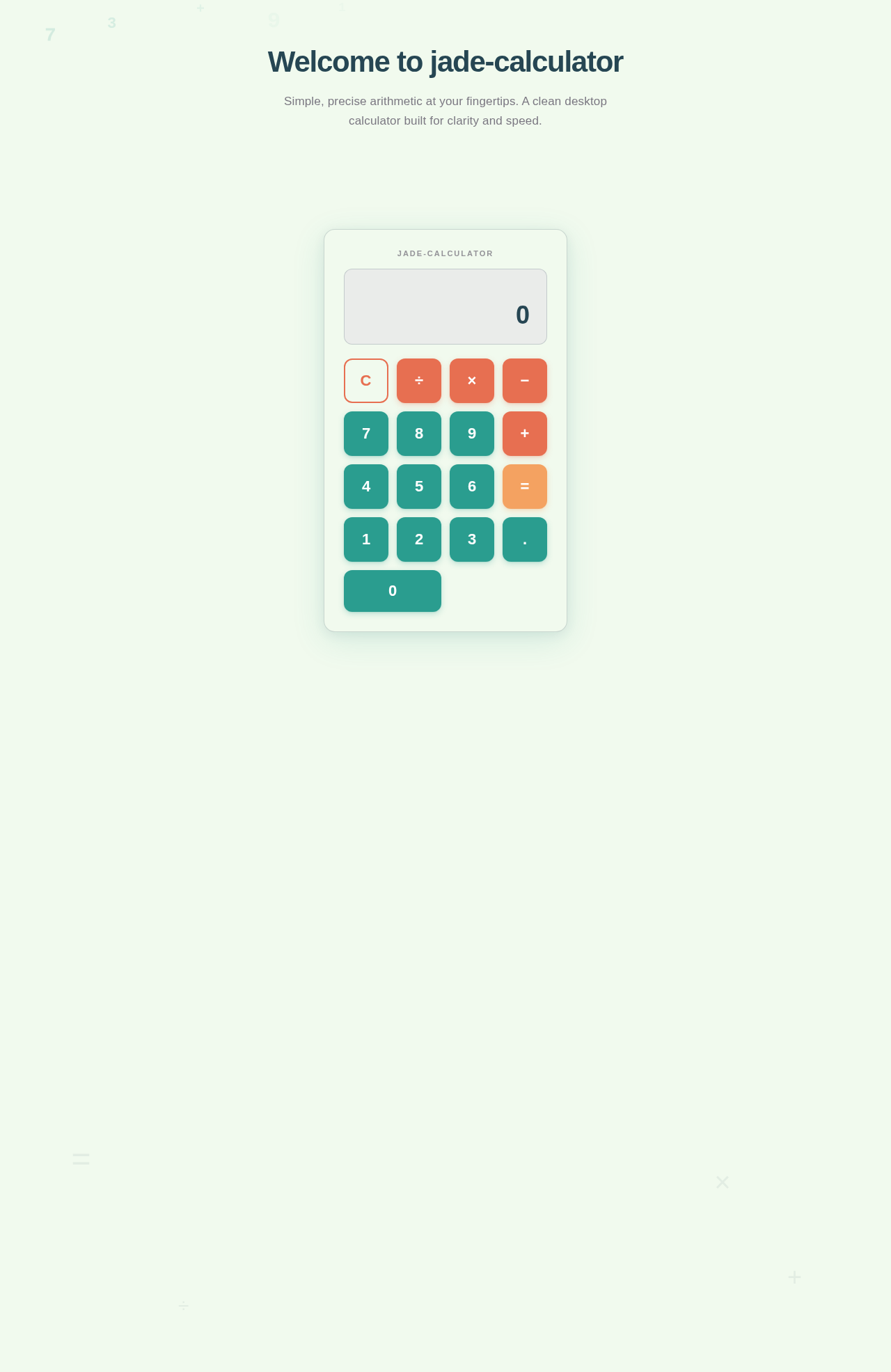
Welcome to jade-calculator
Simple, precise arithmetic at your fingertips. A clean desktop calculator built for clarity and speed.
Why jade-calculator?
A focused desktop calculator built for speed, simplicity, and reliability.
Fast Loading
Experience blazing performance with a guaranteed load time under 2 seconds on standard desktop hardware. No waiting — just instant calculations.
Intuitive Design
A clean, distraction-free interface that any user can master within 5 minutes. No learning curve, no clutter — just a straightforward calculator.
Precision Arithmetic
Reliable addition, subtraction, multiplication, and division you can trust. Every result is accurate, every operation dependable.
Start Calculating Now
Experience fast, intuitive arithmetic with a beautifully crafted interface. No clutter, no distractions — just clean calculations.
No comments yet. Be the first!