jade-build
create a project to build a simple calculator and with no advance arthematic operations

Comments (0)
Sign in to leave a comment
Project Tasks4
Implement CalculatorHeader for Calculator
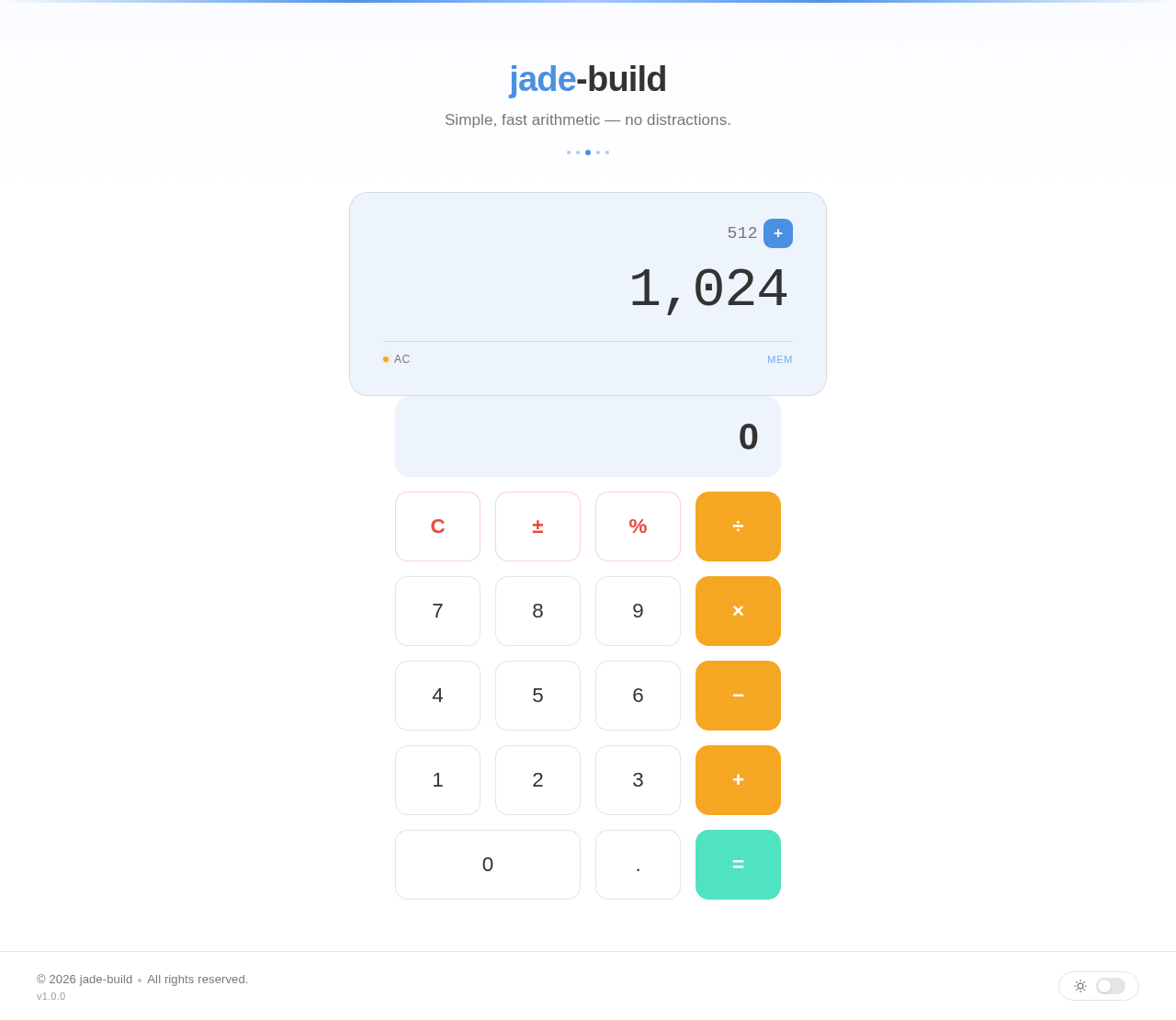
As a frontend developer, implement the CalculatorHeader section for the Calculator page. This section renders a <header> with className 'ch-header' containing a centered content block with three sequentially animated elements using framer-motion: (1) an <h1> with className 'ch-title' that fades in from y:-12 over 0.5s, containing a <span className='ch-title-accent'> wrapping 'jade' alongside '-build' text; (2) a <p> with className 'ch-tagline' that fades in from y:8 with a 0.15s delay; (3) a decorative <div className='ch-separator'> that scales in from scaleX:0 with a 0.3s delay, containing five <span className='ch-dot'> elements with the middle one having an additional 'ch-dot--center' modifier class. Apply CalculatorHeader.css with all associated ch-* class styles. This is a root section — no page dependencies.
Implement CalculatorDisplay for Calculator
As a frontend developer, implement the CalculatorDisplay section for the Calculator page. This section renders a <div className='cd-display'> containing a framer-motion animated inner wrapper that fades in from y:12. It uses four useState hooks: currentValue (default '1,024'), previousValue (default '512'), operation (default 'add'), and hasInput (default true). A OPERATIONS map converts string keys (add/subtract/multiply/divide) to symbols. The top row uses two AnimatePresence/motion.span pairs: previousValue slides in/out on x axis with mode='wait', and operationSymbol scales in/out via spring animation (stiffness:400, damping:20). The main display area uses a motion.div keyed to currentValue with subtle scale/opacity transition (0.15s), containing the value span and a conditional <span className='cd-cursor' /> when hasInput is true. A status bar shows a cd-clear-dot (active class when hasInput) with 'AC'/'Ready' label and a MEM label that fades in at opacity:0.7 with 0.2s delay when both previousValue and operation exist. Apply CalculatorDisplay.css with cd-* class styles.
Implement CalculatorButtonGrid for Calculator
As a frontend developer, implement the CalculatorButtonGrid section for the Calculator page. This section contains a complete functional calculator engine. The BUTTONS array defines 19 buttons with types: 'clear', 'func', 'digit', 'op', and 'equals'; the '0' button has a span:true flag for double-width grid layout. Four useState hooks manage state: display (init '0'), prevValue (null), operation (null), resetNext (false). Five useCallback handlers manage logic: handleDigit (appends digits/decimals, respects resetNext flag, prevents duplicate decimals), handleOperation (chains operations by evaluating pending prevValue+operation, sets new op and resetNext), handleEquals (evaluates prevValue+display with current operation, clears op state), handleClear (resets all state to initial), and handleFunc (handles '±' sign toggle and '%' percentage conversion). The evaluate() helper performs +/-/*/÷ with parseFloat, returns 'Error' on division by zero, and rounds to 10 decimal places. Each button is a motion.div with whileTap scale animation and appropriate type-based className (cbg-btn--clear, cbg-btn--op, cbg-btn--equals, cbg-btn--func, cbg-btn--digit, cbg-btn--span). Apply CalculatorButtonGrid.css with cbg-* class styles. This section implements all four arithmetic operations required by the SRD.
Implement CalculatorFooter for Calculator
As a frontend developer, implement the CalculatorFooter section for the Calculator page. This section renders a motion.footer with className 'cf-footer' that fades in at opacity:0→1 over 0.4s with a 0.2s delay. It uses a single useState hook: darkMode (init false). The inner layout (cf-inner) has a left side (cf-left) showing a copyright span with className 'cf-copyright' containing '© 2026 jade-build', a <span className='cf-dot' /> separator, 'All rights reserved.', and a sibling <span className='cf-version'>v1.0.0</span>. On the right is a motion.button with className 'cf-toggle', whileTap scale:0.95 animation, onClick calls handleToggle to toggle darkMode boolean, and aria-label='Toggle theme'. The button contains a cf-toggle-icon span that conditionally renders a moon SVG (path-based, 24×24) when darkMode is true or a sun SVG (circle + 8 line rays, 24×24) when false. Below the icon is a cf-toggle-track div with conditional 'cf-toggle-track--active' class and a nested cf-toggle-thumb div with conditional 'cf-toggle-thumb--active' class. Apply CalculatorFooter.css with cf-* class styles.
jade-build
Simple, fast arithmetic — no distractions.
No comments yet. Be the first!