Page 1 of 26
System Requirements Document for iofax-fax
1. Introduction
ioFax is an online fax application that lets people send and receive faxes from a web browser or a mobile device, without owning a fax machine. The product is delivered as a responsive web application: the same interface adapts from a 375px phone viewport up to a 1280px desktop grid, so a user can start a fax from a phone and finish it from a desk.
The product intent is narrow and practical. A user must be able to:
- Understand what ioFax does and start using it from a public landing page.
- Choose a subscription plan from a pricing page.
- Send a fax by picking a fax template and adding all required fax details.
- Choose a fax number from the USA or Canada and proceed with payment to acquire it.
- See a dashboard summary of sent and received faxes on their fax number, with all statuses.
The audience is individuals and small professional teams — clinics, law offices, finance staff, and personal users — who need a document to arrive at a fax machine that still matters. A failed fax is a missed deadline, so status legibility is treated as a first-class product concern rather than a cosmetic one.
Competitor sites ifaxapp.com and iofaxapp.com were supplied as inspiration-only references for fax domain context and feature framing. They do not supply product names, copy, facts, or capabilities to this document, and nothing from them is treated as an ioFax requirement.
Page 2 of 26
2. System Overview
ioFax is a first-party web application with an application-owned identity layer, a fax sending capability, a fax number acquisition capability with payment, a subscription pricing surface, and a dashboard that summarizes fax activity.
Actors
- Fax Sender — a person who composes and sends a fax using a template and full fax details, then tracks its status.
- Fax Number Subscriber — a person who selects a USA or Canada fax number and proceeds through payment to acquire it.
- Fax Account Owner — a person who reviews the dashboard summary of sent and received faxes on their fax number with all statuses, and manages their subscription plan.
- External fax recipients — the destination fax machines and their operators. These are typed non-persona actors: they receive the transmitted document and are not users of ioFax.
- Payment provider — an external service that processes payment for a selected fax number and subscription plan. It is a typed non-persona actor.
Accepted behavior
- Public landing page describing ioFax and routing users into sending a fax or getting a fax number.
- Self-service enrollment and returning verification, because fax activity, fax numbers, and subscription state are durable and must remain bound to the correct person.
- Pricing page presenting subscription plans that a user can view and select.
- Send fax page with a fax template option and full fax detail entry, producing a submitted fax with an observable status.
- Get faxnumber page where a user chooses a USA or Canada number and proceeds with payment.
- Dashboard summarizing sent and received faxes on the user's fax number, with all statuses.
Narrow exclusions
- Fax number selection is limited to USA and Canada numbers. No other country's numbers are offered.
- No team management, broadcast/fax merge, API access, OCR/AI features, cloud-storage integrations, company fax pages, or dedicated Windows/Mac/iOS/Android applications are part of this scope. Those appear only in the inspiration-only competitor observations and are not accepted ioFax requirements.
- No blue or indigo accent appears anywhere in the interface.
Page 3 of 26
2a. Product Interpretation and Delivery Boundary
ioFax is delivered as a responsive first-party web application. All seven surfaces — Landing page, Sign Up, Login, Pricing, Send fax, Get faxnumber, and Dashboard — are owned and rendered by the ioFax application itself. There is no provider-owned or external-only surface in the current scope, and no headless delivery mode.
Access is split deliberately. The Landing page, Sign Up, Login, and Pricing are reachable without an established session, because a person must be able to learn about ioFax, create an account, return to an existing account, and compare plans before committing. Send fax, Get faxnumber, and Dashboard require a signed-in session, because each one reads or writes durable state bound to a specific person: a sent fax and its status, an acquired fax number, and the fax activity summary on that number.
Identity is application-owned. It is established at first use through self-service enrollment on Sign Up and re-established on return through Login. This is the minimum continuity needed so that a fax a person sends, a number a person pays for, and the received faxes on that number stay attached to the right account. Identity here is continuity only — it does not create differentiated permissions, role-based visibility, or permission controls over shared product state, because no accepted requirement establishes any.
Payment for a selected fax number and for a subscription plan is processed by an external payment provider. ioFax owns the selection, the order context, and the resulting entitlement; the provider owns the card capture and authorization step.
Everything described in this document is current scope. No future-horizon requirements were accepted.
Page 4 of 26
2b. Source Content Inventory
Not applicable. The supplied reference directives declare feature_reference and domain_context uses with inspiration_only authority. No directive declares content_source, so no source content inventory is included.
2c. Page Content and Component Coverage
Page 5 of 26
Landing page
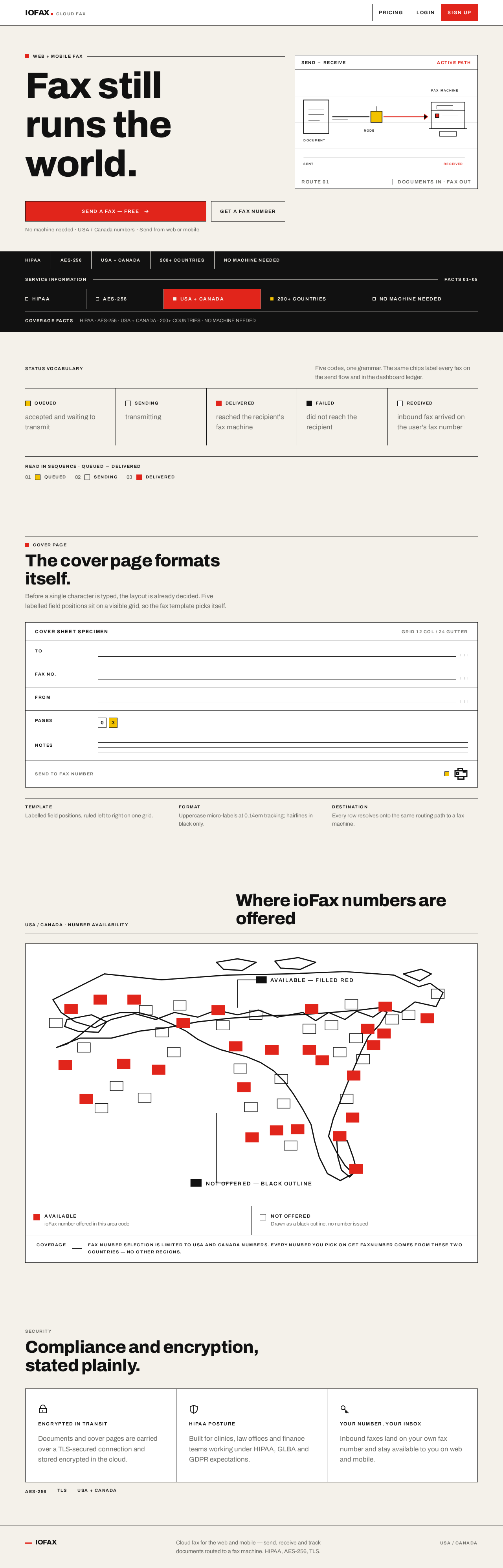
- Information and state: Public entry surface. States the product proposition — send and receive faxes from web or mobile without a fax machine. Presents the coded status vocabulary (Queued, Sending, Delivered, Failed, Received) as part of explaining what the product does. Presents the compliance and coverage strip (HIPAA · AES-256 · USA + CANADA · 200+ COUNTRIES · NO MACHINE NEEDED) as infrastructure information, not marketing.
- Primary actions: "SEND A FAX — FREE" red rectangle CTA routing toward Send fax (through Sign Up or Login when no session exists). "GET A FAX NUMBER" black-outlined secondary rectangle routing toward Get faxnumber.
- Supporting actions: Navigate to Pricing; navigate to Login; navigate to Sign Up.
- Domain entities: Fax, fax status code, fax number, subscription plan.
- Component responsibilities:
- Asymmetric poster hero: type block in columns 1–7, schematic routing diagram panel in columns 8–12.
- Oversized flush-left headline in three stacked lines that intentionally break the grid.
- Hairline black rule beneath the headline with the primary CTA pinned flush-left under it.
- Ruled white routing-diagram panel: document rectangle, black rule travelling right through a coded node, fax machine pictogram at the destination, red active path and yellow node.
- Full-bleed black wayfinding strip of uppercase labels separated by vertical rules.
- Rule-based USA/Canada availability map where available area codes are solid red and unavailable ones are black outlines.
- Cover-page specimen diagram showing labelled field positions (TO / FAX NO. / FROM / PAGES / NOTES) on a visible grid.
- Security panel of three 24px pictograms (lock, shield, key) drawn with 2px black strokes.
- States: Loading — hero type and diagram panel render immediately as static structure; no skeleton shimmer. Empty — not applicable, the page has no user-specific data. Success — page renders fully. Error — if a navigation target is unavailable, the CTA remains visible and the failure is surfaced inline without removing the control. Recovery — the user can retry the CTA or use the navigation to reach Pricing, Login, or Sign Up.
Page 6 of 26
Sign Up
- Information and state: Anonymous identity-access surface. Explains that an ioFax account is needed to send faxes, acquire a fax number, and see fax activity. States that enrollment is self-service.
- Primary actions: Submit enrollment details to create an ioFax account.
- Supporting actions: Navigate to Login for an existing account; return to Landing page.
- Domain entities: Account, credential, session.
- Component responsibilities:
- Ruled enrollment form with labelled fields on a visible grid, black 1px rules between field rows.
- Uppercase wayfinding micro-label above the form ("CREATE ACCOUNT").
- Inline field-level validation messages in muted grey at body size.
- Red rectangle submit control; black-outlined secondary control to switch to Login.
- States: Loading — submit control shows a disabled state while the account is being created. Empty — form renders with empty fields and no error text. Success — account is created and the user is taken into the signed-in experience with a clear next step toward Send fax or Get faxnumber. Error — invalid or already-used enrollment details produce inline messages next to the offending field, and the form retains entered values. Recovery — the user corrects the flagged field and resubmits, or switches to Login if an account already exists.
Login
- Information and state: Anonymous identity-access surface for returning users. Explains that signing in restores access to fax activity, fax numbers, and subscription state.
- Primary actions: Submit credentials to establish a session.
- Supporting actions: Navigate to Sign Up for a new account; return to Landing page.
- Domain entities: Account, credential, session.
- Component responsibilities:
- Ruled credential form with labelled fields and black 1px rules.
- Uppercase wayfinding micro-label ("SIGN IN").
- Inline error region for failed verification.
- Red rectangle submit control; black-outlined secondary control to switch to Sign Up.
- States: Loading — submit control disabled while verification is in progress. Empty — form renders with empty fields. Success — session established and the user is returned to the destination they were attempting to reach, or to the Dashboard. Error — incorrect credentials produce a single non-enumerating error message and the form retains the entered identifier. Recovery — the user retries, or switches to Sign Up.
Page 7 of 26
Pricing
- Information and state: Publicly reachable subscription surface. Presents subscription plans with their terms so a user can compare and select. The highlighted plan is rendered on a signal-yellow ground.
- Primary actions: Select a subscription plan.
- Supporting actions: Navigate to Sign Up or Login to complete plan selection when no session exists; return to Landing page.
- Domain entities: Subscription plan, plan term, price, selected plan, subscription.
- Component responsibilities:
- Three ruled plan columns of unequal emphasis, separated by vertical black rules, with the middle plan on a yellow ground.
- Uppercase wayfinding micro-labels for plan names and price periods.
- Tabular price figures aligned so they can be compared in a column.
- Red rectangle select control per plan; black-outlined secondary controls for non-highlighted plans.
- Selected-plan confirmation region.
- States: Loading — plan columns render as ruled structure while plan data resolves. Empty — if no plans are available, a ruled message states that plans are unavailable and offers a retry. Success — the selected plan is confirmed and the user is routed to Sign Up or Login if needed, then to the subscription state on the Dashboard. Error — a failed plan selection or failed plan load surfaces an inline message and preserves the user's place. Recovery — the user retries the selection or reloads the plan list.
Page 8 of 26
Send fax
- Information and state: Signed-in working surface. Shows the selected fax template, the fax detail fields, the attached document, and the resulting fax status. Requires a signed-in session.
- Primary actions: Choose a fax template; add all fax details; attach the document to transmit; submit the fax.
- Supporting actions: Change the selected template; clear the form; navigate to Dashboard to track the submitted fax.
- Domain entities: Fax template, cover-page field (TO / FAX NO. / FROM / PAGES / NOTES), recipient fax number, sender fax number, attached document, submitted fax, fax status.
- Component responsibilities:
- Template picker rendered as a strict ruled specimen: labelled field positions (TO / FAX NO. / FROM / PAGES / NOTES) laid out on a visible grid with black hairlines, so the template picks itself before any form is filled.
- Ruled detail form with labelled fields on the same grid, black 1px rules between rows.
- Document attachment control with the attached file name shown in tabular type.
- Uppercase wayfinding micro-labels ("SEND FAX", "STATUS").
- Status chip component using the shared five-chip code system.
- Red rectangle submit control; black-outlined secondary controls.
- States: Loading — the template specimen and detail form render as ruled structure while template data resolves. Empty — no template selected shows the specimen grid with an instruction to pick one; no document attached shows the attachment control in its empty state. Success — the fax is submitted and a status chip appears, stepping through Queued → Sending → Delivered in discrete frames. Error — a missing required detail, an unreadable attachment, or a rejected submission produces an inline message naming the specific field or cause, and the entered details are preserved. Recovery — the user corrects the named field or reattaches the document and resubmits; a fax that reaches Failed shows the Failed chip with a resubmit path.
Page 9 of 26
Get faxnumber
- Information and state: Signed-in working surface. Shows available fax numbers filtered to USA and Canada, and the checkout context for the selected number. Requires a signed-in session.
- Primary actions: Filter available numbers by country (USA / Canada), area code, or toll-free; select a fax number; proceed with payment.
- Supporting actions: Change the country filter; clear filters; return to the number list from checkout.
- Domain entities: Available fax number, country (USA / Canada), area code, toll-free designation, selected number, payment, acquired fax number.
- Component responsibilities:
- Two-pane picker: left filter column (Country: USA / Canada, Area code, Toll-free), right ruled list of available numbers.
- Vertical black rules separating the picker columns.
- Rule-based USA/Canada availability map where available area codes are solid red and unavailable ones are black outlines.
- Per-number red rectangle "Select" control.
- Right-hand checkout panel that replaces the list on mobile.
- Payment handoff region showing the selected number and the amount to be paid.
- States: Loading — the filter column and number list render as ruled structure while availability resolves. Empty — a filter combination with no matches shows a ruled empty message and a control to clear filters. Success — the selected number is confirmed, payment completes, and the acquired number appears as the user's fax number. Error — a failed payment or an unavailable number surfaces an inline message, and the selected number is retained so the user does not have to re-select. Recovery — the user retries payment or picks a different number from the list.
Page 10 of 26
Dashboard
- Information and state: Signed-in summary surface. Shows the summary of sent and received faxes on the user's fax number, with all statuses. Requires a signed-in session.
- Primary actions: Review the summary figures; read the fax ledger; filter the ledger by status.
- Supporting actions: Open an individual fax row for its detail; navigate to Send fax; navigate to Get faxnumber when no number is held; navigate to Pricing to manage the subscription plan.
- Domain entities: Fax, direction (sent / received), fax number, page count, status, timestamp, confirmation ID, summary figure, subscription state.
- Component responsibilities:
- Top strip of four summary figures separated by vertical rules instead of floating cards.
- Left rail of colour-coded status filters.
- Wide ruled ledger table with tabular columns: Direction, Number, Pages, Status chip, Timestamp.
- 1px black rule between every table row; all numbers tabular and right-aligned.
- Shared five-chip status code system: Queued yellow #F2C200, Sending black outline, Delivered red #E1251B, Failed black solid, Received white with black rule.
- Subscription state region linking to Pricing.
- States: Loading — the summary strip and ledger render as ruled structure while fax data resolves. Empty — a user with no fax activity sees a ruled empty ledger with a route to Send fax, and a user with no fax number sees a route to Get faxnumber. Success — summary figures and ledger rows render with status chips. Error — a failed data load surfaces an inline message and preserves the current filter selection. Recovery — the user retries the load or changes the status filter.
- Responsive behavior: At 375px the ledger table becomes stacked labelled rows rather than a horizontally scrolling table, and the status filter rail collapses above the ledger.
Page 11 of 26
3. Functional Requirements
FR-1 — Product identity and delivery
As a visitor, I should encounter ioFax as an online fax application delivered as a responsive web app, so that I can use it from a web browser or a mobile device.
- Provenance: explicit
- Lifecycle: Trigger — the visitor opens ioFax. Observable result — the ioFax application renders and adapts from a 375px mobile viewport to a 1280px desktop grid. Access state — no session required. Failure/recovery — if the application fails to load, the visitor can reload. Continuation — the visitor proceeds to the Landing page content.
- Acceptance: The application is named ioFax; the layout is usable at 375px, 768px, and 1280px; no horizontal scrolling of readable text or controls is required at any of those widths.
FR-2 — Landing page
As a visitor, I should see a Landing page that explains ioFax and offers the two starting actions, so that I can decide how to begin.
- Provenance: explicit
- Lifecycle: Trigger — the visitor arrives at ioFax. Observable result — the Landing page presents the product proposition, the status vocabulary, the compliance and coverage strip, and the two primary CTAs. Access state — no session required. Failure/recovery — if a CTA target is unavailable, the control remains visible and the failure is surfaced inline. Continuation — the visitor routes to Send fax or Get faxnumber, or navigates to Pricing, Login, or Sign Up.
- Acceptance: The Landing page is reachable without a session; both "SEND A FAX — FREE" and "GET A FAX NUMBER" controls are present and functional.
FR-3 — Self-service enrollment
As a new user, I should be able to create an ioFax account myself, so that my fax activity, fax number, and subscription stay bound to me.
- Provenance: required_inference
- Lifecycle: Trigger — the user chooses to create an account. Input — enrollment details. Observable result — an ioFax account exists and the user enters the signed-in experience. Access state — anonymous entry; the Sign Up surface is reachable without a session. Failure/recovery — invalid or already-used details produce inline field-level messages and the entered values are retained. Continuation — the user proceeds to Send fax or Get faxnumber.
- Acceptance: Enrollment completes without operator intervention; the resulting account is the identity under which subsequent faxes, numbers, and subscription state are held.
FR-4 — Returning verification
As a returning user, I should be able to sign in, so that I can reach my fax activity, fax number, and subscription state.
- Provenance: required_inference
- Lifecycle: Trigger — the user chooses to sign in. Input — credentials. Observable result — a session is established and the user reaches their durable state. Access state — anonymous entry; the Login surface is reachable without a session. Failure/recovery — incorrect credentials produce a single non-enumerating error and the entered identifier is retained. Continuation — the user is returned to the destination they were attempting to reach, or to the Dashboard.
- Acceptance: A signed-in user reaches Send fax, Get faxnumber, and Dashboard; a user without a session cannot reach those three surfaces.
FR-5 — Pricing with subscription
As a Fax Account Owner, I should see subscription plans on a Pricing page and be able to select one, so that I can subscribe to ioFax.
- Provenance: explicit
- Lifecycle: Trigger — the user opens Pricing. Input — plan selection. Observable result — the selected plan is confirmed and becomes the user's subscription state. Access state — Pricing is reachable without a session; completing a selection routes through Sign Up or Login when no session exists. Failure/recovery — a failed plan load or failed selection surfaces an inline message and preserves the user's place. Continuation — the user proceeds to the Dashboard, where subscription state is shown.
- Acceptance: Pricing presents subscription plans; a plan can be selected; the selected plan is reflected in the user's subscription state.
FR-6 — Send fax with template and full details
As a Fax Sender, I should pick a fax template and add all fax details to send a fax, so that my document reaches the recipient's fax machine.
- Provenance: explicit
- Lifecycle: Trigger — the signed-in user opens Send fax. Input — a chosen fax template, all required fax details, and the document to transmit. Observable result — the fax is submitted and a status chip appears for it. Access state — requires a signed-in session. Failure/recovery — a missing required detail, an unreadable attachment, or a rejected submission produces an inline message naming the specific field or cause, and entered details are preserved. Continuation — the user tracks the fax on the Dashboard, or resubmits after correcting the named cause.
- Acceptance: A fax template option is presented; all fax details can be entered; a submitted fax produces an observable status.
FR-7 — Fax status visibility on a submitted fax
As a Fax Sender, I should see the status of the fax I sent, so that I know whether it arrived.
- Provenance: explicit
- Lifecycle: Trigger — the user submits a fax. Observable result — a status chip steps through Queued → Sending → Delivered in discrete frames, or settles on Failed. Access state — requires a signed-in session. Failure/recovery — a fax that reaches Failed shows the Failed chip with a resubmit path. Continuation — the user resubmits or returns to the Dashboard.
- Acceptance: The five status codes (Queued, Sending, Delivered, Failed, Received) are rendered identically on the send flow and the Dashboard.
FR-8 — Fax number selection limited to USA and Canada
As a Fax Number Subscriber, I should choose a fax number from USA or Canada, so that I acquire an inbound number in an offered region.
- Provenance: explicit
- Lifecycle: Trigger — the signed-in user opens Get faxnumber. Input — a country filter (USA or Canada), an area code, or a toll-free designation. Observable result — a ruled list of available numbers matching the filter. Access state — requires a signed-in session. Failure/recovery — a filter combination with no matches shows a ruled empty message and a control to clear filters. Continuation — the user selects a number and proceeds to payment.
- Acceptance: Only USA and Canada numbers are offered; no other country's numbers appear in the picker.
FR-9 — Fax number acquisition with payment
As a Fax Number Subscriber, I should proceed with payment for the fax number I selected, so that the number becomes mine.
- Provenance: explicit
- Lifecycle: Trigger — the user selects a number and proceeds to checkout. Input — payment details captured by the external payment provider. Observable result — payment completes and the acquired number appears as the user's fax number. Access state — requires a signed-in session. Failure/recovery — a failed payment surfaces an inline message and the selected number is retained so the user does not have to re-select. Continuation — the user retries payment, picks a different number, or proceeds to the Dashboard where received faxes on the number appear.
- Acceptance: The selected number and the amount to be paid are shown before payment; on success the number is bound to the user's account.
FR-10 — Dashboard summary of sent and received faxes with all statuses
As a Fax Account Owner, I should see a summary of sent and received faxes on my fax number with all statuses, so that I can review my fax activity at a glance.
- Provenance: explicit
- Lifecycle: Trigger — the signed-in user opens the Dashboard. Observable result — a top strip of four summary figures and a ruled ledger of faxes with Direction, Number, Pages, Status chip, and Timestamp columns. Access state — requires a signed-in session. Failure/recovery — a failed data load surfaces an inline message and preserves the current filter selection. Continuation — the user filters by status, opens a fax row, or navigates to Send fax, Get faxnumber, or Pricing.
- Acceptance: Both sent and received faxes appear; every row carries a status chip; all five status codes are representable.
FR-11 — Dashboard status filtering
As a Fax Account Owner, I should filter the fax ledger by status, so that I can find the faxes I care about.
- Provenance: explicit
- Lifecycle: Trigger — the user selects a status in the left rail. Observable result — the ledger shows only faxes with that status. Access state — requires a signed-in session. Failure/recovery — a failed load preserves the current filter selection. Continuation — the user clears the filter or selects another status.
- Acceptance: The status filter rail is colour-coded with the same five-chip code system used in the ledger.
FR-12 — Dashboard empty-state routing
As a Fax Account Owner, I should be routed to the right next step when I have no fax activity or no fax number, so that I am never stuck on an empty screen.
- Provenance: required_inference
- Lifecycle: Trigger — the user opens the Dashboard with no fax activity, or with no fax number. Observable result — a ruled empty ledger with a route to Send fax, or a route to Get faxnumber. Access state — requires a signed-in session. Failure/recovery — if the routing control is unavailable, the empty message remains readable. Continuation — the user proceeds to Send fax or Get faxnumber.
- Acceptance: The Dashboard never presents an empty ledger without a next step.
FR-13 — Subscription management from Pricing
As a Fax Account Owner, I should manage my subscription plan from Pricing, so that my plan matches my needs.
- Provenance: explicit
- Lifecycle: Trigger — the user opens Pricing while signed in. Observable result — the current plan is identifiable and a different plan can be selected. Access state — Pricing is reachable without a session; changing a plan requires a session. Failure/recovery — a failed change surfaces an inline message and the previous plan remains in effect. Continuation — the user returns to the Dashboard, where subscription state is shown.
- Acceptance: Subscription state on the Dashboard and the selected plan on Pricing agree.
Page 12 of 26
4. User Personas
Page 13 of 26
Fax Sender
Product context. The Fax Sender needs a document to arrive at a fax machine that still matters — a clinic intake desk, a court filing office, a finance department. They are often working under a deadline and are slightly anxious: a fax that fails is a missed deadline. They may be on a phone in a hallway or at a desk, and they expect the same flow to work in both places.
Primary goal. Compose and send a fax quickly, with the right cover-page fields filled in, and know whether it arrived.
Distinct accepted responsibilities. The Fax Sender owns the send lifecycle end to end: choosing a fax template, adding all fax details, attaching the document, submitting the fax, and reading the resulting status. This is different from the Fax Account Owner's work, which is retrospective review of activity, and from the Fax Number Subscriber's work, which is acquiring an inbound number.
Relevant inputs and decisions. Which template to use; the recipient fax number; the cover-page fields (TO / FAX NO. / FROM / PAGES / NOTES); which document to attach; whether to resubmit after a failure.
Interactions with other accepted participants. The Fax Sender's submission produces a transmission that arrives at an external fax recipient — a non-persona actor that receives the document. The Fax Sender's own observable result is the status chip on the submitted fax, which also appears in the Fax Account Owner's Dashboard ledger.
Observable success. The fax is submitted, a status chip appears, and it settles on Delivered — or, if it fails, the Failed chip appears with a clear resubmit path.
Page 14 of 26
Fax Number Subscriber
Product context. The Fax Number Subscriber needs a dedicated inbound fax number so that documents can be sent to them. They care about the region the number belongs to, because a local USA or Canada number is what their correspondents expect to dial.
Primary goal. Choose a fax number from the USA or Canada and complete payment so the number becomes theirs.
Distinct accepted responsibilities. The Fax Number Subscriber owns the acquisition lifecycle: filtering available numbers by country, area code, or toll-free designation; selecting a number; and proceeding through payment. This is different from the Fax Sender's outbound work and from the Fax Account Owner's review work.
Relevant inputs and decisions. Country (USA or Canada); area code; toll-free designation; which specific number to select; whether to complete or abandon payment.
Interactions with other accepted participants. The Fax Number Subscriber hands payment capture to the external payment provider, which is a non-persona actor. The acquired number becomes the number on which the Fax Account Owner sees received faxes.
Observable success. Payment completes and the acquired number appears as the user's fax number, ready to receive.
Page 15 of 26
Fax Account Owner
Product context. The Fax Account Owner is accountable for the fax account as a whole. They need to know what has been sent and what has arrived, and they need their subscription to match their usage. They are the person who notices that a fax failed and chases it.
Primary goal. Review the summary of sent and received faxes on their fax number with all statuses, and keep their subscription plan correct.
Distinct accepted responsibilities. The Fax Account Owner owns retrospective review — reading the summary figures, reading the ruled ledger, filtering by status, and opening individual fax rows — and owns subscription management from Pricing. This is different from the Fax Sender's composition work and the Fax Number Subscriber's acquisition work.
Relevant inputs and decisions. Which status to filter by; which fax row to open; whether the current plan still fits; whether to change plans.
Interactions with other accepted participants. The Fax Account Owner sees the Fax Sender's submitted faxes and the received faxes on the number the Fax Number Subscriber acquired. When they have no fax number, they are routed to Get faxnumber; when they have no activity, they are routed to Send fax.
Observable success. The Dashboard shows both sent and received faxes with status chips, the summary figures agree with the ledger, and the subscription state shown on the Dashboard agrees with the plan selected on Pricing.
5. Core User Flows
Page 16 of 26
Flow 1 — Fax Sender sends a fax using a template
- The Fax Sender opens ioFax on a phone or a browser. The Landing page renders as a warm-paper poster with the headline block on the left and the routing diagram panel on the right.
- The Fax Sender activates "SEND A FAX — FREE". Because Send fax requires a session, the Fax Sender is routed to Sign Up (or Login if an account already exists).
- On Sign Up, the Fax Sender submits enrollment details. Inline validation flags any invalid field and retains the entered values. On success, the Fax Sender enters the signed-in experience.
- The Fax Sender arrives at Send fax. The template specimen renders as a ruled grid with labelled field positions (TO / FAX NO. / FROM / PAGES / NOTES) and black hairlines, so the template picks itself before any form is filled.
- The Fax Sender selects a fax template. The detail form adopts that template's field layout.
- The Fax Sender adds all fax details — recipient fax number, sender fax number, and the cover-page fields — and attaches the document to transmit. The attached file name appears in tabular type.
- The Fax Sender submits the fax. A status chip appears and steps through Queued → Sending → Delivered in discrete frames.
- Failure path. If a required detail is missing, the attachment is unreadable, or the submission is rejected, an inline message names the specific field or cause and the entered details are preserved. The Fax Sender corrects the named field or reattaches the document and resubmits. If the fax reaches Failed, the Failed chip appears with a resubmit path.
- Continuation. The Fax Sender navigates to the Dashboard, where the submitted fax appears in the ledger with its status chip.
Flow 2 — Fax Number Subscriber acquires a USA or Canada fax number
- The Fax Number Subscriber opens ioFax and activates "GET A FAX NUMBER" on the Landing page. Because Get faxnumber requires a session, they are routed to Sign Up or Login.
- After establishing a session, the Fax Number Subscriber arrives at Get faxnumber. The two-pane picker renders: the left filter column (Country: USA / Canada, Area code, Toll-free) and the right ruled list of available numbers, separated by vertical black rules.
- The Fax Number Subscriber sets the country filter to USA or Canada and optionally narrows by area code or toll-free. The rule-based USA/Canada availability map shows available area codes as solid red and unavailable ones as black outlines.
- Empty path. If the filter combination has no matches, a ruled empty message appears with a control to clear filters. The Fax Number Subscriber clears or changes the filters and the list repopulates.
- The Fax Number Subscriber selects a number using its red rectangle "Select" control. On mobile, the checkout panel replaces the list.
- The checkout panel shows the selected number and the amount to be paid. The Fax Number Subscriber proceeds with payment, and card capture and authorization are handled by the external payment provider.
- Failure path. If payment fails, an inline message appears and the selected number is retained, so the Fax Number Subscriber does not have to re-select. They retry payment or pick a different number from the list.
- Success and continuation. Payment completes and the acquired number appears as the Fax Number Subscriber's fax number. Received faxes on that number will appear in the Dashboard ledger.
Page 17 of 26
Flow 3 — Fax Account Owner reviews fax activity on the Dashboard
- The Fax Account Owner opens ioFax and signs in on Login. Incorrect credentials produce a single non-enumerating error and the entered identifier is retained; on success a session is established.
- The Fax Account Owner arrives at the Dashboard. The top strip renders four summary figures separated by vertical rules, and the ruled ledger renders with Direction, Number, Pages, Status chip, and Timestamp columns, with a 1px black rule between every row and all numbers tabular and right-aligned.
- The Fax Account Owner reads the summary figures and scans the ledger, which contains both sent and received faxes on their fax number, each carrying a status chip from the shared five-chip code system.
- The Fax Account Owner selects a status in the left colour-coded filter rail. The ledger narrows to faxes with that status.
- Failure path. If the data load fails, an inline message appears and the current filter selection is preserved. The Fax Account Owner retries the load or changes the status filter.
- Empty path. If there is no fax activity, a ruled empty ledger appears with a route to Send fax. If there is no fax number, a route to Get faxnumber appears.
- Continuation. The Fax Account Owner opens an individual fax row for its detail, or navigates to Send fax to send a new fax.
Flow 4 — Fax Account Owner manages the subscription plan
- The Fax Account Owner opens Pricing. The page is reachable without a session, so they can compare plans before signing in.
- Pricing renders three ruled plan columns of unequal emphasis, separated by vertical black rules, with the middle plan on a signal-yellow ground. Plan names and price periods appear as uppercase wayfinding micro-labels, and prices are tabular and aligned for column comparison.
- The Fax Account Owner selects a plan using its red rectangle select control. If no session exists, they are routed through Sign Up or Login to complete the selection.
- Failure path. If the plan list fails to load, a ruled message states that plans are unavailable and offers a retry. If a selection fails, an inline message appears and the user's place is preserved.
- Success and continuation. The selected plan is confirmed and becomes the Fax Account Owner's subscription state. They return to the Dashboard, where the subscription state region shows the plan and links back to Pricing.
6. Visuals Colors and Theme
The creative direction is authoritative for this section. It follows Massimo Vignelli: information design as public service — a visible grid, one grotesque at a few sizes, and colour used strictly as a code. The muse is Massimo Vignelli, and the headline idea is fax as wayfinding: ioFax is a routing system with statuses, so every status becomes a coded colour chip the way a transit line becomes a colour, and every number becomes tabular and aligned so it can be scanned in a hurry.
Page 18 of 26
Colour tokens
Light mode (default)
| Role | Token | Hex |
|---|
| Background (warm paper ground) | --color-bg | #F4F1EA |
| Surface (working panels) | --color-surface | #FFFFFF |
| Text | --color-text | #111111 |
| Primary (single action colour) | --color-primary | #E1251B |
| Accent (secondary code) | --color-accent | #F2C200 |
| Muted (metadata, timestamps, helper text) | --color-muted | #6B6B66 |
| Rule (all hairlines and borders) | --color-rule | #111111 at 1px |
Status code system — used identically on the Landing page, the send flow, and the Dashboard ledger.
| Status | Chip treatment |
|---|
| Queued | Yellow #F2C200 square chip + uppercase word |
| Sending | Black outline square chip + uppercase word |
| Delivered | Red #E1251B square chip + uppercase word |
| Failed | Black solid square chip + uppercase word |
| Received | White square chip with black rule + uppercase word |
Ratio discipline. Approximately 65% paper ground, 25% white panels, 8% black rules and type mass, 2% red and yellow combined. No blue anywhere; no gradients; no shadows masking the grid. Focus is a 2px red outline offset 2px — never a blue focus ring.
Page 19 of 26
Typography
- Headings: Archivo, 700–800 for display, set flush-left ragged-right, tracking
-0.02em. Sentence case for editorial headlines; uppercase for system labels.
- Wayfinding micro-labels: Archivo Narrow or Archivo at 600, uppercase,
0.14em letterspacing — station-style labels such as "SEND FAX", "USA / CANADA", "STATUS".
- Body: Archivo.
- Numbers: Archivo with
font-variant-numeric: tabular-nums, so fax numbers and confirmation IDs align in columns.
- Type scale (1.333 modular on a 4px baseline): display 44px mobile → 96px desktop (
clamp); section head 28 → 44; subhead 20 → 24; body 16 → 17; label 11 → 12 uppercase with 0.14em tracking; data/table 13 → 14 tabular.
- Line height: 1.05 display, 1.55 body, 1.2 labels.
Shape language
Hard edges only: zero border-radius on panels, buttons, inputs, and cards. Structure is expressed with 1px black rules — horizontal rules between every table row and every section, vertical rules separating the number-picker columns. Buttons are solid rectangles with uppercase labels: the primary button is a red rectangle, the secondary is a black 1px outline rectangle on paper ground. Status is a small square colour chip plus an uppercase word, never a pill. Pictograms are drawn on a 24px grid with 2px strokes, transit-signage style: a fax machine, a document, an arrow into a tray, and a globe split into two halves for USA/CA.
Page 20 of 26
Layout
A strict 12-column grid with visible alignment, 24px gutters, max content width 1280px, 24px page margin on mobile and 64px on desktop. The Landing hero is an asymmetric poster: type block in columns 1–7, coded diagram in columns 8–12. The Dashboard is a ruled ledger: a left rail of colour-coded status filters, a wide table of faxes with tabular columns, and a top strip of four summary figures separated by vertical rules. Get faxnumber is a two-pane picker with a filter column on the left and a ruled number list on the right, whose selection opens a right-hand checkout panel that replaces the list on mobile. Pricing is three ruled plan columns of unequal emphasis with the middle plan on a yellow ground. Everything collapses to a single column at 375px, with the ledger table becoming stacked labelled rows rather than a horizontally scrolling table.
Imagery
Diagrams, not photography. The hero's right-hand block is a schematic routing diagram: a document rectangle on the left, a black rule travelling right through a coded node, and a fax machine pictogram at the destination, with red and yellow used only on the active path. Elsewhere: a rule-based US/Canada map where available area codes are filled red and the rest are outlined black; a cover-page diagram showing field positions; and a small security panel of three pictograms (lock, shield, key) with black 2px strokes. No stock people, no device mockups, no abstract blobs, no illustration for its own sake.
Page 21 of 26
7. Signature Design Concept
The ioFax departure board.
The public entry is a full-width warm-paper poster, not a centred SaaS hero. The left block occupies columns 1–7: an oversized flush-left headline in Archivo 800, 44px on mobile rising to 96px on desktop, set in three stacked lines that break the grid intentionally — "FAX STILL / RUNS THE / WORLD." A hairline black rule sits beneath it, and a single uppercase red rectangle CTA ("SEND A FAX — FREE") is pinned flush-left under the rule, with a small black-outlined secondary rectangle ("GET A FAX NUMBER") beside it.
The right block occupies columns 8–12: a ruled white panel containing a schematic send-to-receive routing diagram — a document rectangle, a black rule travelling right through a coded node, and a fax machine pictogram at the destination — with a red active path and a yellow node. Its top edge aligns exactly to the headline's cap height and its baseline grid matches the type, so the poster reads as one composed sheet rather than two stacked blocks.
Below the fold edge, a full-bleed black strip of uppercase wayfinding labels separated by vertical rules — "HIPAA · AES-256 · USA + CANADA · 200+ COUNTRIES · NO MACHINE NEEDED" — acts as the transit-line divider into the next section. Compliance reads as infrastructure, not as marketing.
The concept recomposes only accepted content, states, and controls: the two CTAs, the status vocabulary, the compliance and coverage facts, and the routing diagram. It introduces no new behaviour, page, or destination. No gradient, no blob, no centred stack, no blue.
Page 22 of 26
8. Interaction Model & Motion Direction
Interaction Model: Static (direction)
Motion Tempo: still
Hero Dimensionality: flat
Landing Hero Motion Brief
- Focal subject. The schematic routing diagram in the hero's right-hand panel: a document rectangle on the left, a black rule travelling right through a coded node, and a fax machine pictogram at the destination, with the red active path and yellow node marking the live route.
- Input → transformation → outcome thesis. The visitor's attention moves left to right across the poster — from the oversized headline and its red CTA, across the hairline rule, into the routing diagram — and the diagram's red active path resolves the product's whole proposition in one glance: a document enters on the left and arrives at a fax machine on the right. The transformation is comprehension, not animation: the visitor understands the routing system before reading a single feature.
- Motion vocabulary. Almost none, and always mechanical. State changes are instant: a status chip swaps colour with no tween, a button depresses 1px. The only permitted motion is a 120ms linear colour/opacity fade on hover and focus, plus a single purposeful element — the status chip on a newly sent fax stepping through Queued → Sending → Delivered in discrete frames rather than a smooth animation. No parallax, no scroll reveals, no bouncing, no gradient drift.
- Composed first frame. Warm paper ground
#F4F1EA fills the viewport. The three-line headline sits flush-left in columns 1–7, black #111111, with the hairline rule beneath it and the red #E1251B CTA rectangle pinned under the rule. The ruled white #FFFFFF routing panel sits in columns 8–12, its top edge aligned to the headline's cap height, its red active path and yellow #F2C200 node the only saturated marks on the page. The full-bleed black wayfinding strip closes the frame at the fold edge.
- Reduced-motion state. Under
prefers-reduced-motion, the status chip simply renders its final state and all fades become instant. The hero is already static, so the composed first frame is the reduced-motion frame: no element moves, and every readable text and control remains whole and inside its container at 375px, 768px, and 1280px.
Page 23 of 26
9. Non-Functional Requirements
NFR-1 — Responsive delivery
The webapp design must be responsive for web and mobile use.
- Provenance: explicit
- Rationale: The source states mobile faxing from web/mobile and an explicitly responsive webapp design.
- Acceptance: The interface is usable at 375px, 768px, and 1280px; at 375px the Dashboard ledger becomes stacked labelled rows rather than a horizontally scrolling table; headlines, wordmarks, labels, numbers, card text, and controls stay entirely inside the viewport and their container at all three widths.
NFR-2 — Fax number region constraint
Fax number selection is limited to USA and CA numbers.
- Provenance: explicit
- Rationale: Explicit hard constraint in the authoritative user evidence.
- Acceptance: No fax number outside the USA and Canada appears in the Get faxnumber picker under any filter combination.
NFR-3 — Status legibility
Every fax row and every submitted fax must carry a status chip drawn from the shared five-chip code system, rendered identically across the Landing page, the send flow, and the Dashboard.
- Provenance: explicit
- Rationale: The source requires the Dashboard to show all statuses; a single shared code system is what makes "all statuses" scannable.
- Acceptance: Queued, Sending, Delivered, Failed, and Received are each representable and visually distinct by colour and word.
NFR-4 — Access continuity
Send fax, Get faxnumber, and Dashboard require a signed-in session; Landing page, Sign Up, Login, and Pricing do not.
- Provenance: required_inference
- Rationale: Fax activity, fax numbers, and subscription state are durable and must remain bound to the correct person.
- Acceptance: An unauthenticated request to Send fax, Get faxnumber, or Dashboard routes to Login or Sign Up; the four public surfaces remain reachable without a session.
NFR-5 — Payment ownership
Payment for a selected fax number and for a subscription plan is processed by an external payment provider.
- Provenance: required_inference
- Rationale: The source requires proceeding with payment; card capture and authorization are not ioFax-owned capabilities.
- Acceptance: ioFax owns the selection, order context, and resulting entitlement; the provider owns card capture and authorization.
NFR-6 — No blue, no gradients, no shadows
No blue or indigo accent appears anywhere in the interface; no gradients; no shadows masking the grid.
- Provenance: explicit (creative direction)
- Rationale: The creative direction forbids the generic indigo/blue-on-white SaaS template for this project.
- Acceptance: No
#0057FF, #2563EB, or #4F46E5 family accent, no blue links, and no blue focus rings; focus is a 2px red outline offset 2px.
NFR-7 — Hard edges and black rules
Zero border-radius on panels, buttons, inputs, and cards; every hairline is black at 1px, never grey.
- Provenance: explicit (creative direction)
- Rationale: Structure is expressed with rules rather than with rounding or shadow.
- Acceptance: No rounded corners, no pill buttons, no soft drop shadows, no blurred glass panels, and no grey hairlines or grey chips.
NFR-8 — Readable text and controls stay whole
Headlines, wordmarks, labels, numbers, card text, and controls stay entirely inside the viewport and their container at 375px, 768px, and 1280px, wrapping or scaling to fit, and no other element covers any part of them.
- Provenance: explicit (creative direction)
- Rationale: Legibility is the product's core design value.
- Acceptance: No readable text or control is cropped, clipped, covered, or run off an edge at any of the three widths.
NFR-9 — Reduced motion
Under prefers-reduced-motion, the status chip renders its final state and all fades become instant.
- Provenance: explicit (creative direction)
- Rationale: The direction's motion is limited to discrete state swaps and must degrade to a usable static arrangement.
- Acceptance: With reduced motion enabled, no element animates and every item remains fully readable.
Page 24 of 26
10. Tech Stack
- Frontend: React, delivered as a responsive web application. The interface is a single responsive codebase serving both the web and mobile browser experiences; no separate native application is in scope.
- Backend: Python with FastAPI, providing the API for accounts, fax submission, fax number availability and acquisition, subscription state, and dashboard fax activity.
- Storage: A relational database for accounts, fax records with their statuses, acquired fax numbers, and subscription state; object storage for transmitted and received fax documents.
- Payment: An external payment provider integration for fax number acquisition and subscription plan payment.
- Fax transmission: An outbound fax transmission service that carries submitted documents to recipient fax machines and reports delivery status back to ioFax.
- Containerization: Docker with docker-compose for local and single-host deployment.
- Orchestration: Kubernetes is not required by any accepted requirement and is therefore not included.
Page 25 of 26
11. Assumptions and Constraints
Assumptions
- A-1
[Default — not specified by user] The application is delivered as a responsive React web application with a Python/FastAPI backend. The source requires a responsive webapp and mobile faxing from web/mobile; it does not name a framework.
- A-2
[Default — not specified by user] Fax transmission to recipient fax machines is performed by an outbound fax transmission service, and delivery status is reported back to ioFax. The source requires sending faxes and showing statuses; it does not name a transmission provider.
- A-3
[Default — not specified by user] Payment for fax numbers and subscription plans is processed by an external payment provider. The source requires proceeding with payment; it does not name a provider.
- A-4
[Default — not specified by user] Received faxes arrive on the user's acquired fax number and are stored as documents attached to the fax record. The source requires the Dashboard to summarize received faxes on the fax number.
- A-5
[Default — not specified by user] The five status codes (Queued, Sending, Delivered, Failed, Received) are the complete status vocabulary. The source requires all statuses to be shown; the creative direction names these five as the code system.
- A-6
[Default — not specified by user] Subscription plans are presented as three ruled plan columns with the middle plan highlighted. The source requires Pricing with subscription; it does not specify a plan count.
Constraints
- C-1 Fax number selection is limited to USA and CA numbers. No other country's numbers are offered.
- C-2 The webapp design must be responsive for web and mobile use.
- C-3 Send fax, Get faxnumber, and Dashboard require a signed-in session. Landing page, Sign Up, Login, and Pricing do not.
- C-4 Identity is application-owned and is continuity only. No differentiated permissions, role-based visibility, or permission controls over shared product state are established by any accepted requirement.
- C-5 No blue or indigo accent, no gradients, no shadows masking the grid, no rounded corners, and no grey hairlines or grey chips.
- C-6 The following are out of scope for this document: team management, broadcast/fax merge, developer API access, OCR and AI features, cloud-storage integrations, company fax pages with branded URLs, and dedicated Windows/Mac/iOS/Android applications. These appear only in the inspiration-only competitor observations and are not accepted ioFax requirements.
Future requirements
None. No future-horizon requirements were accepted in the authoritative requirement thread.
Page 26 of 26
12. Glossary
- ioFax — The online fax application defined by this document.
- Fax — A document transmitted to or received from a fax machine, represented in ioFax as a record with a direction, a fax number, a page count, a status, and a timestamp.
- Fax template — A preformatted cover-page layout with labelled field positions (TO / FAX NO. / FROM / PAGES / NOTES) that a Fax Sender selects before filling in fax details.
- Fax number — A dedicated inbound number, selected from USA or Canada availability, on which received faxes arrive.
- Get faxnumber — The signed-in surface where a Fax Number Subscriber filters, selects, and pays for a USA or Canada fax number.
- Send fax — The signed-in surface where a Fax Sender picks a fax template, adds all fax details, attaches a document, and submits the fax.
- Dashboard — The signed-in surface summarizing sent and received faxes on the user's fax number, with all statuses.
- Status chip — A small square colour chip plus an uppercase word representing a fax status, drawn from the shared five-chip code system.
- Queued — Status code rendered as a yellow
#F2C200 chip; the fax is accepted and waiting to transmit.
- Sending — Status code rendered as a black outline chip; the fax is transmitting.
- Delivered — Status code rendered as a red
#E1251B chip; the fax reached the recipient's fax machine.
- Failed — Status code rendered as a black solid chip; the fax did not reach the recipient.
- Received — Status code rendered as a white chip with a black rule; an inbound fax arrived on the user's fax number.
- Fax Sender — The accepted persona who composes and sends a fax using a template and full fax details, then tracks its status.
- Fax Number Subscriber — The accepted persona who selects a USA or Canada fax number and proceeds through payment to acquire it.
- Fax Account Owner — The accepted persona who reviews the Dashboard summary of sent and received faxes with all statuses and manages the subscription plan from Pricing.
- External fax recipient — The destination fax machine and its operator; a typed non-persona actor that receives the transmitted document.
- Payment provider — The external service that processes payment for a selected fax number and subscription plan; a typed non-persona actor.
- Wayfinding strip — A full-bleed black band of uppercase labels separated by vertical rules that announces a major section like a station sign.
- Ruled ledger — The Dashboard's fax table, with a 1px black rule between every row and all numbers tabular and right-aligned.
 Krunal Hingu

No comments yet. Be the first!