invoicing-freelancers
 Pavan Canada
You are an expert SaaS product team consisting of: - Product Manager - UI/UX Designer - Frontend Engineer - Backend Engineer - Database Architect - DevOps Engineer - QA Engineer Build a production-ready Micro SaaS. Idea: ( Simple Invoicing + Payment Reminders for Freelancers Problem: Freelancers lose time chasing late payments and managing invoices. Target audience: Freelancers, consultants, small agencies (US/EU/AU). Existing competitors: Bonsai, Wave, FreshBooks, HoneyBook. Estimated pricing: $9–$29/month. Why customers pay: Faster payments and less admin. Market validation: Freelance billing tools are a recurring paid category. Opportunity score: 7/10. Difficulty: 4/10. AI features: Payment reminder personalization, cash‑flow forecasting, late‑fee suggestions. MVP features: Invoice creation, payment links, reminders, basic reports. Growth channels: Freelancer communities, Upwork/Fiverr groups, LinkedIn. Best niche first: Creative freelancers.) Requirements: Create: - Beautiful landing page - Dashboard - User authentication - Google Login - Email Login - Stripe subscriptions - Pricing page - Admin dashboard - Database - REST APIs - Responsive design - Dark mode - User settings - Billing page - Analytics - SEO - Error handling - Loading states Generate: - Frontend - Backend - Database schema - APIs - Authentication - Deployment configuration - Environment variables - README - Sample data Use a modern design similar to Linear, Notion or Vercel. Everything should be production-ready.

Comments (0)
Sign in to leave a comment
System Requirements
System Requirements Document for invoicing-freelancers
1. Introduction
invoicing-freelancers is a production-ready Micro SaaS that solves a single, sharp problem: freelancers lose time chasing late payments and managing invoices. The product combines simple invoice creation, shareable payment links, and payment reminders into one focused tool, then layers AI assistance on top — personalized payment reminder copy, cash-flow forecasting, and late-fee suggestions — so that getting paid takes less admin and less awkwardness.
The primary audience is freelancers, consultants, and small agencies in the US, EU, and Australia, with creative freelancers (designers, illustrators, copywriters, small studios) as the deliberate first niche. These users judge software the way they judge a portfolio site: they want control without bureaucracy, confidence, and a little cool. The product is priced in the $9–$29/month range and monetized through Stripe subscriptions.
The product intent is not to become a full accounting suite. It is to be the fastest, best-looking way for a creative freelancer to issue an invoice, get a payment link in front of a client, and follow up on it — with enough reporting, analytics, and forecasting to know where the money is.
2. System Overview
invoicing-freelancers is delivered as a responsive web application with a public marketing surface (Landing page, Pricing page), an identity surface (Login, Admin Login), and an authenticated application surface (Dashboard, Invoices, Invoice Details, Reminders, Reports, Analytics, Cash Flow, Late Fees, Billing page, Settings) plus a role-restricted operator surface (Admin dashboard).
Actors
- Freelancer / Consultant — the primary paying subscriber; creates invoices, shares payment links, sends reminders, reads reports and analytics, manages their own settings and subscription.
- Small Agency Owner / Manager — same invoicing workflow at team-scale client volume; manages billing for a larger client base.
- Platform Administrator — internal operator who monitors users, subscriptions, and platform activity through the Admin dashboard.
Accepted behavior
- Invoice creation, editing, and durable invoice records.
- Payment links generated per invoice and shared with clients.
- Payment reminders, including AI-driven reminder personalization.
- Basic reports on invoicing and payments.
- Analytics over invoicing, payments, and business performance.
- AI cash-flow forecasting derived from invoice and payment data.
- AI late-fee suggestions on overdue invoices.
- Stripe subscriptions with a Billing page for plan, payment method, and billing details.
- User settings including profile, preferences, and dark mode.
- Admin dashboard for platform monitoring.
- REST APIs, a database, deployment configuration, environment variables, a README, and sample data.
Narrow exclusions
- No full double-entry accounting, payroll, tax filing, or expense management.
- No client-facing portal beyond the payment link and reminder emails.
- No team permission hierarchy beyond the customer/admin split established by the accepted access contract.
2a. Product Interpretation and Delivery Boundary
Delivery ownership. The product is a first-party web application. All customer-facing pages — Landing page, Login, Pricing page, Dashboard, Invoices, Invoice Details, Reminders, Reports, Analytics, Cash Flow, Late Fees, Billing page, Settings — are owned and rendered by the application. The Admin Login and Admin dashboard are also first-party, but role-restricted to Platform Administrators.
Access ownership. Anonymous visitors can reach the Landing page and the Pricing page without any identity. Identity is established on the Login surface via Google Login or Email Login; this is the single entry point for both first-use enrollment and returning verification of Freelancer / Consultant and Small Agency Owner / Manager. Platform Administrators verify on the separate Admin Login surface before reaching the role-restricted Admin dashboard. All application pages (Dashboard, Invoices, Invoice Details, Reminders, Reports, Analytics, Cash Flow, Late Fees, Billing page, Settings) and the Admin dashboard require an established identity; the Admin dashboard additionally requires the administrator role.
Provider-owned work. Stripe owns subscription billing, payment method storage, and payment processing. The application owns the plan selection, the Billing page presentation, and the subscription state it reads back from Stripe. Payment links are generated by the application and route the client to a Stripe-hosted payment experience.
External recipients. Clients of the freelancer receive reminder emails and payment links. They are outbound recipients, not in-product personas, and they do not have an account or a page in this product.
Current vs. future. Everything listed in Section 3 is current. Growth channels (freelancer communities, Upwork/Fiverr groups, LinkedIn) are go-to-market activities, not product features. Anything not enumerated in Section 3 is out of scope for this generation.
2b. Source Content Inventory
No reference directive with content_source authority was supplied. This section is intentionally omitted.
2c. Page Content and Component Coverage
Landing page
- Information/state: Anonymous marketing surface. Magazine-cover hero with the headline "GET PAID. / WITHOUT THE / CHASING." set flush-left in Archivo Black, crossing from ink-on-paper onto a full-bleed #FF3B1F block. One line of muted Archivo beneath: "Invoicing and payment reminders for freelancers who'd rather be working." Wordmark "LEDGER." top-left with a 1px ink rule and a single nav link row; rectangular "Start free" button top-right in ink. A duotone monochrome photograph cropped hard into the bottom-right corner, bleeding off the edge.
- Primary actions: "Start free" → Login (first-use enrollment). Nav link to Pricing page.
- Supporting actions: Scroll through value sections (invoice creation, payment links, reminders, reports, AI assistance) rendered as ruled editorial blocks, not hover-lift cards.
- Domain entities: None persisted; presents product capability and audience.
- Component responsibilities: Hero block (type + accent block + cropped photograph), value sections, closing call to action, footer with SEO-relevant links.
- States: Loading (skeleton for any deferred imagery), empty (not applicable), success (fully rendered), error (inline fallback for failed image loads; page remains usable), recovery (retry image fetch; no blocking failure).
Login
- Information/state: Anonymous identity surface. Two entry paths presented with equal weight: Google Login and Email Login. Email Login collects email and password. Copy clarifies that this is the same surface for first-time enrollment and returning sign-in.
- Primary actions: Continue with Google; sign in / create account with email and password.
- Supporting actions: Link to Pricing page for visitors who arrived without a plan decision; link back to Landing page.
- Domain entities: User identity (email, provider, credential), session.
- Component responsibilities: Provider button, email/password form, validation messaging, error region, loading indicator on submit.
- States: Loading (button and form disabled with inline spinner during auth round-trip), empty (blank form), success (redirect to Dashboard), error (invalid credentials, provider failure, network failure — inline message with retry), recovery (form remains populated on failure so the user can correct and resubmit).
Pricing page
- Information/state: Anonymous comparison surface. Three columns of unequal width (5/4/3) with the middle plan on a solid black ground and inverted type — the black column is the badge, no "Most popular" ribbon. Plans sit within the $9–$29/month range. Each plan lists what it includes.
- Primary actions: Select a plan → Login (if anonymous) → Billing page (to complete Stripe subscription).
- Supporting actions: Toggle between monthly and annual presentation if offered; link to Landing page.
- Domain entities: Plan, price, billing interval, plan entitlements.
- Component responsibilities: Plan columns, price display with tabular numerals, entitlement list, selection control, accent used sparingly as the only colour.
- States: Loading (plan data fetch), empty (fallback message if plans unavailable), success (plans rendered), error (inline message with retry), recovery (retry plan fetch without losing page position).
Admin Login
- Information/state: Anonymous, role-appropriate identity surface for Platform Administrators. Visually distinct from the customer Login so the two are never confused.
- Primary actions: Verify administrator identity and proceed to the Admin dashboard.
- Supporting actions: None beyond verification.
- Domain entities: Administrator identity, session, role.
- Component responsibilities: Credential form, validation messaging, error region, loading indicator.
- States: Loading (submit disabled with spinner), empty (blank form), success (redirect to Admin dashboard), error (invalid credentials or insufficient role — explicit message, no role disclosure beyond necessity), recovery (form remains usable for retry).
Dashboard
- Information/state: Authenticated landing surface after Login. 240px left rail (nav + workspace switcher) with content in a 960px max-width column. Summarizes invoices, payments, and reminders: outstanding totals, overdue count, recent invoice activity, upcoming and sent reminders. Invoice rows are ruled like a ledger with tabular numerals and right-aligned amounts.
- Primary actions: Create a new invoice → Invoice Details; open an existing invoice → Invoice Details; jump to Reminders, Reports, Analytics, Cash Flow, Late Fees.
- Supporting actions: Filter and sort the recent activity list; switch workspace context.
- Domain entities: Invoice, payment, reminder, client, amount, due date, status.
- Component responsibilities: Left rail navigation, summary figures, ledger-style invoice table, reminder status strip, quick-create control.
- States: Loading (skeleton rows and figures), empty (first-run guidance pointing to invoice creation), success (populated summary and ledger), error (inline banner with retry for failed data fetch), recovery (retry fetch; partial data renders with a clear notice rather than a blank page).
Invoices
- Information/state: Authenticated browse and management surface for durable invoice records. Ledger-style ruled table with 1px ink rules, tabular numerals, right-aligned amounts, and status pills (the only rounded element, 2px radius, uppercase, 0.12em tracking). Overdue rows carry the #FF3B1F pill. Rows invert to black-on-paper on hover — no lift, no shadow.
- Primary actions: Create invoice → Invoice Details; open invoice → Invoice Details; filter by status, client, or date range.
- Supporting actions: Sort columns; bulk-select for reminder actions.
- Domain entities: Invoice, client, amount, currency, issue date, due date, status.
- Component responsibilities: Ledger table, filter controls, status pills, pagination or virtualized scroll, create control.
- States: Loading (skeleton ledger rows), empty (no invoices yet — guidance to create the first invoice), success (populated ledger), error (inline banner with retry), recovery (retry fetch; filters preserved).
Invoice Details
- Information/state: Authenticated focused surface for a single invoice. Full-width document view on a white surface with app chrome reduced to a single breadcrumb line, so the invoice reads like a printed page. Shows line items, totals, client details, issue and due dates, status, and the generated payment link.
- Primary actions: Create a new invoice; edit an existing invoice; generate and share the payment link; send a reminder for this invoice.
- Supporting actions: Copy payment link; download or print the invoice document; navigate back to Invoices.
- Domain entities: Invoice, line item, client, amount, currency, due date, status, payment link.
- Component responsibilities: Document view, line-item editor, totals block with tabular numerals, payment link control, share control, breadcrumb.
- States: Loading (document skeleton), empty (new-invoice form with no line items yet), success (saved invoice with active payment link), error (validation errors on required fields; save failure banner with retry), recovery (unsaved edits preserved on failure; payment link regenerated on demand if generation failed).
Reminders
- Information/state: Authenticated surface for sending and personalizing payment reminders for unpaid invoices and tracking their status. Lists unpaid and overdue invoices with their reminder history. AI-driven personalization proposes reminder copy that the user can review and edit before sending.
- Primary actions: Select an unpaid invoice; review or edit the AI-personalized reminder copy; send the reminder.
- Supporting actions: Schedule a follow-up reminder; view reminder status per invoice; filter to overdue only.
- Domain entities: Reminder, invoice, recipient client, message body, send timestamp, delivery status.
- Component responsibilities: Unpaid-invoice list, personalization panel with editable copy, send control, reminder history, status indicators.
- States: Loading (skeleton list and copy panel), empty (no unpaid invoices — clear confirmation), success (reminder sent with timestamp and status), error (send failure banner with retry; personalization unavailable falls back to a plain editable template), recovery (retry send; edited copy preserved).
Reports
- Information/state: Authenticated surface for the requested basic reports on invoicing and payments. Presents period-based summaries: invoiced totals, paid totals, outstanding totals, and counts by status.
- Primary actions: Choose a reporting period; read the summary figures.
- Supporting actions: Export or print the report view; drill from a figure into the filtered Invoices list.
- Domain entities: Invoice, payment, period, aggregate totals.
- Component responsibilities: Period selector, summary blocks with tabular numerals, ruled tables, export control.
- States: Loading (skeleton figures), empty (no activity in the selected period — explicit message), success (populated report), error (inline banner with retry), recovery (retry fetch; selected period preserved).
Analytics
- Information/state: Authenticated analytics view of invoicing, payments, and business performance. Shows trends over time — invoiced versus collected, average time to payment, overdue share — rendered with restrained, non-decorative charts consistent with the editorial system.
- Primary actions: Select a time range; read trends and comparisons.
- Supporting actions: Hover or focus a data point for its exact value; switch between metric views.
- Domain entities: Invoice, payment, time bucket, metric.
- Component responsibilities: Range selector, chart surfaces, metric legend, tabular fallback for accessibility.
- States: Loading (chart skeletons), empty (insufficient data — explicit message rather than an empty axis), success (rendered charts), error (inline banner with retry), recovery (retry fetch; range preserved).
Cash Flow
- Information/state: Authenticated surface for AI cash-flow forecasting derived from invoice and payment data. Presents a forward-looking projection of expected inflows based on outstanding invoices, due dates, and historical payment behavior, with the assumptions stated plainly.
- Primary actions: Generate or refresh the forecast; select the forecast horizon.
- Supporting actions: Read the stated assumptions; drill into the invoices driving the projection.
- Domain entities: Invoice, payment history, due date, forecast horizon, projected inflow.
- Component responsibilities: Horizon selector, projection display, assumption notes, contributing-invoice list.
- States: Loading (projection skeleton with progress indication), empty (insufficient invoice history — explicit message), success (projection with assumptions), error (forecast failure banner with retry), recovery (retry generation; previous projection retained until the new one succeeds).
Late Fees
- Information/state: Authenticated surface for AI late-fee suggestions on overdue invoices. Lists overdue invoices and proposes a late fee per invoice with the reasoning shown, so the user decides rather than the system applying it silently.
- Primary actions: Review a suggested late fee; accept it onto the invoice; dismiss the suggestion.
- Supporting actions: Edit the suggested amount before accepting; filter to overdue invoices only.
- Domain entities: Invoice, overdue amount, days overdue, suggested late fee, decision state.
- Component responsibilities: Overdue-invoice list, suggestion panel with reasoning, accept/dismiss controls, editable amount field.
- States: Loading (skeleton list and suggestion panel), empty (no overdue invoices — clear confirmation), success (suggestion accepted and reflected on the invoice), error (suggestion generation failure banner with retry), recovery (retry generation; manual late-fee entry remains available).
Billing page
- Information/state: Authenticated surface for managing the Stripe subscription, payment methods, and billing details. Shows the current plan, its price within the $9–$29/month range, renewal date, and subscription status. Payment method and billing details are presented and edited through Stripe-owned components.
- Primary actions: Choose or change plan; update payment method; update billing details; cancel or resume the subscription.
- Supporting actions: View invoice history for the subscription; link to Pricing page for plan comparison.
- Domain entities: Subscription, plan, price, billing interval, payment method, billing details, subscription invoice.
- Component responsibilities: Current-plan summary, plan-change control, Stripe-hosted payment method and billing detail components, subscription status indicator, history list.
- States: Loading (subscription skeleton), empty (no active subscription — prompt to choose a plan), success (active subscription displayed), error (Stripe component or API failure banner with retry), recovery (retry; the user is never left without a clear path back to a working subscription state).
Settings
- Information/state: Authenticated surface for user settings: profile, preferences, and dark mode. Dark mode is a first-class setting, not a filter — the paper ground becomes #0B0B0B, type becomes #F5F1EA, and the accent stays #FF3B1F.
- Primary actions: Edit profile details; toggle dark mode; save preferences.
- Supporting actions: Review the identity method used to sign in; navigate to Billing page for subscription matters.
- Domain entities: User profile, preferences, theme setting.
- Component responsibilities: Profile form, preference controls, theme toggle, save control, confirmation feedback.
- States: Loading (form skeleton), empty (not applicable — profile always has at least the identity values), success (saved confirmation), error (validation or save failure banner with retry), recovery (unsaved edits preserved on failure).
Admin dashboard
- Information/state: Role-restricted operator surface for Platform Administrators. Monitors users, subscriptions, and platform activity to keep the service healthy. Presents counts and lists of users, subscription states, and recent platform activity.
- Primary actions: Review user and subscription lists; inspect platform activity.
- Supporting actions: Filter and sort the monitored lists; drill into a user or subscription record.
- Domain entities: User, subscription, plan, platform activity event.
- Component responsibilities: Summary figures, user list, subscription list, activity feed, filter controls.
- States: Loading (skeleton figures and lists), empty (no activity in the selected window — explicit message), success (populated monitoring view), error (inline banner with retry), recovery (retry fetch; filters preserved).
3. Functional Requirements
Each requirement is a distinct story point with provenance, lifecycle facts, and observable acceptance.
FR-1 — Invoice creation (explicit) As a Freelancer / Consultant, I should create an invoice with client details, line items, amounts, currency, issue date, and due date, so that I can bill a client for completed work.
- Trigger/input: the user opens Invoice Details from Dashboard or Invoices and enters invoice fields.
- Observable result: a durable invoice record is saved and appears in the Invoices ledger with a status.
- Access state: authenticated.
- Failure/recovery: validation errors are shown inline per field; a save failure preserves entered data and offers retry.
- Continuation: the saved invoice is available for payment-link generation and reminders.
FR-2 — Invoice editing and management (explicit) As a Freelancer / Consultant, I should edit, browse, filter, and sort my invoices, so that I can keep my billing records accurate.
- Trigger/input: the user opens Invoices or Invoice Details and modifies or filters records.
- Observable result: updated invoice records and a filtered ledger view.
- Access state: authenticated.
- Failure/recovery: failed updates preserve edits and offer retry; failed list fetches show an inline banner with retry.
- Continuation: the user returns to the ledger or continues to reminders.
FR-3 — Payment links (explicit) As a Freelancer / Consultant, I should generate a payment link for an invoice and share it with my client, so that the client can pay without back-and-forth.
- Trigger/input: the user generates the link on Invoice Details and copies or shares it.
- Observable result: an active payment link bound to that invoice, which the client can open to pay.
- Access state: authenticated for generation; the link itself is reachable by the client without an account.
- Failure/recovery: if generation fails, an inline error offers retry and the invoice remains intact.
- Continuation: the invoice's payment status updates when the client pays.
FR-4 — Payment reminders (explicit) As a Freelancer / Consultant, I should send payment reminders for unpaid invoices, so that I get paid faster with less admin.
- Trigger/input: the user selects an unpaid invoice on Reminders and sends a reminder.
- Observable result: the reminder is sent to the client and its status and timestamp are recorded against the invoice.
- Access state: authenticated.
- Failure/recovery: a send failure shows an inline banner with retry and preserves the composed message.
- Continuation: the user can schedule a follow-up or return to the invoice.
FR-5 — AI payment reminder personalization (explicit) As a Freelancer / Consultant, I should receive AI-personalized reminder copy that I can review and edit before sending, so that my follow-ups sound like me rather than a template.
- Trigger/input: the user opens a reminder for an unpaid invoice and requests personalization.
- Observable result: proposed reminder copy appears in an editable field.
- Access state: authenticated.
- Failure/recovery: if personalization is unavailable, the user falls back to a plain editable template without losing the send path.
- Continuation: the user edits and sends, or discards the suggestion.
FR-6 — Basic reports (explicit) As a Freelancer / Consultant, I should view basic reports on invoicing and payments for a chosen period, so that I understand what I billed and what I collected.
- Trigger/input: the user selects a reporting period on Reports.
- Observable result: period summaries of invoiced, paid, and outstanding totals with counts by status.
- Access state: authenticated.
- Failure/recovery: a fetch failure shows an inline banner with retry and preserves the selected period.
- Continuation: the user drills into the filtered Invoices list or exports the view.
FR-7 — Analytics (explicit) As a Freelancer / Consultant, I should view analytics on invoicing, payments, and business performance over time, so that I can see trends rather than snapshots.
- Trigger/input: the user selects a time range on Analytics.
- Observable result: trend views of invoiced versus collected, average time to payment, and overdue share.
- Access state: authenticated.
- Failure/recovery: a fetch failure shows an inline banner with retry and preserves the selected range.
- Continuation: the user adjusts the range or moves to Cash Flow.
FR-8 — AI cash-flow forecasting (explicit) As a Freelancer / Consultant, I should see an AI cash-flow forecast derived from my invoice and payment data, so that I can anticipate inflows.
- Trigger/input: the user selects a horizon on Cash Flow and generates or refreshes the forecast.
- Observable result: a forward projection of expected inflows with its assumptions stated and the contributing invoices listed.
- Access state: authenticated.
- Failure/recovery: a generation failure shows a banner with retry and retains the previous projection until a new one succeeds.
- Continuation: the user drills into contributing invoices or changes the horizon.
FR-9 — AI late-fee suggestions (explicit) As a Freelancer / Consultant, I should receive AI late-fee suggestions on overdue invoices with the reasoning shown, so that I can decide whether to apply a fee.
- Trigger/input: the user opens Late Fees and reviews a suggestion for an overdue invoice.
- Observable result: a suggested late fee with reasoning, which the user can accept, edit, or dismiss.
- Access state: authenticated.
- Failure/recovery: a generation failure shows a banner with retry; manual late-fee entry remains available.
- Continuation: an accepted fee is reflected on the invoice; a dismissed suggestion is removed from the list.
FR-10 — Landing page (explicit) As an anonymous visitor, I should reach a beautiful landing page that explains the invoicing and payment-reminder product, its audience, and its value, so that I understand what it does before signing up.
- Trigger/input: the visitor navigates to the site root.
- Observable result: the magazine-cover hero and value sections render without requiring identity.
- Access state: anonymous.
- Failure/recovery: failed imagery degrades gracefully; the page remains usable.
- Continuation: the visitor proceeds to Login or Pricing page.
FR-11 — Pricing page (explicit) As an anonymous visitor, I should compare plans priced within $9–$29/month on a pricing page, so that I can choose before subscribing.
- Trigger/input: the visitor opens the Pricing page.
- Observable result: plan columns with prices and entitlements, with the middle plan on a black ground.
- Access state: anonymous.
- Failure/recovery: a plan-fetch failure shows an inline message with retry.
- Continuation: the visitor selects a plan and proceeds to Login, then Billing page.
FR-12 — User authentication with Google Login and Email Login (explicit) As a Freelancer / Consultant or Small Agency Owner / Manager, I should establish and verify my identity using Google Login or Email Login, so that my invoices, reminders, and subscription stay bound to me.
- Trigger/input: the user submits Google credentials or an email and password on Login.
- Observable result: an authenticated session and a redirect to Dashboard.
- Access state: anonymous entry on Login; protected state becomes available only after identity is established.
- Failure/recovery: invalid credentials or provider failure show an inline message and keep the form usable for retry.
- Continuation: the user lands on Dashboard and can begin invoicing.
FR-13 — Stripe subscriptions (explicit) As a Freelancer / Consultant or Small Agency Owner / Manager, I should subscribe to a plan through Stripe, so that I can use the paid invoicing features.
- Trigger/input: the user selects a plan and completes checkout through Stripe-owned components.
- Observable result: an active subscription with a plan, price, interval, and renewal date.
- Access state: authenticated; Stripe owns payment method and billing detail handling.
- Failure/recovery: a declined payment or Stripe error shows a clear message with a path to retry or change the payment method.
- Continuation: the user returns to the application with the subscription active.
FR-14 — Billing page (explicit) As a Freelancer / Consultant or Small Agency Owner / Manager, I should manage my subscription, payment methods, and billing details on a billing page, so that I stay in control of what I pay.
- Trigger/input: the user opens the Billing page and changes plan, payment method, or billing details, or cancels/resumes.
- Observable result: updated subscription state reflected on the page.
- Access state: authenticated.
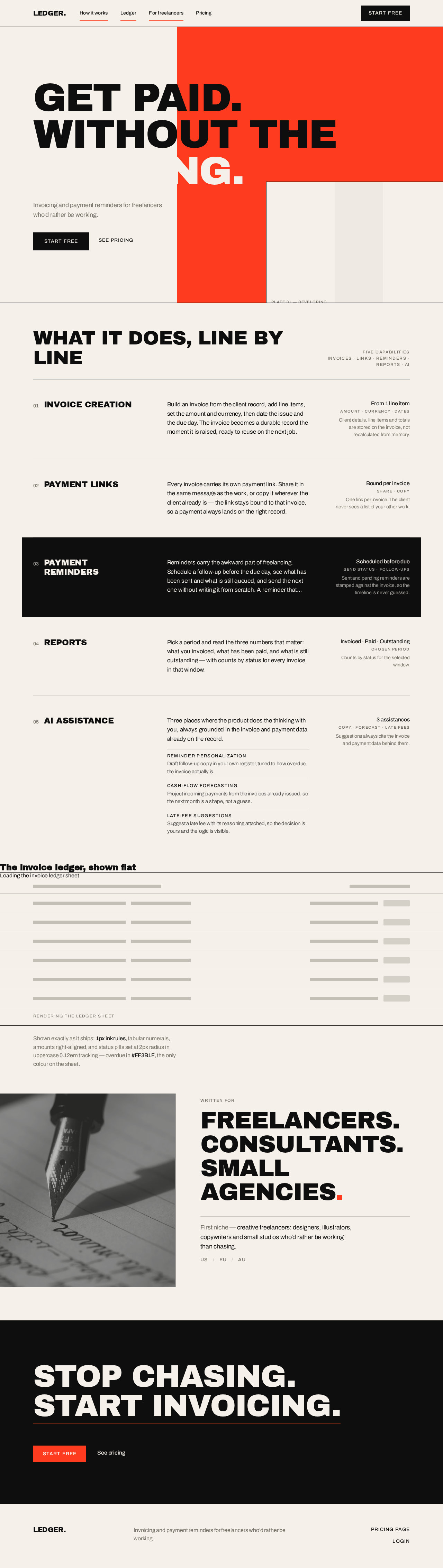
Get paid.Without the
Invoicing and payment reminders for freelancers who’d rather be working.

What it does, line by line
INVOICE CREATION
Build an invoice from the client record, add line items, set the amount and currency, then date the issue and the due day. The invoice becomes a durable record the moment it is raised, ready to reuse on the next job.
PAYMENT LINKS
Every invoice carries its own payment link. Share it in the same message as the work, or copy it wherever the client already is — the link stays bound to that invoice, so a payment always lands on the right record.
PAYMENT REMINDERS
Reminders carry the awkward part of freelancing. Schedule a follow-up before the due day, see what has been sent and what is still queued, and send the next one without writing it from scratch. A reminder that reads like you, sent on time, is worth more than a perfect one sent late.
REPORTS
Pick a period and read the three numbers that matter: what you invoiced, what has been paid, and what is still outstanding — with counts by status for every invoice in that window.
AI ASSISTANCE
Three places where the product does the thinking with you, always grounded in the invoice and payment data already on the record.
- Reminder personalizationDraft follow-up copy in your own register, tuned to how overdue the invoice actually is.
- Cash-flow forecastingProject incoming payments from the invoices already issued, so the next month is a shape, not a guess.
- Late-fee suggestionsSuggest a late fee with its reasoning attached, so the decision is yours and the logic is visible.
The invoice ledger, shown flat
Rendering the ledger sheet
Shown exactly as it ships: 1px ink rules, tabular numerals, amounts right-aligned, and status pills set at 2px radius in uppercase 0.12em tracking — overdue in #FF3B1F, the only colour on the sheet.

Freelancers.Consultants.Small agencies.
First niche — creative freelancers: designers, illustrators, copywriters and small studios who’d rather be working than chasing.
USEUAU
Stop chasing.Start invoicing.
Get paid.Without the
Invoicing and payment reminders for freelancers who’d rather be working.
What it does, line by line
INVOICE CREATION
Build an invoice from the client record, add line items, set the amount and currency, then date the issue and the due day. The invoice becomes a durable record the moment it is raised, ready to reuse on the next job.
PAYMENT LINKS
Every invoice carries its own payment link. Share it in the same message as the work, or copy it wherever the client already is — the link stays bound to that invoice, so a payment always lands on the right record.
PAYMENT REMINDERS
Reminders carry the awkward part of freelancing. Schedule a follow-up before the due day, see what has been sent and what is still queued, and send the next one without writing it from scratch. A reminder that reads like you, sent on time, is worth more than a perfect one sent late.
REPORTS
Pick a period and read the three numbers that matter: what you invoiced, what has been paid, and what is still outstanding — with counts by status for every invoice in that window.
AI ASSISTANCE
Three places where the product does the thinking with you, always grounded in the invoice and payment data already on the record.
- Reminder personalizationDraft follow-up copy in your own register, tuned to how overdue the invoice actually is.
- Cash-flow forecastingProject incoming payments from the invoices already issued, so the next month is a shape, not a guess.
- Late-fee suggestionsSuggest a late fee with its reasoning attached, so the decision is yours and the logic is visible.
The invoice ledger, shown flat
Rendering the ledger sheet
Shown exactly as it ships: 1px ink rules, tabular numerals, amounts right-aligned, and status pills set at 2px radius in uppercase 0.12em tracking — overdue in #FF3B1F, the only colour on the sheet.
Freelancers.Consultants.Small agencies.
First niche — creative freelancers: designers, illustrators, copywriters and small studios who’d rather be working than chasing.
USEUAU
No comments yet. Be the first!