infini-todo
 Diya Trivedi
start a project to build a simple single page design of todo

Comments (0)
Sign in to leave a comment
System Requirements
System Requirements Document for infini-todo
1. Introduction
infini-todo is a deliberately minimal personal todo utility delivered as a single page. The product intent is narrow and complete: one anonymous visitor opens the page, types a task, adds it, and sees their current list of tasks in that same view. There is no navigation, no account, no second screen, and no surrounding application shell.
The audience is a single person — the "Todo user" — who wants to capture tasks and review them in one place without ceremony. The design brief treats the page as a poster: oversized typography, hard colour blocks, a ruled list, and one hot accent. The product's value is the speed and small delight of getting a thought onto the page and seeing it counted.
This document is the System Requirements Document for infini-todo, prepared for Diya Trivedi.
2. System Overview
infini-todo is a single-page web application. The page is the anonymous public entry surface and the working surface at once: it explains the app through its own poster-like composition and, in the same view, hosts the add-task input and the current task list.
Actors
- Todo user (human, active) — the single person who adds tasks and views the list.
- Application (system) — holds the current task list in the page's runtime state, renders counts, and applies completion styling.
Accepted behavior
- Add a todo item by entering task text and submitting it.
- View the current todo items on the single page.
- See the open/done count reflected in the page's count displays.
- Mark a task complete (checkbox) and remove a task (delete glyph), as the page's list controls.
Ownership and delivery
- One first-party custom page, Todo, owned by the application, anonymously reachable, with no identity requirement.
- No provider surfaces, no external destinations, no background services required for the accepted behavior.
Narrow exclusions
- No additional pages, routes, or navigation.
- No accounts, sign-in, or user profiles.
- No persistence beyond the page session is specified by the source.
Removed from scope
- None. No concept was explicitly removed by the user.
2a. Product Interpretation and Delivery Boundary
The user asked for "a simple single page design of todo." That is both a product statement and a hard structural constraint: the entire product is one page. The page is publicly reachable with no identity step, because nothing in the accepted behavior requires a durable, privately owned, resumable state tied to a person — the user adds tasks and views them in the same session on the same page.
The page carries two responsibilities that are cohesive rather than separate: it is the anonymous entry (the poster composition that presents the app) and the working surface (input plus list). Because the entry context and the working lifecycle share the same view, the same state, and the same completion outcome, they belong to one destination, not two.
Current delivery is a first-party custom UI. There are no provider-owned or external destinations, and no headless delivery. Anything beyond adding and viewing tasks — accounts, multi-page navigation, sharing, reminders, integrations — is outside the current boundary and is not implemented.
2c. Page Content and Component Coverage
Todo
The single page of infini-todo. Anonymous, no identity required. It is simultaneously the public entry (poster composition) and the working surface (add input and task list).
Information and state
- The current task list: an ordered collection of task items, each with task text and a completion state (open or done).
- Derived counts: number of open tasks and number of done tasks, displayed in the spine strip and the ticker.
- Input state: the current contents of the add-task field (empty or typed text).
- Empty state: when no tasks exist, the list area shows the ruled table frame with no rows and the counts read zero.
Primary actions
- Add a task — type task text into the thick black-outlined input and press the solid red ADD button (or submit the field). The task is appended to the list, the input clears, and the counts update.
- Complete a task — toggle the chunky square checkbox on a row. The checkbox fills solid red and a hard red strike is drawn left-to-right through the task text over 180ms; the counts update.
- Delete a task — activate the bold × glyph at the right of a row. The row is removed and the counts update.
Supporting actions and states
- The ticker line under the input scrolls the count phrase continuously; under reduced motion it becomes a wrapped static line.
- The spine strip shows the rotated INFINI label and the open/done count as vertical tracked type.
Domain entities
- Task item: task text (string, required, non-empty after trimming), completion state (open/done), position in the list.
Component responsibilities
- Hero band — full-bleed poster-red band roughly 55vh tall holding the oversized stacked TODO wordmark in paper-white, cropped intentionally by the right viewport edge; optional halftone dot texture at 8% opacity.
- Spine strip — black vertical strip down the left edge with rotated INFINI in 12px tracked uppercase and the open/done count.
- Diagonal cut — hard diagonal colour-block transition between the red band and the paper ground.
- Add-task form — thick black-outlined input on white with a solid red ADD button; validation prevents adding empty or whitespace-only text.
- Ticker — mustard hairline band under the input scrolling the count phrase.
- Task list — hard-ruled table: 2px black rule per row, checkbox left, task text, delete glyph right; no cards, no shadows.
States
- Loading — not applicable; the page renders its static composition and current in-memory list immediately.
- Empty — no tasks: ruled frame with no rows, counts at zero, ticker reads zero open and zero done.
- Success — a task is added and appears as a new ruled row; the input clears; counts update.
- Error and recovery — submitting empty or whitespace-only text is rejected: the field retains focus and no row is added. If a task is deleted, the remaining rows reflow and counts update; there is no undo specified.
3. Functional Requirements
FR-1 — Single-page delivery (explicit) As a Todo user I should use the entire product on one page, so that I never navigate away to do my work.
- Trigger: opening the product.
- Observable result: the Todo page renders the hero, input, and list together; no other route or navigation exists.
- Failure/recovery: not applicable.
- Continuation: the user proceeds directly to adding or viewing tasks.
FR-2 — Add a todo item (explicit) As a Todo user I should add a todo item by entering its text and submitting, so that my task is captured.
- Input: task text typed into the add-task field.
- Trigger: pressing ADD or submitting the field.
- Observable result: a new ruled row appears in the list with the task text, the input clears, and the open count increases.
- Failure/recovery: empty or whitespace-only text is rejected; no row is added and the field retains focus.
- Continuation: the user can immediately add another task or act on the new row.
FR-3 — View todo items (explicit) As a Todo user I should view my todo items on the single page, so that I can see what I have captured.
- Trigger: the page rendering with one or more tasks, or a task being added.
- Observable result: each task appears as a row in the hard-ruled table with its text and completion state.
- Failure/recovery: with no tasks, the empty ruled frame and zero counts are shown.
- Continuation: the user reviews the list and may complete or delete a row.
FR-4 — Complete a task (required_inference) As a Todo user I should mark a task complete via its checkbox, so that the list reflects what is done.
- Input: the chunky square checkbox on a row.
- Observable result: the checkbox fills solid red and a hard red strike is drawn left-to-right through the task text over 180ms; the open and done counts update.
- Failure/recovery: toggling again returns the task to open and removes the strike.
- Continuation: the user continues with remaining open tasks.
FR-5 — Delete a task (required_inference) As a Todo user I should remove a task via its delete glyph, so that the list stays accurate.
- Input: the bold × glyph at the right of a row.
- Observable result: the row is removed, remaining rows reflow, and the counts update.
- Failure/recovery: no undo is specified; the removal is immediate.
- Continuation: the user continues adding or reviewing tasks.
FR-6 — Count display (required_inference) As a Todo user I should see the open and done counts, so that I know the state of my list at a glance.
- Trigger: any add, complete, or delete.
- Observable result: the spine strip and the ticker show the current open and done counts (for example "3 OPEN · 2 DONE").
- Failure/recovery: with no tasks, both counts read zero.
- Continuation: the user acts on the list informed by the counts.
4. User Personas
Todo user
Product context. A single person using a tiny personal-productivity utility. They arrive at the page with a thought to capture and no patience for setup. There is no account, no onboarding, and no second screen — the page is the whole product.
Primary goal. Get a task onto the page quickly and see the current list in one view.
Distinct accepted responsibilities.
- Enter task text and add it to the list.
- Review the current list of tasks.
- Mark tasks complete and remove tasks as the list evolves.
- Read the open/done counts to understand the state of the list.
Relevant inputs and decisions. The task text itself; whether a task is done; whether a task should be removed.
Interactions with other participants. None beyond the application, which holds the list state and renders counts and completion styling. There is no second human participant in the accepted behavior.
Observable success. Their tasks are visible as ruled rows on the single page, the counts match the list, and adding, completing, and deleting all take effect immediately in the same view.
5. Core User Flows
Flow 1 — Add a task and see it in the list
- The Todo user opens the Todo page. The poster composition renders: red hero band with the oversized TODO wordmark, black spine strip with INFINI and the counts, the diagonal cut, the add-task input, the ticker, and the ruled list.
- The user clicks the add-task input and types the task text.
- The user presses ADD (or submits the field).
- The application appends a new ruled row with the task text, clears the input, and updates the open count in the spine strip and ticker.
- The user sees the new row in the list and the updated count, and may add another task or act on the row.
Failure and recovery. If the user submits empty or whitespace-only text, no row is added; the field retains focus so the user can type a real task.
Flow 2 — Review the current list
- The Todo user opens the Todo page with one or more tasks present.
- The application renders each task as a row in the hard-ruled table with its text and completion state.
- The user reads the list and the open/done counts in the spine strip and ticker.
- The user decides whether to add, complete, or delete a task and proceeds to the relevant flow.
Failure and recovery. With no tasks, the user sees the empty ruled frame and zero counts, and proceeds to Flow 1.
Flow 3 — Complete a task
- The Todo user locates an open task row in the list.
- The user activates the chunky square checkbox on that row.
- The application fills the checkbox solid red, draws a hard red strike left-to-right through the task text over 180ms, and updates the open and done counts.
- The user sees the completed task and the updated counts, and continues with remaining open tasks.
Failure and recovery. Toggling the checkbox again returns the task to open and removes the strike.
Flow 4 — Delete a task
- The Todo user locates a task row to remove.
- The user activates the bold × glyph at the right of the row.
- The application removes the row, reflows the remaining rows, and updates the counts.
- The user sees the updated list and continues.
Failure and recovery. No undo is specified; the removal is immediate and the user can re-add the task if needed.
6. Visuals Colors and Theme
The creative direction is authoritative for this section. Muse: Paula Scher. Headline idea: type as architecture for a one-page todo — a poster-sized idea on a single sheet, not a dashboard.
Mode. Light mode only.
Colour tokens (exact hex by role)
| Role | Hex | Use |
|---|---|---|
| Background (paper) | #F4EFE6 | Warm paper ground carrying everything |
| Surface | #FFFFFF | Input field and list rows only |
| Text | #111111 | Pure black type and rules |
| Primary (poster red) | #E4321B | Hero colour block, ADD button, completion strike, count |
| Accent (mustard) | #F2C51D | Thin ticker band and focus ring only — never a second dominant |
| Muted | #6F6A62 | Metadata only |
Proportions. Roughly 70% paper, 20% black type, 8% red, 2% yellow.
Typography
- Headings: Anton, uppercase only, tracking
-0.01em, leading0.86, set enormous and stacked so words become blocks; the word TODO may be rotated 90° as a spine label. - Body: Archivo (400/600) for body, labels, and task text — tight, neutral voice so the display type stays the only shout.
- Scale: 1.25 modular for UI. Display
clamp(56px, 11vw, 128px); secondary display 32/44; section labels 12px uppercase tracked+0.14em; task text 18/20; meta 13px. - Never more than three sizes visible at once.
Shape language. Hard edges everywhere — zero border radius. Full-bleed flat colour blocks butted directly against each other, black 2px rules as dividers, diagonal band cuts between hero and list, thick black outlines on the input and button. Sticker-free, shadow-free, no glass, no gradients.
Layout. Poster grid: full-width red band at the top holding the oversized TODO wordmark bleeding off the right edge; a black spine strip down the left with the rotated label. Below, an asymmetric two-column split at 1280px (5 columns of stacked type, 7 columns of input + list), collapsing to one column at 768px and 375px with the display type wrapping to two or three stacked lines. The task list is a ruled table: a thick black rule per row, checkbox left, task text, delete glyph right.
Imagery. Typography is the image. No photography, no illustration, no icons beyond a thick-line black checkbox square and a bold ×. Optional halftone dot texture in the red band at 8% opacity as the only texture.
Readable text and controls. Headlines, wordmarks, labels, numbers, task text, and controls stay entirely inside the viewport and their container at 375px, 768px, and 1280px, wrapping or scaling to fit. Decoration and motion may crop, bleed, rotate, or overlap, but never cover readable text or controls. The ticker may cross the viewport edge by design because it moves; under reduced motion it wraps to a static line.
7. Signature Design Concept
The public entry is a poster, not a SaaS hero. The top of the page is a full-bleed poster-red (#E4321B) band roughly 55vh tall. Inside it, the word TODO in Anton at clamp(56px, 11vw, 128px), uppercase, stacked on two lines and deliberately cropped by the right viewport edge, in paper-white (#F4EFE6). A rotated black spine strip runs down the left edge carrying INFINI in 12px tracked uppercase and the open/done count as vertical tracked type, like the spine of a poster book.
Beneath the red band, butted flush against it with a hard diagonal cut, sits the paper ground holding the add-task input as a thick black-outlined field on white with a solid red ADD button. There is no centred headline, no subtext, no blue, no gradient. A mustard (#F2C51D) hairline ticker under the input scrolls the count phrase continuously. The task list below is a hard-ruled table — 2px black rules between rows, no cards, no shadows, a chunky square checkbox that fills solid red with a left-to-right strike through the task text on completion.
The signature moves are: the oversized cropped TODO wordmark as the hero image; the rotated INFINI spine strip with vertical counts; the hard-ruled task table with chunky checkbox and strike; the mustard ticker; and the hard diagonal colour-block cut between hero and list. Sections collide rather than fade.
8. Interaction Model & Motion Direction
Interaction Model: Animated Motion Tempo: expressive Hero Dimensionality: flat
Landing Hero Motion Brief
- Focal subject. The oversized stacked TODO wordmark in Anton, paper-white on the poster-red band, cropped by the right viewport edge.
- Input → transformation → outcome thesis. On load, each hero word slides up from behind a mask, staggered 60ms apart, resolving the wordmark into its final cropped position. When a task is added, a colour-block wipe sweeps across the list area as the new row settles into place. The mustard ticker scrolls the count phrase continuously. A checkbox completes with a hard red strike drawn left-to-right in 180ms.
- Motion vocabulary. Masked word reveals, colour-block wipes, continuous marquee ticker, hard left-to-right strike. Expressive but disciplined; no easing softness, no bounce, no float.
- Composed first frame. The red band fills the top of the viewport with the TODO wordmark partially revealed behind its mask, the black spine strip already in place, the paper ground and input below the diagonal cut, and the ticker beginning its scroll.
- Reduced-motion state. All decorative motion collapses to static: the wordmark appears in its final position, the colour-block wipe is omitted, the strike appears instantly, and the ticker becomes a wrapped static line reading the count phrase.
9. Non-Functional Requirements
- Single-page constraint (explicit): the product is exactly one page; no additional routes, navigation, or screens may be introduced.
- Simplicity (explicit): the design must remain a simple single page of todo; no adjacent modules, dashboards, or settings surfaces.
- Readability at every viewport (explicit, from creative direction): readable text and controls stay whole and inside their container at 375px, 768px, and 1280px; decoration and motion may crop but never cover readable content.
- Reduced motion (explicit, from creative direction): all decorative motion collapses to static under
prefers-reduced-motion, with the ticker becoming a wrapped static line. - Contrast and legibility (required_inference): black
#111111on paper#F4EFE6and white#FFFFFFsurfaces maintains full contrast for task text; the mustard accent is confined to a hairline and focus ring so it never carries body text. - No persistence requirement (explicit boundary): the source specifies no storage, accounts, or cross-session continuity; the list lives in the page session.
10. Tech Stack
- Frontend: React single-page application rendering the Todo page.
- Styling: CSS with the exact tokens above (Anton and Archivo loaded as web fonts); no component library that would impose rounded corners, shadows, or blue defaults.
- State: in-page client state for the task list and counts; no backend or database is required by the accepted behavior.
- Build and delivery: static build served as a single page; Docker/docker-compose only if a containerized static host is desired. No Kubernetes.
11. Assumptions and Constraints
- Assumption (required_inference): the task list lives in the page session; no persistence across reloads is specified by the source, so none is implemented.
- Assumption (required_inference): task text is required and non-empty after trimming; empty submissions are rejected.
- Assumption (required_inference): tasks can be marked complete and deleted via the list controls described in the creative direction; these are the minimal list-management mechanics needed for a usable todo list.
- Constraint (explicit): exactly one page, anonymously reachable, with no identity step.
- Constraint (explicit): no blue or indigo anywhere; no rounded corners, soft shadows, floating cards, gradients, glass, or blur.
- Constraint (explicit): no photography, illustration, or icons beyond the checkbox square and the × glyph.
- Constraint (explicit): Inter, Roboto, Arial, Helvetica, Poppins, and system-ui are not used for any text.
12. Glossary
- Todo page — the single page of infini-todo; the anonymous public entry and the working surface.
- Task item — a single todo entry with task text and a completion state.
- Open count — the number of tasks not yet completed.
- Done count — the number of completed tasks.
- Spine strip — the rotated black vertical strip on the left edge carrying INFINI and the counts.
- Ticker — the mustard hairline band under the input scrolling the count phrase.
- Diagonal cut — the hard diagonal colour-block transition between the red hero band and the paper list area.
- Strike — the hard red left-to-right line drawn through a completed task's text.
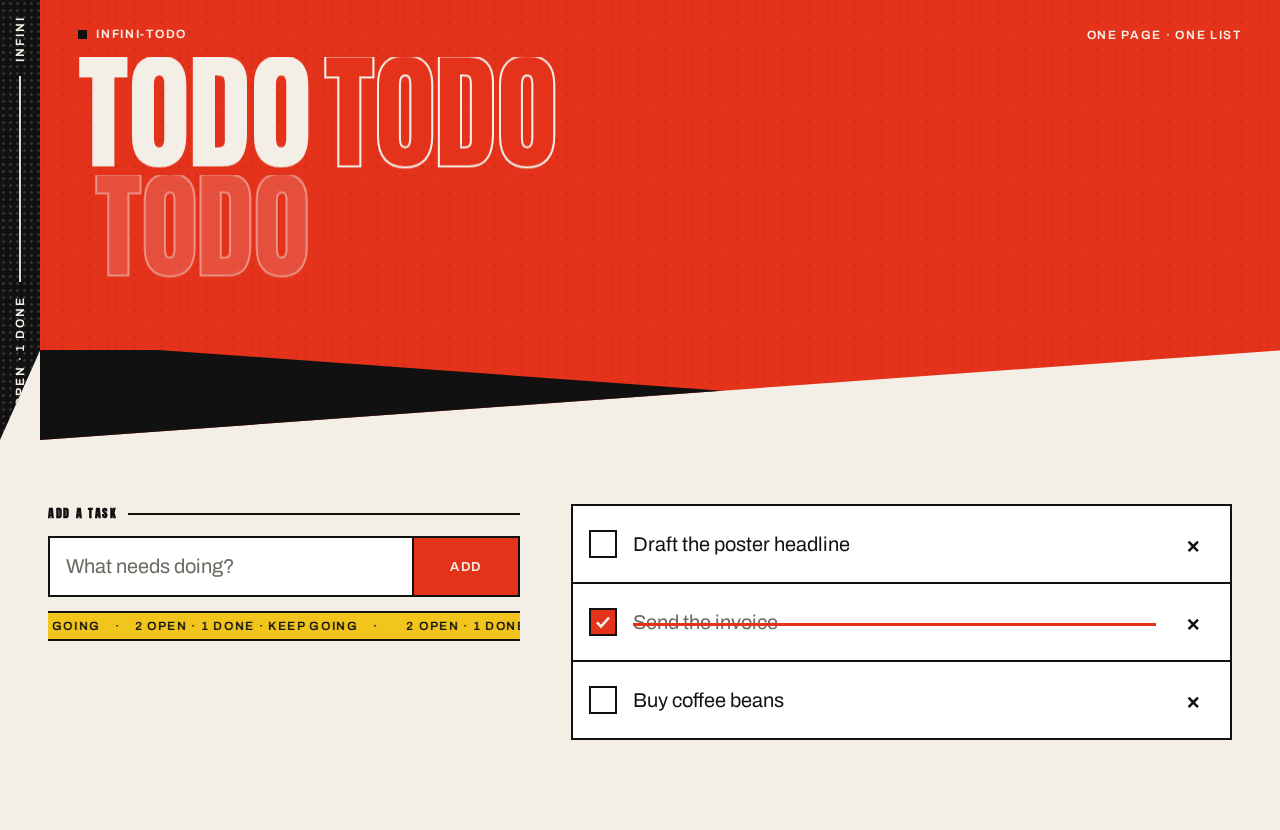
TODO
Add a task
2 OPEN·1 DONE·KEEP GOING
- Draft the poster headline
- Send the invoice
- Buy coffee beans
TODO
Add a task
2 OPEN·1 DONE·KEEP GOING
- Draft the poster headline
- Send the invoice
- Buy coffee beans
No comments yet. Be the first!