indigo-tic
 Priyal Vadgama
make me a tic tac toe app

Comments (0)
Sign in to leave a comment
System Requirements
System Requirements Document for indigo-tic
1. Introduction
indigo-tic is a small, universal tic tac toe game. The product intent is a two-screen, immediately playable toy: a public entry that shows what the game is and how it looks, and a game surface where two players take turns placing marks on a 3x3 board until the game detects and reports a win, loss, or draw — after which a new game can be started.
The audience is anyone with two minutes and a screen: a kid on a phone at a bus stop, an adult killing time. The register is playful, warm, and low-stakes. It must feel like a toy you already know how to use, not a product you have to learn. There is no account, no sign-in, no saved history, and no server-side game state required by the accepted requirements.
2. System Overview
indigo-tic is delivered as a first-party custom web UI with two pages:
- Landing — the anonymous public entry. It explains the game, who it is for, and what it does, and it demonstrates the product to itself with a self-playing 3x3 pixel demo board before any game is started.
- Game — owns the accepted tic tac toe lifecycle: starting a game, alternating turns on the 3x3 board, reporting the win, loss, or draw outcome, and starting a new game afterward.
Both pages are owned by the application and require no access identity (access_requirement: none). The single accepted active human persona is Player — the person who plays tic tac toe against an opponent in the app. The opponent is the second human participant in the same local game; the app itself is the system that enforces turn order and adjudicates the outcome.
Current scope: a playable local two-player tic tac toe game with turn alternation, outcome detection (win, loss, draw), a new-game action after a game ends, and a persistent score strip.
Narrow exclusions: no online or networked multiplayer, no matchmaking, no accounts or profiles, no persistent cross-session history, no AI opponent, no chat, and no monetization are established by the accepted requirements. Nothing in this document should be read as authorizing those adjacent capabilities.
2a. Product Interpretation and Delivery Boundary
The accepted requirement is a tic tac toe app, and the accepted delivery shape is a custom first-party UI. The two pages above are the complete current information architecture: an anonymous public entry that introduces and demonstrates the game, and the game surface that owns play.
Access is deliberately open. Neither page requires identity, and no accepted journey needs durable actor-specific state to be privately owned or resumed — a game is played in one sitting, and the score strip is the game's only persistent chrome. No first-use identity establishment, invitation, provisioning, or account-management capability is therefore part of this product.
Everything the player sees and touches is first-party. There is no provider-owned surface, no external destination, and no headless delivery in the accepted scope. The system's own work — enforcing alternating turns, detecting a win, loss, or draw, and updating the score strip — is internal execution supporting the player's interaction, not a separate destination.
Future ideas are kept out of the current pages and acceptance criteria; see Section 11.
2c. Page Content and Component Coverage
Landing
- Information and state: the product wordmark
INDIGO-TIC; a short statement of what the game is, who it is for, and what it does; the current state of the self-playing demo board (in progress, or a completed game under reduced motion). - Primary action: a single chunky
PLAYbutton that enters the Game page and starts a game. - Supporting actions: none required. The demo board is non-interactive — it plays itself and is not a second way to start a game.
- Domain entities: the demo board (a 3x3 grid of nine cells), the demo marks (X and O), the demo game outcome.
- Component responsibilities:
- Wordmark —
INDIGO-TICin Silkscreen, all-caps, spanning roughly 88% of the viewport width as a single line at desktop, with the hyphen rendered as a pixel-yellow accent block. - Demo board — a live 3x3 pixel board (max 320px) that plays one self-solving game on loop, X in periwinkle and O in pixel-yellow, so the product demonstrates itself inside the hero. It is decorative-with-meaning: it shows the game, it does not accept input.
- Intro copy — the short explanation of the game, its audience, and its rules, set in Space Grotesk.
PLAYbutton — chunky rectangle, 3px hard offset shadow, pinned bottom-left of the composition, aligned to the same left margin as the wordmark.- Dot-grid field — a faint 4px indigo dot-grid texture at 6% opacity behind the landing field, making the pixel module visible without adding decoration.
- Wordmark —
- States:
- Loading: the page renders immediately; the demo board begins its loop once loaded. No blocking spinner is required.
- Empty: not applicable — the landing content is static copy plus the demo board.
- Success: the player reads the page and presses
PLAY, entering the Game page with a fresh game. - Error/recovery: if the demo board animation cannot run, the board renders as a static completed game so the hero still shows the product. The
PLAYbutton remains fully functional regardless of demo-board state. - Reduced motion: the demo board shows a completed game statically instead of looping.
Game
- Information and state: the 3x3 board with its nine cells and any placed marks; the current turn indicator (
YOUR TURN · X/YOUR TURN · O); the terminal status line (X WINS/O WINS/DRAW); the score strip values for X, draws, and O; whether the game is in progress or finished. - Primary action: placing a mark on an empty cell on the current player's turn.
- Supporting actions:
NEW GAME— starts a fresh game after a game ends (or at any time, clearing the board);RESET SCORE— clears the score strip back to zero. - Domain entities: the board (nine cells, each empty or marked X or O), the mark (X or O), the turn (whose move it is), the game outcome (in progress, X wins, O wins, draw), the winning line (the three cells that produced a win), the score (X wins, draws, O wins).
- Component responsibilities:
- Board — a fixed-aspect 3x3 grid centred in the viewport, capped at
min(88vw, 520px)so it never touches the edges at 375px. Square tiles with 2px hard borders and zero border radius. - Tile — an empty cell that accepts a mark on the current player's turn; shows a 5x5 pixel-matrix X or O once placed; shows a 5x5 pixel cursor hand on hover when it is a legal target.
- Mark renderer — X and O drawn as 5x5 pixel matrices (inline SVG or box-shadow pixel art) rather than font glyphs, X in periwinkle
#8E7BFFand O in pixel-yellow#F2C14E. - Status line — left-aligned above the board, showing the turn indicator during play and the outcome when the game ends.
- Winning line — a dotted rule that draws across the three winning cells, cell by cell, in four 80ms steps.
- Board — a fixed-aspect 3x3 grid centred in the viewport, capped at
- Score strip — three ruled cells (X / DRAWS / O) in a single row, aligned exactly to the board's width, with tabular numerals and tiny pixel pictograms (a pixel X badge, a pixel equals-sign for draws, a pixel O badge).
- Controls row —
NEW GAMEandRESET SCOREas chunky rectangles with 3px hard offset shadows, wrapping to a column at 375px. - States:
- Loading: the board renders empty and ready; no blocking spinner is required.
- Empty: a fresh board with nine empty cells, the status line reading
YOUR TURN · X, and the score strip at its current values. - Success: a mark is placed, the turn indicator blinks once and switches, and play continues; on a terminal move the status line reports
X WINS,O WINS, orDRAW, the winning line draws (on a win), and the score strip updates. - Error/recovery: a tap on an occupied cell or on any cell after the game has ended is rejected — the board is unchanged, no mark is placed, and the status line continues to show the current turn or the final outcome. The player recovers by choosing a legal empty cell, or by pressing
NEW GAMEto start over. - Reduced motion: marks appear without the two-step reveal and the winning line appears whole.
3. Functional Requirements
FR-1 — Play tic tac toe on a 3x3 board (explicit) As a Player, I should be able to play a game of tic tac toe on a 3x3 board so that I can play the game the app exists to provide.
- Trigger/input: the player enters the Game page (from the Landing
PLAYbutton) or pressesNEW GAME. - Observable result: a 3x3 board of nine empty square tiles is presented, centred in the viewport, with the status line reading
YOUR TURN · Xand the score strip showing its current values. - Access state: no identity required.
- Failure/recovery: if the board cannot be presented, the player can return to Landing and press
PLAYagain. - Continuation: the player places the first mark.
FR-2 — Take turns placing marks on the board (explicit) As a Player, I should take turns with my opponent placing marks on the 3x3 board so that we can play the game out.
- Trigger/input: the player taps or clicks an empty tile on their turn.
- Observable result: the mark for the current player (X or O) appears in that tile as a 5x5 pixel matrix, the turn indicator blinks once and switches to the other player, and the board now shows one more mark.
- Access state: no identity required.
- Failure/recovery: a tap on an occupied tile, or on any tile after the game has ended, places no mark and leaves the board and status line unchanged; the player recovers by choosing a legal empty tile.
- Continuation: the other player takes their turn, alternating until the game reaches an outcome.
- Participant response: the opponent is the second human participant in the same local game; their move is their own action on the same board, and the turn indicator is the observable handoff between them.
FR-3 — Detect and report a win, loss, or draw (explicit) As a Player, I should be told when the game is won, lost, or drawn so that I know the game has ended and who won.
- Trigger/input: a mark is placed that completes three in a row (row, column, or diagonal) for that player, or that fills the ninth cell without a line.
- Observable result: the status line reports
X WINS,O WINS, orDRAW; on a win the winning line draws as a dotted rule stepping cell by cell across the three winning cells in four 80ms steps; the score strip updates — the winner's cell increments, or the draws cell increments on a draw. - Access state: no identity required.
- Failure/recovery: if the outcome cannot be determined, the board remains in its last valid state and the player can press
NEW GAMEto start over. - Continuation: the player presses
NEW GAMEto play again, orRESET SCOREto clear the score strip. - Participant response: both players see the same reported outcome and the same winning line; the losing player's result is reported as the winner's counterpart (
X WINSis the loss for O and vice versa).
FR-4 — Start a new game after a game ends (explicit) As a Player, I should be able to start a new game after a game ends so that I can keep playing.
- Trigger/input: the player presses
NEW GAMEafter a game has ended. - Observable result: the board is cleared to nine empty tiles, the winning line is removed, the status line returns to
YOUR TURN · X, and the score strip retains its accumulated values. - Access state: no identity required.
- Failure/recovery: if the board does not clear, the player can reload the Game page; the score strip is the only persistent chrome and is not required to survive a reload.
- Continuation: the player places the first mark of the new game.
FR-5 — See the game demonstrated before playing (required_inference) As a Player, I should see the game demonstrated on the Landing page before I start so that I understand what the app is and what it does.
- Trigger/input: the player opens the Landing page.
- Observable result: the
INDIGO-TICwordmark, a short explanation of the game and its audience, and a live 3x3 pixel demo board that plays one self-solving game on loop, with X in periwinkle and O in pixel-yellow. - Access state: anonymous — no identity required.
- Failure/recovery: if the demo board cannot animate, it renders as a static completed game so the hero still shows the product; the
PLAYbutton remains functional. - Continuation: the player presses
PLAYto enter the Game page with a fresh game.
FR-6 — Keep score across games in the session (required_inference) As a Player, I should see a running score for X, draws, and O so that repeated games have a result to compare.
- Trigger/input: each game reaches a terminal outcome on the Game page.
- Observable result: the three-cell ruled score strip (X / DRAWS / O), aligned to the board's width with tabular numerals, increments the winner's cell or the draws cell.
- Access state: no identity required; the score is session-scoped chrome, not a durable account record.
- Failure/recovery: if the score strip is cleared or lost, the player presses
RESET SCOREto zero it deliberately, or simply continues playing from zero. - Continuation: the player presses
NEW GAMEand the score strip carries forward into the next game.
4. User Personas
Player
Product context. The Player is the person who plays tic tac toe against an opponent in the app. They arrive with no account and no setup — often on a phone, often with only a couple of minutes — and they expect to be playing within seconds. The app is a toy they already know how to use.
Primary goal. Play a complete game of tic tac toe against a second player, see the result clearly, and start another game if they want one.
Distinct accepted responsibilities.
- Enter the game from the Landing page via
PLAY. - Take their turn by placing their mark on an empty tile of the 3x3 board.
- Read the turn indicator to know whose move it is, and hand the turn over to the opponent.
- Read the reported outcome —
X WINS,O WINS, orDRAW— and the winning line when there is one. - Start a new game with
NEW GAMEafter a game ends. - Read the score strip across games, and clear it with
RESET SCOREwhen they want a fresh tally.
Relevant inputs and decisions. Which empty tile to claim on their turn; whether to keep playing after a game ends or stop; whether to reset the accumulated score.
Interactions with other accepted participants. The Player shares the board with a second human player sitting at the same screen. Turn alternation is the handoff between them: the turn indicator is the observable signal that the other player's move is now expected, and the reported outcome is the shared result both players read. The app is the system that enforces the alternation and adjudicates the outcome; it is not a participant.
Observable success. A mark appears where they tapped, the turn indicator switches to the other player, the game ends with a clearly reported win, loss, or draw, the winning line is drawn when there is one, the score strip reflects the result, and NEW GAME produces a clean board ready for the next game.
What makes this role distinct. The Player is simultaneously the initiator and one of two participants in the same local game — they both make moves and read the outcome of a game they are playing in. There is no separate administrator, spectator, or account holder in this product, and no role has differentiated visibility or control over shared state.
5. Core User Flows
Flow 1 — Discover the game and start playing (Player)
- The Player opens the app and lands on the Landing page — an anonymous public entry requiring no identity.
- The Landing page presents the
INDIGO-TICwordmark in Silkscreen, a short explanation of what the game is, who it is for, and what it does, and a live 3x3 pixel demo board that plays one self-solving game on loop, X in periwinkle and O in pixel-yellow. - The Player watches the demo board complete a game and understands the product without reading instructions.
- The Player presses the chunky
PLAYbutton pinned bottom-left of the composition. - The Game page opens with a fresh board: nine empty square tiles centred in the viewport, the status line reading
YOUR TURN · X, and the score strip at its current values. - Failure/recovery: if the demo board cannot animate, it renders as a static completed game and the
PLAYbutton still works; the Player is never blocked from starting. - Continuation: the Player places the first mark (Flow 2).
Flow 2 — Play a game to its outcome (Player, with the second player)
- The Player is on the Game page with an empty board and the status line reading
YOUR TURN · X. - The Player taps an empty tile. The X mark pops in as a two-step pixel reveal (outline frame → filled frame, 90ms each), and the turn indicator blinks once and switches to
YOUR TURN · O. - The second player — the opponent at the same screen — sees the turn indicator change and taps an empty tile. The O mark pops in, and the turn indicator blinks once and switches back to
YOUR TURN · X. - Steps 2 and 3 repeat, each player placing one mark per turn, until the board reaches a terminal state.
- Failure/recovery: if the Player taps an occupied tile, or taps any tile after the game has ended, no mark is placed and the board and status line are unchanged; the Player recovers by choosing a legal empty tile.
- Continuation: the game reaches an outcome (Flow 3).
Flow 3 — See the outcome (Player, with the second player)
- A player places a mark that completes three in a row — a row, a column, or a diagonal — or that fills the ninth cell without a line.
- The status line reports the outcome:
X WINS,O WINS, orDRAW. - On a win, the winning line draws as a dotted rule stepping cell by cell across the three winning cells in four 80ms frames — the game's reward moment.
- The score strip updates: the winner's cell increments, or the draws cell increments on a draw.
- Both players read the same reported outcome and the same winning line; the losing player's result is the counterpart of the winner's.
- Failure/recovery: if the outcome cannot be determined, the board remains in its last valid state and the Player can press
NEW GAMEto start over. - Continuation: the Player presses
NEW GAME(Flow 4) orRESET SCORE(Flow 5).
Flow 4 — Start a new game (Player)
- The Player is on the Game page with a finished game and its outcome reported.
- The Player presses
NEW GAMEin the controls row below the board. - The board clears to nine empty tiles, the winning line is removed, and the status line returns to
YOUR TURN · X. - The score strip retains its accumulated values, so the next game adds to the running tally.
- Failure/recovery: if the board does not clear, the Player can reload the Game page; the score strip is session chrome and is not required to survive a reload.
- Continuation: the Player places the first mark of the new game (Flow 2).
Flow 5 — Reset the score (Player)
- The Player is on the Game page and wants a fresh tally.
- The Player presses
RESET SCOREin the controls row below the board. - The three-cell score strip (X / DRAWS / O) returns to zero.
- Continuation: the Player continues with the current game or presses
NEW GAMEto start a fresh one; the next completed game increments the cleared strip.
6. Visuals, Colors and Theme
Muse and headline. Susan Kare — Charming clarity, indigo grid: a tic tac toe app with pixel soul. Kare's craft is small legible symbols with personality inside a grid you can feel, which is the exact fit for a 3x3 board: the board becomes an icon sheet of nine chunky tiles, and X and O become pictograms rather than text glyphs. The indigo ground is honoured as a deep pixel-field, with the marks as the crisp two-colour signal.
Palette — dark mode (authoritative).
| Role | Hex | Use |
|---|---|---|
| Background | #191A4A | Deep indigo field — the dominant ground on both pages |
| Surface | #232566 | Board tiles, lifted slightly off the field, with 2px light pixel borders |
| Text | #F4F1E8 | Warm paper-white — all readable text |
| Primary | #8E7BFF | Periwinkle — the X mark |
| Accent | #F2C14E | Warm pixel-yellow — the O mark, the winning line, the wordmark hyphen, and one CTA |
| Muted | #9A9BD4 | Muted periwinkle — labels, turn indicators, and rule lines only, never body copy |
No gradients anywhere. Accent yellow is rationed to the winning line, the O mark, and one CTA. X and O read instantly on the dark field and stay distinguishable at 375px.
Typography.
- Headings: Silkscreen (Google Fonts) at 400/700, all-caps for labels and the wordmark, used at a genuinely large display scale so the pixel grid of the letterforms is visible. Tracking slightly open at
+0.02emso pixel counters do not merge. - Body and UI: Space Grotesk at 400/500 — a characterful grotesque with a slightly technical, screen-native feel that pairs with pixel display type without competing. Numbers in the score and turn region use Space Grotesk with tabular figures.
- Scale: 1.25 modular, mobile → desktop — display
clamp(44px, 9vw, 104px), h2 24px → 34px, h3 18px → 22px, body 16px → 18px, label 11px → 13px with+0.12emtracking, tile mark 40px → 72px. Line-height 1.05 on display, 1.5 on body.
Shape language. Pixel-grid geometry: everything snaps to a 4px module. Board tiles are square with 2px hard borders and square corners — no border radius anywhere; the hard edge is the point. Marks are built as 5x5 pixel matrices rendered as CSS box-shadow pixel art or an inline SVG of filled squares, so an X looks like a Kare-era icon rather than a font glyph. Buttons are chunky rectangles with a 3px offset hard shadow (no blur) that compresses on press. Rules and dividers are 2px dotted or solid lines in muted periwinkle. Nothing is rounded, nothing glows.
Spacing rhythm. Strict 4/8pt scale throughout.
Imagery style. No photography, no illustration, no 3D. The imagery is the interface: pixel-drawn X and O marks, a 5x5 pixel cursor hand for the hover state on tiles, tiny pixel pictograms for the score strip (a pixel X badge, a pixel equals-sign for draws, a pixel O badge), and a 2px dotted rule system. A faint 4px indigo dot-grid texture at 6% opacity sits behind the landing field to make the pixel module visible without adding decoration.
Forbidden. Blue-indigo primary on a white or near-white ground; Inter, Roboto, Arial, Helvetica, Open Sans, Lato, Poppins, or system-ui for any heading or body text; rounded corners, border-radius on tiles or buttons, frosted glass, blur, or soft drop shadows with blur radius; gradient blobs, glow effects, neon outlines, or luminous volumetric treatment; a centred hero stack of headline + subheadline + blue button, or a grid of identical hover-lift cards; photography, 3D renders, or illustration; bouncy spring easing, elastic transitions, or confetti on win; score or turn text in muted periwinkle #9A9BD4 at body size. The generic indigo/blue-on-white SaaS template is forbidden for this project.
Readable-text integrity. Headlines, wordmarks, labels, numbers, and controls stay entirely inside the viewport and their container at 375px, 768px, and 1280px, wrapping or scaling to fit, and no other element covers any part of them. Decoration and motion may be cropped, bled, overlapped, or cut as the direction asks, as long as they cover no readable text or control.
7. Signature Design Concept
The board as an icon sheet. The Landing first screen is a full-bleed deep indigo field (#191A4A) with a 4px dot-grid at 6% opacity. The dominant element is the wordmark INDIGO-TIC set in Silkscreen, all-caps, spanning roughly 88% of the viewport width as a single line at desktop at clamp(44px, 9vw, 104px), with the hyphen rendered as a pixel-yellow accent block. To its right at desktop and below it at mobile sits a live 3x3 pixel demo board (max 320px) that plays one self-solving game on loop — X in periwinkle, O in pixel-yellow — so the product demonstrates itself inside the hero. A single chunky PLAY button with a 3px hard offset shadow sits bottom-left of the composition, aligned to the same left margin as the wordmark. No centred stack, no subheadline paragraph, no gradient, no floating cards.
The concept carries into the Game page unchanged: the same nine chunky tiles, the same 5x5 pixel marks, the same hard-edged controls, so the demo board the player watched on Landing is literally the board they then play on.
Signature moves.
- A full-width Silkscreen wordmark
INDIGO-TICwith a pixel-yellow accent block for the hyphen, at up to 104px, sitting above a self-playing 3x3 demo board in the hero. - X and O rendered as 5x5 pixel matrices (inline SVG / box-shadow pixel art) rather than font glyphs, so the marks read as Kare-era icons and pop in with a two-step outline→fill sprite reveal.
- Square board tiles with 2px hard borders and zero border radius, chunky offset hard shadows on every button, snapping to a visible 4px dot-grid module.
- The winning line draws as a dotted rule stepping cell by cell in four 80ms frames — the only "animation" moment in the game, and it is the reward.
- A three-cell ruled score strip (X / DRAWS / O) aligned exactly to the board's width, with tabular numerals, acting as the game's only persistent chrome.
8. Interaction Model & Motion Direction
Interaction Model: Static Motion Tempo: restrained Hero Dimensionality: flat
Landing Hero Motion Brief.
- Focal subject: the self-playing 3x3 pixel demo board beside the
INDIGO-TICwordmark — the product demonstrating itself inside the hero. - Input → transformation → outcome thesis: the page loads → the demo board plays one self-solving game on loop, each move stamped in as a two-step pixel reveal and the winning line drawing as a dotted rule stepping cell by cell → the visitor understands the game and what it does without reading a paragraph, then presses
PLAY. - Motion vocabulary: frame-by-frame, no easing theatrics. Two-step pixel reveal (outline frame → filled frame, 90ms each,
steps()timing function) like an old sprite animation; the winning line extends cell by cell in four 80ms steps; the turn indicator blinks once on change; press states compress the button shadow by 3px in 60ms. Everything is instant on input. - Composed first frame: the full-bleed indigo field with its 6% dot-grid, the oversized Silkscreen wordmark spanning the width with its pixel-yellow hyphen block, the demo board mid-game to the right (or below at mobile), and the chunky
PLAYbutton bottom-left with its 3px hard offset shadow. - Reduced-motion state: the demo board shows a completed game statically, marks appear without the two-step reveal, and the winning line appears whole. The
PLAYbutton and all game controls remain fully usable.
9. Non-Functional Requirements
NFR-1 — Immediate, low-stakes play (explicit) The app must be playable within seconds of opening, with no account, sign-in, or setup step. Rationale: the accepted audience is a kid on a phone at a bus stop and an adult killing two minutes; the register is a toy you already know how to use.
NFR-2 — Legibility at small viewports (explicit)
Readable text and controls stay whole at 375px, 768px, and 1280px. The board is capped at min(88vw, 520px) so it never touches the edges at 375px; the controls row wraps to a column at 375px; the wordmark scales via clamp(44px, 9vw, 104px). No element covers any part of readable text or a control.
NFR-3 — Mark distinguishability (explicit)
X (#8E7BFF) and O (#F2C14E) must remain instantly distinguishable on the dark field at 375px, including for the smallest tile mark size (40px).
NFR-4 — Reduced-motion support (explicit)
Under prefers-reduced-motion, the demo board shows a completed game statically, marks appear without the two-step reveal, and the winning line appears whole. All game functionality remains available.
NFR-5 — No gradients, no blur, no rounded corners (explicit) No gradients anywhere; no border-radius on tiles or buttons; no frosted glass, blur, or soft drop shadows with blur radius; no glow, neon outline, or luminous volumetric treatment.
NFR-6 — Session-scoped score (required_inference) The score strip is session chrome, not a durable account record. It is not required to survive a page reload, and no persistence layer is required by the accepted requirements.
10. Tech Stack
- Frontend: React — a two-page custom UI (Landing, Game) with client-side routing between them.
- Styling: CSS with the 4px pixel module, hard 2px borders, 3px offset hard shadows, and
steps()timing functions for the sprite-style reveals. Marks rendered as inline SVG or box-shadow pixel art. - Fonts: Silkscreen (headings, wordmark, labels) and Space Grotesk (body, UI, tabular numerals), loaded from Google Fonts.
- Game logic: client-side — turn alternation, win/line detection, draw detection, and score accumulation run in the browser. No server-side game state is required by the accepted requirements.
- Backend: none required for the accepted scope. The accepted requirements describe a local two-player game with no accounts, no persistence, and no networked play; no API, database, or container service is needed to satisfy them.
11. Assumptions and Constraints
Assumptions.
- A-1 (required_inference): The two players share one screen and one device, taking turns on the same board. The accepted requirements describe turn alternation and a win/loss/draw outcome but do not describe networked play, so the opponent is the second human at the same screen.
- A-2 (required_inference): The score strip is session-scoped chrome. The accepted requirements establish a score strip as the game's only persistent chrome but do not establish durable cross-session history.
- A-3 (required_inference): X always moves first in a new game, so the status line reads
YOUR TURN · Xon a fresh board. - A-4 (required_inference):
NEW GAMEclears the board and preserves the score strip;RESET SCOREclears the score strip and leaves the current game in place. These are the two distinct controls the direction specifies below the board.
Constraints.
- C-1 (explicit): The product is a tic tac toe app — a 3x3 board, alternating turns, win/loss/draw detection, and a new game after a game ends.
- C-2 (explicit): Both pages require no access identity. No accounts, sign-in, profiles, or permission controls are part of this product.
- C-3 (explicit): The visual direction in Sections 6–8 is authoritative: the specified palette, fonts, shape language, layout, and motion vocabulary are binding, and the listed forbidden treatments are excluded.
- C-4 (explicit): The generic indigo/blue-on-white SaaS template is forbidden for this project.
Future (not current scope, not in current pages or acceptance).
- Online or networked multiplayer, matchmaking, and remote opponents.
- An AI opponent.
- Accounts, profiles, and durable cross-session score history.
- Chat, monetization, and any adjacent social or commercial capability.
12. Glossary
- Board — the 3x3 grid of nine square tiles on which the game is played.
- Cell / Tile — one of the nine squares of the board; empty, or marked X or O.
- Mark — an X or an O placed in a cell, rendered as a 5x5 pixel matrix rather than a font glyph.
- Turn — one player's opportunity to place a single mark on an empty cell; turns alternate between X and O.
- Turn indicator — the status line above the board reading
YOUR TURN · XorYOUR TURN · O, which blinks once on change. - Outcome — the terminal state of a game:
X WINS,O WINS, orDRAW. - Winning line — the three cells in a row, column, or diagonal that produced a win, drawn as a dotted rule stepping cell by cell in four 80ms frames.
- Score strip — the three-cell ruled row (X / DRAWS / O) aligned to the board's width, with tabular numerals and pixel pictograms; the game's only persistent chrome.
NEW GAME— the control that clears the board and starts a fresh game while preserving the score strip.RESET SCORE— the control that returns the score strip to zero.- Demo board — the non-interactive 3x3 pixel board on the Landing page that plays one self-solving game on loop.
- Pixel module — the 4px grid to which all geometry snaps, made visible by the 6%-opacity dot-grid texture on the landing field.
- Player — the accepted active human persona: the person who plays tic tac toe against an opponent in the app.
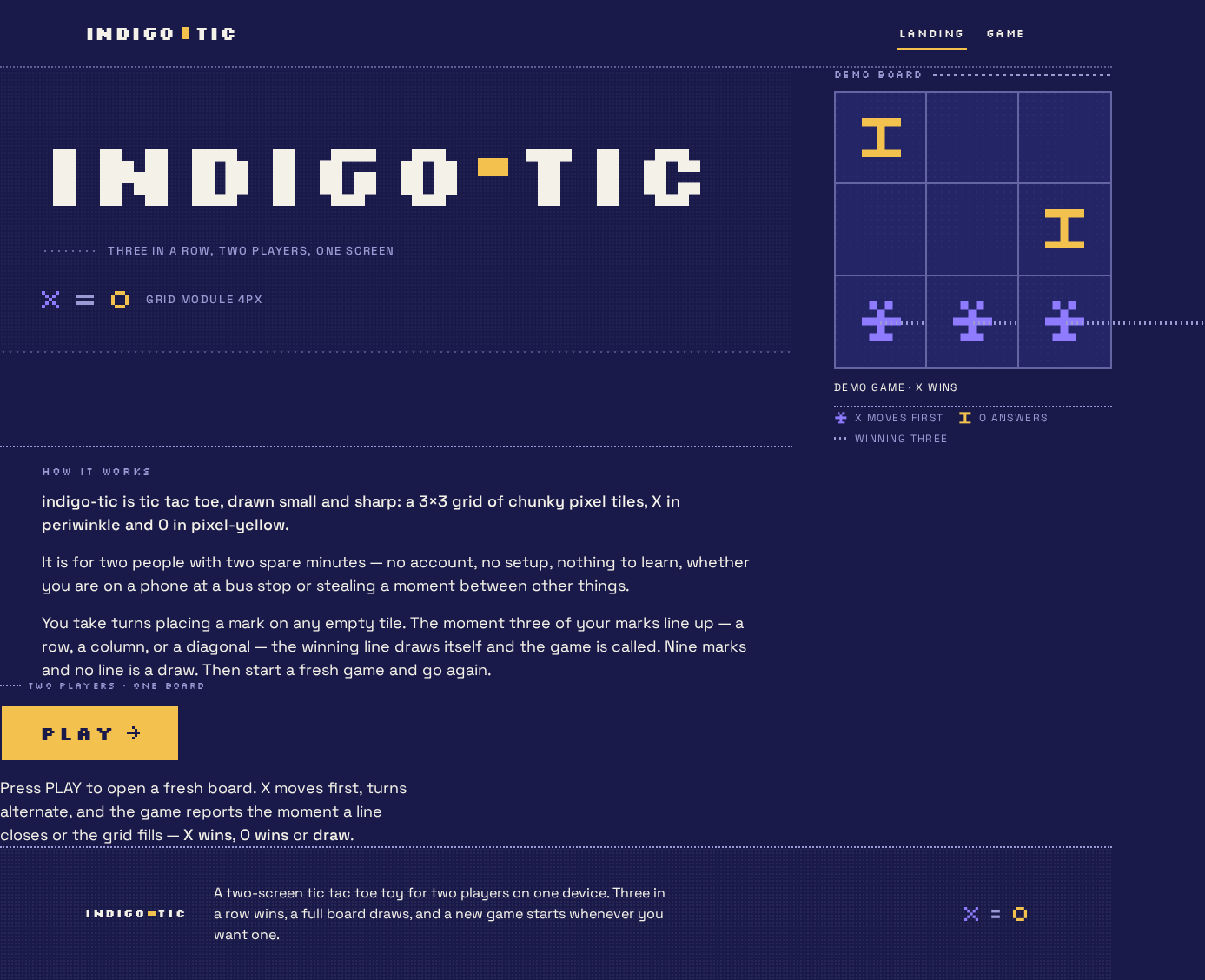
Three in a row, two players, one screen
indigo-tic is tic tac toe, drawn small and sharp: a 3×3 grid of chunky pixel tiles, X in periwinkle and O in pixel-yellow.
It is for two people with two spare minutes — no account, no setup, nothing to learn, whether you are on a phone at a bus stop or stealing a moment between other things.
You take turns placing a mark on any empty tile. The moment three of your marks line up — a row, a column, or a diagonal — the winning line draws itself and the game is called. Nine marks and no line is a draw. Then start a fresh game and go again.
Two players · one board
PLAYPress PLAY to open a fresh board. X moves first, turns alternate, and the game reports the moment a line closes or the grid fills — X wins, O wins or draw.
Demo game · X WINS
Three in a row, two players, one screen
indigo-tic is tic tac toe, drawn small and sharp: a 3×3 grid of chunky pixel tiles, X in periwinkle and O in pixel-yellow.
It is for two people with two spare minutes — no account, no setup, nothing to learn, whether you are on a phone at a bus stop or stealing a moment between other things.
You take turns placing a mark on any empty tile. The moment three of your marks line up — a row, a column, or a diagonal — the winning line draws itself and the game is called. Nine marks and no line is a draw. Then start a fresh game and go again.
Two players · one board
PLAYPress PLAY to open a fresh board. X moves first, turns alternate, and the game reports the moment a line closes or the grid fills — X wins, O wins or draw.
Demo game · X WINS
No comments yet. Be the first!