indigo-panel
 Vardhaman CodeTech
I need create whatsapp panel with official api global to connect all client


Comments (0)
Sign in to leave a comment
Project Tasks22
Implement Theme & Global Styles
As a Frontend Developer, I want to implement the global color palette and theme defined in the SRD (Background: #F5F8FA, Surface: #FFFFFF, Text: #2C3E50, Accent: #3B5998, Muted: #B0BEC5) across the scaffold project. This includes setting up CSS variables, Tailwind config or styled-components theme, typography, spacing, and shared UI components (buttons, cards, inputs) so all pages use a consistent design system. Remove any unused scaffold pages not present in the design pages list.
Implement Clients API
As a Backend Developer, I want to implement REST API endpoints for client account management so that Admins can create, read, update, and delete client accounts. Endpoints should include: POST /clients, GET /clients, GET /clients/{id}, PUT /clients/{id}, DELETE /clients/{id}. Built with FastAPI and MySQL.
Implement Messages API
As a Backend Developer, I want to implement REST API endpoints for sending and receiving WhatsApp messages via the official WhatsApp Business API so that Clients can manage their communications. Endpoints: POST /messages/send, GET /messages, GET /messages/{conversation_id}, webhook receiver for incoming messages.
Implement Templates API
As a Backend Developer, I want to implement REST API endpoints for managing message templates so that Clients can create, retrieve, update, and delete their templates. Endpoints: POST /templates, GET /templates, GET /templates/{id}, PUT /templates/{id}, DELETE /templates/{id}. Integration with WhatsApp Business API for template submission and approval status.
Implement Settings API
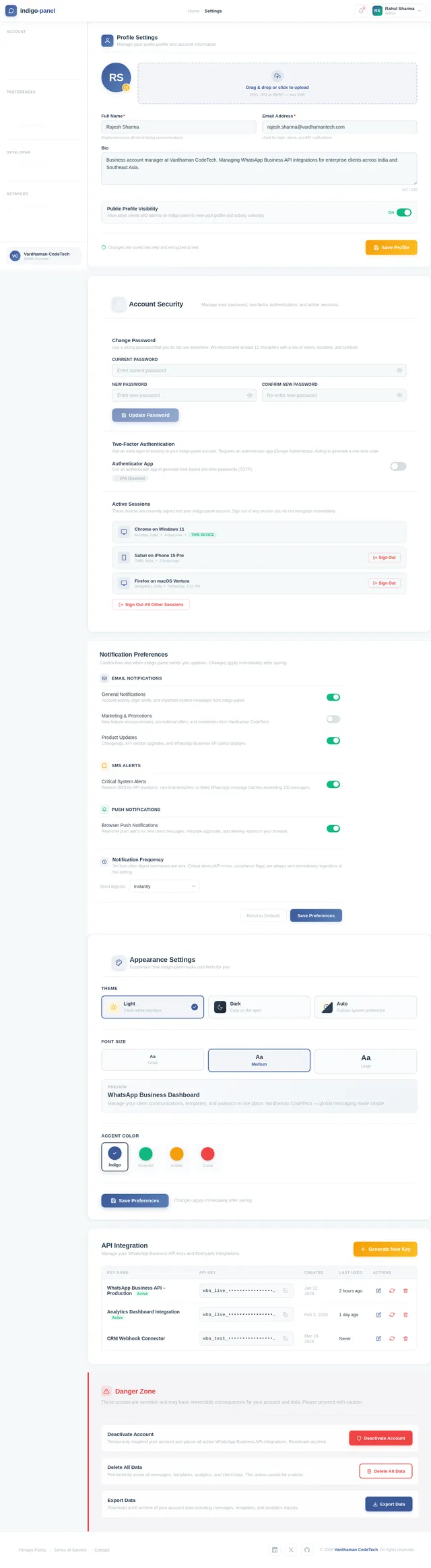
As a Backend Developer, I want to implement REST API endpoints for managing account and system settings so that Admins and Clients can configure their API keys and system-wide integrations. Endpoints: GET /settings, PUT /settings, GET /settings/api-keys, POST /settings/api-keys, DELETE /settings/api-keys/{id}.
Build Landing Page
As a Frontend Developer, I want to implement the Landing page based on the existing JSX design (Landing v2). This page serves as the entry point for Guests who view the platform demo and explore the interactive global map. It should feature dynamic animations with glowing connection lines between countries, hover interactions showing live stats, client highlights on dot click, and a side panel summary. Links to Login and Demo pages. Implement based on the existing Landing v2 design.
Build Login Page
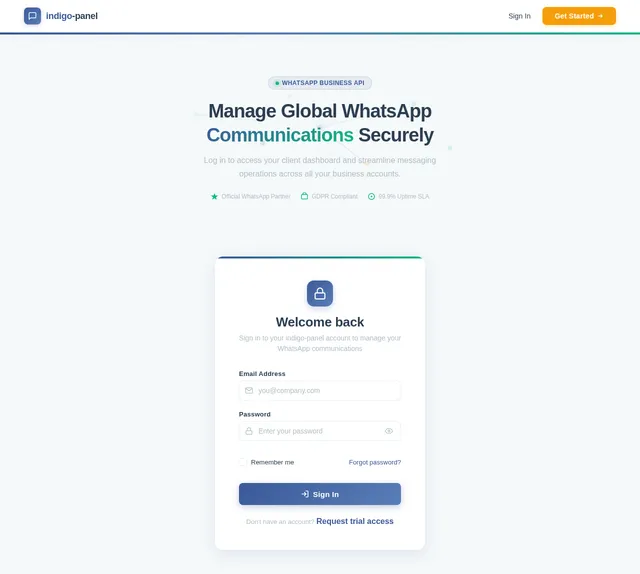
As a Frontend Developer, I want to implement the Login page based on the existing JSX design (Login v2). This page allows Admins and Clients to sign in to the platform. It should include form validation, error handling, and navigation to the Dashboard on success. Implement based on the existing Login v2 design.
Build Signup Page
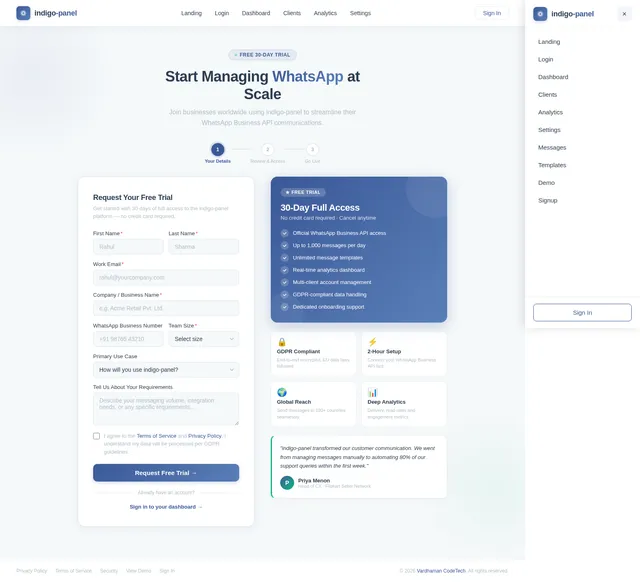
As a Frontend Developer, I want to implement the Signup page based on the existing JSX design (Signup v2). This page allows Guests to request a trial account by submitting their details. It includes a multi-step or single-step form for collecting business information and links back to the Landing page. Implement based on the existing Signup v2 design.
Build Demo Page
As a Frontend Developer, I want to implement the Demo page based on the existing JSX design (Demo v2). This page is accessible to Guests and showcases the platform's key features interactively. It is reached from the Landing page and leads to the Signup page. Implement based on the existing Demo v2 design.
Implement Analytics API
As a Backend Developer, I want to implement REST API endpoints for analytics data so that Admins and Clients can retrieve message usage statistics and reports. Endpoints: GET /analytics/overview, GET /analytics/messages, GET /analytics/clients/{id}, with filters for date ranges and aggregation.
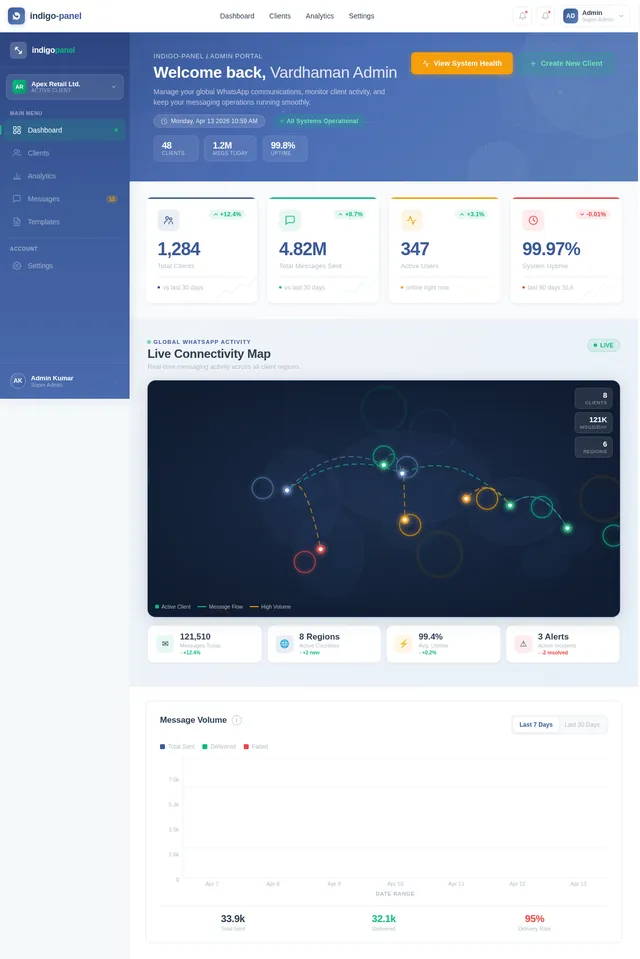
Build Dashboard Overview Page
As a Frontend Developer, I want to implement the Dashboard Overview page based on the existing JSX design (Dashboard v2). This is the main landing page post-login for both Admins and Clients. Admins see platform-wide stats and navigation to Clients and Analytics. Clients see their own message stats and navigation to Messages, Templates, Analytics, and Settings. Implement based on the existing Dashboard v2 design.
Integrate AI Assistant (GPT)
As an AI Engineer, I want to integrate GPT-based AI assistant functionality using Langchain so that users can interact with an intelligent assistant within the dashboard for query resolution, message drafting, and analytics insights. This powers the dashboard/ai-assistant page already present in the scaffold.
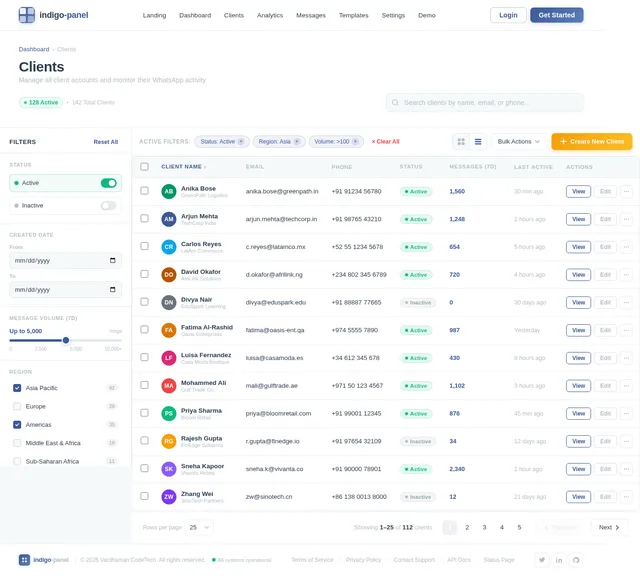
Build Clients Management Page
As a Frontend Developer, I want to implement the Clients page based on the existing JSX design (Clients v2). This page is accessible to Admins and allows them to view, create, and manage client accounts. It includes a list/table of clients, a create client form/modal, and links to individual client details. Implement based on the existing Clients v2 design.
Build Messages Page
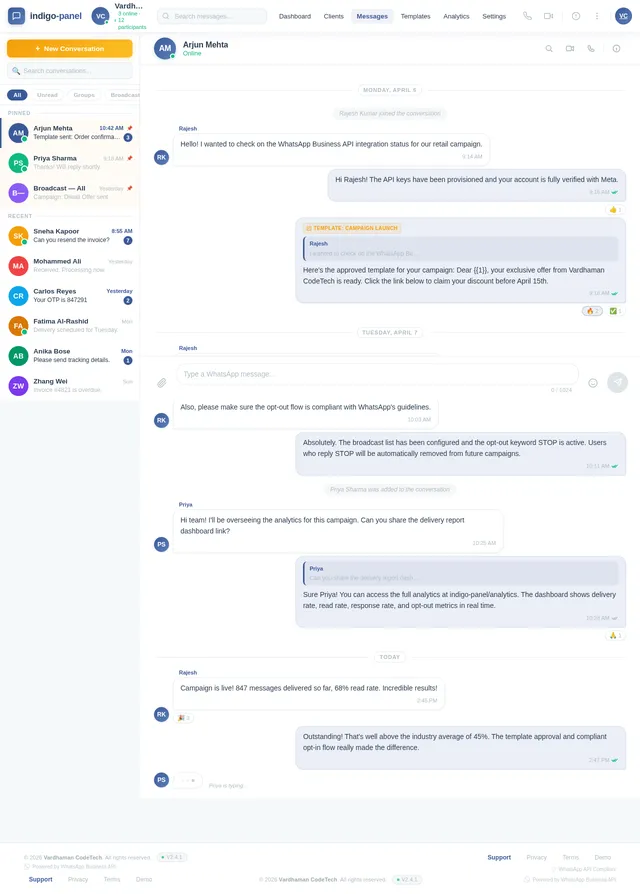
As a Frontend Developer, I want to implement the Messages page based on the existing JSX design (Messages v2). This page allows Clients to send and receive WhatsApp messages through the panel. It includes a conversation list, message thread view, and a compose/send message interface. Accessible from the Client Dashboard. Implement based on the existing Messages v2 design.
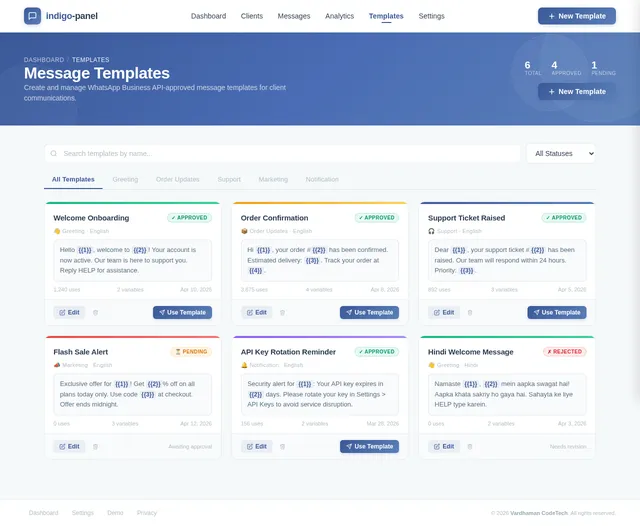
Build Templates Management Page
As a Frontend Developer, I want to implement the Templates page based on the existing JSX design (Templates v2). This page allows Clients to create and manage message templates. It includes a list of existing templates, a create/edit template form, and template preview functionality. Accessible from the Client Dashboard. Implement based on the existing Templates v2 design.
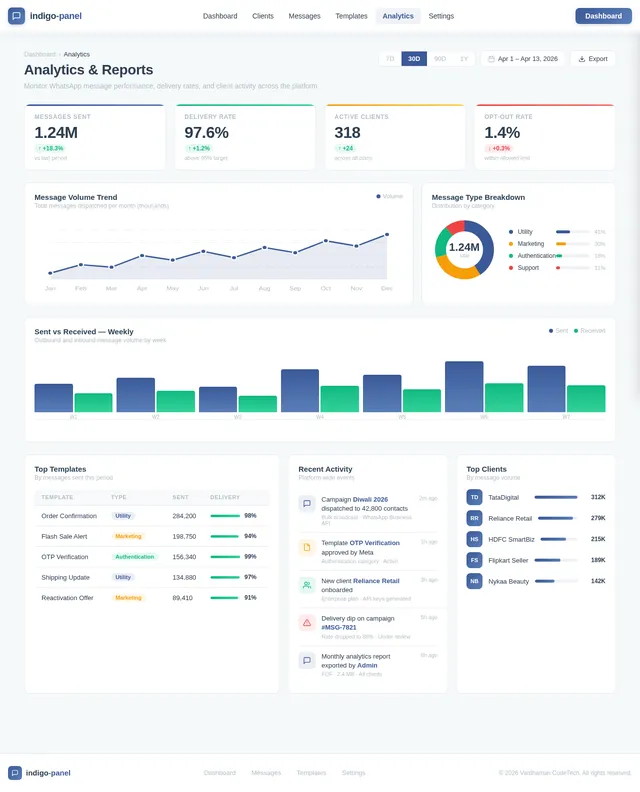
Build Analytics Page
As a Frontend Developer, I want to implement the Analytics page based on the existing JSX design (Analytics v2). This page serves both Admins (to monitor all client usage) and Clients (to view their own message reports). It includes charts, KPIs, and filters for date ranges. Accessible from both Admin and Client dashboards. Implement based on the existing Analytics v2 design.
Build Settings Page
As a Frontend Developer, I want to implement the Settings page based on the existing JSX design (Settings v2). This page serves both Admins (system-wide settings, API integrations) and Clients (manage API keys, account settings). Accessible from the Admin Analytics page and Client Analytics page. Implement based on the existing Settings v2 design.
Connect Frontend to Clients API
As a Frontend Developer, I want to connect the Clients management page to the backend Clients API so that Admins can create, view, update, and delete client accounts via the UI with real data. Includes API service layer, loading states, error handling, and form submissions.
Connect Frontend to Messages API
As a Frontend Developer, I want to connect the Messages page to the backend Messages API so that Clients can send and receive real WhatsApp messages via the UI. Includes real-time updates via polling or WebSocket, message state management, and error handling.
Connect Frontend to Templates API
As a Frontend Developer, I want to connect the Templates page to the backend Templates API so that Clients can create and manage real message templates via the UI. Includes API service layer, template submission, approval status display, and error handling.
Connect Frontend to Analytics API
As a Frontend Developer, I want to connect the Analytics page to the backend Analytics API so that Admins and Clients can view real usage statistics and reports via charts and KPIs. Includes API service layer, chart data binding, and date filter integration.
Connect Frontend to Settings API
As a Frontend Developer, I want to connect the Settings page to the backend Settings API so that Admins and Clients can manage their API keys and system configurations via the UI. Includes API service layer, form handling, and secure key masking.

Centralized WhatsApp Communication Management
Streamline your global messaging operations with indigo-panel. Connect clients worldwide, manage templates, track analytics, and ensure compliance — all from one powerful dashboard.
Real-Time WhatsApp Activity
Monitor live messaging activity across all client accounts worldwide. Click on any region to explore detailed communication analytics.
Everything You Need to Manage WhatsApp at Scale
From messaging and templates to analytics and compliance, indigo-panel gives your team the tools to communicate globally with confidence.
Send Messages
Reach customers worldwide through the official WhatsApp Business API with rich media support, scheduled delivery, and real-time status tracking.
Explore Messaging→Manage Templates
Create, edit, and organize WhatsApp-approved message templates. Streamline bulk communication with pre-built and custom template libraries.
View Templates→Real-Time Analytics
Monitor message delivery, open rates, and engagement metrics with live dashboards. Make data-driven decisions with comprehensive reporting tools.
See Analytics→Admin Controls
Centralized oversight for managing client accounts, enforcing compliance, and configuring system-wide settings from a single command center.
Open Dashboard→API Integration
Seamlessly connect your existing tools and workflows with our robust RESTful API. Manage API keys, webhooks, and third-party integrations effortlessly.
API Documentation→Compliance & Security
Enterprise-grade security with GDPR compliance, end-to-end encryption adherence, and full alignment with WhatsApp Business API guidelines.
Learn More→Platform Performance at Scale
Built for enterprise reliability, indigo-panel delivers consistent performance across thousands of concurrent connections.
Powering seamless WhatsApp communication for thousands of businesses simultaneously worldwide.
Enterprise-grade reliability ensuring your messages are always delivered without interruption.
Lightning-fast message delivery and API response times for real-time global connectivity.
Designed for Every Role
Whether you manage the platform, communicate with clients, or explore our features, indigo-panel adapts to your needs.
Admin
Oversees the entire indigo-panel platform with full system access and control.
Key Responsibilities
- Manage client accounts and permissions
- Monitor message usage and analytics
- Enforce WhatsApp API compliance
- Handle system-wide settings and integrations
Client
Business user managing their own WhatsApp communications independently.
Key Responsibilities
- Send and receive WhatsApp messages
- Create and manage message templates
- View real-time messaging analytics
- Manage account settings and API keys
Guest
Prospective user exploring the platform before committing to a plan.
Key Responsibilities
- Explore platform features via live demo
- Request a free trial account
- Browse documentation and use cases
- Contact sales for enterprise plans
Get Started in 5 Simple Steps
From your first visit to sending messages across the globe — here's your journey with indigo-panel.
Explore the Platform
Visit the indigo-panel landing page and discover how centralized WhatsApp communication management can transform your business operations.
View Landing→Sign Up & Log In
Create your account in seconds or log in with existing credentials. Secure authentication ensures your data stays protected at all times.
Go to Login→Access Your Dashboard
Get a comprehensive overview of your WhatsApp activity, client stats, message analytics, and real-time metrics all in one centralized dashboard.
Open Dashboard→Send & Manage Messages
Compose messages using pre-approved templates, manage conversations with clients worldwide, and track delivery status in real time.
Start Messaging→Analyze & Optimize
Leverage detailed analytics to monitor engagement rates, optimize your templates, and scale your WhatsApp communication strategy globally.
View Analytics→Testimonials
Trusted by Businesses Worldwide
See how companies around the globe use indigo-panel to streamline their WhatsApp communications.
Ready to Transform Your WhatsApp Communication?
Join 500+ businesses worldwide using indigo-panel to streamline messaging operations, manage templates, and gain real-time analytics with the official WhatsApp Business API.
Frequently Asked Questions
Everything you need to know about indigo-panel, from setup to scaling.
Still have questions? Our team is here to help you get started.
Contact Support →
No comments yet. Be the first!