image-audio
 Aditya Solanki
Act as an expert frontend web and mobile app developer. Build a complete, production-ready "Offline Image & Audio Utility Toolkit" inside a single, self-contained HTML file (with embedded CSS and vanilla JavaScript). The entire app must work 100% offline using browser-native APIs (HTML5 Canvas, FileReader, Web Audio API) with zero external server uploads and zero external CDN dependencies that could break offline. ### 1. Visual Design & UI System - **Theme & Aesthetic:** Use a colorful, modern light glassmorphism design (soft pastel mesh gradient background, frosted translucent white cards with subtle borders, soft shadows, and crisp dark slate typography). Do NOT use dark themes, black backgrounds, neon colors, or electric blue. - **Mobile-First Layout:** Design for mobile portrait viewports (responsive up to desktop), featuring a sticky top header ("MediaKit Offline"), a clean dashboard grid of tools, and a bottom or back navigation bar when inside an active tool. - **Language:** Use strictly clean English across all UI labels, buttons, code comments, and variable names. ### 2. Core Functional Tools (4 Modules) Build a tab or card switcher so users can jump between these four working tools: 1. **Passport Photo & Custom Image Resizer:** - Upload an image (`JPG`, `PNG`, `WEBP`). - Offer quick preset buttons: "Indian Passport (35x45 mm / 413x531 px)", "Square Profile (1080x1080 px)", "YouTube Thumbnail (1280x720 px)", plus custom Width/Height inputs with an "Aspect Ratio Lock" toggle. - Include a live HTML5 Canvas preview and a target file-size quality slider (10% to 100%). - Provide a 1-tap "Download Resized Image" button. 2. **Image Format Converter & Compressor:** - Upload any image and display original file size and dimensions. - Allow converting between `PNG`, `JPEG`, and `WEBP` formats using Canvas `toBlob()`. - Show the estimated new file size in KB/MB before downloading. 3. **Offline Audio Trimmer & Ringtone Cutter:** - Upload an audio file (`MP3`, `WAV`, `OGG`, `M4A`) and decode it locally using the Web Audio API (`AudioContext`). - Render a clean visual waveform on an HTML5 Canvas. - Provide Start Time and End Time range sliders (with numeric seconds display), an audio preview player ("Play Selection"), and an "Export Trimmed WAV" button that encodes the sliced `AudioBuffer` into a downloadable `.wav` file. 4. **Quick Quote & Text Card Maker:** - A lightweight graphic generator for social media cards or thumbnails. - Inputs: Custom headline text, subtext, background gradient selector (4–5 light pastel/vibrant presets), text alignment, and font size slider. - Render live onto an HTML5 Canvas and allow 1-tap PNG export. ### 3. Technical & Performance Requirements - **Zero Lag & Memory Safety:** Properly revoke object URLs (`URL.revokeObjectURL`) and close unused `AudioContext` instances so the app runs smoothly on mid-range Android WebViews without memory leaks. - **Error Handling:** Show clean, user-friendly toast notifications for unsupported file types, empty inputs, or successful file downloads. - **Code Quality:** Write clean, modular, well-structured vanilla JavaScript inside a single `<script>` tag and clean CSS inside a single `<style>` tag so the single HTML file can be directly wrapped into an Android APK.


Comments (0)
Sign in to leave a comment
System Requirements
System Requirements Document for MediaKit Offline
1. Introduction
MediaKit Offline is a complete, production-ready "Offline Image & Audio Utility Toolkit" delivered as a single, self-contained HTML file with embedded CSS and vanilla JavaScript. It gives people on Android phones and in desktop browsers a private, zero-upload workspace for four everyday media jobs: resizing images to exact print and social dimensions, converting and compressing images between formats, trimming audio into ringtones, and composing quote or thumbnail text cards.
The product intent is privacy and reliability first. Every operation runs 100% offline using browser-native APIs — HTML5 Canvas, FileReader and the Web Audio API — with zero external server uploads and zero external CDN dependencies that could break offline. The single HTML file is designed so it can be directly wrapped into an Android APK.
The audience is the Offline Media Creator: a person who prepares passport photos, profile pictures, thumbnails, ringtones and social quote cards on one device, often on a mid-range Android WebView, and who wants finished files downloaded locally without sending anything to a server.
2. System Overview
MediaKit Offline is a client-only, single-file web application. All image decoding, resizing, format conversion, audio decoding, waveform rendering, trimming, WAV encoding and card rendering happen inside the browser using HTML5 Canvas, FileReader and the Web Audio API. No file ever leaves the device, and no network request is required for the app to function.
The app presents a sticky top header titled "MediaKit Offline", a clean dashboard grid of the four tools, and a bottom or back navigation bar when a tool is active. A tab or card switcher lets the user jump between the four tools. The visual system is a colorful, modern light glassmorphism design: a soft pastel mesh gradient background, frosted translucent white cards with subtle borders, soft shadows and crisp dark slate typography. Dark themes, black backgrounds, neon colors and electric blue are excluded.
The single active human persona is the Offline Media Creator. All four tools are anonymous, no-account, on-device utilities; there is no application-owned identity, no login, and no persistent server-side state. The provisioned backend, database and frontend services in the scaffold are infrastructure inventory only and do not add product requirements, domain entities or authentication to this offline toolkit.
Removed from scope
- Dark themes (also: black backgrounds, black panels)
- Neon colors (also: electric blue)
- External server uploads
- External CDN dependencies
- Application accounts, login and authentication
- Server-side persistence of user media
2a. Product Interpretation and Delivery Boundary
MediaKit Offline is delivered as one self-contained HTML file. The user opens that file in a browser or an Android WebView, and the entire toolkit — all four tools, all styling and all logic — is available immediately with no install step, no network connection and no account. The file is structured so it can be wrapped directly into an Android APK.
All processing is local and ephemeral. Uploaded images and audio are read with FileReader and decoded in memory; results are produced on Canvas or via the Web Audio API and delivered to the user as downloaded files. Object URLs are revoked and unused AudioContext instances are closed so the app stays smooth on mid-range Android WebViews. Nothing is transmitted, stored remotely or shared.
The current delivery boundary is the single offline HTML file and its four tools. There is no current or planned server-side component, no user account, and no cloud storage. The provisioned backend, database and frontend services exist as scaffold infrastructure only; they are not required by, and do not extend, the accepted offline product behavior.
2c. Page Content and Component Coverage
Landing
- Information/state: Product name "MediaKit Offline" in the sticky frosted header; hero headline "Edit images and audio on your phone"; subline "Resize, convert, trim and make quote cards. All work stays on your device."; a pastel mesh gradient first screen with a large frosted white panel.
- Primary action: "Open a tool" call to action leading to the Dashboard.
- Supporting actions: None beyond entry; the sticky header remains visible.
- Domain entities: None (no data yet).
- Component responsibilities: Sticky frosted header (title, blurs the mesh gradient behind it); hero panel (headline, subline, CTA); decorative pastel gradient shapes and glass primitives behind the panel.
- States: Loading — not applicable (static entry). Empty — not applicable. Success — hero renders fully at 375px, 768px and 1280px with all text and the CTA whole and inside the viewport. Error — not applicable. Recovery — not applicable.
Dashboard
- Information/state: Clean dashboard grid of the four tool tiles: Image Resizer, Format Converter, Audio Trimmer, Text Card Maker. Each tile is a glass card with a soft colour glow behind it and a simple line-symbol icon on a frosted tile.
- Primary action: Tap a tool tile to open that tool.
- Supporting actions: Tab or card switcher to jump between the four tools; sticky header remains visible.
- Domain entities: Tool (name, icon, destination).
- Component responsibilities: Sticky frosted header; responsive card grid (single column on mobile, two columns at 768px, three at 1280px); tool tiles with hover/tap lift of 4px; tab/card switcher.
- States: Loading — not applicable. Empty — not applicable (four tools always present). Success — all four tiles render with labels whole and inside their containers at every viewport. Error — not applicable. Recovery — not applicable.
Image Resizer
- Information/state: Uploaded image (JPG, PNG, WEBP); selected preset or custom dimensions; current Width and Height values; Aspect Ratio Lock state; quality slider value (10%–100%); live HTML5 Canvas preview.
- Primary action: "Download Resized Image" (1-tap).
- Supporting actions: Upload image; choose preset "Indian Passport (35x45 mm / 413x531 px)", "Square Profile (1080x1080 px)" or "YouTube Thumbnail (1280x720 px)"; enter custom Width/Height; toggle "Aspect Ratio Lock"; adjust quality slider.
- Domain entities: Source image (file, dimensions), target size (width, height, preset), quality setting, output image blob.
- Component responsibilities: File input; preset buttons; custom width/height inputs; aspect-ratio-lock toggle; quality slider (violet-to-pink track, large round thumb); live Canvas preview; download button; bottom glass bar with active tool name and Back control.
- States: Loading — image being read/decoded. Empty — no image uploaded, preview placeholder. Success — preview updates live and download triggers a toast. Error — unsupported file type or empty inputs show a toast. Recovery — user re-uploads a valid file or corrects inputs.
Format Converter
- Information/state: Uploaded image; original file size and dimensions; selected target format (PNG, JPEG, WEBP); estimated new file size in KB/MB.
- Primary action: Download the converted image.
- Supporting actions: Upload any image; select target format; view original size/dimensions and estimated new size before download.
- Domain entities: Source image (file size, dimensions), target format, estimated output size, output blob.
- Component responsibilities: File input; original-info panel; format selector; Canvas
toBlob()conversion; estimated-size display; download control; bottom glass bar with active tool name and Back control. - States: Loading — image being read and converted. Empty — no image uploaded. Success — estimated size shown and download triggers a toast. Error — unsupported file type or empty inputs show a toast. Recovery — re-upload or change format.
Audio Trimmer
- Information/state: Uploaded audio (MP3, WAV, OGG, M4A); decoded AudioBuffer; waveform on HTML5 Canvas; Start Time and End Time slider values with numeric seconds display; playback state.
- Primary action: "Export Trimmed WAV".
- Supporting actions: Upload audio; adjust Start Time and End Time sliders; "Play Selection" preview.
- Domain entities: Source audio (file, duration), AudioBuffer, selection range (start, end), trimmed WAV blob.
- Component responsibilities: File input; Web Audio API AudioContext decode; waveform Canvas; start/end range sliders with numeric seconds; "Play Selection" player; "Export Trimmed WAV" encoder; bottom glass bar with active tool name and Back control.
- States: Loading — audio decoding. Empty — no audio uploaded, waveform placeholder. Success — waveform renders, preview plays, export triggers a toast. Error — unsupported file type or empty inputs show a toast. Recovery — re-upload a valid file; AudioContext closed when unused.
Text Card Maker
- Information/state: Headline text; subtext; selected background gradient (4–5 light pastel/vibrant presets); text alignment; font size slider value; live Canvas render.
- Primary action: 1-tap PNG export.
- Supporting actions: Enter headline and subtext; choose gradient preset; set text alignment; adjust font size slider.
- Domain entities: Card content (headline, subtext), gradient preset, alignment, font size, exported PNG blob.
- Component responsibilities: Text inputs; gradient selector; alignment control; font size slider; live Canvas; PNG export button; bottom glass bar with active tool name and Back control.
- States: Loading — not applicable (instant render). Empty — blank canvas placeholder until text entered. Success — live render updates and export triggers a toast. Error — empty inputs show a toast. Recovery — enter text or adjust controls.
3. Functional Requirements
FR-1 — Single self-contained offline file (explicit) As an Offline Media Creator, I should open one self-contained HTML file with embedded CSS and vanilla JavaScript so that the entire toolkit works without any server or network.
- Trigger: user opens the HTML file in a browser or Android WebView.
- Observable result: all four tools, styling and logic load from the single file.
- Failure/recovery: if the browser lacks required APIs, the app cannot run; the user opens it in a supported browser/WebView.
- Continuation: user proceeds to the Landing/Dashboard.
FR-2 — 100% offline with browser-native APIs (explicit) As an Offline Media Creator, I should have all processing run locally via HTML5 Canvas, FileReader and the Web Audio API so that nothing is uploaded and no CDN is needed.
- Observable result: no network requests; all operations complete on-device.
FR-3 — Light glassmorphism visual system (explicit) As an Offline Media Creator, I should see a colorful, modern light glassmorphism design — soft pastel mesh gradient background, frosted translucent white cards with subtle borders, soft shadows and crisp dark slate typography — so the app feels calm and friendly.
- Constraint: no dark themes, black backgrounds, neon colors or electric blue.
FR-4 — Mobile-first responsive layout (explicit) As an Offline Media Creator, I should get a mobile-first layout for portrait viewports that is responsive up to desktop, with a sticky top header "MediaKit Offline", a clean dashboard grid of tools, and a bottom or back navigation bar when inside an active tool.
FR-5 — Clean English (explicit) As an Offline Media Creator, I should see strictly clean English across all UI labels, buttons, code comments and variable names.
FR-6 — Tab/card switcher (explicit) As an Offline Media Creator, I should use a tab or card switcher to jump between the four tools.
FR-7 — Image Resizer upload (explicit) As an Offline Media Creator, I should upload a JPG, PNG or WEBP image into the Passport Photo & Custom Image Resizer.
- Failure/recovery: unsupported file type shows a toast.
FR-8 — Resizer presets (explicit) As an Offline Media Creator, I should tap preset buttons "Indian Passport (35x45 mm / 413x531 px)", "Square Profile (1080x1080 px)" and "YouTube Thumbnail (1280x720 px)" to set target dimensions.
FR-9 — Custom dimensions with Aspect Ratio Lock (explicit) As an Offline Media Creator, I should enter custom Width and Height and toggle "Aspect Ratio Lock" to control the output size.
FR-10 — Live preview and quality slider (explicit) As an Offline Media Creator, I should see a live HTML5 Canvas preview and adjust a target file-size quality slider from 10% to 100%.
FR-11 — Download resized image (explicit) As an Offline Media Creator, I should tap "Download Resized Image" once to save the result.
- Observable result: file downloads; success toast shown.
FR-12 — Format Converter upload and info (explicit) As an Offline Media Creator, I should upload any image and see its original file size and dimensions.
FR-13 — Format conversion (explicit)
As an Offline Media Creator, I should convert between PNG, JPEG and WEBP using Canvas toBlob().
FR-14 — Estimated new size (explicit) As an Offline Media Creator, I should see the estimated new file size in KB/MB before downloading.
FR-15 — Audio upload and local decode (explicit) As an Offline Media Creator, I should upload MP3, WAV, OGG or M4A audio and have it decoded locally with the Web Audio API AudioContext.
- Failure/recovery: unsupported file type shows a toast.
FR-16 — Waveform rendering (explicit) As an Offline Media Creator, I should see a clean visual waveform on an HTML5 Canvas.
FR-17 — Start/End time sliders (explicit) As an Offline Media Creator, I should set Start Time and End Time with range sliders that show numeric seconds.
FR-18 — Play Selection preview (explicit) As an Offline Media Creator, I should preview the selection with a "Play Selection" player.
FR-19 — Export Trimmed WAV (explicit) As an Offline Media Creator, I should tap "Export Trimmed WAV" to encode the sliced AudioBuffer into a downloadable .wav file.
- Observable result: .wav downloads; success toast shown.
FR-20 — Text Card Maker inputs (explicit) As an Offline Media Creator, I should enter a custom headline and subtext, choose a background gradient from 4–5 light pastel/vibrant presets, set text alignment and adjust a font size slider.
FR-21 — Live card render and PNG export (explicit) As an Offline Media Creator, I should see the card render live on an HTML5 Canvas and export it as PNG in one tap.
- Failure/recovery: empty inputs show a toast.
FR-22 — Memory safety (explicit)
As an Offline Media Creator, I should have object URLs revoked with URL.revokeObjectURL and unused AudioContext instances closed so the app runs smoothly on mid-range Android WebViews without memory leaks.
FR-23 — Toast notifications (explicit) As an Offline Media Creator, I should see clean, user-friendly toast notifications for unsupported file types, empty inputs and successful file downloads.
FR-24 — Code quality for APK wrapping (explicit)
As an Offline Media Creator, I should have clean, modular, well-structured vanilla JavaScript in a single <script> tag and clean CSS in a single <style> tag so the single HTML file can be directly wrapped into an Android APK.
FR-25 — Runtime environment (required_inference) As an Offline Media Creator, I should open the single HTML file in a browser or Android WebView that supplies HTML5 Canvas, FileReader and Web Audio API support, so the accepted journeys are executable.
4. User Personas
Offline Media Creator
- Product context: A person preparing everyday media on a phone or desktop — passport photos, profile pictures, thumbnails, ringtones and social quote cards — who values privacy and works without reliable connectivity. Often runs the app inside a mid-range Android WebView.
- Primary goal: Produce correctly sized, correctly formatted images and trimmed audio, and compose text cards, all on-device and downloaded locally, without uploading anything.
- Distinct accepted responsibilities: Uploads images and audio; selects presets or custom dimensions; toggles Aspect Ratio Lock; adjusts quality and font-size sliders; sets audio start/end times; previews selections; exports resized images, converted images, trimmed WAV files and PNG cards.
- Relevant inputs/decisions: File type and content; target dimensions or preset; target format; quality level; audio selection range; headline/subtext, gradient, alignment and font size.
- Interactions with other participants: None — the toolkit is a single-user, on-device utility with no other human participants, no accounts and no sharing.
- Observable success: A downloaded file of the expected type and size, confirmed by a success toast, with no network activity and no memory degradation across repeated use.
5. Core User Flows
Flow A — Open the toolkit and reach a tool
- The Offline Media Creator opens the single HTML file in a browser or Android WebView (Landing).
- The Landing shows the pastel mesh gradient, the frosted hero panel with headline "Edit images and audio on your phone", subline "Resize, convert, trim and make quote cards. All work stays on your device." and the "Open a tool" call to action.
- The user taps "Open a tool" and arrives at the Dashboard, which shows the four tool tiles.
- The user taps a tool tile (or uses the tab/card switcher) to open Image Resizer, Format Converter, Audio Trimmer or Text Card Maker.
- Inside the tool, the bottom glass bar shows the active tool name and a Back control; tapping Back returns to the Dashboard.
Flow B — Resize an image (Image Resizer)
- The user opens Image Resizer and uploads a JPG, PNG or WEBP image.
- If the file type is unsupported, a toast appears and the user re-uploads a valid file.
- The user taps a preset — "Indian Passport (35x45 mm / 413x531 px)", "Square Profile (1080x1080 px)" or "YouTube Thumbnail (1280x720 px)" — or enters custom Width/Height and toggles "Aspect Ratio Lock".
- The user adjusts the quality slider (10%–100%) and watches the live Canvas preview update.
- The user taps "Download Resized Image"; the file downloads and a success toast appears.
- Continuation: the user taps Back to return to the Dashboard or switches to another tool.
Flow C — Convert and compress an image (Format Converter)
- The user opens Format Converter and uploads any image.
- The app displays the original file size and dimensions.
- The user selects a target format (PNG, JPEG or WEBP); the app converts via Canvas
toBlob()and shows the estimated new file size in KB/MB. - The user downloads the converted image; a success toast appears.
- Failure/recovery: unsupported file type or empty inputs show a toast; the user re-uploads or changes format.
Flow D — Trim audio into a ringtone (Audio Trimmer)
- The user opens Audio Trimmer and uploads an MP3, WAV, OGG or M4A file.
- The app decodes it locally with the Web Audio API AudioContext and renders the waveform on an HTML5 Canvas.
- The user sets Start Time and End Time with the range sliders, reading the numeric seconds display.
- The user taps "Play Selection" to preview the chosen range.
- The user taps "Export Trimmed WAV"; the sliced AudioBuffer is encoded into a downloadable .wav file and a success toast appears.
- Failure/recovery: unsupported file type shows a toast; the AudioContext is closed when unused to protect memory.
Flow E — Make a quote or thumbnail card (Text Card Maker)
- The user opens Text Card Maker.
- The user enters a custom headline and subtext, chooses one of 4–5 light pastel/vibrant gradient presets, sets text alignment and adjusts the font size slider.
- The card renders live on the HTML5 Canvas.
- The user taps PNG export; the card downloads and a success toast appears.
- Failure/recovery: empty inputs show a toast; the user enters text or adjusts controls.
6. Visuals Colors and Theme
The visual direction follows the muse Michal Malewicz — layered translucency — under the headline "Edit images and audio on your phone." The mood is calm, light and friendly, never technical or dark.
Color tokens (light mode):
- Background base:
#F4EEFB - Surface (frosted card):
#FFFFFFat 72% opacity - Text:
#2B2A3D(dark slate) - Primary (main action):
#7A4FBF(violet) - Accent (active tool):
#E0629A(pink) - Muted text:
#6E6B85 - Pastel mesh stops:
#F4EEFB,#FBE9F1,#E7F4F2,#FDF3E3behind frosted white cards - Excluded: dark themes, black backgrounds, neon colors, electric blue.
Typography:
- Headings: Plus Jakarta Sans — Semi-bold, tight tracking, sentence case, large and friendly.
- Body: Manrope.
- Scale (1.25 modular): mobile 34/28/22/17/15 px; desktop 44/32/24/17/15 px.
Shape language: Soft rounded cards at 20px radius with 1px white borders; floating glass layers; pill buttons.
Layout: Mobile-first single column; sticky header; dashboard card grid; bottom bar inside a tool. Cards stack in two columns at 768px and three at 1280px.
Imagery: Abstract pastel gradient shapes and glass 3D primitives behind the cards; tool icons are simple line symbols on frosted tiles.
Signature moves: Sticky frosted header showing "MediaKit Offline" that blurs the mesh gradient behind it; four dashboard tiles floating on soft colour glows that lift 4px on tap; a bottom glass bar showing the active tool name and a Back control; sliders with a violet-to-pink track on frosted rails and large round thumbs.
Readability rule: Headlines, wordmarks, labels, numbers, card text and controls stay entirely inside the viewport and their containers at 375px, 768px and 1280px, wrapping or scaling (e.g. font-size: clamp(...)) to fit; decoration may bleed but never covers readable text or controls.
7. Signature Design Concept
The public entry (Landing) is a composed pastel mesh stage: a full first screen of soft pastel mesh gradient (#F4EEFB, #FBE9F1, #E7F4F2, #FDF3E3) with abstract glass primitives floating behind a large frosted white panel (72% opacity, 20px radius, 1px white border, soft shadow). The panel holds the headline "Edit images and audio on your phone", the subline "Resize, convert, trim and make quote cards. All work stays on your device." and the "Open a tool" pill button in violet #7A4FBF. On entry to the Dashboard, the same panel language carries the four tool tiles, each a glass card with a soft colour glow behind it and a line-symbol icon on a frosted tile. The concept recomposes only accepted content and controls — it introduces no new behavior or destination.
8. Interaction Model & Motion Direction
Interaction Model: Animated Motion Tempo: expressive Hero Dimensionality: layered_2d
Landing Hero Motion Brief
- Focal subject: the frosted white hero panel over the pastel mesh gradient, with abstract glass primitives behind it.
- Input→transformation→outcome thesis: on load, the mesh gradient and glass primitives settle into place and the frosted panel fades in; on tap of "Open a tool", the panel transitions with a blur into the Dashboard grid.
- Motion vocabulary: gentle float and hover lift on cards; blur transitions between dashboard and tool view; 200ms ease-out only.
- Composed first frame: pastel mesh gradient fills the screen; the frosted panel is centered with headline, subline and CTA fully readable; glass primitives float softly behind.
- Reduced-motion state: with
prefers-reduced-motion, the mesh and panel render statically with no float or blur transition; all text and the CTA remain fully visible and usable.
9. Non-Functional Requirements
- Offline operation (explicit): The app must work 100% offline with zero external server uploads and zero external CDN dependencies.
- Single-file delivery (explicit): The entire app must be one self-contained HTML file with embedded CSS and vanilla JavaScript, directly wrappable into an Android APK.
- Memory safety (explicit): Object URLs must be revoked with
URL.revokeObjectURLand unused AudioContext instances closed so the app runs smoothly on mid-range Android WebViews without memory leaks. - Responsive readability (explicit + direction): Text and controls stay whole and inside the viewport and containers at 375px, 768px and 1280px.
- Language (explicit): Strictly clean English across all UI labels, buttons, code comments and variable names.
- Error handling (explicit): Clean, user-friendly toast notifications for unsupported file types, empty inputs and successful downloads.
- Code quality (explicit): Clean, modular, well-structured vanilla JavaScript in a single
<script>tag and clean CSS in a single<style>tag.
10. Tech Stack
- Frontend: Single self-contained HTML file with embedded CSS (single
<style>tag) and vanilla JavaScript (single<script>tag). No frameworks, no external CDN dependencies. - Browser-native APIs: HTML5 Canvas (preview, waveform, card rendering,
toBlob()conversion), FileReader (file reading), Web Audio API (AudioContextdecode, playback, WAV encoding). - Packaging: The single HTML file is directly wrappable into an Android APK (e.g. via a WebView wrapper).
- Scaffold infrastructure (inventory only, not required by product behavior): a shared FastAPI backend process, a MariaDB database, and a React frontend application. These are provisioned services that do not add product requirements, domain entities, authentication or server-side persistence to this offline toolkit.
11. Assumptions and Constraints
- Assumption: The user opens the single HTML file in a browser or Android WebView that supports HTML5 Canvas, FileReader and the Web Audio API. (required_inference)
- Assumption: All four tools are anonymous, no-account, on-device utilities; there is no application-owned identity, login or persistent server state. (derived from explicit offline/no-upload constraints)
- Constraint: No dark themes, black backgrounds, neon colors or electric blue. (explicit)
- Constraint: No external server uploads and no external CDN dependencies. (explicit)
- Constraint: The single HTML file must be directly wrappable into an Android APK. (explicit)
- Constraint: The design must be mobile-first for portrait viewports and responsive up to desktop. (explicit)
- Constraint: The app must run smoothly on mid-range Android WebViews without memory leaks. (explicit)
- Constraint: Use strictly clean English across all UI labels, buttons, code comments and variable names. (explicit)
12. Glossary
- MediaKit Offline: The product name of this offline image and audio utility toolkit.
- Offline Media Creator: The single active human persona who uses the toolkit on-device.
- Glassmorphism: A light UI style using frosted translucent white cards, subtle borders, soft shadows and a pastel mesh gradient background.
- Pastel mesh gradient: A soft multi-color background blending
#F4EEFB,#FBE9F1,#E7F4F2and#FDF3E3. - Aspect Ratio Lock: A toggle that constrains custom Width/Height to the source image's aspect ratio.
- AudioBuffer: The Web Audio API object holding decoded audio samples used for waveform rendering, selection playback and WAV encoding.
- Trimmed WAV: A
.wavfile encoded from the sliced AudioBuffer for the selected Start/End range. - Toast: A brief, user-friendly notification for unsupported file types, empty inputs or successful downloads.
- APK: An Android application package; the single HTML file is designed to be wrapped into one.
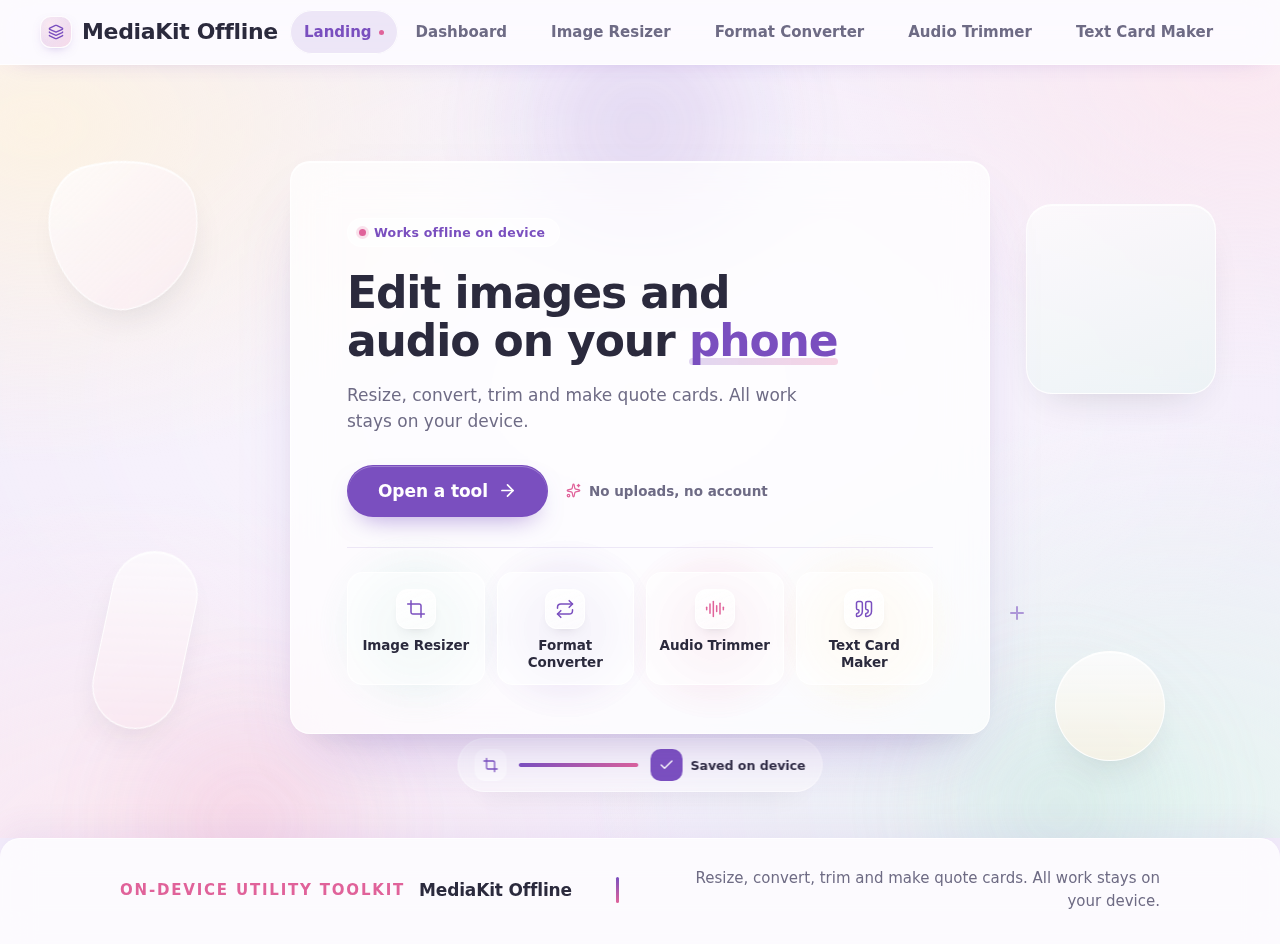
Edit images and audio on your phone
Resize, convert, trim and make quote cards. All work stays on your device.
- Image Resizer
- Format Converter
- Audio Trimmer
- Text Card Maker
Edit images and audio on your phone
Resize, convert, trim and make quote cards. All work stays on your device.
- Image Resizer
- Format Converter
- Audio Trimmer
- Text Card Maker
No comments yet. Be the first!