icy-system
start a project to build a simple single page design of todo

Comments (0)
Sign in to leave a comment
Project Tasks4
Build Tasks CRUD API
As a Backend Developer, implement a RESTful API for managing todo tasks. Endpoints: GET /api/tasks (list all tasks), POST /api/tasks (create task), PUT /api/tasks/:id (update task title/description), PATCH /api/tasks/:id/complete (toggle completion status), DELETE /api/tasks/:id (delete task). Each task entity should include: id, title, completed (boolean), createdAt, updatedAt. Use an in-memory store or lightweight database (SQLite/JSON file) since no external DB is specified in the SRD.
Setup Design System Theme
As a Frontend Developer, configure the global design system and theme tokens for the icy-system project. Define CSS custom properties or a theme object (e.g. in Tailwind config or styled-components/emotion) using the SRD color palette: primary #4A90E2, primary_light #B3D4FC, secondary #F5A623, accent #50E3C2, highlight #F8E71C, bg #FFFFFF, surface rgba(74,144,226,0.1), text #333333, text_muted #9B9B9B, border rgba(74,144,226,0.2). Also install and configure framer-motion for animations and spring physics as specified in the Interaction Model.
Build Home Page UI
As a Frontend Developer, implement the Home page as a single-page React application following the v2 design. Include: (1) Task Carousel with framer-motion smooth transitions and spring physics — each task card flips to reveal edit options on click, active cards highlighted in accent teal (#50E3C2). (2) Add Task input/form to create new tasks. (3) Task list view showing all tasks. (4) Mark-as-complete toggle with visual status update. (5) Delete task button per card. (6) Edit task inline or via card flip. Ensure responsive layout for desktop and mobile. Integrate scroll-triggered animations and hover transitions as per Interaction Model. Depends on design system theme (temp_theme_setup) and backend API (temp_backend_tasks_api) — note: wire up API calls once backend is available.
Integrate Home Page API
As a Tech Lead, verify the end-to-end integration between the Home page frontend implementation and the Tasks CRUD backend API. Ensure all user flows work correctly: adding a task calls POST /api/tasks and the new task appears in the carousel/list; marking complete calls PATCH /api/tasks/:id/complete and the card updates visually; editing a task calls PUT /api/tasks/:id and changes are reflected; deleting a task calls DELETE /api/tasks/:id and the task is removed from the carousel. Verify framer-motion transitions occur correctly on data updates and that API error states are handled gracefully in the UI.
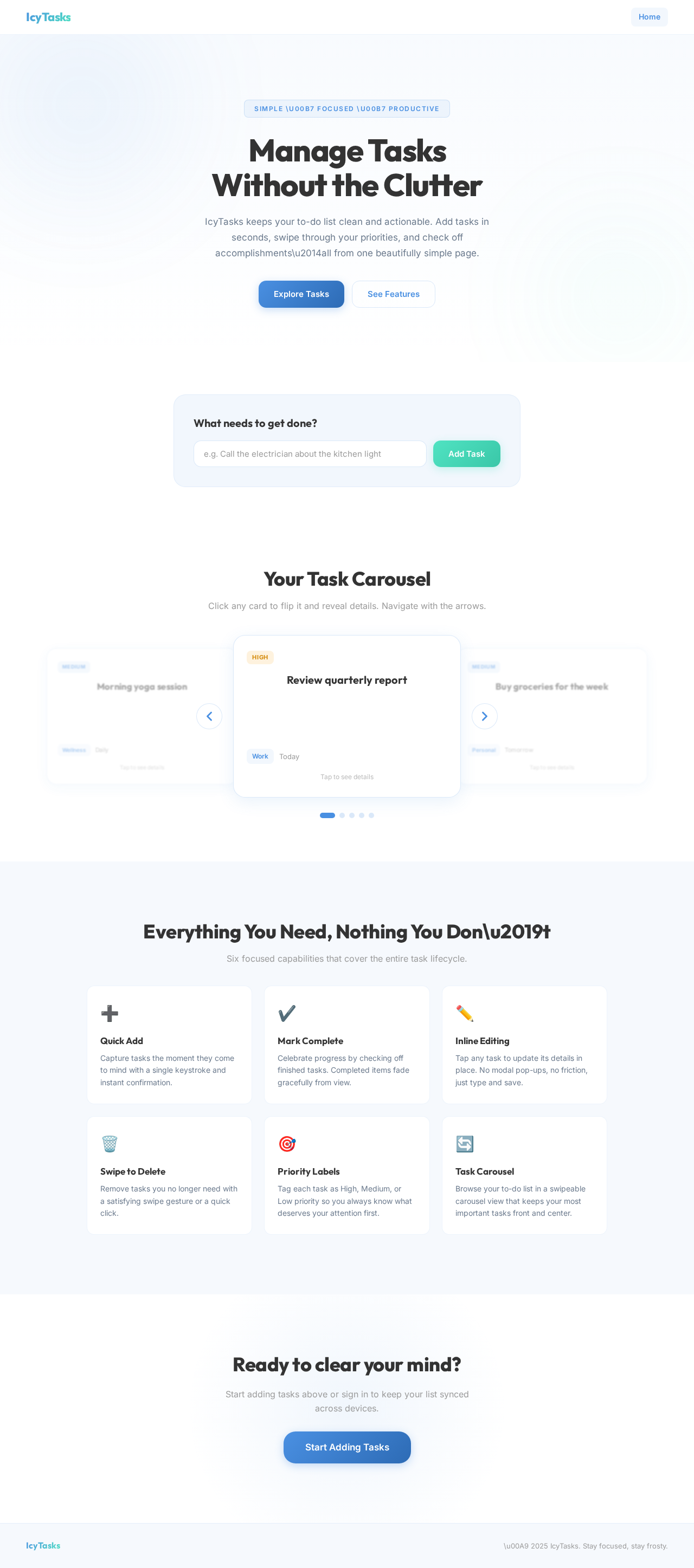
Manage Tasks
Without the Clutter
IcyTasks keeps your to-do list clean and actionable. Add tasks in seconds, swipe through your priorities, and check off accomplishments\u2014all from one beautifully simple page.
What needs to get done?
Your Task Carousel
Click any card to flip it and reveal details. Navigate with the arrows.
Everything You Need, Nothing You Don\u2019t
Six focused capabilities that cover the entire task lifecycle.
Quick Add
Capture tasks the moment they come to mind with a single keystroke and instant confirmation.
Mark Complete
Celebrate progress by checking off finished tasks. Completed items fade gracefully from view.
Inline Editing
Tap any task to update its details in place. No modal pop-ups, no friction, just type and save.
Swipe to Delete
Remove tasks you no longer need with a satisfying swipe gesture or a quick click.
Priority Labels
Tag each task as High, Medium, or Low priority so you always know what deserves your attention first.
Task Carousel
Browse your to-do list in a swipeable carousel view that keeps your most important tasks front and center.
Ready to clear your mind?
Start adding tasks above or sign in to keep your list synced across devices.
No comments yet. Be the first!