icy-system
start a project to build a simple single page design of todo

Comments (0)
Sign in to leave a comment
System Requirements
icy-system System Requirements Document
Introduction
The icy-system project aims to develop a simple single-page design for a to-do application. This document outlines the system requirements necessary to achieve this goal.
System Overview
The icy-system is a minimalistic to-do application designed to provide users with a straightforward interface to manage their tasks. The application will be developed as a single-page application (SPA) to ensure a seamless user experience without the need for page reloads.
Functional Requirements
- As a User, I should be able to add new tasks to my to-do list.
- As a User, I should be able to view all my tasks in a single view.
- As a User, I should be able to mark tasks as completed.
- As a User, I should be able to delete tasks from my list.
- As a User, I should be able to edit existing tasks.
User Personas
- User: An individual who wants to manage their daily tasks efficiently using a simple interface.
Core User Flows
- User opens the application -> adds a new task -> views the task in the list.
- User marks a task as completed -> task status updates visually.
- User edits a task -> changes are saved and reflected in the list.
- User deletes a task -> task is removed from the list.
Visuals Colors and Theme
- primary: #4A90E2 (a calming blue for the main interface elements)
- primary_light: #B3D4FC (a lighter blue for hover states)
- secondary: #F5A623 (a warm orange for emphasis and highlights)
- accent: #50E3C2 (a vibrant teal for call-to-action buttons)
- highlight: #F8E71C (a bright yellow for notifications and alerts)
- bg: #FFFFFF (a clean white background for the page)
- surface: rgba(74, 144, 226, 0.1) (a subtle blue tint for cards and panels)
- text: #333333 (a dark grey for primary text)
- text_muted: #9B9B9B (a light grey for secondary text)
- border: rgba(74, 144, 226, 0.2) (a soft blue for borders)
Signature Design Concept
The icy-system will feature an interactive "Task Carousel" on the homepage. Users can swipe through their tasks in a carousel format, with each task card flipping to reveal details or editing options when clicked. The carousel will have smooth transitions powered by framer-motion, providing an engaging and dynamic user experience. The design will incorporate the primary blue theme, with task cards highlighted in the accent teal when active.
Interaction Model & Motion Direction
- Interaction Model: Animated
- The landing page will feature smooth scroll-triggered animations and hover transitions. Task cards will have spring physics for interactive elements, ensuring a polished and responsive user experience.
Non-Functional Requirements
- The application should load quickly and respond to user interactions without noticeable delay.
- The design should be responsive and work well on both desktop and mobile devices.
Tech Stack
- Frontend: React for Web
Assumptions and Constraints
- The application will be developed as a single-page application.
- The design will prioritize simplicity and ease of use.
Glossary
- SPA: Single-Page Application
- Task Carousel: An interactive element allowing users to navigate through tasks in a carousel format.
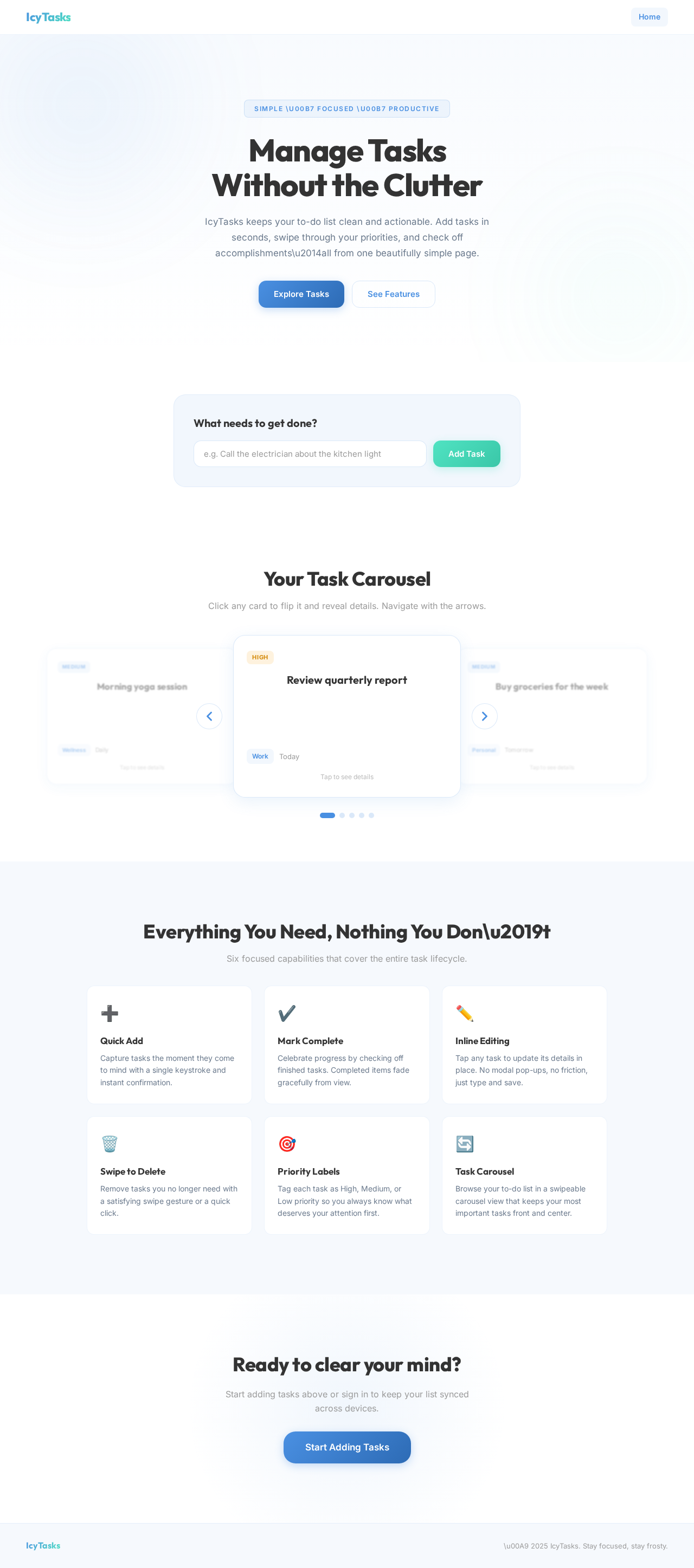
Manage Tasks
Without the Clutter
IcyTasks keeps your to-do list clean and actionable. Add tasks in seconds, swipe through your priorities, and check off accomplishments\u2014all from one beautifully simple page.
What needs to get done?
Your Task Carousel
Click any card to flip it and reveal details. Navigate with the arrows.
Everything You Need, Nothing You Don\u2019t
Six focused capabilities that cover the entire task lifecycle.
Quick Add
Capture tasks the moment they come to mind with a single keystroke and instant confirmation.
Mark Complete
Celebrate progress by checking off finished tasks. Completed items fade gracefully from view.
Inline Editing
Tap any task to update its details in place. No modal pop-ups, no friction, just type and save.
Swipe to Delete
Remove tasks you no longer need with a satisfying swipe gesture or a quick click.
Priority Labels
Tag each task as High, Medium, or Low priority so you always know what deserves your attention first.
Task Carousel
Browse your to-do list in a swipeable carousel view that keeps your most important tasks front and center.
Ready to clear your mind?
Start adding tasks above or sign in to keep your list synced across devices.
No comments yet. Be the first!