icy-habit
Build Daylight, a simple personal habit tracker. Include a dashboard with daily progress, a habits page to add and complete habits, and a weekly insights page. Use a clean, friendly design with teal accents. Keep the first version focused on these three pages.


Comments (0)
Sign in to leave a comment
System Requirements
System Requirements Document for Daylight
1. Introduction
Daylight is a simple personal habit tracker for everyday people who want gentle daily momentum and a weekly view of their effort. The product is deliberately small: a dashboard that shows daily progress, a habits page where the user adds habits and marks them complete, and a weekly insights page that shows how the week is going. The first version stays focused on these three pages, wrapped in a clean, friendly design with teal accents.
The audience is a single kind of person: someone tracking their own habits privately, day by day, who wants a warm and encouraging surface rather than a clinical productivity tool. Because habit records are personal and must persist between visits, Daylight establishes a private, application-owned record for each person and lets them return to it.
This document is the System Requirements Document for Daylight (project name: icy-habit). It specifies the product's features and workflows in full, together with the design language, delivery boundary, and technical stack.
Success Criteria
- A new person can reach Daylight, understand what it does, and start a private habit record without assistance.
- A returning person can verify identity and land on their own daily progress.
- A person can add a habit and mark it complete on the same day, and see that completion reflected in daily progress.
- A person can open weekly insights and see their week's effort represented.
- The three core pages — Dashboard, Habits, Weekly Insights — are the complete first-version surface, presented in a clean, friendly design with teal accents.
2. System Overview
Daylight is a three-page personal habit tracker with a private, per-person record. The current delivery consists of:
- Landing — the anonymous public entry that explains Daylight and invites the visitor to start.
- Sign Up — self-service enrollment that creates the person's private habit record.
- Login — returning identity verification that unlocks the protected pages.
- Dashboard — daily progress for the signed-in person.
- Habits — where the person adds habits and marks them complete.
- Weekly Insights — the person's weekly view of their effort.
The only active human actor is the Habit tracker user, who owns their own habits and progress. The application itself owns identity, habit records, completion records, and the derived daily and weekly views. There are no other human roles, no shared or team state, and no differentiated permissions: every signed-in person sees only their own data.
Removed from scope
- Smart micro-grid dashboard, telemetry cards, relay control, and activity logs (also: ESP32, EMS, Random Forest, load shedding, SoC, PWA 390px layout) — these belong to an unrelated design-system reference and are not part of Daylight.
- Any fourth product page or module beyond Dashboard, Habits, and Weekly Insights in the first version.
2a. Product Interpretation and Delivery Boundary
Daylight is delivered as a first-party web application. The public entry (Landing) and the two identity surfaces (Sign Up, Login) are anonymously reachable. The Dashboard, Habits, and Weekly Insights pages are protected: they require a verified identity so that each person's habits and progress remain private and resumable across visits.
Identity is application-owned and established through self-service enrollment on Sign Up, with returning verification on Login. This is the minimum continuity needed for a personal tracker whose records must persist and belong to exactly one person. It does not introduce roles, sharing, or account administration. All habit data, completion data, and the daily and weekly views are computed and stored by the application backend against the provisioned database.
The first version is bounded to the three core pages plus the entry and identity surfaces required to reach them. Nothing beyond that — reminders, social features, categories, or additional analytics — is part of the current delivery.
2c. Page Content and Component Coverage
Landing
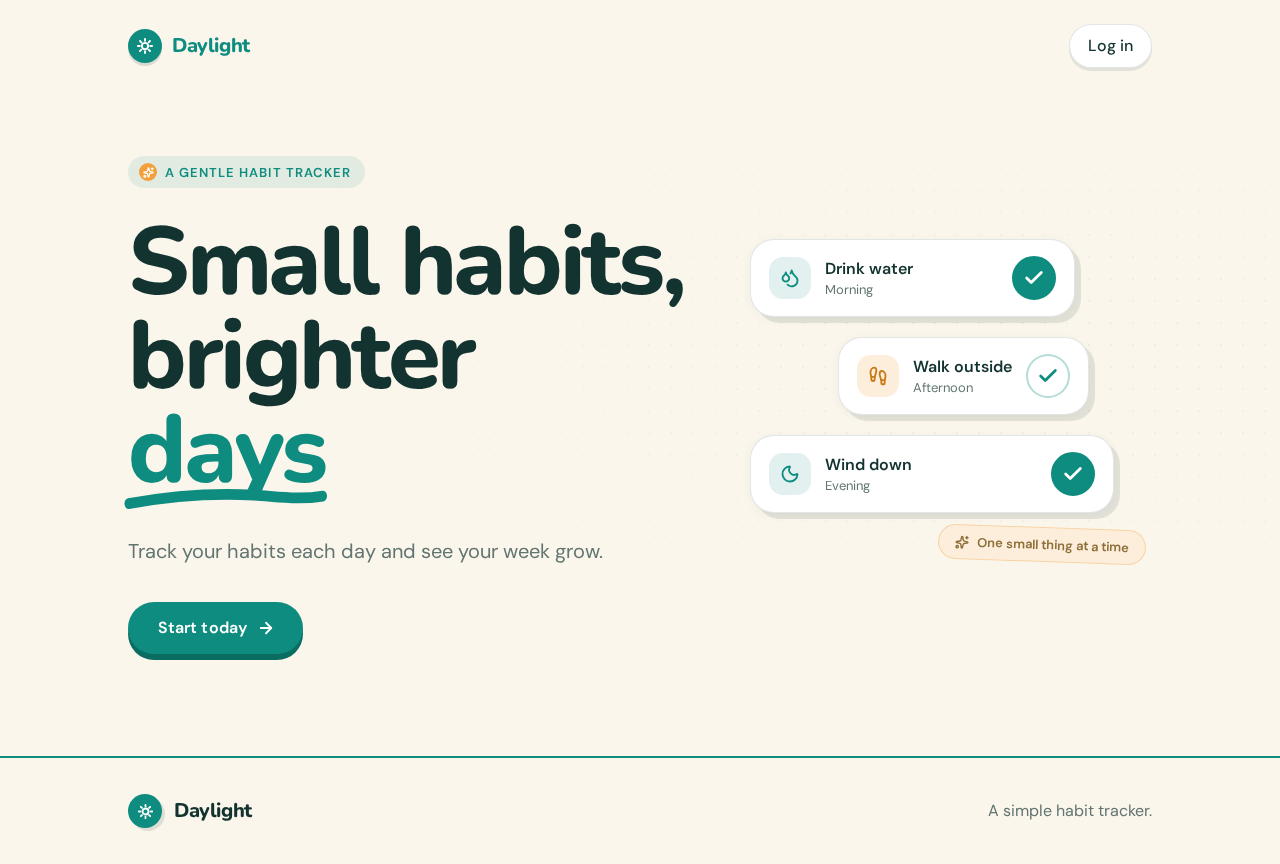
- Information/state: Anonymous public entry. Presents the Daylight wordmark, the hero headline "Small habits, brighter days", the subline "Track your habits each day and see your week grow.", and the primary call to action "Start today". A secondary path to Login is available for returning people.
- Primary actions: "Start today" navigates to Sign Up. A "Log in" link navigates to Login.
- Supporting actions: None beyond navigation into the identity surfaces.
- Domain entities: None persisted; purely presentational.
- Component responsibilities:
- Hero block: left-aligned three-line Nunito headline with a hand-drawn teal underline under the last word; subline beneath; pill CTA under the headline.
- Sticker-card cluster: three tilted habit sticker-cards with teal check marks and soft offset shadows, decorative only.
- Header: wordmark and a Login link.
- States: Loading not applicable (static content). Empty/error not applicable. Success = navigation to Sign Up or Login. Recovery: if a signed-in person reaches Landing, they may still proceed to Login or continue to their Dashboard via the standard navigation.
Sign Up
- Information/state: Anonymous enrollment surface. Collects the credentials needed to create a private record (email and password). Shows inline validation and a submitting state.
- Primary actions: Submit enrollment to create the account and private habit record, then proceed to the Dashboard.
- Supporting actions: Navigate to Login if the person already has an account.
- Domain entities: Person account (identity), which anchors the person's habit record.
- Component responsibilities:
- Enrollment form with labeled email and password fields and a submit pill button.
- Inline field validation messages.
- Link to Login.
- States:
- Loading: submit button shows a pending state while the request is in flight.
- Empty: blank form on first arrival.
- Success: account created; redirect to Dashboard.
- Error: invalid or already-registered email, weak password, or network failure — shown inline with the form preserved so the person can correct and resubmit.
- Recovery: the person can retry submission or switch to Login.
Login
- Information/state: Anonymous returning-identity surface. Collects email and password and verifies them.
- Primary actions: Submit credentials to verify identity and proceed to the Dashboard.
- Supporting actions: Navigate to Sign Up for a new account.
- Domain entities: Person account (identity).
- Component responsibilities:
- Login form with labeled email and password fields and a submit pill button.
- Inline error messaging.
- Link to Sign Up.
- States:
- Loading: pending submit state.
- Empty: blank form on first arrival.
- Success: identity verified; redirect to Dashboard.
- Error: incorrect credentials or network failure — inline message, form preserved for retry.
- Recovery: retry, or switch to Sign Up.
Dashboard
- Information/state: Protected. Shows the signed-in person's daily progress: a circular progress ring with a large number in the centre representing how much of today's habits are complete, plus a compact list of today's habits with their completion state.
- Primary actions: Open Habits to add or complete habits; open Weekly Insights.
- Supporting actions: Navigate between Dashboard, Habits, and Weekly Insights via the primary navigation.
- Domain entities: Habit, Completion (for today), derived daily progress.
- Component responsibilities:
- Progress ring: circular ring with a large central number (e.g., completed / total for today).
- Today's habit summary list: each habit with its completion indicator.
- Primary navigation to the three core pages.
- States:
- Loading: skeleton or spinner while today's progress loads.
- Empty: no habits yet — friendly prompt directing the person to Habits to add their first habit.
- Success: ring and list reflect current completions.
- Error: load failure shows a retry affordance.
- Recovery: retry reloads progress; navigation to Habits remains available.
Habits
- Information/state: Protected. Lists the person's habits with their completion state for today, and provides an add-habit control.
- Primary actions: Add a habit (name it and save); mark a habit complete for today.
- Supporting actions: Navigate to Dashboard and Weekly Insights.
- Domain entities: Habit (name, created state), Completion (per habit per day).
- Component responsibilities:
- Add-habit form or inline control: text input for the habit name and a save action.
- Habit list: each habit row with a pill check button that gives a small springy nod when pressed and reflects completion.
- Primary navigation.
- States:
- Loading: list loading state.
- Empty: no habits — friendly prompt to add the first habit.
- Success: new habit appears in the list; completion toggles update immediately and persist.
- Error: add or complete failure shows an inline message and preserves the person's input or prior state.
- Recovery: retry the add or completion; the list remains usable.
Weekly Insights
- Information/state: Protected. Shows the person's weekly view of effort: weekly insight bars drawn as rounded capsules in teal and amber representing the week's completions.
- Primary actions: Review the week; navigate to Dashboard or Habits.
- Supporting actions: Primary navigation.
- Domain entities: Completion records aggregated by day for the current week.
- Component responsibilities:
- Weekly capsule bar chart: rounded capsule bars per day, teal for completed effort and amber for streak/reward emphasis.
- Week summary label.
- Primary navigation.
- States:
- Loading: chart loading state.
- Empty: no completions this week — friendly message encouraging a first completion.
- Success: bars reflect the week's completions.
- Error: load failure with retry.
- Recovery: retry reloads the week's insights.
3. Functional Requirements
FR-1 — Public entry explains Daylight. As a Habit tracker user, I should see a public Landing page that explains Daylight and its habit-tracking purpose, so that I understand the product before starting. (explicit)
- Trigger: anonymous visit to Landing.
- Observable result: hero headline, subline, and "Start today" CTA render; Login link available.
- Continuation: selecting "Start today" proceeds to Sign Up; selecting Login proceeds to Login.
FR-2 — Self-service enrollment. As a Habit tracker user, I should be able to create a private account through Sign Up, so that my habits and progress are mine and persist. (required_inference)
- Input: email and password.
- Observable result: account created; redirect to Dashboard.
- Failure/recovery: invalid or duplicate email, weak password, or network error shown inline with the form preserved for retry.
FR-3 — Returning identity verification. As a Habit tracker user, I should be able to log in with my credentials, so that I can reach my private pages on return. (required_inference)
- Input: email and password.
- Observable result: identity verified; redirect to Dashboard.
- Failure/recovery: incorrect credentials shown inline; retry or switch to Sign Up.
FR-4 — Protected access to core pages. As a Habit tracker user, I should only reach Dashboard, Habits, and Weekly Insights after verifying identity, so that my records stay private. (required_inference)
- Trigger: attempt to open a protected page without a verified session.
- Observable result: redirected to Login; after verification, the requested page is reachable.
- Failure/recovery: failed verification keeps the person on Login with an inline message.
FR-5 — Dashboard shows daily progress. As a Habit tracker user, I should see my daily progress on the Dashboard, so that I know how today is going. (explicit)
- Observable result: circular progress ring with a large central number and a summary of today's habits with completion state.
- Empty: prompt to add a first habit on Habits.
- Failure/recovery: load error with retry.
FR-6 — Add habits. As a Habit tracker user, I should be able to add a habit on the Habits page, so that I can track something new. (explicit)
- Input: habit name.
- Observable result: the habit appears in the list and is available for completion.
- Failure/recovery: save error shown inline; input preserved for retry.
FR-7 — Complete habits. As a Habit tracker user, I should be able to mark a habit complete on the Habits page, so that I record today's effort. (explicit)
- Input: pressing the pill check button on a habit.
- Observable result: the habit shows as complete for today; the completion persists and feeds daily progress and weekly insights.
- Failure/recovery: completion error shown inline; prior state preserved.
FR-8 — Weekly insights. As a Habit tracker user, I should see weekly insights on the Weekly Insights page, so that I can review my week's effort. (explicit)
- Observable result: rounded capsule bars in teal and amber representing the week's completions.
- Empty: friendly message when there are no completions this week.
- Failure/recovery: load error with retry.
FR-9 — Clean, friendly design with teal accents. As a Habit tracker user, I should experience a clean, friendly interface with teal accents across all pages, so that tracking feels kind rather than clinical. (explicit)
- Observable result: consistent palette, typography, shape language, and motion per Section 6.
FR-10 — Focused first version. As a Habit tracker user, I should encounter only the three core pages plus the entry and identity surfaces, so that the product stays simple. (explicit)
- Observable result: no additional product pages or modules are present.
4. User Personas
Habit tracker user
- Product context: An everyday person who wants gentle daily momentum and a weekly view of their effort. They use Daylight privately, on their own, to track personal habits.
- Primary goal: Build small habits day by day and see their week grow.
- Distinct accepted responsibilities: Enrolls once to create a private record; returns and verifies identity; adds habits on the Habits page; marks habits complete each day; checks daily progress on the Dashboard; reviews the week on Weekly Insights.
- Relevant inputs or decisions: Habit names; which habits to complete today; credentials for enrollment and login.
- Interactions with other accepted participants: None beyond the application itself — the person is the sole human actor and owns all their own data.
- Observable success: Their daily progress ring reflects today's completions, and their weekly insights show their effort across the week.
- What makes this role distinct: The work is entirely self-directed and private; there is no counterparty, no shared state, and no role differentiation. The person's only decisions are what to track and what to complete.
5. Core User Flows
Flow A — First-time enrollment and first habit
- The Habit tracker user opens Landing and reads the hero headline, subline, and "Start today" CTA.
- The user selects "Start today" and arrives at Sign Up.
- The user enters an email and password and submits.
- The application creates the private account and redirects the user to the Dashboard.
- The Dashboard shows an empty state prompting the user to add a first habit; the user navigates to Habits.
- The user enters a habit name and saves; the habit appears in the list.
- The user presses the pill check button to mark it complete; the button gives a small springy nod and the habit shows as complete.
- The user returns to the Dashboard and sees the progress ring reflect the completion.
- Failure/recovery: If enrollment fails (duplicate email, weak password, network), the form shows an inline message and preserves input for retry. If adding a habit fails, the input is preserved for retry.
Flow B — Returning login and daily completion
- The returning user opens Landing and selects Login (or is redirected to Login when opening a protected page).
- The user enters email and password and submits.
- The application verifies identity and redirects to the Dashboard.
- The Dashboard shows today's progress ring and today's habits.
- The user navigates to Habits and marks one or more habits complete.
- The user returns to the Dashboard and sees the progress ring update.
- Failure/recovery: Incorrect credentials show an inline message; the user retries or switches to Sign Up. A load error on the Dashboard offers retry.
Flow C — Reviewing the week
- The signed-in user navigates to Weekly Insights.
- The page shows rounded capsule bars in teal and amber representing the week's completions.
- The user reviews the week and navigates back to the Dashboard or Habits to continue.
- Failure/recovery: If there are no completions this week, a friendly empty message appears. A load error offers retry.
6. Visuals Colors and Theme
Following the creative direction (muse: Pablo Stanley — warm modular clarity):
- Mode: Light.
- Colors by role:
- Background:
#FBF6EC(cream ground, holds most space) - Surface:
#FFFFFF - Text:
#12332F - Primary (teal):
#0E8C7F - Accent (amber):
#F2A03D(streaks and small rewards only) - Muted:
#6B807B
- Background:
- Typography:
- Headings: Nunito ExtraBold, tight tracking, sentence case.
- Body: DM Sans.
- Scale: 1.25 modular —
clamp(40px, 8vw, 96px)/ 40 / 28 / 20 / 16.
- Shape language: Large 24px radii, pill buttons, soft offset shadows, sticker-like circular badges.
- Layout: One wide column with a left-aligned headline block, then a three-part row of habit cards on a 12-column grid.
- Imagery: Modular vector people and simple object icons in teal and amber on cream; no stock photography.
- Motion: Springy 200ms hover lifts on cards and a gentle nod on the check button; no looping motion.
- Accessibility: Readable text and controls stay whole at 375px, 768px, and 1280px, wrapping or scaling to fit; decoration may crop or overlap but never covers readable text or controls.
7. Signature Design Concept
The public entry is a cream hero with a three-line Nunito headline at left, scaling from 40px on mobile to 96px on desktop, with a hand-drawn teal underline beneath the last word. To the right, three tilted habit sticker-cards stack with teal check marks and soft offset shadows. A pill "Start today" CTA sits under the headline. The concept recomposes only accepted content — the headline, subline, CTA, and Login link — into a warm, sticker-like composition that signals a friendly personal tracker rather than a corporate dashboard.
8. Interaction Model & Motion Direction
Interaction Model: Animated Motion Tempo: expressive Hero Dimensionality: layered_2d
Landing Hero Motion Brief
- Focal subject: The three tilted habit sticker-cards with teal check marks, layered over the cream hero beside the headline.
- Thesis: On load, the sticker-cards settle into their tilted stack with a soft spring; on hover, each card lifts 200ms with a soft offset shadow; pressing the pill check button gives a small springy nod. The outcome is a warm, tactile first impression that mirrors the act of checking off a habit.
- Motion vocabulary: Springy 200ms hover lifts, gentle nod on check, soft offset shadows; no looping motion.
- Composed first frame: Cream ground, left-aligned three-line Nunito headline with teal underline, subline, pill CTA, and the sticker-card stack at right, fully composed and readable before any motion.
- Reduced-motion state: Cards rest in their tilted stack without hover lift or nod; all text and controls remain fully visible and usable.
9. Non-Functional Requirements
- NFR-1 — Persistence. Habit and completion records persist across sessions and are bound to the owning person. (required_inference; durable_state_required)
- NFR-2 — Privacy. Each person's habits, completions, and derived views are visible only to that person after identity verification. (required_inference)
- NFR-3 — Responsiveness. All pages render usably at 375px, 768px, and 1280px with readable text and controls fully inside the viewport and their containers. (explicit via creative direction)
- NFR-4 — Reduced motion. With
prefers-reduced-motion, motion is suppressed and a usable static arrangement is provided. (explicit via creative direction) - NFR-5 — Simplicity. The first version exposes only the three core pages plus the entry and identity surfaces. (explicit)
10. Tech Stack
- Frontend: React application UI.
- Backend: Shared FastAPI process for application APIs and domain modules (identity, habits, completions, daily and weekly aggregation).
- Database: MariaDB for application-owned persistent data.
- Deployment: docker-compose with the backend, database, and frontend services as provisioned.
11. Assumptions and Constraints
- Assumption: Identity is application-owned and self-service, established on Sign Up and verified on Login, because habit records must persist privately per person. (required_inference)
- Assumption: Daily progress and weekly insights are derived from completion records; no separate analytics module is required. (required_inference)
- Constraint: The first version is limited to Dashboard, Habits, and Weekly Insights plus the Landing, Sign Up, and Login surfaces. (explicit)
- Constraint: The design is clean and friendly with teal accents, per Section 6. (explicit)
- Constraint: No differentiated permissions or shared state; every signed-in person sees only their own data. (required_inference)
12. Glossary
- Habit: A named behavior the person tracks, added on the Habits page.
- Completion: A record that a habit was marked complete for a given day.
- Daily progress: The Dashboard's representation of today's completions against today's habits.
- Weekly insights: The Weekly Insights page's representation of the week's completions as rounded capsule bars.
- Habit tracker user: The sole active human persona; owns their private habits and progress.
Small habits,brighterdays
Track your habits each day and see your week grow.
Start todaySmall habits,brighterdays
Track your habits each day and see your week grow.
Start today
No comments yet. Be the first!