
hyper-build

byRavi K

Build a production-ready, full-stack web application called “SubTrackr” – a Micro SaaS subscription tracker for individuals and small teams. Mission Help users track all their recurring subscriptions (SaaS, streaming, utilities, etc.), understand their true monthly/annual spend, and never miss a renewal or trial end. The app should feel fast, trustworthy, and finance-grade, with a clean, modern UI. Target users Primary: Tech-savvy individuals and freelancers who manage multiple subscriptions. Secondary: Small teams/agencies that want to track business SaaS spend and renewals. Core features (MVP) Authentication Email/password sign up, login, logout, and password reset. Secure session management with JWT or session cookies. Subscription management Users can create, edit, and delete subscriptions with fields: Name, description/notes Cost (decimal), currency (default USD, but support multiple) Billing cycle: weekly, monthly, quarterly, yearly, other Next renewal date Category (e.g., Productivity, Design, Dev Tools, Entertainment, Utilities, Other) Status: Active, Paused, Cancelled, Trial Optional: linked website URL, logo URL Display a list of subscriptions with sorting (by name, next renewal, cost) and basic filtering (by category, status). Dashboard & analytics Show: Total monthly and annualized subscription cost. Number of active subscriptions and trials. Upcoming renewals in the next 7 and 30 days. Simple charts: Monthly spend trend over the last 6 months (use sample/synthetic data if needed for history). Spend by category (pie or bar chart). Renewal reminders Daily background job that checks for subscriptions renewing soon. Send email reminders: 7 days before renewal 1 day before renewal On the renewal date In-app notification center showing upcoming renewals and recent alerts. User settings Profile: name, email, timezone, default currency. Notification preferences: toggle email reminders on/off. Data export: download all subscriptions as CSV. Pro features (design the data model and UI hooks for these, even if not fully implemented yet) Automatic subscription detection from bank transactions or email receipts (design tables and API endpoints for future integration). Smart insights: detect unused subscriptions, price increases, and duplicate services. Team workspace: shared subscriptions, owners, and approval workflow for new SaaS. Integration with Stripe for paid plans (Free vs Pro vs Team). Tech stack Frontend: React + TypeScript, Vite, Tailwind CSS, shadcn/ui (or similar component library). Backend: Node.js (Express or Fastify) or Python (FastAPI) with a clean REST API. Database: PostgreSQL with Prisma or SQLAlchemy ORM. Auth: JWT-based auth with secure password hashing. Background jobs: simple scheduler (e.g., node-cron or Celery-like pattern) for daily renewal checks and email sending. Email: use a provider like SendGrid/Resend (mock the integration if needed, but design the service layer). Deployment-ready structure: clear separation of frontend, backend, and database, with environment variables for config. Data model (minimum) User: id, email, passwordHash, name, timezone, defaultCurrency, plan (free/pro/team), createdAt Subscription: id, userId, name, description, cost, currency, billingCycle, nextRenewalDate, category, status, websiteUrl, logoUrl, createdAt, updatedAt Reminder: id, userId, subscriptionId, type (renewal_7d, renewal_1d, renewal_day), sentAt, createdAt Notification: id, userId, title, message, type, read, createdAt (Optional future) Team, TeamMember, SubscriptionOwner for B2B features. UX & design requirements Clean, modern SaaS look with a light/dark mode toggle. Responsive design that works well on desktop and mobile. Home/Dashboard page: high-level metrics + charts + upcoming renewals. Subscriptions page: list + search + filters + add/edit modal or page. Settings page: profile, notifications, export data. Use clear empty states (e.g., “No subscriptions yet – add your first one”). Include loading states and basic error handling (form validation, API errors). Monetization hooks Design the app so a “Upgrade to Pro” CTA can be shown in: Dashboard (e.g., “Pro: auto-detect subscriptions from your bank”) Settings (plan management) Include a simple pricing page (Free / Pro / Team) with feature comparison, even if payments are not wired yet. Deliverables A complete, runnable full-stack app with: Frontend code (React + TypeScript) Backend API (Node/Express or FastAPI) Database schema and migrations Seed script with sample user and subscriptions for demo Basic tests for critical flows (auth, CRUD subscriptions, renewal calculation) Clear README with: How to run locally (frontend, backend, DB) Environment variables needed How to deploy (e.g., to Render, Railway, or similar) Prioritize clean architecture, readable code, and a polished UI over excessive features. The goal is a Micro SaaS-ready foundation that can be extended with bank integrations, Stripe payments, and team features later.

LandingSubscriptionsAuthenticationSettingsNotification CenterDashboard
Landing

Comments (0)

No comments yet. Be the first!

System Requirements

System Requirement Document
Page 1 of 6

System Requirements Document for hyper-build

Introduction

The project "hyper-build" aims to develop a production-ready, full-stack web application called "SubTrackr." SubTrackr is a Micro SaaS subscription tracker designed for individuals to manage recurring subscriptions, understand spending, and receive renewal reminders.

System Overview

SubTrackr is designed to help users track all their recurring subscriptions, understand their true monthly/annual spend, and never miss a renewal or trial end. The application should feel fast, trustworthy, and finance-grade, with a clean, modern UI.

Page 2 of 6

Product Interpretation and Delivery Boundary

  • Domain Descriptors:

    • Subscription Management: Users can create, edit, and delete subscriptions with various fields and display a list with sorting and filtering.
    • Dashboard & Analytics: Show total costs, active subscriptions, upcoming renewals, and charts.
    • Renewal Reminders: Daily background job for email reminders and in-app notifications.
  • What is being built:

    • A Micro SaaS application for tracking subscriptions with features like authentication, subscription management, dashboard analytics, renewal reminders, user settings, and monetization hooks.
  • Excluded Conventional Assumptions:

    • Generic admin roles and conventional e-commerce checkout processes are excluded.
  • First-party Custom Pages:

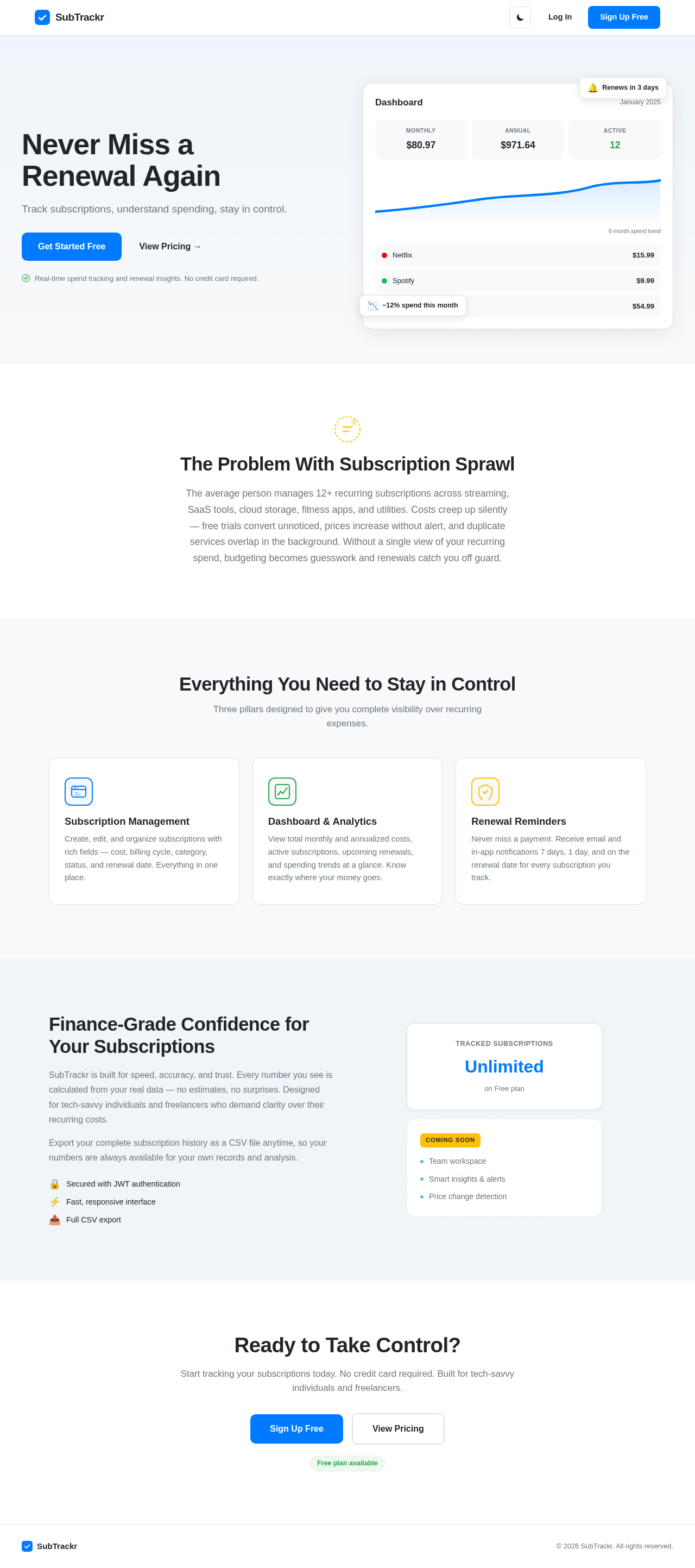
    • Dashboard
    • Subscriptions
    • Settings
    • Pricing
    • Notification Center
    • Authentication
  • Provider-owned Surfaces:

    • None
  • Access:

    • Application-owned identity with JWT-based authentication.
  • Behavior Contracts:

    • Receive Renewal Reminders: Daily background job execution sends email reminders and creates in-app notifications.
    • User Authentication: Handles user sign-up, login, logout, and password reset with secure session management.
    • Secure Session Management: Establishes or validates user sessions using JWT or session cookies.
    • Manage User Settings: Allows users to update profile and notification preferences.
    • Export Subscription Data as CSV: Users can download their subscription data.
    • Manage Subscription Fields: Users can create or edit subscriptions with detailed fields.
    • List, Sort, and Filter Subscriptions: Users can view and organize subscriptions with sorting and filtering options.
    • Display Subscription Metrics: Shows total costs, active subscriptions, and upcoming renewals.
    • Display Spend Trend and Category Charts: Visualizes spending trends and categories.
    • In-App Notification Center: Displays renewal and alert notifications.
    • Daily Renewal Reminder Job: Automates daily renewal checks and sends reminder emails.
    • Send Renewal Reminder Emails: Sends email reminders for upcoming renewals.
    • JWT Authentication with Secure Password Hashing: Issues JWT for authenticated sessions and securely hashes passwords.
    • Background Jobs for Daily Renewal Checks and Email Sending: Automates daily tasks using a scheduler.
    • Integrate with Email Provider: Handles email sending via provider or mock service.
    • Mock Email Integration for Testing: Allows email sending to be mocked for testing.
    • Simple Scheduler for Background Jobs: Schedules background jobs using a simple scheduler.
    • Generate Smart Subscription Insights: Detects unused subscriptions, price increases, and duplicate services.
Page 3 of 6

Functional Requirements as Story Points

  • As a tech-savvy individual, I should be able to sign up, log in, log out, and reset my password to manage my account securely. explicit
  • As a user, I should be able to create, edit, and delete subscriptions with detailed fields to manage my recurring expenses. explicit
  • As a user, I should be able to view a list of my subscriptions with sorting and filtering options to organize them effectively. explicit
  • As a user, I should be able to see total monthly and annualized subscription costs, active subscriptions, and upcoming renewals on my dashboard to understand my financial commitments. explicit
  • As a user, I should receive email reminders and in-app notifications for upcoming renewals to avoid missing any payments. explicit
  • As a user, I should be able to update my profile and notification preferences to personalize my experience. explicit
  • As a user, I should be able to export my subscription data as a CSV file for offline analysis. explicit
  • As a user, I should be able to view spending trends and category charts on my dashboard to gain insights into my expenses. explicit
  • As a user, I should be able to access a notification center to view all my renewal and alert notifications in one place. explicit
  • As a system, I should automatically send renewal reminder emails to users to ensure they are notified of upcoming renewals. explicit
  • As a system, I should securely manage user sessions using JWT or session cookies to maintain user authentication. explicit
  • As a system, I should integrate with an email provider to send emails reliably. explicit
  • As a system, I should schedule background jobs for daily renewal checks and email sending to automate routine tasks. explicit
  • As a user, I should be able to view smart insights on unused subscriptions, price increases, and duplicate services to optimize my expenses. explicit

User Personas

  • Tech-savvy Individuals and Freelancers: Primary users managing multiple subscriptions.

Core User Flows

Page 4 of 6

Tech-savvy Individuals and Freelancers

  1. Sign Up/Login:

    • Access the authentication form.
    • Enter email and password to sign up or log in.
    • Receive confirmation of account creation or authentication.
  2. Manage Subscriptions:

    • Navigate to the Subscriptions page.
    • Create, edit, or delete subscriptions using the provided form.
    • View the list of subscriptions with sorting and filtering options.
  3. Dashboard Overview:

    • Access the Dashboard page.
    • View total costs, active subscriptions, and upcoming renewals.
    • Analyze spending trends and category charts.
  4. Receive Notifications:

    • Access the Notification Center.
    • View renewal and alert notifications.
  5. Update Settings:

    • Navigate to the Settings page.
    • Update profile information and notification preferences.
    • Export subscription data as a CSV file.
Page 5 of 6

Visuals Colors and Theme

  • Primary: #007BFF (Blue)
  • Primary Light: #66B2FF
  • Secondary: #6C757D (Gray)
  • Accent: #28A745 (Green)
  • Highlight: #FFC107 (Yellow)
  • Background: #F8F9FA (Light Gray)
  • Surface: #FFFFFF (White)
  • Text: #212529 (Dark Gray)
  • Text Muted: #6C757D (Gray)
  • Border: #E0E0E0 (Light Gray)

Signature Design Concept

The SubTrackr application will feature a clean, modern SaaS look with a light/dark mode toggle. The design will be responsive, ensuring usability on both desktop and mobile devices. The Dashboard page will serve as the focal point, presenting high-level metrics, charts, and upcoming renewals in a visually appealing manner. The use of clear empty states and loading indicators will enhance user experience, providing clarity and feedback during interactions.

Interaction Model & Motion Direction

The interaction model for SubTrackr will be "animated," featuring moderate scroll-triggered reveals, hover transitions, and spring physics on interactive elements. This approach will add polish to the feature-rich product pages and dashboards, enhancing user engagement without overwhelming the interface.

Page 6 of 6

Non-Functional Requirements

  • The application must ensure high performance and reliability to feel fast, trustworthy, and finance-grade. explicit
  • The design must be responsive to work well on both desktop and mobile devices. explicit
  • The application must maintain a clean, modern UI to enhance user experience. explicit

Tech Stack

  • Frontend: React + TypeScript, Vite, Tailwind CSS, shadcn/ui
  • Backend: FastAPI (Python) with JWT auth
  • Database: PostgreSQL with SQLAlchemy ORM and migrations
  • Background Jobs: Simple scheduler (e.g., APScheduler or similar) for daily renewal checks
  • Email: Resend (mocked in dev, real integration ready for prod)

Assumptions and Constraints

  • The application will be built with a clear separation of frontend, backend, and database components.
  • Environment variables will be used for configuration to ensure a deployment-ready structure.
  • The application will prioritize clean architecture, readable code, and a polished UI over excessive features.

Glossary

  • JWT: JSON Web Token, a compact, URL-safe means of representing claims to be transferred between two parties.
  • SaaS: Software as a Service, a software distribution model in which applications are hosted by a service provider and made available to customers over the internet.
  • CRUD: Create, Read, Update, Delete, the four basic functions of persistent storage.
  • CSV: Comma-Separated Values, a file format used to store tabular data.
Landing design preview
Subscription History Process: subscription cost change detected
Subscription History Process: historical cost data recorded
Subscription History Process: history update error logged
Landing design preview
Subscription History Process: subscription cost change detected
Subscription History Process: historical cost data recorded
Subscription History Process: history update error logged