hollow-workout
 James James
A app to track workout waits and progression across months

Comments (0)
Sign in to leave a comment
System Requirements
System Requirements Document (SRD)
Project Name: hollow-workout
1. Introduction
Welcome to the hollow-workout System Requirements Document (SRD). This document outlines the functional and non-functional requirements, design concepts, and technical specifications for the hollow-workout application. The project is designed to help individual users track their workout weights and progression across months, empowering them to achieve their fitness goals through consistent monitoring and visualization of their progress.
This SRD has been tailored specifically for James James, based in the US, with locale-specific defaults such as time zones (EST) and units (imperial).
2. System Overview
The hollow-workout application is a fitness tracking tool aimed at individual gym-goers. It enables users to log their workout weights, reps, and sets, and visualize their progression over time. The system focuses on simplicity and personalization, ensuring users can easily track their progress without unnecessary complexity.
Key features include:
- Logging workout details (weights, reps, sets).
- Viewing progression charts across months.
- Setting personal fitness goals.
- Tracking specific muscle groups.
The system is designed to be intuitive, visually appealing, and motivating for users who are committed to their fitness journey.
3. Functional Requirements
As an Individual User:
- I should be able to log workout weights, reps, and sets.
- I should be able to view progression charts across months.
- I should be able to set personal fitness goals.
- I should be able to track specific muscle groups.
- I should be able to export my workout data for personal use.
- I should be able to receive motivational insights based on my progress.
4. User Personas
Persona 1: Fitness Enthusiast
Description: A gym-goer who is committed to tracking their workouts and improving their performance over time.
Goals:
- Monitor progress in lifting heavier weights.
- Set and achieve personal fitness milestones.
Pain Points: - Difficulty visualizing long-term progress.
- Lack of motivation due to stagnant results.
Persona 2: Casual Gym User
Description: Someone who visits the gym occasionally and wants to keep track of their workouts for general fitness.
Goals:
- Maintain a record of workouts for consistency.
- Track improvements without overwhelming detail.
Pain Points: - Overly complex tracking systems.
- Lack of personalized insights.
5. Visuals Colors and Theme
Color Palette:
The hollow-workout app will feature a modern, energetic theme inspired by fitness and progression.
- Background: #1A1A2E (Deep Midnight Blue)
- Surface: #16213E (Dark Slate Blue)
- Text: #E5E5E5 (Soft White)
- Accent: #F76C6C (Vivid Coral Red)
- Muted Tones: #A6B1E1 (Calm Lavender Blue)
This palette combines bold, motivating colors with calming tones to balance energy and focus.
6. Signature Design Concept
Concept: Interactive Progression Timeline
The homepage will feature an Interactive Progression Timeline that visually represents the user’s workout journey.
Details:
- Design: A horizontal timeline with animated workout icons (e.g., dumbbells, barbells) representing logged sessions.
- Interaction: Users can scroll through the timeline to view past workouts, with each icon expanding into a detailed card showing weights, reps, sets, and notes.
- Animation: Smooth transitions as users scroll, with icons glowing brighter as they approach the current date.
- Color Shifts: The timeline background subtly shifts from muted tones to vibrant colors as users progress, symbolizing growth and achievement.
- Micro-interactions: Hovering over icons triggers motivational quotes or stats (e.g., “You’ve lifted 20% more this month!”).
This design ensures the homepage is visually captivating, motivating, and highly interactive, making users excited to log their workouts and track their progress.
7. Non-Functional Requirements
- The system must support high responsiveness across devices (web and mobile).
- Data storage must ensure security and privacy, adhering to US regulations.
- The app must be intuitive and require minimal onboarding for first-time users.
- The system must handle at least 10,000 users concurrently without performance degradation.
8. Tech Stack
Frontend:
- React for Web
- React Native for Mobile App
Backend:
- Python
- FastAPI
Database:
- MySQL (preferred) or MariaDB for relational data storage.
- MongoDB for NoSQL data storage.
AI Models:
- GPT 5.4 for user-friendly responses and motivational insights.
AI Tools:
- Litellm for LLM Routing
- Langchain
Local Orchestration:
- Docker
- docker-compose
Server-Side Orchestration:
- Kubernetes
9. Assumptions and Constraints
Assumptions:
- Users will primarily access the app via mobile devices.
- The app will cater to individual users only, not trainers or groups.
- Users will prefer visual progress tracking over detailed numerical data.
Constraints:
- The app must comply with US data privacy laws (e.g., GDPR equivalent).
- The system must operate within a limited budget for initial development.
10. Glossary
- Workout Session: A single instance of exercise logged by the user, including weights, reps, and sets.
- Progression Chart: A visual representation of workout data over time.
- Muscle Groups: Specific areas of the body targeted during workouts (e.g., chest, legs, back).
- Interactive Timeline: A dynamic visual feature allowing users to explore their workout history.

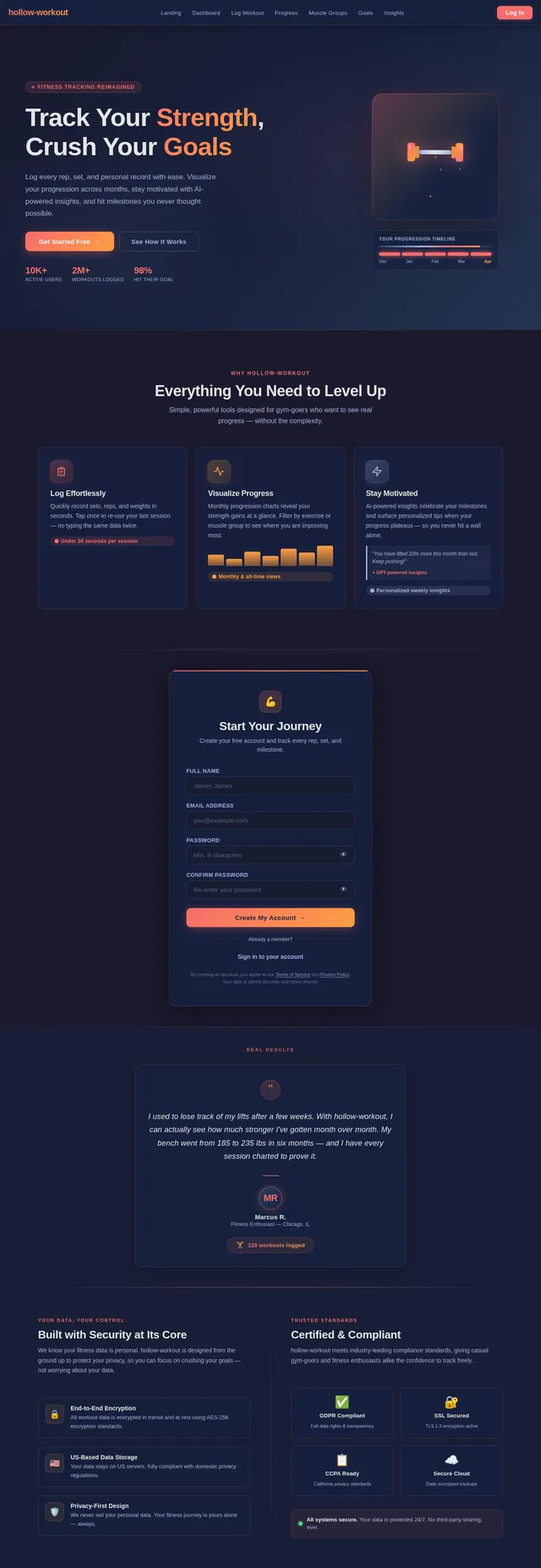
Track Your Fitness Journey
Visualize your progress, stay motivated, achieve your goals.
Your Progression Timeline
Watch your strength evolve over time. Each workout brings you closer to your goals.
Scroll through your journey. Track every lift, celebrate every milestone.
Everything You Need to Train Smarter
Powerful features designed to keep you consistent, informed, and motivated on your fitness journey.
Log Workouts
Record your weights, reps, and sets for every session. Simple input keeps you focused on lifting, not logging.
View Progress
Visualize your strength gains with detailed progression charts spanning weeks and months of training.
Set Goals
Define personal fitness milestones and track your path toward hitting new PRs and benchmarks.
Muscle Group Tracking
Monitor volume and progress across specific muscle groups to ensure balanced training coverage.
Motivational Insights
Receive personalized tips and encouragement based on your workout patterns and consistency streaks.
Export Data
Download your complete workout history in CSV format for backup, analysis, or sharing with a coach.
See Your Strength Grow
See your strength grow month after month.
Weight Progression
Bench press over the past 12 months
Total Workouts
247
PR This Month
+15 lbs
Consistency
94%
Built for Every Fitness Level
Whether you're chasing personal records or building a consistent routine, hollow-workout adapts to your journey.
Fitness Enthusiast
Dedicated Athlete
A gym-goer who is committed to tracking their workouts and improving their performance over time. They push limits consistently and rely on data to optimize every session.
Goals
- Monitor progress in lifting heavier weights
- Set and achieve personal fitness milestones
- Optimize training splits for maximum gains
Pain Points
- Difficulty visualizing long-term progress
- Lack of motivation due to stagnant results
- Scattered notes across apps and notebooks
Casual Gym User
Wellness-Focused
Someone who visits the gym occasionally and wants to keep track of their workouts for general fitness. Values simplicity and clarity over granular statistics.
Goals
- Maintain a record of workouts for consistency
- Track improvements without overwhelming detail
- Stay accountable with easy logging
Pain Points
- Overly complex tracking systems
- Lack of personalized insights
- Hard to build a habit without feedback
Community Achievements
Numbers That Inspire
Join thousands of fitness enthusiasts pushing their limits.
Built with Modern Tech
Optimized for speed, security, and scalability.
Start Your Fitness Journey Today
Sign up free and begin tracking your progress. Log workouts, visualize your gains, and stay motivated every step of the way.
Frequently Asked Questions
Everything you need to know about tracking your fitness journey with hollow-workout.
Simply navigate to the Log Workout page from your dashboard. Enter your exercise name, the weight used, number of reps, and sets completed. Hit save and your session is recorded instantly. You can log multiple exercises per session to capture your full routine.
Absolutely. hollow-workout lets you tag each exercise with the muscle group it targets — chest, back, legs, shoulders, arms, and core. Visit the Muscle Groups page to see a breakdown of your training volume and ensure balanced development across all areas.
The Progress page displays your lifting data over time as interactive line charts. You can filter by exercise, muscle group, or date range to see monthly trends. The chart highlights personal records and shows percentage improvements so you can visualize your gains at a glance.
Yes. Head to the Export page from your dashboard to download your complete workout history. Data is available in CSV format, making it easy to analyze in spreadsheets or share with a personal trainer for review.
Your data security is our priority. All information is encrypted in transit and at rest. We comply with US data privacy regulations and never share your personal workout data with third parties. You have full control over your data at all times.
Based on your workout patterns and progress, hollow-workout generates personalized insights and encouragement. These might include streak notifications, strength milestones, consistency scores, or suggestions to help you break through plateaus and stay motivated.
Not at all. hollow-workout works with any type of resistance training — free weights, machines, bodyweight exercises, or bands. Just log whatever you do at the gym, and the app handles the tracking and visualization for you.
Still have questions?Get started free and see for yourself.
No comments yet. Be the first!