hi
 ima Bling
Bet. We need something **kids AND adults would actually use**, not another boring chatbot. ### 🧠 Idea: **“Explain It” AI** You paste or type **anything you don't understand**, and the AI explains it at whatever level you want. **Example:** > “What is a mortgage?” You can choose: * 🧒 **Kid mode** → super simple * 🎓 **Student mode** → school-level explanation * 👨 **Adult mode** → normal detailed explanation * 🧠 **Expert mode** → deep explanation But here's the 🔥 part: **“Make it make sense” button** * Paste homework * Paste an email * Paste a confusing bill * Paste instructions * Paste a news article * Upload a picture of something confusing And it breaks it down **without making you feel stupid**. ### Extra features * **Explain this picture** 📸 * **Summarize this** * **Turn it into steps** * **Quiz me on it** * **Translate + explain** * **Ask follow-up questions** * **Make it shorter/longer** The website could look ridiculously simple: > **What are you confused about?** > `[ Paste anything here... ]` > > **Explain it like:** > `Kid 🧒 | Student 🎓 | Adult 👨 | Expert 🧠` > > **[ MAKE IT MAKE SENSE ]** That has a much broader audience than something only kids or only adults would use.

Comments (0)
Sign in to leave a comment
System Requirements
System Requirements Document for hi
1. Introduction
hi is an AI explanation tool — presented in the product concept as “Explain It” AI — built for a deliberately broad audience: kids and adults, not a single age group and not another boring chatbot.
The product intent is simple and singular: a person arrives with something they don't understand, and the product explains it at whatever level they want. The user pastes or types anything confusing — homework, an email, a confusing bill, instructions, a news article, or a plain question like “What is a mortgage?” — or uploads a picture of something confusing, and the product breaks it down without making them feel stupid.
The audience spans a child meeting a concept for the first time, a student working at school level, an adult who wants a normal detailed explanation, and an expert who wants depth. The same person may move between those levels depending on the material in front of them. The product therefore treats explanation depth as a user choice, not a fixed product personality.
Beyond the core explanation, the accepted product includes a set of extra capabilities the user explicitly requested: Explain this picture, Summarize this, Turn it into steps, Quiz me on it, Translate + explain, Ask follow-up questions, and Make it shorter/longer.
2. System Overview
hi is a web product with a custom first-party interface. Its current delivery shape is a set of simple, directly reachable surfaces that carry a user from confusing content to an explanation they can actually follow, and then let them keep working with that material.
Actors. The accepted active-human catalog is closed and consists of four personas: Confused Learner, Visual Explainer Seeker, Study & Practice User, and Cross-Language Reader. The AI explanation engine is a non-persona system actor that performs the explanation, summarization, step generation, quizzing, translation, and follow-up work the user requests.
Accepted behavior. Users can:
- paste or type any content they don't understand;
- upload a picture of something confusing;
- choose an explanation level — Kid\x20\xf0\x9f\xa7\x92 (super simple), Student\x20\xf0\x9f\x8e\x93 (school-level), Adult\x20\xf0\x9f\x91\xa8 (normal detailed), or Expert\x20\xf0\x9f\xa7\xa0 (deep);
- press MAKE IT MAKE SENSE to break the content down;
- get a picture explained via Explain this picture;
- summarize the content;
- turn it into steps;
- be quizzed on it;
- translate and explain it;
- ask follow-up questions;
- make it shorter or longer.
Ownership. All of the above human-facing work is owned by first-party custom pages. The AI explanation engine is a supporting system actor behind those pages; it is not a destination and does not replace the user's own interaction.
Exclusions and boundaries. This document does not add adjacent capabilities the user did not request — no accounts, no saved libraries, no social or sharing features, no classroom management, no billing, and no chatbot framing. The product is an explanation tool, not a conversational assistant product.
2a. Product Interpretation and Delivery Boundary
Delivery. The product is delivered as a first-party web experience with a custom interface. The entry experience is intentionally ridiculously simple, exactly as the user described it:
What are you confused about?
[ Paste anything here... ]Explain it like:
Kid\x20\xf0\x9f\xa7\x92 | Student\x20\xf0\x9f\x8e\x93 | Adult\x20\xf0\x9f\x91\xa8 | Expert\x20\xf0\x9f\xa7\xa0[ MAKE IT MAKE SENSE ]
Access. The accepted page contract assigns no access requirement to any page. Every surface — Landing, Input, Picture Explain, Explain Level, Explanation, Picture Explanation, Summary, Steps, Quiz, Translate, Follow-Up, and Adjust Length — is reachable without an account. There is no application-owned identity, no sign-in, and no protected destination in the current product. A user can arrive, paste or upload, choose a level, and get an explanation immediately.
Current vs. future. Everything described in this document is current. No future-horizon requirements were accepted in the authoritative thread; the future section is therefore empty by design rather than by omission.
Provider and system boundary. The AI explanation engine is a system actor that performs the requested transformation on the user's content. It is not a persona, not a page, and not a destination. Its work is always initiated by an accepted human actor through a first-party page, and its output is always presented back to that actor on a first-party page.
2b. Source Content Inventory
No reference directive in this project declares content_source. This section is intentionally omitted.
2c. Page Content and Component Coverage
The page inventory below is the accepted final page contract, preserved exactly and in order. Each page appears exactly once.
Landing
- Information/state: The product's purpose in one line — paste or type anything you don't understand and get it explained at the level you choose. The headline question “What are you confused about?”. A statement of the broad audience (kids and adults). The four explanation levels shown as Kid\x20\xf0\x9f\xa7\x92 | Student\x20\xf0\x9f\x8e\x93 | Adult\x20\xf0\x9f\x91\xa8 | Expert\x20\xf0\x9f\xa7\xa0. The primary call to action MAKE IT MAKE SENSE.
- Primary actions: Enter the paste-anything input; choose an explanation level; press MAKE IT MAKE SENSE; go to Picture Explain to upload a picture instead.
- Supporting actions: Read the level descriptions (super simple / school-level / normal detailed / deep).
- Domain entities: Explanation level (Kid, Student, Adult, Expert); submitted content.
- Component responsibilities: Headline block; paste-anything input; level selector; primary action button; picture-entry link.
- States: Loading — not applicable on first paint. Empty — input empty, level unselected or defaulted, primary action prompts the user to provide content. Success — content and level present, primary action proceeds to the explanation. Error — empty submission is refused with a plain, non-judgmental prompt to paste or type something first. Recovery — the user's typed content is preserved when a submission is refused.
Input
- Information/state: The paste-anything field, labeled “Paste anything here...”, accepting typed or pasted text of any kind — homework, an email, a confusing bill, instructions, a news article, or a plain question.
- Primary actions: Type content; paste content; clear content; submit content for explanation.
- Supporting actions: Move to Picture Explain if the confusing thing is an image rather than text.
- Domain entities: Submitted content (text).
- Component responsibilities: Multi-line text field; paste handling; clear control; submit control; character/content presence indicator.
- States: Loading — not applicable until submission. Empty — placeholder “Paste anything here...” is shown and submission is unavailable. Success — content is present and submission is available. Error — submission attempted with no content shows a plain prompt to paste or type something. Recovery — content is retained in the field so the user can edit rather than retype.
Picture Explain
- Information/state: The upload surface for a picture of something confusing — a photo, screenshot, or image of a document, sign, or diagram. The action Explain this picture\x20\xf0\x9f\x93\xb8.
- Primary actions: Upload or select an image; trigger Explain this picture.
- Supporting actions: Replace the selected image; remove the selected image; return to text input.
- Domain entities: Uploaded image; explanation level.
- Component responsibilities: Image picker/drop area; image preview; replace and remove controls; Explain this picture action.
- States: Loading — image is being read/prepared after selection. Empty — no image selected, Explain this picture unavailable. Success — image selected and previewed, Explain this picture available. Error — an unreadable or unsupported image is reported plainly and the user is invited to choose another. Recovery — the previous selection is cleared and the picker remains available.
Explain Level
- Information/state: The “Explain it like:” selector with exactly four options and their meanings: Kid\x20\xf0\x9f\xa7\x92 → super simple, Student\x20\xf0\x9f\x8e\x93 → school-level explanation, Adult\x20\xf0\x9f\x91\xa8 → normal detailed explanation, Expert\x20\xf0\x9f\xa7\xa0 → deep explanation.
- Primary actions: Choose one of the four levels; change the chosen level.
- Supporting actions: Read each level's meaning before choosing.
- Domain entities: Explanation level (Kid, Student, Adult, Expert).
- Component responsibilities: Four-option level selector; per-option description text; current-selection indicator.
- States: Loading — not applicable. Empty — no level chosen; the user is prompted to pick one before explaining. Success — a level is selected and carried into the explanation request. Error — an explanation requested without a level prompts the user to choose one. Recovery — the previously chosen level remains visible and re-selectable.
Explanation
- Information/state: The main explanation of the submitted content, written at the selected level, produced after the user presses MAKE IT MAKE SENSE. The explanation is presented as a breakdown of the content, framed so the user is not made to feel stupid for not understanding it.
- Primary actions: Read the explanation; ask a follow-up question; make it shorter; make it longer; summarize; turn it into steps; quiz me on it; translate and explain.
- Supporting actions: Change the explanation level and re-explain; return to the input to submit different content.
- Domain entities: Submitted content; explanation level; explanation output; follow-up question; follow-up answer.
- Component responsibilities: Explanation display; level indicator; action row for the extra features; follow-up entry point; length controls.
- States: Loading — the explanation is being produced; a clear in-progress state is shown. Empty — no explanation yet; the user is directed back to provide content and a level. Success — the explanation is displayed at the chosen level with the extra-feature actions available. Error — the explanation could not be produced; the user is told plainly and offered a retry that keeps their content and level. Recovery — retry reuses the retained content and level; the user may also change the level and try again.
Picture Explanation
- Information/state: The explanation of the uploaded picture, produced after Explain this picture is triggered, written at the selected level.
- Primary actions: Read the picture explanation; ask a follow-up question about what is shown; make it shorter; make it longer.
- Supporting actions: Upload a different picture; change the explanation level and re-explain.
- Domain entities: Uploaded image; explanation level; picture explanation output; follow-up question; follow-up answer.
- Component responsibilities: Image reference alongside the explanation; explanation display; level indicator; follow-up entry point; length controls.
- States: Loading — the picture is being explained; an in-progress state is shown. Empty — no picture explanation yet; the user is directed to upload a picture. Success — the picture explanation is displayed at the chosen level. Error — the picture could not be explained; the user is told plainly and offered a retry that keeps the image and level. Recovery — retry reuses the retained image and level; the user may also choose a different picture.
Summary
- Information/state: A concise summary of the submitted content, produced on request via Summarize this.
- Primary actions: Request the summary; read the summary; make it shorter; make it longer; ask a follow-up question.
- Supporting actions: Return to the full explanation; return to the input.
- Domain entities: Submitted content; summary output; explanation level.
- Component responsibilities: Summary display; request control; length controls; follow-up entry point.
- States: Loading — the summary is being produced. Empty — no summary requested yet; the request control is presented. Success — the summary is displayed. Error — the summary could not be produced; the user is told plainly and offered a retry. Recovery — retry reuses the retained content.
Steps
- Information/state: The submitted content turned into a step-by-step breakdown via Turn it into steps, presented as an ordered sequence the user can follow.
- Primary actions: Request the step breakdown; read the steps in order; ask a follow-up question about a step.
- Supporting actions: Make the steps shorter or longer; return to the full explanation.
- Domain entities: Submitted content; ordered steps; explanation level.
- Component responsibilities: Ordered step list; request control; length controls; follow-up entry point.
- States: Loading — the steps are being produced. Empty — no steps requested yet; the request control is presented. Success — the ordered steps are displayed. Error — the steps could not be produced; the user is told plainly and offered a retry. Recovery — retry reuses the retained content.
Quiz
- Information/state: Quiz questions generated from the submitted content via Quiz me on it, for study and practice.
- Primary actions: Request the quiz; answer the quiz questions; see whether an answer was right or wrong; ask a follow-up question about a question.
- Supporting actions: Retake the quiz; return to the explanation or steps.
- Domain entities: Submitted content; quiz questions; user answers; correctness feedback; explanation level.
- Component responsibilities: Question display; answer input/selection; answer submission; correctness feedback; retake control.
- States: Loading — the quiz is being generated. Empty — no quiz requested yet; the request control is presented. Success — questions are displayed, answers are accepted, and correctness feedback is shown. Error — the quiz could not be generated; the user is told plainly and offered a retry. Recovery — retry reuses the retained content; the user may also return to the explanation.
Translate
- Information/state: A translation of the submitted content together with an explanation of it, produced via Translate + explain, at the selected level.
- Primary actions: Request translation and explanation; read the translation; read the explanation; ask a follow-up question to confirm meaning.
- Supporting actions: Make the translation/explanation shorter or longer; return to the full explanation.
- Domain entities: Submitted content; translation output; explanation output; explanation level.
- Component responsibilities: Translation display; explanation display; request control; length controls; follow-up entry point.
- States: Loading — the translation and explanation are being produced. Empty — no translation requested yet; the request control is presented. Success — the translation and its explanation are displayed. Error — the translation could not be produced; the user is told plainly and offered a retry. Recovery — retry reuses the retained content.
Follow-Up
- Information/state: A continuing question-and-answer thread about the submitted content or the generated explanation, so the user can keep asking until it makes sense.
- Primary actions: Type a follow-up question; submit it; read the answer; ask another follow-up.
- Supporting actions: Return to the explanation, picture explanation, summary, steps, quiz, or translation the follow-up is about.
- Domain entities: Submitted content; explanation output; follow-up question; follow-up answer; explanation level.
- Component responsibilities: Follow-up question input; submit control; question-and-answer thread display; return-to-source control.
- States: Loading — a follow-up answer is being produced. Empty — no follow-up asked yet; the question input is presented. Success — the question and its answer appear in the thread. Error — the follow-up could not be answered; the user is told plainly and the question is retained for retry. Recovery — the retained question can be resubmitted or edited.
Adjust Length
- Information/state: Shorter or longer versions of an explanation, produced via Make it shorter/longer.
- Primary actions: Request a shorter version; request a longer version; read the adjusted version.
- Supporting actions: Return to the original explanation; ask a follow-up question about the adjusted version.
- Domain entities: Explanation output; adjusted-length output; explanation level.
- Component responsibilities: Shorter control; longer control; adjusted-version display; return-to-original control.
- States: Loading — the adjusted version is being produced. Empty — no adjustment requested yet; the shorter and longer controls are presented. Success — the adjusted version is displayed. Error — the adjusted version could not be produced; the user is told plainly and offered a retry. Recovery — retry reuses the retained explanation; the original remains available.
3. Functional Requirements
Each requirement below is a distinct story point with its provenance and observable acceptance.
FR-1 — Explain anything at a chosen level. As a Confused Learner, I should be able to paste or type anything I don't understand and have it explained at the level I choose, so that I can actually follow it.
- Provenance: explicit.
- Trigger/input: the user provides content and selects one of Kid, Student, Adult, or Expert.
- Observable result: an explanation of that content written at the selected level is displayed.
- Access state: no access requirement; reachable without an account.
- Failure/recovery: if the explanation cannot be produced, the user is told plainly and can retry with their content and level retained.
- Continuation: the user can ask follow-up questions, adjust length, or use any extra feature on the same content.
FR-2 — Paste or type any content. As a Confused Learner, I should be able to paste or type any content I don't understand — homework, an email, a confusing bill, instructions, a news article, or a plain question — so that I can submit exactly what is confusing me.
- Provenance: explicit.
- Trigger/input: typing or pasting into the paste-anything field.
- Observable result: the content is accepted and available to be explained.
- Access state: no access requirement.
- Failure/recovery: an empty submission is refused with a plain prompt; typed content is preserved.
- Continuation: the user selects a level and presses MAKE IT MAKE SENSE.
FR-3 — Choose an explanation level. As a Confused Learner, I should be able to choose Kid mode (super simple), Student mode (school-level), Adult mode (normal detailed), or Expert mode (deep), so that the explanation matches how much depth I want.
- Provenance: explicit.
- Trigger/input: selecting one of the four levels under “Explain it like:”.
- Observable result: the selected level is carried into the explanation request and shown with the explanation.
- Access state: no access requirement.
- Failure/recovery: requesting an explanation without a level prompts the user to choose one; the previous selection remains re-selectable.
- Continuation: the user can change the level and re-explain the same content.
FR-4 — Make it make sense. As a Confused Learner, I should be able to press MAKE IT MAKE SENSE and have the pasted content broken down without being made to feel stupid, so that I get an explanation I can act on.
- Provenance: explicit.
- Trigger/input: pressing MAKE IT MAKE SENSE with content and a level present.
- Observable result: the content is broken down into an explanation at the selected level, framed without condescension.
- Access state: no access requirement.
- Failure/recovery: if the breakdown cannot be produced, the user is told plainly and can retry; content and level are retained.
- Continuation: the user can follow up, shorten, lengthen, summarize, turn into steps, quiz, or translate.
FR-5 — Explain this picture. As a Visual Explainer Seeker, I should be able to upload a picture of something confusing and use Explain this picture, so that something I can't easily type out still gets explained.
- Provenance: explicit.
- Trigger/input: uploading or selecting an image and triggering Explain this picture.
- Observable result: an explanation of the picture is displayed at the selected level.
- Access state: no access requirement.
- Failure/recovery: an unreadable or unsupported image is reported plainly and the user can choose another; if the picture cannot be explained, the image and level are retained for retry.
- Continuation: the user can ask follow-up questions about what is shown, or adjust the length.
FR-6 — Summarize this. As a Study & Practice User, I should be able to summarize the content, so that I get the short version when I don't need the full breakdown.
- Provenance: explicit.
- Trigger/input: requesting Summarize this on the submitted content.
- Observable result: a concise summary of the content is displayed.
- Access state: no access requirement.
- Failure/recovery: if the summary cannot be produced, the user is told plainly and can retry with the content retained.
- Continuation: the user can lengthen or shorten the summary, or ask a follow-up question.
FR-7 — Turn it into steps. As a Study & Practice User, I should be able to turn the content into steps, so that I get an ordered sequence I can follow.
- Provenance: explicit.
- Trigger/input: requesting Turn it into steps on the submitted content.
- Observable result: the content is displayed as an ordered step-by-step breakdown.
- Access state: no access requirement.
- Failure/recovery: if the steps cannot be produced, the user is told plainly and can retry with the content retained.
- Continuation: the user can ask follow-up questions about a step, or adjust the length.
FR-8 — Quiz me on it. As a Study & Practice User, I should be able to be quizzed on the content, so that I can test whether I actually understand it.
- Provenance: explicit.
- Trigger/input: requesting Quiz me on it on the submitted content.
- Observable result: quiz questions generated from the content are displayed; the user answers them and sees whether each answer was right or wrong.
- Access state: no access requirement.
- Failure/recovery: if the quiz cannot be generated, the user is told plainly and can retry with the content retained.
- Continuation: the user can retake the quiz, return to the explanation or steps, or ask a follow-up question about a question.
FR-9 — Translate + explain. As a Cross-Language Reader, I should be able to translate and explain the content, so that I get both the translation and an explanation of what it means.
- Provenance: explicit.
- Trigger/input: requesting Translate + explain on the submitted content.
- Observable result: a translation of the content together with an explanation of it is displayed at the selected level.
- Access state: no access requirement.
- Failure/recovery: if the translation cannot be produced, the user is told plainly and can retry with the content retained.
- Continuation: the user can ask follow-up questions to confirm they understood the meaning correctly, or adjust the length.
FR-10 — Ask follow-up questions. As a Confused Learner, I should be able to ask follow-up questions about the explanation, so that I can keep going until it actually makes sense.
- Provenance: explicit.
- Trigger/input: typing and submitting a follow-up question about the submitted content or the generated explanation.
- Observable result: the question and its answer appear in a continuing thread.
- Access state: no access requirement.
- Failure/recovery: if the follow-up cannot be answered, the user is told plainly and the question is retained so it can be resubmitted or edited.
- Continuation: the user can ask another follow-up, or return to the explanation, picture explanation, summary, steps, quiz, or translation the follow-up is about.
FR-11 — Make it shorter/longer. As a Confused Learner, I should be able to make the explanation shorter or longer, so that I can get exactly as much detail as I need.
- Provenance: explicit.
- Trigger/input: requesting a shorter or longer version of an explanation.
- Observable result: an adjusted-length version of the explanation is displayed.
- Access state: no access requirement.
- Failure/recovery: if the adjusted version cannot be produced, the user is told plainly and can retry; the original explanation remains available.
- Continuation: the user can adjust again in either direction, or ask a follow-up question about the adjusted version.
FR-12 — Simple entry experience. As a Confused Learner, I should see a ridiculously simple entry experience — the question “What are you confused about?”, a paste-anything input, an “Explain it like:” selector with Kid, Student, Adult, and Expert, and a MAKE IT MAKE SENSE button — so that I know exactly what to do the moment I arrive.
- Provenance: explicit.
- Trigger/input: arriving at the product.
- Observable result: the headline question, the paste-anything input, the four-level selector, and the MAKE IT MAKE SENSE button are presented together.
- Access state: no access requirement.
- Failure/recovery: an empty submission is refused with a plain prompt and the typed content is preserved.
- Continuation: the user provides content, picks a level, and presses MAKE IT MAKE SENSE.
FR-13 — Broad audience. As a product owner, I should have the product usable by both kids and adults, so that it serves a broad audience rather than a kids-only or adults-only tool.
- Provenance: explicit.
- Trigger/input: any user arriving at the product.
- Observable result: the four levels span super simple through deep, and the interface and language work for a child and an adult alike.
- Access state: no access requirement.
- Failure/recovery: not applicable.
- Continuation: not applicable.
FR-14 — Never make the user feel stupid. As a Confused Learner, I should be explained to without being made to feel stupid, so that asking for help never costs me dignity.
- Provenance: explicit.
- Trigger/input: any explanation, summary, step breakdown, quiz, translation, follow-up answer, or adjusted-length output.
- Observable result: the output is framed as a breakdown of the material, not a judgment of the reader; empty-submission and error messages are plain and non-judgmental.
- Access state: no access requirement.
- Failure/recovery: error and empty states use the same non-condescending tone as the explanations.
- Continuation: not applicable.
4. User Personas
The active-human catalog is closed and consists of exactly the four personas below.
Confused Learner
Product context. This person arrives with something specific in front of them that they don't understand — homework, an email, a confusing bill, instructions, a news article, or a plain question like “What is a mortgage?”. They are not looking for a conversation partner; they are looking for the thing in front of them to stop being confusing.
Primary goal. Get the material broken down at a level they can actually follow, without being made to feel stupid for not already knowing it.
Distinct accepted responsibilities. This persona owns the core loop: paste or type the content, choose one of Kid, Student, Adult, or Expert, press MAKE IT MAKE SENSE, read the explanation, and then keep working with it — asking follow-up questions and making it shorter or longer until it lands. They are the persona who most directly exercises the level selector and the length controls, because the right depth for them is a moving target as their understanding grows.
Relevant inputs or decisions. The content itself; the choice of explanation level; whether the current explanation is too long, too short, or still unclear; what to ask next.
Interactions with other accepted participants. None required. This persona's work is self-contained; the AI explanation engine is a system actor that serves them, not a participant they coordinate with.
Observable success. They can restate the material in their own words, and they never had to admit they didn't understand it in order to get there.
Visual Explainer Seeker
Product context. This person is confused by something they cannot easily type out — a photo, a screenshot, or an image of a document, sign, or diagram. Typing it would lose the thing that's confusing them.
Primary goal. Get the picture itself explained, at their chosen level, so that what they are looking at becomes legible.
Distinct accepted responsibilities. This persona owns the image path: upload or select the picture, trigger Explain this picture, read the picture explanation, and then follow up with questions about what they see. Their work is distinguished by the fact that the source material is visual and the explanation must be grounded in the image rather than in text they supplied.
Relevant inputs or decisions. Which image to upload; whether the image is readable; the explanation level; what specifically about the image is unclear.
Interactions with other accepted participants. None required. The AI explanation engine is a system actor serving them.
Observable success. They can describe what the picture shows and what it means, having started from not being able to read it at all.
Study & Practice User
Product context. This person is working through study material and wants more than a one-off explanation. They need to be able to work with the material on their own afterward.
Primary goal. Convert confusing material into something they can study, follow, and test themselves on.
Distinct accepted responsibilities. This persona owns the study toolset: summarizing the content, turning it into steps, and using Quiz me on it to test their understanding, then iterating with follow-up questions and shorter or longer versions until they can work with the material independently. Their work is distinguished by the fact that they are not just seeking comprehension — they are seeking retention and self-testing.
Relevant inputs or decisions. What to summarize versus what to break into steps; whether to quiz now or after another pass; which questions they got wrong and what to ask about them.
Interactions with other accepted participants. None required. The AI explanation engine is a system actor serving them.
Observable success. They can answer quiz questions about the material correctly and follow the step breakdown without needing the original explanation open.
Cross-Language Reader
Product context. This person is facing content in a language or phrasing they don't fully follow — a bill, an article, or instructions — and needs both the words and the meaning.
Primary goal. Get a translation and an explanation together, so that they understand what the content actually means and not just what it literally says.
Distinct accepted responsibilities. This persona owns the translation path: request Translate + explain, read the translation and the explanation at their chosen level, and then ask follow-up questions to confirm they understood the meaning correctly. Their work is distinguished by the fact that comprehension requires crossing a language boundary first, so a translation alone would not be sufficient and an explanation alone would not be readable.
Relevant inputs or decisions. The content to translate; the explanation level; whether the translation reads correctly to them; what meaning they need confirmed.
Interactions with other accepted participants. None required. The AI explanation engine is a system actor serving them.
Observable success. They can act on the content — pay the bill, follow the instructions, understand the article — with confidence that they read it correctly.
5. Core User Flows
Flow 1 — Confused Learner: explain pasted content at a chosen level
- The Confused Learner arrives at Landing and sees the question “What are you confused about?”, the paste-anything input, the “Explain it like:” selector with Kid\x20\xf0\x9f\xa7\x92 | Student\x20\xf0\x9f\x8e\x93 | Adult\x20\xf0\x9f\x91\xa8 | Expert\x20\xf0\x9f\xa7\xa0, and the MAKE IT MAKE SENSE button.
- They move to Input and paste or type the thing they don't understand — a homework question, an email, a confusing bill, a set of instructions, a news article, or a plain question like “What is a mortgage?”.
- On Explain Level, they choose the depth they want. If they pick Kid\x20\xf0\x9f\xa7\x92, they get a super simple explanation; Student\x20\xf0\x9f\x8e\x93 gives a school-level explanation; Adult\x20\xf0\x9f\x91\xa8 gives a normal detailed explanation; Expert\x20\xf0\x9f\xa7\xa0 gives a deep one.
- They press MAKE IT MAKE SENSE.
- Explanation shows the content broken down at the selected level, framed as a breakdown of the material rather than a judgment of the reader.
- If the explanation cannot be produced, they are told plainly and can retry; their content and level are retained so they don't have to start over.
- Once they have the explanation, they continue on Follow-Up by asking a question about it, and read the answer in the thread. If a follow-up can't be answered, the question is retained so they can resubmit or edit it.
- If the explanation is more or less than they want, they go to Adjust Length and request a shorter or longer version. The original explanation remains available.
- They keep alternating between follow-ups and length adjustments until the material makes sense to them.
Flow 2 — Visual Explainer Seeker: explain a picture
- The Visual Explainer Seeker arrives at Landing and sees that they can paste anything — but what's confusing them is an image, so they go to Picture Explain.
- They upload or select the picture — a photo, screenshot, or image of a document, sign, or diagram. A preview of the selected image is shown.
- If the image is unreadable or unsupported, they are told plainly and can choose another; the previous selection is cleared and the picker stays available.
- On Explain Level, they choose Kid, Student, Adult, or Expert.
- They trigger Explain this picture\x20\xf0\x9f\x93\xb8.
- Picture Explanation shows the explanation of the image at the selected level, with the image alongside it.
- If the picture cannot be explained, they are told plainly and can retry; the image and level are retained. They may also choose a different picture.
- They continue on Follow-Up, asking about what they see in the image, and read the answers in the thread.
- If the picture explanation is more or less than they want, they go to Adjust Length for a shorter or longer version.
Flow 3 — Study & Practice User: summarize, step, and quiz
- The Study & Practice User arrives at Landing and goes to Input to paste the study material they're working through.
- On Explain Level, they choose the level that matches the course they're studying — typically Student\x20\xf0\x9f\x8e\x93 or Adult\x20\xf0\x9f\x91\xa8.
- They press MAKE IT MAKE SENSE and read the explanation on Explanation.
- They go to Summary and request Summarize this to get the concise version of the material. If the summary can't be produced, they are told plainly and can retry with the content retained.
- They go to Steps and request Turn it into steps to get an ordered breakdown they can follow. If the steps can't be produced, they are told plainly and can retry.
- They go to Quiz and request Quiz me on it. Quiz questions generated from the material are displayed.
- They answer the questions and see whether each answer was right or wrong.
- For anything they got wrong or don't understand, they go to Follow-Up and ask about it, reading the answers in the thread.
- If any output is too long or too short for their study session, they go to Adjust Length and request a shorter or longer version.
- They retake the quiz on Quiz to confirm they can now work with the material on their own.
Flow 4 — Cross-Language Reader: translate and explain
- The Cross-Language Reader arrives at Landing and goes to Input to paste the content they don't fully follow — a bill, an article, or instructions.
- On Explain Level, they choose the level they want the explanation at.
- They go to Translate and request Translate + explain.
- Translate shows the translation of the content together with an explanation of it at the selected level.
- If the translation cannot be produced, they are told plainly and can retry with the content retained.
- They go to Follow-Up and ask questions to confirm they understood the meaning correctly — not just the words — and read the answers in the thread.
- If the translation or explanation is more or less than they need, they go to Adjust Length for a shorter or longer version.
- They act on the content — pay the bill, follow the instructions, understand the article — confident they read it correctly.
Flow 5 — Any persona: change the level and re-explain
- A user is reading an explanation on Explanation, Picture Explanation, Summary, Steps, Quiz, or Translate and finds the depth is wrong for them.
- They return to Explain Level and choose a different level — for example, moving from Adult\x20\xf0\x9f\x91\xa8 to Kid\x20\xf0\x9f\xa7\x92 because the detailed version was too dense, or from Student\x20\xf0\x9f\x8e\x93 to Expert\x20\xf0\x9f\xa7\xa0 because the school-level version left something out.
- They re-run the explanation on the same content.
- The output is regenerated at the new level and displayed.
- They continue with follow-up questions or length adjustments as before.
6. Visuals Colors and Theme
No CREATIVE DIRECTION block was supplied, and the user gave no explicit colour, brand, or font instructions. The user did specify the tone and layout intent — ridiculously simple, kids AND adults, not another boring chatbot — and the entry experience as a headline question, a paste field, a four-option level row, and one big button. The tokens below are coherent defaults chosen to serve that intent, and are labeled as defaults.
[Default — not specified by user]
Palette (light mode).
| Role | Hex | Use |
|---|---|---|
| Background | #FFFDF7 | Page canvas — warm off-white, not clinical |
| Surface | #FFFFFF | Cards, explanation panels, input field |
| Surface alt | #F4F1E8 | Level selector track, secondary panels |
| Ink | #1B1B1F | Primary text |
| Ink muted | #5C5A63 | Level descriptions, helper text |
| Border | #E3DFD3 | Field and card borders |
| Primary | #FF5A3C | MAKE IT MAKE SENSE button, primary actions |
| Primary ink | #FFFFFF | Text on primary |
| Kid accent | #FFB020 | Kid\x20\xf0\x9f\xa7\x92 level chip |
| Student accent | #2BB673 | Student\x20\xf0\x9f\x8e\x93 level chip |
| Adult accent | #3B82F6 | Adult\x20\xf0\x9f\x91\xa8 level chip |
| Expert accent | #7C4DFF | Expert\x20\xf0\x9f\xa7\xa0 level chip |
| Success | #2BB673 | Correct quiz answers, completed states |
| Error | #D93A2B | Plain, non-judgmental error text |
| Focus ring | #1B1B1F at 2px offset | Keyboard focus |
Palette (dark mode).
| Role | Hex |
|---|---|
| Background | #14131A |
| Surface | #1E1D26 |
| Surface alt | #272633 |
| Ink | #F5F3EE |
| Ink muted | #A8A4B3 |
| Border | #33313F |
| Primary | #FF6B4F |
| Primary ink | #14131A |
Typography.
- Headings: Nunito (rounded, friendly, legible to a child without reading as childish to an adult). Fallback:
system-ui, -apple-system, "Segoe UI", sans-serif. - Body: Inter. Fallback:
system-ui, -apple-system, "Segoe UI", sans-serif. - Type scale:
12 / 14 / 16 / 20 / 26 / 34 / 44 px, with the Landing headline at44px(mobile32px) and explanation body at18pxfor comfortable reading. - Line height:
1.6for explanation body,1.2for headings.
Shape and radius. Rounded and soft: 8px for chips and inputs, 14px for cards and panels, 999px for the primary button and level chips. Nothing sharp; nothing that reads as enterprise software.
Spacing rhythm. 4 / 8 / 12 / 16 / 24 / 32 / 48 / 64 px. The Landing entry block is centered with generous vertical space so the four elements — question, input, level row, button — read as one obvious action.
Imagery style. Minimal and functional. The only imagery in the product is the user's own uploaded picture, shown as a preview on Picture Explain and alongside the explanation on Picture Explanation. No stock photography, no decorative illustration, no mascot.
7. Signature Design Concept
The One-Screen Answer.
The public entry is a single centered column on a warm off-white canvas, and it contains exactly four things stacked in the order the user described them:
- “What are you confused about?” — set large in Nunito, the only large text on the page.
- A paste-anything field — a tall, soft-cornered white surface with the placeholder “Paste anything here...”, sized so it visibly invites a whole email, a whole bill, or a whole article rather than a sentence.
- “Explain it like:” — a single horizontal row of four pill chips: Kid\x20\xf0\x9f\xa7\x92 | Student\x20\xf0\x9f\x8e\x93 | Adult\x20\xf0\x9f\x91\xa8 | Expert\x20\xf0\x9f\xa7\xa0. Each chip carries its own accent colour when selected, and its meaning — super simple, school-level, normal detailed, deep — appears directly beneath the row for the currently selected chip.
- MAKE IT MAKE SENSE — one wide, full-column primary button in
#FF5A3C, the only saturated element on the page.
The signature move is the level row as the product's identity. Where a chatbot would put a personality, this product puts four explicit depths side by side and lets the user point at one. The chips are the same four colours everywhere they appear — on Explain Level, as the level indicator on Explanation and Picture Explanation, and on the outputs of Summary, Steps, Quiz, Translate, and Adjust Length — so that a user can always see, at a glance, which depth they are currently reading at.
The second move is the picture door: a small, quiet Explain this picture\x20\xf0\x9f\x93\xb8 affordance sits beside the paste field, so a user whose confusing thing is an image finds their path without the entry screen becoming a menu.
Nothing else is on the entry. No navigation bar full of features, no feature grid, no marketing sections. The page is the product's first sentence, and it is the same sentence for a nine-year-old and for an adult reading a mortgage document.
8. Interaction Model & Motion Direction
No CREATIVE DIRECTION block was supplied. The tempo below is chosen for the product's audience and stated with its reason.
Interaction Model: Animated Motion Tempo: restrained Hero Dimensionality: flat
Why this tempo. The product's promise is that it is ridiculously simple and that it will not make the user feel stupid. Motion that calls attention to itself would undercut both: a child and an adult reading a confusing bill both want the interface to get out of the way. Motion is therefore used only to confirm that something happened — a chip selecting, a panel arriving, an answer appearing — never to perform.
Landing Hero Motion Brief.
- Focal subject. The four-level row — Kid\x20\xf0\x9f\xa7\x92 | Student\x20\xf0\x9f\x8e\x93 | Adult\x20\xf0\x9f\x91\xa8 | Expert\x20\xf0\x9f\xa7\xa0 — sitting between the paste field and the MAKE IT MAKE SENSE button.
- Input → transformation → outcome thesis. The user points at a level (input); the chosen chip fills with its accent colour and its meaning line beneath the row swaps to that level's description (transformation); the MAKE IT MAKE SENSE button becomes the obvious next action and the user presses it (outcome). The motion makes the causal chain — this depth, then explain — visible in one gesture.
- Motion vocabulary. 120–180ms ease-out on chip fill and meaning-line swap; a 200ms fade-and-rise of the explanation panel when it arrives; no bounce, no spring, no parallax, no scroll-linked effects.
- Composed first frame. Warm off-white canvas. The headline “What are you confused about?” at rest. The paste field empty with its placeholder. The four chips unselected but each showing its accent as a thin outline. The MAKE IT MAKE SENSE button present but visually secondary until content and a level exist.
- Reduced-motion state. With
prefers-reduced-motion: reduce, all transitions collapse to instant state changes. Chip selection, meaning-line swap, and explanation arrival render immediately with no fade or rise. No information is conveyed by motion alone at any point.
No 3D or WebGL scene is requested by the user and none is derived from a direction, so no Canvas/R3F/Drei dependency is required.
9. Non-Functional Requirements
NFR-1 — Tone is a functional requirement, not a style preference. Every explanation, summary, step breakdown, quiz question, translation, follow-up answer, adjusted-length output, empty state, and error message must be written so that the user is not made to feel stupid. Provenance: explicit. Rationale: the user stated this as the defining quality of the Make it make sense action.
NFR-2 — Broad-audience legibility. The interface and all product copy must be usable by both kids and adults. Concretely: body text at 18px for explanations, 1.6 line height, no jargon in interface labels, and no age-gating or age-specific entry path. Provenance: explicit. Rationale: the user stated the product must be for kids AND adults, not one or the other.
NFR-3 — No account required. Every page in the accepted contract carries no access requirement. A user must be able to arrive, paste or upload, choose a level, and receive an explanation without creating an identity or signing in. Provenance: explicit via the accepted page contract. Rationale: the accepted access contract assigns none to all twelve pages.
NFR-4 — Plain, non-judgmental failure. When an explanation, summary, steps, quiz, translation, follow-up answer, or adjusted-length output cannot be produced, the user is told plainly what happened and offered a retry that preserves their content, image, and selected level. Provenance: required_inference. Rationale: the explicit constraint that the user must never be made to feel stupid applies with the most force at the moment something goes wrong.
NFR-5 — Content preservation on failure. Submitted text, uploaded images, and the selected explanation level must survive a failed request so the user can retry without retyping or re-uploading. Provenance: required_inference. Rationale: retyping a confusing bill or re-uploading a photo is exactly the kind of friction that would make a user feel stupid for having tried.
NFR-6 — Level visibility. The currently selected explanation level must be visible wherever an explanation, picture explanation, summary, steps, quiz, translation, or adjusted-length output is displayed. Provenance: required_inference. Rationale: the user's core mental model is explain it at the level I chose; if the level is invisible, the user cannot tell whether the product honored their choice.
NFR-7 — Responsive layout. The entry experience — headline, paste field, four-level row, and MAKE IT MAKE SENSE button — must remain a single readable column on a phone, with the level row wrapping rather than truncating. Provenance: required_inference. Rationale: a broad kid-and-adult audience arrives on phones as often as on laptops, and the entry experience is the product's entire first impression.
NFR-8 — Accessible interaction. All controls must be keyboard reachable with a visible focus ring, the four level chips must expose their selected state to assistive technology, and no information may be conveyed by colour or motion alone. Provenance: required_inference. Rationale: a product whose stated purpose is to avoid making people feel stupid cannot make its own controls unreadable.
10. Tech Stack
The user specified no technology choices. The stack below is the minimal coherent set for a custom-UI web product with an AI explanation engine behind it.
- Frontend: React (web). Chosen because the accepted delivery shape is a custom first-party web interface with twelve directly reachable surfaces and no native-app requirement.
- Backend: Python with FastAPI. Serves the explanation, picture explanation, summary, steps, quiz, translation, follow-up, and length-adjustment requests, and holds the AI explanation engine integration.
- AI explanation engine: An external model provider accessed from the backend. It is a system actor, not a page and not a persona. It performs the transformation; the first-party pages own the user's interaction with the result.
- Storage: No durable user-content storage is required by the accepted requirements. Submitted content, uploaded images, and generated outputs are held for the duration of the user's session so that retries, follow-ups, and length adjustments can reuse them, and are not persisted as a user library. If the deployment requires it, a lightweight object store may hold in-flight uploads; no user account store is needed because no page requires access.
- Containerization: Docker with docker-compose for local development and single-host deployment.
- Orchestration: Kubernetes is not required by the accepted requirements and is not included.
11. Assumptions and Constraints
Constraints (binding).
- Explanations must be delivered without making the user feel stupid. This applies to every output and every error or empty state.
- The product must be usable by both kids and adults, not limited to a single age group.
- The four explanation levels are exactly Kid\x20\xf0\x9f\xa7\x92 (super simple), Student\x20\xf0\x9f\x8e\x93 (school-level), Adult\x20\xf0\x9f\x91\xa8 (normal detailed), and Expert\x20\xf0\x9f\xa7\xa0 (deep).
- The entry experience is exactly the headline question, the paste-anything input, the “Explain it like:” selector, and the MAKE IT MAKE SENSE button.
- Every page in the accepted contract carries no access requirement.
Assumptions (narrow, labeled).
- [Assumption] The AI explanation engine is an external model provider reached from the backend. The user did not name a provider; the requirement is only that explanations are produced, so the provider is an implementation choice.
- [Assumption] Submitted content and uploaded images are held for the session so that follow-ups, retries, and length adjustments can reuse them. The user did not specify persistence, and no accepted requirement asks for a saved library, so nothing is persisted beyond the session.
- [Assumption] The four level chips carry distinct accent colours so the current level is visible at a glance. The user specified the four levels and their meanings but not their colours.
- [Assumption] The product is delivered as a web application. The user described "the website" and specified no native app.
Explicit exclusions.
- No chatbot framing. The user stated the product should not be "another boring chatbot."
- No accounts, sign-in, or protected destinations. The accepted page contract assigns no access requirement to any page.
- No saved library, history, or sharing features. Not requested.
- No classroom, teacher, or parent management features. Not requested.
- No billing or subscription features. Not requested.
Future requirements. None. The authoritative thread accepted no future-horizon requirements.
12. Glossary
- Explain It AI — The product concept name used in the authoritative requirement thread. The project name is hi.
- Make it make sense — The primary action, presented as the MAKE IT MAKE SENSE button, that breaks down submitted content into an explanation at the selected level.
- Explanation level — One of exactly four depths: Kid\x20\xf0\x9f\xa7\x92 (super simple), Student\x20\xf0\x9f\x8e\x93 (school-level), Adult\x20\xf0\x9f\x91\xa8 (normal detailed), Expert\x20\xf0\x9f\xa7\xa0 (deep).
- Submitted content — The text a user pastes or types, or the picture a user uploads, that they don't understand and want explained.
- Explain this picture — The action that produces an explanation of an uploaded image at the selected level.
- Summarize this — The action that produces a concise summary of the submitted content.
- Turn it into steps — The action that produces an ordered step-by-step breakdown of the submitted content.
- Quiz me on it — The action that generates quiz questions from the submitted content and shows the user whether each answer was right or wrong.
- Translate + explain — The action that produces a translation of the submitted content together with an explanation of it at the selected level.
- Follow-up question — A continuing question about the submitted content or a generated explanation, answered in a thread.
- Make it shorter/longer — The action that produces a shorter or longer version of an explanation.
- AI explanation engine — The non-persona system actor that performs the explanation, summarization, step generation, quizzing, translation, follow-up answering, and length adjustment work the user requests. It is not a page and not a persona.
- Confused Learner — The persona who arrives with something they don't understand and needs it broken down at a chosen level.
- Visual Explainer Seeker — The persona who is confused by an image they cannot easily type out and uses Explain this picture.
- Study & Practice User — The persona who summarizes, turns content into steps, and quizzes themselves to work with material independently.
- Cross-Language Reader — The persona who uses Translate + explain to get both a translation and an explanation, then confirms meaning with follow-ups.
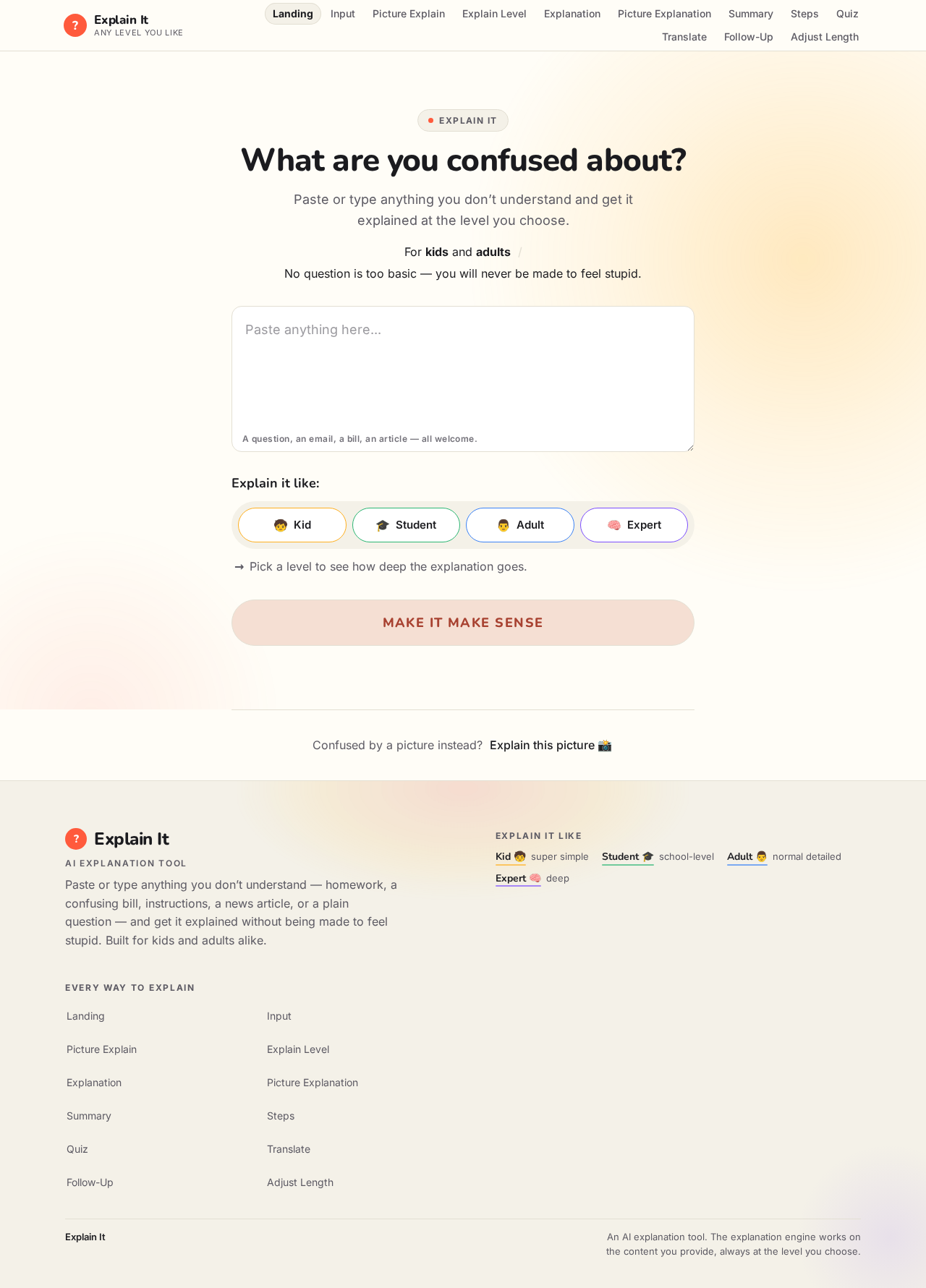
Explain It
What are you confused about?
Paste or type anything you don’t understand and get it explained at the level you choose.
For kids and adultsNo question is too basic — you will never be made to feel stupid.
Explain it like:
Pick a level to see how deep the explanation goes.
Confused by a picture instead?Explain this picture
Explain It
What are you confused about?
Paste or type anything you don’t understand and get it explained at the level you choose.
For kids and adultsNo question is too basic — you will never be made to feel stupid.
Explain it like:
Pick a level to see how deep the explanation goes.
Confused by a picture instead?Explain this picture
No comments yet. Be the first!