Page 1 of 27
System Requirements Document for heroic-project
1. Introduction
heroic-project is a cybersecurity operations system dedicated to executing penetration-testing commands and protecting networks. Its defining entry behavior is environmental: the site displays the Wi‑Fi networks near the user, subjects them to AI-driven inspection, and reports an analysis that must be correct, realistic, and not fabricated.
The product intent derived from the authoritative requirement thread is therefore threefold and inseparable:
- Discovery — surface the Wi‑Fi networks physically near the operator.
- AI-driven inspection — run an AI-based scan over a selected network and produce a real analysis of it.
- Offensive and defensive execution — carry out penetration-testing commands and network-protection actions.
The audience is a single accepted active human role: a cybersecurity user / penetration tester operating in Arabic-speaking markets, working in a dark operations-console environment where the interface behaves like a live instrument reporting truth rather than a marketing surface. The hard constraint that analysis must be real and non-fabricated governs the entire information architecture: observed evidence and inferred verdict are never merged, and every number shown must trace to an observation.
Page 2 of 27
2. System Overview
heroic-project is delivered as a first-party web application with custom UI. There is no sign-up, no login, and no account creation: the system works end-to-end immediately («يعمل على الطول») and begins directly with scanning networks and vulnerabilities. The operator opens the application and is already inside the operations console.
Current delivery and actors
- Accepted active human persona (closed set): مستخدم أمن سيبراني / مختبر اختراق — the cybersecurity user / penetration tester.
- Application-owned surfaces: Landing (entry), Networks, AI Scan, Analysis, Penetration Testing, Network Protection.
- Backend responsibility: the scan and analysis execution runs through a backend capable of producing correct, realistic, non-fabricated results. The backend is a supporting system actor, not a persona and not a page.
- No other human roles are accepted. There is no administrator, no client, no auditor, and no invited third party in the current scope.
Accepted behavior
- Display of nearby Wi‑Fi networks.
- AI-based scanning of a selected network.
- Realistic, non-fabricated analysis output.
- Execution of penetration-testing commands.
- Execution of network-protection actions.
- Immediate end-to-end operation starting directly with network and vulnerability scanning, with no identity step in the path.
Narrow exclusions
- No sign-up, login, or account-creation step may be built or may block the scanning journey.
- No fabricated, placeholder, or simulated scan results may ever be presented as real.
- No adjacent account-management capabilities (no team management, no billing, no role administration) are in scope.
- No additional personas, pages, or product modules are introduced beyond the accepted catalog.
Page 3 of 27
2a. Product Interpretation and Delivery Boundary
Delivery ownership. heroic-project is a first-party web application. All nine accepted surfaces are application-owned custom pages. The scan and analysis work is executed by an application backend; the operator interacts with it through the AI Scan and Analysis surfaces, never directly.
Access ownership. There is no identity layer. No sign-up, login, or account-creation surface exists, and no session is required to reach any surface. Landing, Networks, AI Scan, Analysis, Penetration Testing, and Network Protection are all reachable directly, and the system begins scanning networks and vulnerabilities immediately on entry. Scan history, analysis results, penetration-testing executions, and protection actions remain available to the operator on the device without an account gate.
Current vs. future boundary. Everything described in this document is current. No future-horizon capabilities were accepted in the authoritative thread; nothing is deferred, and nothing outside the accepted behavior is planned here.
Truth boundary. The no-fabrication constraint is a delivery boundary, not a stylistic preference. The system reports what was observed and separately reports what was inferred, with the inference citing the observations it used. Where an observation is unavailable, the system says so rather than filling the gap. The system never displays fake or virtual networks: every row, blip, and counter is produced from a real observation of the operator's environment, and when real observation is unavailable the system states that unavailability instead of rendering simulated networks.
Page 4 of 27
2b. Source Content Inventory
Not applicable — no reference directive in this project declares content_source authority, so no source content inventory is rendered.
2c. Page Content and Component Coverage
Landing
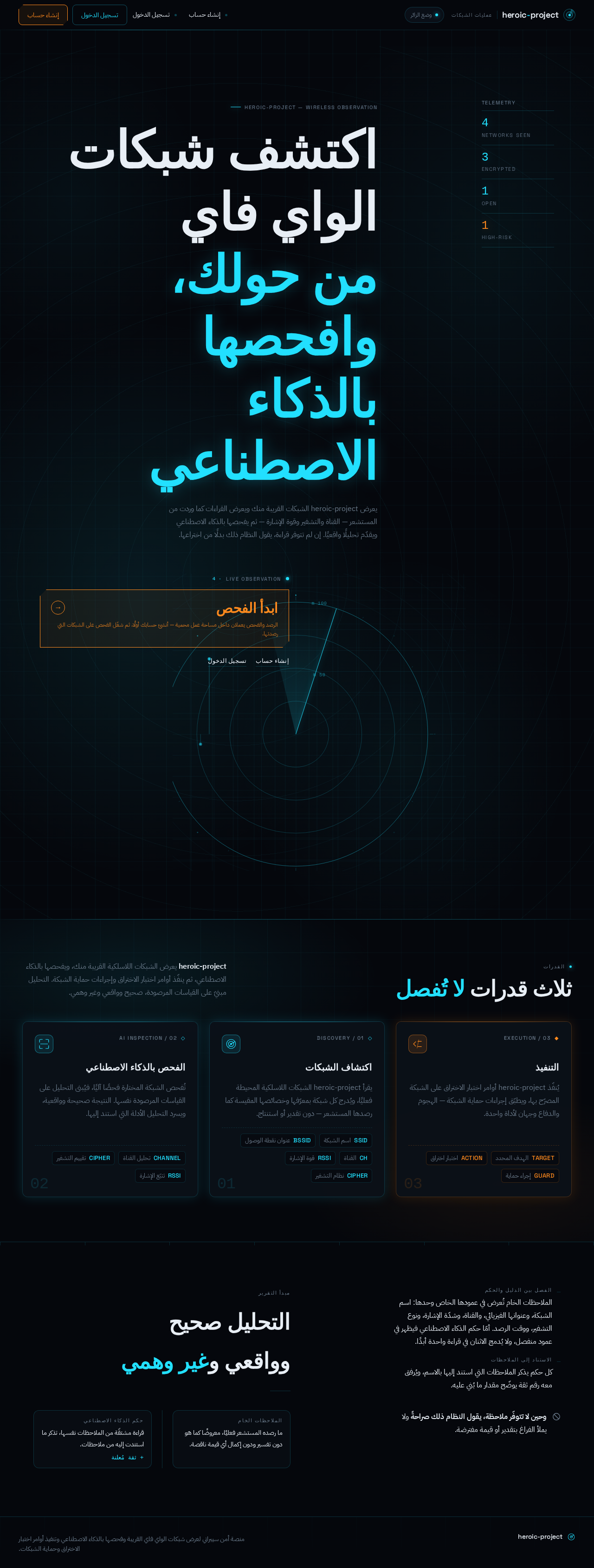
- Information/state: Public explanation that heroic-project is a cybersecurity system for discovering nearby Wi‑Fi networks, scanning and analyzing them with AI, and protecting networks — presented before any protected work is reachable. Live telemetry counters (networks seen, encrypted, open, high-risk) drawn from the product's own sensor output.
- Primary action: Begin the scan journey — the amber chamfered command card «ابدأ الفحص», which routes an unauthenticated visitor into identity establishment and then into the protected scan flow.
- Supporting actions: Navigate to Sign Up; navigate to Login for a returning operator.
- Domain entities: Nearby network observation (SSID, BSSID, channel, RSSI, cipher), telemetry counter set.
- Component responsibilities: Full-bleed void canvas with a live radar field (concentric cyan range rings on a 1px grid, rotating sweep arm, network blips placed by real bearing and radius-by-RSSI); Arabic-first headline set in the upper-right quadrant with the second line offset left; vertical telemetry strip of monospace counters at the far left; amber chamfered command card cut into the composition.
- States:
- Loading: radar field initializes with rings drawn and sweep arm starting; counters hold at zero.
- Empty: no networks observed yet — radar shows rings and sweep with no blips, and the telemetry strip reads zero for every counter rather than showing invented values.
- Success: blips appear as networks are observed; counters count up to their real values.
- Error: sensor output unavailable — the radar renders as a static concentric diagram with an explicit unavailable notice; no blips and no counters are fabricated.
- Recovery: the operator can retry observation from the protected Networks surface after establishing identity.
Page 5 of 27
Sign Up
- Information/state: Anonymous self-service identity establishment for a first-time operator. Explains that an account is required to run scans, penetration tests, and protection actions.
- Primary action: Create the operator account.
- Supporting actions: Navigate to Login if an account already exists; return to Landing.
- Domain entities: Operator identity (credential and profile content intended for the product).
- Component responsibilities: Credential entry form; validation messaging; submission control; link to the returning-operator surface.
- States:
- Loading: submission in progress with the control in a pending state.
- Empty: pristine form with no values entered.
- Success: identity established; the operator proceeds to the protected operations console.
- Error: invalid or incomplete credentials, or an identity that already exists — the specific reason is stated and entered values are preserved.
- Recovery: correct the indicated field and resubmit, or switch to Login.
Page 6 of 27
Login
- Information/state: Returning-operator verification surface granting access to the protected scan, penetration-testing, and protection operations.
- Primary action: Verify identity and enter the operations console.
- Supporting actions: Navigate to Sign Up; return to Landing.
- Domain entities: Operator identity.
- Component responsibilities: Credential entry form; verification submission control; link to the self-service registration surface.
- States:
- Loading: verification in progress.
- Empty: pristine form.
- Success: session established; the operator lands in the protected operations console with prior work resumable.
- Error: credentials not recognized — a clear failure message is shown without disclosing which element was wrong beyond what is necessary.
- Recovery: re-enter credentials, or navigate to Sign Up.
Page 7 of 27
Dashboard
- Information/state: Protected operations workspace summarizing the state of the operator's cybersecurity work and orienting them toward network discovery, scanning, testing, and protection.
- Primary action: Enter the Networks surface to observe nearby Wi‑Fi networks.
- Supporting actions: Jump to AI Scan, Analysis, Penetration Testing, or Network Protection; resume the most recent scan or analysis.
- Domain entities: Operator session, recent scan records, recent analysis results, recent penetration-testing executions, recent protection actions.
- Component responsibilities: Persistent left rail navigation in Arabic RTL (الشبكات، الفحص، التحليل، اختبار الاختراق، الحماية); summary panels for recent activity; entry points into each operations surface.
- States:
- Loading: panels in a pending state while recent activity is retrieved.
- Empty: no prior scans, analyses, tests, or protection actions — panels state that no work has been performed yet rather than displaying invented records.
- Success: recent activity listed with real timestamps and real values.
- Error: activity retrieval failed — an explicit failure notice with a retry control; no stale or invented data is substituted.
- Recovery: retry retrieval, or proceed directly to Networks to begin fresh work.
Page 8 of 27
Networks
- Information/state: Revisitable list of the Wi‑Fi networks near the operator, presented as a dense ruled table with columns SSID / BSSID / CH / RSSI / CIPHER / RISK and a live sparkline column.
- Primary action: Select a specific network to scan with AI.
- Supporting actions: Refresh the observation of nearby networks; sort or filter the ruled table; open a network's detail view showing channel-occupancy waterfall across 2.4/5/6 GHz bands.
- Domain entities: Network observation (SSID, BSSID, channel, RSSI, cipher suite, risk indicator, sparkline history), band occupancy.
- Component responsibilities: Ruled data table with monospace tabular numerals; live sparkline column; refresh control; selection control routing to AI Scan; channel-occupancy waterfall in the detail view.
- States:
- Loading: table skeleton with column headers present and rows pending.
- Empty: no networks observed in range — the table states this plainly with no placeholder rows.
- Success: rows populated with real observed values; risk rendered as a radial gauge or sparkline, never a progress bar.
- Error: observation failed or permission to observe was refused — an explicit message distinguishing "no networks found" from "could not observe".
- Recovery: retry observation; if the failure persists, the reason is stated and the operator can return to Dashboard.
Page 9 of 27
AI Scan
- Information/state: Focused workspace for running the AI scan against one specific selected Wi‑Fi network. Shows which network is targeted and the scan's live progress.
- Primary action: Launch the AI scan on the selected network.
- Supporting actions: Change the selected target network; cancel a running scan; proceed to Analysis when the scan completes.
- Domain entities: Selected network, scan run (start time, status, progress), raw observations collected during the run.
- Component responsibilities: Target network identity panel; scan launch control rendered as an amber chamfered command card; horizontal scan-line sweep across the card while running, terminating in a cyan complete pulse or an amber action-required pulse; progress readout in monospace tabular figures.
- States:
- Loading: scan running — scan-line sweep active, progress counting in monospace.
- Empty: no network selected — the surface states that a target must be chosen and links to Networks.
- Success: scan completed — cyan complete pulse, and the operator is routed to Analysis for the real result.
- Error: scan failed or was refused — an amber action-required pulse with the specific reason; no partial result is presented as a completed analysis.
- Recovery: retry the scan on the same target, select a different target, or return to Networks.
Page 10 of 27
Analysis
- Information/state: Results surface presenting the realistic analysis of the scanned network. Enforces a strict two-column split: the right column holds only raw observations (BSSID, timestamps, captured frames, cipher suite) in monospace; the left column holds the AI verdict with a confidence figure and an explicit "based on" list citing which observations it used. The two are never merged.
- Primary action: Read the AI verdict and audit it against the cited observations.
- Supporting actions: Follow a cited observation to its raw evidence entry; move from the analysis into Penetration Testing or Network Protection for the analyzed network; return to AI Scan to re-run.
- Domain entities: Analysis result (verdict, confidence figure, cited observation references), raw observation records (BSSID, timestamp, captured frames, cipher suite).
- Component responsibilities: Evidence column (raw observations, monospace, timestamps); verdict panel (AI verdict, confidence figure, "based on" citation list); threat score rendered as a radial gauge with a needle; explicit unavailable-observation markers where evidence is missing.
- States:
- Loading: both columns in a pending state with their headers present.
- Empty: no analysis exists for the selected network — the surface states this and links to AI Scan rather than showing a sample result.
- Success: verdict and evidence both populated; every number in the verdict traces to an entry in the evidence column.
- Error: analysis could not be produced — the surface states the failure explicitly and shows no verdict at all, rather than a low-confidence guess presented as a result.
- Recovery: re-run the scan from AI Scan; if evidence was insufficient, the surface names which observations were missing.
Page 11 of 27
Penetration Testing
- Information/state: Protected workspace for executing penetration-testing commands. Shows the target network, the available commands, and the execution state of each run.
- Primary action: Execute a penetration-testing command against the selected target.
- Supporting actions: Select the target network; review the command's parameters before execution; review the output of a completed execution; move to Analysis to consult the evidence behind a finding.
- Domain entities: Penetration-testing command, execution run (target, start time, status, output), target network.
- Component responsibilities: Command list with amber chamfered command cards (45° cut corners, 1px amber border) distinguishing executable actions from cyan telemetry readouts; execution control; horizontal scan-line sweep while a command runs, terminating in a cyan complete pulse or an amber action-required pulse; monospace output readout.
- States:
- Loading: command executing — scan-line sweep active, output streaming in monospace.
- Empty: no target selected or no command chosen — the surface states what is required before execution.
- Success: command completed — cyan complete pulse with the real output recorded and bound to the operator's session.
- Error: command failed or was refused — amber action-required pulse with the specific reason; the failure is recorded as a failure, never as a success.
- Recovery: adjust parameters and re-execute, choose a different command, or return to Analysis to re-examine the evidence.
Page 12 of 27
Network Protection
- Information/state: Protected workspace for executing network-protection actions. Shows the network under protection, the available protective actions, and the state of each applied action.
- Primary action: Apply a network-protection action to the selected network.
- Supporting actions: Select the network to protect; review the action's effect before applying it; review the state of previously applied protections; consult Analysis for the findings that motivate a protection.
- Domain entities: Protection action, protection state (network, action, applied time, status), target network.
- Component responsibilities: Protection action list with amber chamfered command cards for executable actions; apply control; protection-state readout in monospace; cyan telemetry panels for current defensive posture.
- States:
- Loading: action being applied — pending state with the control disabled.
- Empty: no network selected or no protection applied yet — the surface states this plainly.
- Success: protection applied — cyan complete pulse and the protection state recorded against the correct network and operator.
- Error: protection action failed or was refused — amber action-required pulse with the specific reason.
- Recovery: retry the action, choose a different protective action, or return to Analysis to re-check the underlying finding.
Page 13 of 27
3. Functional Requirements
FR-1 — Nearby Wi‑Fi network display
As a مستخدم أمن سيبراني / مختبر اختراق I should see the Wi‑Fi networks near me listed with their identifying and signal attributes so that I can choose a real target to examine.
- Provenance: explicit
- Trigger/input: The operator opens the Networks surface (or refreshes it) from an authenticated session.
- Observable result: A ruled table of observed networks with SSID, BSSID, channel, RSSI, cipher, and risk, plus a live sparkline column.
- Access state: Requires login.
- Failure/recovery: If observation fails or is refused, the surface states the failure explicitly and distinguishes it from "no networks found"; the operator can retry.
- Continuation: The operator selects a network and proceeds to AI Scan.
FR-2 — AI scan of a selected network
As a مستخدم أمن سيبراني / مختبر اختراق I should run an AI-based scan against a specific nearby network so that the network is actually inspected rather than merely listed.
- Provenance: explicit
- Trigger/input: The operator selects a target network and launches the scan from AI Scan.
- Observable result: A scan run executes with visible progress; on completion the operator is routed to Analysis.
- Access state: Requires login.
- Failure/recovery: A failed or refused scan terminates in an amber action-required pulse with the specific reason; no partial result is presented as a completed analysis. The operator can retry or change target.
- Continuation: The completed scan produces the analysis surfaced on Analysis.
FR-3 — Realistic, non-fabricated analysis
As a مستخدم أمن سيبراني / مختبر اختراق I should receive an analysis that is correct and realistic and not fabricated so that I can act on it with confidence.
- Provenance: explicit (hard constraint)
- Trigger/input: A completed AI scan on a selected network.
- Observable result: Analysis presents a two-column split — raw observations (BSSID, timestamps, captured frames, cipher suite) in the right evidence column, and the AI verdict with a confidence figure and an explicit "based on" citation list in the left verdict panel. Every number in the verdict traces to an observation shown in the evidence column.
- Access state: Requires login.
- Failure/recovery: If the analysis cannot be produced, the surface states the failure and shows no verdict at all rather than a low-confidence guess presented as a result; if evidence was insufficient, the missing observations are named.
- Continuation: The operator proceeds to Penetration Testing or Network Protection for the analyzed network, or re-runs the scan.
FR-4 — Penetration-testing command execution
As a مستخدم أمن سيبراني / مختبر اختراق I should execute penetration-testing commands against a target network so that I can carry out the offensive testing the system exists to perform.
- Provenance: explicit
- Trigger/input: The operator selects a target and a penetration-testing command on the Penetration Testing surface and executes it.
- Observable result: The command runs with a horizontal scan-line sweep across its amber chamfered card, terminating in a cyan complete pulse with the real output recorded, or an amber action-required pulse on failure.
- Access state: Requires login.
- Failure/recovery: A failed or refused command is recorded as a failure with its specific reason, never as a success; the operator can adjust parameters and re-execute.
- Continuation: The operator reviews the output, consults Analysis for the underlying evidence, or proceeds to Network Protection.
FR-5 — Network protection action execution
As a مستخدم أمن سيبراني / مختبر اختراق I should apply network-protection actions to a network so that I can defend the networks the system has analyzed.
- Provenance: explicit
- Trigger/input: The operator selects a network and a protection action on the Network Protection surface and applies it.
- Observable result: The protection is applied and its state is recorded against the correct network and operator, confirmed by a cyan complete pulse.
- Access state: Requires login.
- Failure/recovery: A failed or refused protection action terminates in an amber action-required pulse with the specific reason; the operator can retry or choose a different action.
- Continuation: The operator reviews the recorded protection state or returns to Analysis.
FR-6 — Self-service identity establishment
As a مستخدم أمن سيبراني / مختبر اختراق I should create my own account on first use so that my scans, analyses, tests, and protections are privately owned and resumable.
- Provenance: required_inference
- Trigger/input: An unauthenticated visitor chooses to begin protected work and is routed to Sign Up.
- Observable result: An operator identity is created and the operator enters the protected operations console.
- Access state: Anonymous entry (no session required to reach Sign Up).
- Failure/recovery: Invalid or incomplete credentials, or an already-existing identity, produce a specific stated reason with entered values preserved; the operator corrects the field and resubmits or switches to Login.
- Continuation: The operator proceeds to the protected operations console.
FR-7 — Returning verification
As a مستخدم أمن سيبراني / مختبر اختراق I should verify my identity on return so that I regain access to my scan, testing, and protection work.
- Provenance: required_inference
- Trigger/input: A returning operator submits credentials on Login.
- Observable result: A session is established and the operator lands in the protected operations console with prior work resumable.
- Access state: Anonymous entry (no session required to reach Login).
- Failure/recovery: Unrecognized credentials produce a clear failure message; the operator re-enters credentials or navigates to Sign Up.
- Continuation: The operator resumes work from Dashboard.
FR-8 — Backend execution of scan and analysis
As a مستخدم أمن سيبراني / مختبر اختراق I should have the scan and analysis executed by a backend capable of producing correct, realistic, non-fabricated results so that the output I read is grounded in real observation.
- Provenance: required_inference
- Trigger/input: A scan launched from AI Scan.
- Observable result: The backend returns observations and an analysis whose verdict cites the observations it used; the operator sees this on Analysis.
- Access state: Invoked only from an authenticated session; the operator never interacts with the backend directly.
- Failure/recovery: Backend failure surfaces as an explicit failure on AI Scan or Analysis with no fabricated substitute.
- Continuation: The operator acts on the returned result in Penetration Testing or Network Protection.
Page 14 of 27
4. User Personas
Page 15 of 27
مستخدم أمن سيبراني / مختبر اختراق (Cybersecurity user / penetration tester)
Product context. This operator works inside heroic-project as an instrument panel for live Wi‑Fi discovery, AI-driven vulnerability analysis, and offensive/defensive command execution. They operate in Arabic RTL, in a dark console environment, often at night, and they need the interface to report truth rather than to persuade. The product's whole reason for existing is that this operator must be able to trust what the screen says.
Primary goal. Discover the Wi‑Fi networks physically near them, obtain a correct and realistic AI analysis of a chosen network, and then execute the penetration-testing commands and network-protection actions that the analysis justifies.
Distinct accepted responsibilities.
- Observing and reading the nearby Wi‑Fi network list, including signal strength, channel, cipher, and risk.
- Selecting a specific network as a scan target.
- Launching and monitoring an AI scan on that target.
- Reading the analysis and auditing it against the raw evidence it cites.
- Executing penetration-testing commands against a target.
- Applying network-protection actions to a network.
- Establishing their own identity on first use and verifying it on return so their work remains theirs.
Relevant inputs and decisions.
- Inputs: observed network attributes (SSID, BSSID, channel, RSSI, cipher), raw observation records (timestamps, captured frames, cipher suite), scan progress, command output, protection state.
- Decisions: which network to target; whether the evidence supports the verdict; which penetration-testing command to execute and with what parameters; which protection action to apply; whether to re-run a scan when evidence was insufficient.
Interactions with other accepted participants. There are no other accepted human participants in the current scope. The operator's counterpart is the application backend, which performs the scan and analysis and returns observations and a verdict. The operator's relationship to it is one of audit: the backend must show its evidence, and the operator must be able to check the verdict against it. The operator also interacts with the identity surfaces (Sign Up, Login) as a prerequisite to protected work, but those are access boundaries rather than collaborators.
Observable success. The operator sees a real list of nearby networks, obtains an analysis whose every number traces to a visible observation, executes penetration-testing commands and protection actions whose outcomes are recorded truthfully as success or failure, and can leave and return to find their work intact.
What makes this role's work different. This is not a passive dashboard reader. The operator's work alternates between two channels that the interface keeps visually and semantically distinct: passive observation (cyan telemetry — what the system is seeing) and active execution (amber commands — what the system is about to do). The operator must be able to tell at a glance which mode they are in, because one is reading and the other is acting on a live network. Their defining constraint is that they cannot tolerate a fabricated result: a wrong reading in this role is worse than no reading.
Page 16 of 27
5. Core User Flows
Flow A — First use: establish identity and reach the operations console
- The operator arrives at Landing without a session. The radar field renders with concentric cyan rings and a rotating sweep arm; the telemetry strip shows counters at zero because nothing has been observed yet.
- The operator reads the Arabic-first headline explaining that heroic-project discovers nearby Wi‑Fi networks, scans and analyzes them with AI, and protects networks.
- The operator activates the amber chamfered command card «ابدأ الفحص». Because protected work requires identity, they are routed to Sign Up.
- On Sign Up, the operator enters their credentials and submits. The control enters a pending state.
- Observable result: the identity is created and the operator enters the protected operations console at Dashboard.
- Failure/recovery: if the credentials are invalid, incomplete, or already registered, the surface states the specific reason and preserves what was entered; the operator corrects the field and resubmits, or switches to Login.
- Continuation: from Dashboard the operator proceeds to Networks to begin discovery.
Flow B — Returning operator: verify and resume
- The operator arrives at Landing and chooses to sign in, reaching Login.
- The operator submits their credentials. Verification runs.
- Observable result: a session is established and the operator lands at Dashboard, where their recent scans, analyses, tests, and protection actions are listed with real timestamps.
- Failure/recovery: if the credentials are not recognized, a clear failure message is shown; the operator re-enters credentials or navigates to Sign Up.
- Continuation: the operator resumes the most recent scan or analysis, or proceeds to Networks for fresh work.
Flow C — Discover nearby networks and choose a target
- From Dashboard, the operator enters Networks.
- The application observes the Wi‑Fi networks near the operator. The ruled table renders with columns SSID / BSSID / CH / RSSI / CIPHER / RISK and a live sparkline column; numerals count up in monospace tabular figures so no column reflows.
- Observable result: the operator sees the real nearby networks with their real signal and cipher attributes.
- Empty state: if no networks are in range, the table states this plainly with no placeholder rows.
- Failure/recovery: if observation fails or is refused, the surface states the failure explicitly and distinguishes it from "no networks found"; the operator retries, or returns to Dashboard if the failure persists.
- Continuation: the operator selects a specific network, which routes them to AI Scan with that network as the target. The operator may also open a network's detail view to inspect its channel-occupancy waterfall across the 2.4/5/6 GHz bands before deciding.
Page 17 of 27
Flow D — Run the AI scan on the selected network
- On AI Scan, the operator sees the target network's identity confirmed.
- The operator launches the scan from the amber chamfered command card. A horizontal scan-line sweep crosses the card while the run is in progress, and progress counts in monospace tabular figures.
- Observable result: on completion the card terminates in a cyan complete pulse, and the operator is routed to Analysis.
- Empty state: if no network is selected, the surface states that a target must be chosen and links to Networks.
- Failure/recovery: a failed or refused scan terminates in an amber action-required pulse with the specific reason. No partial result is presented as a completed analysis. The operator retries on the same target, selects a different target, or returns to Networks.
- Continuation: the completed scan produces the analysis on Analysis.
Flow E — Read the analysis and audit it against the evidence
- On Analysis, the operator sees a strict two-column split. The right column holds only raw observations — BSSID, timestamps, captured frames, cipher suite — in monospace. The left column holds the AI verdict with a confidence figure and an explicit "based on" list citing which observations it used. The two are never merged.
- The operator reads the verdict, then follows each citation into the evidence column to confirm the verdict rests on what was actually observed. The threat score renders as a radial gauge with a needle.
- Observable result: the operator has a realistic analysis whose every number traces to a visible observation, and can see exactly which observations the inference used.
- Empty state: if no analysis exists for the selected network, the surface states this and links to AI Scan rather than showing a sample result.
- Failure/recovery: if the analysis could not be produced, the surface states the failure explicitly and shows no verdict at all rather than a low-confidence guess presented as a result. If evidence was insufficient, the surface names which observations were missing, and the operator re-runs the scan from AI Scan.
- Continuation: the operator proceeds to Penetration Testing or Network Protection for the analyzed network.
Flow F — Execute a penetration-testing command
- From Analysis or from the left rail, the operator enters Penetration Testing. The target network is carried over.
- The operator reviews the available commands, presented as amber chamfered command cards with 45° cut corners and 1px amber borders — visually distinct from the rounded cyan telemetry panels — and selects one, reviewing its parameters before execution.
- The operator executes the command. A horizontal scan-line sweep crosses the card while it runs, and output streams in monospace.
- Observable result: the run terminates in a cyan complete pulse, and the real output is recorded and bound to the operator's session.
- Empty state: if no target is selected or no command chosen, the surface states what is required before execution.
- Failure/recovery: a failed or refused command terminates in an amber action-required pulse with the specific reason, and is recorded as a failure — never as a success. The operator adjusts parameters and re-executes, chooses a different command, or returns to Analysis to re-examine the evidence.
- Continuation: the operator reviews the output, consults Analysis for the underlying evidence, or proceeds to Network Protection.
Page 18 of 27
Flow G — Apply a network-protection action
- From Analysis or from the left rail, the operator enters Network Protection. The network under protection is shown.
- The operator reviews the available protective actions and their effect, then applies one using its amber chamfered command card.
- Observable result: the protection is applied and its state is recorded against the correct network and operator, confirmed by a cyan complete pulse; the current defensive posture is shown in cyan telemetry panels.
- Empty state: if no network is selected or no protection has been applied yet, the surface states this plainly.
- Failure/recovery: a failed or refused protection action terminates in an amber action-required pulse with the specific reason. The operator retries, chooses a different protective action, or returns to Analysis to re-check the underlying finding.
- Continuation: the operator reviews the recorded protection state, or returns to Dashboard where the action appears in their recent activity.
Flow H — Resume prior work
- The operator verifies identity at Login and lands at Dashboard.
- Dashboard lists their recent scans, analyses, penetration-testing executions, and protection actions with real timestamps and real values.
- Observable result: the operator can re-enter any prior analysis or execution and continue from where it stands.
- Empty state: if no prior work exists, the panels state that no work has been performed yet rather than displaying invented records.
- Failure/recovery: if activity retrieval fails, an explicit failure notice with a retry control is shown; no stale or invented data is substituted. The operator retries, or proceeds directly to Networks to begin fresh work.
- Continuation: the operator resumes the selected item or starts new work.
6. Visuals, Colors and Theme
Muse: Gleb Kuznetsov. Headline direction: Cinematic future tech for offensive and defensive network operations — a live instrument reading a hostile environment, not a marketing surface.
Page 19 of 27
Color tokens (dark mode)
| Role | Hex | Usage |
|---|
| Background (void ground) | #05070C | Carries ~70% of every screen |
| Surface (panel) | #0B1018 | Panels at 0.92 opacity so the void shows through faintly |
| Text | #E8EEF5 | Body text at 15–16px on the void ground (~14:1 contrast) |
| Primary (cyan signal) | #22E0FF | Passive telemetry, network blips, safe/encrypted states, focus rings, active nav |
| Accent (amber) | #FF8A1E | Reserved exclusively for offensive/active actions and unencrypted-network warnings |
| Muted | #5A6B7D | Metadata, timestamps, secondary labels — never for anything the user must read to act |
| Panel border | rgba(34,224,255,0.18) | 1px luminous border on every panel |
| Glow | 0 0 24px rgba(34,224,255,0.15) | Depth source; no drop shadows anywhere |
Cyan sits at hue 187, deliberately outside the forbidden blue-indigo band. No blue-indigo (#2563EB, #6366F1, #7C3AED) appears anywhere. Amber's appearance on screen is itself information: any amber pixel means an offensive command is available or was executed.
Typography
- Headings (Latin): Space Grotesk, weights 500–700, tracking −0.02em, sentence case.
- Headings (Arabic): Almarai 700 or Tajawal 800, paired with the Latin display face.
- Body: IBM Plex Sans Arabic.
- Numerals and data readouts: IBM Plex Mono, 13–14px, tabular figures, so columns align and digits do not shift width while counting.
- Micro-labels (NETWORK ID, RSSI, CIPHER, LAST SEEN): uppercase Space Grotesk 500 at 11px with +0.14em tracking in muted
#5A6B7D.
- Type scale (1.25 modular): 12 / 14 / 16 / 20 / 25 / 40 / 64 / 96.
- Hero display:
clamp(48px, 8vw, 112px). Section headings: clamp(28px, 4vw, 48px). Body: 16px / 1.6 line-height. Arabic body: same scale with 1.75 line-height for diacritic clearance.
Page 20 of 27
Shape language
Thin luminous strokes and glass. Panels are 12px-radius rounded rectangles with a 1px rgba(34,224,255,0.18) border and a #0B1018 fill at 0.92 opacity. Radial gauges and concentric rings carry signal strength and threat scoring. Actionable command cards use 45° chamfered corners — cut, not rounded — to distinguish "this executes something" from "this displays something". No drop shadows; depth comes from glow and layering, never from grey blur.
Layout
Full-bleed dark canvas with a persistent left rail (72px collapsed, 264px expanded) holding icon+label navigation in Arabic RTL: الشبكات، الفحص، التحليل، اختبار الاختراق، الحماية. Content is a modular HUD grid. On the hero, the radar sweep is the dominant element at 60% width with a right-hand vertical telemetry stack. Networks is a dense ruled table (SSID / BSSID / CH / RSSI / CIPHER / RISK) with a live sparkline column, not cards. Analysis uses a two-column split — evidence on the right, AI verdict on the left — never merged. At 375px the rail collapses to a bottom tab bar, the radar becomes a vertical list, and the table becomes stacked ruled rows with label/value pairs.
Page 21 of 27
Imagery
No stock photography, no illustration. Imagery is generated from the product's own data: a canvas radar field with network blips positioned by real bearing and RSSI, concentric range rings labelled in metres, and faint topographic contour lines for physical-space context. Network detail views show a channel-occupancy waterfall (2.4/5/6 GHz bands as stacked rows, occupied channels lit cyan, congested channels amber). Threat scores render as a radial gauge with a needle, never a progress bar. Icons are 1.5px-stroke line pictograms in the HUD style.
Readability at every viewport
Headlines, wordmarks, labels, numbers, cards, and controls stay entirely inside the viewport and their container at 375px, 768px, and 1280px, wrapping or scaling (for example font-size: clamp(...) with its mobile size) to fit, with no other element covering any part of them. Crops, bleeds, and off-edge placement are reserved for decoration only — shapes, textures, rules, and background art. Moving and scrollable content may cross the viewport edge by design, but every item must become fully readable as it passes; under prefers-reduced-motion it stops and shows whole items, wrapping into rows or sitting in a horizontally scrollable row (overflow-x: auto).
Page 22 of 27
7. Signature Design Concept
The radar is the hero, and the type sits inside the instrument.
The public entry is a full-bleed void-black canvas (#05070C) whose dominant element is a live radar field: concentric cyan rings on a 1px grid, a rotating sweep arm at a 6-second period, and network blips placed at their real bearing and radius-by-RSSI. This is the product's own sensor output rendered as the first thing anyone sees — not a claim about the product, but the product observing.
The headline is set in Space Grotesk at clamp(48px, 8vw, 112px), Arabic first for the primary audience, positioned in the upper-right quadrant of the grid rather than centred, with the second line offset left by two columns to break the axis. Below it, a single amber chamfered command card reads «ابدأ الفحص», cut into the composition at the 7th column. To the far left, a vertical telemetry strip shows live counters — networks seen, encrypted, open, high-risk — in IBM Plex Mono tabular figures.
The composition deliberately refuses the centred headline + subtext + single CTA template. There is no gradient blob, no centred stack, and no blue button. The radar occupies the field; the type is placed into it as an instrument annotation. The amber card is the only amber element on the surface, which means its presence alone signals that an action is available — the colour system is doing operational work from the very first screen.
8. Interaction Model & Motion Direction
Interaction Model: Animated
Motion Tempo: cinematic
Hero Dimensionality: layered_2d
Page 23 of 27
Landing Hero Motion Brief
Focal subject. The live radar field: concentric cyan range rings on a 1px void grid, a rotating sweep arm at a 6-second period, and network blips placed at their real bearing and radius-by-RSSI, with a vertical telemetry strip of monospace counters at the far left.
Input → transformation → outcome thesis. Real nearby-network observations enter the system → the sweep arm passes over each network's bearing and the blip fades in at its radius-by-RSSI while the telemetry counters count up to their real values → the operator sees the product's own sensor output as the first frame, and the amber «ابدأ الفحص» card becomes the single available action.
Motion vocabulary. Continuous slow radar sweep (6s rotation) with blips fading in as networks are discovered; numbers counting up on reveal (RSSI, channel, threat score) in monospace tabular figures so nothing reflows; scroll-scrubbed parallax on the hero's concentric rings at 0.3x; command execution shown as a horizontal scan-line sweep across the card while running, terminating in either a cyan complete pulse or an amber action-required pulse.
Composed first frame. Void-black ground. Concentric cyan rings drawn on the grid with the sweep arm mid-rotation. Blips already placed at their real positions. The Arabic headline in the upper-right quadrant with its second line offset left. The amber chamfered command card cut in at the 7th column. The telemetry strip at the far left holding its counters at zero, about to count up.
Reduced-motion state. Under prefers-reduced-motion, the radar freezes as a static concentric diagram with blips placed at their final positions, counters jump directly to their final values, and scan-lines become a static progress bar. No information is lost — the instrument simply stops moving.
Page 24 of 27
9. Non-Functional Requirements
NFR-1 — Analysis truthfulness (hard constraint)
The analysis produced by the system must be correct and realistic and must not be fabricated. No placeholder, simulated, or invented scan result may be presented as real. Every number displayed in a verdict must trace to an observation shown in the evidence column. Where an observation is unavailable, the system states its unavailability rather than filling the gap.
- Provenance: explicit (user-stated hard constraint)
- Rationale: The user explicitly required that the analysis be correct and realistic and not fake; this is the product's defining quality bar.
NFR-2 — Evidence/verdict separation
The Analysis surface must keep raw observations and the AI verdict in separate, non-merged columns, with the verdict citing the specific observations it used and a confidence figure.
- Provenance: required_inference
- Rationale: This is the only mechanism that makes NFR-1 auditable by the operator rather than merely asserted.
NFR-3 — Backend capability for real results
Scan and analysis execution must run through a backend capable of producing correct, realistic, non-fabricated results.
- Provenance: required_inference
- Rationale: Required to make the accepted scan-and-analyze journey executable without adding a product capability.
NFR-4 — Identity continuity for protected work
Scan history, analysis results, penetration-testing executions, and protection actions must remain bound to the correct operator and resumable across sessions.
- Provenance: required_inference
- Rationale: The accepted work creates durable, actor-specific state that must remain privately owned.
NFR-5 — Access boundary integrity
Landing, Sign Up, and Login are reachable without a session. Dashboard, Networks, AI Scan, Analysis, Penetration Testing, and Network Protection require login. No protected destination owns the interaction that grants access to itself.
- Provenance: required_inference
- Rationale: Required to make the accepted protected journeys executable while keeping the entry interaction anonymous.
NFR-6 — Readability at every viewport
Headlines, wordmarks, labels, numbers, cards, and controls must remain entirely inside the viewport and their container at 375px, 768px, and 1280px, wrapping or scaling to fit, with no other element covering any part of them.
- Provenance: explicit (creative direction constraint)
- Rationale: Stated as a project-wide readability requirement.
NFR-7 — Reduced-motion compliance
All motion must honour prefers-reduced-motion: the radar freezes as a static concentric diagram with blips placed, counters jump to final values, and scan-lines become a static progress bar.
- Provenance: explicit (creative direction constraint)
- Rationale: Stated as a project-wide motion requirement.
NFR-8 — Arabic RTL operation
The interface operates in Arabic RTL, with the left rail holding icon+label navigation in Arabic and Arabic body text set at 1.75 line-height for diacritic clearance.
- Provenance: explicit (creative direction constraint)
- Rationale: The primary audience is Arabic-speaking.
Page 25 of 27
10. Tech Stack
- Frontend: React (web application with custom UI).
- Backend: Python / FastAPI, responsible for scan execution, analysis production, and persistence of operator-bound results.
- Storage: appropriate persistent storage for operator identity, network observations, scan runs, analysis results, penetration-testing executions, and protection states.
- Containerization: Docker / docker-compose for local and deployment packaging.
- Orchestration: Kubernetes only if deployment scale requires it; not otherwise mandated by the source.
No source-specified technology was overridden. The stack above preserves the accepted delivery shape (first-party custom UI with application-owned identity and backend integration) and introduces no adjacent capability.
Page 26 of 27
11. Assumptions and Constraints
Assumptions
- A-1
[Required inference] The operator has a device capable of observing nearby Wi‑Fi networks, and the application can obtain that observation. If observation is unavailable, the system reports the failure rather than fabricating networks.
- A-2
[Required inference] Self-service registration is the correct identity bootstrap because the source specifies no invitation, provisioning, or deployment-based onboarding.
- A-3
[Required inference] The backend is the sole producer of scan observations and analysis verdicts; the frontend never invents or interpolates a result.
- A-4
[Default — not specified by user] The application is delivered as a web application with a persistent left rail that collapses to a bottom tab bar at 375px.
Constraints
- C-1 The analysis must be correct and realistic and must not be fabricated. No fabricated or placeholder scan results may be presented as real. (explicit, hard)
- C-2 The system must display the Wi‑Fi networks near the user. (explicit)
- C-3 The system must scan the displayed networks using AI. (explicit)
- C-4 The system must execute penetration-testing commands. (explicit)
- C-5 The system must execute network-protection actions. (explicit)
- C-6 The generic indigo/blue-on-white SaaS template is forbidden for this project. (explicit)
- C-7 Blue-indigo (
#2563EB, #6366F1, #7C3AED) must not appear anywhere; cyan stays at hue ~187. (explicit)
- C-8 White or near-white grounds, light-mode variants, and "clean modern dashboard" interpretations are excluded. (explicit)
- C-9 Inter, Roboto, Poppins, and system-ui are excluded for headings and body. (explicit)
- C-10 Progress bars must not be used for risk or signal strength; radial gauges, needles, or sparklines are used instead. (explicit)
- C-11 Decorative 3D objects, floating holograms, and particle fields with no data behind them are excluded. (explicit)
- C-12 Gradient-blob heroes, glassmorphic cards over violet-pink gradients, and identical hover-lift card grids are excluded. (explicit)
- C-13 Centred headline + subtext + single CTA hero composition is excluded. (explicit)
- C-14 Amber is reserved exclusively for offensive/active actions and unencrypted-network warnings; it is never used decoratively. (explicit)
- C-15 Muted
#5A6B7D is never used for anything the user must read to act. (explicit)
Page 27 of 27
12. Glossary
- AI Scan — The focused workspace where the operator launches an AI-based inspection of one selected Wi‑Fi network.
- Analysis — The results surface presenting the realistic analysis of a scanned network, split into a raw-evidence column and an AI-verdict panel.
- BSSID — The unique identifier of a specific wireless access point, shown as a raw observation.
- Channel-occupancy waterfall — A visualization of the 2.4/5/6 GHz bands as stacked rows, with occupied channels lit cyan and congested channels amber.
- Chamfered command card — A 12px card with 45° cut corners and a 1px amber border, used exclusively for actionable controls so an executable action is distinguishable from a telemetry readout by silhouette alone.
- Cipher suite — The encryption configuration of a network, shown as a raw observation and reflected in the network's risk indicator.
- Evidence column — The right-hand column of Analysis holding only raw observations (BSSID, timestamps, captured frames, cipher suite) in monospace.
- Network observation — A recorded reading of a nearby Wi‑Fi network: SSID, BSSID, channel, RSSI, cipher, and risk.
- Network Protection — The protected workspace for executing network-protection actions.
- Penetration Testing — The protected workspace for executing penetration-testing commands against a target network.
- Radar field — The canvas visualization of nearby networks, with concentric range rings, a rotating sweep arm, and blips placed by real bearing and radius-by-RSSI.
- RSSI — Received signal strength indicator; determines a network blip's radial distance on the radar field.
- Scan run — A single execution of the AI scan against one target network, with a start time, status, and progress.
- SSID — The broadcast name of a Wi‑Fi network.
- Telemetry strip — The vertical monospace counter display (networks seen, encrypted, open, high-risk) on the Landing hero.
- Verdict panel — The left-hand column of Analysis holding the AI verdict, its confidence figure, and the explicit "based on" list citing the observations it used.
 اختصاصي الاندرويد
No comments yet. Be the first!