◆03 / EXECUTION
التنفيذ
يُنفّذ heroic-project أوامر اختبار الاختراق على الشبكة المصرّح بها، ويطبّق إجراءات حماية الشبكة — الهجوم والدفاع وجهان لأداة واحدة.
- TARGETالهدف المحدد
- ACTIONاختبار اختراق
- GUARDإجراء حماية
 اختصاصي الاندرويد
ممكن تعمل لي نظام خاص بالامن السيبراني مختص بتنفيذ جميع اوامر اختبار الاختراق وحماية الشبكات الموقع يعرض الشبكات الواي فاي القريبة منك ويفحصها بالاستمال الذكاء الاصطناعي ويكون التحليل صحيح وواقعي وليس وهمي

Sign in to leave a comment
heroic-project — WIRELESS OBSERVATION
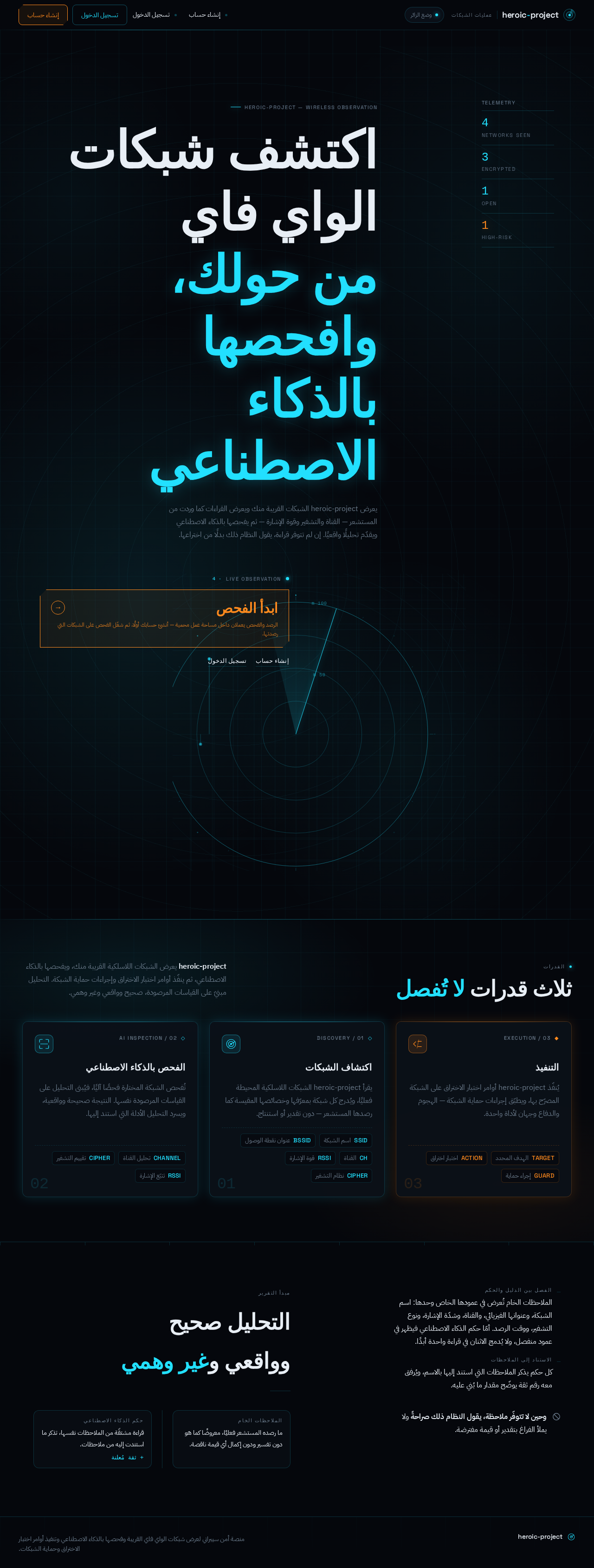
يعرض heroic-project الشبكات القريبة منك ويعرض القراءات كما وردت من المستشعر — القناة والتشفير وقوة الإشارة — ثم يفحصها بالذكاء الاصطناعي ويقدّم تحليلًا واقعيًا. إن لم تتوفر قراءة، يقول النظام ذلك بدلًا من اختراعها.
heroic-project يعرض الشبكات اللاسلكية القريبة منك، ويفحصها بالذكاء الاصطناعي، ثم ينفّذ أوامر اختبار الاختراق وإجراءات حماية الشبكة. التحليل مبنيّ على القياسات المرصودة، صحيح وواقعي وغير وهمي.
يُنفّذ heroic-project أوامر اختبار الاختراق على الشبكة المصرّح بها، ويطبّق إجراءات حماية الشبكة — الهجوم والدفاع وجهان لأداة واحدة.
يقرأ heroic-project الشبكات اللاسلكية المحيطة فعليًا، ويُدرج كل شبكة بمعرّفها وخصائصها المقيسة كما رصدها المستشعر — دون تقدير أو استنتاج.
تُفحص الشبكة المختارة فحصًا آليًا، فيُبنى التحليل على القياسات المرصودة نفسها. النتيجة صحيحة وواقعية، ويسرد التحليل الأدلة التي استند إليها.
الملاحظات الخام تُعرض في عمودها الخاص وحدها: اسم الشبكة، وعنوانها الفيزيائي، والقناة، وشدّة الإشارة، ونوع التشفير، ووقت الرصد. أمّا حكم الذكاء الاصطناعي فيظهر في عمود منفصل، ولا يُدمج الاثنان في قراءة واحدة أبدًا.
كل حكم يذكر الملاحظات التي استند إليها بالاسم، ويُرفق معه رقم ثقة يوضّح مقدار ما بُني عليه.
الملاحظات الخام
ما رصده المستشعر فعليًا، معروضًا كما هو دون تفسير ودون إكمال أي قيمة ناقصة.
حكم الذكاء الاصطناعي
قراءة مشتقّة من الملاحظات نفسها، تذكر ما استندت إليه من ملاحظات.
وحين لا تتوفّر ملاحظة، يقول النظام ذلك صراحةً ولا يملأ الفراغ بتقدير أو قيمة مفترضة.
heroic-project — WIRELESS OBSERVATION
يعرض heroic-project الشبكات القريبة منك ويعرض القراءات كما وردت من المستشعر — القناة والتشفير وقوة الإشارة — ثم يفحصها بالذكاء الاصطناعي ويقدّم تحليلًا واقعيًا. إن لم تتوفر قراءة، يقول النظام ذلك بدلًا من اختراعها.
heroic-project يعرض الشبكات اللاسلكية القريبة منك، ويفحصها بالذكاء الاصطناعي، ثم ينفّذ أوامر اختبار الاختراق وإجراءات حماية الشبكة. التحليل مبنيّ على القياسات المرصودة، صحيح وواقعي وغير وهمي.
يُنفّذ heroic-project أوامر اختبار الاختراق على الشبكة المصرّح بها، ويطبّق إجراءات حماية الشبكة — الهجوم والدفاع وجهان لأداة واحدة.
يقرأ heroic-project الشبكات اللاسلكية المحيطة فعليًا، ويُدرج كل شبكة بمعرّفها وخصائصها المقيسة كما رصدها المستشعر — دون تقدير أو استنتاج.
تُفحص الشبكة المختارة فحصًا آليًا، فيُبنى التحليل على القياسات المرصودة نفسها. النتيجة صحيحة وواقعية، ويسرد التحليل الأدلة التي استند إليها.
الملاحظات الخام تُعرض في عمودها الخاص وحدها: اسم الشبكة، وعنوانها الفيزيائي، والقناة، وشدّة الإشارة، ونوع التشفير، ووقت الرصد. أمّا حكم الذكاء الاصطناعي فيظهر في عمود منفصل، ولا يُدمج الاثنان في قراءة واحدة أبدًا.
كل حكم يذكر الملاحظات التي استند إليها بالاسم، ويُرفق معه رقم ثقة يوضّح مقدار ما بُني عليه.
الملاحظات الخام
ما رصده المستشعر فعليًا، معروضًا كما هو دون تفسير ودون إكمال أي قيمة ناقصة.
حكم الذكاء الاصطناعي
قراءة مشتقّة من الملاحظات نفسها، تذكر ما استندت إليه من ملاحظات.
وحين لا تتوفّر ملاحظة، يقول النظام ذلك صراحةً ولا يملأ الفراغ بتقدير أو قيمة مفترضة.
No comments yet. Be the first!