headphones-volume
 CJ
CJMake me an app so I can control everything on my headphones like the volume turn one headphones or both off and over $0


Comments (0)
Sign in to leave a comment
System Requirements
System Requirements Document for headphones-volume
1. Introduction
headphones-volume is a personal headphone-control utility for a single owner. Its product intent, derived directly from the authoritative requirement thread, is to let the user control everything on their headphones from one place: adjust the volume, turn one headphone (one ear) off, or turn both headphones off together — and to do so at no cost ("over $0" interpreted as free to use).
The audience is the Headphone Owner: an individual who wants a direct, trustworthy instrument for their own worn hardware, not a consumer toy or a marketing site. The app is a control instrument — it applies volume and power-off controls to the user's headphones and reflects the resulting state back to the owner.
The product is free to use, with no cost to the user. This is a hard, explicit constraint.
2. System Overview
headphones-volume is a small, focused utility delivered as a custom first-party web application with two pages:
- Landing — an anonymous public entry surface that explains, in the instrument aesthetic, that the app controls the owner's headphones: volume, turning one ear off, and turning both off.
- Controls — the cohesive local-device control surface where the owner adjusts volume and turns off one selected headphone (one ear) or both headphones together.
Actors
- Headphone Owner (active human persona) — the sole human actor; initiates every control action and observes the resulting state.
- Headphone device (non-persona actor) — the worn hardware that receives and reflects the applied volume and power state.
Accepted behavior
- Adjust headphone volume.
- Turn one headphone (one ear) off.
- Turn both headphones off together.
- Free to use, no cost to the user.
Ownership and exclusions
- Both pages are application-owned and reachable without any account or sign-in (
access_requirement: none). No identity, login, subscription, payment, or account-management capability is part of this product. - The app is a control surface for the owner's own headphones; it does not add adjacent capabilities such as audio streaming, playback libraries, equalizer profiles, device pairing marketplaces, social features, or analytics dashboards.
2a. Product Interpretation and Delivery Boundary
The user asked for one thing: an app to control everything on their headphones — volume, turning one headphone off, turning both off — for free. The delivered product is therefore a single-owner control instrument with a public explanatory entry (Landing) and a working control surface (Controls). Both are first-party and open: there is no account to create, no sign-in, and no charge at any point.
The app must be able to apply volume and power-off controls to the user's headphones and show the owner the resulting state. This is the minimum mechanics required to make the accepted journeys executable; it does not introduce any additional product capability.
Everything outside volume adjustment and per-ear / both-ear power-off is out of current scope. No future features are specified by the source; the current delivery horizon covers all accepted requirements.
2b. Source Content Inventory
Not applicable — no reference directive with content_source authority was supplied.
2c. Page Content and Component Coverage
Landing
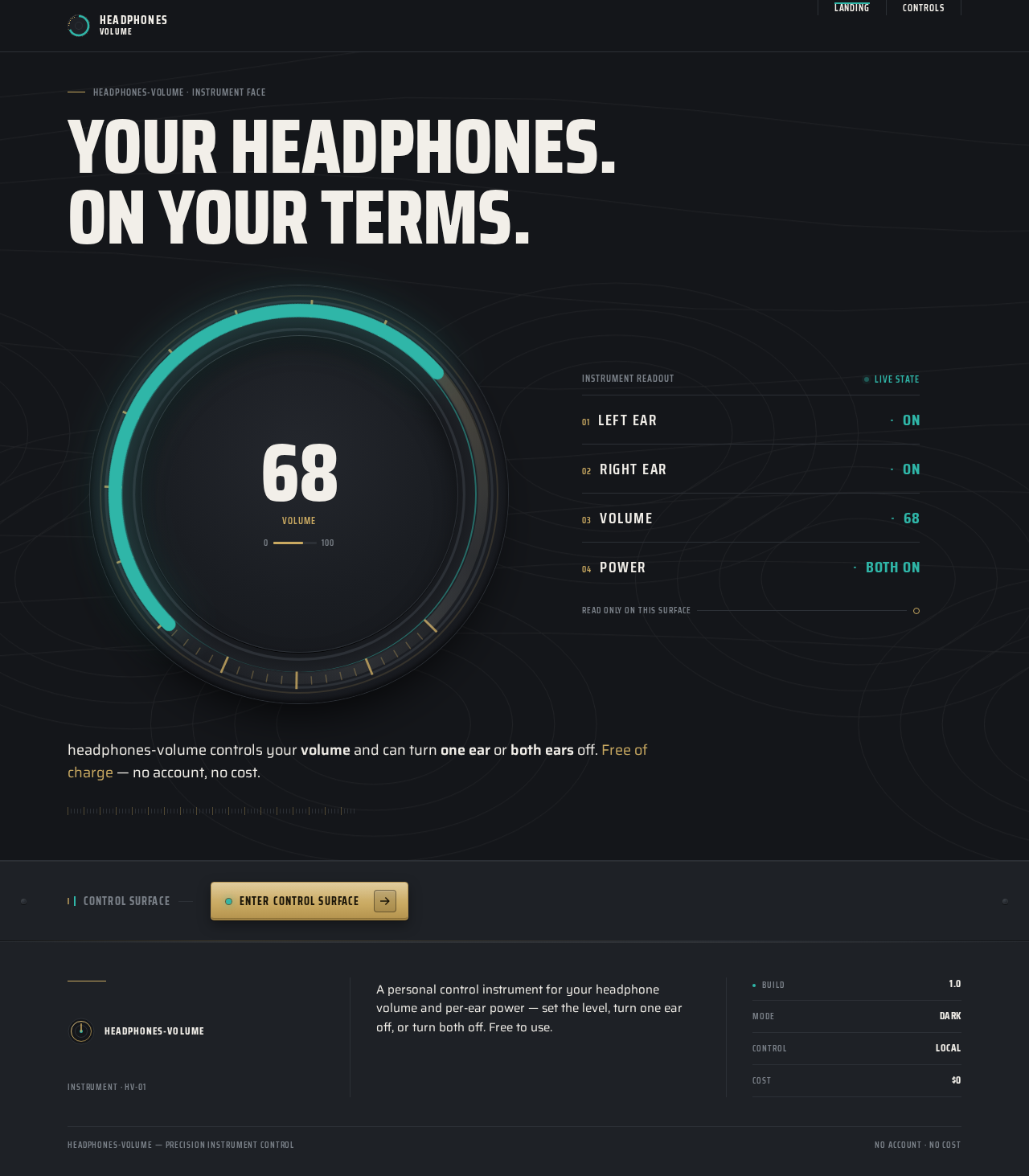
- Information / state: Anonymous first impression. A condensed headline "YOUR HEADPHONES. ON YOUR TERMS." flush-left above the instrument panel. A ruled readout column showing the current instrument state —
LEFT EAR · ON,RIGHT EAR · ON,VOLUME · 68,POWER · BOTH ON— as a machined spec sheet with hairline dividers and tabular values. A short humanist body line explaining that the app controls volume and can turn one ear or both ears off, free of charge. - Primary action: Enter the control surface (navigate to Controls).
- Supporting actions: None beyond entry; the Landing is explanatory and does not itself apply controls.
- Domain entities: Headphone (left ear, right ear), Volume level, Power state (both on / one off / both off).
- Component responsibilities:
- Oversized circular volume dial (~520px desktop, 280px mobile) with champagne tick ring, teal live arc, and a tabular numeral in the bezel centre — presented as a live instrument preview.
- Ruled readout rows (LEFT EAR / RIGHT EAR / VOLUME / POWER) with hairline dividers and aligned tabular values.
- Condensed headline block and humanist body copy.
- Topographic contour background at 6% opacity.
- Entry control into Controls.
- States:
- Loading: static instrument frame renders immediately; no data dependency.
- Empty: not applicable — the readout always shows a defined instrument state.
- Success: readout and dial render fully; entry control is available.
- Error: not applicable at this surface; if the control surface is unavailable, the entry control remains visible and the owner can retry.
- Recovery: re-attempt entry.
Controls
- Information / state: The live control surface. Current volume as a tabular numeral inside the dial bezel and as a teal arc on the champagne tick ring. Per-ear status gauges stacked as ruled rows:
LEFT EAR · ON/OFF,RIGHT EAR · ON/OFF,VOLUME · <value>,POWER · BOTH ON / LEFT OFF / RIGHT OFF / BOTH OFF. A segmented bezel control strip with LEFT · BOTH · RIGHT as a mechanical three-position switch with a teal active indicator, plus a power toggle styled as a recessed metal button. - Primary actions:
- Adjust volume (drag the dial or use the volume control) — the numeral counts to the new value and the teal arc sweeps to match.
- Turn one headphone off: select LEFT or RIGHT on the segmented switch, then engage the power toggle to power off that ear.
- Turn both headphones off: select BOTH on the segmented switch, then engage the power toggle to power both ears off.
- Supporting actions: Re-enable a powered-off ear by toggling power back on for the selected position; switch the segmented selection at any time.
- Domain entities: Headphone (left ear, right ear), Volume level (numeric), Power state per ear, Selected control target (LEFT / BOTH / RIGHT).
- Component responsibilities:
- Volume dial: concentric bezels, champagne tick ring, teal live arc, tabular numeral, drag interaction.
- Ruled readout rows: per-ear and aggregate state with hairline dividers and aligned values.
- Segmented bezel control strip: three-position LEFT · BOTH · RIGHT switch with teal active indicator.
- Power toggle: recessed metal button applying power-off to the selected target.
- States:
- Loading: instrument frame renders; readouts show the last known state.
- Empty: not applicable — the instrument always has a defined volume and power state.
- Success: the applied change is reflected in the dial numeral, teal arc, and ruled readout rows; the active ear ring breathes slowly.
- Error: if a control cannot be applied to the headphones, the readout retains the last confirmed state and the owner is shown that the change did not take effect.
- Recovery: the owner re-attempts the control; the readout updates on success.
3. Functional Requirements
FR-1 — Control the owner's headphones As a Headphone Owner, I should be able to control everything on my headphones from the app, so that I have one place to manage my worn hardware.
- Provenance: explicit.
- Lifecycle: The owner opens the app (Landing), enters Controls, and sees the current instrument state. The headphone device is the affected participant; its state is reflected back in the readout.
- Access: no account required.
- Observable acceptance: the Controls surface presents volume and power controls for the owner's headphones and reflects the resulting state.
- Failure/recovery: if the control surface cannot reach the headphones, the last confirmed state remains displayed and the owner can retry.
- Continuation: the owner proceeds to adjust volume or power off an ear.
FR-2 — Adjust headphone volume As a Headphone Owner, I should be able to adjust the volume of my headphones, so that I can set the loudness I want.
- Provenance: explicit.
- Lifecycle: The owner drags the volume dial (or uses the volume control) on Controls; the tabular numeral counts to the new value and the teal arc sweeps to match; the ruled
VOLUMErow updates. The headphone device receives the new volume. - Access: no account required.
- Observable acceptance: the displayed volume numeral and teal arc reflect the new value, and the change is applied to the headphones.
- Failure/recovery: if the volume cannot be applied, the numeral and arc retain the last confirmed value and the owner is shown the change did not take effect; the owner retries.
- Continuation: the owner continues adjusting or moves to power controls.
FR-3 — Turn one headphone off As a Headphone Owner, I should be able to turn one headphone (one ear) off, so that I can silence a single ear while keeping the other active.
- Provenance: explicit.
- Lifecycle: On Controls, the owner selects LEFT or RIGHT on the segmented bezel switch (teal active indicator moves), then engages the power toggle. The selected ear powers off; its ruled row changes to
OFFand thePOWERrow reflects the single-ear state. The headphone device reflects the change. - Access: no account required.
- Observable acceptance: the selected ear's readout shows
OFF, the other ear remainsON, and thePOWERrow shows the corresponding single-ear state. - Failure/recovery: if the ear cannot be powered off, the readout retains the last confirmed state and the owner is shown the change did not take effect; the owner retries.
- Continuation: the owner may re-enable the ear by toggling power back on, or select BOTH to power both off.
FR-4 — Turn both headphones off As a Headphone Owner, I should be able to turn both headphones off together, so that I can silence both ears at once.
- Provenance: explicit.
- Lifecycle: On Controls, the owner selects BOTH on the segmented bezel switch, then engages the power toggle. Both ears power off; both ruled rows show
OFFand thePOWERrow showsBOTH OFF. The headphone device reflects the change. - Access: no account required.
- Observable acceptance: both ear readouts show
OFFand thePOWERrow showsBOTH OFF. - Failure/recovery: if both ears cannot be powered off, the readout retains the last confirmed state and the owner is shown the change did not take effect; the owner retries.
- Continuation: the owner may toggle power back on to restore both ears.
FR-5 — Free to use As a Headphone Owner, I should be able to use the app at no cost, so that controlling my headphones costs me nothing.
- Provenance: explicit (hard constraint).
- Lifecycle: The owner uses Landing and Controls without any payment, subscription, or paid gate.
- Access: no account, no payment.
- Observable acceptance: no charge, paywall, or paid tier appears anywhere in the accepted journeys.
- Failure/recovery: not applicable.
- Continuation: the owner uses the app freely.
FR-6 — Apply controls to the headphones and reflect state As a Headphone Owner, I should see the app apply my volume and power-off controls to my headphones and show me the resulting state, so that I can trust the instrument.
- Provenance: required_inference (indispensable mechanics for FR-2, FR-3, FR-4).
- Lifecycle: Each control action on Controls is applied to the headphone device; the resulting state is reflected in the dial numeral, teal arc, and ruled readout rows.
- Access: no account required.
- Observable acceptance: after each action, the readout matches the applied state.
- Failure/recovery: on failure, the last confirmed state remains and the owner is informed; retry is available.
- Continuation: the owner continues controlling.
4. User Personas
Headphone Owner
- Product context: An individual who owns a pair of headphones and wants a direct, trustworthy instrument to control them. They are the sole user of this personal utility and expect it to feel like premium hardware software — a piece of gear they trust in their hand.
- Primary goal: Control everything on their headphones from one place — set the volume, turn one ear off, or turn both ears off — at no cost.
- Distinct accepted responsibilities:
- Adjust the headphone volume to the desired level.
- Turn one headphone (one ear) off while keeping the other active.
- Turn both headphones off together.
- Use the app freely, with no cost.
- Relevant inputs / decisions: The desired volume level; which ear to target (LEFT, RIGHT, or BOTH); whether to power off or restore power.
- Interactions with other accepted participants: The owner interacts with the headphone device, which receives the applied volume and power state and reflects it back in the readout. There are no other human participants.
- Observable success: The dial numeral and teal arc show the chosen volume; the ruled readout rows show the correct per-ear and aggregate power state; no charge is ever requested.
- What makes this role distinct: The owner is both the operator and the beneficiary of a single worn device — every action is a direct physical control applied to their own hardware, observed immediately in the instrument readout. There is no multi-user coordination, no shared state, and no administrative role.
5. Core User Flows
Flow A — Adjust headphone volume
- The Headphone Owner opens the app and lands on Landing, which presents the instrument face: the oversized volume dial with its tabular numeral, the teal live arc, and the ruled readout rows (
LEFT EAR · ON,RIGHT EAR · ON,VOLUME · 68,POWER · BOTH ON). - The owner enters Controls.
- On Controls, the owner drags the volume dial (or uses the volume control) to the desired level.
- The tabular numeral counts to the new value and the teal arc sweeps to match; the
VOLUMEruled row updates. - The headphone device receives the new volume; the readout reflects the applied state.
- Failure/recovery: if the volume cannot be applied, the numeral and arc retain the last confirmed value and the owner is shown the change did not take effect; the owner retries.
- Continuation: the owner continues adjusting or moves to power controls.
Flow B — Turn one headphone off
- The Headphone Owner is on Controls.
- The owner selects LEFT or RIGHT on the segmented bezel switch; the teal active indicator moves to the selected position.
- The owner engages the power toggle (recessed metal button).
- The selected ear powers off; its ruled row changes to
OFF, the other ear remainsON, and thePOWERrow reflects the single-ear state. - The headphone device reflects the change.
- Failure/recovery: if the ear cannot be powered off, the readout retains the last confirmed state and the owner is shown the change did not take effect; the owner retries.
- Continuation: the owner may re-enable the ear by toggling power back on, or select BOTH to power both off.
Flow C — Turn both headphones off
- The Headphone Owner is on Controls.
- The owner selects BOTH on the segmented bezel switch; the teal active indicator moves to BOTH.
- The owner engages the power toggle.
- Both ears power off; both ruled rows show
OFFand thePOWERrow showsBOTH OFF. - The headphone device reflects the change.
- Failure/recovery: if both ears cannot be powered off, the readout retains the last confirmed state and the owner is shown the change did not take effect; the owner retries.
- Continuation: the owner may toggle power back on to restore both ears.
Flow D — Free use
- The Headphone Owner opens the app and uses Landing and Controls.
- No payment, subscription, or paid gate appears at any point.
- The owner completes any of Flows A–C at no cost.
6. Visuals Colors and Theme
Muse and headline: Precision instrument control, after MARQ by Garmin — "YOUR HEADPHONES. ON YOUR TERMS."
Mode: Dark mode only.
Colour tokens (exact hex by role):
| Role | Hex | Usage |
|---|---|---|
| Background | #14161A | Graphite-titanium ground |
| Surface | #1E2126 | Raised panels |
| Hairline rule | #2C3036 | 1px dividers and ruled rows |
| Text | #F2EFE9 | Off-white body and numerals at full contrast |
| Primary | #C9A961 | Warm champagne — bezel/metal highlight and primary action |
| Accent | #2FB6A8 | Teal — single instrument accent reserved for live state (connected, volume arc, active ear) |
| Muted | #7A8088 | Labels only, ≥14px semibold; never body |
Champagne and teal appear on ≤15% of any screen; the rest is dark metal.
Typography:
- Headings: Saira Condensed — condensed technical uppercase at 700–800 for numerals, dial readouts, and section labels; tracking +0.08em on micro-labels, tight −0.01em on big numerals.
- Body: Saira at 400/500 for warmth against the condensed data voice.
- Scale: 1.25 modular with instrument jumps — display 48px mobile → 96px desktop (clamp); dial numeral 56px → 120px; section head 22px → 32px; body 16px → 18px; micro-label 11px → 12px uppercase.
- Tabular numerals everywhere (
font-variant-numeric: tabular-nums).
Shape language: Circular bezels and gauge arcs as the core motif; ruled data rows with 1px hairlines; rounded-rectangle controls with 4px radius (mechanical, not pill); chamfered metal edges suggested by inset highlights; concentric rings for the volume dial. No blobs, no soft 24px consumer radii.
Layout: Asymmetric instrument panel — a large circular volume dial occupying the left 55% of the hero, per-ear status gauges stacked right as ruled rows with label/value pairs aligned on a strict column. Below, an edge-to-edge control strip — LEFT / BOTH / RIGHT segmented state plus power controls — laid out like a bezel button cluster. Mobile stacks dial above the ruled readout rows; all text stays inside its container at 375px.
Imagery: Macro-grade CSS/SVG instrument art — concentric dial bezels with brushed-metal conic gradients, topographic line texture at 6% opacity in the background, ruled tick marks around gauges. No stock people, no product photos of headphones; the interface itself is the artefact, rendered like a machined object.
Forbidden: Blue–indigo primary on white; any #2563EB/#4F46E5-family accent; gradient-blob heroes; glassmorphism panels; floating translucent cards; grids of identical hover-lift cards; pill buttons and 24px consumer radii; Inter, Roboto, Arial, Helvetica, Poppins, or system-ui for headings or body; playful bounce or springy easing on the dial; stock photography of people wearing headphones; decorative motion that moves or obscures readable labels.
7. Signature Design Concept
The public entry (Landing) is a dark titanium instrument face, not a SaaS hero. A single condensed headline — "YOUR HEADPHONES. ON YOUR TERMS." — runs above, flush-left, spanning the grid. Left: an oversized circular volume dial (~520px desktop, 280px mobile) with a champagne tick ring, a teal arc showing current volume, and a tabular numeral (clamp 56px→120px) sitting dead centre in the bezel. Right: a ruled readout column — LEFT EAR · ON, RIGHT EAR · ON, VOLUME · 68, POWER · BOTH ON — in condensed uppercase labels with hairline dividers and aligned values. The background is #14161A with faint topographic lines at 6% opacity; no gradient blob, no centred subtext-button stack. The interface itself is the artefact, rendered like a machined object, and the entry control into Controls sits within the bezel cluster.
8. Interaction Model & Motion Direction
Interaction Model: Animated Motion Tempo: cinematic Hero Dimensionality: dimensional_css
Landing Hero Motion Brief
- Focal subject: The oversized circular volume dial — concentric bezels with brushed-metal conic gradients, champagne tick ring, teal live arc, and a tabular numeral in the bezel centre.
- Input → transformation → outcome thesis: As the owner's attention settles on the instrument face, the teal arc sweeps along the champagne tick ring and the tabular numeral ticks to the current volume value; the active ear ring breathes slowly. The outcome is a live, trustworthy instrument readout that mirrors the accepted state (
LEFT EAR · ON,RIGHT EAR · ON,VOLUME · 68,POWER · BOTH ON) — no new behaviour, only the accepted state rendered as a machined object. - Motion vocabulary: Needle sweeps on the volume arc; counting numerals that tick to the new value; slow 8s breathing glow on the active ear ring; precise easing
cubic-bezier(0.2, 0.7, 0.2, 1), 240–400ms, never bouncy; scroll reveals one panel at a time; topographic contour lines at 6% opacity drifting slowly behind the dial. - Composed first frame: Dark
#14161Aground with faint topographic lines; flush-left condensed headline above; the dial at left with its champagne tick ring and teal arc at the current volume; the ruled readout column at right with hairline dividers and aligned tabular values; the entry control within the bezel cluster. - Reduced-motion state: Values snap instantly, no arc sweep, static rings; the readout and dial remain fully legible and the entry control remains available.
9. Non-Functional Requirements
- NFR-1 — Free to use (explicit, hard constraint): The app must be free to use, with no cost to the user. No payment, subscription, or paid gate may appear in any accepted journey. Rationale: explicit user constraint ("over $0").
- NFR-2 — Readable text and controls at every viewport (explicit): Headlines, wordmarks, labels, numbers, cards' text, and controls stay entirely inside the viewport and their container at 375px, 768px, and 1280px, wrapping or scaling (e.g.
font-size: clamp(...)with its mobile size) to fit; no other element covers any part of them. Imagery, decoration, and motion may be cropped, bled, rotated, or overlapped as the direction asks, as long as they cover no readable text or control. Rationale: explicit readability constraint. - NFR-3 — Reduced motion (explicit): With
prefers-reduced-motion, provide a usable static arrangement: values snap instantly, no arc sweep, static rings; every item remains fully readable. Rationale: explicit accessibility constraint. - NFR-4 — Instrument legibility (explicit): Muted
#7A8088is used only for labels at ≥14px semibold, never for body; text at full contrast uses#F2EFE9. Rationale: explicit palette constraint. - NFR-5 — No account or payment (required_inference): Both pages are reachable without sign-in; no identity, account-management, or payment capability is introduced. Rationale: access contract
noneon both pages and the free-use constraint.
10. Tech Stack
- Frontend: React (custom first-party web application) with CSS/SVG instrument art for the dial, tick rings, and ruled readouts.
- Backend: Python/FastAPI — a single shared backend process exposing the control endpoints that apply volume and power-off state to the headphones and return the resulting state.
- Storage: Lightweight persistence for the last confirmed instrument state (volume and per-ear power), sufficient to render the readout on load.
- Deployment: Docker / docker-compose for the frontend and backend services.
No additional services, queues, or Kubernetes orchestration are required for the accepted scope.
11. Assumptions and Constraints
- Assumption (narrow): "over $0" is interpreted as "free to use, no cost to the user," consistent with the Planning Scope constraint.
- Assumption (narrow): "turn one headphones or both off" is interpreted as powering off one ear (left or right) or both ears together, matching the LEFT · BOTH · RIGHT segmented control.
- Assumption (narrow): The app controls the owner's own headphones; the headphone device is the affected non-persona actor that receives and reflects applied state.
- Constraint (explicit, hard): The app must be free to use, with no cost to the user.
- Constraint (explicit): Readable text and controls stay whole at 375px, 768px, and 1280px.
- Constraint (explicit): The generic indigo/blue-on-white SaaS template is forbidden; the MARQ-derived dark titanium instrument aesthetic is authoritative.
- Boundary: No account, login, subscription, payment, audio streaming, equalizer profiles, device pairing marketplace, social features, or analytics dashboards are part of current scope.
12. Glossary
- Headphone Owner: The sole active human persona; the individual who owns and controls their headphones through the app.
- Headphone device: The worn hardware that receives and reflects applied volume and power state; a non-persona actor.
- Ear (Left / Right): One side of the headphone pair; each can be powered on or off independently.
- Volume: The numeric loudness level applied to the headphones, shown as a tabular numeral and a teal arc on the dial.
- Power state: Whether an ear (or both ears) is on or off; shown in the ruled
POWERrow. - Segmented bezel switch: The three-position LEFT · BOTH · RIGHT control with a teal active indicator that selects the target for the power toggle.
- Power toggle: The recessed metal button that applies power-off (or power-on) to the selected target.
- Instrument readout: The ruled rows (
LEFT EAR,RIGHT EAR,VOLUME,POWER) with hairline dividers and aligned tabular values. - Landing: The anonymous public entry surface explaining the app and presenting the instrument face.
- Controls: The cohesive control surface where the owner adjusts volume and powers ears off or on.
Your headphones.On your terms.
Instrument readout
Live state- Left earON
- Right earON
- Volume68
- PowerBOTH ON
headphones-volume controls your volume and can turn one ear or both ears off. Free of charge — no account, no cost.
Control surface
Enter control surfaceYour headphones.On your terms.
Instrument readout
Live state- Left earON
- Right earON
- Volume68
- PowerBOTH ON
headphones-volume controls your volume and can turn one ear or both ears off. Free of charge — no account, no cost.
Control surface
Enter control surface
No comments yet. Be the first!