hardy-emails
 Hello Mcdonald
create a website that can search and Extract Emails


Comments (0)
Sign in to leave a comment
System Requirements
System Requirements Document for hardy-emails
1. Introduction
hardy-emails is a public website for searching and extracting email addresses. A visitor arrives, enters a search query, receives matching email addresses as results, and can then extract those addresses into a usable list. The product intent is narrow and exact: make email discovery and collection fast, legible, and trustworthy for people who work with email data.
The audience is the Email researcher — a person who needs to find email addresses by query and turn the matches into a clean, usable list. The product is a public tool: no account, sign-in, or personal workspace is required to search or extract.
This document is the System Requirements Document for hardy-emails, written from the requester's stated product intent.
2. System Overview
hardy-emails is delivered as a three-part web application:
- A React frontend presenting three public pages — Landing, Search, and Extract — in a single coherent typographic system.
- A shared FastAPI backend that serves the search and extraction APIs and holds the domain logic for querying and collecting email addresses.
- A MariaDB database holding the application-owned data that search queries against and that extraction reads from.
All three pages are public (access_requirement: none). There is no application-owned identity, no sign-in, and no per-user persistence. A visitor can move from Landing to Search to Extract without establishing an account.
The accepted behavior is: search for email addresses, and extract email addresses from search results. The supporting interaction mechanics — entering a query, and triggering extraction from the results — are the minimum needed to make those two commitments executable.
Removed from scope
- User accounts, sign-in, and authentication (also: login, registration, sessions)
- Saved searches, saved lists, and per-user history
- Email sending, verification, or validation services
- Bulk crawling or scraping of external websites
- Payment, billing, and subscription management
2a. Product Interpretation and Delivery Boundary
hardy-emails is a first-party public web tool. The application owns the full lifecycle of both accepted capabilities: the visitor enters a query on the Search page, the backend returns matching email addresses, and the visitor triggers extraction on the Extract page to receive a usable list of those addresses.
Access is open. Because no accepted behavior requires a durable, privately owned, or resumable per-user state, no identity establishment, verification, or account management is introduced. The Landing page is the anonymous public entry; Search and Extract are equally public working surfaces. Nothing in the current scope is delegated to a provider surface or an external destination.
The current delivery horizon covers only search and extraction. Future ideas — such as saved lists or verification — are not part of this release and are not represented in any page or requirement.
2c. Page Content and Component Coverage
Landing
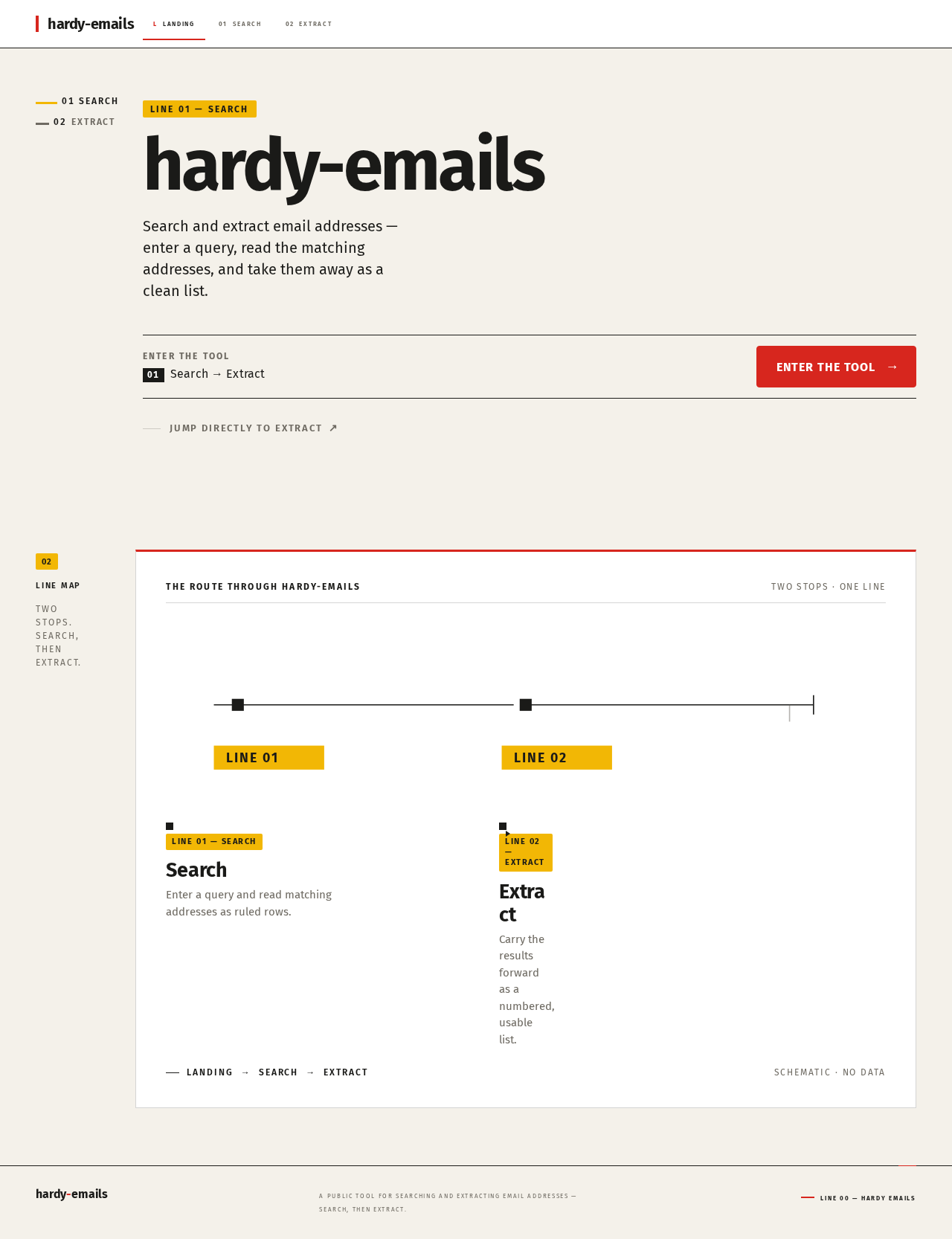
- Information and state: Product name hardy-emails; a one-line statement of what the tool does (search and extract email addresses); a schematic transit-style line map showing the search → extract flow; numbered line-code labels marking each section band.
- Primary action: Enter the tool — a solid red square button leading to Search.
- Supporting actions: A secondary link to Extract for visitors who already know they want to extract.
- Domain entities: None persisted; the line map is a static schematic of the two-step flow.
- Component responsibilities: Hero ruled band with 96px flush-left headline (40px on mobile) and wide search-style band; left label rail with numbered line codes; line-map pictogram component; primary call-to-action button.
- States: Static page; no loading, empty, or error states beyond standard page load. If the backend is unreachable, the call-to-action still navigates and the Search page surfaces the error.
Search
- Information and state: A wide ruled search band with a query input spanning 8 columns and a solid red square submit button pinned to its right edge; a results region below showing matching email addresses as tabular rows with fixed columns for email, source, and tag; a yellow tag chip on each address row; a result count in muted grey.
- Primary action: Submit a search query and receive matching email addresses.
- Supporting actions: Clear the query; select a result row to carry it forward to Extract; navigate to Extract with the current results.
- Domain entities: Search query (transient input); email address record (address, source, tag).
- Component responsibilities: Query input with validation; submit button; results table with hairline row rules; per-row tag chip; empty-state message; error banner; loading indicator.
- States:
- Loading: ruled band shows a restrained inline progress indicator while the query runs.
- Empty (no query yet): instructional empty state prompting the visitor to enter a query.
- Empty (no matches): explicit "no matching email addresses" message with the submitted query echoed back.
- Success: tabular result rows slide in sequentially at 140ms intervals.
- Error: inline error banner with a retry action that resubmits the same query.
- Recovery: clearing the query returns to the instructional empty state.
Extract
- Information and state: A numbered list panel with a red header rule; the list of email addresses carried from Search results; a count of extracted addresses; a copy control and a download control for the usable list.
- Primary action: Extract email addresses from the current search results into a usable list.
- Supporting actions: Copy the list to the clipboard; download the list as a text file; return to Search to refine the query.
- Domain entities: Extraction set (ordered list of email addresses derived from the current results).
- Component responsibilities: Numbered list panel with red header rule; per-address row with yellow tag chip; copy button; download button; count display; empty-state panel.
- States:
- Empty (no results carried forward): panel explains that no results are available and offers a link back to Search.
- Success: numbered list renders with each address on its own ruled row.
- Copy success: brief confirmation that the list was copied.
- Error: inline message if extraction fails, with a retry action.
- Recovery: returning to Search and re-running the query repopulates the extraction set.
3. Functional Requirements
FR-1 — Search for email addresses (explicit) As an Email researcher, I should search for email addresses so that I can find the addresses matching my query.
- Trigger/input: The researcher enters a query in the Search page's ruled search band and submits it.
- Observable result: Matching email addresses appear as tabular rows with email, source, and tag columns, with a result count.
- Access state: Public; no identity required.
- Failure/recovery: If the query returns no matches, an explicit empty message echoes the query. If the backend fails, an inline error banner offers retry with the same query.
- Continuation: The researcher can refine the query, clear it, or carry results to Extract.
FR-2 — Extract email addresses from search results (explicit) As an Email researcher, I should extract email addresses from search results so that I get a usable list of addresses.
- Trigger/input: From the Search results, the researcher proceeds to the Extract page with the current result set.
- Observable result: A numbered list panel with a red header rule shows each extracted address on its own ruled row with a yellow tag chip, plus a count.
- Access state: Public; no identity required.
- Failure/recovery: If no results are available, the panel explains this and links back to Search. If extraction fails, an inline message offers retry.
- Continuation: The researcher can copy the list, download it as a text file, or return to Search.
FR-3 — Enter a search query (required_inference) As an Email researcher, I should enter a search query so that the search has an input to act on.
- Trigger/input: Typing into the query input on the Search page.
- Observable result: The input reflects the typed text; submitting dispatches the query.
- Access state: Public.
- Failure/recovery: An empty submission is blocked with an inline prompt to enter a query.
- Continuation: Submission leads to FR-1's results.
FR-4 — Extract addresses from the results (required_inference) As an Email researcher, I should trigger extraction from the results so that the addresses become a usable list.
- Trigger/input: Activating the extract action from the Search results or the Extract page.
- Observable result: The numbered list panel populates with the extracted addresses.
- Access state: Public.
- Failure/recovery: If the result set is empty, the extract action is unavailable and the empty-state panel explains why.
- Continuation: The researcher copies or downloads the list, or returns to Search.
4. User Personas
Email researcher
- Product context: A person who works with email data and needs to locate addresses by query and collect them into a clean list. They arrive at hardy-emails expecting a fast, exact, trustworthy tool — not a marketing site.
- Primary goal: Find email addresses matching a query and walk away with a usable list of those addresses.
- Distinct accepted responsibilities: Entering search queries (FR-3), reviewing matching results (FR-1), triggering extraction (FR-4), and consuming the extracted list via copy or download (FR-2).
- Relevant inputs or decisions: The query text; whether the result set is satisfactory or needs refinement; whether to copy or download the extracted list.
- Interactions with other accepted participants: None — the Email researcher is the sole active human persona, and no other participant is affected by search or extraction.
- Observable success: A tabular result set appears for their query, and the Extract page presents a numbered, copyable, downloadable list of those addresses.
5. Core User Flows
Flow A — Search for email addresses
- The Email researcher opens the Landing page and reads the one-line statement of what hardy-emails does, with the line map showing the search → extract flow.
- The researcher activates the primary red square button to enter the tool, arriving at Search.
- On Search, the researcher types a query into the wide ruled search band (FR-3).
- The researcher submits the query with the red square button. The band shows a restrained inline progress indicator.
- The backend returns matching email addresses; the Search page renders them as tabular rows with email, source, and tag columns, each row carrying a yellow tag chip, and shows a result count (FR-1).
- If no matches: the page shows an explicit empty message echoing the query; the researcher refines the query and resubmits.
- If the backend fails: an inline error banner appears with a retry action that resubmits the same query.
- Continuation: the researcher proceeds to Extract with the current results, or clears the query to start over.
Flow B — Extract email addresses from search results
- From the Search results, the Email researcher activates the extract action, arriving at Extract with the current result set (FR-4).
- The Extract page renders a numbered list panel with a red header rule; each address sits on its own ruled row with a yellow tag chip, and a count is displayed (FR-2).
- The researcher copies the list to the clipboard or downloads it as a text file, receiving a brief confirmation on copy.
- If no results were carried forward: the panel explains that no results are available and offers a link back to Search.
- If extraction fails: an inline message offers retry.
- Continuation: the researcher returns to Search to refine the query and repopulate the extraction set.
6. Visuals Colors and Theme
The creative direction is authoritative: typographic infrastructure in the spirit of Erik Spiekermann — warm order built from type and signal colour, like a transit system for data.
Palette (light mode)
| Role | Hex | Usage |
|---|---|---|
| Background | #F4F1EA | Warm paper ground, ~70% of surface |
| Surface | #FFFFFF | Result rows, panels |
| Text | #1A1A18 | Ink for all type |
| Primary | #D7261E | Signal red for search and extract actions |
| Accent | #F2B705 | Yellow tag chips on result rows |
| Muted | #6E6A62 | Metadata, counts, secondary labels |
Typography
- Headings: Fira Sans Bold 700, tight tracking, flush left. Small caps for labels at 12px with wide tracking.
- Body: Fira Sans.
- Modular scale (1.333): 64 / 48 / 36 / 27 / 20 / 16 / 13 px. Headline 96px desktop, 40px mobile, using
clamp()so text stays whole at 375px, 768px, and 1280px.
Shape language
- Hard edges; 4px control radii.
- Thin 1px rules separate rows.
- Numbered section bands echo transit line codes.
Layout
- Strict 12-column grid with a left label rail.
- Search field spans 8 columns in a ruled band.
- Results use a tabular row list with fixed columns for email, source, and tag.
Motion
- Short 140ms state changes. Result rows slide in one after the other. No decorative loops.
Imagery
- Pictograms and schematic diagrams only. A small transit-style line map shows the search → extract flow.
7. Signature Design Concept
The public entry is a full-width ruled band on warm paper #F4F1EA. A 96px flush-left headline in Fira Sans Bold sits above a wide search field with a solid red square button (#D7261E) pinned to its right edge. A yellow line-code tag (#F2B705) reads LINE 01 — SEARCH. A left rail of numbered line codes marks each section like a transit map, and a small schematic line map shows the search → extract flow. The composition recomposes only accepted content — the product statement, the entry action, and the flow schematic — with no new behavior.
8. Interaction Model & Motion Direction
Interaction Model: Animated Motion Tempo: restrained Hero Dimensionality: flat
Landing Hero Motion Brief
- Focal subject: The ruled search band with its solid red square button and the yellow "LINE 01 — SEARCH" tag.
- Input → transformation → outcome thesis: The visitor's attention moves from the headline to the search band; on interaction the red square button gives a 140ms press response and the page transitions to Search — the accepted entry behavior, nothing more.
- Motion vocabulary: Short 140ms state changes; sequential row slide-in on results; no decorative loops.
- Composed first frame: Warm paper ground, flush-left 96px headline, wide ruled band, red square button at the right edge, yellow line-code tag above.
- Reduced-motion state: All transitions resolve instantly; result rows appear without slide-in; the layout remains fully readable and static.
9. Non-Functional Requirements
- Public access (explicit via planning scope): All three pages are reachable without identity; no authentication gate exists.
- Readability at every viewport (explicit via creative direction): Headlines, labels, numbers, and controls stay entirely inside the viewport and their container at 375px, 768px, and 1280px, wrapping or scaling via
clamp(). - Motion accessibility (explicit via creative direction): With
prefers-reduced-motion, a usable static arrangement is provided; row slide-in is suppressed. - Response speed (required_inference): Search results return promptly enough to support the "fast" product promise; the UI shows an inline progress indicator during any wait.
- Trustworthy results (required_inference): Each result row displays its source and tag so the researcher can judge the address's provenance.
10. Tech Stack
- Frontend: React application UI.
- Backend: Shared FastAPI process for application APIs and domain modules (search and extraction endpoints).
- Database: MariaDB for application-owned persistent data (email address records with source and tag).
- Infrastructure:
docker-compose.ymlprovisioning the backend, database, and frontend services.
11. Assumptions and Constraints
- A-1 (assumption): The MariaDB database is seeded with email address records (address, source, tag) that search queries against. The source does not specify how records enter the database; no ingestion UI is in scope.
- A-2 (assumption): Search matches against the stored email address records; the exact matching semantics (substring, prefix, exact) are unspecified and left to implementation.
- A-3 (constraint): No user accounts, saved searches, or per-user persistence — all pages are public and stateless.
- A-4 (constraint): No email sending, verification, or external crawling is in scope.
- A-5 (constraint): The creative direction's palette, typography, shape language, and motion rules are binding; the generic indigo/blue-on-white SaaS template is forbidden.
12. Glossary
- Email researcher: The sole active human persona; searches for and extracts email addresses.
- Search query: The text a researcher enters to find matching email addresses.
- Result row: A tabular row on the Search page showing one email address with its source and tag.
- Extraction set: The ordered list of email addresses carried from Search results into the Extract page.
- Line code: A numbered transit-style label marking a section band, per the creative direction.
- Tag chip: The yellow
#F2B705label attached to each result row and extracted address.
Line 01 — Search
hardy-emails
Search and extract email addresses — enter a query, read the matching addresses, and take them away as a clean list.
The route through hardy-emails
- 01LINE 01 — SEARCHSearchEnter a query and read matching addresses as ruled rows.
- 02LINE 02 — EXTRACTExtractCarry the results forward as a numbered, usable list.
Line 01 — Search
hardy-emails
Search and extract email addresses — enter a query, read the matching addresses, and take them away as a clean list.
The route through hardy-emails
- 01LINE 01 — SEARCHSearchEnter a query and read matching addresses as ruled rows.
- 02LINE 02 — EXTRACTExtractCarry the results forward as a numbered, usable list.
No comments yet. Be the first!