green-dashboard
 Harshil vaja
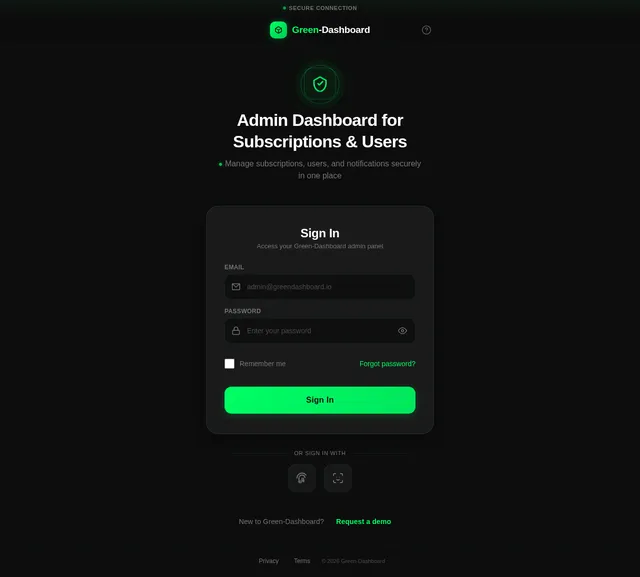
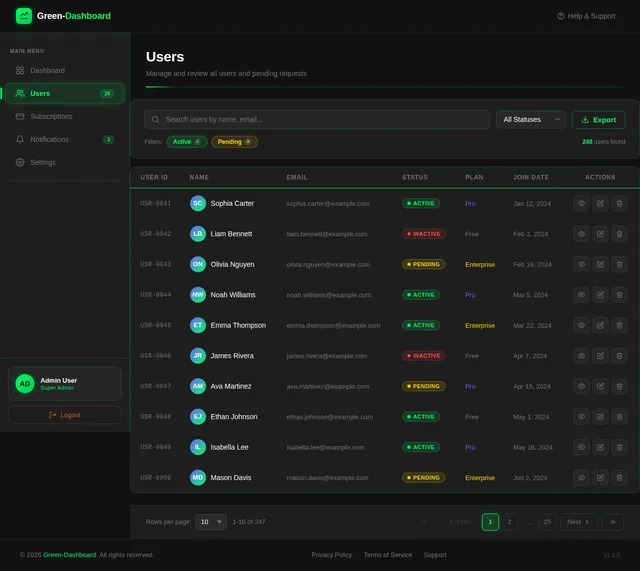
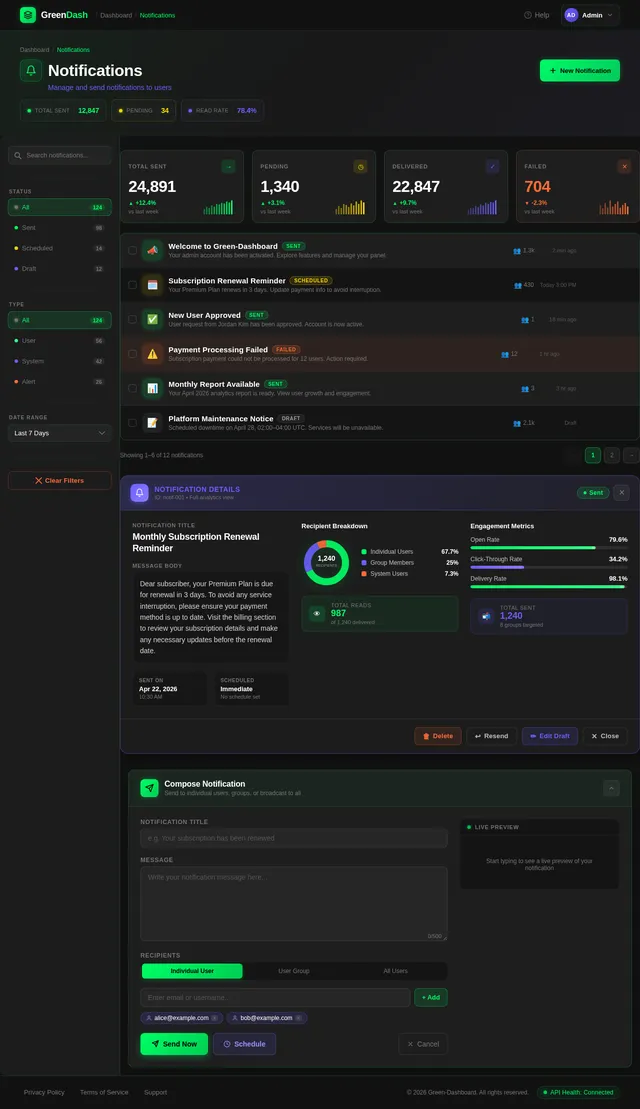
The admin panel flow starts with a secure login, after which the admin lands on a dashboard that acts as the main control center. This dashboard displays key summary information such as total users, active subscriptions, pending user requests, and notifications sent, along with clear navigation options to three main sections: Subscription Management, User Management, and Notification Management. In Subscription Management, the admin can view a list of all plans, add new plans, update existing ones, and activate or deactivate them using simple controls. In User Management, all users are listed with their current status, and when a new user signs up, they appear in a pending request list where the admin can approve or reject their access; the admin can also view user details and manage their active status. In Notification Management, the admin can manually send notifications to individual users, selected groups, or all users, and also view a complete history of sent notifications with details like message content, target audience, and timestamps. Overall, the flow is designed to be simple, structured, and efficient, allowing the admin to quickly manage subscriptions, users, and communications from a centralized mobile interface. i share my screen according to create ui.
Comments (0)
Sign in to leave a comment
System Requirements
System Requirements Document (SRD)
Project Name: Green-Dashboard
1. Introduction
The Green-Dashboard is a centralized admin panel designed for mobile-first use, enabling administrators to efficiently manage subscriptions, users, and notifications. The design aligns with the sleek, modern UI principles of the mobile application theme, ensuring simplicity, clarity, and ease of navigation for administrators. The interface incorporates touch-friendly interactions and visually appealing elements optimized for mobile devices, following the visual references provided.
2. System Overview
The Green-Dashboard is a mobile-first application tailored for administrators to manage subscriptions, users, and notifications efficiently. The system begins with a secure login process, followed by a dashboard overview displaying critical metrics such as total users, active subscriptions, pending user requests, and notification history.
Key features include:
- Subscription Management: Add, update, activate, or deactivate subscription plans.
- User Management: Approve/reject user requests, view user details, and manage user statuses.
- Notification Management: Send notifications to individual users, groups, or all users, and view notification history with timestamps.
The design is inspired by the shared mobile application theme, ensuring a sleek, modern, and intuitive interface optimized for touch interactions.
3. Functional Requirements
Admin Functionalities:
- As Admin, I should be able to securely log in to the system.
- As Admin, I should see a dashboard summary with metrics like total users, active subscriptions, pending requests, and notifications sent.
- As Admin, I should be able to navigate to Subscription Management, User Management, and Notification Management sections.
- As Admin, I should be able to add new subscription plans.
- As Admin, I should be able to update existing subscription plans.
- As Admin, I should be able to activate or deactivate subscription plans.
- As Admin, I should be able to view a list of all users.
- As Admin, I should be able to approve or reject pending user requests.
- As Admin, I should be able to view user details and manage their active status.
- As Admin, I should be able to send notifications to individual users, selected groups, or all users.
- As Admin, I should be able to view notification history with details like message content, target audience, and timestamps.
4. User Personas
Admin:
- Role: Oversees the dashboard and manages subscriptions, users, and notifications.
- Needs: Secure access, clear metrics, and efficient tools for managing the system.
5. Visuals Colors and Theme
Inspired by the shared mobile application theme, the Green-Dashboard adopts a modern, dark-themed design with vibrant accents for clarity and focus.
Color Palette:
- Background: #0D0D0D (Deep Black)
- Surface: #1A1A1A (Dark Gray)
- Text: #FFFFFF (Bright White)
- Accent: #00FF66 (Neon Green)
- Muted Tones: #757575 (Muted Gray)
6. Signature Design Concept
Interactive Mobile Dashboard with Dynamic Cards
The homepage of the Green-Dashboard will feature dynamic cards that display key metrics (e.g., total users, active subscriptions, pending requests, notifications sent). Each card will have subtle animations:
- Hover Effect: Cards will slightly elevate and glow with the accent color (#00FF66) when tapped.
- Micro-Interactions: Tapping a card will expand it into a detailed view with actionable buttons (e.g., "View Details," "Manage").
- Live Updates: Metrics on the cards will update dynamically, reflecting real-time changes.
The navigation bar at the bottom will include glowing icons that pulse subtly when selected, ensuring a seamless and engaging user experience. The design will follow the visual style of the reference images shared, ensuring consistency with the mobile application theme.
7. Non-Functional Requirements
- Performance: The system should load pages within 2 seconds.
- Security: Implement secure login with encryption and session management.
- Scalability: Support up to 10,000 users and 1,000 subscription plans.
- Availability: Ensure 99.9% uptime.
- Responsiveness: Optimize for mobile devices.
8. Tech Stack
Frontend:
- React Native for Mobile
Backend:
- Python
- FastAPI
Database:
- MySQL or MariaDB (with Alembic for migrations)
AI Models:
- GPT 5.4 for user-friendly responses
AI Tools:
- Langchain
- Litellm for LLM Routing
Local Orchestration:
- Docker
- Docker-Compose
Server-Side Orchestration:
- Kubernetes
9. Assumptions and Constraints
Assumptions:
- Admins will primarily use mobile devices to access the dashboard.
- Notifications will be text-based and sent via the dashboard.
Constraints:
- The system must comply with data protection regulations in India (e.g., GDPR equivalent).
- Limited to managing 10,000 users and 1,000 subscription plans simultaneously.
10. Glossary
- Dashboard: The main interface for administrators to view and manage system metrics.
- Subscription Management: Section for managing subscription plans.
- User Management: Section for managing user requests and statuses.
- Notification Management: Section for sending and viewing notifications.
- Interactive Cards: Dynamic elements on the dashboard that display key metrics and allow actions.
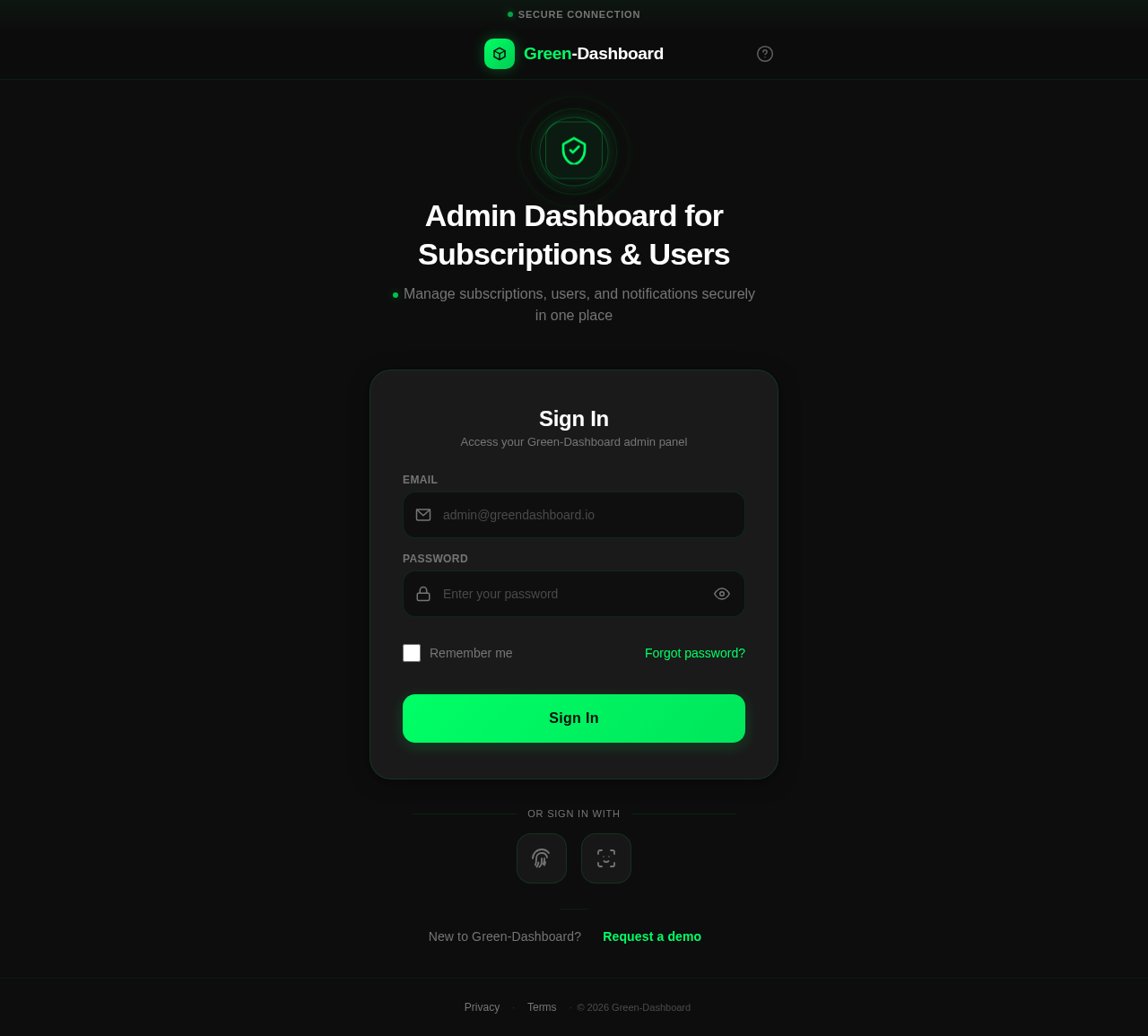
Admin Dashboard for Subscriptions & Users
Manage subscriptions, users, and notifications securely in one place
New to Green-Dashboard? Request a demo
No comments yet. Be the first!