goud-industries

byMallugari Rakhi

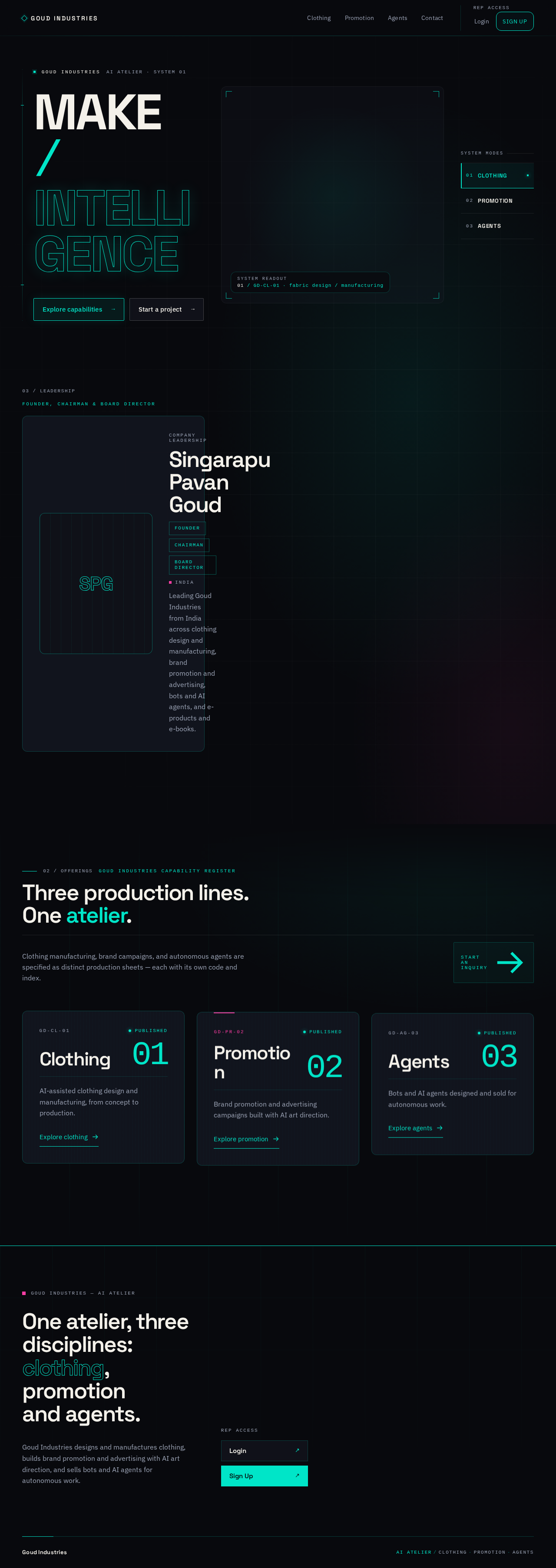
creat a app for ai company goud industries that produsing and manufacharing cloth desing,brand promotion,advitesment,sells bots and ai agents

Landing
Landing

Comments (0)

No comments yet. Be the first!

Project Tasks

33 planning tasks
#1

Generate system requirement document

1m 34s0.05 cr used
Done
#2

Generate personas & user flows

0m 9s0.05 cr used
Done
#5

Architecture

0.05 cr needed
Cancelled
#6

Workspace task plan

0.05 cr needed
Cancelled
#7

Create flow for Prospective Client

0m 7sCredits in parent
Done
#8

Create flow for Company Representative

0m 7sCredits in parent
Done
#9

Landing

11m 27sCredits in subtasks
Done
#10

Clothing

Credits in subtasks
Cancelled
#11

Promotion

Credits in subtasks
Cancelled
#12

Bots & AI Agents

Credits in subtasks
Cancelled
#13

Contact

Credits in subtasks
Cancelled
#14

Login

Credits in subtasks
Cancelled
#15

Sign Up

Credits in subtasks
Cancelled
#16

Inquiries

Credits in subtasks
Cancelled
#17

Content Manager

Credits in subtasks
Cancelled
#18

Landing / Goud Site Header

0m 0s0.85 cr used
Done
#19

Landing / Hero

2m 48s0.85 cr used
Done
#20

Landing / Offering Sheets

1m 35s0.85 cr used
Done
#21

Landing / Closing Statement

0m 54s0.85 cr used
Done
#22

Landing / Goud Site Footer

0m 0s0.85 cr used
Done
#23

Goud Site Header

0m 53sCredits in parent
Done
#24

Goud Site Footer

0m 39sCredits in parent
Done
#25

Fix Landing: Hero Web GL artwork is blank in the desktop reduced-motion screenshot; see (/) and ().

2m 46sCredits unavailable
Done
#26

Fix Landing: The required focal Web GL textile ribbon is absent from the rendered hero, leaving its…

5m 37sCredits unavailable
Error
#27

Fix Landing review findings: Hero Web GL artwork is blank in the desktop reduced-motion… (+1 more)

1m 26s0.02 cr used
Done
#28

Fix Landing: The rendered hero still shows an empty framed canvas, with no visible gold textile…

2m 51sCredits unavailable
Error
#29

Fix Landing review findings: Q2 as reviewed now: The current reduced-motion rendered… (+1 more)

0m 56s0.02 cr used
Done
#30

Fix Landing: The current rendered frame still shows the framed hero canvas empty, without the…

0m 27sCredits unavailable
Error
#31

Fix Landing review findings: Q2 as reviewed now: The current reduced-motion frame shows… (+2 more)

0m 26s0.02 cr used
Error
#32

Generate system requirement document

0m 42s0.05 cr used
Done
#33

Update Company Representative flow

0m 15sCredits unavailable
Done
#34

Update Prospective Client flow

0m 35sCredits unavailable
Done
#35

Update Landing

9m 18sCredits unavailable
Done
Live
Landing design preview
Landing: Proceed to representative access
Sign Up: 1. Complete enrollment form
Sign Up: 2. Correct enrollment errors
Sign Up: 3. Retry account creation
Login: 1. Submit credentials
Login: 2. Correct credential errors
Inquiries: 1. Review inquiry list
Inquiries: 2. Select inquiry detail
Inquiries: 3. Compose response and status
Inquiries: 4. Retry saving response
Inquiries: 5. Confirm response saved
Content Manager: 1. Select offering line
Content Manager: 2. Create offering entry
Content Manager: 3. Edit offering entry
Content Manager: 4. Remove offering entry
Content Manager: 5. Correct content errors
Content Manager: 6. Retry saving content
Content Manager: 7. Confirm content saved
Content Manager: 8. Edit leadership profile
Content Manager: 9. Correct leadership profile errors
Content Manager: 10. Retry saving leadership profile
Content Manager: 11. Confirm leadership profile saved
Live
Landing design preview
Landing: Proceed to representative access
Sign Up: 1. Complete enrollment form
Sign Up: 2. Correct enrollment errors
Sign Up: 3. Retry account creation
Login: 1. Submit credentials
Login: 2. Correct credential errors
Inquiries: 1. Review inquiry list
Inquiries: 2. Select inquiry detail
Inquiries: 3. Compose response and status
Inquiries: 4. Retry saving response
Inquiries: 5. Confirm response saved
Content Manager: 1. Select offering line
Content Manager: 2. Create offering entry
Content Manager: 3. Edit offering entry
Content Manager: 4. Remove offering entry
Content Manager: 5. Correct content errors
Content Manager: 6. Retry saving content
Content Manager: 7. Confirm content saved
Content Manager: 8. Edit leadership profile
Content Manager: 9. Correct leadership profile errors
Content Manager: 10. Retry saving leadership profile
Content Manager: 11. Confirm leadership profile saved