goud-industries

byMallugari Rakhi

creat a app for ai company goud industries that produsing and manufacharing cloth desing,brand promotion,advitesment,sells bots and ai agents

Landing
Landing

Comments (0)

No comments yet. Be the first!

System Requirements

System Requirements Document for goud-industries

1. Introduction

Goud Industries is an AI company that designs and manufactures clothing, provides brand promotion and advertising services, sells bots and AI agents, and offers e-products and e-books. This System Requirements Document defines a web application that represents the company, presents each of its offering lines, identifies its founder, chairman, and board director, and lets prospective clients learn about the company and get in touch, while giving company representatives a protected place to review incoming inquiries and manage the content that describes the offerings.

The product intent is a single, coherent public-facing company presence with a small, protected back office. Visitors arrive anonymously, understand who Goud Industries is, who leads it, and what it sells, browse the clothing, promotion, bots/AI-agent, and e-products/e-books offerings, and submit an inquiry. Company representatives enroll, sign in, review and respond to inquiries, and keep the offering content current so visitors can evaluate and contact the company.

The audience is two-fold: prospective clients (businesses or individuals evaluating Goud Industries' clothing design and manufacturing, brand promotion and advertising, bots and AI agents, or e-products and e-books) and Goud Industries company representatives who present the company and respond to client interest.

Page 1 of 25

2. System Overview

The application is delivered as a React frontend, a shared FastAPI backend, and a MariaDB database, run together via docker-compose. The frontend renders the public pages and the protected representative pages. The backend exposes the application APIs and domain modules for offerings, inquiries, company leadership profile, and representative identity. The database persists application-owned data: representative accounts, offering content, company leadership profile content, and submitted inquiries.

Current actors:

  • Prospective Client — anonymous visitor who browses offerings and submits inquiries.
  • Company Representative — authenticated Goud Industries staff member who reviews and responds to inquiries and manages offering content.

Current accepted behavior:

  • A public Landing page introduces Goud Industries as an AI company, identifies Singarapu Pavan Goud from India as founder, chairman, and board director, and routes visitors into each offering and to contact.
  • Public Clothing, Promotion, Bots & AI Agents, and E-Products & E-Books pages present the respective offerings.
  • A public Contact page lets visitors submit an inquiry to the company.
  • Sign Up and Login establish and verify company representative identity.
  • Protected Inquiries lets representatives review and respond to submitted inquiries.
  • Protected Content Manager lets representatives manage the content describing the clothing, promotion, advertising, AI, and e-products/e-books offerings, including the company leadership profile shown on Landing.
Page 2 of 25

Narrow exclusions: the application does not include e-commerce checkout, payment processing, order fulfillment, inventory management, or a customer account area for prospective clients. Prospective clients interact anonymously and submit inquiries; they do not create accounts. No invitation or provisioning flow for representatives is established; enrollment is self-service via Sign Up.

Removed from scope

  • None.
Page 3 of 25

2a. Product Interpretation and Delivery Boundary

Goud Industries' app is a first-party, application-owned web presence. All public pages are anonymously reachable. The two protected destinations — Inquiries and Content Manager — require a verified company representative identity, established through self-service Sign Up and returning Login. Identity exists to keep representative work private and continuous (so a representative can return to review inquiries and manage content), not to differentiate permissions among representatives; all representatives share the same protected capabilities.

Prospective clients never need an account: their entire accepted journey — browsing offerings and submitting an inquiry — is anonymous and ephemeral from their side, with the durable record living on the company side. The company's response to an inquiry is delivered through the representative's work in Inquiries; the inquiry record persists so the representative can revisit and continue it.

Company leadership is presented as public company identity content: Singarapu Pavan Goud, from India, is identified as the company's founder, chairman, and board director. This is a public-facing identity statement, not an access role — it grants no differentiated permissions, and all representatives continue to share the same protected capabilities.

Everything described in this document is current. No future-horizon capabilities are defined.

2c. Page Content and Component Coverage

Page 4 of 25

Landing

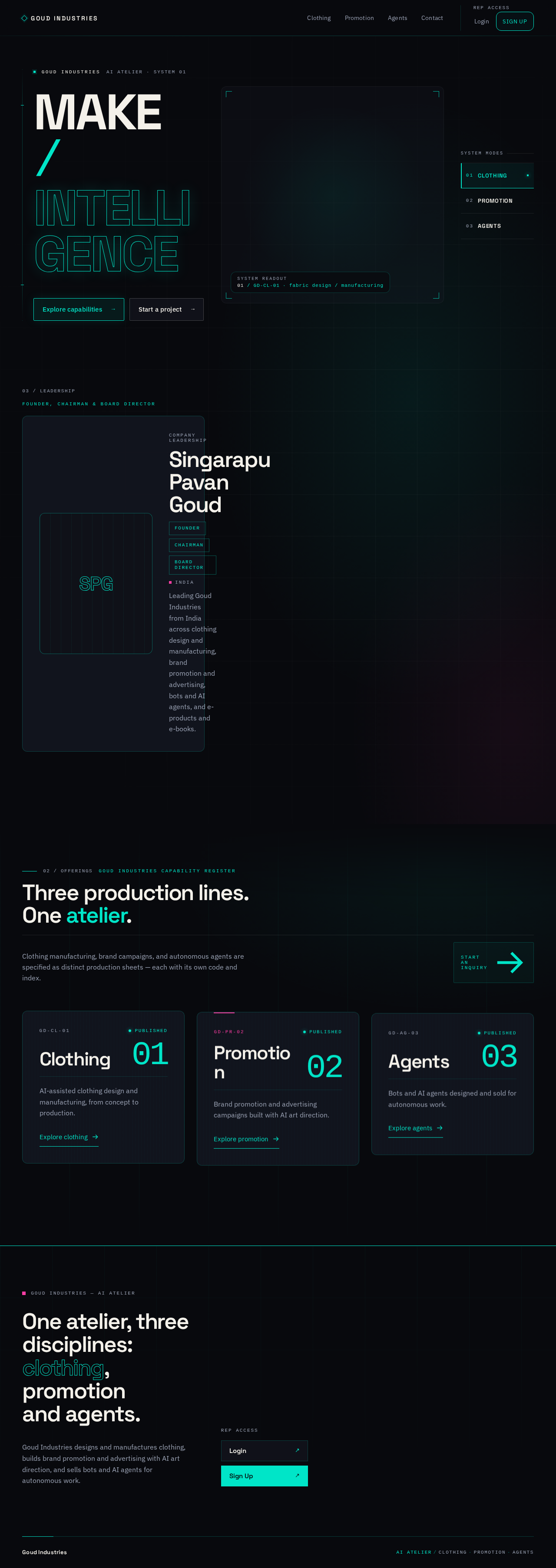
  • Information/state: Company identity as an AI company; the founder, chairman, and board director profile (Singarapu Pavan Goud, India) with supplied portrait imagery; the four offering lines (clothing design and manufacturing, brand promotion and advertising, bots and AI agents, e-products and e-books); routes into each offering and to Contact; entry points to representative Login/Sign Up.
  • Primary actions: Navigate to Clothing, Promotion, Bots & AI Agents, E-Products & E-Books, Contact; proceed to Login or Sign Up.
  • Supporting actions: None beyond navigation.
  • Domain entities: Offering summary (name, short description, link); Leadership profile (full name, country, titles — founder, chairman, board director — portrait image, short statement).
  • Component responsibilities: Hero/intro block presenting the company; leadership profile block presenting the founder/chairman/board director with portrait and titles; offering summary modules; navigation to public pages and representative access.
  • States: Loading (offering summaries and leadership profile fetching); empty (no offerings configured — show company intro, leadership profile, and contact route); success (summaries and leadership profile rendered); error (summaries or leadership profile fail to load — show intro and a retry, keep Contact reachable); recovery (retry re-fetches).
Page 5 of 25

Clothing

  • Information/state: Goud Industries' clothing design and manufacturing offerings as published content.
  • Primary actions: Browse offering entries; navigate to Contact to inquire.
  • Supporting actions: Navigate to other offering pages.
  • Domain entities: Offering entry (title, description, details) for the clothing line.
  • Component responsibilities: Offering list/detail presentation; inquiry call-to-action linking to Contact.
  • States: Loading; empty (no clothing offerings published — show a message and Contact route); success; error (load failure with retry); recovery.

Promotion

  • Information/state: Goud Industries' brand promotion and advertising services as published content.
  • Primary actions: Browse service entries; navigate to Contact to inquire.
  • Supporting actions: Navigate to other offering pages.
  • Domain entities: Offering entry for the promotion/advertising line.
  • Component responsibilities: Service presentation; inquiry call-to-action linking to Contact.
  • States: Loading; empty; success; error with retry; recovery.
Page 6 of 25

Bots & AI Agents

  • Information/state: The bots and AI agents Goud Industries sells, as published content.
  • Primary actions: Browse agent/bot entries; navigate to Contact to inquire.
  • Supporting actions: Navigate to other offering pages.
  • Domain entities: Offering entry for bots and AI agents.
  • Component responsibilities: Agent/bot presentation; inquiry call-to-action linking to Contact.
  • States: Loading; empty; success; error with retry; recovery.

E-Products & E-Books

  • Information/state: Goud Industries' e-products and e-books as published content.
  • Primary actions: Browse e-product and e-book entries; navigate to Contact to inquire.
  • Supporting actions: Navigate to other offering pages.
  • Domain entities: Offering entry (title, description, details) for the e-products and e-books line.
  • Component responsibilities: E-product/e-book presentation; inquiry call-to-action linking to Contact.
  • States: Loading; empty (no e-products or e-books published — show a message and Contact route); success; error (load failure with retry); recovery.
Page 7 of 25

Contact

  • Information/state: Inquiry form capturing the visitor's message and contact details; confirmation of submission.
  • Primary actions: Submit an inquiry.
  • Supporting actions: Navigate back to offerings.
  • Domain entities: Inquiry (visitor name, contact details, message, related offering if indicated — clothing, promotion, bots & AI agents, or e-products & e-books — submission timestamp, status).
  • Component responsibilities: Inquiry form with validation; submission handling; confirmation display.
  • States: Idle (blank form); validation error (required fields missing/invalid — inline messages, form preserved); submitting (disabled submit, progress indication); success (confirmation shown, form cleared); error (submission fails — error message, entered data preserved, retry available); recovery (retry resubmits).

Login

  • Information/state: Returning representative credential entry.
  • Primary actions: Sign in.
  • Supporting actions: Navigate to Sign Up.
  • Domain entities: Representative account (email/identifier, credential).
  • Component responsibilities: Credential form; verification; redirect to protected destination on success.
  • States: Idle; validation error; submitting; success (redirect to Inquiries or Content Manager); error (invalid credentials — message, form preserved); recovery (retry).
Page 8 of 25

Sign Up

  • Information/state: First-use enrollment form for a company representative.
  • Primary actions: Create representative account.
  • Supporting actions: Navigate to Login.
  • Domain entities: Representative account.
  • Component responsibilities: Enrollment form with validation; account creation; transition to authenticated state.
  • States: Idle; validation error (e.g., missing fields, duplicate identifier); submitting; success (account created, representative proceeds to protected work); error (creation fails — message, data preserved); recovery.

Inquiries

  • Information/state: List of submitted client inquiries with their details and status; selected inquiry detail.
  • Primary actions: Review an inquiry; respond to an inquiry; update its status.
  • Supporting actions: Filter/sort the list; navigate to Content Manager.
  • Domain entities: Inquiry (visitor details, message, related offering, timestamp, status, representative response).
  • Component responsibilities: Inquiry list; inquiry detail; response composer; status control.
  • States: Loading; empty (no inquiries yet — explanatory message); success; error (load/save failure with retry); recovery. Access: requires verified representative; unauthenticated access redirects to Login.
Page 9 of 25

Content Manager

  • Information/state: Editable content for the clothing, promotion, advertising, AI, and e-products/e-books offering pages, plus the company leadership profile shown on Landing.
  • Primary actions: Create, edit, and remove offering content entries; edit the leadership profile (name, country, titles, portrait, statement).
  • Supporting actions: Navigate to Inquiries.
  • Domain entities: Offering entry (line, title, description, details, publication state); Leadership profile (full name, country, titles, portrait image, short statement).
  • Component responsibilities: Content list per offering line; editor form; save/delete controls; leadership profile editor.
  • States: Loading; empty (no content for a line — prompt to create); success; validation error; save error with retry; recovery. Access: requires verified representative; unauthenticated access redirects to Login.
Page 10 of 25

3. Functional Requirements

  1. As a Prospective Client, I should see that Goud Industries is an AI company on the Landing page so I understand who I am dealing with. (explicit) — Trigger: visiting Landing. Result: company identity, the founder/chairman/board director profile (Singarapu Pavan Goud, India), and the four offering lines are presented with routes into each and to Contact. Access: anonymous. Failure/recovery: if offering summaries or the leadership profile fail to load, the company intro and Contact route remain available with a retry. Continuation: navigate to an offering or Contact.

1a. As a Prospective Client, I should see who leads Goud Industries on the Landing page so I can judge the company's credibility and leadership. (explicit) — Trigger: viewing the Landing leadership profile block. Result: Singarapu Pavan Goud is presented as the company's founder, chairman, and board director, identified as being from India, with the supplied portrait imagery and titles. Access: anonymous. Failure/recovery: if the leadership profile fails to load, the rest of Landing remains usable with a retry. Continuation: continue browsing offerings or proceed to Contact.

  1. As a Prospective Client, I should browse Goud Industries' clothing design and manufacturing offerings on the Clothing page so I can evaluate fit. (explicit) — Trigger: opening Clothing. Result: published clothing offerings are shown. Access: anonymous. Failure/recovery: load failure shows a retry; empty state shows a message and Contact route. Continuation: proceed to Contact to inquire.

  2. As a Prospective Client, I should browse Goud Industries' brand promotion and advertising services on the Promotion page so I can evaluate fit. (explicit) — Trigger: opening Promotion. Result: published promotion/advertising services are shown. Access: anonymous. Failure/recovery: as above. Continuation: proceed to Contact.

Page 11 of 25
  1. As a Prospective Client, I should browse the bots and AI agents Goud Industries sells on the Bots & AI Agents page so I can evaluate fit. (explicit) — Trigger: opening Bots & AI Agents. Result: published bots/AI-agent offerings are shown. Access: anonymous. Failure/recovery: as above. Continuation: proceed to Contact.

4a. As a Prospective Client, I should browse Goud Industries' e-products and e-books on the E-Products & E-Books page so I can evaluate fit. (explicit) — Trigger: opening E-Products & E-Books. Result: published e-product and e-book offerings are shown. Access: anonymous. Failure/recovery: as above. Continuation: proceed to Contact.

  1. As a Prospective Client, I should submit an inquiry to Goud Industries on the Contact page so I can start a conversation about its offerings. (explicit) — Trigger: completing and submitting the inquiry form. Result: the inquiry is persisted and a confirmation is shown. Access: anonymous. Failure/recovery: validation errors are shown inline with the form preserved; submission failure preserves entered data and offers retry. Continuation: the inquiry appears in the representative's Inquiries list.

  2. As a Company Representative, I should enroll via Sign Up so I can access protected representative work. (required_inference) — Trigger: submitting the enrollment form. Result: a representative account is created and the representative proceeds authenticated. Access: anonymous entry. Failure/recovery: validation and creation errors preserve entered data with retry. Continuation: proceed to Inquiries or Content Manager.

  3. As a Company Representative, I should sign in via Login so I can resume protected work. (required_inference) — Trigger: submitting credentials. Result: verified session and redirect to protected destination. Access: anonymous entry. Failure/recovery: invalid credentials show a message with the form preserved. Continuation: Inquiries or Content Manager.

Page 12 of 25
  1. As a Company Representative, I should review and respond to submitted client inquiries on Inquiries so prospective clients receive a company response. (required_inference) — Trigger: opening Inquiries and selecting an inquiry. Result: inquiry details are shown; a response and status update are saved. Access: verified representative only; unauthenticated access redirects to Login. Failure/recovery: load/save failures show retry with data preserved. Continuation: return to the list and continue with other inquiries.

  2. As a Company Representative, I should manage the content describing the clothing, promotion, advertising, AI, and e-products/e-books offerings on Content Manager so visitors see current offerings. (required_inference) — Trigger: creating, editing, or removing an offering entry. Result: the change is saved and reflected on the corresponding public page. Access: verified representative only; unauthenticated access redirects to Login. Failure/recovery: validation and save errors preserve input with retry. Continuation: return to the content list.

  3. As a Company Representative, I should keep the company leadership profile current on Content Manager so the founder, chairman, and board director information shown on Landing stays accurate. (explicit) — Trigger: editing the leadership profile (name, country, titles, portrait, statement). Result: the change is saved and reflected in the Landing leadership profile block. Access: verified representative only; unauthenticated access redirects to Login. Failure/recovery: validation and save errors preserve input with retry. Continuation: return to the content list.

4. User Personas

Page 13 of 25

Prospective Client

  • Product context: A business or individual evaluating Goud Industries' clothing design and manufacturing, brand promotion and advertising, bots and AI agents, or e-products and e-books. They arrive anonymously, without an account.
  • Primary goal: Understand what Goud Industries offers, who leads it, and reach out to start a project or request a quote.
  • Distinct responsibilities: Browse the Landing page (including the founder/chairman/board director profile) and the four offering pages; decide which offering fits; submit an inquiry via Contact.
  • Inputs/decisions: Which offering line is relevant; what to say in the inquiry; contact details.
  • Interactions: Submits inquiries that a Company Representative later reviews and responds to.
  • Observable success: A confirmation that the inquiry was submitted; the inquiry is visible to the company.
Page 14 of 25

Company Representative

  • Product context: A Goud Industries staff member responsible for presenting the company's services and products and responding to client interest.
  • Primary goal: Keep offering content current and respond to prospective client inquiries.
  • Distinct responsibilities: Enroll via Sign Up and sign in via Login; review and respond to inquiries on Inquiries; create, edit, and remove offering content on Content Manager; keep the company leadership profile (founder, chairman, board director) current.
  • Inputs/decisions: Which inquiries to respond to and how; what offering content to publish or change.
  • Interactions: Receives inquiries submitted by Prospective Clients; publishes content that Prospective Clients browse.
  • Observable success: Inquiries carry a saved response and status; public offering pages reflect the representative's content changes.

5. Core User Flows

Page 15 of 25

Flow A — Prospective Client evaluates offerings and submits an inquiry

  1. Prospective Client opens Landing (anonymous) and sees Goud Industries as an AI company with its four offering lines, plus the founder, chairman, and board director profile identifying Singarapu Pavan Goud from India.
  2. They select an offering — Clothing, Promotion, Bots & AI Agents, or E-Products & E-Books — and browse the published entries.
  3. They choose to inquire and navigate to Contact.
  4. They complete the inquiry form and submit.
  5. On validation error, inline messages appear and the form is preserved; they correct and resubmit.
  6. On submission failure, entered data is preserved and a retry is offered; they retry.
  7. On success, a confirmation is shown and the form clears. The inquiry is now persisted and appears in the representative's Inquiries list.

Flow B — Company Representative enrolls and signs in

  1. Representative opens Sign Up (anonymous entry) and completes the enrollment form.
  2. On validation/creation error, data is preserved with a message; they correct and retry.
  3. On success, the account is created and they proceed authenticated to protected work.
  4. Returning later, they open Login, submit credentials, and on success are redirected to a protected destination. Invalid credentials show a message with the form preserved.
Page 16 of 25

Flow C — Company Representative reviews and responds to an inquiry

  1. Representative signs in and opens Inquiries (verified access; unauthenticated access redirects to Login).
  2. They select an inquiry and review the visitor's details and message.
  3. They compose a response and update the inquiry status, then save.
  4. On save failure, data is preserved and a retry is offered; they retry.
  5. On success, the response and status are saved; they return to the list and continue with other inquiries.

Flow D — Company Representative manages offering content

  1. Representative signs in and opens Content Manager (verified access; unauthenticated access redirects to Login).
  2. They select an offering line and create, edit, or remove an entry.
  3. On validation/save error, input is preserved with a message; they correct and retry.
  4. On success, the change is saved and reflected on the corresponding public offering page, which Prospective Clients then see.

Flow E — Company Representative updates the company leadership profile

  1. Representative signs in and opens Content Manager (verified access; unauthenticated access redirects to Login).
  2. They open the leadership profile editor and update the founder/chairman/board director details — name, country, titles, portrait, and short statement.
  3. On validation/save error, input is preserved with a message; they correct and retry.
  4. On success, the change is saved and reflected in the Landing leadership profile block, which Prospective Clients then see.
Page 17 of 25

6. Visuals Colors and Theme

Muse: Gleb Kuznetsov — a cinematic AI atelier. Dark, motion-led future-tech language giving equal authority to intelligent agents and AI-designed apparel.

Colour tokens (dark mode):

  • Background (void): #08090D — dominant ~70%.
  • Surface (graphite panels): #151823.
  • Text (soft ivory): #F4F1EA.
  • Primary (electric mint): #00E5C8 — interactive states, active navigation, data strokes, primary CTAs.
  • Accent (hot magenta): #FF3EA5 — campaign signals, textile highlights, urgent markers only.
  • Muted (blue-grey): #9BA3B5 — metadata and labels.

Typography:

  • Headings: Space Grotesk, 600–700 weight, tracking -0.04em, compact line-height, sentence case.
  • Body: IBM Plex Sans.
  • Mono labels: IBM Plex Mono for SKU-like agent labels, production metrics, timestamps, status.
  • Scale (fluid, mobile-safe): display clamp(56px, 9vw, 144px); H1 clamp(42px, 6vw, 88px); H2 clamp(30px, 4vw, 56px); H3 24–32px; body 16–18px; mono labels 11–13px.

Shape language: Glass-dark instrument panels over a deep void, cut with sharp 12px corners; luminous 1px mint edge strokes, hairline orbital rings, textile-weave line patterns, cropped contour grids. No blobs, no generic pill-card grids.

Page 18 of 25

Layout: Asymmetric command-stage — compact left-aligned wordmark and utility navigation over a full-bleed visual field; editorial statements in 7 of 12 columns, telemetry/specs/agent labels in the remaining columns. Mobile stacks readable content first, interactive canvas beneath; tablet retains 60/40 split.

Imagery: One art-directed real-time 3D hero object (metallic-gold textile ribbon with luminous mint circuit threads) plus macro photography of technical fabrics, stitched labels, garment prototypes, illuminated signage, and campaign art direction. No stock office teams, generic robots, or gradient blobs.

Page 19 of 25

7. Signature Design Concept

The public entry (Landing) is a full-viewport dark production chamber. A sculptural gold fabric ribbon occupies the right 55% at desktop, turning slowly inside a thin mint orbital scaffold, its folded surface carrying woven data traces and magenta campaign light catches. On the left, a massive two-line statement — "MAKE / INTELLIGENCE" — fills the content column, with "Goud Industries" as a small uppercase locator above it and two sharp rectangular actions beneath: Explore capabilities and Start a project. A vertical rail on the far right lists CLOTHING / PROMOTION / AGENTS as numbered system modes (01 Clothing, 02 Promotion, 03 Agents) that change the hero object lighting and a small system readout without changing page structure. The final word of the headline is rendered as a mint outlined glyph treatment. At 375px the statement wraps above the CTA pair, the object moves below all readable content, and the mode rail becomes a horizontally scrollable, fully readable tab row. Offering modules below are translucent dark specification sheets — large capability name, mono production code, one oversized metric, one luminous action line — not equal-height marketing cards. Section transitions use a scanning shutter: a slim mint line crosses the viewport before the next dark chamber reveals its new material, campaign, or agent scene. This concept only recomposes accepted content and controls.

Page 20 of 25

8. Interaction Model & Motion Direction

Interaction Model: Animated Motion Tempo: cinematic Hero Dimensionality: webgl

Landing Hero Motion Brief

  • Focal subject: The metallic-gold textile ribbon woven with luminous mint circuit threads, inside a thin mint orbital scaffold.
  • Thesis: On load, the ribbon turns slowly within its orbital rig (input: time and cursor position) → shallow parallax and lighting shifts respond to cursor and to the selected mode rail item (transformation) → the hero object and system readout reflect the active offering mode while the headline and CTAs remain fixed and readable (outcome).
  • Motion vocabulary: Slow orbital rotation; thin scanning lines across data panels; shallow cursor parallax on interface layers; 500–900ms eased transitions; no bouncy motion.
  • Composed first frame: Ribbon in a strong three-quarter view, mint orbital ring lit, headline "MAKE / INTELLIGENCE" fully rendered, CTA pair visible, mode rail at right.
  • Reduced-motion state: Freeze the textile object in a strong three-quarter view, retain clear static light rings, and expose every navigation and offering label as ordinary stacked controls (mode rail becomes a wrapped/scrollable readable row).

Landing Hero 3D Scene Brief — DIRECTION-DERIVED A single crafted real-time WebGL/R3F object: a metallic-gold fabric ribbon with mint circuit filaments, rotating slowly inside a thin orbital production rig, with restrained production markers and magenta campaign light catches. It shows the product's defining state — material intelligence meeting autonomous systems — and must never degrade readability of the headline, CTAs, or mode rail at 375px, 768px, and 1280px.

Page 21 of 25

9. Non-Functional Requirements

  • Access control: Inquiries and Content Manager require a verified representative session; unauthenticated access redirects to Login. (required_inference)
  • Persistence: Representative accounts, offering content (including the company leadership profile), and inquiries persist in MariaDB so representatives can resume work and visitors' inquiries are retained. (required_inference; durable_state_required)
  • Readability and accessibility: Readable text and controls stay whole at 375px, 768px, and 1280px; motion respects prefers-reduced-motion with a usable static arrangement; keyboard navigation is not compromised by HUD decoration. (explicit — creative direction)
  • Form resilience: Inquiry, enrollment, login, and content forms preserve entered data on validation or submission failure and offer retry. (required_inference)
  • Visual system: Dark-mode palette, Space Grotesk / IBM Plex Sans / IBM Plex Mono typography, sharp 12px corners, mint/magenta as precision signal colours only. (explicit — creative direction)
Page 22 of 25

10. Tech Stack

  • Frontend: React application UI.
  • Backend: Shared FastAPI process for application APIs and domain modules (offerings, inquiries, company leadership profile, representative identity).
  • Database: MariaDB for application-owned persistent data.
  • Orchestration: docker-compose running frontend, backend, and database.
  • 3D hero: WebGL/R3F for the Landing hero object, per the creative direction.
Page 23 of 25

11. Assumptions and Constraints

  • Prospective clients interact anonymously and do not create accounts; their only durable action is submitting an inquiry. (required_inference)
  • Representative enrollment is self-service via Sign Up; no invitation or provisioning boundary is established. (required_inference)
  • All representatives share the same protected capabilities; no differentiated permissions are defined. (required_inference)
  • The application does not include e-commerce checkout, payments, fulfillment, inventory, or a client account area. (explicit exclusion)
  • Offering content is authored by representatives through Content Manager and rendered on the public offering pages. (required_inference)
  • Singarapu Pavan Goud, from India, is the company's founder, chairman, and board director; this is public identity content presented on Landing and maintained through Content Manager, and it confers no differentiated permissions. (explicit)
  • The supplied portrait images of Singarapu Pavan Goud are used as the leadership profile imagery on Landing. (explicit)
  • The creative direction is authoritative for visuals, motion, and layout; the generic indigo/blue-on-white SaaS template is forbidden. (explicit)
Page 24 of 25

12. Glossary

  • Offering: A published entry describing one of Goud Industries' clothing, promotion/advertising, bots/AI-agent, or e-products/e-books products or services.
  • Leadership Profile: The public company identity content identifying Singarapu Pavan Goud, from India, as founder, chairman, and board director, presented on Landing and maintained through Content Manager.
  • Inquiry: A message submitted by a Prospective Client via Contact, reviewed and responded to by a Company Representative.
  • Company Representative: An authenticated Goud Industries staff member who manages inquiries and offering content.
  • Prospective Client: An anonymous visitor evaluating Goud Industries' offerings and submitting inquiries.
  • Content Manager: The protected destination where representatives manage offering content.
  • Inquiries: The protected destination where representatives review and respond to submitted inquiries.
Page 25 of 25
Live
Landing design preview
Landing: Proceed to representative access
Sign Up: 1. Complete enrollment form
Sign Up: 2. Correct enrollment errors
Sign Up: 3. Retry account creation
Login: 1. Submit credentials
Login: 2. Correct credential errors
Inquiries: 1. Review inquiry list
Inquiries: 2. Select inquiry detail
Inquiries: 3. Compose response and status
Inquiries: 4. Retry saving response
Inquiries: 5. Confirm response saved
Content Manager: 1. Select offering line
Content Manager: 2. Create offering entry
Content Manager: 3. Edit offering entry
Content Manager: 4. Remove offering entry
Content Manager: 5. Correct content errors
Content Manager: 6. Retry saving content
Content Manager: 7. Confirm content saved
Content Manager: 8. Edit leadership profile
Content Manager: 9. Correct leadership profile errors
Content Manager: 10. Retry saving leadership profile
Content Manager: 11. Confirm leadership profile saved
Live
Landing design preview
Landing: Proceed to representative access
Sign Up: 1. Complete enrollment form
Sign Up: 2. Correct enrollment errors
Sign Up: 3. Retry account creation
Login: 1. Submit credentials
Login: 2. Correct credential errors
Inquiries: 1. Review inquiry list
Inquiries: 2. Select inquiry detail
Inquiries: 3. Compose response and status
Inquiries: 4. Retry saving response
Inquiries: 5. Confirm response saved
Content Manager: 1. Select offering line
Content Manager: 2. Create offering entry
Content Manager: 3. Edit offering entry
Content Manager: 4. Remove offering entry
Content Manager: 5. Correct content errors
Content Manager: 6. Retry saving content
Content Manager: 7. Confirm content saved
Content Manager: 8. Edit leadership profile
Content Manager: 9. Correct leadership profile errors
Content Manager: 10. Retry saving leadership profile
Content Manager: 11. Confirm leadership profile saved