golden-sports

byHarshil Vaja

Create a modern, responsive sports and fitness e-commerce website called **SportZone** with a professional, energetic UI. Create a dashboard/homepage featuring a hero banner, promotional offers, featured products, trending collections, and popular sports categories. Add a product listing page with product cards, images, prices, ratings, category filters, and a search bar. Create a product details page with large product images, descriptions, specifications, available sizes, colors, prices, and ratings. Design a user profile page displaying profile information, personal details, and account settings. Include a clean sidebar or navigation bar linking the dashboard, products, categories, and profile pages. Use a bold sports-inspired design with black, white, and vibrant orange accents, modern typography, and consistent spacing. Ensure all pages are visually polished, responsive, and navigable, with working buttons, filters, and page transitions using realistic sample data.

dashboardLoginprofilecategoriesproductsSign UpProduct Details
dashboard

Comments (0)

No comments yet. Be the first!

System Requirements

System Requirements Document for golden-sports

1. Introduction

golden-sports delivers SportZone, a modern, responsive sports and fitness e-commerce website with a professional, energetic UI. This updated SRD incorporates the request to change the entire UI across all pages and make product images look realistic, while preserving the established sports retail context, black, white, and vibrant orange palette, and responsive behavior.

SportZone helps Shoppers discover and evaluate sports and fitness gear through the dashboard, product listing, Product Details, categories, and Wishlist. Account holders can establish or verify their identity to review and maintain their own profile information, personal details, and account settings. Product and catalogue content uses realistic sample data; no live commerce integration is included.

The audience includes Shoppers browsing anonymously on phones or larger screens and Account holders returning to maintain their own profile. The UI refresh applies across all contracted pages. Product photography must look realistic, with actual sports footwear, apparel, and equipment presented with clear materials and natural shadows.

Page 1 of 36

2. System Overview

SportZone is a first-party web application using the provisioned services:

  • frontend — React application rendering the SportZone pages and navigation.
  • backend — shared FastAPI process serving application APIs and domain modules.
  • database — MariaDB for application-owned persistent data.

Accepted human personas. The active-human catalog consists of Shopper and Account holder. Shoppers browse anonymously, search and filter products, inspect product details, and save products to a Wishlist. Account holders establish identity through Sign Up or verify through Login to access and maintain their own profile.

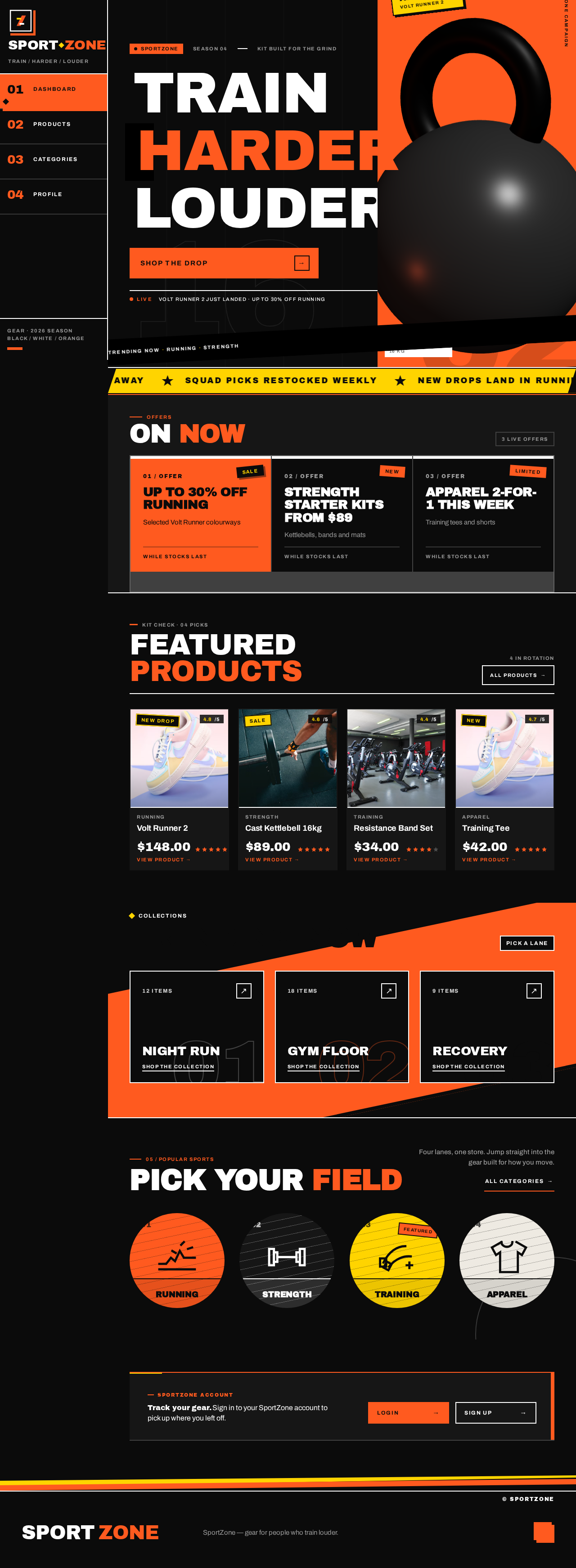
Current behavior. The dashboard presents a hero banner, promotional offers, featured products, trending collections, and popular sports categories. The product listing presents product cards with images, prices, and ratings, plus category filters and a search bar. Product Details presents large product images, descriptions, specifications, available sizes, colors, prices, and ratings. Categories lead to their products in the listing. The Wishlist lets Shoppers save products, view saved products, open them in Product Details, and remove them. The profile page presents profile information, personal details, and account settings. Navigation links the dashboard, products, categories, and profile; the contracted page inventory also includes Landing, Wishlist, Login, and Sign Up.

Page 2 of 36

The entire UI across all pages is to be refreshed. Product images must look realistic. The SportZone logo in the header is changed while preserving the requested palette, fonts, surfaces, tone, layout, and product context; no specific replacement logo design is prescribed. The Product Details-to-dashboard redirect must work. The dashboard must not overflow horizontally, and readable content and controls must remain fully visible at 375px, 768px, and 1280px.

Ownership and access. Landing, dashboard, products, categories, Product Details, and Wishlist are anonymous destinations. Login and Sign Up are anonymously reachable identity surfaces. The profile page and its account data are available only to the verified owner of that account. No differentiated roles or permission tiers exist.

Scope boundaries. Cart, checkout, payment, orders, and review authoring are out of scope; ratings are displayed only. The earlier instruction not to create Sign Up and Sign In pages is superseded by the accepted page contract, which includes Login and Sign Up for protected profile access. No future-horizon capabilities are committed.

Page 3 of 36

2a. Product Interpretation and Delivery Boundary

SportZone is delivered through the existing React frontend, shared FastAPI backend, and MariaDB database. Catalogue, search, filtering, Wishlist, and account APIs reuse the shared backend; no additional runnable service is specified.

Landing is the anonymous public entry introducing SportZone before identity establishment or protected work. Dashboard, products, categories, Product Details, and Wishlist support anonymous shopping and saving. Sign Up establishes identity for first-time Account holders; Login verifies returning Account holders. Profile is protected: an unauthenticated profile visit redirects to Login, and profile state remains unavailable until identity is verified.

The current page inventory and access boundaries are those in the supplied versioned page contract. The full UI refresh and realistic product imagery apply to all pages. All accepted capabilities are current; no future-horizon capabilities are committed.

2c. Page Content and Component Coverage

Page 4 of 36

Landing

  • Access: Anonymous.
  • Information and state: Public introduction to SportZone, its sports and fitness shopping purpose, and its black, white, and orange identity.
  • Primary actions: Continue to dashboard and begin anonymous product browsing.
  • Supporting actions: Navigate to public shopping destinations.
  • Domain entities: SportZone brand and public storefront content.
  • Components: Responsive brand header, concise public introduction, and navigation into the storefront.
  • States: Loading and error states must not prevent a usable route to dashboard; retry is available when entry content fails.
Page 5 of 36

dashboard

  • Access: Anonymous.
  • Information and state: Hero banner, promotional offers, featured products, trending collections, and popular sports categories, populated with realistic sample data and realistic product photography.
  • Primary actions: Use the hero shopping action to open products; open a featured product in Product Details; open a trending collection or category in products.
  • Supporting actions: Navigate to products, categories, Wishlist, or profile; reach Login or Sign Up from the account area.
  • Domain entities: Product, category, promotion, collection.
  • Components: Header with the changed SportZone logo; responsive navigation; hero; promotional offer panel; featured product cards; trending collection tiles; popular category tiles.
  • Responsive behavior: At 375px, 768px, and 1280px, readable content and controls remain within the viewport. Reflow content as needed; imagery and decoration may crop but must not cover text or controls. The dashboard must not overflow horizontally.
  • States: Loading placeholders; empty sections show a concise empty message while other sections remain available; success shows sample content; a failed section shows an inline retry; retry reloads only the failed section.
Page 6 of 36

products

  • Access: Anonymous.
  • Information and state: Product cards with realistic images, prices, and ratings; active category filter and search term; matching results.
  • Primary actions: Enter a search term, select or clear a category filter, and open a product in Product Details.
  • Supporting actions: Save a product to Wishlist; navigate to dashboard, categories, Wishlist, or profile.
  • Domain entities: Product, category, rating, Wishlist item.
  • Components: Search bar, category filters, product card grid with realistic product photography, and Wishlist save control associated with products.
  • States: Loading; success with matching cards; empty results with a way to clear the search and filter; error with retry. Retry preserves the current search and filter.
Page 7 of 36

Product Details

  • Access: Anonymous.
  • Information and state: Large realistic product images, description, specifications, available sizes, colors, price, and rating.
  • Primary actions: Switch the displayed image; select an available size or color; save the product to Wishlist; return to products or navigate to dashboard.
  • Supporting actions: Use navigation to reach other contracted destinations.
  • Domain entities: Product, product image, specification, size option, color option, rating, Wishlist item.
  • Components: Product image gallery with thumbnail selectors; product information and price; specification rows; size and color selectors; rating; Wishlist control; navigation and return controls.
  • States: Loading placeholders; success with available product facts; unavailable size or color selectors are omitted; load failure or missing product shows an error and a route back to products. A failed Wishlist save reports failure without falsely marking the product saved; retrying the save can complete it. The dashboard navigation/redirect opens the dashboard.
Page 8 of 36

categories

  • Access: Anonymous.
  • Information and state: Popular sports categories with names and identifying imagery.
  • Primary actions: Select a category to open its products in the product listing.
  • Supporting actions: Navigate to dashboard, products, Wishlist, or profile.
  • Domain entities: Category.
  • Components: Category tile grid and category labels.
  • States: Loading; success with category tiles; empty state with a link to products; error with retry; retry reloads categories.

Wishlist

  • Access: Anonymous; no identity required.
  • Information and state: Products the Shopper has saved for later, shown with realistic product imagery.
  • Primary actions: Save a product from its product card or Product Details; open Wishlist to view saved products; open a saved product in Product Details.
  • Supporting actions: Remove a saved product; continue browsing products or return to the dashboard.
  • Domain entities: Product, Wishlist item.
  • States: Loading; success with saved products; empty state when no products have been saved; error when saved items cannot be loaded or a save/removal fails. On failure, preserve the last confirmed state and allow the Shopper to retry. A successful save or removal updates the visible Wishlist state.
Page 9 of 36

Login

  • Access: Anonymous.
  • Information and state: Credential inputs and inline validation messages.
  • Primary actions: Submit credentials to verify identity and continue to profile.
  • Supporting actions: Go to Sign Up.
  • Domain entities: Account, credentials.
  • States: Idle; submitting; success navigates to profile; invalid credentials show an error and retain inputs; correcting credentials and resubmitting retries verification.

Sign Up

  • Access: Anonymous.
  • Information and state: Enrollment inputs and inline validation messages.
  • Primary actions: Submit enrollment to establish identity and continue to profile.
  • Supporting actions: Go to Login.
  • Domain entities: Account, credentials, personal details.
  • States: Idle; submitting; success establishes identity and opens profile; validation or duplicate-account errors retain inputs; correcting inputs and resubmitting retries enrollment.
Page 10 of 36

profile

  • Access: Protected; only the verified owner of the account may view or change its profile state.
  • Information and state: Profile information, personal details, and account settings in tabbed sections.
  • Primary actions: Review and update personal details and account settings; save changes.
  • Supporting actions: Switch tabs; sign out; navigate to contracted public pages.
  • Domain entities: Account, profile information, personal details, account settings.
  • States: Loading placeholders; empty stored fields appear as empty inputs; success shows saved values and confirmation; validation or save errors retain entered values and show a field-level or form-level message; correcting and resaving retries. An unauthenticated visit redirects to Login.
Page 11 of 36

3. Functional Requirements

FR-1 — SportZone storefront and full UI refresh (explicit)
As a Shopper, I should experience a modern, responsive sports and fitness e-commerce website called SportZone with a professional, energetic UI, so that I can browse a polished sports storefront.

  • Trigger/input: Open Landing or any contracted page.
  • Observable result: SportZone identity and the refreshed sports retail UI are presented consistently across all pages.
  • Acceptance: Use the requested bold sports-inspired design with black, white, and vibrant orange accents, modern typography, and consistent spacing. Change the SportZone logo in the header while preserving the requested palette, fonts, surfaces, tone, layout, and product context; no specific replacement logo design is prescribed. The entire UI across all pages is to be changed.
  • Access: Landing and public shopping pages are anonymous; profile access is protected.
  • Failure/recovery: No logo-specific or UI-refresh-specific recovery behavior is specified.
  • Continuation: Navigate among contracted pages.
Page 12 of 36

FR-2 — Dashboard content (explicit)
As a Shopper, I should see a dashboard with a hero banner, promotional offers, featured products, trending collections, and popular sports categories, so that I can discover gear and current promotions.

  • Trigger/input: Open dashboard.
  • Observable result: All five requested content groups are presented using realistic sample data.
  • Acceptance: Hero action opens products; featured products open Product Details; collections and categories open their products in the listing.
  • Access: Anonymous.
  • Failure/recovery: A failed content section shows an inline retry without preventing other sections from rendering; retry reloads that section.
  • Continuation: Browse products, collections, categories, or Product Details.

FR-3 — Product listing (explicit)
As a Shopper, I should see product cards with images, prices, and ratings, so that I can compare gear at a glance.

  • Trigger/input: Open products.
  • Observable result: Product cards show images, prices, and ratings.
  • Acceptance: Cards use realistic sample data and realistic product photography, and remain readable at supported viewport widths.
  • Access: Anonymous.
  • Failure/recovery: A failed product query shows a retry; retry reloads the listing.
  • Continuation: Search, filter, save a product, or open Product Details.
Page 13 of 36

FR-4 — Category filtering (explicit)
As a Shopper, I should filter products by category, so that I can narrow the listing to relevant gear.

  • Trigger/input: Select or clear a category filter.
  • Observable result: The product results reflect the selected category; clearing restores the unfiltered results.
  • Acceptance: Category filters are operable and work with the search term.
  • Access: Anonymous.
  • Failure/recovery: No matches show an empty state and a clear-filter action.
  • Continuation: Open a matching product or clear the filter.

FR-5 — Product search (explicit)
As a Shopper, I should search the product listing, so that I can find a specific product.

  • Trigger/input: Enter or clear a search term.
  • Observable result: The listing narrows to matching products; clearing the term restores matching results for any remaining category filter.
  • Acceptance: Search combines with the active category filter.
  • Access: Anonymous.
  • Failure/recovery: No matches show an empty state and a way to clear the search and filter.
  • Continuation: Open a matching product.
Page 14 of 36

FR-6 — Product details (explicit)
As a Shopper, I should see large product images, descriptions, specifications, available sizes, colors, prices, and ratings, so that I can evaluate a product.

  • Trigger/input: Open a product from the listing, dashboard, collection, category results, or Wishlist.
  • Observable result: The product’s available requested details are displayed.
  • Acceptance: Product facts render when available; product images look realistic; unavailable size or color selectors are omitted.
  • Access: Anonymous.
  • Failure/recovery: A missing or failed product load shows an error and a route back to products.
  • Continuation: Return to products, navigate to dashboard, save to Wishlist, or continue browsing.

FR-7 — Product option selection (explicit)
As a Shopper, I should select an available size and color on Product Details, so that I can identify the variant I want to view.

  • Trigger/input: Select an available size or color.
  • Observable result: The selected option is visibly marked.
  • Acceptance: Only available options are selectable; selectors are omitted when no options exist.
  • Access: Anonymous.
  • Failure/recovery: No options means no selector is shown.
  • Continuation: Continue reviewing the product or save it to Wishlist.
Page 15 of 36

FR-8 — Wishlist save and revisit (explicit)
As a Shopper, I should save products to a Wishlist and later view those saved products, so that I can return to gear I am considering.

  • Trigger/input: Save a product from its card or Product Details, then open Wishlist.
  • Observable result: A successful save adds the product to Wishlist; opening Wishlist displays saved products, and selecting one opens Product Details.
  • Acceptance: Wishlist browsing and saving require no identity. A saved product can be revisited from Wishlist.
  • Access: Anonymous.
  • Failure/recovery: If saving or loading fails, show an error, preserve the last confirmed state, and allow retry; do not show an unconfirmed save as successful.
  • Continuation: Open a saved product, remove a saved product, or continue browsing.

FR-9 — Wishlist removal (explicit)
As a Shopper, I should remove a product from Wishlist, so that the saved-items view reflects my current choices.

  • Trigger/input: Choose to remove a saved product.
  • Observable result: On successful removal, the product no longer appears in Wishlist.
  • Acceptance: The visible state changes only after removal succeeds.
  • Access: Anonymous.
  • Failure/recovery: On failure, retain the last confirmed item and allow retry.
  • Continuation: View remaining saved products or continue browsing.
Page 16 of 36

FR-10 — Categories page (explicit)
As a Shopper, I should browse popular sports categories and open a category’s products, so that I can start product discovery by sport.

  • Trigger/input: Open categories and select a category.
  • Observable result: Category tiles show names and imagery; selection opens matching products in the listing.
  • Access: Anonymous.
  • Failure/recovery: Loading failure shows retry; an empty category set shows a link to products.
  • Continuation: Search, filter, or open a product.

FR-11 — Profile information and personal details (explicit)
As an Account holder, I should see my profile information and personal details, so that I can confirm my stored information.

  • Trigger/input: Open profile while verified.
  • Observable result: The verified owner’s profile information and personal details are displayed.
  • Acceptance: Profile data belongs to the verified account owner.
  • Access: Protected; an unauthenticated visit redirects to Login.
  • Failure/recovery: A failed load offers retry.
  • Continuation: Review or update details and settings.
Page 17 of 36

FR-12 — Account settings (explicit)
As an Account holder, I should review and update account settings, so that my account remains configured as I choose.

  • Trigger/input: Open account settings, change a setting, and save.
  • Observable result: Successful changes persist and a confirmation appears.
  • Acceptance: Saved values persist across visits; validation errors are shown.
  • Access: Protected; only the verified owner may change their own account settings.
  • Failure/recovery: A save failure shows a message and retains entered values; correcting and resaving retries.
  • Continuation: Continue profile use or sign out.

FR-13 — Navigation and redirects (explicit)
As a Shopper, I should navigate among the dashboard, products, categories, and profile, so that I can reach the requested destinations reliably.

  • Trigger/input: Select a navigation link or page control.
  • Observable result: The selected destination opens.
  • Acceptance: Navigation includes the contracted Landing, Wishlist, Login, and Sign Up destinations; the Product Details-to-dashboard redirect opens the dashboard. An unauthenticated profile visit redirects to Login.
  • Access: Public destinations are anonymous; profile requires verified identity.
  • Failure/recovery: A failed destination load presents its page’s error and recovery state; retry or navigation remains available.
  • Continuation: Continue browsing at the destination.
Page 18 of 36

FR-14 — Responsive and navigable experience (explicit)
As a Shopper, I should use polished, responsive pages with working buttons, filters, and page transitions, so that the storefront remains usable across devices.

  • Trigger/input: Open or interact with any page.
  • Observable result: Layout and controls adapt and respond.
  • Acceptance: The dashboard must not overflow horizontally at 375px, 768px, and 1280px. Readable content and controls remain fully visible at those widths; imagery and decoration may crop but must not cover them. All motion collapses to instant state changes under prefers-reduced-motion.
  • Access: Applies to all contracted pages.
  • Failure/recovery: No additional recovery behavior specified.
  • Continuation: Continue using the current page or navigate.

FR-15 — Realistic sample data (explicit)
As a Shopper, I should see realistic sample data throughout the storefront, so that the catalogue appears populated.

  • Trigger/input: Open a page that presents catalogue content.
  • Observable result: Products, categories, promotions, collections, prices, and ratings have realistic sample values.
  • Acceptance: No live commerce integration is included.
  • Access: Public browsing.
  • Failure/recovery: Data-load failures use the relevant page’s error and retry behavior.
  • Continuation: Browse or inspect available sample products.
Page 19 of 36

FR-16 — Realistic product imagery (explicit)
As a Shopper, I should see realistic images of sports products, so that the gear appears tangible and desirable.

  • Trigger/input: Open a page that presents product imagery.
  • Observable result: Sports footwear, apparel, and equipment are represented by realistic product photography.
  • Acceptance: Use high-quality photographs of actual sports products with clear materials, natural shadows, and consistent lighting. Products dominate their image frames against black, warm neutral, or orange studio backdrops. Do not substitute illustrations, emoji, or abstract blobs for product images.
  • Access: Applies to product imagery on all contracted pages.
  • Failure/recovery: If an image fails to load, retain the product information and show a recoverable image error state rather than presenting a misleading substitute.
  • Continuation: Continue browsing or open Product Details.

FR-17 — Anonymous browsing (required_inference)
As a Shopper, I should browse the dashboard, products, categories, Product Details, and Wishlist without signing in, so that I can explore and save products without an account.

  • Trigger/input: Visit any of those destinations without identity.
  • Observable result: The destination and its accepted browsing or Wishlist behavior are available without a sign-in prompt.
  • Acceptance: All five destinations are anonymously reachable.
  • Access: Anonymous.
  • Failure/recovery: Use the destination’s defined error and retry behavior.
  • Continuation: Continue browsing or open another contracted destination.
Page 20 of 36

FR-18 — Self-service enrollment (explicit)
As an Account holder, I should establish identity through Sign Up before first profile access, so that my profile is bound to its owner.

  • Trigger/input: Open Sign Up, enter enrollment details, and submit.
  • Observable result: Successful enrollment establishes identity and opens profile.
  • Acceptance: Sign Up is anonymously reachable; invalid or duplicate input shows an error and retains entries.
  • Access: Anonymous entry; profile is protected after enrollment.
  • Failure/recovery: Correct inputs and resubmit.
  • Continuation: Review profile information and settings.

FR-19 — Returning verification (explicit)
As an Account holder, I should verify identity through Login to reach profile, so that my account data remains available to its owner.

  • Trigger/input: Open Login or be redirected there from profile; submit credentials.
  • Observable result: Valid credentials open profile; invalid credentials show an error and retain inputs.
  • Acceptance: Profile is unavailable before verification; unauthenticated profile visits redirect to Login.
  • Access: Login is anonymous; profile is protected.
  • Failure/recovery: Correct credentials and resubmit.
  • Continuation: Review profile or sign out.

4. User Personas

Page 21 of 36

Shopper

  • Product context: Browses SportZone anonymously on a phone or larger screen to discover and compare sports and fitness gear.
  • Primary goal: Find and evaluate products and save items to revisit.
  • Distinct accepted responsibilities: Explore dashboard promotions, featured products, collections, and categories; search and filter the listing; compare product images, prices, and ratings; inspect realistic product images and product details; select available size or color; save products and revisit or remove them in Wishlist.
  • Inputs and decisions: Search terms, category selection, product selection, size and color choices, and whether to save or remove a product.
  • Interactions with other participants: No other accepted human participant is required for browsing or Wishlist use.
  • Observable success: Finds and evaluates a product and can later locate it in Wishlist.
Page 22 of 36

Account holder

  • Product context: Has a SportZone account and returns to review and maintain their own profile.
  • Primary goal: Keep profile information, personal details, and account settings accurate.
  • Distinct accepted responsibilities: Establish identity through Sign Up on first use or verify through Login when returning; review profile information and personal details; update account settings and confirm saved changes persist.
  • Inputs and decisions: Enrollment or login credentials, personal-detail values, and account-setting choices.
  • Interactions with other participants: Acts on their own account; no other human participant is required.
  • Observable success: Profile data is available only after verification, and saved account-setting changes persist with confirmation.

5. Core User Flows

Page 23 of 36

Flow A — Enter SportZone and discover products

  1. The Shopper opens Landing anonymously and sees SportZone’s sports and fitness shopping purpose and visual identity.
  2. The Shopper continues to dashboard.
  3. The dashboard presents the hero, promotional offers, featured products, trending collections, and popular sports categories using realistic sample data and realistic product photography.
  4. The Shopper selects the hero shopping action to open products, a featured product to open Product Details, or a collection/category to open its products.
  5. If a dashboard section fails, the Shopper retries that section; other sections remain available.
  6. The Shopper continues browsing at the selected destination.

Flow B — Search and filter products

  1. The Shopper opens products anonymously.
  2. The Shopper enters a search term; the listing narrows to matching products.
  3. The Shopper selects a category filter; results reflect both the search term and category.
  4. If there are no matches, the Shopper sees the empty state and clears the search and/or filter.
  5. The Shopper opens a matching product in Product Details or saves it to Wishlist.
  6. If the product query fails, the Shopper retries; the current search and filter remain in place.
Page 24 of 36

Flow C — Evaluate a product and return to the dashboard

  1. The Shopper opens Product Details from products, the dashboard, a collection, category results, or Wishlist.
  2. Realistic product images, description, specifications, available sizes, colors, price, and rating are displayed when available.
  3. The Shopper switches images and selects an available size or color. Unavailable selectors are not shown.
  4. The Shopper may save the product to Wishlist; on success, the saved state is visible. If saving fails, the Shopper sees an error and can retry.
  5. To return to the dashboard, the Shopper uses the dashboard navigation/redirect. dashboard opens as the destination.
  6. If the product cannot be loaded, the Shopper sees an error and can return to products.

Flow D — Browse categories

  1. The Shopper opens categories from navigation or a dashboard category tile.
  2. Category tiles show names and imagery.
  3. The Shopper selects a category; products opens with that category’s products.
  4. The Shopper searches or filters further, opens Product Details, or saves a product to Wishlist.
  5. If categories fail to load, the Shopper retries; if none are available, a link to products remains available.
Page 25 of 36

Flow E — Save and revisit products in Wishlist

  1. The Shopper saves a product from a product card or Product Details without signing in.
  2. On successful save, the product is included in Wishlist. If saving fails, the Shopper sees an error and can retry; the interface does not claim an unconfirmed save.
  3. The Shopper opens Wishlist and views saved products.
  4. The Shopper selects a saved product to open Product Details, or removes a saved product.
  5. A successful removal updates Wishlist; a failed removal preserves the last confirmed state and allows retry.
  6. If no products are saved, Wishlist shows its empty state. The Shopper can continue browsing.

Flow F — Enroll and review profile

  1. A first-time Account holder opens Sign Up anonymously.
  2. The Account holder enters enrollment details and submits.
  3. If validation fails or the account already exists, an error appears and the entered values remain available for correction and resubmission.
  4. On success, identity is established and profile opens.
  5. The Account holder reviews profile information, personal details, and account settings.
Page 26 of 36

Flow G — Log in and maintain account settings

  1. A returning Account holder opens Login, or an unauthenticated profile visit redirects to Login.
  2. The Account holder enters credentials and submits.
  3. Invalid credentials produce an error while retaining inputs; the Account holder corrects them and retries.
  4. Valid credentials open profile, where the Account holder reviews profile information and personal details.
  5. The Account holder opens account settings, changes a setting, and saves.
  6. On success, a confirmation appears and the saved value persists across visits. On failure, the entered value remains, an error appears, and the Account holder can correct and resave.
  7. The Account holder continues profile use or signs out.
Page 27 of 36

6. Visuals Colors and Theme

Muse: Jessica Walsh. Headline: SportZone, turned up to full volume.

The visual direction refreshes the entire UI with saturated, confident sports retail art direction. Use bold colour blocking and oversized display type while keeping shopping controls and product details clear and responsive.

Palette — dark mode

RoleHexUsage
Background#0A0A0ADominant black ground
Surface#171717Cards and panels
Text#FFFFFFReadable content and strong contrast
Primary#FF541FSportZone orange for primary actions, prices, and energetic colour fields
Accent#FFD21FSmall promotional tags and secondary emphasis
Muted#A5A5A5Secondary information

Keep black dominant, white for readable content, and orange for primary emphasis. Reserve signal yellow for small promotional tags and secondary emphasis; do not use it for small text on white.

Typography

Page 28 of 36
  • Headings: Archivo Black, heavy, compact uppercase display headlines with tight tracking and close leading.
  • Body, product details, navigation, and controls: Barlow, with bold weights for labels.
  • Responsive scale: display headline 48px at 375px to 104px at 1280px using clamp(); section headings 36/48px; product titles 24/32px; body 16/18px; compact labels 12/14px.
  • Wrap or scale all text to remain within its container.

Shape and surfaces. Use hard-edged colour fields, square-cornered image frames, thick black-and-white rules, and occasional offset shadows or outlined labels. Keep cards and controls crisp and tactile rather than soft glass or gradient surfaces.

Layout. Use a consistent dark shopping shell with compact, responsive navigation linking dashboard, products, categories, Wishlist, and profile. Give each page its own clear hierarchy: an energetic image-led dashboard, filterable product listing, large Product Details gallery with adjacent product information, and orderly profile and Wishlist views. At mobile widths, stack columns and wrap controls without horizontal page overflow.

Imagery. Use realistic, high-quality product photography of actual sports footwear, apparel, and equipment, with clear materials, natural shadows, and consistent lighting. Let products dominate their image frames against black, warm neutral, or orange studio backdrops. Do not substitute illustrations, emoji, or abstract blobs for product images.

Page 29 of 36

Signature moves. Use a black dashboard hero with a huge, left-aligned Archivo Black headline and a single realistic product photograph set into a vivid orange rectangular field. Use a small, slightly rotated yellow promotional tag with black uppercase lettering sparingly for new drops and limited offers. Product cards use edge-to-edge realistic photography, crisp black framing, white price and rating rows, and a high-contrast orange Wishlist control. Product-detail galleries use bold white rules, thumbnail selectors, and an orange price/action cluster adjacent to product information. Mark section transitions with thick horizontal rules and compact uppercase labels.

Readability. At 375px, 768px, and 1280px, headlines, wordmarks, labels, numbers, card text, and controls remain entirely inside the viewport and their containers. Imagery, decoration, and motion may crop, bleed, rotate, overlap, or be cut as directed, provided they do not cover readable text or controls. Moving or scrollable content may cross an edge by design if every item becomes fully readable through the intended motion or scrolling. Under reduced motion, provide a usable static arrangement; wrap items into rows or allow horizontal scrolling so each item can be brought fully into view.

Page 30 of 36

7. Signature Design Concept

Build the dashboard’s first screen as a black campaign field with a huge, left-aligned Archivo Black headline and a vivid orange rectangular image field occupying the right half on desktop. Feature one large, realistic sports-product photograph—such as a running shoe—cropped within the image field, with a small yellow new-drop tag and a solid orange shopping action anchored below the headline. On mobile, stack the image field beneath the headline. Keep all type and controls fully inside the viewport at 375px, 768px, and 1280px; only the decorative image may crop.

Apply the refreshed visual language across the other contracted pages: realistic product photography in product cards and Wishlist, a bold white-rule product gallery with adjacent product information on Product Details, and clear, orderly profile and identity surfaces. The header’s SportZone logo is changed, but no replacement artwork or specific logo treatment is prescribed; keep it consistent with the established palette, typography, surfaces, tone, layout, and product context.

8. Interaction Model & Motion Direction

Interaction Model: Animated
Motion Tempo: expressive
Hero Dimensionality: layered_2d

Page 31 of 36

Landing Hero Motion Brief

  • Focal subject: A realistic sports-product photograph, such as a running shoe, set in the vivid orange image field beside the oversized campaign headline.
  • Input → transformation → outcome thesis: On dashboard load, the headline and image enter with brief, purposeful reveals; the orange shopping action remains immediately usable. The result is a clear campaign entry into product browsing.
  • Motion vocabulary: Expressive but purposeful colour-block reveals and image transitions, with quick feedback on filters, Wishlist toggles, and navigation. Motion must not obscure or delay shopping controls.
  • Composed first frame: Black ground, left-aligned oversized headline, orange image field with realistic product photography, small yellow promotional tag, and visible orange shopping action.
  • Reduced-motion state: Remove animation and present the same content in a static, fully usable arrangement. All motion collapses to instant state changes under prefers-reduced-motion.
Page 32 of 36

9. Non-Functional Requirements

  • Responsive layout (explicit): The dashboard must not overflow horizontally at 375px, 768px, and 1280px. All pages must remain responsive; at those widths, readable content and controls remain fully visible.
  • Readability and containment (explicit): Headlines, wordmarks, labels, numbers, card text, and controls remain within their viewport and containers. Imagery and decoration must not cover them.
  • Motion accessibility (explicit): All motion collapses to instant state changes under prefers-reduced-motion.
  • Visual consistency (explicit): The entire UI across all pages is refreshed while preserving the requested black, white, and vibrant orange palette, modern typography, consistent spacing, professional energetic tone, and sports retail context.
  • Realistic product imagery (explicit): Product images look realistic and depict actual sports footwear, apparel, and equipment with clear materials, natural shadows, and consistent lighting. Do not use illustrations, emoji, or abstract blobs as product-image substitutes.
  • Realistic sample data (explicit): Products, categories, promotions, collections, prices, and ratings use realistic sample values. No live commerce integration is included.
  • Profile privacy (explicit): The profile page and account data are reachable only by the verified owner. Login and Sign Up expose no profile state before identity is established.
  • Wishlist access (explicit): Wishlist browsing and saving are available anonymously.
  • No differentiated permissions (explicit): No differentiated roles or permission tiers exist; an Account holder sees only their own profile.
Page 33 of 36

10. Tech Stack

  • Frontend: React application UI for the contracted pages and navigation.
  • Backend: Existing shared FastAPI process for application APIs and domain modules, including catalogue, Wishlist, and account behavior.
  • Database: Existing MariaDB service for application-owned persistent data.
  • Service inventory: The runnable services are frontend, backend, and database. No additional service is specified.
11. Assumptions and Constraints

Page 34 of 36
  • A1 — Sample catalogue (explicit): Use realistic sample data for products, categories, promotions, collections, prices, and ratings; no live commerce integration is included.
  • A2 — Logo change (explicit): Change the SportZone logo in the header. The replacement design is unspecified and must preserve the requested palette, fonts, surfaces, tone, layout, and product context.
  • A3 — Full UI refresh (explicit): Change the entire UI across all pages while preserving the accepted product context and visual constraints.
  • A4 — Realistic product imagery (explicit): Product images must look realistic; use realistic photography of actual sports products, not illustrations, emoji, or abstract substitutes.
  • A5 — Wishlist access (explicit): Wishlist is anonymously accessible and supports saving, later viewing, opening saved products in Product Details, and removal.
  • A6 — Identity continuity (explicit and required_inference): Application-owned identity is used for protected profile access. Sign Up establishes identity; Login verifies returning Account holders; unauthenticated profile visits redirect to Login.
  • A7 — Profile ownership (explicit): An Account holder can access only their own profile; no differentiated roles or permission tiers exist.
  • A8 — Responsive dashboard (explicit): The dashboard must not overflow horizontally at 375px, 768px, and 1280px, and readable content and controls must remain fully visible.
  • A9 — Future scope (explicit): No future-horizon capabilities are committed.
  • A10 — Exclusions (explicit, qualified): Cart, checkout, payment, orders, and review authoring are out of scope; ratings are displayed only. The earlier instruction not to create Sign Up and Sign In pages is superseded by the accepted page contract, which includes Login and Sign Up for protected profile access.
Page 35 of 36

12. Glossary

  • SportZone — the sports and fitness e-commerce website delivered by golden-sports.
  • Landing — the anonymous public entry introducing SportZone and its shopping purpose.
  • Dashboard — the homepage presenting the hero banner, promotional offers, featured products, trending collections, and popular sports categories.
  • Products — the listing with product cards, images, prices, ratings, category filters, and search.
  • Product Details — the destination showing a product’s images, description, specifications, available sizes and colors, price, and rating.
  • Categories — the destination for popular sports categories that open their products in the listing.
  • Wishlist — the anonymous destination where a Shopper views, opens, and removes products saved for later.
  • Profile — the protected destination for an Account holder’s profile information, personal details, and account settings.
  • Shopper — the anonymous browsing persona who discovers, evaluates, and saves products.
  • Account holder — the verified persona who reviews and maintains their own profile and account settings.
Page 36 of 36
Live
dashboard design preview
dashboard: Open dashboard anonymously
dashboard: Open Sign Up from account block
Sign Up: 1. Submit enrollment details
Sign Up: 2. Correct errors and resubmit
dashboard: Open Login from account block
Login: 1. Submit credentials
Login: 2. Correct credentials and resubmit
profile: 1. Review profile information
profile: Review personal details
profile: Update personal details
profile: Switch to account settings tab
profile: Update account setting
profile: 1. Save changes and confirm
profile: 2. Correct field and resave
profile: 2. Retry failed profile load
profile: Sign out
categories: Browse categories after sign-out
Live
dashboard design preview
dashboard: Open dashboard anonymously
dashboard: Open Sign Up from account block
Sign Up: 1. Submit enrollment details
Sign Up: 2. Correct errors and resubmit
dashboard: Open Login from account block
Login: 1. Submit credentials
Login: 2. Correct credentials and resubmit
profile: 1. Review profile information
profile: Review personal details
profile: Update personal details
profile: Switch to account settings tab
profile: Update account setting
profile: 1. Save changes and confirm
profile: 2. Correct field and resave
profile: 2. Retry failed profile load
profile: Sign out
categories: Browse categories after sign-out