gilded-school
 Naga Naga
Create “SchoolOpen ERP” – Multi-School SaaS Based ERP Platform Create a scalable, cloud-based, high-performance School ERP system named “SchoolOpen ERP” that works on a SaaS (Software as a Service) model. The system must handle 10,000–12,000 students per school efficiently using a strong relational database architecture. 🏫 1. School Self-Registration System Create a public registration page where schools can register. Registration Form Fields: School Name School Address City State Full Location Student Capacity School Phone Number Official Email Create Password Confirm Password 🔑 2. Auto School Code Generation After successful registration: Generate unique School Code (6–8 digit alphanumeric) Example: SCH-782941 Show code on screen Send to email School Code = Username 💼 3. SaaS Business Model (Very Important) The platform must work on subscription basis. 🎁 Free Trial: First 1 Year FREE for every new school Full feature access during free period 💳 After 1 Year: ₹4999 per year subscription If payment not done: System access limited Only dashboard view allowed Data not deleted Payment reminder notifications Admin Super Panel (For You – Owner Control) Create a Super Admin Panel where platform owner can: View All Registered Schools See Subscription Status Activate / Deactivate Schools Extend Free Trial View Total Revenue Manage Payments Send Renewal Reminders 👨💼 4. School Admin Panel (Principal) Login: Username: School Code Password: Set during registration Full control over: Students Teachers Fees Results Attendance Reports ID Cards Communication 👩🏫 5. Teacher Panel Mark Attendance Add Homework Upload Marks View Student List View Fee Status (Read Only) 👨👩👧 6. Parent Panel Login: Username: School Code + Student Code Password: Student Date of Birth Parents can: View Fees (Paid/Pending) Download Receipt View Result Download Report Card View Attendance View Homework Receive Notices 💰 7. Fees System Class-wise fee structure Auto fine calculation Online payment integration Auto PDF receipt generation Defaulters list Fee reports 📄 8. Result System Subject-wise marks entry Auto total & percentage Grade calculation Auto PDF report card Print option 🆔 9. Smart ID Card Generator Student Photo Student Code School Logo QR Code Print & Download 🗄 10. Technical Requirements Multi-tenant architecture Separate database per school OR isolated schema MySQL / PostgreSQL Indexed tables for fast queries JWT authentication bcrypt password encryption Cloud-ready deployment Daily backup system Audit log tracking 🎨 UI Requirements Modern professional dashboard Mobile responsive Blue-White theme Light/Dark mode Fast loading 🚀 Advanced Features Bulk student import (Excel) Auto promotion SMS reminders Email alerts QR based ID verification Capacity usage tracking Best ui ux degine

Comments (0)
Sign in to leave a comment
Project Tasks
No tasks generated yet.
Tasks will appear here as requirements are defined.

Streamline Your
School Operations
A scalable, multi-tenant SaaS platform designed to simplify and automate school management for 10,000+ students. From attendance to fee collection, manage everything in one place.
Trusted by Schools Across India
10,000+ Students Managed
Multi-Tenant Architecture
ISO Secure
India Ready (UPI + INR)
Free Trial 1 Year
Explore the Gilded-School Campus
Navigate our virtual campus to discover each module. Click on any building to dive into powerful school management tools.
Click any building above or use the button to start exploring
Everything Your School Needs
A comprehensive suite of tools designed to simplify administration, engage parents, and empower educators.
Self-Registration
Schools register independently with auto-generated unique codes. Get started in minutes with zero paperwork.
Free Trial — 1 Year
Full feature access for an entire year at no cost. Experience everything before committing to a plan.
Role-Based Access
Dedicated panels for Admin, Teacher, Parent, and Student. Each role sees exactly what they need.
Attendance Tracking
Mark and monitor daily attendance with real-time dashboards. Instant alerts for absentee patterns.
Fee Management
Collect fees via UPI, track payments, and auto-calculate late fines. Download receipts instantly.
Result Processing
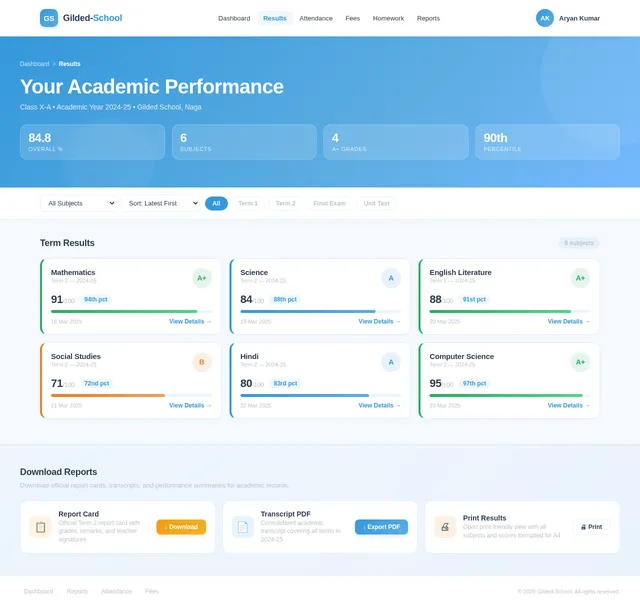
Upload marks, auto-generate report cards, and share results with parents seamlessly.
ID Card Generation
Create smart student ID cards with embedded QR codes for quick verification and attendance scanning.
Bulk Student Import
Import thousands of student records via Excel spreadsheets. Map columns and validate data automatically.
Auto-Promotion
Promote students to the next class at year-end with one click. Custom rules for pass/fail criteria.
SMS & Email Reminders
Send automated fee reminders, exam notifications, and announcements to parents and staff.
How It Works
Go live in four simple steps. From registration to full school management — we make onboarding effortless.
Schools Register with Unique Code
Self-register your school with basic details. The system generates a unique school code sent via email for secure access.
Free Trial Year Begins
Get full feature access for an entire year at no cost. Explore every module and see how Gilded-School transforms your operations.
Manage Students, Fees & Attendance
Import students in bulk, track attendance, process fees with UPI, generate ID cards with QR codes, and much more.
Subscribe to Annual Plan
Choose a plan that fits your school size. Continue seamlessly with all your data intact and premium support included.
Tailored Dashboards for Every Role
From platform owners to parents, every user gets a dedicated experience designed for their unique needs.
Super Admin
Platform Owner
- Monitor all registered schools and subscription status
- Track total platform revenue and payment analytics
- Activate or deactivate schools and extend free trials
- Manage platform-wide settings and configurations
School Admin
Principal / Administrator
- Manage students, teachers, fees, and results
- Generate smart ID cards with QR codes
- Bulk import students via Excel and auto-promote
- Oversee attendance reports and communications
Teacher
Educator
- Mark daily attendance for assigned classes
- Upload marks and manage student performance
- Assign and track homework submissions
- View student lists and fee payment statuses
Parent
Guardian
- View and pay fees online with UPI integration
- Download receipts and detailed fee breakdowns
- Access results and download report cards
- Track child attendance and receive notices
Trusted by Schools Across India
See how schools are transforming their operations with Gilded-School’s comprehensive ERP platform.
Gilded-School transformed how we manage over 8,000 students. Attendance tracking, fee collection via UPI, and auto-generated report cards have saved us 20+ hours per week. The self-registration was incredibly smooth.
The bulk student import and auto-promotion features alone justified the switch. Our teachers now spend more time teaching and less time on paperwork. The QR-based ID cards are a hit with parents too.
As a parent, I can instantly check my child's attendance, download fee receipts, and view results from my phone. The SMS reminders for due fees and exam schedules are incredibly helpful.
Managing 3 school branches used to be a nightmare. With the multi-tenant architecture and Super Admin dashboard, I now have real-time visibility into subscriptions, revenue, and operations across all campuses.
100+
Schools Onboarded
10,000+
Students Managed
4.9/5
Average Rating
20hrs
Saved Weekly
Simple, Transparent Pricing
Start with a free 1-year trial. No credit card required. Choose the plan that fits your school's needs.
Starter
Perfect for small schools getting started
Billed annually in INR
What's included
- Up to 500 students
- Attendance tracking
- Fee management
- Result processing
- SMS & email reminders
- Bulk student import
- Smart ID cards with QR
- Priority support
Professional
Ideal for mid-size schools scaling up
Billed annually in INR
What's included
- Up to 5,000 students
- Attendance tracking
- Fee management + UPI
- Result & report cards
- SMS & email reminders
- Bulk student import
- Smart ID cards with QR
- Priority support
Enterprise
Built for large institutions with 10,000+ students
Billed annually in INR
What's included
- Up to 12,000 students
- Attendance tracking
- Fee management + UPI
- Result & report cards
- SMS & email reminders
- Bulk student import
- Smart ID cards with QR
- Dedicated priority support
Frequently Asked Questions
Everything you need to know about Gilded-School. Can't find the answer you're looking for? Reach out to our support team.
Ready to Transform Your School?
Join 100+ schools already using Gilded-School to streamline operations, manage fees, track attendance, and deliver results — all from one platform.
No comments yet. Be the first!