gilded-school
 Naga Naga
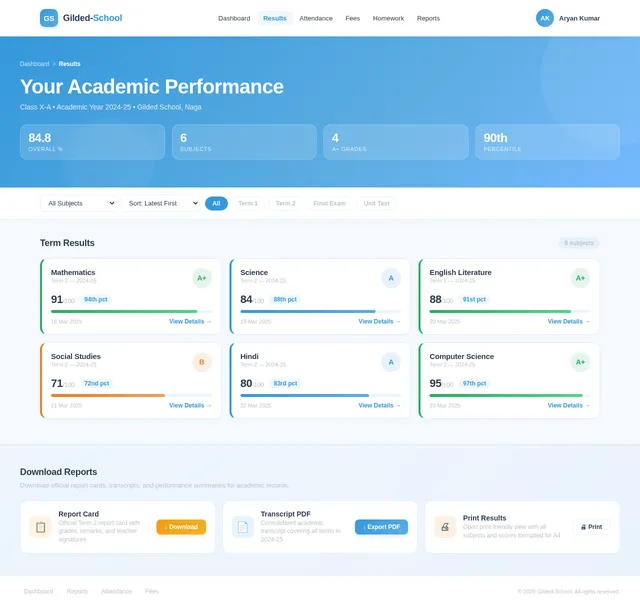
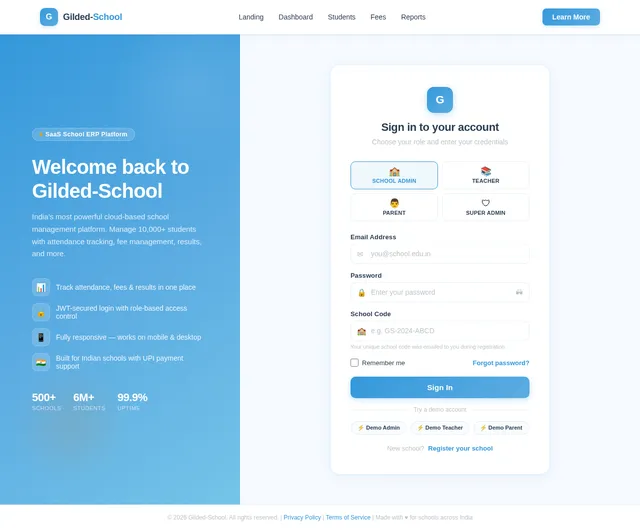
Create “SchoolOpen ERP” – Multi-School SaaS Based ERP Platform Create a scalable, cloud-based, high-performance School ERP system named “SchoolOpen ERP” that works on a SaaS (Software as a Service) model. The system must handle 10,000–12,000 students per school efficiently using a strong relational database architecture. 🏫 1. School Self-Registration System Create a public registration page where schools can register. Registration Form Fields: School Name School Address City State Full Location Student Capacity School Phone Number Official Email Create Password Confirm Password 🔑 2. Auto School Code Generation After successful registration: Generate unique School Code (6–8 digit alphanumeric) Example: SCH-782941 Show code on screen Send to email School Code = Username 💼 3. SaaS Business Model (Very Important) The platform must work on subscription basis. 🎁 Free Trial: First 1 Year FREE for every new school Full feature access during free period 💳 After 1 Year: ₹4999 per year subscription If payment not done: System access limited Only dashboard view allowed Data not deleted Payment reminder notifications Admin Super Panel (For You – Owner Control) Create a Super Admin Panel where platform owner can: View All Registered Schools See Subscription Status Activate / Deactivate Schools Extend Free Trial View Total Revenue Manage Payments Send Renewal Reminders 👨💼 4. School Admin Panel (Principal) Login: Username: School Code Password: Set during registration Full control over: Students Teachers Fees Results Attendance Reports ID Cards Communication 👩🏫 5. Teacher Panel Mark Attendance Add Homework Upload Marks View Student List View Fee Status (Read Only) 👨👩👧 6. Parent Panel Login: Username: School Code + Student Code Password: Student Date of Birth Parents can: View Fees (Paid/Pending) Download Receipt View Result Download Report Card View Attendance View Homework Receive Notices 💰 7. Fees System Class-wise fee structure Auto fine calculation Online payment integration Auto PDF receipt generation Defaulters list Fee reports 📄 8. Result System Subject-wise marks entry Auto total & percentage Grade calculation Auto PDF report card Print option 🆔 9. Smart ID Card Generator Student Photo Student Code School Logo QR Code Print & Download 🗄 10. Technical Requirements Multi-tenant architecture Separate database per school OR isolated schema MySQL / PostgreSQL Indexed tables for fast queries JWT authentication bcrypt password encryption Cloud-ready deployment Daily backup system Audit log tracking 🎨 UI Requirements Modern professional dashboard Mobile responsive Blue-White theme Light/Dark mode Fast loading 🚀 Advanced Features Bulk student import (Excel) Auto promotion SMS reminders Email alerts QR based ID verification Capacity usage tracking Best ui ux degine

Comments (0)
Sign in to leave a comment
System Requirements
System Requirements Document (SRD) for Gilded-School
1. Introduction
The purpose of this document is to define the system requirements for Gilded-School, a scalable, cloud-based, high-performance School ERP system designed to operate on a SaaS (Software as a Service) model. This platform aims to streamline school management processes for multiple schools, efficiently handling 10,000–12,000 students per school. The system will cater to various user personas, including school administrators, teachers, parents, and students, while ensuring a seamless and modern user experience.
This document has been tailored for Naga Naga, based in India, and incorporates locale-specific considerations such as UPI payment integration and INR currency for subscriptions.
2. System Overview
Gilded-School is a multi-tenant SaaS-based ERP platform designed to simplify and automate school management. The system will provide the following key features:
- School Self-Registration System: Schools can register themselves with a unique school code generated automatically.
- Subscription-Based SaaS Model: Schools will operate on a subscription basis, with a free trial for the first year and an annual fee thereafter.
- Role-Based Access: Separate panels for school administrators, teachers, and parents with tailored functionalities.
- Comprehensive Modules: Includes attendance tracking, fee management, result processing, ID card generation, and more.
- Advanced Features: Bulk student import, auto-promotion, SMS/email reminders, and QR-based ID verification.
- Scalability: Designed to handle thousands of students per school with robust database architecture and cloud-ready deployment.
The platform will prioritize a modern, responsive UI with light/dark mode options and fast loading times.
3. Functional Requirements
- As a School, I should be able to self-register with details like name, address, capacity, and contact information.
- As a System, I should generate a unique school code upon registration and send it via email.
- As a School, I should have a free trial for the first year with full feature access.
- As a System, I should limit access to dashboard view only if subscription payments are not made after the free trial.
- As a Super Admin, I should be able to view all registered schools, their subscription status, and total revenue.
- As a Super Admin, I should be able to activate/deactivate schools, extend free trials, and manage payments.
- As a School Admin, I should be able to manage students, teachers, fees, results, attendance, reports, ID cards, and communication.
- As a Teacher, I should be able to mark attendance, add homework, upload marks, and view student lists and fee statuses.
- As a Parent, I should be able to view fees, download receipts, view results, download report cards, view attendance, and receive notices.
- As a System, I should support UPI payment integration for subscription and fee payments.
- As a System, I should generate auto-calculated fines for late fee payments.
- As a System, I should allow bulk student import via Excel.
- As a System, I should generate smart ID cards with QR codes for students.
4. User Personas
- Super Admin: The platform owner with full control over all schools, subscriptions, and revenue management.
- School Admin: The principal or designated administrator responsible for managing the school's operations.
- Teacher: Educators with access to attendance, homework, and student performance management.
- Parent: Guardians with access to their child's academic and financial information.
- Student: End-users who benefit from the system's streamlined processes (indirect user).
5. Visuals Colors and Theme
The color palette for Gilded-School has been designed to evoke professionalism, trust, and modernity while maintaining a vibrant and engaging aesthetic.
- Background: #F5F9FF (Soft Sky Blue)
- Surface: #FFFFFF (Pure White)
- Text: #2C3E50 (Charcoal Gray)
- Accent: #3498DB (Bright Azure Blue)
- Muted Tones: #BDC3C7 (Light Gray)
This palette ensures a clean and modern look, suitable for both light and dark modes.
6. Signature Design Concept
The Gilded-School homepage will feature an interactive 3D campus map. This map will serve as the primary navigation interface, allowing users to explore different sections of the platform by clicking on virtual buildings representing modules (e.g., "Admin Office" for the admin panel, "Classroom" for teacher tools, "Library" for reports).
Key Features:
- Dynamic Animations: Buildings will gently "pop" into focus when hovered over, with subtle lighting effects.
- Micro-Interactions: Clicking on a building will trigger a smooth zoom-in transition, revealing the corresponding module's dashboard.
- Time-Based Themes: The campus map will shift between day and night modes based on the user's local time, with animated sunrises and sunsets.
- Engaging Onboarding: First-time users will be guided through the map with animated tooltips and a friendly mascot character.
This unique design will make the platform memorable and engaging, setting it apart from traditional ERP systems.
7. Non-Functional Requirements
- Performance: The system must handle up to 12,000 students per school with minimal latency.
- Scalability: Support for adding new schools without impacting existing performance.
- Security: Use JWT for authentication and bcrypt for password encryption.
- Reliability: Daily backups and audit log tracking to ensure data integrity.
- Accessibility: Fully responsive design for mobile and desktop users.
- Localization: Support for Indian locale settings, including INR currency and UPI payments.
8. Tech Stack
- Frontend: React for web.
- Backend: Python with FastAPI.
- Database: MySQL with Alembic for migrations.
- AI Models: GPT 5.4 for user-friendly responses.
- AI Tools: Langchain for advanced workflows.
- Orchestration: Docker for local development and Kubernetes for server-side deployment.
9. Assumptions and Constraints
- The system assumes schools will have basic internet connectivity for cloud-based operations.
- UPI payment integration will be the primary payment method, with no support for international payment gateways.
- Each school will have its own database schema to ensure data isolation.
- The free trial period is fixed at one year and cannot be extended beyond the Super Admin's discretion.
10. Glossary
- ERP: Enterprise Resource Planning.
- SaaS: Software as a Service.
- UPI: Unified Payments Interface, a real-time payment system in India.
- JWT: JSON Web Token, a standard for secure authentication.
- RDBMS: Relational Database Management System.
- UI/UX: User Interface/User Experience.
No comments yet. Be the first!