giant-rental
 Suresh Basnet
You are a senior full-stack engineer, product designer, and database architect. Build **Phase 1 only** of a production-quality multi-tenant SaaS web application called **RentalDesk**. RentalDesk is a mobile-first operating system for small equipment and party-rental businesses, such as bounce-house, table/chair, tent, AV, tool, photo-booth, and generator rental companies. In later phases, it will manage inventory availability, quotes, customer deposits, bookings, delivery/pickup jobs, check-in/check-out inspections, damage charges, late fees, refunds, and Stripe subscription billing. In this phase, build ONLY the foundation. # 1. Phase 1 goal By the end of Phase 1, a new user must be able to: 1. Sign up with email and password. 2. Log in, log out, and reset their password. 3. Create a rental business. 4. Become the owner of that business. 5. See a protected dashboard. 6. See the app navigation. 7. See empty-state screens for future modules. 8. Access only their own business data. 9. Never access another business’s data. Do not build any feature that is not explicitly listed below. # 2. Tech stack Use exactly this stack: - Next.js App Router - TypeScript - Tailwind CSS - shadcn/ui - Supabase for Postgres, Auth, Storage, and Row Level Security - @supabase/supabase-js - @supabase/ssr - Zod for validation - React Hook Form for forms - Vercel-ready deployment structure Use cookie-based Supabase Auth for Next.js App Router. Create separate Supabase clients for: - Browser/client components - Server components - Server actions / route handlers Never expose these values to the browser: - SUPABASE_SERVICE_ROLE_KEY - STRIPE_SECRET_KEY - STRIPE_WEBHOOK_SECRET - RESEND_API_KEY Use environment variables and provide a `.env.example` file. # 3. What to build in Phase 1 ## A. Project setup Create a clean, production-quality Next.js project with: - TypeScript strict mode - ESLint - Prettier - Tailwind CSS - shadcn/ui - Absolute imports using `@/` - A scalable folder structure - Reusable UI components - Consistent error and loading states - Mobile-first responsive layout Do not use unnecessary libraries. ## B. Authentication Implement Supabase Auth with email and password. Build these pages: 1. `/auth/sign-up` 2. `/auth/login` 3. `/auth/forgot-password` 4. `/auth/reset-password` 5. `/auth/callback` Requirements: - Email and password signup - Email confirmation flow if Supabase requires it - Login - Logout - Forgot password - Reset password - Redirect unauthenticated users away from protected routes - Redirect authenticated users away from login/signup pages - Show clear validation errors - Show loading states on all auth buttons - Disable submit buttons while submitting - Prevent duplicate form submission - Never reveal whether an email exists during password reset Use Supabase Auth’s built-in session handling. Do not build custom JWT handling. ## C. Business onboarding After signup, if the user does not have a business, redirect them to: ```text /onboarding/create-business

Comments (0)
Sign in to leave a comment
System Requirements
System Requirements Document for RentalDesk
1. Introduction
RentalDesk is a mobile-first operating system for small equipment and party-rental businesses — bounce-house, table/chair, tent, AV, tool, photo-booth, and generator rental companies. This document specifies Phase 1 only: the foundation on which later phases will add inventory availability, quotes, customer deposits, bookings, delivery/pickup jobs, check-in/check-out inspections, damage charges, late fees, refunds, and Stripe subscription billing.
Phase 1 delivers a production-quality multi-tenant SaaS foundation in which a new user can sign up with email and password, log in, log out, and reset their password; create a rental business and become its owner; see a protected dashboard and the app navigation; see empty-state screens for future modules; and access only their own business data — never another business's data.
The audience is the small rental operator (the "Rental business owner") who needs one calm, trustworthy place to start and grow their rental operation. The product must feel sturdy, friendly, and organized — not corporate.
Out of scope for this phase: every feature not explicitly listed in this document. Later-phase capabilities are named above only to establish the boundary of the foundation.
2. System Overview
RentalDesk Phase 1 is a Next.js App Router application (TypeScript, Tailwind CSS, shadcn/ui) backed by Supabase for Postgres, Auth, Storage, and Row Level Security. Authentication is cookie-based Supabase Auth with separate browser, server-component, and server-action/route-handler clients. Zod and React Hook Form validate and manage forms. The deployment structure is Vercel-ready.
The single active human actor is the Rental business owner. The owner moves through an anonymous public entry (Landing), identity access surfaces (/auth/sign-up, /auth/login, /auth/forgot-password, /auth/reset-password, /auth/callback), a protected onboarding surface (/onboarding/create-business), and protected working surfaces (Dashboard, Modules). Every protected surface is scoped to the owner's own business through Supabase Row Level Security.
The provisioned infrastructure inventory is a shared backend process for application APIs and domain modules, a database for application-owned persistent data, and a frontend application UI. In this phase the Supabase platform supplies Postgres, Auth, Storage, and RLS as the authoritative data and identity layer; the shared backend and database services host the application's own API surface and any application-owned persistent data, and the frontend serves the Next.js UI. These services do not add product requirements or change access decisions.
Removed from scope
- Inventory availability (also: availability management)
- Quotes
- Customer deposits
- Bookings
- Delivery/pickup jobs
- Check-in/check-out inspections
- Damage charges
- Late fees
- Refunds
- Stripe subscription billing
- Custom JWT handling
2a. Product Interpretation and Delivery Boundary
RentalDesk Phase 1 is a first-party, application-owned web product. Identity is application-owned through Supabase Auth: a visitor establishes identity by signing up with email and password, confirms their email when Supabase requires it, and thereafter resumes a durable session through Supabase's built-in cookie-based session handling. No custom JWT handling exists.
Access boundaries are explicit and closed:
- Anonymous surfaces — Landing,
/auth/sign-up,/auth/login,/auth/forgot-password,/auth/reset-password,/auth/callback— are reachable without a session. Authenticated users are redirected away from login and signup pages. - Protected surfaces —
/onboarding/create-business, Dashboard, Modules — require a session. Unauthenticated users are redirected away from protected routes. - Tenant boundary — every protected read and write is scoped to the signed-in owner's own business by Supabase Row Level Security. A user must never access another business's data.
The current delivery horizon is Phase 1 only. Later-phase modules appear solely as empty-state screens reached through the app navigation; they carry no working capability in this phase. Secrets — SUPABASE_SERVICE_ROLE_KEY, STRIPE_SECRET_KEY, STRIPE_WEBHOOK_SECRET, RESEND_API_KEY — are supplied through environment variables, documented in .env.example, and never exposed to the browser.
2c. Page Content and Component Coverage
Landing
- Information/state: Anonymous public entry. Presents RentalDesk to small rental teams. Hero headline "Run your rental business from one desk"; subline "RentalDesk gives small rental teams one calm place to start and grow."; call to action "Create your business". No session required; authenticated visitors may still view it.
- Primary action: "Create your business" navigates to
/auth/sign-up. - Supporting actions: Link to
/auth/loginfor returning users. - Domain entities: None persisted; marketing copy only.
- Component responsibilities: Asymmetric two-panel hero (left 7-column type panel, right 5-column teal colour block with flat tent-and-chair illustration); mustard pattern bands separating sections; tomato CTA under the headline; responsive type via
clamp(40px, 7vw, 88px). - States: Static content; no loading, empty, or error states. Reduced-motion renders a usable static arrangement.
/auth/sign-up
- Information/state: Anonymous identity-access surface. Email and password fields; validation feedback; submit control.
- Primary action: Submit email and password to create a Supabase Auth account.
- Supporting actions: Link to
/auth/login; link to/auth/forgot-password. - Domain entities: Supabase Auth user (email, password).
- Component responsibilities: React Hook Form + Zod validation; loading state on the submit button; submit disabled while submitting to prevent duplicate submission; clear validation errors; redirect authenticated users away from this page.
- States: Loading (submit in flight); success (redirect to email confirmation or to
/onboarding/create-business); error (validation errors, Supabase error surfaced clearly); recovery (retry submission).
/auth/login
- Information/state: Anonymous identity-access surface. Email and password fields; validation feedback; submit control; logout affordance for authenticated sessions.
- Primary action: Submit email and password to establish a Supabase Auth session.
- Supporting actions: Link to
/auth/sign-up; link to/auth/forgot-password; logout action that ends the session. - Domain entities: Supabase Auth session.
- Component responsibilities: React Hook Form + Zod validation; loading state on the submit button; submit disabled while submitting; clear validation errors; redirect authenticated users away from this page; redirect unauthenticated users away from protected routes.
- States: Loading; success (redirect to Dashboard or
/onboarding/create-businessif no business); error (invalid credentials surfaced clearly); recovery (retry).
/auth/forgot-password
- Information/state: Anonymous identity-access surface. Email field; neutral confirmation message.
- Primary action: Request a password reset email.
- Supporting actions: Link back to
/auth/login. - Domain entities: Supabase Auth password-reset request.
- Component responsibilities: React Hook Form + Zod validation; loading state on the submit button; submit disabled while submitting; the confirmation message never reveals whether the email exists.
- States: Loading; success (neutral "if an account exists, a reset link was sent" message); error (validation errors only — never existence disclosure); recovery (retry).
/auth/reset-password
- Information/state: Anonymous identity-access surface reached from the reset email link. New password field(s); validation feedback.
- Primary action: Set a new password.
- Supporting actions: Link back to
/auth/loginafter success. - Domain entities: Supabase Auth password update.
- Component responsibilities: React Hook Form + Zod validation; loading state on the submit button; submit disabled while submitting; clear validation errors; handles invalid or expired reset links with a clear recovery path.
- States: Loading; success (redirect to
/auth/login); error (validation or expired-link error with recovery); recovery (request a new reset link).
/auth/callback
- Information/state: Anonymous identity-access surface that completes the Supabase email confirmation and session flow.
- Primary action: Exchange the callback parameters for a Supabase session and redirect onward.
- Supporting actions: Redirect to
/onboarding/create-businesswhen the user has no business; redirect to Dashboard when the user has a business. - Domain entities: Supabase Auth session.
- Component responsibilities: Server-side callback handling using the server-action/route-handler Supabase client; no custom JWT handling.
- States: Loading (processing); success (redirect); error (invalid or expired link with a clear recovery path back to
/auth/loginor/auth/forgot-password).
/onboarding/create-business
- Information/state: Protected onboarding surface for a signed-in user without a business. Business creation form.
- Primary action: Create a rental business and become its owner.
- Supporting actions: Logout.
- Domain entities: Business (owned by the signed-in user); ownership link between the user and the business.
- Component responsibilities: React Hook Form + Zod validation; loading state on the submit button; submit disabled while submitting; clear validation errors; redirect unauthenticated users away; redirect users who already have a business to Dashboard.
- States: Loading; empty (no business yet); success (business created, owner assigned, redirect to Dashboard); error (validation or persistence error with recovery); recovery (retry).
Dashboard
- Information/state: Protected working surface scoped to the owner's own business. Shows the business context and the app navigation.
- Primary action: View the protected dashboard for the owner's business.
- Supporting actions: Navigate to Modules via the app navigation; logout.
- Domain entities: Business (owner's own only).
- Component responsibilities: Server-component Supabase client with RLS-scoped reads; app navigation shell; consistent loading and error states; redirect unauthenticated users away; redirect users without a business to
/onboarding/create-business. - States: Loading; empty (no business data yet — foundation only); success (business context rendered); error (clear error with recovery); recovery (retry).
Modules
- Information/state: Protected surface reached through the app navigation. Presents empty-state screens for future modules.
- Primary action: View empty-state screens for future modules.
- Supporting actions: Navigate back to Dashboard; logout.
- Domain entities: None persisted in this phase; empty-state placeholders only.
- Component responsibilities: App navigation shell; empty-state components; consistent loading and error states; redirect unauthenticated users away; redirect users without a business to
/onboarding/create-business. - States: Loading; empty (the defining state for every future module); success (empty-state rendered); error (clear error with recovery); recovery (retry).
3. Functional Requirements
FR-1 — Sign up with email and password (explicit) As a Rental business owner, I should sign up with email and password so that I can create an account.
- Trigger/input: email and password submitted on
/auth/sign-up. - Observable result: a Supabase Auth account is created; the user is routed to email confirmation when Supabase requires it, otherwise to
/onboarding/create-business. - Access state: anonymous.
- Failure/recovery: validation errors shown clearly; submit disabled while submitting to prevent duplicate submission; retry available.
- Continuation: email confirmation or onboarding.
FR-2 — Email confirmation flow (explicit; required_inference for the confirmation step) As a Rental business owner, I should complete email confirmation when Supabase requires it so that my account becomes usable.
- Trigger/input: confirmation link from the Supabase email.
- Observable result:
/auth/callbackcompletes the Supabase email confirmation and session flow and redirects onward. - Access state: anonymous.
- Failure/recovery: invalid or expired link shows a clear recovery path back to
/auth/loginor/auth/forgot-password. - Continuation:
/onboarding/create-businessor Dashboard.
FR-3 — Log in (explicit) As a Rental business owner, I should log in with email and password so that I can reach my protected surfaces.
- Trigger/input: email and password submitted on
/auth/login. - Observable result: a Supabase Auth session is established; the user is routed to Dashboard, or to
/onboarding/create-businessif they have no business. - Access state: anonymous.
- Failure/recovery: invalid credentials surfaced clearly; submit disabled while submitting; retry available.
- Continuation: Dashboard or onboarding.
FR-4 — Log out (explicit) As a Rental business owner, I should log out so that my session ends.
- Trigger/input: logout action from an authenticated surface.
- Observable result: the Supabase Auth session ends; the user is returned to an anonymous surface.
- Access state: authenticated.
- Failure/recovery: clear error with retry.
- Continuation:
/auth/login.
FR-5 — Forgot password (explicit) As a Rental business owner, I should request a password reset so that I can regain access.
- Trigger/input: email submitted on
/auth/forgot-password. - Observable result: a neutral confirmation message is shown; the message never reveals whether the email exists.
- Access state: anonymous.
- Failure/recovery: validation errors only; submit disabled while submitting; retry available.
- Continuation: reset email.
FR-6 — Reset password (explicit) As a Rental business owner, I should set a new password from the reset flow so that I can log in again.
- Trigger/input: new password submitted on
/auth/reset-passwordfrom the reset link. - Observable result: the Supabase Auth password is updated; the user is routed to
/auth/login. - Access state: anonymous.
- Failure/recovery: validation or expired-link error with a clear recovery path; submit disabled while submitting.
- Continuation:
/auth/login.
FR-7 — Redirect unauthenticated users away from protected routes (explicit) As a Rental business owner, I should be redirected away from protected routes when unauthenticated so that protected data is never exposed.
- Trigger/input: request to a protected route without a session.
- Observable result: redirect to
/auth/login. - Access state: anonymous.
- Failure/recovery: none required beyond the redirect.
- Continuation: login.
FR-8 — Redirect authenticated users away from login and signup pages (explicit) As a Rental business owner, I should be redirected away from login and signup pages when authenticated so that I do not re-enter credentials unnecessarily.
- Trigger/input: request to
/auth/loginor/auth/sign-upwith a session. - Observable result: redirect to Dashboard or
/onboarding/create-business. - Access state: authenticated.
- Failure/recovery: none required beyond the redirect.
- Continuation: Dashboard or onboarding.
FR-9 — Create a rental business and become its owner (explicit)
As a Rental business owner, I should create a rental business on /onboarding/create-business so that I become its owner.
- Trigger/input: business creation form submitted by a signed-in user without a business.
- Observable result: a business is created and the signed-in user is recorded as its owner; the user is routed to Dashboard.
- Access state: authenticated.
- Failure/recovery: validation or persistence error with clear recovery; submit disabled while submitting; retry available.
- Continuation: Dashboard.
FR-10 — Redirect users without a business to onboarding (explicit)
As a Rental business owner, I should be redirected to /onboarding/create-business after signup when I have no business so that I can complete setup.
- Trigger/input: signup completion or protected-route access by a user without a business.
- Observable result: redirect to
/onboarding/create-business. - Access state: authenticated.
- Failure/recovery: none required beyond the redirect.
- Continuation: business creation.
FR-11 — See a protected dashboard (explicit) As a Rental business owner, I should see a protected dashboard for my own business so that I have a working home.
- Trigger/input: navigation to Dashboard with a session and a business.
- Observable result: the dashboard renders the owner's own business context.
- Access state: authenticated; RLS-scoped to the owner's business.
- Failure/recovery: clear error with retry; redirect to onboarding if no business.
- Continuation: Modules via the app navigation.
FR-12 — See the app navigation (explicit) As a Rental business owner, I should see the app navigation so that I can move between surfaces.
- Trigger/input: any protected surface.
- Observable result: the app navigation is visible and functional.
- Access state: authenticated.
- Failure/recovery: consistent error state if navigation data fails.
- Continuation: Dashboard or Modules.
FR-13 — See empty-state screens for future modules (explicit) As a Rental business owner, I should see empty-state screens for future modules so that I understand what is coming without any working capability.
- Trigger/input: navigation to Modules.
- Observable result: empty-state screens render for future modules.
- Access state: authenticated; RLS-scoped.
- Failure/recovery: clear error with retry.
- Continuation: back to Dashboard.
FR-14 — Access only own business data; never another business's data (explicit) As a Rental business owner, I should access only my own business data so that tenant isolation is guaranteed.
- Trigger/input: any protected read or write.
- Observable result: Supabase Row Level Security scopes every operation to the signed-in owner's business; no cross-tenant access is possible.
- Access state: authenticated.
- Failure/recovery: denied access surfaces a clear error without leaking other-tenant data.
- Continuation: normal protected work.
FR-15 — Show clear validation errors, loading states, and prevent duplicate submission (explicit) As a Rental business owner, I should see clear validation errors and loading states on all auth buttons, with submit buttons disabled while submitting, so that I never submit twice or guess what went wrong.
- Trigger/input: any auth or onboarding form submission.
- Observable result: validation errors are shown clearly; loading states appear on all auth buttons; submit buttons are disabled while submitting.
- Access state: per surface.
- Failure/recovery: retry after correction.
- Continuation: successful submission.
FR-16 — Never reveal whether an email exists during password reset (explicit) As a Rental business owner, I should receive a neutral response during password reset so that account existence is never disclosed.
- Trigger/input: email submitted on
/auth/forgot-password. - Observable result: the same neutral confirmation message is shown regardless of account existence.
- Access state: anonymous.
- Failure/recovery: validation errors only.
- Continuation: reset email or retry.
FR-17 — Use Supabase Auth built-in session handling (explicit) As a Rental business owner, I should have my session handled by Supabase Auth so that I do not depend on custom JWT handling.
- Trigger/input: any authenticated request.
- Observable result: cookie-based Supabase Auth session handling with separate browser, server-component, and server-action/route-handler clients.
- Access state: per surface.
- Failure/recovery: expired session redirects to
/auth/login. - Continuation: normal protected work.
4. User Personas
Rental business owner
- Product context: Runs a small equipment or party-rental business — bounce houses, tables and chairs, tents, AV, tools, photo booths, or generators. Works mobile-first, often on-site, and needs one calm place to start and grow the operation. Phase 1 is the foundation: account, business, dashboard, navigation, and empty-state previews of what is coming.
- Primary goal: Get a working, trustworthy RentalDesk account tied to their own business, with confidence that their data is isolated and their session is secure.
- Distinct accepted responsibilities: Signs up with email and password; confirms email when Supabase requires it; logs in and logs out; requests and completes a password reset; creates a rental business and becomes its owner; views the protected dashboard; uses the app navigation; views empty-state screens for future modules.
- Relevant inputs or decisions: Email and password; business creation details; choice to log out; choice to request a password reset.
- Interactions with other accepted participants: None in Phase 1 — the owner is the sole active human actor. Supabase Auth and Supabase Postgres/RLS are non-persona system actors that enforce identity and tenant isolation.
- Observable success: A confirmed account, an owned business, a protected dashboard scoped to that business, working navigation, empty-state screens for future modules, and the guarantee that no other business's data is reachable.
5. Core User Flows
Flow A — Sign up and reach onboarding
- The owner opens Landing and selects "Create your business", arriving at
/auth/sign-up. - The owner enters email and password; the submit button shows a loading state and is disabled while submitting.
- Supabase Auth creates the account. If Supabase requires email confirmation, the owner is told to check their email; otherwise the owner is routed to
/onboarding/create-business. - Failure/recovery: validation errors are shown clearly; the owner corrects and retries. Duplicate submission is prevented by the disabled submit button.
- Continuation: Flow B (email confirmation) or Flow C (business creation).
Flow B — Email confirmation
- The owner opens the confirmation link from the Supabase email, landing on
/auth/callback. - The callback completes the Supabase email confirmation and session flow and redirects onward.
- Failure/recovery: an invalid or expired link shows a clear recovery path back to
/auth/loginor/auth/forgot-password. - Continuation:
/onboarding/create-businessif the owner has no business, otherwise Dashboard.
Flow C — Create a business and become owner
- The signed-in owner without a business arrives at
/onboarding/create-business. - The owner completes the business creation form; the submit button shows a loading state and is disabled while submitting.
- The business is created and the owner is recorded as its owner; the owner is routed to Dashboard.
- Failure/recovery: validation or persistence errors are shown clearly; the owner corrects and retries.
- Continuation: Flow D (dashboard).
Flow D — View the protected dashboard and navigation
- The signed-in owner with a business opens Dashboard.
- The dashboard renders the owner's own business context, scoped by RLS, with the app navigation visible.
- Failure/recovery: a clear error with retry is shown if data fails; a user without a business is redirected to
/onboarding/create-business. - Continuation: Flow E (modules) or Flow F (logout).
Flow E — View empty-state screens for future modules
- The owner uses the app navigation to reach Modules.
- Empty-state screens render for future modules; no working capability is present.
- Failure/recovery: a clear error with retry is shown if rendering fails.
- Continuation: back to Dashboard.
Flow F — Log in and log out
- The owner opens
/auth/loginand enters email and password; the submit button shows a loading state and is disabled while submitting. - A Supabase Auth session is established; the owner is routed to Dashboard, or to
/onboarding/create-businessif they have no business. - Failure/recovery: invalid credentials are surfaced clearly; the owner retries.
- To log out, the owner triggers logout from an authenticated surface; the session ends and the owner returns to
/auth/login. - Continuation: Dashboard or onboarding.
Flow G — Forgot and reset password
- The owner opens
/auth/forgot-passwordand submits their email; the submit button shows a loading state and is disabled while submitting. - A neutral confirmation message is shown that never reveals whether the email exists.
- The owner opens the reset link and arrives at
/auth/reset-password, enters a new password, and submits. - The Supabase Auth password is updated; the owner is routed to
/auth/login. - Failure/recovery: validation or expired-link errors show a clear recovery path; the owner can request a new reset link.
- Continuation: Flow F (login).
Flow H — Tenant isolation guarantee
- On every protected read or write, Supabase Row Level Security scopes the operation to the signed-in owner's business.
- The owner sees only their own business data; another business's data is never reachable.
- Failure/recovery: a denied access surfaces a clear error without leaking other-tenant data.
- Continuation: normal protected work.
6. Visuals Colors and Theme
The creative direction is authoritative: Warm modernism for rental operators, after Charles & Ray Eames. The product must feel sturdy, friendly, and organized — not corporate.
Palette (light mode)
- Background:
#F3EBDC(cream ground, 60%) - Surface:
#FBF6EC - Text:
#2B2620(walnut ink) - Primary:
#1F6F6B(teal, 25%) - Accent:
#C8452C(tomato, 10%) - Muted:
#8A7F6C - Label accent:
#D9A22B(mustard, small labels)
Typography
- Headings: Jost 600, tight tracking, mixed case, large and warm.
- Body: Literata.
- Scale: 1.333 modular — 56/40/28/20/16. Mobile display 40px; desktop display 88px.
Shape language
- Soft rounded rectangles with 12px and 20px radii.
- Modular panels on a visible grid with thin walnut rules.
Layout
- Asymmetric two-panel hero: a large type panel and a colour-block panel.
- Sections stack as modular cream and teal panels.
Imagery
- Warm flat illustration of ladders, crates, tents, and chairs.
- Mustard and teal pattern bands separate sections.
Motion
- Slow film-like fades and gentle 240ms pans. No bounce and no particles.
Avoid
- No blue or indigo primary on white.
- No gradient blobs.
- No grid of identical hover-lift cards.
- No Inter, Roboto, or system-ui fonts.
Readability rule
- Headlines, wordmarks, labels, numbers, cards' text, and controls stay entirely inside the viewport and their container at 375px, 768px, and 1280px, wrapping or scaling (for example
font-size: clamp(...)with its mobile size) to fit. No other element covers any part of them. Imagery, decoration, and motion may be cropped, bled, rotated, overlapped, or cut as the direction asks, as long as they cover no readable text or control.
7. Signature Design Concept
The public entry (Landing) is an asymmetric two-panel hero built from the Eames direction:
- Left 7 columns: a walnut-ink Jost headline at
clamp(40px, 7vw, 88px)on cream — "Run your rental business from one desk" — wrapping to three lines at 1280px, with the subline "RentalDesk gives small rental teams one calm place to start and grow." in Literata beneath it, and the tomato CTA "Create your business" under the headline. - Right 5 columns: a solid teal block holding a flat Eames-style illustration of rental gear — a tent and a chair — in warm flat shapes.
- Section dividers: mustard pattern bands divide each section like a printed catalogue page.
- Form panels (auth and onboarding) use 20px radii and a thin walnut rule above each field group.
The concept recomposes only accepted content and controls: the headline, subline, CTA to /auth/sign-up, and a link to /auth/login. It introduces no new behaviour, page, or destination.
8. Interaction Model & Motion Direction
Interaction Model: Animated Motion Tempo: restrained Hero Dimensionality: layered_2d
Landing Hero Motion Brief
- Focal subject: the flat Eames-style tent-and-chair illustration inside the teal colour block, paired with the oversized Jost headline on cream.
- Input → transformation → outcome thesis: on load, the cream type panel and the teal colour block fade in as two layered planes with a slow film-like fade; the headline settles into place with a gentle 240ms pan; the tomato CTA fades in last. The outcome is a composed, calm first frame that invites "Create your business" — using only accepted behaviour (navigation to
/auth/sign-upand/auth/login). - Motion vocabulary: slow film-like fades and gentle 240ms pans. No bounce and no particles.
- Composed first frame: left 7-column walnut-ink Jost headline at
clamp(40px, 7vw, 88px)on cream, subline in Literata, tomato CTA beneath; right 5-column solid teal block with the flat illustration; mustard pattern band below. - Reduced-motion state: all elements render in their final positions with no fade or pan; the layout remains fully usable and every readable text and control stays whole at 375px, 768px, and 1280px.
9. Non-Functional Requirements
- Tenant isolation (explicit): Supabase Row Level Security enforces that a user accesses only their own business data and never another business's data. Every protected read and write is RLS-scoped.
- Secret protection (explicit):
SUPABASE_SERVICE_ROLE_KEY,STRIPE_SECRET_KEY,STRIPE_WEBHOOK_SECRET, andRESEND_API_KEYare never exposed to the browser; they are supplied via environment variables and documented in.env.example. - Session handling (explicit): cookie-based Supabase Auth for Next.js App Router with separate browser, server-component, and server-action/route-handler clients. No custom JWT handling.
- Form safety (explicit): clear validation errors, loading states on all auth buttons, submit buttons disabled while submitting, and duplicate form submission prevented.
- Privacy (explicit): password reset never reveals whether an email exists.
- Code quality (explicit): TypeScript strict mode, ESLint, Prettier, absolute imports using
@/, a scalable folder structure, reusable UI components, and consistent error and loading states. - Responsiveness (explicit): mobile-first responsive layout; readable text and controls stay whole at 375px, 768px, and 1280px.
- Deployment (explicit): Vercel-ready deployment structure.
- Library discipline (explicit): do not use unnecessary libraries.
10. Tech Stack
- Framework: Next.js App Router with TypeScript strict mode.
- Styling: Tailwind CSS; shadcn/ui components.
- Data, identity, storage, isolation: Supabase for Postgres, Auth, Storage, and Row Level Security.
- Supabase clients:
@supabase/supabase-jsand@supabase/ssr, with separate clients for browser/client components, server components, and server actions/route handlers; cookie-based Supabase Auth. - Validation and forms: Zod and React Hook Form.
- Tooling: ESLint, Prettier, absolute imports using
@/. - Deployment: Vercel-ready structure;
.env.exampledocuments required environment variables. - Provisioned infrastructure: a shared backend process for application APIs and domain modules; a database for application-owned persistent data; a frontend application UI. Supabase supplies the authoritative Postgres, Auth, Storage, and RLS layer for this phase.
11. Assumptions and Constraints
- Phase boundary (explicit): build Phase 1 only; do not build any feature not explicitly listed. Later-phase features — inventory availability, quotes, customer deposits, bookings, delivery/pickup jobs, check-in/check-out inspections, damage charges, late fees, refunds, and Stripe subscription billing — are out of scope.
- Stack constraint (explicit): use exactly the specified stack and do not use unnecessary libraries.
- Secret constraint (explicit): never expose
SUPABASE_SERVICE_ROLE_KEY,STRIPE_SECRET_KEY,STRIPE_WEBHOOK_SECRET, orRESEND_API_KEYto the browser. - JWT constraint (explicit): do not build custom JWT handling.
- Tenant constraint (explicit): a user must never access another business's data.
- Privacy constraint (explicit): never reveal whether an email exists during password reset.
- Email confirmation (explicit): the confirmation flow applies only if Supabase requires it.
- Single active persona (required_inference): the Rental business owner is the sole active human actor in Phase 1.
- Business prerequisite (required_inference): the dashboard shows business data only after the owner has a business; users without a business are redirected to
/onboarding/create-business. - Design defaults: the creative direction supplies palette, fonts, surfaces, tone, layout, and motion; it fills unspecified details only and does not add product behaviour.
12. Glossary
- RentalDesk: the multi-tenant SaaS product specified here; Phase 1 is its foundation.
- Rental business owner: the sole active human persona in Phase 1; signs up, logs in, creates a business, and views the protected dashboard and empty-state modules.
- Business: a tenant record created by an owner on
/onboarding/create-business; the owner is recorded as its owner. - Tenant isolation: the guarantee, enforced by Supabase Row Level Security, that a user accesses only their own business data.
- RLS (Row Level Security): Supabase/Postgres policy mechanism that scopes every protected read and write to the signed-in owner's business.
- Supabase Auth: the identity provider used for email/password signup, login, logout, password reset, email confirmation, and cookie-based session handling.
/auth/callback: the route that completes the Supabase email confirmation and session flow.- Empty-state screen: a placeholder surface for a future module, reached through the app navigation, with no working capability in Phase 1.
- App navigation: the navigation shell visible on protected surfaces that moves the owner between Dashboard and Modules.
- Phase 1: the foundation scope defined in this document; later-phase capabilities are explicitly excluded.
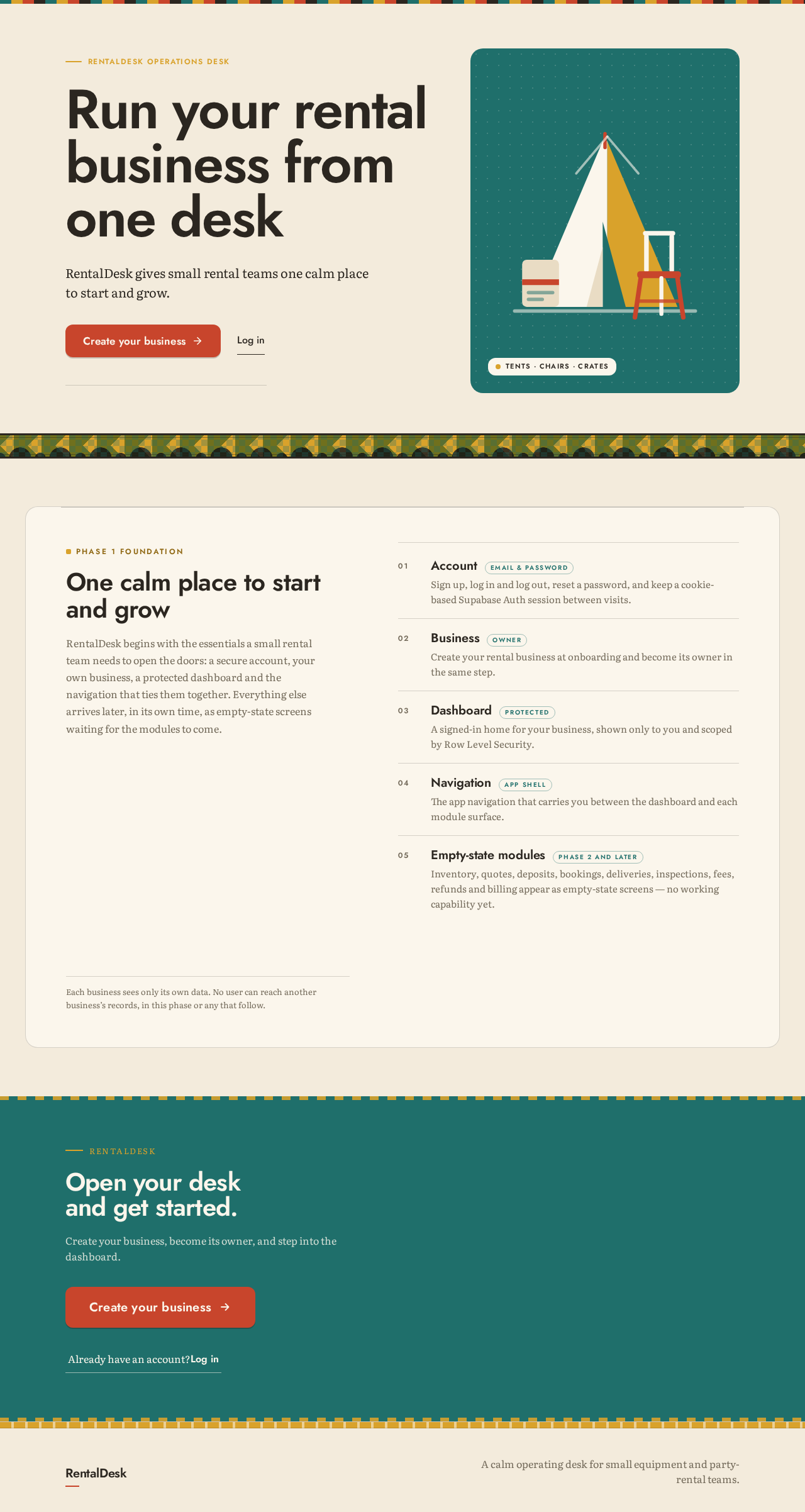
RentalDesk operations desk
Run your rental business from one desk
RentalDesk gives small rental teams one calm place to start and grow.
Tents · chairs · crates
Phase 1 foundation
One calm place to start and grow
RentalDesk begins with the essentials a small rental team needs to open the doors: a secure account, your own business, a protected dashboard and the navigation that ties them together. Everything else arrives later, in its own time, as empty-state screens waiting for the modules to come.
AccountEmail & password
Sign up, log in and log out, reset a password, and keep a cookie-based Supabase Auth session between visits.
BusinessOwner
Create your rental business at onboarding and become its owner in the same step.
DashboardProtected
A signed-in home for your business, shown only to you and scoped by Row Level Security.
NavigationApp shell
The app navigation that carries you between the dashboard and each module surface.
Empty-state modulesPhase 2 and later
Inventory, quotes, deposits, bookings, deliveries, inspections, fees, refunds and billing appear as empty-state screens — no working capability yet.
Each business sees only its own data. No user can reach another business’s records, in this phase or any that follow.
RentalDesk
Open your desk and get started.
Create your business, become its owner, and step into the dashboard.
RentalDesk operations desk
Run your rental business from one desk
RentalDesk gives small rental teams one calm place to start and grow.
Tents · chairs · crates
Phase 1 foundation
One calm place to start and grow
RentalDesk begins with the essentials a small rental team needs to open the doors: a secure account, your own business, a protected dashboard and the navigation that ties them together. Everything else arrives later, in its own time, as empty-state screens waiting for the modules to come.
AccountEmail & password
Sign up, log in and log out, reset a password, and keep a cookie-based Supabase Auth session between visits.
BusinessOwner
Create your rental business at onboarding and become its owner in the same step.
DashboardProtected
A signed-in home for your business, shown only to you and scoped by Row Level Security.
NavigationApp shell
The app navigation that carries you between the dashboard and each module surface.
Empty-state modulesPhase 2 and later
Inventory, quotes, deposits, bookings, deliveries, inspections, fees, refunds and billing appear as empty-state screens — no working capability yet.
Each business sees only its own data. No user can reach another business’s records, in this phase or any that follow.
RentalDesk
Open your desk and get started.
Create your business, become its owner, and step into the dashboard.
No comments yet. Be the first!