giant-cyber
 gsghy
gsghybuild a cyber awareness website

Comments (0)
Sign in to leave a comment
Project Tasks24
Implement Theme & Structure
As a Frontend Developer, I want to implement the global color theme and layout structure so that all pages look exactly identical to the mock-design pages. Apply the color palette: Background #1E1F26, Surface #2A2D34, Text #F4F4F9, Accent #FF6F61, Muted #A6A8AB. Set up shared layout components (navbar, footer, sidebar). Remove any scaffold pages not present in the design (e.g. welcome page post login if not in designs). This task is independent of all others and must be completed first.
Implement Auth Backend API
As a user, I want to use the backend API for login and signup so that my credentials are securely verified and sessions managed. Implement FastAPI endpoints: POST /auth/login, POST /auth/signup, POST /auth/logout, GET /auth/me. Use JWT tokens, password hashing, and MySQL for user storage.
Build Landing Page
As a student, I want to view an interactive galaxy map landing page so that I can explore cyber attack types visually. Implement the Landing (v3) design with the interactive galaxy map where each star represents a cyber attack type. Include twinkling star animations, comet streaks, smooth zoom transitions, hover micro-interactions revealing attack names and descriptions, and time-of-day color shifts. Navigation links to Login and Signup pages.
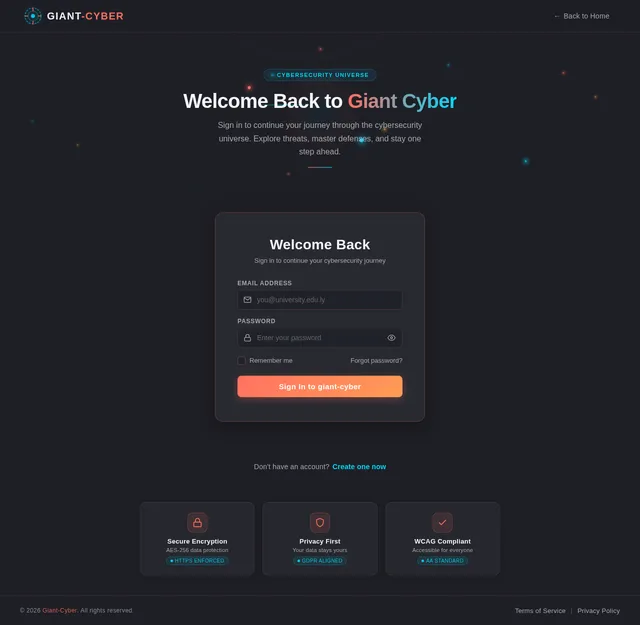
Build Login Page
As a student or admin, I want to sign in to the platform so that I can access my personalized dashboard and content. Implement the Login (v2) design page with email/password fields, form validation, and links to Signup. On success, redirect students to the Home page and admins to the Dashboard.
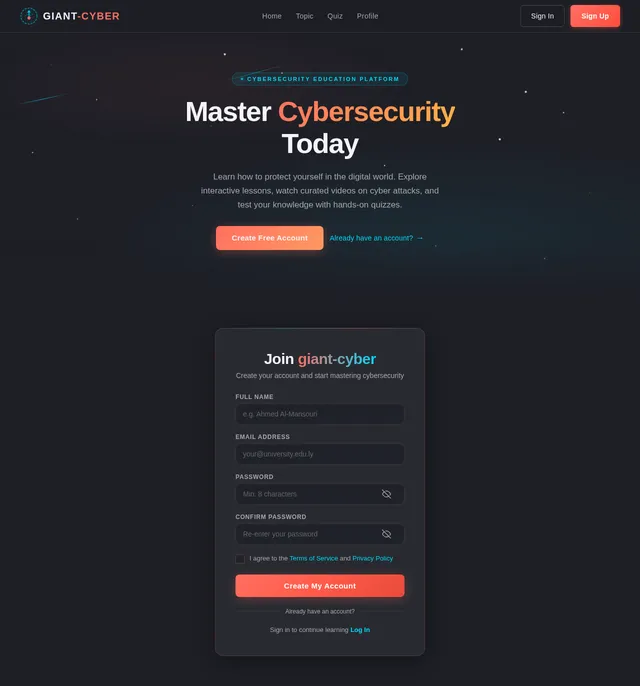
Build Signup Page
As a student, I want to create an account on the platform so that I can start learning about cybersecurity. Implement the Signup (v2) design with name, email, password fields, validation, and a link back to Login. On success, redirect to Login.
Build Home Page
As a student, I want to browse all cyber attack types on the Home page so that I can choose a topic to learn about. Implement the Home (v1) design showing categorized attack type cards. Each card links to the corresponding Topic page. Includes navigation to Profile and Settings.
Build Settings Page
As a student or admin, I want to update my profile settings so that I can manage my account preferences. Implement the Settings (v1) design with editable name, email, password fields, and save functionality. Accessible from both Profile (student) and Dashboard (admin).
Build Dashboard Page
As an admin, I want to view a dashboard with site stats and navigation so that I can monitor engagement and access management tools. Implement the Dashboard (v1) design with stats cards, engagement metrics overview, and navigation links to Content, Quiz management, Users, and Settings sections.
Implement Topics Backend API
As a student, I want to use the backend API for cyber attack topics so that I can fetch categorized attack types, topic details, videos, and animations. Implement FastAPI endpoints: GET /topics, GET /topics/{id}, with topic metadata stored in MySQL and video/animation references.
Implement Content Management API
As an admin, I want to use the backend API for content management so that I can upload videos, manage animations, and edit lessons via the admin Content page. Implement FastAPI endpoints: POST /admin/videos, PUT /admin/videos/{id}, DELETE /admin/videos/{id}, similar for animations and lessons. Secure with admin-only JWT role check.
Implement Users Management API
As an admin, I want to use the backend API for user management so that I can list users, view their activity, and enable/disable accounts. Implement FastAPI endpoints: GET /admin/users, GET /admin/users/{id}/activity, PATCH /admin/users/{id}/status. Secure with admin-only JWT role check.
Implement AI Assistant Integration
As a student, I want to use an AI assistant on the platform so that I can ask questions about cybersecurity topics and get helpful, accurate answers. Integrate LiteLLM routing with GPT-5.4 for user-friendly responses and Claude 4.6 Opus for academic/technical queries. Expose via FastAPI POST /ai/chat endpoint and surface in the dashboard AI-assistant page.
Build Topic Page
As a student, I want to view a topic detail page for a specific cyber attack type so that I can watch the teaching video, view the animation, and complete the lesson. Implement the Topic (v1) design with an embedded video player, animation section, interactive lesson actions, and a link to the Quiz for that topic.
Build Profile Page
As a student, I want to view my profile and learning progress so that I can track which topics I've completed and my quiz scores. Implement the Profile (v1) design showing user info, completed topics, and progress metrics. Links to Settings for profile updates.
Build Content Management Page
As an admin, I want to upload videos, manage animations, and edit lessons so that I can keep the educational content up to date. Implement the Content (v1) design with a video upload form, animation management list, and lesson editor. Links back to Dashboard.
Build Users Management Page
As an admin, I want to manage users and view their activity so that I can ensure appropriate use of the platform. Implement the Users (v1) design with a users list table, activity view per user, and actions (disable/enable). Links back to Dashboard.
Implement Quiz Backend API
As a student, I want to use the backend API for quizzes so that I can fetch questions per topic and submit answers to get my score. Implement FastAPI endpoints: GET /quizzes/{topic_id}, POST /quizzes/{quiz_id}/submit. Store quiz results in MySQL linked to user profiles.
Integrate Frontend with Auth API
As a user, I want the Login and Signup pages to connect to the backend auth API so that my credentials are validated and I receive a session token. Wire Login (v2) and Signup (v2) pages to POST /auth/login and POST /auth/signup. Store JWT in secure storage and redirect on success.
Build Quiz Page
As a student, I want to take a quiz on a cybersecurity topic so that I can test my understanding and see my results. Implement the Quiz (v1) design with question cards, multiple choice options, a submit flow, and a Results view showing score and correct answers. Links back to Home or next topic.
Implement Progress Backend API
As a student, I want to use the backend API for progress tracking so that my completed topics and quiz scores are saved and retrievable on my Profile page. Implement FastAPI endpoints: GET /users/{id}/progress, POST /users/{id}/progress. Store progress data in MySQL.
Integrate Frontend with Topics API
As a student, I want the Home and Topic pages to load data from the backend topics API so that I see real attack type categories and topic content. Wire Home (v1) to GET /topics and Topic (v1) to GET /topics/{id}, including video embeds and animation display.
Integrate Admin Content & Users API
As an admin, I want the Content and Users management pages to connect to their respective backend APIs so that I can manage platform content and users in real time. Wire Content (v1) to content management endpoints and Users (v1) to user management endpoints.
Integrate Frontend with Quiz API
As a student, I want the Quiz page to load questions from the backend and submit answers so that I can take real quizzes and see my score. Wire Quiz (v1) to GET /quizzes/{topic_id} and POST /quizzes/{quiz_id}/submit. Display result summary after submission.
Integrate Frontend with Progress API
As a student, I want the Profile page to display my real learning progress from the backend so that I can track completed topics and quiz scores. Wire Profile (v1) to GET /users/{id}/progress. Show completed topic list and score history.

Master Cybersecurity,
Explore the Galaxy
Interactive learning for college students in Libya. Navigate the cyber universe through engaging videos, animations, and hands-on challenges.
Explore the Cyber Galaxy
Navigate through the galaxy of cyber threats. Click on each star to discover attack types, watch teaching videos, and test your knowledge.
Hover over a star to preview · Click to dive deeper
Everything You Need to Learn Cybersecurity
Explore powerful tools and resources designed to make cybersecurity education engaging, interactive, and accessible for every student.
Engaging Videos
Watch expertly crafted teaching videos categorized by cyber attack type. Each video breaks down complex threats into clear, digestible lessons designed for college students.
Learn More→Visual Animations
Understand cybersecurity concepts through dynamic animations that visually demonstrate how attacks work, from phishing schemes to malware propagation.
Learn More→Interactive Lessons
Go beyond passive learning with hands-on, actionable lessons. Practice identifying threats and securing accounts in guided, real-world scenarios.
Learn More→Progress Tracking
Monitor your learning journey with detailed progress dashboards. Track completed topics, quiz scores, and milestones as you master cybersecurity.
Learn More→Quizzes
Test your understanding with interactive quizzes after each topic. Get instant feedback, review explanations, and earn scores to measure your knowledge.
Learn More→Mobile-Friendly
Learn anywhere, anytime. The platform is fully responsive and optimized for smartphones and tablets so you can study on the go.
Learn More→How It Works
Your journey to cybersecurity mastery in four simple steps. Start exploring and level up your digital defense skills.
Explore
Navigate the interactive galaxy map and discover different types of cyber attacks and threats.
Learn
Watch engaging teaching videos and animations that break down complex cybersecurity concepts.
Practice
Apply your knowledge through hands-on interactive lessons and real-world security scenarios.
Achieve
Test your skills with quizzes, earn badges, and track your cybersecurity mastery progress.
What is Phishing?
Learn how attackers craft convincing emails and messages to steal your personal information, and discover practical steps to protect yourself.
Perfect for Getting Started
Our curated video library breaks down complex cybersecurity threats into clear, beginner-friendly lessons. Start with phishing — the most common attack vector targeting students — and build your digital defense skills from the ground up.
Interactive Lessons
Dive into real cybersecurity scenarios with interactive diagrams, guided walkthroughs, and hands-on practice exercises.
Interactive Diagram
How Malware Works
Explore an interactive network diagram showing how malware spreads through systems. Trace infection paths and learn defense strategies in real time.
Animated Walkthrough
Spotting Phishing
Follow a step-by-step animated walkthrough that teaches you to identify phishing emails, fake links, and social engineering tactics.
Hands-on Scenario
Secure Your Account
Practice securing a real-world account scenario. Set up two-factor authentication, create strong passwords, and audit your privacy settings.
Test Your Knowledge
Challenge yourself with interactive quizzes on real-world cybersecurity threats. Track your progress, earn scores, and solidify your understanding of each attack type.
What best describes a phishing attack?
What Students Are Saying
Hear from college students across Libya who are building their cybersecurity skills with giant-cyber.
“ The phishing simulation was eye-opening. I almost fell for a real phishing email last week, but thanks to giant-cyber, I spotted it immediately. The interactive lessons make complex topics so easy to understand. ”
“ I love how each cyber attack type has its own teaching video. The galaxy map makes exploring different threats feel like an adventure. My favorite section is the malware walkthrough animation. ”
“ The quizzes really helped me retain what I learned. I scored 92 on the social engineering quiz after watching just two videos. This platform is exactly what Libyan students need. ”
“ As a non-tech student, I was worried cybersecurity would be too technical. But the animations and step-by-step lessons break everything down perfectly. Now I feel confident protecting my accounts. ”
Ready to Explore the Cyber Galaxy?
Join thousands of college students across Libya mastering cybersecurity through interactive lessons, engaging videos, and hands-on challenges.
No comments yet. Be the first!