giant-cyber
 gsghy
gsghybuild a cyber awareness website

Comments (0)
Sign in to leave a comment
System Requirements
System Requirements Document (SRD)
Project Name: giant-cyber
1. Introduction
The giant-cyber project is an educational website designed to enhance cybersecurity awareness among college students in Libya (LY). This platform aims to provide engaging and interactive learning experiences through teaching videos, animations, actionable lessons, and quizzes. By focusing on the unique needs of college students, giant-cyber seeks to empower them with the knowledge and skills necessary to navigate the digital world safely and responsibly.
This document outlines the updated system requirements for the giant-cyber project, incorporating selective re-run capabilities for user-triggered SRD regeneration.
2. System Overview
The giant-cyber website will serve as a comprehensive educational platform tailored for college students. It will feature categorized teaching videos for different types of cyber attacks, animations to explain concepts visually, and interactive actions to reinforce learning. The website will be designed with a clean, modern aesthetic that appeals to young adults, ensuring ease of navigation and engagement.
Key features include:
- Categorized teaching videos for various cyber attack types.
- Animations and interactive elements to simplify complex concepts.
- Quizzes to test understanding and reinforce learning.
- A responsive design optimized for both desktop and mobile devices.
- Selective re-run capabilities for regenerating specific sections of the SRD based on user input.
The platform will prioritize accessibility, user engagement, and educational effectiveness, making cybersecurity education approachable and impactful for college students.
3. Functional Requirements
Story Points:
- As a Student, I should be able to watch teaching videos categorized by types of cyber attacks.
- As a Student, I should be able to view animations that explain cybersecurity concepts visually.
- As a Student, I should be able to interact with actionable lessons to understand concepts better.
- As a Student, I should be able to take quizzes to test my understanding of cybersecurity topics.
- As a Student, I should be able to navigate the website easily on both desktop and mobile devices.
- As a User, I should be able to selectively regenerate specific sections of the SRD based on my input.
4. User Personas
1. Student
- Description: College students aged 18–25 who are frequent users of digital platforms and devices.
- Goals: Learn about cybersecurity threats and solutions in an engaging and interactive way.
- Needs: Easy-to-understand content, visual aids, and actionable lessons.
2. Admin
- Description: Website administrators responsible for managing content and user interactions.
- Goals: Ensure the website runs smoothly and content is updated regularly.
- Needs: Tools to upload videos, manage animations, and monitor user engagement.
3. User
- Description: Individuals who interact with the SRD system to regenerate specific sections based on their needs.
- Goals: Efficiently update or regenerate portions of the SRD without redoing the entire document.
- Needs: A user-friendly interface for triggering selective SRD regeneration.
5. Visuals Colors and Theme
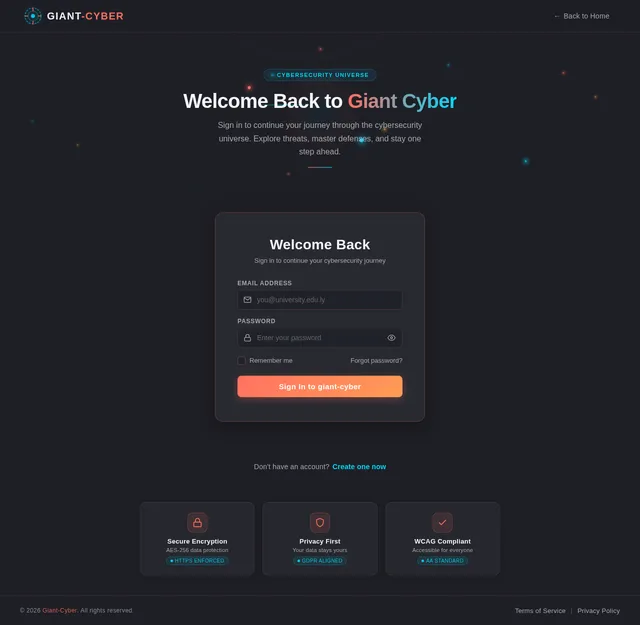
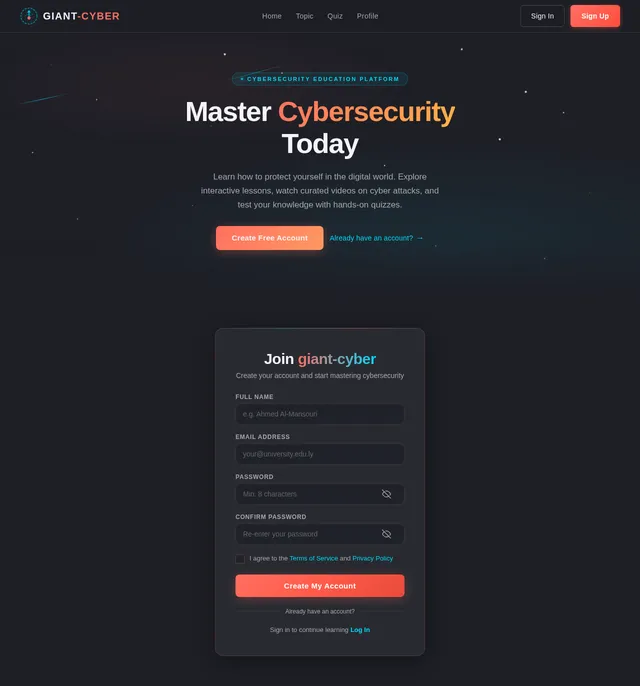
Unique Color Palette for giant-cyber:
- Background: #1E1F26 (Dark Navy Blue)
- Surface: #2A2D34 (Charcoal Gray)
- Text: #F4F4F9 (Soft White)
- Accent: #FF6F61 (Vibrant Coral)
- Muted Tones: #A6A8AB (Muted Silver)
The color palette reflects a modern, professional aesthetic while maintaining an engaging and youthful vibe suitable for college students.
6. Signature Design Concept
Concept: Interactive Cybersecurity Universe
The homepage will feature an interactive galaxy map, where each star represents a type of cyber attack. Students can click on a star to zoom in and explore:
- Teaching Videos: Embedded within the star, explaining the attack type.
- Animations: Surrounding the star, visually demonstrating the concept.
- Quizzes: A comet trail leading to a quiz section for that topic.
Details:
- Animations: Stars twinkle subtly, and comets streak across the galaxy map.
- Transitions: Smooth zoom-in/out effects when navigating between stars.
- Micro-interactions: Hovering over a star reveals its name and a brief description.
- Color Shifts: The galaxy background subtly changes hues based on the time of day (e.g., deep blue at night, soft lavender in the morning).
This design will make the website instantly fascinating and memorable, immersing students in a visually captivating learning experience.
7. Non-Functional Requirements
- Performance: The website should load within 3 seconds on standard internet connections.
- Scalability: The system should support up to 10,000 concurrent users.
- Accessibility: The website must comply with WCAG 2.1 Level AA standards.
- Security: Implement HTTPS, secure user data, and protect against common vulnerabilities (e.g., SQL injection, XSS).
- Localization: Default language is English, with potential for Arabic localization in the future.
- Selective Regeneration: The SRD system must allow users to regenerate specific sections without affecting the rest of the document.
8. Tech Stack
Frontend
- React for Web
- React Native for Mobile App
Backend
- Python
- FastAPI
Database
- MySQL or MariaDB (preferred for relational data)
- MongoDB (for unstructured data)
AI Models
- GPT 5.4 for user-friendly responses
- Claude 4.6 Opas for academic or coding work
- Google Nano Banana for image generation
AI Tools
- Litellm for LLM Routing
- Langchain
Orchestration
- Docker and docker-compose for local orchestration
- Kubernetes for server-side orchestration
9. Assumptions and Constraints
Assumptions
- College students in Libya have access to smartphones and laptops.
- Internet connectivity is stable enough to stream videos and animations.
- Students are familiar with basic website navigation.
- Users will have access to a simple interface for triggering selective SRD regeneration.
Constraints
- No certification features will be included.
- The website must prioritize simplicity and ease of use over advanced features.
- Budget constraints may limit the use of premium third-party tools or services.
10. Glossary
- Cyber Attack: Any attempt to expose, alter, disable, destroy, steal, or gain unauthorized access to computer systems.
- WCAG: Web Content Accessibility Guidelines, a standard for making web content accessible to people with disabilities.
- LLM: Large Language Model, an AI model designed to understand and generate human-like text.
- Docker: A platform for developing, shipping, and running applications in containers.
- Kubernetes: An open-source system for automating deployment, scaling, and management of containerized applications.
- Selective Regeneration: A feature that allows users to regenerate specific sections of the SRD without affecting the rest of the document.

Master Cybersecurity,
Explore the Galaxy
Interactive learning for college students in Libya. Navigate the cyber universe through engaging videos, animations, and hands-on challenges.
Explore the Cyber Galaxy
Navigate through the galaxy of cyber threats. Click on each star to discover attack types, watch teaching videos, and test your knowledge.
Hover over a star to preview · Click to dive deeper
Everything You Need to Learn Cybersecurity
Explore powerful tools and resources designed to make cybersecurity education engaging, interactive, and accessible for every student.
Engaging Videos
Watch expertly crafted teaching videos categorized by cyber attack type. Each video breaks down complex threats into clear, digestible lessons designed for college students.
Learn More→Visual Animations
Understand cybersecurity concepts through dynamic animations that visually demonstrate how attacks work, from phishing schemes to malware propagation.
Learn More→Interactive Lessons
Go beyond passive learning with hands-on, actionable lessons. Practice identifying threats and securing accounts in guided, real-world scenarios.
Learn More→Progress Tracking
Monitor your learning journey with detailed progress dashboards. Track completed topics, quiz scores, and milestones as you master cybersecurity.
Learn More→Quizzes
Test your understanding with interactive quizzes after each topic. Get instant feedback, review explanations, and earn scores to measure your knowledge.
Learn More→Mobile-Friendly
Learn anywhere, anytime. The platform is fully responsive and optimized for smartphones and tablets so you can study on the go.
Learn More→How It Works
Your journey to cybersecurity mastery in four simple steps. Start exploring and level up your digital defense skills.
Explore
Navigate the interactive galaxy map and discover different types of cyber attacks and threats.
Learn
Watch engaging teaching videos and animations that break down complex cybersecurity concepts.
Practice
Apply your knowledge through hands-on interactive lessons and real-world security scenarios.
Achieve
Test your skills with quizzes, earn badges, and track your cybersecurity mastery progress.
What is Phishing?
Learn how attackers craft convincing emails and messages to steal your personal information, and discover practical steps to protect yourself.
Perfect for Getting Started
Our curated video library breaks down complex cybersecurity threats into clear, beginner-friendly lessons. Start with phishing — the most common attack vector targeting students — and build your digital defense skills from the ground up.
Interactive Lessons
Dive into real cybersecurity scenarios with interactive diagrams, guided walkthroughs, and hands-on practice exercises.
Interactive Diagram
How Malware Works
Explore an interactive network diagram showing how malware spreads through systems. Trace infection paths and learn defense strategies in real time.
Animated Walkthrough
Spotting Phishing
Follow a step-by-step animated walkthrough that teaches you to identify phishing emails, fake links, and social engineering tactics.
Hands-on Scenario
Secure Your Account
Practice securing a real-world account scenario. Set up two-factor authentication, create strong passwords, and audit your privacy settings.
Test Your Knowledge
Challenge yourself with interactive quizzes on real-world cybersecurity threats. Track your progress, earn scores, and solidify your understanding of each attack type.
What best describes a phishing attack?
What Students Are Saying
Hear from college students across Libya who are building their cybersecurity skills with giant-cyber.
“ The phishing simulation was eye-opening. I almost fell for a real phishing email last week, but thanks to giant-cyber, I spotted it immediately. The interactive lessons make complex topics so easy to understand. ”
“ I love how each cyber attack type has its own teaching video. The galaxy map makes exploring different threats feel like an adventure. My favorite section is the malware walkthrough animation. ”
“ The quizzes really helped me retain what I learned. I scored 92 on the social engineering quiz after watching just two videos. This platform is exactly what Libyan students need. ”
“ As a non-tech student, I was worried cybersecurity would be too technical. But the animations and step-by-step lessons break everything down perfectly. Now I feel confident protecting my accounts. ”
Ready to Explore the Cyber Galaxy?
Join thousands of college students across Libya mastering cybersecurity through interactive lessons, engaging videos, and hands-on challenges.
No comments yet. Be the first!