get-selected

byMandy Lawn

Build a production-ready AI Resume Analyzer web application. Users should upload a PDF resume, select a target job description, and receive an analysis of ATS compatibility, missing skills, keyword matching, experience alignment, and actionable improvement suggestions. Include authentication, dashboard, resume history, job-description input, analysis results, and downloadable report. Use a clean modern responsive UI. Separate frontend, backend API, database and AI processing. Include proper validation, error handling, loading states and tests.

LandingLogindashboard
Landing

Comments (0)

No comments yet. Be the first!

System Requirements

System Requirement Document
Page 1 of 9

System Requirements Document for get-selected

1. Introduction

The get-selected project aims to develop a production-ready AI Resume Analyzer web application. This application is designed for job seekers who wish to enhance their resumes for better compatibility with Applicant Tracking Systems (ATS). Users will be able to upload their resumes, select a target job description, and receive detailed analyses including ATS compatibility, missing skills, keyword matching, experience alignment, and actionable improvement suggestions. The application will feature a clean, modern, and responsive UI, with separate frontend, backend API, database, and AI processing components.

2. System Overview

The get-selected application provides a comprehensive platform for job seekers to analyze and improve their resumes. Key features include resume upload, job description input, detailed analysis results, and a downloadable report. The application requires user authentication and offers a dashboard for managing resume history and accessing analysis results. The system is designed with a focus on functional clarity, inspired by Dieter Rams' design philosophy.

Page 2 of 9

2a. Product Interpretation and Delivery Boundary

The application is structured with distinct frontend, backend API, database, and AI processing components. It requires user authentication to access the dashboard and analysis workflows. The system enforces PDF format for resume uploads and ensures a responsive interface. The application is designed to provide instant, mechanical feedback with a restrained motion tempo, aligning with the functional clarity inspired by Dieter Rams.

2b. Source Content Inventory

Not applicable as no content source directive is provided.

2c. Page Content and Component Coverage

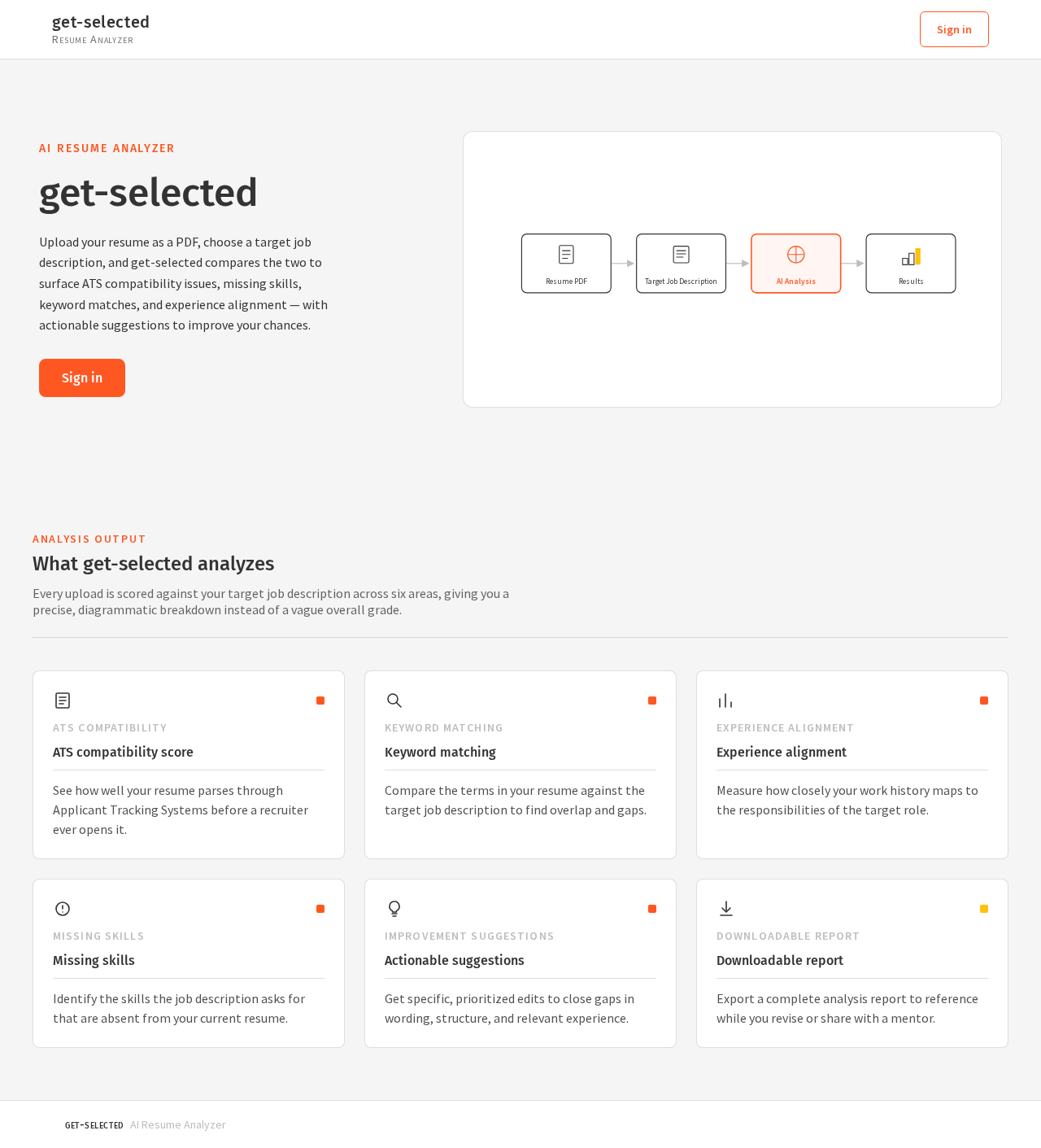
Landing

  • Purpose: Introduce the AI Resume Analyzer and its benefits to job seekers.
  • Components:
    • Overview of features and benefits
    • Call-to-action for login or signup
    • Responsive design ensuring accessibility on various devices

Login

  • Purpose: Authenticate users to access the dashboard and analysis features.
  • Components:
    • Username and password fields
    • "Forgot Password" link
    • "Sign Up" option for new users
Page 3 of 9

Dashboard

  • Purpose: Central hub for managing resume uploads and accessing analysis history.
  • Components:
    • Navigation to resume upload and job description input
    • Display of recent analyses and access to resume history
    • User profile and settings

Resume Upload

  • Purpose: Allow users to upload and validate PDF resumes.
  • Components:
    • PDF upload field with validation
    • Error handling for invalid formats
    • Loading state during upload process

Job-Description Input

  • Purpose: Enable users to input or select a target job description.
  • Components:
    • Text input for job description
    • Option to select from predefined job descriptions
    • Validation and error handling
Page 4 of 9

Analysis Results

  • Purpose: Display detailed analysis of the uploaded resume.
  • Components:
    • ATS compatibility score
    • Missing skills and keyword matching
    • Experience alignment and improvement suggestions
    • Downloadable report option

Resume History

  • Purpose: Provide access to past analyses and results.
  • Components:
    • List of previous analyses with dates
    • Option to view detailed results
    • Download previous reports

3. Functional Requirements

  • As a Job Seeker, I should be able to upload a PDF resume to receive an analysis. (explicit)
  • As a Job Seeker, I should be able to input or select a target job description for analysis. (explicit)
  • As a Job Seeker, I should receive an analysis of ATS compatibility, missing skills, keyword matching, and experience alignment. (explicit)
  • As a Job Seeker, I should receive actionable suggestions to improve my resume. (explicit)
  • As a Job Seeker, I should be able to download a report of the analysis results. (explicit)
  • As a Job Seeker, I should be able to view my resume analysis history. (explicit)
  • As a Job Seeker, I should be able to authenticate to access the dashboard and analysis features. (required_inference)
  • The system should validate PDF files before processing uploads. (required_inference)
  • The system should provide backend API, database persistence, and AI processing for analysis generation and history retrieval. (required_inference)
  • The system should generate reports for completed analyses. (required_inference)
Page 5 of 9

4. User Personas

Job Seeker

  • Context: Individuals seeking to improve their resumes for better job application outcomes.
  • Primary Goal: Enhance resume compatibility with ATS and improve job application success.
  • Responsibilities:
    • Upload PDF resumes for analysis
    • Input or select target job descriptions
    • Review analysis results and improvement suggestions
    • Download analysis reports
    • Manage resume history and access past analyses
  • Interactions: Engages with the application to upload resumes, input job descriptions, and review analysis results. Uses actionable suggestions to improve resumes.

5. Core User Flows

5.1 Upload and Analyze Resume

  1. Start: Job Seeker logs into the application.
  2. Action: Navigate to the Resume Upload page.
  3. Action: Upload a PDF resume.
  4. Result: System validates the PDF and processes the upload.
  5. Next: Redirect to Job-Description Input page.
Page 6 of 9

5.2 Input Job Description

  1. Start: On the Job-Description Input page.
  2. Action: Input or select a target job description.
  3. Result: System validates the input.
  4. Next: Proceed to Analysis Results page.

5.3 Review Analysis Results

  1. Start: On the Analysis Results page.
  2. Action: Review ATS compatibility, missing skills, keyword matching, and experience alignment.
  3. Action: Download the analysis report.
  4. Result: Report is downloaded successfully.
  5. Next: Option to return to the Dashboard or Resume History.

5.4 Access Resume History

  1. Start: On the Dashboard.
  2. Action: Navigate to Resume History.
  3. Result: View list of past analyses.
  4. Action: Select a past analysis to view details.
  5. Next: Option to download past reports or return to the Dashboard.
Page 7 of 9

6. Visuals Colors and Theme

  • Muse: Dieter Rams
  • Palette:
    • Background: #F5F5F5
    • Surface: #FFFFFF
    • Text: #333333
    • Primary: #FF5722
    • Accent: #FFC107
    • Muted: #BDBDBD
  • Typography:
    • Headings: Fira Sans — Medium weight, small caps
    • Body: Source Sans Pro
    • Scale: 1.25 modular, 48/32/24/16/14
  • Shape Language: Rounded-rectangle controls, strict modular grid
  • Layout: Dense but ordered, modular grid
  • Imagery: Diagrammatic line art, clear product silhouettes

7. Signature Design Concept

The public entry page will feature a centered, diagrammatic illustration of the resume analysis process, using the primary orange color to highlight key steps. The design will be clean and unobtrusive, with ample white space to ensure clarity and focus on the product's functionality.
Page 8 of 9

8. Interaction Model & Motion Direction

  • Interaction Model: Static
  • Motion Tempo: Restrained
  • Hero Dimensionality: Flat
  • Landing Hero Motion Brief: The hero section will feature a static, diagrammatic illustration of the resume analysis process, emphasizing clarity and efficiency without unnecessary animations.

9. Non-Functional Requirements

  • The application must be responsive and accessible on various devices. (explicit)
  • The solution must separate frontend, backend API, database, and AI processing responsibilities. (explicit)
  • The application must include validation, error handling, loading states, and tests. (explicit)

10. Tech Stack

  • Frontend: React
  • Backend: Python/FastAPI
  • Database: PostgreSQL
  • AI Processing: TensorFlow or PyTorch
  • Containerization: Docker/docker-compose
  • Deployment: Kubernetes (if required)

11. Assumptions and Constraints

  • Resume uploads are limited to PDF files only.
  • The application requires user authentication for accessing the dashboard and analysis features.
  • The interface must adhere to the design principles inspired by Dieter Rams.
Page 9 of 9

12. Glossary

  • ATS: Applicant Tracking System, a software application that enables the electronic handling of recruitment and hiring needs.
  • PDF: Portable Document Format, a file format used to present documents independently of application software, hardware, and operating systems.
Preview dataChanges stay in this preview.
Landing design preview
Landing: View features overview
Login: Sign in
dashboard: View dashboard
Resume Upload: Upload PDF resume
Resume Upload: Handle invalid file error
job-description input: Input job description
job-description input: Select predefined description
analysis results: View ATS compatibility
analysis results: Review missing skills
analysis results: View improvement suggestions
analysis results: Download analysis report
dashboard: 1. Return to dashboard
resume history: 2. View past analyses
resume history: 3. Select past analysis
analysis results: 4. View past results
resume history: 5. Download past report
Preview dataChanges stay in this preview.
Landing design preview
Landing: View features overview
Login: Sign in
dashboard: View dashboard
Resume Upload: Upload PDF resume
Resume Upload: Handle invalid file error
job-description input: Input job description
job-description input: Select predefined description
analysis results: View ATS compatibility
analysis results: Review missing skills
analysis results: View improvement suggestions
analysis results: Download analysis report
dashboard: 1. Return to dashboard
resume history: 2. View past analyses
resume history: 3. Select past analysis
analysis results: 4. View past results
resume history: 5. Download past report