garnet-learn
 satyam dave
make me a app to learn spnaish

Comments (0)
Sign in to leave a comment
System Requirements
System Requirements Document for Learn Spanish
1. Introduction
Learn Spanish (project name: garnet-learn) is a self-service web application for adult beginners who want to learn Spanish. The product's intent is narrow and concrete: a learner studies Spanish words and phrases in lessons, and can return in later sessions to continue learning from saved progress. The app is energetic and cultural rather than school-test-like, and it treats typography as the primary lesson surface.
This document is the System Requirements Document for the product. It defines the current delivery: a public entry surface, self-service identity establishment and return verification, a progress dashboard, a lesson experience, and a lesson result surface, all backed by application-owned persistent state.
Audience: the single active human persona, the Spanish learner — an adult beginner who wants to study Spanish vocabulary and phrases in short lessons and resume where they left off.
2. System Overview
Learn Spanish is delivered as a React frontend, a shared FastAPI backend process, and a MariaDB database for application-owned persistent data. The frontend presents six first-party pages: Landing (public), Sign Up (public), Login (public), Dashboard (authenticated), Lesson (authenticated), and Lesson Result (authenticated). The backend owns learner identity, lesson content delivery, and saved progress; MariaDB stores accounts and per-learner lesson progress so that a learner can continue in later sessions.
The only active human actor is the Spanish learner. There are no other human roles, no instructors, no administrators, and no social or sharing participants. The system itself (backend process and database) is a non-persona actor that persists identity and progress.
Accepted current behavior:
- The app helps a user learn Spanish.
- The user studies Spanish words and phrases in lessons.
- The user can continue learning in later sessions.
- The learner completes self-service enrollment before saved progress exists.
- The learner verifies identity on return to reach saved progress.
Removed from scope
- None. No concepts were removed by the authoritative requirement thread.
2a. Product Interpretation and Delivery Boundary
The product is a first-party, application-owned experience. Identity is application-owned: a learner creates an account through Sign Up, and a returning learner verifies identity through Login to reach saved progress. Landing, Sign Up, and Login are anonymously reachable; Dashboard, Lesson, and Lesson Result require a verified session. A protected page never establishes access to itself — the anonymous entry interactions live on Landing, Sign Up, and Login.
Current scope is limited to studying Spanish words and phrases in lessons and resuming saved progress across sessions. There is no speech recognition, no live tutoring, no social features, no instructor role, and no content authoring surface in the current delivery. Lesson content is delivered by the application backend.
2c. Page Content and Component Coverage
Landing
- Information/state: Public entry surface. Presents the product name and the hero copy: headline "Spanish, Set in Bold Letters", subline "Study words and phrases in short lessons. Your progress waits for your next session.", call to action "Start Learning". A full-height stacked Anton word wall fills the left ~60% in black, red, and yellow on paper; a red block on the right holds the headline and the Start Learning button. A red horizontal ticker of Spanish phrases runs under the hero.
- Primary actions: "Start Learning" navigates to Sign Up. A secondary link to Login is available for returning learners.
- Supporting actions: None beyond navigation to Sign Up and Login.
- Domain entities: None persisted on this page.
- Component responsibilities: Hero word wall (decorative type stack, rotated words), red hero block with headline/subline/CTA, phrase ticker (marquee), top rule with progress accent (static on public entry).
- States: Loading — not applicable (static content). Empty — not applicable. Success — page renders fully. Error — if the app cannot reach the backend, the CTA still navigates to Sign Up; no data is required to render. Recovery — reload.
Sign Up
- Information/state: Anonymous identity-establishment surface. Collects the minimum fields required to create an account (email and password). Explains that an account saves lesson progress.
- Primary actions: Submit enrollment to create the account and start a verified session, then continue to Dashboard.
- Supporting actions: Link to Login for learners who already have an account; link back to Landing.
- Domain entities: Learner account (email, password credential, created timestamp).
- Component responsibilities: Enrollment form, inline field validation, submit control, error banner.
- States: Loading — submit disabled with pending indicator during account creation. Empty — blank form. Success — account created, session established, redirect to Dashboard. Error — duplicate email, invalid email format, weak/empty password, or backend failure shown inline with recovery by correcting fields and resubmitting. Recovery — form retains entered email so the learner can fix and retry.
Login
- Information/state: Anonymous return-verification surface. Collects email and password to verify identity and restore access to saved progress.
- Primary actions: Submit credentials to verify identity and open a session, then continue to Dashboard.
- Supporting actions: Link to Sign Up for new learners; link back to Landing.
- Domain entities: Learner account credential check.
- Component responsibilities: Login form, inline validation, submit control, error banner.
- States: Loading — submit disabled with pending indicator during verification. Empty — blank form. Success — session established, redirect to Dashboard. Error — incorrect credentials or backend failure shown inline; recovery by re-entering credentials. Recovery — form retains entered email.
Dashboard
- Information/state: Authenticated home. Shows saved progress (for example, lessons completed and current position) and the next lesson to continue. Progress is shown as a yellow block that grows across the top rule. Numbered lesson rows use tabular alignment with oversized outlined numerals in the left margin.
- Primary actions: Open the next lesson (navigate to Lesson).
- Supporting actions: Select any available lesson row to open it; sign out.
- Domain entities: Learner progress record, lesson catalog entries (number, title, track).
- Component responsibilities: Progress band (yellow growth block), numbered lesson list, next-lesson call to action, account/sign-out control.
- States: Loading — skeleton or pending indicator while progress and lesson list load. Empty — new learner with no completed lessons sees the first lesson as the next lesson and zero progress. Success — progress and lesson list render. Error — backend failure shows a retry control; recovery by retrying the fetch. Recovery — session expiry redirects to Login.
Lesson
- Information/state: Authenticated lesson surface. Presents the selected lesson's Spanish words and phrases as exercises. Shows the current step within the lesson. Answer feedback is a full-width colour-block wipe: red for wrong, teal for right. Colour-block wipes mark each lesson step.
- Primary actions: Answer each exercise (select or enter the response) and advance through the lesson steps.
- Supporting actions: Exit the lesson back to Dashboard (progress on the in-flight lesson is not counted as complete).
- Domain entities: Lesson, exercise items (Spanish word or phrase and its prompt/answer), in-progress attempt.
- Component responsibilities: Exercise presenter, answer input/selection, feedback wipe, step indicator, exit control.
- States: Loading — pending indicator while lesson content loads. Empty — not applicable (a lesson always has exercises). Success — each answer produces immediate feedback and advances. Error — content load failure shows retry; answer submission failure preserves the current step and allows retry. Recovery — retry the failed request without losing the current step.
Lesson Result
- Information/state: Authenticated result surface shown after a lesson is completed. Summarizes the completed lesson's outcome (for example, number of correct answers and completion) and confirms that progress has been saved.
- Primary actions: Return to Dashboard to continue, or start the next lesson.
- Supporting actions: Revisit the completed lesson.
- Domain entities: Completed lesson attempt, updated learner progress record.
- Component responsibilities: Result summary block, saved-progress confirmation, continue/next-lesson controls.
- States: Loading — pending indicator while the result is recorded/loaded. Empty — not applicable. Success — result and saved-progress confirmation render. Error — if the result cannot be saved, an error is shown with a retry; recovery by retrying the save. Recovery — retry preserves the completed answers.
3. Functional Requirements
FR-1 — Learn Spanish in the app (explicit) As a Spanish learner, I should be able to use the app to learn Spanish, so that I can build Spanish vocabulary and phrase knowledge.
- Trigger/input: learner opens the app.
- Observable result: the app presents Spanish learning content (words and phrases) in lessons.
- Access state: Landing is public; lessons require a verified session.
- Failure/recovery: if content cannot load, the learner sees a retry and can return to Dashboard.
- Continuation: after a lesson, the learner returns to Dashboard to continue.
FR-2 — Study Spanish words and phrases in lessons (explicit) As a Spanish learner, I should study Spanish words and phrases in lessons, so that I practice specific vocabulary and phrases.
- Trigger/input: learner opens a lesson from Dashboard.
- Observable result: the Lesson page presents the lesson's words and phrases as exercises; each answer yields immediate feedback (red wipe for wrong, teal wipe for right) and advances the step.
- Access state: authenticated (login required).
- Failure/recovery: content load or answer submission failure preserves the current step and offers retry.
- Continuation: completing the lesson leads to Lesson Result.
FR-3 — Continue learning in later sessions (explicit) As a Spanish learner, I should be able to continue learning in later sessions, so that my progress is not lost when I leave and return.
- Trigger/input: learner returns and verifies identity via Login.
- Observable result: Dashboard shows saved progress and the next lesson to continue.
- Access state: authenticated.
- Failure/recovery: incorrect credentials show an inline error and allow re-entry; session expiry redirects to Login.
- Continuation: learner opens the next lesson.
FR-4 — Self-service enrollment before saved progress (required_inference) As a Spanish learner, I should complete self-service enrollment before any saved progress exists, so that my progress can be tied to my account.
- Trigger/input: learner selects "Start Learning" on Landing and submits the Sign Up form.
- Observable result: an account is created, a verified session is established, and the learner reaches Dashboard with zero progress.
- Access state: Sign Up is anonymous; Dashboard requires the newly established session.
- Failure/recovery: duplicate email, invalid input, or backend failure show inline errors; the learner corrects and resubmits.
- Continuation: learner proceeds to the first lesson.
FR-5 — Verify identity on return to reach saved progress (required_inference) As a Spanish learner, I should verify my identity when I return, so that I can reach my saved progress.
- Trigger/input: returning learner opens Login and submits credentials.
- Observable result: identity is verified, a session opens, and Dashboard shows the learner's saved progress.
- Access state: Login is anonymous; Dashboard, Lesson, and Lesson Result require the verified session.
- Failure/recovery: incorrect credentials show an inline error; recovery by re-entering credentials.
- Continuation: learner resumes from the next lesson.
4. User Personas
Spanish learner
- Product context: An adult beginner who wants to learn Spanish and has chosen this app as a self-service tool. They arrive at the public Landing page, decide to start, and enroll themselves. They study in short lessons and return across multiple sessions.
- Primary goal: Study Spanish words and phrases in lessons and continue learning in later sessions without losing progress.
- Distinct accepted responsibilities:
- Decides to start learning from Landing and completes self-service enrollment on Sign Up.
- Studies words and phrases by answering exercises on Lesson and reading immediate feedback.
- Reviews the outcome of a completed lesson on Lesson Result.
- Returns later, verifies identity on Login, and resumes from saved progress on Dashboard.
- Relevant inputs or decisions: Whether to start learning; enrollment credentials (email, password); answers to each lesson exercise; whether to continue to the next lesson or return to Dashboard.
- Interactions with other accepted participants: None. The Spanish learner is the only active human persona; the backend and database persist identity and progress on the learner's behalf.
- Observable success: Lessons present Spanish words and phrases, answers receive immediate feedback, completed lessons are recorded, and a returning learner sees their saved progress and next lesson on Dashboard.
5. Core User Flows
Flow A — First-time learner enrolls and starts learning
- The Spanish learner opens the app and lands on Landing (public). They see the word wall, the headline "Spanish, Set in Bold Letters", the subline, and the "Start Learning" button.
- The learner selects Start Learning and is taken to Sign Up (public).
- The learner enters an email and password and submits. The form shows a pending state while the account is created.
- On success, an account is created, a verified session is established, and the learner is taken to Dashboard. Dashboard shows zero progress and the first lesson as the next lesson.
- Failure/recovery: If the email is already registered or input is invalid, an inline error appears; the learner corrects the fields and resubmits.
- Continuation: The learner selects the next lesson to begin studying.
Flow B — Learner studies a lesson
- From Dashboard, the learner selects the next lesson (or any lesson row) and opens Lesson.
- Lesson loads the lesson's Spanish words and phrases as exercises and shows the current step.
- For each exercise, the learner selects or enters an answer. A full-width colour-block wipe gives immediate feedback — red for wrong, teal for right — and the lesson advances to the next step.
- Failure/recovery: If content fails to load, a retry is offered. If an answer submission fails, the current step is preserved and the learner can retry.
- When the learner answers the final exercise, the lesson is completed and the learner is taken to Lesson Result.
- Exit: If the learner exits mid-lesson, they return to Dashboard; the in-flight lesson is not counted as complete.
Flow C — Learner reviews a lesson result
- On Lesson Result, the learner sees the completed lesson's outcome (for example, correct answers and completion) and confirmation that progress was saved.
- Failure/recovery: If the result cannot be saved, an error with a retry is shown; retrying preserves the completed answers.
- Continuation: The learner returns to Dashboard to continue, or starts the next lesson.
Flow D — Returning learner verifies identity and continues
- The returning learner opens Login (public) — directly or via the link on Landing.
- The learner enters email and password and submits; the form shows a pending state during verification.
- On success, a session opens and the learner is taken to Dashboard, which shows saved progress (yellow progress block across the top rule) and the next lesson to continue.
- Failure/recovery: Incorrect credentials show an inline error; the learner re-enters credentials and retries. If a session expires while on a protected page, the learner is redirected to Login.
- Continuation: The learner opens the next lesson and resumes studying.
6. Visuals Colors and Theme
Muse and headline: Typography as architecture after Paula Scher — "Spanish, Set in Bold Letters."
Mode: Light mode.
Colour tokens (exact hex by role):
- Background (warm paper ground):
#F4EEDF - Surface:
#FFFFFF - Text and rules:
#111111 - Primary (main action colour):
#D8202A - Accent (progress):
#F2B705 - Muted / second lesson track:
#2E6E6A
Typography:
- Headings: Anton, set in tight uppercase stacks, very large with tight leading; some words rotated 90 degrees.
- Body: Archivo at medium weight for all reading text.
- Modular scale (1.5): 120 / 80 / 54 / 36 / 24 / 18 px. Display size: 56px mobile, 128px desktop.
Shape language: Hard edges only. Flat colour blocks, diagonal bands, and thick rules. No rounded cards and no shadows.
Layout: Asymmetric poster grid. A full-bleed word wall sits left; the sign-up block sits right on a red field. Numbered lesson rows use tabular alignment.
Imagery: Type is the image. High-contrast cut-out photos of hands, mouths, and street signs appear only as small accents.
Readability constraint: Headlines, wordmarks, labels, numbers, card text, and controls stay entirely inside the viewport and their container at 375px, 768px, and 1280px, wrapping or scaling (for example font-size: clamp(...)) to fit, with no other element covering them. Decorative type, imagery, and motion may bleed, rotate, or overlap freely as long as they cover no readable text or control.
7. Signature Design Concept
The public entry (Landing) is a full-height word wall: stacked Spanish words in Anton fill the left 60 percent of the viewport in black, red, and yellow on the warm paper ground, with some words rotated 90 degrees. The word wall is the dominant element. On the right, a solid red block holds the headline "Spanish, Set in Bold Letters", the subline "Study words and phrases in short lessons. Your progress waits for your next session.", and the "Start Learning" button. A red horizontal ticker of Spanish phrases runs under the hero. The concept recomposes only accepted content and controls — the product name, hero copy, and the Start Learning action — and introduces no new behavior or destination.
8. Interaction Model & Motion Direction
Interaction Model: Animated Motion Tempo: expressive Hero Dimensionality: flat
Landing Hero Motion Brief
- Focal subject: the stacked Anton word wall of Spanish words on the left, with the red hero block on the right.
- Input → transformation → outcome thesis: as the page loads, the word wall's words slide in staggered from the left, settling into the full-height stack; the red phrase ticker begins running under the hero; the Start Learning button remains a stable, fully readable control throughout.
- Motion vocabulary: staggered left-to-right word slides, a continuous type marquee on the lesson band, and colour-block wipes for lesson-step feedback (red for wrong, teal for right).
- Composed first frame: paper ground
#F4EEDF; left 60% filled with black, red, and yellow Anton words at varied scale, some rotated 90 degrees; right red#D8202Ablock with the headline, subline, and Start Learning button; a red ticker band beneath. - Reduced-motion state: words appear in their final static arrangement without sliding; the ticker becomes a static wrapped row (or horizontally scrollable row) so every phrase can be brought fully into view; all text and controls remain whole and readable.
9. Non-Functional Requirements
- NFR-1 — Persistent progress (explicit): Learner accounts and lesson progress persist in MariaDB so that a learner can continue in later sessions. Rationale: the accepted requirement that the user can continue learning in later sessions.
- NFR-2 — Identity continuity (required_inference): Saved progress is bound to the correct learner account; protected pages (Dashboard, Lesson, Lesson Result) are reachable only with a verified session. Rationale: progress must remain the returning learner's own.
- NFR-3 — Readability at all viewports (explicit, creative direction): Readable text and controls stay whole and uncovered at 375px, 768px, and 1280px; moving content remains fully readable as it passes or via scrolling, with a usable static arrangement under
prefers-reduced-motion. - NFR-4 — Immediate answer feedback (explicit, creative direction): Each lesson answer produces immediate visual feedback (red wipe for wrong, teal wipe for right) without a full-page reload.
- NFR-5 — Failure recovery (required_inference): Content-load, answer-submission, and result-save failures preserve the learner's current step or answers and offer retry, so no accepted progress is silently lost.
10. Tech Stack
- Frontend: React application UI.
- Backend: shared FastAPI process for application APIs and domain modules (identity, lesson content, progress).
- Database: MariaDB for application-owned persistent data (accounts, lesson progress).
- Infrastructure:
docker-compose.ymlwith thefrontend,backend, anddatabaseservices. Feature APIs extend the shared backend process; no additional services are required for the current scope.
11. Assumptions and Constraints
- A-1 (assumption): Lesson content (Spanish words and phrases) is provided by the application backend; no external content provider is in scope.
- A-2 (assumption): Enrollment uses email and password as the minimum credential set; no third-party identity provider is in scope.
- A-3 (constraint): The active human persona set is closed to the single Spanish learner; no instructor, administrator, or social roles exist.
- A-4 (constraint): Landing, Sign Up, and Login are anonymously reachable; Dashboard, Lesson, and Lesson Result require a verified session.
- A-5 (constraint): No speech recognition, live tutoring, social features, or content authoring are in current scope.
- A-6 (constraint): The visual direction (Paula Scher typography-as-architecture, hard edges, no rounded cards or shadows, specified palette and fonts) is binding; the generic indigo/blue-on-white SaaS template is forbidden.
12. Glossary
- Spanish learner: the single active human persona who studies Spanish words and phrases and resumes saved progress.
- Word wall: the full-height stacked Anton typographic composition on Landing.
- Lesson: a set of Spanish word and phrase exercises the learner completes on the Lesson page.
- Lesson Result: the surface summarizing a completed lesson's outcome and confirming saved progress.
- Progress: the learner's saved record of completed lessons and current position, shown on Dashboard.
- Colour-block wipe: the full-width red (wrong) or teal (right) answer-feedback transition in a lesson.
- Ticker: the red horizontal marquee of Spanish phrases running under the Landing hero.
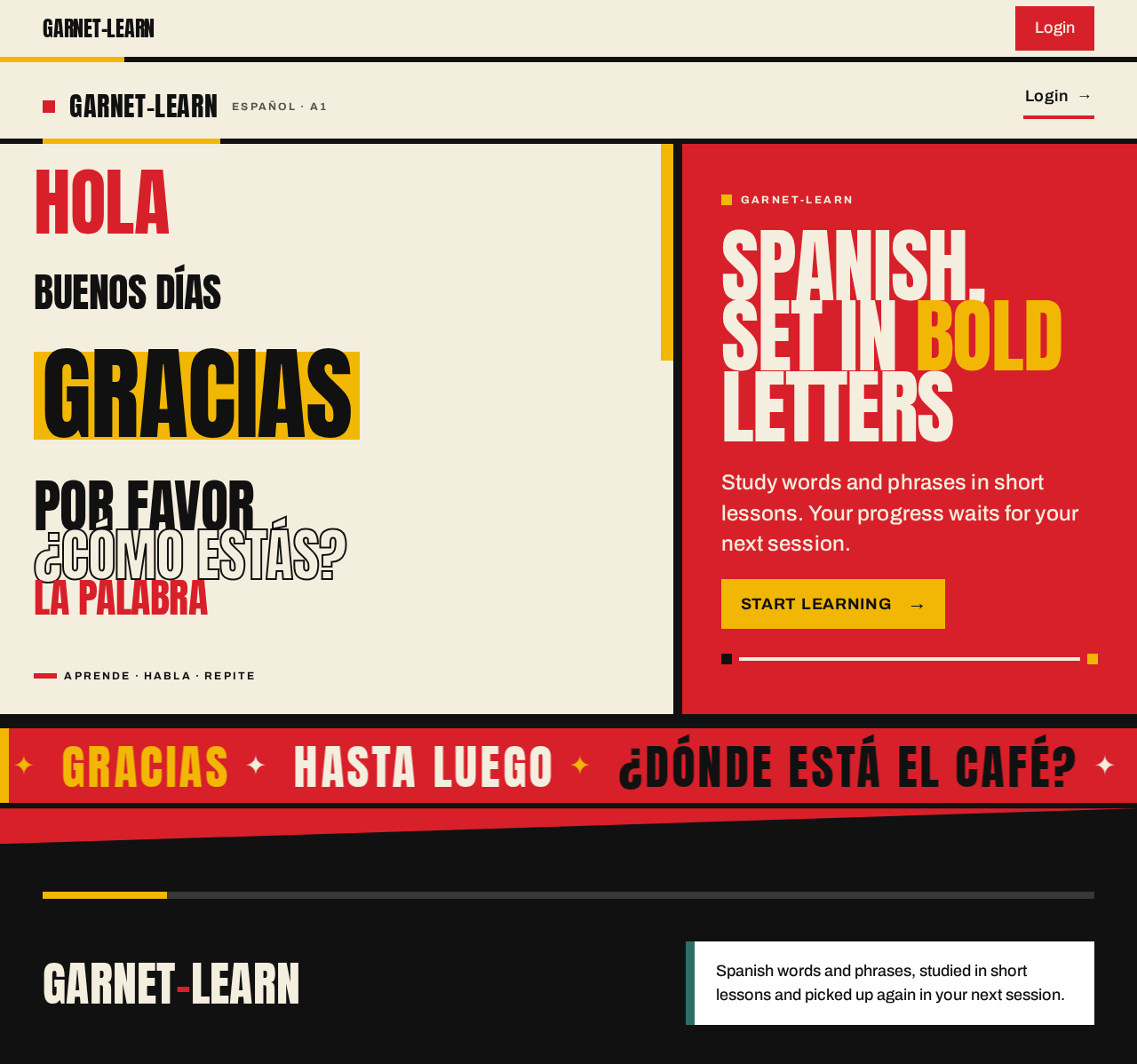
Spanish,Set in BoldLetters
Study words and phrases in short lessons. Your progress waits for your next session.
Start Learning- Hola, ¿qué tal?
- Buenos días
- Por favor
- Gracias
- Hasta luego
- ¿Dónde está el café?
- Me llamo…
- Mucho gusto
- Lo siento
- Buenas noches
- ¿Cuánto cuesta?
- Nos vemos
Spanish,Set in BoldLetters
Study words and phrases in short lessons. Your progress waits for your next session.
Start Learning- Hola, ¿qué tal?
- Buenos días
- Por favor
- Gracias
- Hasta luego
- ¿Dónde está el café?
- Me llamo…
- Mucho gusto
- Lo siento
- Buenas noches
- ¿Cuánto cuesta?
- Nos vemos
No comments yet. Be the first!