gamma-note
 Dev Kalyani
create a simple note taker web app


Comments (0)
Sign in to leave a comment
System Requirements
System Requirements Document for gamma-note
1. Introduction
gamma-note is a simple note taker web app. Its product intent is narrow and deliberate: one person, alone with their thoughts, opens a browser and captures notes quickly — then can find them again, read them, change them, and throw them away. Notes are the most human artifact in software: fragments, lists, half-thoughts. The app exists to hold those fragments without ceremony.
The audience is a single active human role, the Note Taker: a person working alone, often on a phone at 375px, who wants speed and zero intimidation from the tool. The register of the product is not "productivity suite" or "enterprise knowledge base" — it is a tidy little tool that likes you. Every accepted capability serves that one person's private collection of notes.
The explicit hard constraint from the user is to keep the app simple. That constraint governs the whole document: no adjacent capabilities, no collaboration, no tagging systems, no sharing, no rich-text formatting engines, no organizational hierarchies beyond the flat list of a person's own notes.
2. System Overview
gamma-note is delivered as a first-party web application with custom UI and application-owned identity. The current delivery shape is:
- Custom UI: the application owns its own pages and interaction surfaces.
- Application-owned identity: notes are durable, private, and bound to the person who wrote them, so the app owns the identity that keeps a note collection attached to the correct Note Taker.
- Backend integration: notes persist server-side so they survive a closed tab, a new device, and a return visit.
The current actors are:
- Note Taker (active human persona, sole accepted human role): creates notes, views the list of their notes, opens and reads a note, edits an existing note, and deletes a note.
- gamma-note application (system): stores notes, enforces that a Note Taker only ever sees and modifies their own notes, and returns observable success or failure for every note operation.
Current accepted behavior, in full:
- A Note Taker can create notes.
- A Note Taker can view a list of their notes.
- A Note Taker can open and read a note.
- A Note Taker can edit an existing note.
- A Note Taker can delete a note.
- A new Note Taker can enroll themselves (self-service) so they have a private place for their notes.
- A returning Note Taker can verify themselves to regain access to previously saved notes.
Narrow exclusions: nothing beyond the above is in scope. There is no sharing, no collaboration, no multi-user visibility, no note hierarchy, no attachments, no reminders, no search infrastructure beyond what the accepted list view provides, and no administrative or moderation surface. The app stays simple.
2a. Product Interpretation and Delivery Boundary
Delivery ownership. gamma-note is a first-party web app. The application owns its pages, its note storage, and the identity that binds a note collection to one person. There is no provider-owned or external-owned surface in the accepted scope, and no headless-only delivery: the accepted behavior is human-facing and must be reachable in a browser.
Access ownership. Notes are durable and personal. A note written today must still be there tomorrow, and must belong to the person who wrote it. That makes identity continuity indispensable rather than decorative: without it, a note collection cannot be privately owned or resumed. The application therefore owns identity, established through self-service enrollment and re-established through returning verification.
The entry interactions that establish access are themselves anonymous: a person who has no account yet, or who is not currently verified, must be able to reach the enrollment and verification interactions without already being verified. Only the destinations that hold a person's durable notes require verification. There is no differentiated permission model in this product — every verified Note Taker has exactly the same relationship to their own notes, and to no one else's. There are no roles, no shared state, and no visibility controls to configure.
Current vs. future boundary. Everything described in this document is current. No future-horizon requirements were accepted; the future section is intentionally empty of commitments.
2b. Source Content Inventory
Not applicable. No reference directive in this project declares content_source; no external factual content, collection, or media inventory is supplied. All product facts in this document come from the authoritative user requirement thread and the accepted planning scope.
2c. Page Content and Component Coverage
The page inventory below is the final, ordered page contract for gamma-note. Each page appears exactly once.
Landing
- Information/state: the product wordmark
gamma-note; a short statement of what the app is (a simple place to write notes down and keep them); the two anonymous entry paths (start a note / log in). No note content, no counts, no personal data — this page is anonymous and holds no protected state. - Primary action: begin the path toward writing a note (leads to enrollment for a first-time visitor).
- Supporting action: log in (leads to verification for a returning visitor).
- Domain entities: none persisted; the page is a public entry surface.
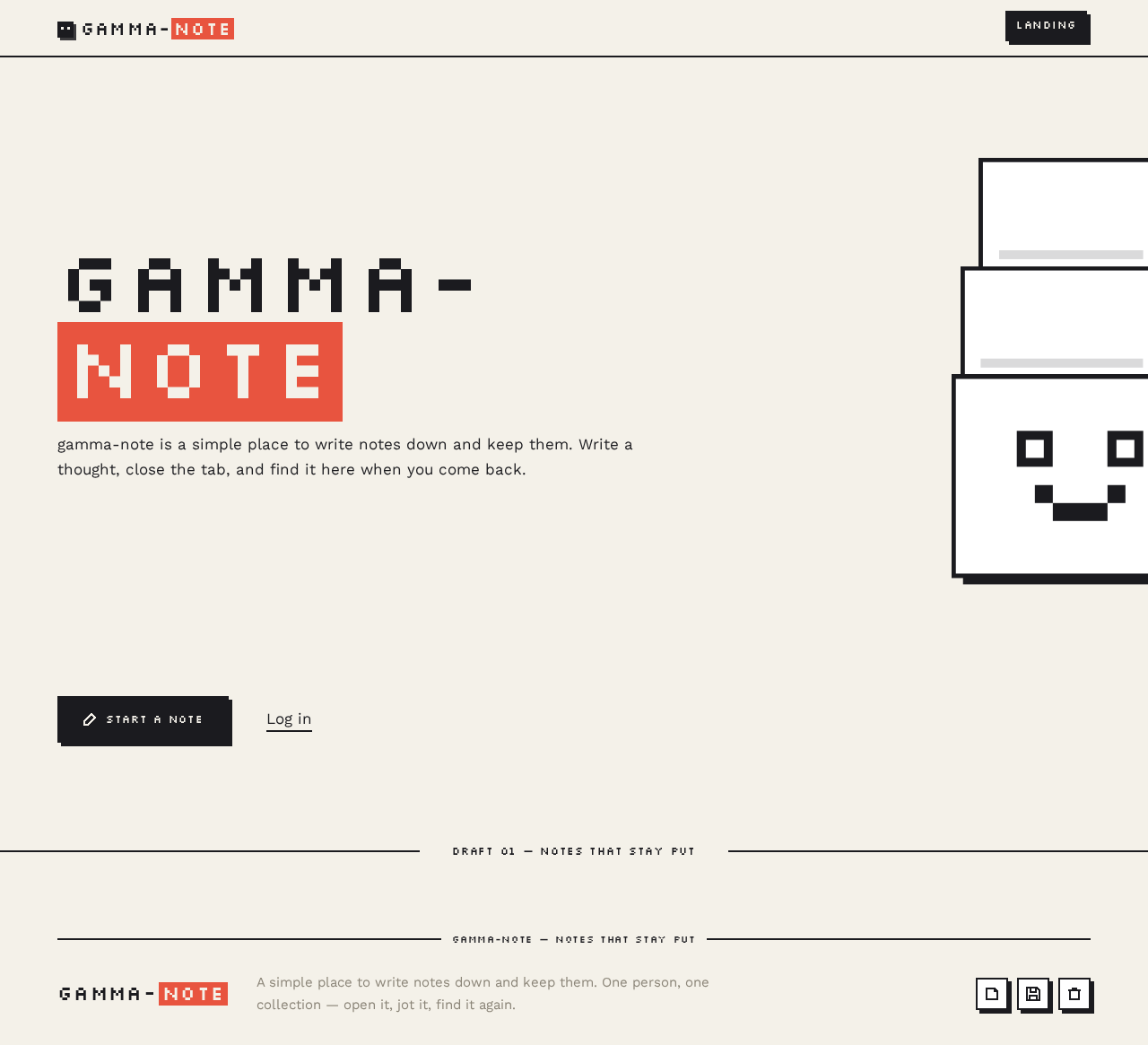
- Component responsibilities: wordmark lockup; hero statement; primary stamped button; secondary text link; the pixel mascot composition; the full-width ink rule with its micro-label.
- States: loading — not applicable (static public content); empty — not applicable; success — not applicable; error — not applicable; recovery — not applicable. If a visitor arrives here already verified, the entry actions remain available and simply lead to the notes list.
Sign Up
- Information/state: the enrollment form for a new Note Taker; the fields required to establish an identity that will own a private note collection; a link across to verification for someone who already has an identity.
- Primary action: submit enrollment to create the Note Taker's identity.
- Supporting action: navigate to Login instead.
- Domain entities: Note Taker identity (created here).
- Component responsibilities: enrollment form; field-level validation messaging; submit control; cross-link to Login; the off-centre stamped card and the mascot bleeding off the right edge.
- States: loading — submit control shows an in-progress state while enrollment is processed; empty — form presented with no values entered; success — identity established, the Note Taker is taken into their notes list; error — enrollment rejected (for example, an identity already exists for the supplied identifier, or a required field is missing or malformed), the form retains what was typed and states what must change; recovery — the Note Taker corrects the field and resubmits, or follows the cross-link to Login if they already have an identity.
Login
- Information/state: the verification form for a returning Note Taker; the fields required to prove the identity that owns an existing note collection; a link across to enrollment for someone who has none.
- Primary action: submit verification to regain access to previously saved notes.
- Supporting action: navigate to Sign Up instead.
- Domain entities: Note Taker identity (verified here).
- Component responsibilities: verification form; field-level validation messaging; submit control; cross-link to Sign Up; the off-centre stamped card and the mascot bleeding off the right edge.
- States: loading — submit control shows an in-progress state while verification is processed; empty — form presented with no values entered; success — verification accepted, the Note Taker lands on their notes list with their saved notes present; error — verification rejected, the form retains the identifier and states that the credentials did not match; recovery — the Note Taker retries, or follows the cross-link to Sign Up.
Notes
- Information/state: the Note Taker's own collection of saved notes, each shown with its title, a short preview of its content, and its timestamp; the count and recency of the collection; the entry point to writing a new note.
- Primary action: open a note from the list to read it.
- Supporting actions: start a new note; sign out of the current verified session.
- Domain entities: Note (title, content, created/updated timestamp), owned by the verified Note Taker.
- Component responsibilities: note tile grid (title, clamped preview, footer timestamp); the ruled index rail of note titles with the active row inverted; the new-note control; the sign-out control; the empty-state mascot and its one line of copy.
- States: loading — the list shows its loading state while the collection is fetched; empty — no notes yet, showing the small mascot and the line "Nothing here yet. Write something down." plus the new-note control; success — tiles render in the grid with title, preview, and timestamp; error — the collection could not be loaded, the page states this plainly and offers a retry; recovery — retry reloads the collection; if the session is no longer valid the Note Taker is returned to verification and, once verified, lands back on the list.
New Note
- Information/state: a focused writing surface for a note that does not exist yet; the title and content being composed; a live indication of whether the draft has been saved.
- Primary action: save the new note into the Note Taker's collection.
- Supporting actions: return to the notes list without saving; abandon the draft.
- Domain entities: Note (created on save), owned by the verified Note Taker.
- Component responsibilities: title input; content writing surface with its ruled baseline; the pixel floppy-disk save control; the word-count footer; the ruled index rail of existing note titles; the empty-editor pixel-pen cursor blink.
- States: loading — not applicable to the blank surface itself; empty — the editor opens blank with the pixel-pen cursor blinking in the empty writing surface; success — the note is saved, the save control blinks its confirmation, and the note appears in the collection; error — the save failed (for example, the connection dropped), the draft is retained in the editor and the failure is stated plainly; recovery — the Note Taker retries the save without losing what they wrote, or returns to the list and comes back to the draft.
Note Details
- Information/state: one existing note belonging to the verified Note Taker, showing its title, its content, and its timestamp; whether the note has unsaved changes.
- Primary action: save edits to the note.
- Supporting action: delete the note.
- Domain entities: Note (read, updated, and deleted here), owned by the verified Note Taker.
- Component responsibilities: title input; content writing surface with its ruled baseline; the pixel floppy-disk save control; the word-count footer; the delete control with its confirmation; the ruled index rail of note titles with the active row inverted; the crumple animation on delete.
- States: loading — the note is being fetched and the workspace shows its loading state; empty — not applicable (this page always addresses an existing note); success — the note renders with its title and content, and a save confirms visibly; error — the note could not be loaded, or a save or delete failed, each stated plainly with the note's current content preserved where possible; recovery — retry the load, retry the save, or cancel the delete confirmation; if the note no longer exists (for example, it was deleted in another tab), the page states that plainly and returns the Note Taker to the notes list.
3. Functional Requirements
Each requirement below is a distinct story point with its provenance, lifecycle facts, and observable acceptance.
FR-1 — Create a note (explicit) As a Note Taker, I should be able to create a note so that a thought is captured before it escapes me.
- Trigger/input: from the notes list, the Note Taker starts a new note and enters a title and content.
- Observable result: the note is saved into the Note Taker's own collection and appears in the list with its title, preview, and timestamp.
- Access state: requires a verified Note Taker; the note is bound to that identity.
- Failure/recovery: if the save fails, the draft stays in the editor and the failure is stated plainly; the Note Taker retries without losing what they wrote.
- Continuation: after saving, the Note Taker can keep writing, open the saved note, or return to the list.
FR-2 — View a list of notes (explicit) As a Note Taker, I should be able to view a list of my notes so that I can see what I have written down.
- Trigger/input: the Note Taker opens the notes list, or returns to it after any note operation.
- Observable result: the Note Taker's own saved notes are listed, each with its title, a short preview, and its timestamp.
- Access state: requires a verified Note Taker; only that Note Taker's notes are ever listed.
- Failure/recovery: if the collection cannot be loaded, the page says so plainly and offers a retry; if the session is no longer valid, the Note Taker is returned to verification and lands back on the list afterwards.
- Continuation: from the list the Note Taker can open a note, start a new one, or sign out.
FR-3 — Open and read a note (explicit) As a Note Taker, I should be able to open and read a note so that I can recall what I wrote.
- Trigger/input: the Note Taker selects a note from the list.
- Observable result: the note's title and full content are displayed in the focused note workspace.
- Access state: requires a verified Note Taker; a note belonging to another identity is never readable.
- Failure/recovery: if the note cannot be loaded, the workspace states this plainly and offers a retry; if the note no longer exists, the Note Taker is told so and returned to the list.
- Continuation: from a read note the Note Taker can edit it, delete it, or return to the list.
FR-4 — Edit an existing note (explicit) As a Note Taker, I should be able to edit an existing note so that I can correct or extend what I wrote.
- Trigger/input: the Note Taker changes the title or content of an open note and saves.
- Observable result: the note's stored title and content are updated, the save is confirmed visibly, and the note's timestamp reflects the change in the list.
- Access state: requires a verified Note Taker; only the owner's note can be modified.
- Failure/recovery: if the save fails, the edited content stays in the workspace and the failure is stated plainly; the Note Taker retries without losing the edit.
- Continuation: the Note Taker can keep editing, return to the list, or delete the note.
FR-5 — Delete a note (explicit) As a Note Taker, I should be able to delete a note so that notes I no longer need stop cluttering my collection.
- Trigger/input: the Note Taker chooses to delete an open note and confirms the deletion.
- Observable result: the note is removed from the collection and no longer appears in the list.
- Access state: requires a verified Note Taker; only the owner's note can be deleted.
- Failure/recovery: if the deletion fails, the note remains and the failure is stated plainly; the Note Taker can retry or cancel. If the Note Taker dismisses the confirmation, nothing is deleted.
- Continuation: after deletion the Note Taker is returned to the notes list, which reflects the removal.
FR-6 — Self-service enrollment for a new Note Taker (required_inference) As a new Note Taker, I should be able to enroll myself so that I have a private place where my notes are kept.
- Trigger/input: an unverified visitor chooses to start writing notes and supplies the information needed to establish their identity.
- Observable result: an identity is created for the Note Taker, and they arrive at their notes list ready to write.
- Access state: the enrollment interaction is reachable anonymously; the notes list is not available until enrollment succeeds.
- Failure/recovery: if enrollment is rejected — for example the identifier is already in use, or a required field is missing or malformed — the form retains what was typed and states what must change; the visitor can correct it and resubmit, or switch to verification if they already have an identity.
- Continuation: an enrolled Note Taker proceeds directly to creating their first note.
FR-7 — Returning verification for access to previously saved notes (required_inference) As a returning Note Taker, I should be able to verify myself so that I can get back to the notes I saved earlier.
- Trigger/input: a returning visitor supplies the credentials of the identity that owns an existing note collection.
- Observable result: the Note Taker regains access and their previously saved notes are present in the list.
- Access state: the verification interaction is reachable anonymously; the notes list and note workspaces are not available until verification succeeds.
- Failure/recovery: if verification is rejected, the form retains the identifier and states that the credentials did not match; the Note Taker can retry or switch to enrollment.
- Continuation: a verified Note Taker proceeds to their notes list and can open, edit, or delete any of their saved notes.
FR-8 — Notes remain private to their owner (required_inference) As a Note Taker, I should have my notes kept private to me so that what I write down stays mine.
- Trigger/input: any read, create, update, or delete of a note.
- Observable result: every note operation is scoped to the verified Note Taker's own collection; no other Note Taker's notes appear in a list, open in a workspace, or can be modified.
- Access state: requires a verified Note Taker.
- Failure/recovery: an attempt to reach a note that is not the Note Taker's own resolves to a plain "not found / not yours" outcome and returns them to their own list, rather than exposing anything.
- Continuation: the Note Taker continues working within their own collection.
FR-9 — Sign out of a verified session (required_inference) As a Note Taker, I should be able to sign out so that a shared or borrowed browser does not leave my notes open to the next person.
- Trigger/input: the Note Taker chooses to sign out from the notes list.
- Observable result: the verified session ends and the protected destinations are no longer reachable without verifying again.
- Access state: requires a verified Note Taker; afterwards the Note Taker is anonymous.
- Failure/recovery: if the sign-out request fails, the app still clears the local session state and returns the Note Taker to the public entry, so the browser is not left holding an open session.
- Continuation: the Note Taker can verify again to return to their notes.
4. User Personas
Note Taker
Product context. The Note Taker is the sole active human role in gamma-note, and the only person the product is built for. They are one person alone with their thoughts, frequently on a phone at 375px, sometimes at a desk at 1280px. They are not managing a team's knowledge, not organizing a project, and not looking for a system to learn. They arrive with a fragment — a list, a name, a half-sentence — and they want it written down before it is gone. The tool they want is small, personal, and a little bit delightful; the tool they do not want is a productivity suite that asks them to configure something first.
Primary goal. Capture and manage personal notes quickly in the browser, and succeed when those notes persist and can be revisited, updated, or removed.
Distinct accepted responsibilities. The Note Taker is the only actor who:
- creates notes (FR-1);
- views the list of their own notes (FR-2);
- opens and reads a note (FR-3);
- edits an existing note (FR-4);
- deletes a note (FR-5);
- enrolls themselves as a new Note Taker (FR-6);
- verifies themselves as a returning Note Taker (FR-7);
- signs out of a verified session (FR-9).
What makes this role's work different from a generic "user" is that every one of these responsibilities is personal and private. There is no second participant to hand anything to, no shared state to reconcile, and no permission to negotiate. The entire product is one person's relationship with their own fragments — which is exactly why the identity that binds a note collection to its owner matters, and why nothing else does.
Relevant inputs and decisions. The Note Taker supplies a title and content when writing; decides whether a draft is worth saving; decides whether an existing note needs correcting or extending; decides whether a note should be deleted and confirms that decision; supplies enrollment information once; supplies verification credentials on return; decides when to sign out. The only consequential decisions in the product are "keep this" and "throw this away."
Interactions with other accepted participants. There are none. gamma-note has exactly one active human persona. The only other actor is the gamma-note application itself, which stores the Note Taker's notes, keeps them private to that identity, and reports observable success or failure for every operation. The Note Taker never waits on another person, never negotiates with another person, and never sees another person's content.
Observable success. The Note Taker succeeds when: a note they wrote is still there when they come back; their list shows their notes with enough of each note visible to recognize it; opening a note shows what they wrote; an edit sticks; a deleted note is gone; and none of this required them to think about the tool. Failure, from their point of view, is a note that vanished, a save that silently did nothing, or a screen that made them stop and figure something out.
Source-backed constraints on this role. The user's explicit constraint is to keep the app simple. The Note Taker's role is therefore bounded to the nine responsibilities above; no adjacent capability — sharing, collaboration, tagging, hierarchy, search infrastructure, reminders, attachments — is part of this role's work.
5. Core User Flows
Flow A — A first-time visitor becomes a Note Taker and writes their first note
- The visitor arrives at Landing anonymously. They see the
gamma-notewordmark, a short statement of what the app is, a black stamped "Start a note" button, and a "Log in" text link. No note content is shown, because there is none to show. - The visitor chooses Start a note. Because they have no identity yet, they are taken to Sign Up.
- On Sign Up, the visitor supplies the information needed to establish their identity and submits. The submit control shows an in-progress state.
- Observable result: enrollment succeeds, an identity is created for the Note Taker, and they arrive at Notes — which is empty, showing the small mascot and the line "Nothing here yet. Write something down."
- The Note Taker chooses to write. They land on New Note, where the editor opens blank with the pixel-pen cursor blinking in the empty writing surface.
- The Note Taker types a title and content. The word-count footer updates as they write.
- The Note Taker saves. The pixel floppy-disk control blinks its confirmation.
- Observable result: the note is saved into their own collection and appears in the list with its title, a short preview, and its timestamp.
- Continuation: the Note Taker can keep writing, open the saved note, or return to the list.
Failure and recovery on this flow. If enrollment is rejected — the identifier is already in use, or a required field is missing or malformed — the Sign Up form retains what was typed and states what must change. The visitor corrects it and resubmits, or follows the cross-link to Login if it turns out they already have an identity. If the save on New Note fails, the draft stays in the editor and the failure is stated plainly; the Note Taker retries without losing what they wrote.
Flow B — A returning Note Taker gets back to their saved notes
- The returning Note Taker arrives at Landing anonymously and chooses Log in, or navigates directly to Login.
- On Login, they supply the credentials of the identity that owns their note collection and submit. The submit control shows an in-progress state.
- Observable result: verification is accepted and they land on Notes, where their previously saved notes are present with their titles, previews, and timestamps.
- Continuation: they can open any note, start a new one, or sign out.
Failure and recovery on this flow. If verification is rejected, the Login form retains the identifier and states that the credentials did not match. The Note Taker retries, or follows the cross-link to Sign Up if they have no identity. If the collection cannot be loaded after verification, Notes states this plainly and offers a retry; retrying reloads the collection.
Flow C — The Note Taker reads a note
- From Notes, the Note Taker selects a note from the tile grid or from the ruled index rail. The active row inverts to black-on-cream.
- Observable result: Note Details opens showing that note's title, its full content, and its timestamp.
- Continuation: the Note Taker can edit the note, delete it, or return to the list.
Failure and recovery on this flow. If the note cannot be loaded, the workspace states this plainly and offers a retry. If the note no longer exists — for example it was deleted in another tab — the Note Taker is told so plainly and returned to Notes.
Flow D — The Note Taker edits an existing note
- From Note Details, the Note Taker changes the title or the content. The word-count footer updates as they write.
- The Note Taker saves. The pixel floppy-disk control blinks its confirmation.
- Observable result: the note's stored title and content are updated, and its timestamp in the list reflects the change.
- Continuation: the Note Taker can keep editing, return to Notes, or delete the note.
Failure and recovery on this flow. If the save fails, the edited content stays in the workspace and the failure is stated plainly. The Note Taker retries without losing the edit.
Flow E — The Note Taker deletes a note
- From Note Details, the Note Taker chooses to delete the note.
- A confirmation appears. The Note Taker confirms.
- Observable result: the note plays its three-frame crumple and is removed from the collection; it no longer appears in the list. The Note Taker is returned to Notes, which reflects the removal.
- Continuation: the Note Taker continues with the rest of their collection, or writes a new note.
Failure and recovery on this flow. If the Note Taker dismisses the confirmation, nothing is deleted and the note is untouched. If the deletion fails, the note remains and the failure is stated plainly; the Note Taker can retry or cancel.
Flow F — The Note Taker signs out
- From Notes, the Note Taker chooses to sign out.
- Observable result: the verified session ends and the protected destinations are no longer reachable without verifying again. The Note Taker is returned to the public entry.
- Continuation: the Note Taker can verify again at Login to return to their notes, which are unchanged.
Failure and recovery on this flow. If the sign-out request fails, the app still clears the local session state and returns the Note Taker to the public entry, so a shared or borrowed browser is not left holding an open session.
6. Visuals, Colors and Theme
The creative direction is authoritative for this section. The muse is Susan Kare, and the headline idea is charming clarity, pixel by pixel: tiny, legible symbols with personality beat chrome and gradients. A note taker is exactly a grid of small legible things — note tiles, a save button, a trash can — and Kare's language gives each one charm without cost. The feeling must be "a tidy little tool that likes you," not "enterprise knowledge base."
Color tokens (light mode)
| Role | Hex | Use |
|---|---|---|
| Background | #F4F1E9 | Paper-cream ground; the desk everything sits on |
| Surface | #FFFFFF | Pure white note tiles and cards, so they read as sheets laid on the desk |
| Text | #1B1B1F | Ink-black for all type |
| Primary | #1B1B1F | Ink-black primary button — a black chunky button, never blue |
| Accent | #E8543F | Kare-red: active nav item, caret, delete confirm, the one hero highlight — roughly 4% of pixels |
| Muted | #8B8578 | Quiet metadata grey for timestamps and character counts |
| Micro-accent | #2E7D5B | Pixel-green, allowed only for the "saved" confirmation glyph |
No gradients anywhere. No blue or indigo primaries. The generic indigo/blue-on-white SaaS template is forbidden for this project.
Typography
- Headings: Silkscreen (Google Font), uppercase only, weight 400, tracking
0.06em— used for the wordmark, section labels, button text, and thegamma-notelockup. Never for paragraphs; at body size it would be unreadable. - Body: Work Sans 400/500, line-height 1.65, measure 62ch.
- Note titles: Work Sans 600 at heading sizes, so reading stays effortless.
- Scale: 1.333 modular — display 44px mobile / 96px desktop (
clamp), h2 28/40, h3 20/24, body 16/17, label 11/12 Silkscreen uppercase, metadata 13/13.
The contrast is the point: bitmap voice for labels, humanist voice for the words you actually read.
Shape language
Hard 2px corners — no border radius on tiles, buttons, or inputs. Every surface is a white rectangle with a 2px ink border (#1B1B1F) and a 4px hard offset shadow in ink (box-shadow: 4px 4px 0 #1B1B1F), so tiles read as physical cards stamped on the desk. Icons are drawn on a 16px grid with 2px strokes and square terminals: a pen nib, a folded-corner note, a floppy disk for save, a fat-bordered trash can, a folder tab. Active state inverts: black fill, cream glyph. No pills, no soft shadows, no blur.
Layout
A 12-column grid with a visible 24px gutter and generous 64px page margins at 1280px, collapsing to 20px margins and a single column at 375px.
- Auth pages (Sign Up, Login): a single white stamped card, 420px max, placed off-centre to the left, with a large pixel-illustration mascot bleeding off the right edge.
- Notes list: a 3-column tile grid at 1280px, 2 at 768px, 1 at 375px. Each tile is a fixed-height 180px sheet with a title, two clamped lines of preview, and a timestamp in the footer rule.
- Note Details / New Note workspace: a two-pane split — a 220px left rail listing note titles as a ruled index (like a Macintosh file list), and a wide writing surface on the right with a hairline ruled baseline every 32px behind the textarea.
Imagery
No photography. Imagery is Kare-style pixel iconography drawn on a 16px grid: a smiling note mascot with two dot eyes and a folded corner, a pen nib, a paperclip, a trash can, a floppy disk, a folder tab, a magnifier. On the landing page one large mascot — a stack of three notes with a face — is composed from these same squares at 8× scale so its pixels are visible. Empty states get a small icon plus one line of plain, warm copy: "Nothing here yet. Write something down."
Readable-text integrity
Headlines, the wordmark, labels, numbers, card text, and controls stay entirely inside the viewport and their container at 375px, 768px, and 1280px, wrapping or scaling (for example font-size: clamp(...) with its mobile size) to fit. No other element covers any part of them. Imagery, decoration, and motion may be cropped, bled off an edge, rotated, overlapped, or cut exactly as the direction asks — as long as they cover no readable text or control. Where the direction asks for a gesture that would crop readable text or a control, the gesture is carried by imagery or decoration instead.
7. Signature Design Concept
The stamped desk. The public entry is not a centred headline with a blue button. It is a left-aligned 9-column stack on the paper-cream ground:
- The wordmark
gamma-noteset in Silkscreen uppercase at 96px desktop / 44px mobile in ink, with the word note knocked out of a solid#E8543Fblock that sits flush beneath the baseline like a highlighter stroke. - Under it, two lines of Work Sans body at 17px stating what the app is.
- To the right, bleeding off the viewport edge, an oversized 8× pixel mascot — a stack of three white note cards with a face — built from 24px squares so the grid is legible, with a 4px ink offset shadow.
- The only button is a black stamped rectangle, "Start a note", with a 4px ink offset shadow and a pixel-pen icon. A secondary text link, "Log in", sits beside it.
- A thin 2px ink rule runs the full viewport width under the whole hero, with a Silkscreen micro-label sitting on it:
DRAFT 01 — NOTES THAT STAY PUT.
The concept is implementable with the accepted content and controls only: the wordmark, the two-line statement, the two anonymous entry actions, the mascot composition, and the rule with its label. It introduces no new behavior, page, or destination. The same stamped-object language then carries through the whole product — every card, button, and input is a physical object with a hard 2px border and a 4px ink offset shadow, never a soft shadow or a rounded pill.
8. Interaction Model & Motion Direction
Interaction Model: Static Motion Tempo: restrained Hero Dimensionality: flat
Landing Hero Motion Brief
- Focal subject: the oversized 8× pixel mascot — a stack of three white note cards with a face — bleeding off the right edge of the hero, composed from 24px squares with a 4px ink offset shadow.
- Input → transformation → outcome thesis: the visitor's attention arrives on the wordmark and the
#E8543Fhighlighter block beneath the baseline; the mascot's pixels settle into their grid in a short stagger; the outcome is a composed first frame in which the black stamped "Start a note" button and the "Log in" link are the only two things asking to be touched. Nothing moves that the visitor did not cause. - Motion vocabulary: frame-by-frame, no easing theatrics — 120ms
steps(2, end)transitions; tiles snap in on mount in a 40ms stagger; the save button swaps to a floppy-disk glyph with a two-frame blink; deleting a note plays a three-frame crumple (scale 1 → 0.96 → 0.92 with opacity steps) before removal; hover inverts colours instantly, with no transition; a single 8-frame pixel-pen cursor blink sits in the empty editor. - Composed first frame: cream ground, ink wordmark with the red highlighter block, two lines of Work Sans, the mascot's pixels fully settled at the right edge, the stamped button and text link at rest, and the 2px ink rule with its Silkscreen micro-label running the full width beneath.
- Reduced-motion state: all of it stops under
prefers-reduced-motion, replaced by instant state changes — the mascot appears fully composed, tiles appear without stagger, the save confirmation is an immediate glyph swap, and the delete is an immediate removal. No decorative animation runs without user action, and none ignoresprefers-reduced-motion.
9. Non-Functional Requirements
NFR-1 — Simplicity is a hard constraint (explicit) The app must stay simple. This is the user's explicit constraint and it governs scope: no capability beyond the nine functional requirements above is added, and no page beyond the six in the page contract is introduced. Rationale: the user asked for a simple note taker and explicitly constrained it to stay that way.
NFR-2 — Notes persist across sessions and devices (required_inference) A note saved by a Note Taker must still exist when that Note Taker returns, including from a different browser or device. Rationale: the accepted capabilities of viewing a list, opening, editing, and deleting notes are only meaningful if notes are durable; a note that vanishes on tab close would make FR-2 through FR-5 unobservable.
NFR-3 — Notes are private to their owner (required_inference) Every note read, create, update, and delete must be scoped to the verified Note Taker's own collection. No other Note Taker's notes may appear in a list, open in a workspace, or be modifiable. Rationale: notes are personal artifacts; the accepted product has no sharing or collaboration, so the only correct visibility is owner-only.
NFR-4 — Protected destinations require a verified session (required_inference) The notes list and the note workspaces must not be reachable without a verified session. The enrollment and verification interactions themselves must be reachable anonymously, since a person cannot verify in order to reach the interaction that verifies them. Rationale: durable, privately owned notes require identity continuity, and the entry interaction cannot be gated behind the state it establishes.
NFR-5 — Mobile-first legibility at 375px (required_inference) The app must be usable at 375px, 768px, and 1280px, with all readable text and controls staying whole inside the viewport and their container. Rationale: the creative direction identifies the audience as one person, often on a phone at 375px, wanting speed and zero intimidation.
NFR-6 — Accessible motion (required_inference)
All motion must stop under prefers-reduced-motion, replaced by instant state changes. Rationale: the creative direction requires it, and motion that ignores a user's stated preference is a defect.
NFR-7 — Plain, warm failure communication (required_inference) Every material failure — enrollment rejected, verification rejected, collection load failed, note load failed, save failed, delete failed — must be stated plainly in the interface, must preserve the user's typed or edited content where possible, and must offer a way forward. Rationale: the accepted capabilities each have a material failure mode, and a note taker that silently loses a draft is worse than one that never saved it.
10. Tech Stack
- Frontend: React (web), built as a single-page application with client-side routing across the six pages in the page contract.
[Default — not specified by user] - Backend: Python with FastAPI, exposing the note and identity operations required by FR-1 through FR-9.
[Default — not specified by user] - Storage: a relational database for Note Taker identities and notes, with notes keyed to their owning identity.
[Default — not specified by user] - Packaging: Docker with docker-compose for local development and a single deployable unit.
[Default — not specified by user] - Fonts: Silkscreen and Work Sans, loaded as web fonts. (source-backed by the creative direction)
Kubernetes is not included: the accepted scope is a simple single-user note taker with no stated deployment scale requirement that would justify it.
11. Assumptions and Constraints
Constraints (binding):
- C-1 (explicit): Keep the app simple. No capability beyond the nine functional requirements, and no page beyond the six in the page contract.
- C-2 (explicit, from the creative direction): The generic indigo/blue-on-white SaaS template is forbidden. No gradients, no rounded corners, no pill buttons, no blurred glass panels, no soft drop shadows, no photography, no 3D renders, and no Inter/Roboto/Poppins/system-ui as heading or body fonts.
- C-3 (explicit, from the creative direction): Silkscreen is never used for paragraphs, long note bodies, or anything below 14px.
- C-4 (explicit, from the creative direction): Readable text and controls stay whole at every viewport; imagery and decoration may bleed, but never over readable text or a control.
Assumptions (narrow, labeled):
- A-1
[Default — not specified by user]: A note consists of a title and a content body. The accepted capabilities of creating, listing, reading, editing, and deleting a note require some note content to operate on; title plus body is the minimal shape that makes a list preview and a reading view meaningful. - A-2
[Default — not specified by user]: Each note carries a created/updated timestamp, displayed in the list footer and on the note workspace. The creative direction's signature moves explicitly call for a timestamp in the tile footer rule and aNOTE 004 — EDITED 2 MIN AGOmicro-label voice. - A-3
[Default — not specified by user]: Identity is established with an identifier and a credential supplied by the Note Taker. The accepted enrollment and verification requirements need some credential shape; no specific scheme, provider, or second factor is specified or assumed. - A-4
[Default — not specified by user]: Notes are stored server-side rather than only in browser storage, because the accepted requirements include returning to previously saved notes and the delivery shape declares backend integration. - A-5
[Default — not specified by user]: There is no differentiated permission model. Every verified Note Taker has the same relationship to their own notes and no access to anyone else's. No role, sharing, or visibility control is assumed, because none was accepted.
Explicit non-goals: sharing, collaboration, multi-user visibility, note hierarchy or folders, tags, attachments, reminders, notifications, rich-text formatting, version history, search infrastructure beyond the accepted list view, administrative or moderation surfaces, and any provider-owned or external-owned surface.
12. Glossary
- Note Taker: the sole active human persona of gamma-note; the person who writes, reads, edits, and deletes their own notes.
- Note: a single saved artifact consisting of a title, a content body, and a timestamp, owned by exactly one Note Taker.
- Collection: the set of notes owned by one Note Taker; the only set that Note Taker ever sees.
- Enrollment: self-service establishment of a new Note Taker identity, so that a private note collection can exist and be resumed.
- Verification: the returning Note Taker's proof of the identity that owns an existing note collection, granting access to previously saved notes.
- Verified session: the state in which a Note Taker may reach the notes list and note workspaces.
- Protected destination: a page that requires a verified session — Notes, New Note, and Note Details.
- Anonymous entry: a page reachable without a verified session — Landing, Sign Up, and Login.
- Stamped object: the shape language of gamma-note — a white surface with a 2px ink border and a 4px hard ink offset shadow, with hard 2px corners and no border radius.
- Ruled index rail: the 220px left rail in the note workspace listing note titles with their timestamps, one per row, with the active row inverted to black-on-cream.
- Mascot: the Kare-style pixel composition — a stack of three note cards with two dot eyes — built from 24px squares, bleeding off the landing hero and reappearing small in every empty state.
gammanote
gamma-note is a simple place to write notes down and keep them. Write a thought, close the tab, and find it here when you come back.
DRAFT 01 — NOTES THAT STAY PUT
gammanote
gamma-note is a simple place to write notes down and keep them. Write a thought, close the tab, and find it here when you come back.
DRAFT 01 — NOTES THAT STAY PUT
No comments yet. Be the first!