food-diary
by Wei Hung Yeo
Wei Hung YeoProject Name: Coach-Share Food Diary Core Purpose: A mobile-first, single-page visual food diary inspired by the "See How You Eat" app. It allows users to track their daily food intake across distinct meals, see timestamps, and generate a clean, readable summary view ready to share with a health coach. Target Tech Stack: React / Tailwind CSS / Lucide React Icons (Client-side execution with local storage persistence to save credits). Core App Features & Layout: 1. Single-Page Chronological Timeline: - Display a single, continuous daily view tracking Breakfast, Lunch, Dinner, and Snacks. - Each meal card must display: A placeholder for a photo/upload, a text description field, a calorie/macro note field, and an automatic timestamp (e.g., "Logged at 08:30 AM"). 2. Interactive Logging Controls: - Quick-add buttons at the top of the page for each meal type. - Text input fields that auto-save locally so data is persistent across browser refreshes. 3. "Share with Coach" Module: - A prominent button that generates a clean, read-only summary layout optimized for mobile screenshots or printing. - Include a simple "Copy Text Summary to Clipboard" action that formats the day's meals into a neat text list for easy pasting into WhatsApp, iMessage, or email. Strict Constraints for AI Agents: - Maintain all logic on a single page using React state and localStorage. - Do not build a backend database, user authentication (login), or external cloud storage architecture. - Use mock image placeholders/URLs for food photos to keep asset management purely front-end. - Style using clean, high-contrast Tailwind CSS utility classes, prioritizing a minimalist, modern fitness aesthetic.

Comments (0)
Sign in to leave a comment
System Requirements
System Requirements Document for food-diary
1. Introduction
Coach-Share Food Diary (delivered as the project food-diary) is a mobile-first, single-page visual food diary inspired by the "See How You Eat" app. It lets a person track their daily food intake across distinct meals — Breakfast, Lunch, Dinner, and Snacks — on one continuous chronological timeline, see an automatic timestamp on every entry, and generate a clean, readable summary view ready to share with a health coach.
The product's intent is a calm, legible daily record that a second person (the coach) can read cold. The diary is used one-handed on a phone while logging meals in a kitchen or at a desk, then handed off to a coach as a mobile screenshot, a printed sheet, or pasted plain text into WhatsApp, iMessage, or email.
The audience is a single individual keeping a personal food log and the health coach who receives that day's summary. There is no login, no shared account, and no server-side record: the diary lives entirely in the user's browser.
The target technology is React with Tailwind CSS and Lucide React icons, executing client-side with localStorage persistence to save credits.
Page 1 of 27
2. System Overview
The current delivery is a single-page, client-side React application. All diary logic — the chronological timeline, quick-add controls, auto-saving text fields, automatic timestamps, optional user-uploaded food photos, and the Share with Coach summary with copy-to-clipboard — runs in the browser on one page, using React state and localStorage for persistence.
Actors
- Food diary user — logs each day's meals and snacks on the single chronological timeline, optionally uploads a photo of their food from their device, adds a text description, calorie/macro note, and automatic timestamp via quick-add controls; their text entries and uploaded photos auto-save locally so the day's record survives browser refreshes; they can open a clean read-only summary of the day.
- Health coach recipient — receives the user's day summary as a read-only layout suitable for mobile screenshots or printing, or as copied plain text pasted into WhatsApp, iMessage, or email. Their outcome is a clean, readable overview of the day's meals and timestamps; they have no in-product logging or editing workflow.
Accepted behavior and ownership
All accepted human-facing behavior is owned by the single Food Diary page. The page is anonymously reachable with no access requirement; there is no application-owned identity, no login, and no protected state. The health coach recipient is an outbound-only recipient: they never enter the product, and their side of the lifecycle is the read-only summary layout and the copied text the user hands them.
Provisioned infrastructure
Page 2 of 27
The initial scaffold inventory lists a shared FastAPI backend, a MariaDB database, and a React frontend. These are provisioned infrastructure only. The product's strict constraints forbid a backend database, user authentication, and external cloud storage architecture for the diary, so the diary's logic and persistence remain entirely client-side in React state and localStorage. The provisioned backend and database do not create domain entities, authentication, or server-side diary storage, and no product requirement depends on them.
Exclusions
- No backend database for diary data.
- No user authentication (login).
- No external cloud storage architecture.
- No server-side persistence of diary entries.
- No external cloud storage or remote asset hosting for uploaded food photos; uploaded images are stored locally in the browser only.
- No multi-page navigation; all logic stays on a single page.
Removed from scope
- Backend database for diary data (also: server-side persistence, database storage).
- User authentication (also: login, sign-in, accounts).
- External cloud storage architecture (also: cloud storage, remote asset hosting).
- Mock image placeholders for food photos (also: mock image URLs, placeholder photos, stock photo stand-ins).
Page 3 of 27
2a. Product Interpretation and Delivery Boundary
The product is a personal, browser-local food diary. Everything the user does — adding a meal, uploading a photo of their food, typing a description, noting calories or macros, viewing timestamps, opening the summary, copying text — happens on one page in their own browser. The diary survives a browser refresh because entries auto-save to localStorage; it does not survive clearing browser storage, and it is not synced anywhere.
Food photos are real images the user picks from their own device (camera capture or photo library) and are optional: a meal entry can be saved with only a text description. Uploaded images are read client-side and stored locally in the browser alongside the entry; they are never sent to a server, a backend database, or external cloud storage, and no asset management or remote hosting is involved.
Access is anonymous and open. There is no identity, no login, and no protected state, because the source explicitly excludes user authentication and the diary has no cross-device or multi-user continuity requirement. The single page is both the anonymous public entry and the working diary.
Sharing is a handoff, not a server feature. The "Share with Coach" module produces a clean, read-only summary layout optimized for mobile screenshots or printing, and a "Copy Text Summary to Clipboard" action formats the day's meals into a neat text list. The user then pastes or sends that text through WhatsApp, iMessage, or email — all external destinations owned by those providers, not by this product. The health coach recipient reads the summary or pasted text outside the product and has no in-product workflow.
Page 4 of 27
The provisioned FastAPI backend and MariaDB database are infrastructure that exists in the scaffold but carries no diary domain responsibility under the strict constraints. The current delivery boundary is therefore: client-side React front end only for all product behavior; backend and database present but unused for diary data; external messaging and email providers own delivery to the coach.
2c. Page Content and Component Coverage
Page 5 of 27
Food Diary
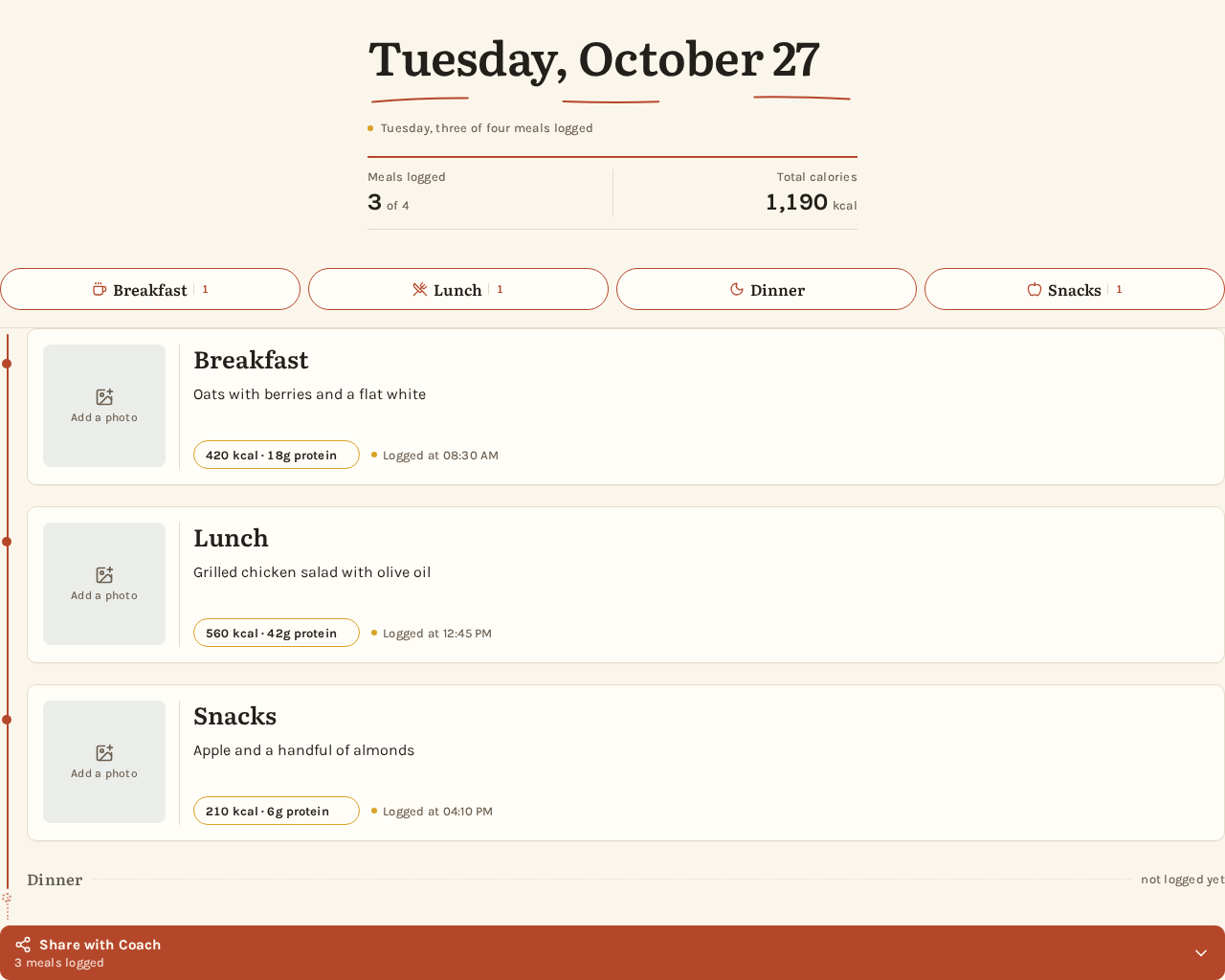
The single page of the product. It is anonymously reachable with no access requirement and serves as both the public entry and the working diary. It contains the day masthead, the quick-add rail, the continuous chronological timeline of meal cards, and the Share with Coach module.
Information and state
- Current day's date and a one-line "what you ate today" summary (e.g., "Thursday, three meals logged").
- A rust-ruled summary strip showing the day's meal count and total calories in tabular numerals.
- The ordered list of logged meal entries, each with meal type (Breakfast, Lunch, Dinner, Snacks), an optional user-uploaded food photo (or the empty photo slot when none was added), description, calorie/macro note, and automatic timestamp (e.g., "Logged at 08:30 AM").
- Which meal types have been logged and which have not, reflected by filled versus hollow timeline dots.
- Auto-save state per text field (saved / saving), persisted to
localStorage. - Share with Coach summary state (collapsed or expanded read-only sheet).
- Copy-to-clipboard state (idle / copied).
Primary actions
Page 6 of 27
- Quick-add a meal of a given type (Breakfast, Lunch, Dinner, Snacks) via the pill rail at the top of the page.
- Upload a photo of the food from the device (camera capture or photo library) into a meal card's photo slot; the image is stored locally and auto-saves.
- Type a description into a meal card's text field; the value auto-saves locally.
- Type a calorie/macro note into a meal card's note field; the value auto-saves locally.
- Open the Share with Coach read-only summary.
- Copy the day's text summary to the clipboard.
Supporting actions
- Scroll the quick-add pill rail horizontally on mobile to reach all four meal types.
- View the automatic timestamp on each card (read-only, set at logging time).
- View the uploaded food photo on each card, or the empty photo slot when no photo was added.
- Replace or remove an uploaded photo on a meal card.
Domain entities
- Day — the current date, its logged entries, meal count, and total calories.
- Meal entry — meal type, optional uploaded food photo (stored locally), description text, calorie/macro note, and automatic timestamp.
- Share summary — a read-only rendering of the day's entries and a plain-text form of the same.
Component responsibilities
Page 7 of 27
- Day masthead — oversized Literata day headline with a hand-drawn rust underline, the one-line summary, and the rust-ruled summary strip with meal count and total calories.
- Quick-add rail — four pills (Breakfast, Lunch, Dinner, Snacks), each with a small Lucide icon and the meal name; horizontally scrollable on mobile, static four-across on desktop.
- Timeline — a single continuous 2px rust vertical rule with a filled dot at every logged meal and a hollow dotted segment for meals not yet logged.
- Meal card — a two-column grid: a 96px square photo area (128px on desktop) on the left and, on the right, the description input, the calorie/macro note chip, and the "Logged at 08:30 AM" line with a mustard dot.
- Photo upload slot — a dusty-blue wash at 12% with a Lucide Camera or ImagePlus icon and the words "Add a photo"; tapping it opens the device camera or photo library picker and shows the chosen image as a warm, slightly desaturated square crop. When a photo exists, the slot offers replace and remove controls. The photo is optional; the slot stays empty and the card remains valid without one.
- Share with Coach module — a prominent button that expands a printed-page-style read-only sheet (cream ground, ink rules, Literata headings, tabular totals) and a Copy Text Summary button that briefly turns into a rust "Copied" state.
States
Page 8 of 27
- Loading — the page reads existing entries from
localStorageon first render; no network loading state is required. - Empty — no meals logged yet: the timeline shows hollow dotted segments for all four meal types, the summary strip shows zero meals and zero calories, and the quick-add rail invites the first entry.
- Success — a quick-add creates a card with an automatic timestamp; an uploaded photo appears in the card's photo slot; typing auto-saves and shows a brief "Saved" flash; the summary expands; copy shows "Copied".
- Error — if
localStorageis unavailable or a write fails, the page keeps the entry in React state for the session and surfaces a non-blocking notice that the entry may not persist across refreshes. If an image cannot be read or is not a supported image type, the card keeps its text fields and shows a non-blocking notice that the photo could not be added. - Recovery — the user can retype or re-add an entry, or pick the photo again; on the next successful write the saved state returns. If the clipboard write is blocked, the summary text remains visible and selectable for manual copying.
Page 9 of 27
3. Functional Requirements
FR-1 — Single continuous daily timeline (explicit) As a Food diary user, I should see a single, continuous daily view tracking Breakfast, Lunch, Dinner, and Snacks, so that my whole day reads as one chronological record.
- Trigger: opening the page.
- Observable result: one vertical timeline in chronological order covering all four meal types.
- Access: anonymous, no login.
- Failure/recovery: if no entries exist, the timeline shows hollow dotted segments for all four meal types.
- Continuation: the user adds entries via quick-add.
FR-2 — Meal card contents (explicit) As a Food diary user, I should see on each meal card an optional photo of my food that I upload from my device, a text description field, a calorie/macro note field, and an automatic timestamp (e.g., "Logged at 08:30 AM"), so that each entry is complete and readable.
- Trigger: a meal entry exists on the timeline.
- Observable result: the card shows the photo area (the uploaded image, or the empty "Add a photo" slot), the description field, the note field, and the timestamp; the timestamp is set automatically at logging time and displayed read-only.
- Failure/recovery: a missing photo, description, or note leaves that element empty but the card and timestamp remain; the photo is optional and never blocks saving the entry.
- Continuation: the user uploads or replaces a photo, or edits the description or note.
Page 10 of 27
FR-3 — Quick-add buttons (explicit) As a Food diary user, I should have quick-add buttons at the top of the page for each meal type, so that I can start an entry in one tap.
- Trigger: tapping a Breakfast, Lunch, Dinner, or Snacks pill.
- Observable result: a new meal card of that type appears on the timeline with an automatic timestamp.
- Access: anonymous.
- Failure/recovery: if the entry cannot be persisted, it remains in session state with a non-blocking notice.
- Continuation: the user types a description and note.
FR-4 — Auto-saving text inputs (explicit) As a Food diary user, I should have text input fields that auto-save locally, so that my data persists across browser refreshes.
- Trigger: typing in a description or calorie/macro note field.
- Observable result: the value is written to
localStorageand a brief "Saved" state appears. - Failure/recovery: if the write fails, the value stays in React state and a non-blocking notice explains it may not persist.
- Continuation: the user keeps typing or refreshes the page and finds the value restored.
Page 11 of 27
FR-5 — Share with Coach summary (explicit) As a Food diary user, I should have a prominent "Share with Coach" button that generates a clean, read-only summary layout optimized for mobile screenshots or printing, so that I can hand my day to my coach.
- Trigger: tapping "Share with Coach".
- Observable result: a read-only summary sheet of the day's meals, timestamps, and totals, laid out for screenshots and printing.
- Access: anonymous.
- Failure/recovery: if there are no entries, the summary shows an empty-day state rather than a broken sheet.
- Continuation: the user screenshots, prints, or copies the text.
FR-6 — Copy text summary to clipboard (explicit) As a Food diary user, I should have a "Copy Text Summary to Clipboard" action that formats the day's meals into a neat text list, so that I can paste it into WhatsApp, iMessage, or email.
- Trigger: tapping "Copy Text Summary to Clipboard".
- Observable result: the formatted text list is on the clipboard and the button briefly shows a rust "Copied" state.
- Failure/recovery: if the clipboard write is blocked, the summary text stays visible and selectable for manual copying.
- Continuation: the user pastes into their messaging or email app.
Page 12 of 27
FR-7 — Health coach receives the day summary (required_inference) As a Health coach recipient, I should receive a clean, readable overview of the user's day — meals, timestamps, and totals — as a screenshot, printed sheet, or pasted text, so that I can review the day without any in-product access.
- Trigger: the user sends the screenshot, print, or pasted text through WhatsApp, iMessage, or email.
- Observable result: the coach reads the day's meals and timestamps in a legible layout.
- Access: no in-product access; the coach never enters the product.
- Failure/recovery: if the text is truncated or unreadable, the coach asks the user to resend; the user reopens the summary and copies again.
- Continuation: the coach responds to the user outside the product.
Page 13 of 27
FR-8 — Optional food photo upload (explicit) As a Food diary user, I should be able to upload a photo of my food from my device and add a text description of the food, so that my diary shows what I actually ate without any asset management or hosting.
- Trigger: tapping the photo slot on a meal card (or the photo control on a newly quick-added card).
- Observable result: the device camera or photo library picker opens; the chosen image is read client-side, stored locally with the entry, and displayed as a warm, slightly desaturated square crop in the card's photo slot. The slot offers replace and remove controls once a photo exists.
- Optionality: the photo is optional — an entry with only a text description is complete and valid, and the empty slot keeps the dusty-blue wash, a Lucide Camera or ImagePlus icon, and "Add a photo".
- Failure/recovery: if the image cannot be read or is not a supported image type, the card keeps its text fields and a non-blocking notice explains the photo could not be added; the user can pick another image.
- Continuation: the user types or edits the description and note, which auto-save locally.
FR-9 — High-contrast Tailwind styling (explicit) As a Food diary user, I should see clean, high-contrast Tailwind CSS styling with a minimalist, modern fitness aesthetic, so that the diary is legible and calm on a phone.
- Trigger: any page render.
- Observable result: cream ground, ink text, rust action color, hairline rules, and legible type at 375px, 768px, and 1280px.
- Failure/recovery: text and controls stay whole and inside the viewport at every width.
- Continuation: none.
Page 14 of 27
FR-10 — Client-side execution with localStorage (explicit)
As a Food diary user, I should have the app built with React, Tailwind CSS, and Lucide React icons executing client-side with localStorage persistence, so that it works without a backend and saves credits.
- Trigger: any interaction.
- Observable result: all logic runs in the browser; entries — including uploaded food photos — persist in
localStorageand are never sent to a server. - Failure/recovery: unavailable
localStoragedegrades to session-only state with a notice. - Continuation: the user continues in the same session.
4. User Personas
Page 15 of 27
Food diary user
Product context. A single individual keeping a personal food log on their phone, logging meals in a kitchen or at a desk, one-handed. They want a calm daily record, not a dashboard.
Primary goal. Record each day's meals and snacks quickly, with an optional photo of the food, a description, calorie/macro note, and automatic timestamp, and hand a clean summary to their coach.
Distinct accepted responsibilities.
- Quick-add a meal of any of the four types from the top-of-page pill rail.
- Upload a photo of the food from their device when they want one; the photo is optional.
- Type a description and a calorie/macro note into each card; both auto-save locally.
- Rely on the automatic timestamp set at logging time.
- Open the Share with Coach read-only summary.
- Copy the day's text summary to the clipboard and paste it into WhatsApp, iMessage, or email.
Relevant inputs or decisions. Which meal type to add, what to write in the description and note, and whether to share via screenshot, print, or copied text.
Interactions with other accepted participants. Hands the summary to the Health coach recipient as a screenshot, printed sheet, or pasted text.
Observable success. The day's timeline is complete and chronological, entries survive a browser refresh, and the coach receives a legible summary.
Constraints. No login, no backend, no cloud storage; photos are user-uploaded images stored locally in the browser only.
Page 16 of 27
Health coach recipient
Product context. A coach who receives the user's day summary cold, outside the product, through WhatsApp, iMessage, email, a screenshot, or a printed sheet.
Primary goal. Read a clean, legible overview of the user's day — meals, timestamps, and totals — without needing any account or in-product access.
Distinct accepted responsibilities.
- Read the read-only summary layout or the pasted text list.
- Respond to the user outside the product.
Relevant inputs or decisions. Whether the summary is legible and complete enough to review the day.
Interactions with other accepted participants. Receives the summary from the Food diary user; has no in-product logging or editing workflow.
Observable success. The coach can read the day's meals and timestamps clearly and reply to the user.
Constraints. No in-product access, no login, no editing.
5. Core User Flows
Page 17 of 27
Flow A — Log a meal and have it auto-save (Food diary user)
- The Food diary user opens the Food Diary page on their phone. The page is anonymously reachable; no login is required.
- The day masthead shows the date, a one-line summary, and the rust-ruled strip with meal count and total calories. The quick-add pill rail sits under the masthead.
- The user taps a meal-type pill (e.g., Lunch). A new meal card appears on the timeline with an automatic timestamp (e.g., "Logged at 08:30 AM") and a filled rust dot on the timeline rule.
- Optionally, the user taps the card's photo slot, picks a photo of the food from the device camera or photo library, and the image appears as a warm, slightly desaturated square crop. Skipping this step is fine — the photo is optional.
- The user types a description into the card's text field. The value auto-saves to
localStorageand a brief "Saved" flash appears. - The user types a calorie/macro note into the note field; it auto-saves the same way.
- Failure/recovery: if the
localStoragewrite fails, the entry stays in React state and a non-blocking notice explains it may not persist across refreshes; the user can retry by editing the field. If the chosen image cannot be read, the card keeps its text fields and a non-blocking notice explains the photo could not be added. - Continuation: the user refreshes the browser and the entries — including any uploaded photos — are restored from
localStorage.
Page 18 of 27
Flow B — Review the day's timeline (Food diary user)
- The user opens the Food Diary page.
- The continuous rust timeline shows filled dots at logged meals and hollow dotted segments for meals not yet logged, so the day's gaps are visible at a glance.
- The summary strip shows the day's meal count and total calories in tabular numerals.
- Empty state: with no entries, all four segments are hollow and the strip shows zero meals and zero calories.
- Continuation: the user quick-adds a missing meal (Flow A).
Flow C — Share the day with the coach (Food diary user → Health coach recipient)
- The Food diary user taps the prominent "Share with Coach" button.
- The Share with Coach module expands into a clean, read-only summary sheet — cream ground, ink rules, Literata headings, tabular totals — optimized for mobile screenshots or printing.
- The user either screenshots or prints the sheet, or taps "Copy Text Summary to Clipboard".
- On copy, the day's meals are formatted into a neat text list and the button briefly turns into a rust "Copied" state.
- Failure/recovery: if the clipboard write is blocked, the summary text stays visible and selectable for manual copying.
- The user pastes the text into WhatsApp, iMessage, or email and sends it.
- The Health coach recipient receives the screenshot, printed sheet, or pasted text outside the product and reads the day's meals, timestamps, and totals. The coach has no in-product access and does not log or edit.
- Continuation: the coach replies to the user outside the product; the user continues logging the next day.
Page 19 of 27
6. Visuals Colors and Theme
The visual direction is warm editorial pages for a daily food diary, after Frank Chimero. The headline idea: a well-set notebook page — calm, warm, legible, with enough editorial character that the shared summary looks considered rather than clinical.
Color tokens (light mode)
| Role | Hex | Use |
|---|---|---|
| Background (cream paper) | #FBF6EC | Page ground |
| Surface | #FFFDF7 | Cards |
| Hairline | #E4DACA | 1px card borders and structural rules |
| Text (ink) | #231F1A | All body copy and headings |
| Primary (rust) | #B4472A | Quick-add buttons, Share with Coach button, active meal marker, vertical timeline rule |
| Accent (mustard) | #D9A227 | Calorie/macro note chip and timestamp dot only; never large fills |
| Muted | #7A6E5F | Timestamps, labels, helper text; darken to #6B5F51 if any line falls under 4.5:1 against #FFFDF7 |
| Photo wash (dusty blue) | #5C7A8A | Photo-placeholder wash at 12%, used once |
No gradients.
Typography
Page 20 of 27
- Headings: Literata at 600–700, slightly negative tracking on the big day headline, normal tracking elsewhere; sentence case, never all-caps headlines. Meal names (Breakfast, Lunch, Dinner, Snacks) are Literata 600 at a modest size.
- Body: Karla.
- Scale: 1.25 modular on a 16px base — 16 / 20 / 25 / 31 / 39 / 49.
- Day headline:
clamp(30px, 7vw, 49px); meal name 20–25px; card description 16px; timestamp and labels 13px Karla 500 with 0.02em tracking; numeric macro values in Karla 700 tabular.
Shape language
- Soft paper, not glass: 10px radius on cards, 8px on inputs, 999px pills only for the quick-add row and the macro chip.
- Hairline 1px rules in
#E4DACAdo the structural work; the timeline is a single 2px rust vertical rule with small filled dots at each logged entry. - No drop shadows beyond an optional
0 1px 0 rgba(35,31,26,0.04)on cards; no blobs, no glossy surfaces.
Layout
- Mobile-first single column, max-width 560px for the diary and 680px for the wide desktop arrangement where the Share with Coach panel docks to the right of the timeline as a sticky card.
- Order: slim day header with date and a one-line "what you ate today" summary; a horizontally scrollable quick-add row of four pills that stays reachable under the thumb; then the continuous vertical timeline of meal cards in chronological order.
- Each card is a two-column grid: a 96px square photo placeholder on the left and the description input, macro note, and "Logged at 08:30 AM" line stacked on the right. Desktop widens the photo to 128px; it never becomes a grid of tiles.
Page 21 of 27
Imagery
- User-uploaded food photos displayed as warm, slightly desaturated square crops in card thumbnails, treated like plates on a table — no white studio cutouts.
- The empty photo slot is a dusty-blue
#5C7A8Awash at 12% with a Lucide Camera or ImagePlus icon in muted ink and the words "Add a photo"; it is the only place the dusty blue appears. - Small hand-drawn-feeling line accents (a fork tick, a hand-drawn underline under the day headline) may appear once per screen as illustration, never as decoration behind text.
7. Signature Design Concept
The public entry is the diary masthead itself — not a marketing hero. The top of the Food Diary page is a full-width cream band with a hand-drawn rust underline under an oversized Literata day headline (clamp(30px, 7vw, 49px)) reading the date and a short line like "Thursday, three meals logged". Immediately beneath it, a single rust-ruled summary strip shows the day's meal count and total calories in tabular Karla numerals, and the four quick-add pills sit as a scrollable row pinned at the bottom edge of that band on mobile.
The dominant element is the type and the rule, not an image. The first meal card is already partly visible above the fold so the page reads as a record in progress. A continuous rust vertical timeline rule runs the full page with a filled dot at every logged meal and a hollow dotted segment for meals not yet logged, so the day's gaps are visible at a glance. The Share with Coach view is a printed-page sheet: cream ground, ink rules, Literata headings, tabular totals, with a Copy Text Summary button that briefly turns into a rust "Copied" state.
Page 22 of 27
8. Interaction Model & Motion Direction
Interaction Model: Animated Motion Tempo: restrained Hero Dimensionality: flat
Landing Hero Motion Brief
- Focal subject: the diary masthead — the oversized Literata day headline with its hand-drawn rust underline, the rust-ruled summary strip, and the quick-add pill rail.
- Input → transformation → outcome thesis: as the page loads, the day headline and its hand-drawn rust underline settle into place, the summary strip's tabular numerals count up to the day's meal count and total calories, and the quick-add pills slide in as a scrollable rail — outcome: the page reads as a record in progress with the first meal card partly visible above the fold.
- Motion vocabulary: restrained — a 160ms ink-to-rust flash on the "Saved" label, new entries sliding in 12px with a 180ms ease-out and a rust dot that settles, and the Share with Coach panel expanding with a single height-and-opacity transition. Everything else is instant.
- Composed first frame: cream
#FBF6ECground; the day headline in ink#231F1Awith the rust#B4472Aunderline drawn; the rust-ruled summary strip beneath it; the four quick-add pills in a row; the first meal card partly visible. - Reduced-motion state: with
prefers-reduced-motion, all transitions collapse to 0ms and the saved state simply appears; the quick-add rail wraps or scrolls so each pill can be brought fully into view.
9. Non-Functional Requirements
Page 23 of 27
- Single-page client-side execution (explicit) — all logic stays on one page using React state and
localStorage; no routing to other pages. - No backend database (explicit) — the diary does not use a backend database for its data.
- No user authentication (explicit) — there is no login or account; the page is anonymously reachable.
- No external cloud storage architecture (explicit) — no cloud storage is used for diary data or assets.
- Front-end-only assets (explicit) — food photos are user-uploaded images read and stored client-side; no mock image placeholders, no remote hosting, and no asset management pipeline.
- Mobile-first (explicit) — the layout is designed for one-handed phone use first, then widens for desktop.
- High-contrast Tailwind styling (explicit) — clean, high-contrast Tailwind CSS utility classes with a minimalist, modern fitness aesthetic.
- Readable text and controls at every viewport (explicit) — headlines, labels, numbers, card text, and controls stay entirely inside the viewport and their container at 375px, 768px, and 1280px, wrapping or scaling to fit; no element covers any part of them.
- Persistence across refreshes (explicit) — text entries and uploaded food photos auto-save to
localStorageand are restored on refresh. - Optional photo (explicit) — a meal entry is valid and complete with only a text description; uploading a photo is never required to save or share the day.
- Graceful degradation (required_inference) — if
localStorageis unavailable or a write fails, the app keeps entries in session state and shows a non-blocking notice. - Clipboard fallback (required_inference) — if the clipboard write is blocked, the summary text remains visible and selectable for manual copying.
- Reduced motion (explicit, from creative direction) — with
prefers-reduced-motion, all transitions collapse to 0ms.
Page 24 of 27
10. Tech Stack
- Frontend: React, with Tailwind CSS utility classes and Lucide React icons. All diary logic runs client-side in React state with
localStoragepersistence. Food photos are picked with the browser's native file input (accept="image/*",capturefor camera on mobile), read with the FileReader API, and stored locally with the entry — no upload endpoint, no image CDN, no cloud storage. - Provisioned infrastructure (scaffold inventory): a shared FastAPI backend, a MariaDB database, and the React frontend. These are provisioned but carry no diary domain responsibility under the strict constraints; the diary does not use the backend or database for its data, and no authentication or cloud storage is built.
- External destinations (provider-owned): WhatsApp, iMessage, and email receive the copied text or screenshot; printing is handled by the browser/OS.
Page 25 of 27
11. Assumptions and Constraints
- A-1 (explicit) — All logic remains on a single page using React state and
localStorage. - A-2 (explicit) — No backend database, user authentication (login), or external cloud storage architecture is built.
- A-3 (explicit) — Food photos are optional user-uploaded images from the device, read and stored purely front-end; no mock image placeholders and no server-side or cloud asset management.
- A-4 (explicit) — Styling uses clean, high-contrast Tailwind CSS utility classes with a minimalist, modern fitness aesthetic.
- A-5 (explicit) — The app is mobile-first.
- A-6 (required_inference) — The page is anonymously reachable with no access requirement; there is no application-owned identity because the source excludes authentication and the diary has no cross-device or multi-user continuity requirement.
- A-7 (required_inference) — The automatic timestamp is set at logging time and displayed read-only.
- A-8 (required_inference) — The provisioned FastAPI backend and MariaDB database are infrastructure only and do not create diary domain entities or server-side persistence.
- A-9 (required_inference) — The health coach recipient has no in-product access and receives the summary only through external messaging, email, screenshot, or print.
Page 26 of 27
12. Glossary
- Food Diary — the single page of the product, containing the day masthead, quick-add rail, timeline, and Share with Coach module.
- Meal entry — one logged meal or snack with meal type, an optional user-uploaded food photo, description, calorie/macro note, and automatic timestamp.
- Photo upload — the action of picking a food photo from the device camera or photo library; the image is stored locally with the entry and is optional.
- Meal type — one of Breakfast, Lunch, Dinner, or Snacks.
- Quick-add — the top-of-page pill buttons that create a new meal entry of a given type.
- Timeline — the continuous rust vertical rule with filled dots at logged meals and hollow dotted segments for meals not yet logged.
- Share with Coach — the module that generates a clean, read-only summary layout optimized for mobile screenshots or printing.
- Copy Text Summary to Clipboard — the action that formats the day's meals into a neat text list for pasting into WhatsApp, iMessage, or email.
localStorage— the browser storage used to auto-save and persist diary entries across refreshes.- Health coach recipient — the outbound-only recipient who reads the day summary outside the product.
Page 27 of 27
Wednesday, October 28
Wednesday, three of four meals logged
Meals logged0 of 4
Total calories0 kcal
Lunch
Snacks
- Dinnernot logged yet
Wednesday, October 28
Wednesday, three of four meals logged
Meals logged0 of 4
Total calories0 kcal
Breakfast
Lunch
Snacks
- Dinnernot logged yet
No comments yet. Be the first!