followupguard-lite
 Pavan Canada
You are an expert SaaS product team consisting of: - Product Manager - UI/UX Designer - Frontend Engineer - Backend Engineer - Database Architect - DevOps Engineer - QA Engineer Build a production-ready Micro SaaS. Idea: (Buddy, here is our business idea in a nutshell. 🎯 1. What are we building? Product name: FollowUpGuard Lite A single-page micro-SaaS for small marketing agencies in the USA, UK, and Australia. Purpose: Help agency owners stop losing potential clients because they forget to follow up on sales proposals and leads. 2. The specific problem we solve An agency sends 20 proposals to potential clients. Some prospects don't reply, some need another follow-up, and others get forgotten. Our tool identifies: - 🔴 Overdue follow-ups. - ⚠️ Prospects with no next action scheduled. - 📧 Follow-ups that need attention today. - 🤖 Suggested follow-up messages generated by AI. - 📊 A simple report showing completed and missed follow-ups. Our unique selling point: A Follow-Up Leak Detector that highlights neglected sales opportunities without requiring users to migrate to a complicated CRM. 3. What price should we charge? Existing follow-up tools range from affordable subscriptions to expensive sales platforms, so we should compete on simplicity and value. G2 Plan Monthly price Target customer Starter $19 Freelancers Agency $39 Small marketing agencies Agency Plus $59 Growing agencies My recommendation: Start at $39/month. 4. How do we reach $500 MRR? Paying customers Price per month Monthly revenue 5 $39 $195 10 $39 $390 13 $39 $507 20 $39 $780 Our first target is 13 paying customers by December 31, 2026. 5. Our strategy 1. Validate: Interview 15–20 agency owners before building. 2. Build: Create a simple dashboard with CSV import, overdue detection, and daily email reminders. 3. Launch: Offer paid pilots to the first three agencies. 4. Sell: Contact 10 relevant agency owners per working day through personalized outreach. 5. Improve: Add features based on what paying customers actually need. My final advice Buddy, remember this: We are not building another CRM. We are building a tool that makes forgotten sales opportunities visible. Keep development small, sell to businesses that can afford $39/month, and validate willingness to pay before spending weeks building. The goal is $500 MRR by the end of 2026. It's achievable, but not guaranteed. Our first milestone is three paying customers—not a perfect product.) Requirements: Create: - Beautiful landing page - Dashboard - User authentication - Google Login - Email Login - Stripe subscriptions - Pricing page - Admin dashboard - Database - REST APIs - Responsive design - Dark mode - User settings - Billing page - Analytics - SEO - Error handling - Loading states Generate: - Frontend - Backend - Database schema - APIs - Authentication - Deployment configuration - Environment variables - README - Sample data Use a modern design similar to Linear, Notion or Vercel. Everything should be production-ready.


Comments (0)
Sign in to leave a comment
System Requirements
System Requirements Document for followupguard-lite
1. Introduction
FollowUpGuard Lite is a single-page micro-SaaS for small marketing agencies in the USA, UK, and Australia. Its purpose is to help agency owners stop losing potential clients because they forget to follow up on sales proposals and leads. An agency sends 20 proposals; some prospects don't reply, some need another follow-up, and others get forgotten. FollowUpGuard Lite makes those forgotten sales opportunities visible without requiring users to migrate to a complicated CRM.
The product identifies overdue follow-ups, prospects with no next action scheduled, and follow-ups that need attention today through a Follow-Up Leak Detector. It provides AI-generated suggested follow-up messages and a simple report showing completed and missed follow-ups. It supports CSV import of prospects and daily email reminders. It is explicitly not another CRM — it is a tool that makes forgotten sales opportunities visible.
The audience is small marketing agencies (5–20 people) whose owners are sellers first and operators second. They live in Gmail, Sheets, and Slack, feel quiet dread about deals going cold, and distrust enterprise CRMs. The commercial target is $500 MRR by the end of 2026, with a first milestone of three paying customers.
2. System Overview
FollowUpGuard Lite is delivered as a production-ready web application with:
- A public marketing surface (Landing page, Pricing page) reachable anonymously.
- A shared identity access surface (Login) supporting Google Login and Email Login, with self-service sign-up for Agency Owners and returning verification for both personas.
- A protected Agency Owner workspace: Dashboard (Follow-Up Leak Detector), Prospects (list and CSV import), Prospect Details (AI-suggested follow-up message and recording follow-up outcomes), Reports (completed vs. missed follow-ups), Analytics, User settings (including dark mode), and Billing page (Stripe subscription and billing details).
- A protected Platform Administrator surface: Admin dashboard for overseeing the product and its paying customers.
- A backend exposing REST APIs, a database with a defined schema, authentication, deployment configuration, environment variables, a README, and sample data.
- Background automation for daily email reminders, and external recipients (prospects) who receive follow-up messages the Agency Owner sends.
Current actors are the Agency Owner and the Platform Administrator. Narrow exclusions: the product is not a CRM and does not require CRM migration; it does not add adjacent account-management, team-collaboration, or enterprise sales-platform capabilities beyond what is stated.
2a. Product Interpretation and Delivery Boundary
FollowUpGuard Lite is a first-party application. Agency Owners establish identity through the Login surface (Google Login or Email Login) and then work inside a protected workspace where their prospects, follow-up schedules, AI-suggested messages, reports, analytics, settings, and billing are privately owned and resumable. The Platform Administrator verifies identity through the same Login surface and reaches the Admin dashboard, which is restricted to the administrator role.
Public, anonymous surfaces are the Landing page and Pricing page. All workspace destinations (Dashboard, Prospects, Prospect Details, Reports, Analytics, User settings, Billing page) and the Admin dashboard require an authenticated session; the Admin dashboard additionally requires the administrator role. Stripe owns subscription billing and payment processing; the application owns the subscription record and billing view. Daily email reminders are produced by background automation on behalf of an authenticated Agency Owner with follow-up records. AI-suggested follow-up messages are generated by an AI service invoked from Prospect Details.
Current scope covers everything in this document. Future ideas from the source (e.g., additional features based on what paying customers need) are not current commitments and are excluded from current pages and acceptance.
2b. Source Content Inventory
Not applicable — no reference directive with content_source was supplied.
2c. Page Content and Component Coverage
Landing page
- Information/state: Public entry explaining the Follow-Up Leak Detector value proposition — overdue follow-ups, prospects with no next action, follow-ups due today, AI-suggested messages, and the completed/missed follow-up report. States: default, loading (skeleton for any dynamic content), error (inline retry).
- Primary actions: "Find my leaks" CTA leading to Login/sign-up; navigation to Pricing page.
- Supporting actions: Sign-in link; theme toggle honoring dark mode preference.
- Domain entities: None persisted; references plan names and product capabilities.
- Component responsibilities: Hero split (paper human half / ink machine half with vermilion seam), product panel showing ruled prospect rows with a wireframe-to-rendered transformation and monospace leak annotation, feature sections, CTA band, footer.
- States: Loading, empty (not applicable), success (rendered), error with retry, recovery via reload.
Pricing page
- Information/state: Presents three plans — Starter $19/month (Freelancers), Agency $39/month (Small marketing agencies), Agency Plus $59/month (Growing agencies). States: default, loading, error.
- Primary actions: Select a plan to begin Stripe subscription (requires authenticated Agency Owner; anonymous visitors are routed to Login first).
- Supporting actions: Navigate to Landing page; sign-in link.
- Domain entities: Plan (name, monthly price, target customer).
- Component responsibilities: Plan comparison cards with sharp corners, monospace price labels, CTA per plan, recommended-plan emphasis on Agency.
- States: Loading, success, error with retry, recovery.
Login
- Information/state: Anonymous access surface owning Google Login, Email Login, and self-service sign-up for Agency Owners; returning verification for Agency Owner and Platform Administrator. States: default, submitting, error (invalid credentials, OAuth failure), success (redirect to intended protected destination).
- Primary actions: Continue with Google; sign in with email and password; create account with email.
- Supporting actions: Switch between sign-in and sign-up; navigate to Landing/Pricing.
- Domain entities: User identity (email, provider, role).
- Component responsibilities: OAuth button, email form with validation, error banner, loading indicator.
- States: Loading, empty (form), success (redirect), error with recovery (retry, reset input), continuation to originally requested destination.
Dashboard
- Information/state: Protected Agency Owner home hosting the Follow-Up Leak Detector: overdue follow-ups, prospects with no next action scheduled, and follow-ups due today. States: loading, empty (no prospects yet — prompt to import CSV), success (leak groups populated), error with retry.
- Primary actions: Open a leak item to Prospect Details; navigate to Prospects to import CSV.
- Supporting actions: Filter/switch leak categories; navigate to Reports, Analytics, Settings, Billing.
- Domain entities: Prospect, FollowUp, LeakSignal (overdue, no_next_action, due_today).
- Component responsibilities: Ink-dark left rail with monospace nav labels; paper main canvas with ruled tables; right inspector panel showing selected prospect with a code-block-styled "suggested message" card; Leak Detector card styled as a code block (
leaks.ts, line-numbered rows, accent severity tokens, copy button). - States: Loading, empty, success, error, recovery.
Prospects
- Information/state: Protected list of the agency's prospects with CSV import. States: loading, empty (no prospects), success (table), import-in-progress, import-error (row-level validation), import-success summary.
- Primary actions: Import prospects via CSV; open a prospect to Prospect Details.
- Supporting actions: Search/filter list; navigate to Dashboard.
- Domain entities: Prospect (name, company, email, proposal sent date, next action date, status), ImportJob.
- Component responsibilities: CSV upload control, import preview/validation, ruled prospect table, row hover lighting mirrored inspector.
- States: Loading, empty, success, error with row-level recovery, continuation to Prospect Details.
Prospect Details
- Information/state: Focused view of a single prospect including AI-suggested follow-up message and recording follow-up outcomes. States: loading, success, AI-generation-in-progress, AI-generation-error, save-in-progress, save-error.
- Primary actions: Generate AI-suggested follow-up message; copy/edit message; record follow-up outcome (completed or missed) and set next action date.
- Supporting actions: Return to Prospects or Dashboard.
- Domain entities: Prospect, FollowUp, SuggestedMessage, FollowUpOutcome.
- Component responsibilities: Prospect summary, code-block-styled suggested message card with copy button, outcome recording form, next-action scheduler.
- States: Loading, success, error with retry, recovery, continuation back to Dashboard/Reports.
Reports
- Information/state: Simple report showing completed and missed follow-ups. States: loading, empty (no follow-ups recorded), success, error.
- Primary actions: View completed vs. missed counts and list.
- Supporting actions: Adjust date range if provided; navigate to Analytics.
- Domain entities: FollowUp, FollowUpOutcome.
- Component responsibilities: Ruled report table, monospace counts, summary totals.
- States: Loading, empty, success, error with retry.
Analytics
- Information/state: Analytics of follow-up activity. States: loading, empty, success, error.
- Primary actions: Review follow-up activity metrics.
- Supporting actions: Navigate to Reports/Dashboard.
- Domain entities: FollowUp, Prospect, FollowUpOutcome.
- Component responsibilities: Metric cards, ruled charts/tables, monospace numerals.
- States: Loading, empty, success, error with retry.
User settings
- Information/state: User settings including dark mode preference. States: loading, success, save-in-progress, save-error.
- Primary actions: Toggle dark mode; update profile settings.
- Supporting actions: Navigate to Billing.
- Domain entities: UserPreference (theme), UserProfile.
- Component responsibilities: Theme toggle, profile form, save control.
- States: Loading, success, error with retry, recovery.
Billing page
- Information/state: View and manage the Stripe subscription and billing details. States: loading, no-subscription, active-subscription, past-due, error.
- Primary actions: Start or change subscription via Stripe; open Stripe billing portal for payment details.
- Supporting actions: Navigate to Pricing to compare plans.
- Domain entities: Subscription (plan, status, renewal date), PaymentMethod (via Stripe).
- Component responsibilities: Current plan card, Stripe portal link, status banner.
- States: Loading, empty (no subscription), success, error with retry, recovery.
Admin dashboard
- Information/state: Protected Platform Administrator surface for overseeing the product and its paying customers. States: loading, empty, success, error.
- Primary actions: Review customer and subscription overview.
- Supporting actions: Navigate within admin views.
- Domain entities: User, Subscription, Agency (customer).
- Component responsibilities: Customer list, subscription status summary, monospace metrics.
- States: Loading, empty, success, error with retry.
3. Functional Requirements
FR-1 — Follow-Up Leak Detector (explicit). As an Agency Owner, I should see overdue follow-ups, prospects with no next action scheduled, and follow-ups that need attention today, so that neglected sales opportunities become visible. Lifecycle: actor opens Dashboard → system evaluates prospects and follow-ups → leak groups render with severity tokens → actor opens an item to Prospect Details. Access: authenticated Agency Owner. Failure/recovery: if evaluation fails, an error state with retry is shown. Continuation: actor acts on a leak item.
FR-2 — AI-suggested follow-up messages (explicit). As an Agency Owner, I should generate an AI-suggested follow-up message for a prospect, so that I can respond without drafting from scratch. Lifecycle: actor opens Prospect Details → requests suggestion → AI service returns message → actor copies/edits. Access: authenticated Agency Owner. Failure/recovery: generation error shows retry. Continuation: actor records outcome.
FR-3 — Completed vs. missed follow-up report (explicit). As an Agency Owner, I should see a simple report of completed and missed follow-ups, so that I understand where follow-ups were honored or dropped. Access: authenticated Agency Owner. Failure/recovery: error with retry. Continuation: actor adjusts behavior via Dashboard.
FR-4 — CSV import of prospects (explicit). As an Agency Owner, I should import prospects via CSV, so that I can populate the workspace without CRM migration. Lifecycle: actor opens Prospects → uploads CSV → system validates rows → import summary shown. Failure/recovery: row-level validation errors are surfaced for correction. Continuation: imported prospects appear in Dashboard leak detection.
FR-5 — Daily email reminders (explicit). As an Agency Owner, I should receive daily email reminders of follow-ups needing attention, so that I do not forget them. Lifecycle: background automation runs daily for an authenticated Agency Owner with follow-up records → email delivered to the owner. Access: authenticated Agency Owner with follow-up records. Failure/recovery: delivery failures are logged; the owner can still see items in Dashboard. Continuation: owner acts on reminders in Dashboard.
FR-6 — Google Login and Email Login (explicit). As an Agency Owner or Platform Administrator, I should sign in with Google or email, so that I can reach my protected workspace. Lifecycle: actor opens Login → chooses provider → identity verified → redirected to intended destination. Access: anonymous entry. Failure/recovery: invalid credentials or OAuth failure show error with retry. Continuation: actor reaches protected destination.
FR-7 — Self-service sign-up (required_inference). As an Agency Owner, I should create an account via Google or email, so that I can start using the workspace. Access: anonymous entry on Login. Failure/recovery: duplicate email or validation error shown. Continuation: redirected to Dashboard.
FR-8 — Stripe subscriptions (explicit). As an Agency Owner, I should subscribe to Starter $19/month, Agency $39/month, or Agency Plus $59/month via Stripe, so that I can pay for the product. Lifecycle: actor selects plan on Pricing → authenticated → Stripe checkout → subscription recorded → Billing page reflects status. Access: authenticated Agency Owner. Failure/recovery: payment failure shows error and retry. Continuation: workspace access continues per subscription status.
FR-9 — Billing management (explicit). As an Agency Owner, I should view and manage my subscription and billing details on the Billing page, so that I can control my plan. Access: authenticated Agency Owner. Failure/recovery: Stripe portal errors show retry. Continuation: return to workspace.
FR-10 — Admin oversight (explicit). As a Platform Administrator, I should oversee the product and its paying customers via the Admin dashboard, so that I can monitor the service. Access: authenticated Platform Administrator (role-restricted). Failure/recovery: error with retry. Continuation: review customer/subscription state.
FR-11 — Analytics (explicit). As an Agency Owner, I should view analytics of follow-up activity, so that I can understand trends. Access: authenticated Agency Owner. Failure/recovery: error with retry. Continuation: navigate to Reports.
FR-12 — User settings and dark mode (explicit). As an Agency Owner, I should configure settings including dark mode, so that the interface matches my preference. Access: authenticated Agency Owner. Failure/recovery: save error with retry. Continuation: preference persists.
FR-13 — Responsive design (explicit). As an Agency Owner, I should use the product across viewports, so that I can work on any device. Acceptance: layouts remain usable at 375px, 768px, and 1280px.
FR-14 — SEO (explicit). As the product, public pages should be SEO-optimized so that agencies can discover FollowUpGuard Lite.
FR-15 — Error handling and loading states (explicit). As an Agency Owner, I should see clear loading and error states with recovery, so that I always know what is happening.
FR-16 — REST APIs and database (explicit). As the system, REST APIs and a database schema should support all above capabilities.
FR-17 — Deployment, environment variables, README, sample data (explicit). As the delivery team, I should provide deployment configuration, environment variables, a README, and sample data, so that the product is production-ready.
4. User Personas
Agency Owner
- Product context: Owns a small marketing agency in the USA, UK, or Australia (5–20 people). Sends proposals to prospects; some don't reply, some need another follow-up, others get forgotten. Lives in Gmail, Sheets, and Slack; distrusts enterprise CRMs.
- Primary goal: Stop losing potential clients to forgotten follow-ups without migrating to a complicated CRM.
- Distinct responsibilities: Imports prospects via CSV; reviews the Follow-Up Leak Detector for overdue follow-ups, prospects with no next action, and follow-ups due today; uses AI-suggested follow-up messages; records follow-up outcomes; reviews completed vs. missed follow-up reports and analytics; manages settings (dark mode) and billing (Stripe subscription).
- Inputs/decisions: CSV files; which leak items to act on; whether to send a suggested message; which plan to subscribe to; theme preference.
- Interactions: With prospects (external recipients of follow-ups); with Stripe (billing); with the Platform Administrator indirectly (service operation).
- Observable success: No neglected sales opportunity goes unnoticed; completed vs. missed follow-ups are visible; subscription active.
Platform Administrator
- Product context: Operates the FollowUpGuard Lite service itself, overseeing the product and its paying customers.
- Primary goal: A functioning, monitored service supporting the paid pilot and subscription milestones.
- Distinct responsibilities: Reviews customer and subscription state via the Admin dashboard; monitors service health.
- Inputs/decisions: Customer/subscription data; service status.
- Interactions: With Agency Owners indirectly (as customers); with Stripe (subscription records).
- Observable success: Customers and subscriptions are visible and monitored; service operates reliably.
5. Core User Flows
Flow A — Agency Owner signs up and reaches the workspace
- Anonymous visitor opens Landing page and selects "Find my leaks".
- Routed to Login; chooses Google Login or Email Login and creates an account (FR-7).
- Identity verified; redirected to Dashboard (FR-6).
- Dashboard shows empty state prompting CSV import.
Flow B — Agency Owner imports prospects via CSV
- Agency Owner opens Prospects.
- Uploads a CSV file (FR-4).
- System validates rows; import summary shown; row-level errors surfaced for correction.
- Imported prospects appear in Dashboard leak detection.
Flow C — Agency Owner reviews the Follow-Up Leak Detector
- Agency Owner opens Dashboard.
- Leak Detector shows overdue follow-ups, prospects with no next action, and follow-ups due today (FR-1).
- Owner opens a leak item to Prospect Details.
Flow D — Agency Owner generates an AI-suggested follow-up and records outcome
- Agency Owner opens Prospect Details for a prospect.
- Requests an AI-suggested follow-up message (FR-2); message renders in a code-block card.
- Owner copies/edits the message and sends it to the prospect (external recipient).
- Owner records the follow-up outcome (completed or missed) and sets the next action date.
- Outcome feeds Reports and Analytics.
Flow E — Agency Owner reviews completed vs. missed follow-ups
- Agency Owner opens Reports.
- Views completed vs. missed follow-up counts and list (FR-3).
- Optionally opens Analytics for follow-up activity trends (FR-11).
Flow F — Agency Owner subscribes via Stripe
- Agency Owner opens Pricing page (anonymous or authenticated).
- Selects Starter $19, Agency $39, or Agency Plus $59 (FR-8).
- If anonymous, routed to Login; after authentication, Stripe checkout completes.
- Subscription recorded; Billing page reflects active status (FR-9).
Flow G — Agency Owner manages billing
- Agency Owner opens Billing page.
- Views current plan and status; opens Stripe billing portal to manage payment details (FR-9).
- Returns to workspace.
Flow H — Agency Owner configures settings and dark mode
- Agency Owner opens User settings.
- Toggles dark mode and updates profile (FR-12).
- Preference persists across sessions.
Flow I — Agency Owner receives daily email reminders
- Background automation runs daily for an authenticated Agency Owner with follow-up records (FR-5).
- Email reminder delivered to the owner.
- Owner opens Dashboard to act on reminders.
Flow J — Platform Administrator oversees the service
- Platform Administrator opens Login and verifies identity (FR-6).
- Redirected to Admin dashboard (role-restricted) (FR-10).
- Reviews customer and subscription state.
- Returns to admin views as needed.
6. Visuals Colors and Theme
Muse: Adham Dannaway. Headline: "Your pipeline is leaking right now."
Light mode tokens:
- Background:
#F4F1EA(warm paper) - Surface:
#FFFFFF - Text:
#12141A(deep ink) - Primary:
#12141A - Accent:
#FF4A1C(vermilion — leak signals, primary CTA, split seam) - Muted:
#6B6F76 - Due-today amber:
#C98A00(restrained, single use)
Dark mode tokens:
- Background:
#0E1014 - Surface:
#171A21 - Text:
#F2EFE8 - Accent:
#FF4A1C(unchanged)
Typography:
- Headings: Instrument Sans, 600–700 (800 for the single hero word "forgotten"), tight tracking −0.03em, sentence case, left-aligned.
- Body: Instrument Sans, 16/26.
- Technical labels: JetBrains Mono 500 uppercase, 11–12px, 0.14em letterspacing; tabular numerals.
- Scale (1.333 modular): display 44px mobile → 104px desktop (clamp); h1 32→56; h2 24→36; h3 18→24; body 16/26; mono label 11/16. Line-height 1.02 on display, 1.55 on body.
Shape language: Sharp corners — 0–2px radius on cards, 4px on buttons, 999px only on status pills. Hairline 1px rules in #12141A at 12% opacity form the visible 8-pt grid. Split seam is a 2px accent line running full height of hero and repeating as section divider. Dark code panels have a 1px inset light border (#FFFFFF at 8%) and a small monospace filename tab in the top-left corner. Data rows are ruled, never boxed in shadow.
Layout: Two-column asymmetric split — left 7 columns paper (human), right 5 columns ink (code/data). Seam always visible on desktop; collapses on mobile into stacked order (human first, code second) with seam becoming a horizontal accent rule. Dashboard adopts the same split: ink-dark left rail with monospace nav labels, paper main canvas with white ruled tables, right inspector panel with code-block "suggested message" card. 8-pt spacing scale; max content width 1240px; 24px gutters at 375px.
Imagery: Diagrams and interface itself — SVG prospect row half wireframe (dashed strokes, monospace coordinates) and half finished UI; schematic icons for overdue/leak/today on an 8-pt grid; recurring "leak" motif (dotted line escaping a solid rectangle in accent). Marketing imagery = real product screenshots framed as browser chrome with monospace URL bars, plus tiny isometric diagrams of a CSV landing in a table.
Avoid: Centred headline + subheadline + blue button SaaS hero; blue/indigo primary or accent; glassmorphism, frosted blur, gradient blobs; identical hover-lift card grids with soft shadows; rounded 16px+ pills; photography as hero subject; Inter, Roboto, Arial, system-ui, Poppins; more than one chromatic accent beyond vermilion (+ amber for due today).
7. Signature Design Concept
The public entry is a full-viewport split screen divided by a 2px vermilion seam at 58/42. LEFT (paper #F4F1EA): an oversized Instrument Sans headline stacked in three ragged lines — "Your pipeline" / "is leaking" / "right now." — with the last word set at 104px in #FF4A1C and a single ink CTA "Find my leaks" pinned beneath it, plus a monospace micro-label "FOLLOW-UP LEAK DETECTOR — v1.0". RIGHT (ink #12141A): a live-feeling product panel showing three ruled prospect rows; the top row is mid-transformation — its left half dashed wireframe, right half finished UI — with a monospace overlay reading "LEAK: no next action · 14d". A thin cursor-highlight follows the pointer across the paper half. On mobile the seam rotates horizontal, headline drops to 44px, and the dark panel stacks beneath as a full-width card with the wireframe row still visible. This recomposes only accepted content (leak categories, CTA, product panel) and introduces no new behavior.
8. Interaction Model & Motion Direction
Interaction Model: Animated Motion Tempo: expressive Hero Dimensionality: layered_2d
Landing Hero Motion Brief:
- Focal subject: The split prospect row — half dashed wireframe, half finished UI — bridging the paper and ink halves.
- Thesis: On first paint, the wireframe half draws itself into the rendered half over 600ms with cubic-bezier(0.22,1,0.36,1); the monospace leak annotation fades in; numbers count up once on entry. Input (page load / pointer move) → transformation (wireframe-to-rendered reveal, cursor-following radial highlight 240px at accent 8% opacity on paper half only) → outcome (the leak becomes visible, matching the product's core value).
- Motion vocabulary: Reveal-by-hover and reveal-on-scroll across the split; hovering a prospect row lights its mirrored counterpart in the code panel; no bounce, no particles.
- Composed first frame: Seam at 58/42, headline fully rendered, top prospect row mid-transformation with leak annotation visible.
- Reduced-motion state: All reveals become instant, the seam stays static, counters render final values; the wireframe row shows its final rendered state.
9. Non-Functional Requirements
- NFR-1 (explicit): Responsive design usable at 375px, 768px, and 1280px; readable text and controls stay whole inside the viewport and their container.
- NFR-2 (explicit): Dark mode supported across the application, persisted per user.
- NFR-3 (explicit): SEO for public pages (Landing, Pricing) — semantic markup, metadata, crawlable content.
- NFR-4 (explicit): Error handling with clear messages and recovery paths on every surface.
- NFR-5 (explicit): Loading states on every asynchronous surface.
- NFR-6 (explicit): REST APIs for all backend capabilities.
- NFR-7 (explicit): Production-ready delivery — deployment configuration, environment variables, README, sample data.
- NFR-8 (required_inference): Protected destinations require an authenticated session; Admin dashboard requires the administrator role.
- NFR-9 (explicit): Keep development small; do not build a CRM or require CRM migration.
10. Tech Stack
- Frontend: React (web), responsive, dark mode, SEO for public pages.
- Backend: Python/FastAPI exposing REST APIs.
- Database: Relational storage with schema for users, prospects, follow-ups, outcomes, subscriptions, preferences, and import jobs.
- Payments: Stripe subscriptions (Starter $19, Agency $39, Agency Plus $59 monthly).
- Authentication: Google Login and Email Login.
- AI: AI service for suggested follow-up messages.
- Email: Daily reminder delivery.
- Deployment: Docker/docker-compose for the application services; environment variables for configuration.
- Design: Instrument Sans, JetBrains Mono; palette and layout per Section 6.
11. Assumptions and Constraints
- Constraints (explicit): Single-page micro-SaaS; target customers are small marketing agencies in the USA, UK, and Australia; do not build another CRM; keep development small; validate willingness to pay before spending weeks building (business strategy, not a product feature).
- Assumption (required_inference): Application-owned identity is required so Agency Owners can privately own and resume their workspace; the Login surface is anonymously reachable and protected destinations require authentication.
- Assumption (required_inference): The Admin dashboard is restricted to the Platform Administrator role.
- Assumption (required_inference): Daily email reminders run as background automation for authenticated Agency Owners with follow-up records.
- Assumption: Prospects are external recipients of follow-up messages sent by the Agency Owner; they do not have accounts.
- Future (not current): Additional features based on what paying customers need; growth toward $500 MRR and 13 paying customers by December 31, 2026 are business goals, not product features.
12. Glossary
- Follow-Up Leak Detector: The Dashboard feature surfacing overdue follow-ups, prospects with no next action, and follow-ups due today.
- Leak signal: A detected neglected opportunity (overdue, no next action, due today).
- Prospect: A potential client the agency has sent a proposal or lead to.
- Follow-up: A scheduled or completed outreach action to a prospect.
- Outcome: Whether a follow-up was completed or missed.
- Agency Owner: The primary user operating the workspace.
- Platform Administrator: The operator of the FollowUpGuard Lite service.
- MRR: Monthly recurring revenue (business metric).
- CSV import: Bulk loading of prospects from a comma-separated file.
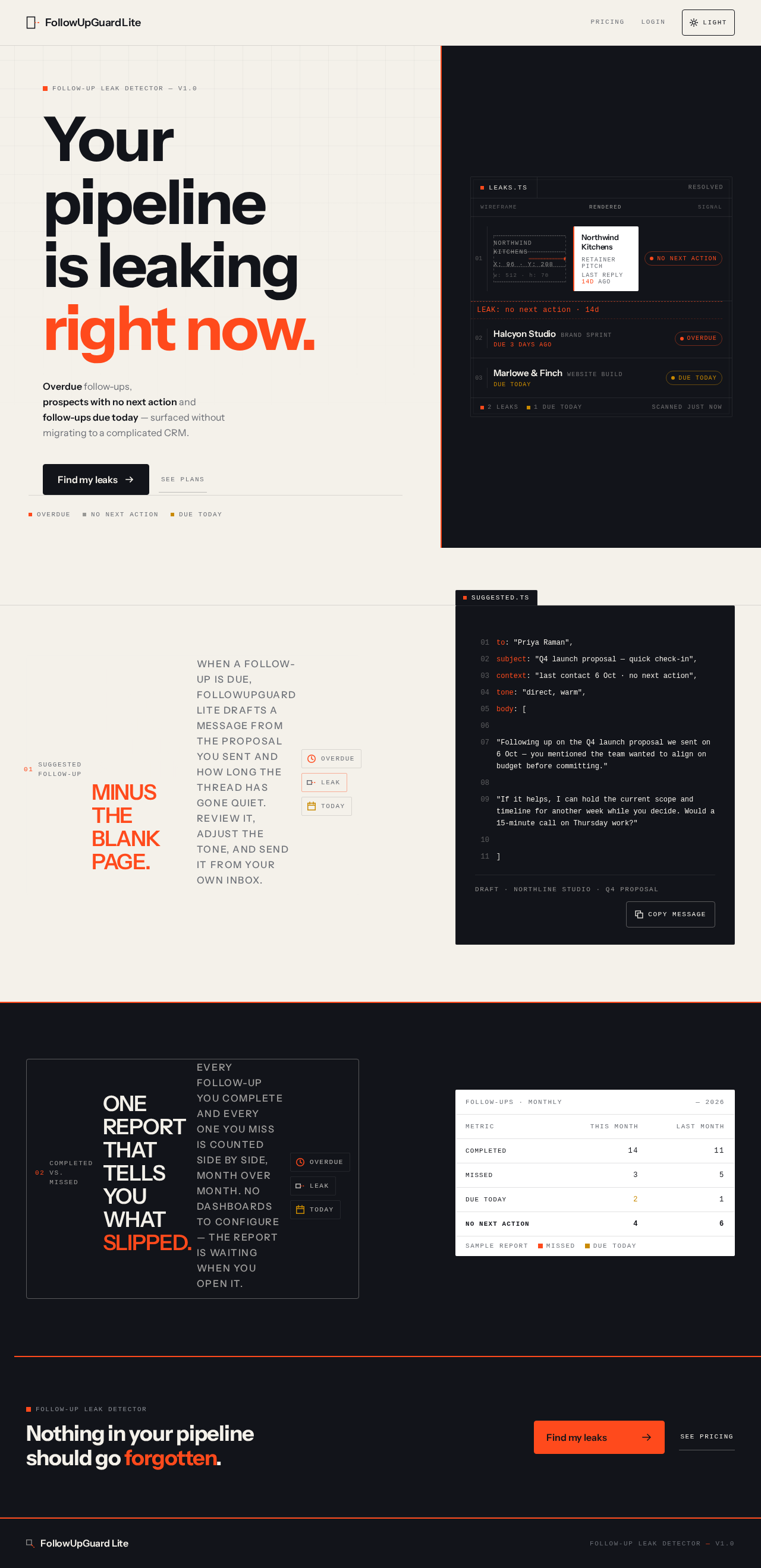
Follow-Up Leak Detector — v1.0
Your pipelineis leakingright now.
Overdue follow-ups, prospects with no next action and follow-ups due today — surfaced without migrating to a complicated CRM.
LEAK: no next action · 14d
01Suggested follow-up
The reply that's already written, minus the blank page.
When a follow-up is due, FollowUpGuard Lite drafts a message from the proposal you sent and how long the thread has gone quiet. Review it, adjust the tone, and send it from your own inbox.
to: "Priya Raman",subject: "Q4 launch proposal — quick check-in",context: "last contact 6 Oct · no next action",tone: "direct, warm",body: [ "Following up on the Q4 launch proposal we sent on 6 Oct — you mentioned the team wanted to align on budget before committing." "If it helps, I can hold the current scope and timeline for another week while you decide. Would a 15-minute call on Thursday work?" ]02Completed vs. missed
One report that tells you what slipped.
Every follow-up you complete and every one you miss is counted side by side, month over month. No dashboards to configure — the report is waiting when you open it.
Follow-ups · monthly
| Metric | This month | Last month |
|---|---|---|
| Completed | 14 | 11 |
| Missed | 3 | 5 |
| Due today | 2 | 1 |
| No next action | 4 | 6 |
Swipe table →
Follow-Up Leak Detector
Nothing in your pipeline should go forgotten.
Follow-Up Leak Detector — v1.0
Your pipelineis leakingright now.
Overdue follow-ups, prospects with no next action and follow-ups due today — surfaced without migrating to a complicated CRM.
LEAK: no next action · 14d
01Suggested follow-up
The reply that's already written, minus the blank page.
When a follow-up is due, FollowUpGuard Lite drafts a message from the proposal you sent and how long the thread has gone quiet. Review it, adjust the tone, and send it from your own inbox.
to: "Priya Raman",subject: "Q4 launch proposal — quick check-in",context: "last contact 6 Oct · no next action",tone: "direct, warm",body: [ "Following up on the Q4 launch proposal we sent on 6 Oct — you mentioned the team wanted to align on budget before committing." "If it helps, I can hold the current scope and timeline for another week while you decide. Would a 15-minute call on Thursday work?" ]02Completed vs. missed
One report that tells you what slipped.
Every follow-up you complete and every one you miss is counted side by side, month over month. No dashboards to configure — the report is waiting when you open it.
Follow-ups · monthly
| Metric | This month | Last month |
|---|---|---|
| Completed | 14 | 11 |
| Missed | 3 | 5 |
| Due today | 2 | 1 |
| No next action | 4 | 6 |
Swipe table →
Follow-Up Leak Detector
No comments yet. Be the first!