financexam-net
 ZahidI Sayed
https://financexam.net . I need such type of website

Comments (0)
Sign in to leave a comment
Project Tasks
13 planning tasksGenerate system requirement document
Generate personas & user flows
Create flow for Site Visitor
Landing
Fix Landing review findings: The instruction stack is incorrectly constrained to 41.67%… (+4 more)
Landing / Header Band
Landing / Login Panel
Landing / Instruction Stack
Landing / Contingency Pictograms
Landing / Exam Calendar Strip
Design remaining pages
Architecture
Workspace task plan
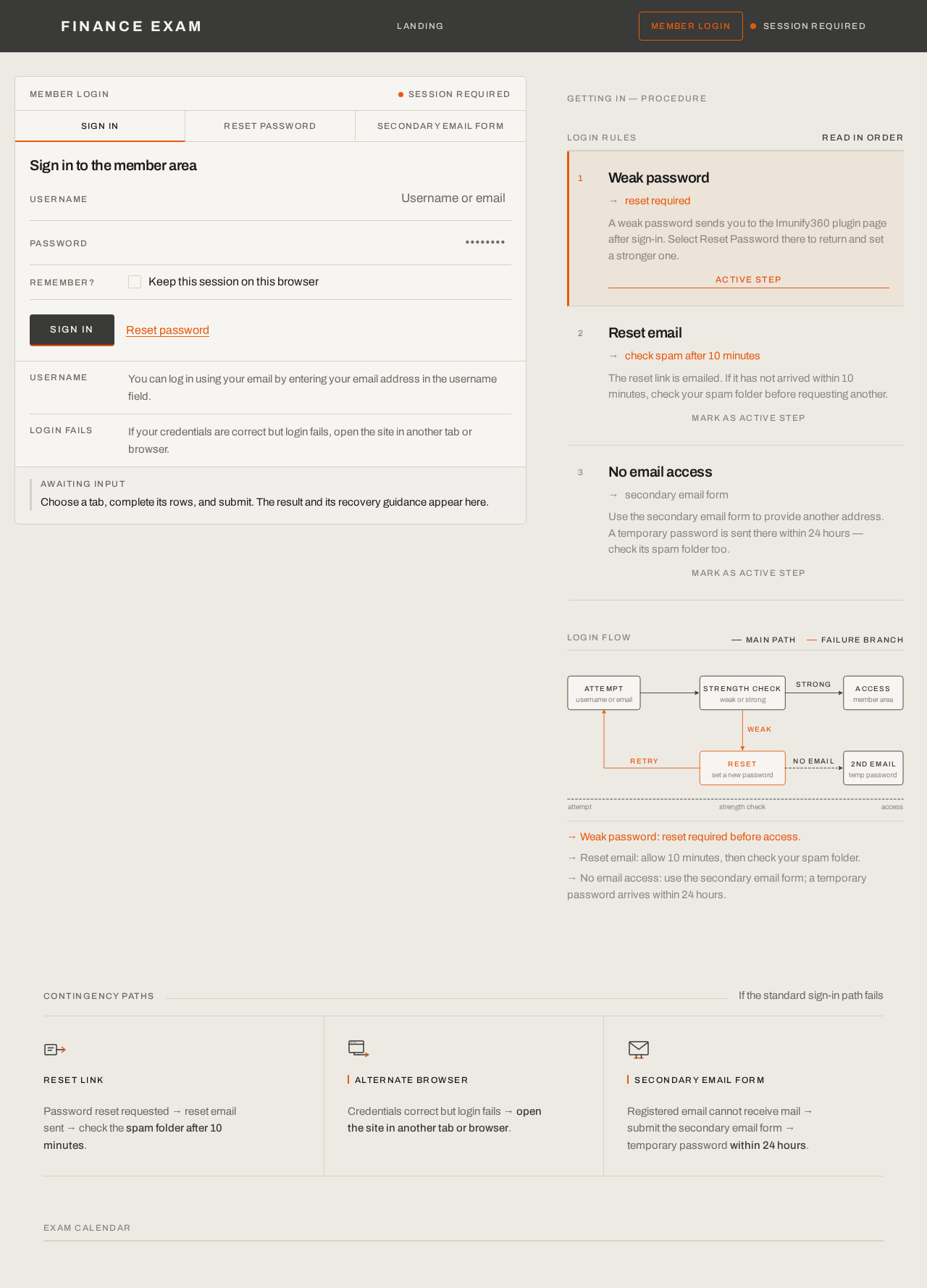
Sign in to the member area
Choose a tab, complete its rows, and submit. The result and its recovery guidance appear here.
Getting in — procedure
Login rules
Read in orderWeak password
reset required
A weak password sends you to the Imunify360 plugin page after sign-in. Select Reset Password there to return and set a stronger one.
Reset email
check spam after 10 minutes
The reset link is emailed. If it has not arrived within 10 minutes, check your spam folder before requesting another.
No email access
secondary email form
Use the secondary email form to provide another address. A temporary password is sent there within 24 hours — check its spam folder too.
Login flow
→ Weak password: reset required before access.
→ Reset email: allow 10 minutes, then check your spam folder.
→ No email access: use the secondary email form; a temporary password arrives within 24 hours.
Password reset requested → reset email sent → check the spam folder after 10 minutes.
Credentials correct but login fails → open the site in another tab or browser.
Registered email cannot receive mail → submit the secondary email form → temporary password within 24 hours.
Sign in to the member area
Choose a tab, complete its rows, and submit. The result and its recovery guidance appear here.
Getting in — procedure
Login rules
Read in orderWeak password
reset required
A weak password sends you to the Imunify360 plugin page after sign-in. Select Reset Password there to return and set a stronger one.
Reset email
check spam after 10 minutes
The reset link is emailed. If it has not arrived within 10 minutes, check your spam folder before requesting another.
No email access
secondary email form
Use the secondary email form to provide another address. A temporary password is sent there within 24 hours — check its spam folder too.
Login flow
→ Weak password: reset required before access.
→ Reset email: allow 10 minutes, then check your spam folder.
→ No email access: use the secondary email form; a temporary password arrives within 24 hours.
Password reset requested → reset email sent → check the spam folder after 10 minutes.
Credentials correct but login fails → open the site in another tab or browser.
Registered email cannot receive mail → submit the secondary email form → temporary password within 24 hours.
No comments yet. Be the first!