
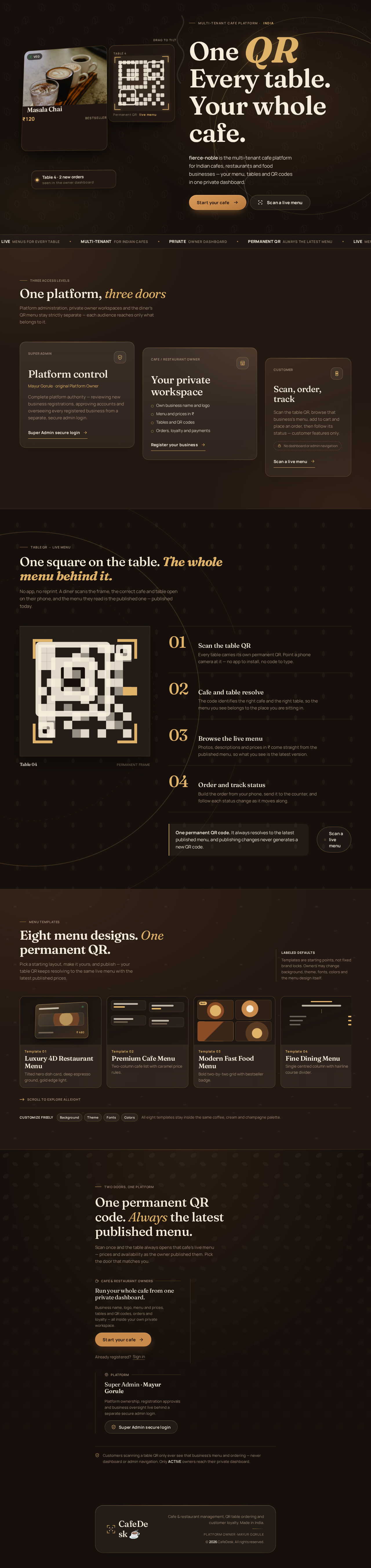
fierce-noble

byM G
LandingSuper Admin PanelOwner Sign UpLoginOverviewregistration verification pageAccount RecoverySUPER ADMIN APPROVAL DASHBOARD
Landing

Comments (0)

No comments yet. Be the first!

Live
Landing design preview
Owner chooses to register a business
Registration saved and OTP sent to Super Admin Gmail
Correct valid OTP activates account
OTP incorrect or expired
Resend within limits
Password forgotten
Access restored
Active owner signs in
Begin onboarding
Business profile set
Organize menu
Categories created
Dishes added
Keep edits private
Ready to go live
Validation errors block publishing
Errors corrected
Menu published
Tables created
QR codes generated
Standees ready
Payments enabled and order placed
Order accepted
Order completed
Customer registered
Set loyalty program
Rules configured
Offers active
Review performance
Check plan status
Table no longer needed
Landing: Start your cafe
Owner Sign Up: Submit business registration
registration verification page: 1. Enter OTP from Super Admin
registration verification page: 2. Resend OTP request
Login: 1. Sign in
Account Recovery: 2. Reset password
Overview: Review onboarding progress
Business Settings: Set cafe name and logo
Menu Management: Edit live menu
Categories: Add food categories
Menu: Add dishes and prices
Menu Management: Preview customer menu
Menu Management: Save draft
Menu Management: 1. Publish changes
Table Management: Add and edit tables
QR Code Generator: Generate table QR codes
QR Generator: Download PNG or PDF
Payments: Configure UPI and payment QR
Orders: Review new order
Orders: Advance order status
Orders: Print receipt
Customer Management: View customer profiles
Loyalty & Rewards: Configure reward rules
Loyalty: Create coupons and offers
Customers: Review customer order history
Analytics: Review revenue analytics
Subscription & Billing: View plan and billing status
Tables: Delete a table
Menu: 2. Fix validation errors
Live
Landing design preview
Owner chooses to register a business
Registration saved and OTP sent to Super Admin Gmail
Correct valid OTP activates account
OTP incorrect or expired
Resend within limits
Password forgotten
Access restored
Active owner signs in
Begin onboarding
Business profile set
Organize menu
Categories created
Dishes added
Keep edits private
Ready to go live
Validation errors block publishing
Errors corrected
Menu published
Tables created
QR codes generated
Standees ready
Payments enabled and order placed
Order accepted
Order completed
Customer registered
Set loyalty program
Rules configured
Offers active
Review performance
Check plan status
Table no longer needed
Landing: Start your cafe
Owner Sign Up: Submit business registration
registration verification page: 1. Enter OTP from Super Admin
registration verification page: 2. Resend OTP request
Login: 1. Sign in
Account Recovery: 2. Reset password
Overview: Review onboarding progress
Business Settings: Set cafe name and logo
Menu Management: Edit live menu
Categories: Add food categories
Menu: Add dishes and prices
Menu Management: Preview customer menu
Menu Management: Save draft
Menu Management: 1. Publish changes
Table Management: Add and edit tables
QR Code Generator: Generate table QR codes
QR Generator: Download PNG or PDF
Payments: Configure UPI and payment QR
Orders: Review new order
Orders: Advance order status
Orders: Print receipt
Customer Management: View customer profiles
Loyalty & Rewards: Configure reward rules
Loyalty: Create coupons and offers
Customers: Review customer order history
Analytics: Review revenue analytics
Subscription & Billing: View plan and billing status
Tables: Delete a table
Menu: 2. Fix validation errors